


Metadata injection facilitates user to define the metadata at run time. E.g. defining a mapping of excel columns to fields at run time based on various parameters.
Pentaho’s most popular tool, Pentaho Data Integration, PDI (aka kettle) gives us a step, ETL Metadata Injection, which is capable of inserting metadata into a template transformation. So instead of statically entering ETL metadata in a step dialog, you can pass it dynamically. This feature certainly plays an instrumental role in solving repetitive ETL workloads like loading of text files, data migration and so on. (Please refer our earlier blog for more details about ETL Process.)
Metadata injection inserts data from various sources into your transformation at runtime. This insertion reduces repetitive ETL tasks for various input and output files.
For example, you might have a simple transformation to load transaction data values from a supplier’s spreadsheet, filter out specific values to examine, and output them to a text file.
You need to develop a transformation for the main repetitive process, which is often known as the template transform.
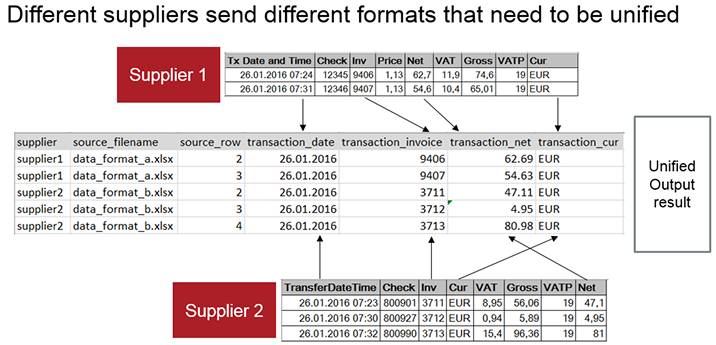
For this example, you need a transformation (process_supplier_file) to process the transactions in each supplier’s file. Then, the metadata needs to be injected from a transformation (inject_supplier_metadata) developed with the ETL Metadata Injection step. The ETL Metadata Injection step calls the template transformation. Since this example is for inserting data from multiple files, the metadata injection transformation needs to be called from another transformation (process_all_suppliers) per each supplier file.
So overall, we will develop three transformations.
Template Transformation
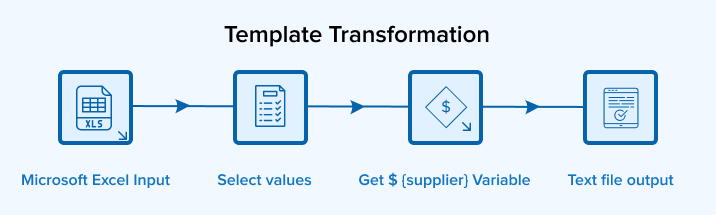
Template Transformation – The main repetitive transformation for processing the data per each supplier’s spreadsheet.
With metadata injection, you develop your repetitive, template transformation as you would normally. The main difference is how the settings for each step pertains to the metadata injection, instead of data values of a single specific source.
Process_supplier_file:
Metadata Injection Transformation
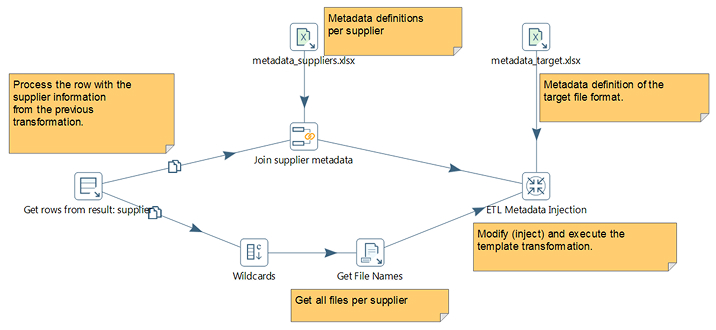
Metadata Injection Transformation – The transformation defining the structure of the metadata and how it is injected into the main transformation.
For this example, our metadata values are maintained in separate spreadsheet files. You need to create a transformation to extract in these values, prepare them for the injection, and then insert them into the template transformation through the ETL Metadata Injection step, as shown in the following figure:
Inject_supplier_metadata:
Transformation for All Suppliers
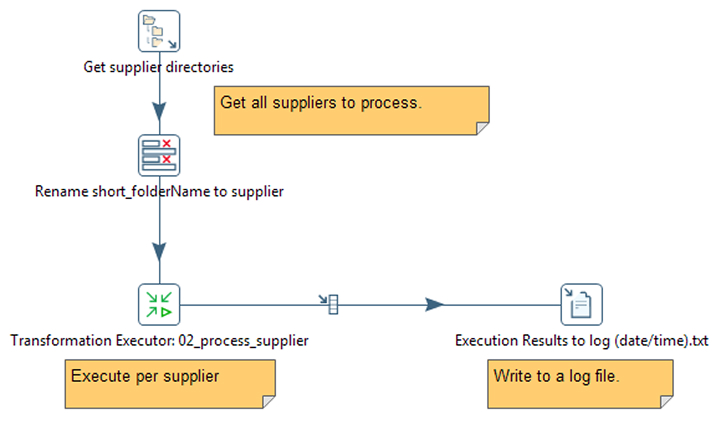
Transformation for All Suppliers – The transformation going through all the suppliers’ spreadsheets, calling the metadata injection transformation per each supplier, and logging the entire process.
Since we have multiple input sources, we need a transformation to run through each source and inject the metadata. Each input source is specified through a variable in a Transformation Executor step, which calls for the metadata injection transformation.
Process_all_suppliers:
This is a simplified example for illustration to store the data in a text file. It can even be used in all sorts of use cases and can store the data in SQL, NoSQL databases or Big Data.



Comments
Leave a message...