


Performance testing is critical to ensuring an application’s functionality under various application loads and environments. It reveals how scalable, reliable, and stable your system truly is. Additionally, it helps identify performance bottlenecks in your web application across different networks, databases, APIs, and servers. Apache JMeter is one of the most popular tools among trusted software testing services providers for effective performance testing. Therefore, this article discusses the concept of performance testing and how to use JMeter to achieve optimal results.
1. What is Performance Testing?
Performance testing involves measuring a system’s loading speed, response time, resource usage, and its ability to perform as expected under a specific workload. This process helps determine the system’s throughput, reliability, and scalability. The purpose of performance testing is to verify the system’s performance against its predefined criteria and to identify any unexpected behavior. Additionally, this testing helps detect and resolve performance bottlenecks in the software.
2. What is Apache JMeter?
JMeter is a popular, open source software tool created mainly to test how well applications perform and function under stress. Its core purpose is load testing. JMeter can simulate various scenarios to test a website or a server by emulating a large number of users accessing the server simultaneously. This simulated heavy load helps evaluate the server’s strength and observe how it handles different levels of traffic.
JMeter was initially developed for web applications, but it has expanded its scope. It is used to test the performance, functionality, and load on various resources, including static content like HTML, CSS, and JavaScript, as well as dynamic content like JSP and Servlets. The tool collects data during these tests and generates reports that help identify bottlenecks and areas for improvement, preparing the application to handle real-world traffic.
JMeter is cost-effective and supported by a large community with extensive documentation, thanks to its open-source nature. Although it may take some time to set up to be Java-based, its capabilities make it a preferred choice for software teams conducting performance tests.
3. Why Use JMeter for Performance Testing?
JMeter is ideal for performance testing because it can effectively simulate a large number of users with concurrent threads that apply a heavy load to the web application under the test. It analyzes the application’s behavior and performance under varying load conditions. JMeter can assess the performance of both static and dynamic resources and provides detailed graphical reports for better understanding and insights into the app’s performance.
4. Types of Performance Testing
Performance testing evaluates how well software performs under various conditions. Here are the different types of performance testing explained clearly:
4.1 Load Testing
Load testing verifies whether your application can handle the expected number of users during both normal daily use and peak periods. The goal is to ensure the software remains fast and reliable. For example, it confirms that when many people visit an online shopping site simultaneously, the pages still load quickly. During load testing, the application’s consistency and response time are carefully measured as the l number of simulated users increases.
4.2 Stress Testing
The purpose of running stress tests is to find the system’s breaking point. These tests intentionally push the software to its limits by simulating a user load much higher than expected. This process determines the maximum load the system can sustain before it fails or slows down significantly. By observing how the system behaves under extreme conditions or high stress, developers can identify the causes of crashes and develop ways to make the system more resilient.
4.3 Capacity Testing
Capacity testing focuses on determining how many users a system can handle before its performance degrades to an unacceptable level. It essentially measures the maximum capacity of the application. This testing is crucial because it helps developers and businesses anticipate potential scalability issues as the number of users grows. Capacity testing ensures that the application can meet both current and future business volume demands.
4.4 Volume Testing
Volume testing evaluates a system’s performance when handling large datasets. It involves inputting a substantial volume of data into the application’s database to determine whether the software can efficiently process, retrieve, and manage this data without crashing, slowing down, or losing any information. This test is essential for applications that must handle extensive datasets.
4.5 Soak Testing
Soak testing, also known as endurance testing, simulates a high level of traffic over an extended period. The goal is to assess the software’s ability to tolerate sustained high traffic during this time. Soak testing helps uncover issues that only emerge after hours of continuous use, such as memory leaks or resource consumption problems that can cause a gradual slowdown.
4.6 Reliability Testing
Reliability testing evaluates an application’s ability to recover from problems or an abnormal state. It helps determine how quickly and effectively the application returns to normal once an issue is resolved. This testing focuses on measuring the time the system takes to restore its original state while maintaining expected performance and stability.
4.7 Scalability Testing
Scalability tests evaluate an app’s ability to scale efficiently and handle increased user load when necessary. The app must accommodate the rapidly growing number of users without any negative impact on performance. This test determines whether the app can support future expansion smoothly.
5. Demonstration: JMeter Performance Testing
Here are the 5 major steps to follow while performing JMeter Performance Testing:
1. Configure Apache JMeter
- Go to the Apache JMeter folder→ Bin Folder
- Select the JMeter.bat file and double-click on it

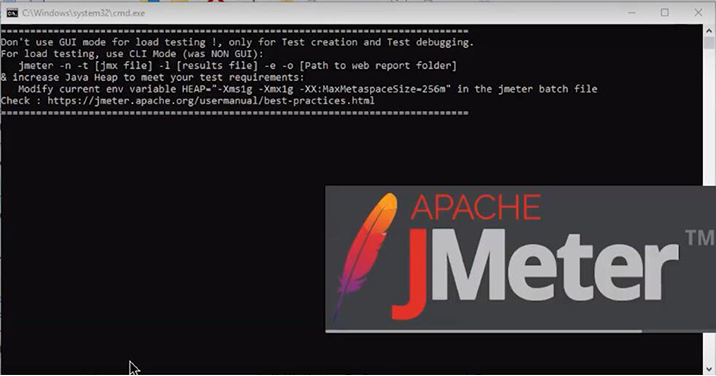
This may take a while, and then the JMeter window will open on the screen.
Now, the test plan is renamed performance testing.
2. Add a Thread Group
- Right-click on the Performance Testing,
- Visit Threads (Users) → Thread Group
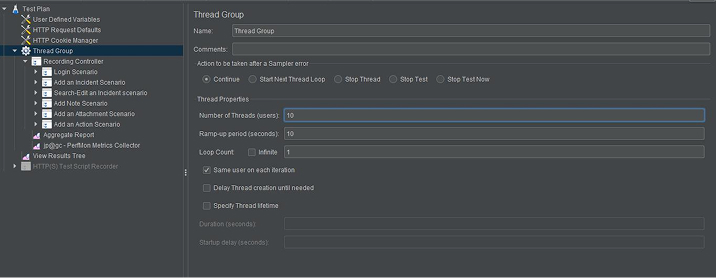
A thread group offers various options such as:
- Action to be taken after there is an absurdity: you can choose it the way you require for your project
- You’ll see a “number of threads”, from that pick the number of users you require
- Now, select the “ramp-up period in seconds” that affirms the time gap connecting the users’ hits
- A “loop count” option is also available where you can choose how many times you want to run the test for the number of users. Else, you can also choose the test to run infinite times (If you’re not aware how many times the test plan has to be run)
- It offers a scheduler that will help you schedule the start time and end time of the test
3. Add the HTTP Request
- Right-click on the Thread group → add option → sampler option
- A menu will be available, from that choose the HTTP request choice
Now, you can see a Server Name which will give the server name in that.
- Go to Your Project site
- Copy the URL
- Come back to the JMeter window
- Paste the URL in the Server Name box
Don’t give HTTP requests or HTTPS as these are protocols that will be seen in the other box, it will automatically be taken in the HTTP request case.
- Go to the path dialog box and leave a forward slash.
The forward slash is used to access the router page.
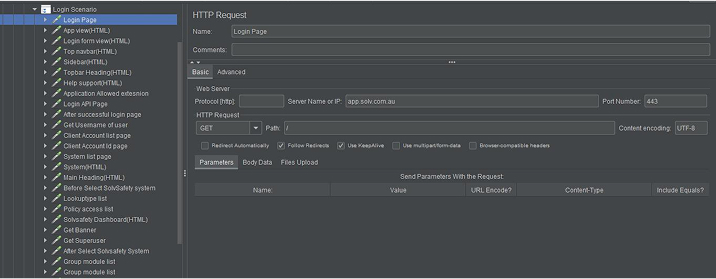
- Rename this HTTP request as Simple.
See the results and add listeners. Listeners are used to providing the outputs of a load test. There are different types of listeners available in JMeter, and for effective results, add plugins.
4. Add Listeners
As we said, there are various types of listeners that you can use to a great idea about the representation that the JMeter offers:
- Right-click on the Thread Group
- Go to Add → Listener option → Tree → View Results
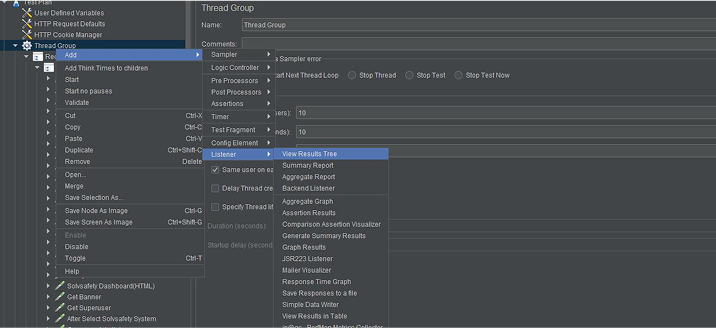
- Again, right-click on the listener → graph results
- And for the third listener, right-click again, view Results in the Table option
Now, you’re all set to run the test.
5. Run the Test
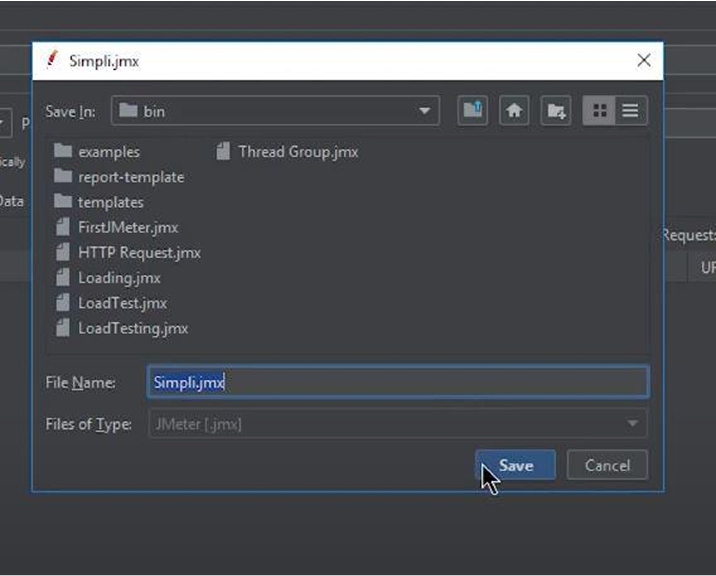
Before you run the test, save the JMeter test as .jmx and click the green button to run the test.
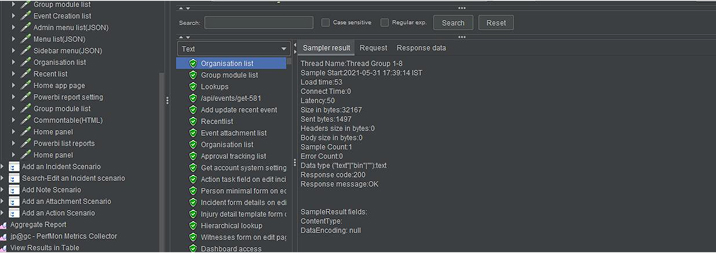
In the “View Results Tree,” see the test running with the same graph results. Now, you can see the time the test has been executed.
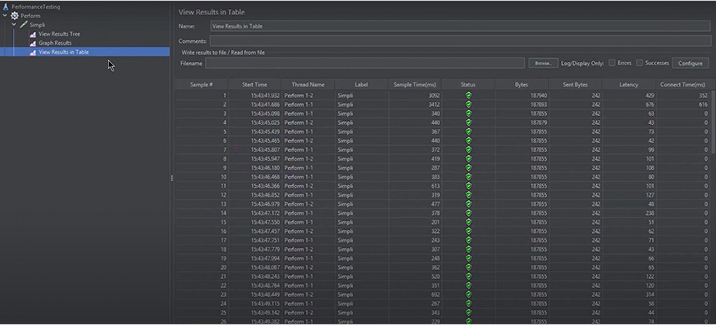
The test will run for a while. Go to the “view results in the table” and see the different performance testing metrics on the screen. You can see the thread name, label, ramp-up period, Sample Time per second, Bytes, Sort Bytes, config element, and the latency.
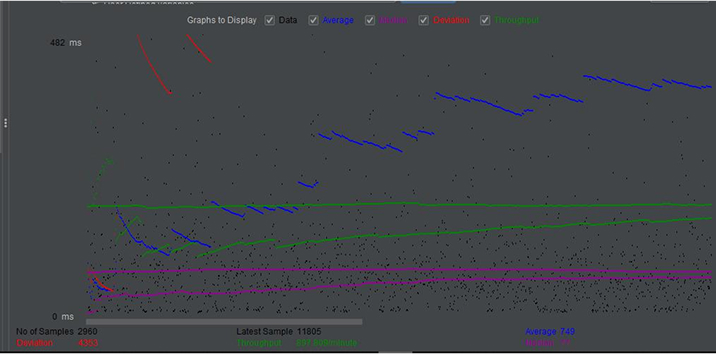
In the tree option, see various performance testing metrics by clicking on any of the tests. In the graph results, you can see the graph coming on the screen which represents the tests taking place concerning the IP address, config element, thread, ramp-up period, and loop counts.
Lastly, JMeter creates a request and sends it to the server. When the server receives the request sent by JMeter, it collects them and imagines those details in a chart. After that, it prepares the server’s response and generates the test results in several formats so that the tester can analyze the data.
6. Conclusion
JMeter is a robust performance testing tool used to measure the performance of web applications under various conditions. It allows you to test how a network or server would work under heavy load. The tool is easy to use and helps identify performance issues through diverse metrics and visualizations. Setting up JMeter is straightforward, and it can be customized to meet your specific testing requirements. Using Apache JMeter effectively enables you to maximize the benefits of performance testing, ensuring that your application is reliable and scalable.

Vishal Shah has an extensive understanding of multiple application development frameworks and holds an upper hand with newer trends in order to strive and thrive in the dynamic market. He has nurtured his managerial growth in both technical and business aspects and gives his expertise through his blog posts.



Comments
Leave a message...