

The advent of cloud and microservices technologies has made it possible to build faster, more flexible, and often more complex software applications. Thanks to rapid technological evolution, release cycles have become shorter and more frequent, while users continue to demand an enhanced experience with every new release. This is when reliable software testing services become essential. They provide the opportunity to test the application’s expected performance, helping you release a stable and scalable application into a modern environment.
This article explores the concept of performance testing, including its benefits, types, tools, and best practices. It also provides a step-by-step approach to running tests and presents some real-world examples.
1. What is Performance Testing?
Performance testing refers to the assessment of how an application performs under different workloads. It measures non-functional characteristics of software, such as speed, scalability, stability, and responsiveness. The primary goal of this testing is to ensure that the application performs well and can efficiently handle the expected number of users or transactions under various conditions, such as large volumes of data or specific network settings.
With performance testing, you can identify performance bottlenecks by analyzing metrics such as throughput and response times to determine whether your app will meet the real-world performance criteria.
2. Benefits of Performance Testing
Performance testing is essential because it helps you understand how your software system behaves under load. Here are a few advantages of conducting this test.
2.1 Verifies the Core Features of Your Software
With performance testing, the team can assess how the essential features of the software perform. This helps ascertain the software’s success, making performance testing one of the most important aspects of testing strategy.
2.2 Identifying Bottlenecks
Identifying the causes for slow or degraded performance is another key reason for conducting performance tests. It helps uncover performance bottlenecks such as network congestion, insufficient memory, and slow database queries. Understanding these underlying issues provides a clearer roadmap to optimize the system and ensures it doesn’t experience poor performance in the future for the same reasons.
2.3 Improved User Experience
Delivering a great user experience is a core strategy for retaining customers and building brand loyalty. Performance testing allows you to identify and eliminate slowinteractions, poor experiences, and glitches that can disrupt the user flow.
2.4 Enhanced Software Quality
With performance testing, you can ensure the overall quality and reliability of your software. This testing verifies that your application can run efficiently in a production environment.
2.5 Supports Scalability
Performance testing not only assesses the app’s capacity to handle the expected load, but also determines whether it can withstand increasing load. If an app is developed with future load or traffic in mind, performance testing will reveal if it can truly handle that demand. It evaluates the app’s ability to respond during peak load without crashing.
3. Key Performance Testing Metrics
Every test requires metrics to measure the results and determine success or failure. In performance testing, tracking the key metrics outlined below in brief can help evaluate system performance and identify areas for optimization.
- Response time: The total time taken by the system to respond to a user request, from sending the request to receiving the complete response. Faster response times enhance the user experience.
- Throughput: The number of transactions or data units, such as bytes, that the system can process per second. A higher throughput indicates better performance and a greater capacity to handle traffic.
- Resource Utilization: The usage levels of core system components, including CPU and memory utilization, during the test. Efficient resource use prevents system overload.
- Error Rate: The percentage of failed transactions or system errors relative to the total number of requests. A high rate indicates stability issues often caused by exceeding system capacity.
- Concurrent Users: The maximum number of users or sessions that a system can support simultaneously while maintaining expected performance. This is a common measure of load capacity.
- Latency: The delay between the user sending a request and the system initiating a response. It is also known as wait time.
- Scalability: The system’s ability to maintain acceptable performance levels as the user load or data volume increases significantly. It indicates the system’s potential for growth.
- Bandwidth: The amount of data transferred per second across the network during the test, typically measured in kilobytes (KB) or megabytes (MB) per second.
- Peak Response Time: The longest time recorded to fulfill a single request during the test. A significantly long response time may indicate an anomaly or potential instability.
- Request Rate: The rate at which a computer or network receives and processes requests per second, reflecting the system’s processing speed.
- Page Fault Rate: The rate at which the processor handles pagefaults. A high rate indicates excessive swapping between RAM and disk, resulting in slower performance.
- Hardware Interrupts: The average number of hardware interrupts the processor receives and processes each second. These are signals from hardware devices such as network cards or disks that require immediate CPU attention. An unusually high rate indicates resource contention or inefficient device drivers.
- Disk I/O Queue Length: The average number of read/write requests queued for a selected disk during a sampling interval. A consistently long queue indicates that the disk is a bottleneck because it cannot process requests quickly enough.
- Packet Queue Length: The length of the output queue for network packets, indicating how many outgoing data packets are waiting to be transmitted. A long queue means the network interface or bandwidth is saturated and cannot keep up with the data volume.
- Network Throughput: The total number of bytes sent or received by the network interface per second. It measures how much data is actually transferred over the network link.
- Pooled Connection Reuse: The number of user requests that were satisfied by reusing existing connections from a connection pool. High reuse indicates efficient resource management, reducing the overhead associated with establishing new connections.
- Max Concurrent Sessions: The maximum number of sessions that can be simultaneously on the system. This metric defines the system’s upper capacity limit under load.
- Cached SQL Statements: The number of SQL statements or queries handled using cached data instead of requiring expensive I/O operations. With an effective database caching strategy, this number remains high.
- Web Server File Access: The number of access requests made to a file on a web server every second. This metric helps gauge the demand on the file and the potential I/O load on the server’s file system.
- Recoverable Data: The amount of data that can be restored or recovered at any given time, typically measured in terms of size or time. This is a key metric for assessing a system’s stability and disaster recovery capabilities.
- Locking Efficiency: This refers to the effectiveness of table and database locking mechanisms. Low efficiency indicates that processes spend excessive time waiting for locks to be released, which may suggest underlying issues such as database contention and reduced concurrency.
- Max Wait Time: The longest duration a request or process spent waiting for a specific resource to become available. This metric helps identify severe performance bottlenecks.
- Active Threads: The number of processing threads currently running or active within the application or system. Monitoring this metric helps assess concurrency levels and manage thread pools effectively.
- Garbage Collection: The rate at which unused memory is reclaimed and returned to the system by the garbage collector. Frequent or prolonged garbage collection cycles may temporarily halt application processing and cause performance degradation.
- Requests Per Second: The total number of user requests or calls the system canhandle per second. It is a key metric for measuring processing speed.
- Transactions Passed/Failed: A measurement of the total number of successful transactions compared to the total number of unsuccessful transactions. This metric determines the system reliability under load.
4. Types of Performance Testing
Different types of performance tests are conducted to assess the overall performance of a system. This section provides a brief explanation of each type.

4.1 Endurance Testing
Endurance testing, also known as soak testing, evaluates how software performs under a specific workload over an extended period. This test helps identify system issues such as memory leaks.
4.2 Stress Testing
Another name for stress testing is fatigue testing. In this test, the software is subjected to loads beyond its normal operational capacity to identify its breaking point. It also determines whether the system remains stable under specific stress conditions and assesses its ability to recover. Additionally, exposing the software to a massive user or transactional load helps uncover bugs.
4.3 Spike Testing
Spike testing examines a system’s performance when workloads increase rapidly and repeatedly. Spikes are short periods during which traffic or workload exceeds basic expectations.
4.4 Scalability Testing
It tests how the system responds to increasing load, allowing the team to understand how it can scale with changes in infrastructure and configurations. This test also uncovers many performance bottlenecks. Scalability tests demonstrate how the system can support a higher workload or more users, for example, by adding a server or improving response time through additional CPU resources on the database.
4.5 Load Testing
It aims to analyze the application’s performance as the workload, such as concurrent users or transactions, increases. In this test, the system’s response time is measured under rising load to determine whether it meets expectations even with the increased workload.
5. Performance Testing Process
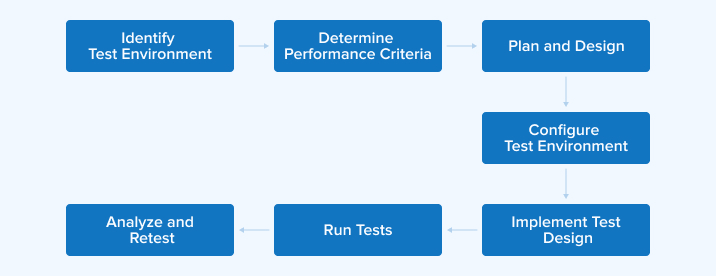
Performance testing is used to assess and optimize the speed, responsiveness, and stability of a software application. Let us explore how to conduct performance testing effectively in five key steps.
5.1 Plan
The first step involves planning and strategizing. Define your testing goals and KPIs, such as response time, throughput, and resource utilization. You must also establish the performance acceptance criteria, which set clear benchmarks for success. Additionally, the testing team should plan specific testing scenarios or test cases to simulate real user interactions, including peak loads, stress conditions, and other critical areas of the software.
5.2 Design
Create detailed test scripts and test cases based on the previously outlined test designs. These scripts are essential for simulating various user interactions and system behaviors to replicate real-world usage patterns. The test design must align with the defined scenarios and include different types of tests, such as load and stress testing, to ensure comprehensive coverage.
5.3 Set Up and Execute
You have to set up a testing environment that accurately replicates the real-world production environment, including the configuration of hardware, software, and network settings. Afterward, run and monitor the previously prepared test scripts. Testers execute the tests under various scenarios, continuously monitoring system performance metrics in real-time to observe throughput, response times, and resource usage. At this stage, you can actively capture performance data.
5.4 Analyze
After running the tests, gather the performance data and analyze it. Testers must evaluate metrics such as CPU usage, memory consumption, and response time against the established acceptance criteria. The main purpose of this stage is to identify bottlenecks that indicate areas where performance slows down. This process is necessary to determine where the app requires optimization.
5.5 Optimize and Retest
Optimize the app through configuration adjustments, resource upgrades, or code changes to resolve the performance issues. After implementing these changes, retest the system to determine whether the performance problems have been eliminated or persist. Repeat this optimize-and-retest cycle until the results meet the performance benchmarks and acceptance criteria.
6. Performance Testing Tools
A large variety of performance testing tools is available in the marketplace to help developers and testers analyze application performance and scalability under different load conditions.
6.1 Apache JMeter
Apache JMeter is a popular, open-source Java application primarily used for load and performance testing to analyze an application’s behavior under various load conditions. It simulates multiple users by sending requests to a server, and collects critical metrics such as response times and throughput.
JMeter supports a wide range of protocols, including HTTP/HTTPS, FTP, and JDBC. It offers a graphical interface for test design and allows distributed testing to simulate large-scale user concurrency.
6.2 LoadRunner
This popular performance testing tool is suitable for high-scale, enterprise-level testing, supporting a wide range of protocols. It is designed for complex, large-scale scenarios, offering robust control over test execution through the Virtual User Generator (VuGen) for script creation. LoadRunner provides detailed analytics and monitoring, delivering deep insights into transaction performance and system resource usage.
6.3 RoadRunner
RoadRunner is an open-source PHP application server and process manager that differs from pure load testing tools. Its primary function is to streamline PHP application performance by eliminating boot load time and reducing latency. It achieves this by executing code on the server rather than the client browser, and it provides an API for dynamic analysis and evaluation of event streams in concurrently operating Java programs.
6.4 Gatling
Gatling is an open-source, high-performance load-testing tool known for its asynchronous and non-blocking I/O architecture. It efficiently handles thousands of concurrent users with minimal resource overhead. Gatling uses a code-first approach using a concise DSL to create realistic user scenarios. It automatically generates detailed, colorful, and interactive HTML reports for quick bottleneck identification and seamless integration into CI/CD pipelines.
6.5 BlazeMeter
BlazeMeter is an enterprise-ready, cloud-based platform designed for massive, scalable testing. It enables the simulation of virtual users from various global locations and offers advanced features such as real-time analytics, scriptless test creation, and extensive integration with CI/CD and APM tools for continuous performance validation.
7. Practical Applications of Performance Testing
Performance testing is essential for addressing operational challenges. By simulating real-world usage, organizations can ensure their systems remain stable and efficient under pressure.
7.1 Fintech: High-Frequency Trading Platforms
In the financial sector, trading platforms must process thousands of transactions per second. Because even a millisecond of delay can cause significant financial losses, rigorous testing is essential to ensure reliability during peak market activity.
Tests to Run:
- Load Testing: Evaluates the system’s ability to handle expected trading volumes during peak market hours.
- Stress Testing: Pushes the platform to its absolute limit to identify failure points and assess recovery capabilities.
- Scalability Testing: Measures how effectively the platform scales to handle increasing numbers of transactions.
Metrics to Monitor:
- Response Time: Verifying that order processing remains under one millisecond.
- Throughput: Handling tens of thousands of transactions per second.
- Error Rate: Maintaining failed transactions below 0.01%.
7.2 Healthcare: Telemedicine Applications
Telemedicine platforms facilitate essential video consultations and patient data transfers. These systems must be tested to ensure they can handle long-term usage and sudden, unpredictable surges in traffic, especially during health emergencies.
Tests to Run:
- Endurance Testing: Evaluates the system’s stability over extended periods to ensure performance does not degrade or cause crashes over time.
- Spike Testing: Simulates a sudden, massive increase in users to assess how quickly the system stabilizes.
Metrics to Monitor:
- Video Quality: Maintaining high-definition video with no noticeable lag.
- Response Time: Keeping delays below two seconds for interactions.
- Recovery Time: Ensuring the system returns to normal within five seconds after a sudden surge.
7.3 E-commerce: Retail Platforms During Sales Events
During major sales events like Black Friday, retail sites must support millions of simultaneous visitors. Performance testing ensures the site does not slow down or crash, thereby protecting both revenue and customer trust.
Tests to Run:
- Volume Testing: Tests the database’s ability to handle massive amounts of user data and transactions.
- Load Testing: Specifically checks whether the checkout and payment systems function correctly under heavy traffic.
- Regression Testing: Verifies that new updates have not negatively impacted the site’s speed or core functions.
Metrics to Monitor:
- Page Load Time: Ensures pages load in under three seconds to retain customers.
- Transaction Success Rate: Maintaining a 99.9% success rate for all purchases.
- Error Rate: Keep technical errors below 1%.
8. Performance Testing Best Practices
Following best practices ensures effective performance testing, leading to accurate results and optimized software performance.
8.1 Test in Realistic Environments
Test the software in an environment that closely resembles the production environment or real-world conditions. To set up such a testing environment, use similar network settings, software configurations, and hardware. Additionally, mimicking actual traffic is also important, as it provides more accurate data and insights into the app performance under real conditions.
8.2 Plan Enough Time for Scripting
The most challenging aspect of testing is estimating the time required for a script to function correctly. Most testing teams do not bother testing simple or trivial features. Instead, they focus on essential or complex aspects of the software. These aspects often require more time to script to operate effectively. So, it is better to plan your scripting time.
8.3 Start at Unit Test Level
Starting performance tests early helps keep your code clean and efficient, but more importantly, it ensures your system performs well. Therefore, don’t wait until after code compilation to run performance tests. As soon as a unit of code is ready, test it against its performance requirements. This best practice aligns with DevOps principles and reduces the likelihood of errors appearing in the later stages of a software development life cycle or directly in the production environment.
8.4 Use Automation
Automated performance testing enables faster, repeatable, and more precise testing on a large scale. Frequent and large-scale tests that are difficult to manage manually can be easily managed with automated testing tools. These tools can simulate extensive data loads and thousands of concurrent users to evaluate how the application behaves under real conditions. Additionally, you can schedule automated tests to run during off-peak hours or overnight, allowing you to receive detailed reports before the next development cycle begins.
8.5 Establish a Scalable Architecture
Setting up scalable processes and performance-oriented architecture helps when working under tight deadlines. It also enables you to launch software applications and their updates quickly into the market.
If you already have a scalable architecture, for example, for an instant message application, it will face no problem and will work efficiently even as its user base grows. Such an architecture also allows you to add new features to the app, such as group chats and video calls, without affecting the overall app performance.
8.6 Test Coverage
Testing your app or its features for only one scenario is not sufficient. You must ensure comprehensive test coverage, including scenarios beyond predetermined situations. Only then can you confirm that your app and its essential functions will not falter under real-world conditions.
9. Conclusion
Performance testing evaluates whether your software can handle real-world conditions. It focuses on assessing speed, scalability, reliability, stability, and other criteria based on the testing objectives. Therefore, it is essential to understand the different types of performance testing. Additionally, following a structured approach and best practices can help identify bottlenecks, reduce risks, and deliver an enhanced user experience. Using performance testing tools like Apache JMeter, LoadRunner, and Gatling ensures more accurate results and helps maintain peak performance.
FAQ
Do we need coding for performance testing?
There is no need for coding when using performance testing tools that take a codeless approach. However, some tools do require coding. The approach you choose depends on various factors, but more importantly, the team’s coding knowledge and experience.
What is the 80/20 rule in performance testing?
The 80/20 rule of performance testing states that priority should be given to test cases covering the 20% of scenarios that cause 80% of the business risk or user pain. This testing approach ensures that testing efforts align with impact, helping to catch critical issues early.
Can Selenium do performance testing?
Selenium is a testing tool, but performance testing is not one of its core capabilities. You have to integrate it with LoadRunner or JMeter to simulate user interactions and measure app performance under various real-world conditions when running functional tests.
Can we do performance testing manually?
Many types of software testing can be performed manually, but performance testing cannot. This type of testing relies heavily on tools for executing tests, analyzing results, and generating charts.

Vishal Shah has an extensive understanding of multiple application development frameworks and holds an upper hand with newer trends in order to strive and thrive in the dynamic market. He has nurtured his managerial growth in both technical and business aspects and gives his expertise through his blog posts.



Comments
Leave a message...