


While creating software for the client, the most important step in the software development life cycle is to test it thoroughly. The very first step in software testing is unit testing. This process involves creating small, testable parts of the software known as units and testing them individually to ensure proper operation. This approach of testing is carried out by many software testing companies and quality assurance experts while the development process is going on.
To know more about unit testing, its process, types, and more, let’s go through this blog.
What is Unit Testing?
Unit testing is a widely used software testing approach that involves testing individual functions or units of the software. The main goal of unit testing is to verify the functionality of each function or unit within the system. By “unit”, we mean the smaller parts of an application that can be tested independently. A unit typically consists of procedures and inputs that produce a single output. Essentially, unit testing verifies the smallest segments of code that can be logically isolated within a solution. In most object-oriented programming languages, a unit is usually a method, function, or subroutine.
Comment
by u/brianatlarge from discussion
in webdev
Purpose of Unit Testing
The software development process is incomplete without unit testing. Execution issues are more likely to arise if unit tests are not performed or are performed poorly, resulting in increased time, cost, and personnel needed to resolve them. Unit testing aims to achieve several objectives, including:
- To ensure that a specific piece of code is correct.
- To divide the code into distinct parts.
- To find and fix problems in the program as quickly as possible.
- Improve the developer’s familiarity with the code base.
- Enable quick and effortless adjustments
- Improve the viability of code reuse.
Advantages of Unit Testing
Some of the major advantages of the unit testing framework are –
Early Detection of Issues
Unit testing helps developers find problems while writing the code. They test each small part separately and quickly spot where errors occur. This approach prevents minor defects from growing into serious issues. Early fixes save effort, reduce costs, and keep the development process smooth and controlled.
Documentation
Unit tests define how the code should behave during execution. Developers depend on these tests during code restructuring and improvement. After modifying the code, testers run the tests again to assess that everything works as expected. These tests also act as simple documentation, helping new team members understand the system and making future updates easier to handle.
Faster Development Cycles
With early detection of the problems, developers spend less time in troubleshooting. Quick checks on small code changes help them confirm everything works right away. This practice speeds up development and allows teams to release updates without waiting for full system testing.
Easier Refactoring
Unit testing makes code restructuring much safer. Developers can improve design or clean up logic without fear of breaking key features. After changes, they run the tests to confirm the system still behaves correctly. If something fails, they identify and correct it immediately. This process allows teams to refine and optimize code with confidence while maintaining stable functionality.
Improved Code Quality
Unit testing forces developers to think deeply about how different parts of the software must behave. It helps to build a clear login and take effective design decisions. While writing tests, they often spot weak areas and fix them early. With tests in place, they can improve structure and maintain clean code. Each unit works as expected, which raises the overall quality and reliability of the software.
Disadvantages of Unit Testing
Some of the major disadvantages of the unit testing framework are –
Time and Cost
Writing and updating unit tests requires a lot of effort, especially in the case of large and complex projects. Many a time, developers may take hours to develop test cases only for a single feature. This results in exceeding the given development time and thus the overall project cost, though it provides long-term reliability.
Balancing Coverage vs. Quality
Maintaining the right balance between how much of the code requires testing and how well the testing is performed can be quite difficult. There’s no guarantee that testing every line of code will improve results. Some tests add little real value. Teams should focus on important features and critical flows instead. By writing meaningful tests for these areas, developers improve reliability without wasting time on unnecessary checks.
False Sense of Security
Unit testing independently checks small parts of the code, but they do not confirm that the full system works smoothly. It’s possible that a feature may pass every unit test but still break when connected to other modules. Interface conflicts or integration gaps can appear later. When teams rely only on unit tests, they may assume everything works fine. They must combine unit testing with integration and system testing to ensure overall stability.
Skill Requirement
Developers need solid technical knowledge to create useful unit tests. They must understand the code, testing tools, and concepts like mocking or stubbing. Without proper training, writing strong and meaningful tests becomes difficult. Less experienced team members may struggle to design complete test cases. Teams should invest in learning and practice so developers can build reliable tests that truly improve software quality.
Difficulty in Testing Complex Units
Testing complex components is not always simple. Some units depend on many other parts of the system, which makes isolation difficult. Developers must create workarounds to separate these pieces before testing them properly and accurately.
Unit Testing Techniques
Some of the most popular techniques of unit testing frameworks are –
White-Box Testing
White-box testing, also known as transparent or glass-box testing, enables testers to have full knowledge of the internal functionalities of the software. However, the internal structure of the function to be tested is completely unknown.
Black-Box Testing
Black-box testing is a testing approach in which testers are unaware of the internal functionality and structure of the system or project being tested.
Gray-Box Testing
Gray-box testing is a semi-transparent approach that combines elements of both white-box and black-box testing. It is a type of system testing where the tester has partial knowledge of the internal functionality of a unit or test method, but not as much as a white-box tester. This means that the testing team is partially aware of the project’s internal workings.
How to Do Unit Testing?
- Identify the Unit to Test: Begin by selecting the most important parts of the application that affect users directly. Focus on the smallest workable piece, such as a method or function. Review its logic carefully and decide what situations you need to test. Then create tests that check this unit separately from the rest of the system.
- Define Input and Expected Output: Decide what data each test will use and define the result you expect. These expected results help testers confirm whether the code works correctly or not.
- Select Testing Approach: Teams must decide whether to perform tests manually or use automated frameworks. Manual testing involves running the code and checking the results directly. Automation uses scripts to execute tests quickly and repeatedly. Automated tests save time, while manual checks help in situations that require careful observation and human judgment.
- Define Test Cases: Develop separate test cases that focus on one function at a time. Include regular inputs, boundary situations, and possible error conditions.
- Prepare the Test Environment: Before running unit tests, the team prepares the testing setup. They arrange test data, required configurations, and mock objects. Developers also use an IDE to write and run tests easily. A separate testing space helps keep results accurate and independent.
- Write and Run Tests: Developers use testing frameworks such as PyTest (Python) or JUnit(Java) to create reusable scripts and run unit tests automatically. These tools execute the test cases where the compiler translates the programming language code into executable code. These tools will display results that need to be captured.
- Evaluate Test Results and Resolve Issues: After running the tests, the team compares the obtained results with the expected results. If a test fails, developers investigate the cause and make corrections in the code. They run the tests again to confirm the modifications work properly. This repeat process helps maintain stable and reliable code. It may take extra time, so teams often include buffer time in the development schedule.
Best Practices of Unit Testing
Here are some best practices of unit testing:
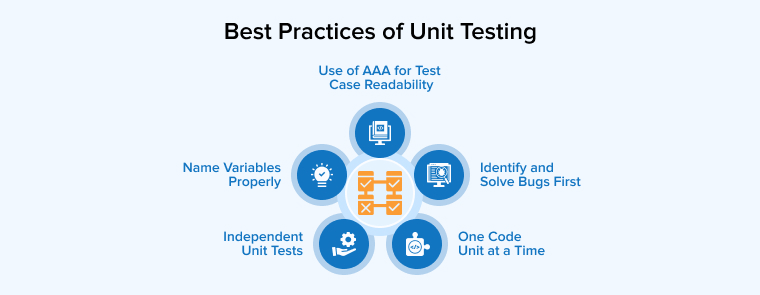
1. Independent Unit Tests
When performing unit testing, developers or testers must ensure that tests remain independent of one another. If unit test cases are dependent, they can interfere with each other, causing changes in one test to affect others. Additionally, dependencies increase the complexity of the test suite. Therefore, maintaining test independence is essential.
2. One Code Unit at a Time
While reviewing a unit of code, testers must look at each test case independently, even if the unit test cases are related. This approach simplifies the coding and refactoring process for team members.
3. Use of AAA for Test Case Readability
AAA stands for Arrange, Act, and Assert in test cases. This approach helps separate the preparation steps from the actual testing actions and verifications of the results. Therefore, it helps in almost eliminating the intermix of the assertions, and this is possible with the help of another A, i.e, Act. Basically, following this approach enables the creation of a test suite with readability.
4. Identify and Solve Bugs First
One of the best practices in unit testing is to identify and fix bugs before moving on to the next phase, known as integration testing. Integration tests identify whether the pieces of code work properly or not.
5. Name Variables Properly
When writing unit tests, the most important thing to do is name the variables properly. This helps in avoiding the usage of magic strings and makes the code easier to understand.
Best Tools For Unit Testing

Some of the best unit testing tools to help developers are –
- JUnit: JUnit is a popular unit testing tool that is free to use, and it is mostly used by developers to check the apps written in the Java programming language. This tool offers assertions to the identification test method of the system.
- PHPUnit: PHPUnit is mainly used by PHP developers. This tool tests individual units of the code separately to ensure their correctness.
- NUnit: NUnit is mostly used by developers working on .NET languages. It is a popular tool for writing automated test scripts.
- EMMA: EMMA is another open-source tool that is used for the Java language. It helps the developers in analyzing and reporting code. It also supports coverage types like basic block, method, or line coverage.
- JMockit: JMockit is an open-source unit testing tool, open-source used for mocking APIs, featuring verification syntax and recording capabilities.
Conclusion
To deliver a high-quality, bug-free software solution to the clients, the software development team follows a rigorous testing process, starting with unit testing at the initial stage. Unit testing focuses on the code of the system and separates the small modules of the program, and tests them individually.
Basically, unit testing helps identify and fix bugs in the code before progressing further in the software development life cycle. This type of software testing ensures that the developed system is quality assured and free of defects.
FAQ
What is Unit Testing vs QA Testing?
Unit testing and QA testing both play their own role in software development. Developers use unit tests to verify small code sections during coding. QA teams examine the entire application later to confirm it meets functional and user requirements. Unit tests check internal logic, while QA testing reviews the system’s overall behavior, performance, and usability. Together, they help deliver stable and reliable software.
What Skills Are Needed for Unit Testing?
Unit testing demands solid coding knowledge and familiarity with testing tools like NUnit. Developers also use techniques like mocking or stubbing to separate components and test them independently.
Who Usually Performs Unit Testing?
Developers usually handle unit testing during the coding stage. They test small pieces of code individually to confirm each part works properly before connecting it with the rest of the system.

Itesh Sharma is core member of Sales Department at TatvaSoft. He has got more than 6 years of experience in handling the task related to Customer Management and Project Management. Apart from his profession he also has keen interest in sharing the insight on different methodologies of software development.



Comments
Leave a message...