


Testing is a critical aspect of the software development lifecycle. It involves evaluating and verifying that the developed product meets project requirements, functions properly, and is free of bugs or issues. There are two main approaches to software testing: automated and manual.
The testing approach you choose directly affects the scope, cost, test coverage, and type of defects you discover. Therefore, selecting an appropriate testing method is essential for achieving effective outcomes.
While reliable software testing services cater to varied and specified requirements, often using the optimal mix of both approaches, understanding these concepts, their benefits, limitations, working, and key differences empowers you to make an informed decision.
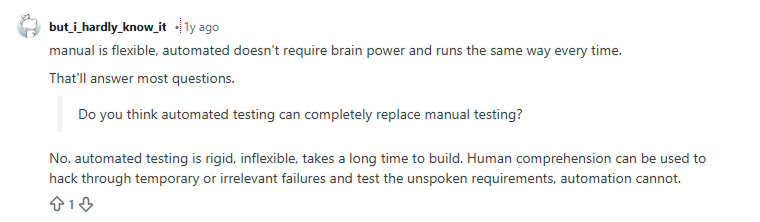
Before proceeding to automation and manual testing, take a look at what a Reddit user says about it
What is Automation Testing?

Automation Testing is one of the most widely used techniques in software testing. It is performed using specialized automated testing tools that enable testers to execute test cases efficiently. Automation testing is more flexible than manual testing because testers do not need to constantly monitor the software and execute the test steps manually. Essentially, automation testing tools can input test data into the system under test, compare expected and actual results, and generate detailed test reports. However, software test automation requires considerable investments of money and resources.
Automation testing is an essential system testing used in successive development cycles that require repeated execution of the same test suite. By using a test automation tool, the testers can record the test suite and replay it as needed. Once the automated tests are started, no human intervention is required. As a result, the ROI of test automation improves significantly.
Some of the major types of automated testing include smoke testing, unit testing, functional testing, keyword testing, integration testing, regression testing, data-driven testing, performance testing, load testing, and black box testing.
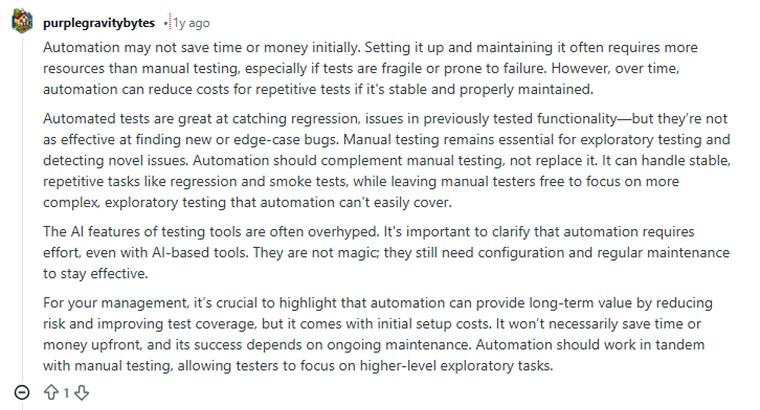
Take a look at what a Reddit user says about automation testing.
When to Use Automation Testing?
We need to perform automation testing in several areas, such as:
- Performance testing: It determines the speed, stability, functionality, scalability, and characteristics of the system under test. It evaluates whether the response times and resource-utilization levels meet the project’s performance objectives and are suitable for automation testing.
- Load Testing: This type of testing is performed to verify that the application can handle the expected number of transactions and to assess its behavior under both peak and normal load conditions.
- Regression testing: Repeated testing of an existing program that has already been tested, conducted after modification to discover any faults introduced as a result of changes in the software being tested or in unrelated software components. Therefore, regression testing is especially suitable for automation as it is beyond human capacity to perform these tests promptly.
Benefits of Automated Testing
Automated testing is undoubtedly a valuable practice and plays a crucial role in QA and modern software development processes.
Increased Accuracy
Improve the precision of test results with automated testing. It also enables tests to be run more frequently and consistently compared to manual testing. Automated testing approaches are especially valuable when working on a large and complex codebase. Issues that are often missed during manual testing due to human error are identified through the consistent repetition of automated tests.
Faster Feedback Loop
Automated testing tools like Cypress and Selenium accelerate test execution. Since machines work faster than humans, they are especially useful for repetitive tests such as regression and integration testing.
Faster tests lead to quicker results and immediate feedback. As a result, issues are identified early and resolved before they can cause significant damage. Fast and frequent feedback is essential in agile life cycles. Developers write code, receive feedback after thorough testing, and refine it accordingly. This iterative process occurs in every sprint.
Test automation enables rapid test execution, delivering precise results during short sprints, supporting the agile teams’ need for swift, thorough, and accurate feedback. This level of efficiency cannot be achieved through manual testing.
Better Allocation of Resources
Automating repetitive tests allows human testers to focus on exploratory testing and test scenarios that require cognitive skills. With test automation, teams can allocate resources strategically, maintaining a balance between automated and manual testing for maximum efficiency.
Automation Testing Helps in Risk Reduction
Automated tests quickly identify security risks and vulnerabilities, allowing you to address them before they cause serious problems for you or your system. More importantly, automated testing enables precise and efficient evaluation of all critical business applications without sacrificing speed or quality. In contrast, manual testing requires a trade-off: going faster increases risk or reduces coverage.
Early Bug Detection
Test automation helps detect issues early in the development process, enabling quicker resolutions. Early bug detection makes fixing issues easier and less expensive.
Disadvantages of Automated Testing
Test automation is undoubtedly helpful in achieving precise results quickly. It also streamlines the entire testing process. However, it is not without limitations. To plan an effective testing strategy, it is important to understand the constraints of automated testing.
Not a Full Replacement
While automated testing eliminates the need to run test cases manually, testing professionals are still required to create them. Therefore, test automation only automates one aspect of the testing process and is not a complete alternative to manual testing.
High Initial Costs
Automating test execution is expensive. Although the investment can be quickly recouped through increased testing productivity and more precise, reliable results, the initial capital required to purchase software testing tools or to automate the implementation of test cases is quite high.
Test Code & Backend Issues
Issues with test frameworks and test scripts can cause test automation to fail. If your backend team lacks proficiency in coding, there is a high likelihood of errors in the test scripts. Many application issues arise because the backend was not coded efficiently. Data, availability, and network problems are the primary reasons for these failures, preventing test automation from delivering accurate results.
Maintenance Overhead
Regularly update the automated test scripts to maintain their relevance and effectiveness over time. If any changes are made to the application’s functionality or user interface, then the existing test scripts will no longer be sufficient to thoroughly test these modifications. Therefore, they require continuous maintenance and timely updates.
Can’t Test User Experience (UX)
Automated tests can evaluate functionality and performance, but they cannot assess the user experience. They lack the capability to analyze visual appeal, accessibility challenges, and emotional reactions. These aspects of UI/UX must be evaluated by real users or manual testers. Manual reviews, user feedback, and accessibility audits help testers assess the user experience.
How Automated Testing Works?
The automated testing tools run pre-written test scripts on the app, verifying different aspects such as functionality, performance, and quality without the need for human intervention.
Select the Right Tool and Framework
Choosing the right software automation testing tool is critical for the success of both the testing phase and the overall project. You must select a tool whose functionalities, technology, and types of tests align closely with your testing objectives.
Along with selecting the right tools, it is necessary to establish a structured test automation framework. This framework consists of essential rules, guidelines, and libraries that provide a well-organized environment for writing, organizing, and managing test scripts. It helps make the testing process more scalable and efficient.
Design and Develop the Test Script
Setting up the tools and frameworks is a prerequisite for creating test scripts. Test scripts are a set of instructions that execute tasks in a specific sequence to simulate various user actions such as entering data, clicking a button, and logging into accounts. The scripts also include checks to verify expected outcomes at specific points, determining whether the application is functioning as intended.
Perform Automated Testing
Once programmed, the tools will automatically run the necessary tests. These automated testing tools simulate various working conditions and environments, such as devices, operating systems, and browsers, to determine how the app will interact with users.
In automated testing, tools are designed to follow a coded set of instructions step by step, performing the simulated actions quickly and consistently with a low margin of errors and without manual intervention.
Gather and Analyze Results
The automated testing tools quickly run the programmed test scripts and gather their results. They compare the actual test results with the expected outcomes predefined in the scripts. Any kind of mismatch or deviation from the expected outcome is flagged as a failure. Automated testing clearly identifies which aspects or parts of the app passed and which failed the tests.
Prepare Test Closure and Maintain Scripts
This step involves preparing a document that summarizes the overall findings of the tests, including the number of passed and failed tests. This document helps determine the quality of the application.
Never discard test scripts after a single use. Retain them for subsequent testing rounds of the same or similar applications. Update the scripts as needed to accommodate new features or changes in the application code.
What is Manual Testing?

Manual Testing is a straightforward process where the test cases are executed manually by the software testing team without using any automation tools or techniques. The primary goal of manual testing is to identify the issues, bugs, and defects in the application developed by the software development team. For this purpose, the testing team uses manual software testing techniques, which are helpful in accurately identifying bugs in the software solution. If the team manually tests a new application before automated testing, the difficulty levels will increase. This is why it is advisable to first perform automated checks on the software. However, manual testing is better suited for usability testing, exploratory testing, and ad hoc testing. Essentially, a combination of both manual and automated testing is required to deliver secure software to clients.
Some of the major types of manual testing include unit testing, black box testing, white box testing, system testing, integration testing, and acceptance testing.
When to Use Manual Testing?
We need to perform manual testing in several areas, such as:
- Ad-hoc Testing: It is the opposite of formal testing. In ad-hoc testing, software testers test the system informally without following any test design techniques or documentation. This type of testing is mostly performed based on the tester’s knowledge. Testers randomly test the application without relying on any test cases or business requirements.
- Exploratory Testing: This testing method is performed by domain experts who explore the application’s functionalities without prior knowledge of the requirements.
- Usability Testing: This evaluates whether the software is user-friendly, ensuring that the users can operate it comfortably. It aims to determine if the end user can easily understand and use the application.
Benefits of Manual Testing
One might wonder why perform manual tasks when you can automate it. Well, the thing is, automated testing has its limitations, as we have already explored. Manual testing helps fill the gaps left by automated testing in the overall testing process. That is why, even though this section focuses on the benefits of manual testing, we will discuss them in comparison with automated testing.
Human Judgment and Insight
Human testers possess experience and intuition that enable them to explore and test software functionalities in ways automated testing can’t. While they follow predefined criteria to test the app, they bring a human touch that is crucial for understanding the user experience delivered by specific software interaction or functionalities. Additionally, human testers can assess usability, accessibility, and other subjective aspects often missed by automated tests.
Let’s Testers Focus on Complex Features and Functions
While automated tests are quick and efficient, they cannot mimic every possible scenario to test a feature. Even if they could, it would be quite time-consuming. Manual testing allows QA experts to focus more on complex test cases and software features.
Preparing automated scripts for complex cases is often overwhelming, and there is frequently insufficient data to evaluate these cases against established standards. In such situations, human testers handle the cases while keeping the testing objectives and expected results for end-users in mind.
Enhancing User Experience Evaluation
Manual testing helps teams understand how real users experience the software. Testers explore features directly and assess ease of use from a human perspective. Tools can run scripts, but they cannot detect frustration or confusion. Human testers try practical situations and test design, flow, and interface behavior. They verify whether the system feels simple and clear. This approach balances technical accuracy with real user comfort and satisfaction.
Test Case Diversity
Unlike automated testing, where test cases are pre-decided and the app is evaluated strictly against specified criteria, manual testing is highly flexible. It gives testers the freedom to design their own test cases, set boundary conditions, and create negative scenarios that are difficult to automate. This enables more thorough testing, helping to validate software functionality under diverse conditions.
Flexibility
Manual testing is flexible, allowing for easy adaptation of minor changes to the testing process or criteria. It is mostly used for complex features and scenarios and often requires modifications to test scripts that are not highly disruptive to achieve relevant outcomes.
Disadvantages of Manual Testing
While manual testing fills the gaps left by automated testing, it has certain disadvantages that can be effectively addressed through automation. Here are a few limitations of manual testing.
Time-Consuming
As the name suggests, manual testing requires QA experts or testers to perform all tasks manually, regardless of the number of scenarios or the size and complexity of the application. Executing a wide range of test cases or testing large applications manually can be extremely time-consuming. This can slow down the testing process, significantly extending the development life cycle and time to market.
Not Reusable
Test cases created for manual testing are specific to the software or its version. Therefore, even if you update an existing test case to accommodate new software or an updated version, the test will be highly unstable. This issue can only be resolved by rewriting the entire test or test case, which consumes significant time and resources.
It is Susceptible to Human Errors
Humans are prone to error. They are not machines; they can become tired, lose focus, and make mistakes. This may cause them to miss important bugs or issues in the system during testing.
Repetitive Pathing
Not all manual tests are meant to follow the same criteria or sequence of steps. Sometimes, testers become so accustomed to a specific testing path that they repeat the pattern in every test they execute, even when instructed otherwise. Human testers often become so set in their ways that they resist change when it costs them time and efficiency.
Resource-Intensive
Manual testing is resource-intensive, requiring significant workforce and financial investment. It demands highly skilled testing and QA experts who know how to execute various tests and test cases, identify bugs, report them with necessary insights, and thoroughly document the entire process.
Meanwhile, financial investment is required to pay the testing team and to hire developers who collaborate with them to resolve bugs and issues identified during testing. Such an undertaking can be costly for small projects.
How Manual Testing Works?
Manual testing is a systematic process that works according to the prescribed steps given below:
Analyze Requirements and Plan the Test
The stakeholders or end users explain how the software is supposed to work. QA testers understand and assess these requirements to define the test objectives. Keeping these objectives in mind, the QA manager devises a comprehensive testing plan that includes the project scope, objectives, resources, and the overall strategy and methods for manual testing necessary to meet the software quality goals.
Design the Test Cases
Now, create detailed test cases based on the testing plan and objectives. Test cases are a set of instructions designed to verify different app functionalities under various scenarios. It includes preconditions, execution steps, and expected results.
Set Up the Environment
To run the tests, you first need to set up a testing environment. This test environment should include all the necessary software and hardware to replicate the production environment, allowing you to simulate user interactions under various scenarios. Doing so ensures that testing conditions closely resemble real-world situations, such as app installation, configuration settings, and access to relevant data.
Execute the Tests Manually
It is time for testers to manually execute the test cases. They will assume the role of end-users and follow the steps defined in each test case to evaluate how each function performs under different scenarios. Testers will record the actual results and compare them with the expected outcomes.
Report and Track Defects
The testers are required to document and report bugs or defects whenever the actual results deviate from the expected results. These reports should include crucial information such as the steps to reproduce the issue, the actual outcome, the expected outcome, and the severity of the issue.
The reported defects are logged into a tracking tool and assigned a priority. After the development team fixes a defect, the QA team performs regression testing to ensure the issue is resolved and no new problems have been introduced. Finally, a test closure report is prepared to communicate the test results to stakeholders.
Automation Testing vs Manual Testing: Comparison Table
| Parameters | Automation Testing | Manual Testing |
|---|---|---|
| Definition | Automation Testing is a process that uses automation tools for test case execution. | Manual testing is a process where test cases are executed manually. |
| Initial Investment | In automation testing, the initial investment is higher, but the ROI is better in the long run. | In manual testing, the initial investment is comparatively lower, and the ROI is also lower. |
| Processing Time | The processing time in automated testing is significantly faster. | Manual testing is a time-consuming process. |
| Reliability | The testing method here is reliable as it is performed by software tools and scripts. | The testing process here isn’t accurate, as there are chances of human errors. |
| Investment | Here, investment is required for software testing tools and engineers. | Here, investment is required only for human resources. |
| Human Observation | There is no involvement of human observation in automated testing. | In manual testing, human observation is necessary. |
| Test Report Visibility | All stakeholders can log in to the system and check the test reports generated by the automation testing approach. | The test reports in manual testing are generally recorded in Excel and aren’t readily available. |
| Cost-Effective | It is not cost-effective for low-volume regression. | It is not cost-effective for high-volume regression. |
Conclusion
As discussed in this blog, both manual and automation testing processes are essential for verifying software and ensuring it is bug-free for end users. The true value of these testing types emerges when the appropriate testing method is applied. This is why understanding the difference between manual testing and automation testing is essential for the QA and testing team. After learning about the types of testing and their respective pros & cons, the testing team of a software development company can determine which type of testing is best suited for a particular project.

Itesh Sharma is core member of Sales Department at TatvaSoft. He has got more than 6 years of experience in handling the task related to Customer Management and Project Management. Apart from his profession he also has keen interest in sharing the insight on different methodologies of software development.



Comments
Leave a message...