


Forms are an essential part of every web application. Whether it’s about user registration, different surveys, product listings, or checkout pages, forms are used to collect data. Forms can be static and dynamic. Static forms contain a fixed set of fields, whereas dynamic forms require runtime adjustments as per user requirements.
In Angular, the Reactive Forms module caters to form management and control. It consists of three building blocks: FormControl, FormGroup, and FormArray. The FormControl and FormGroup deal with static forms, while FormArray allows creating interactive forms to suit the changing requirements. FormArray is one of the most useful features that allows Angular development companies to work with a dynamic collection of form controls.
In this guide, we’ll explore all the aspects of the Angular FormArray, from its working, use cases, how it differs from a FormGroup, and usage best practices to develop scalable applications.
What is an Angular FormArray?
Angular FormArray of the Angular’s Reactive Forms module helps you to work with a changing number of form controls while the application is running. Instead of defining every field in advance, you can add or remove controls whenever the user interacts with the form. Each element inside the array can represent a FormControl, FormGroup, or even another FormArray.
Form controls in a FormArray are identified by their numeric index and not named fields like other form structures. FormArray helps keep track of validation status, user interaction states, and form values automatically.
How Does Angular FormArray Work?
The FormArray in Angular Reactive Forms provides users with a dynamic list of form controls. When there’s a need to add multiple phone numbers, skills, addresses, or education records, FormArray is the best solution, as there’s no fixed number of inputs in these cases.
We’ll explain how the FormArray works using a practical example that covers all the steps. But before that, you need to know the important methods to work with the FormArray.
| Method | Description |
|---|---|
| push() | Add new control |
| removeAt(index) | Remove control |
| at(index) | Get control |
| clear() | Remove all controls |
| length | Total controls |
Let’s begin now.
Step 1: Initialize Form
Here, we’re using FormBuilder to initialize an Angular Reactive Form. In this form, there’s a FormGroup named studentForm with a name field. We’re using the FormArray to create a dynamic field called skills to add or remove multiple skills in the form during runtime.
export class AppComponent { studentForm: FormGroup; constructor(private fb: FormBuilder) { this.studentForm = this.fb.group({ name: [''], skills: this.fb.array([]) }); } } |
Step 2: Create the Getter for FormArray
We’ll now define the getter method to access the values in the skills FormArray from the studentForm. With this method, there’s no need to repeatedly call studentForm.get(‘skills’) in the template, improving readability and simplicity while working with dynamic form controls.
Are getters in FormArrays compulsory to use, or can they be avoided? Let’s see what the Angular developer community thinks about this.
Help with FormArrays
by u/thematicmi in Angular2
get skills(): FormArray { return this.studentForm.get('skills') as FormArray; } |
Step 3: Add New Control
To add new controls to the skills FormArray, we’re using the addSkill() method. Every time you call this method, an empty input field gets created in the form. In this way, you can create as many skills as you want in the form at runtime.
addSkill() { this.skills.push(this.fb.control('')); } |
Step 4: Remove Control
If you want to remove any particular control from the skills FormArray use the removeSkill method. It uses the index value to delete any skill from the form, allowing efficient management of multiple inputs in a dynamic form setup.
removeSkill(index: number) { this.skills.removeAt(index); } |
5. HTML Template
This template binds the Reactive Form using formGroup and connects the skills FormArray with formArrayName. The *ngFor directive dynamically renders input fields for each skill and allows users to add or remove them. It also displays the entered skills in a list to show the current values in the form.
<form [formGroup]="studentForm"> <label>Name</label> <input type="text" formControlName="name"> <h3>Skills</h3> <div formArrayName="skills"> <div *ngFor="let skill of skills.controls; let i = index"> <input [formControlName]="i"> <button type="button" (click)="removeSkill(i)"> Remove </button> </div> </div> <button type="button" (click)="addSkill()"> Add Skill </button> <h3>Skills List</h3> <ul> <li *ngFor="let skill of skills.controls"> {{ skill.value }} </li> </ul> </form> |
6. Final Output
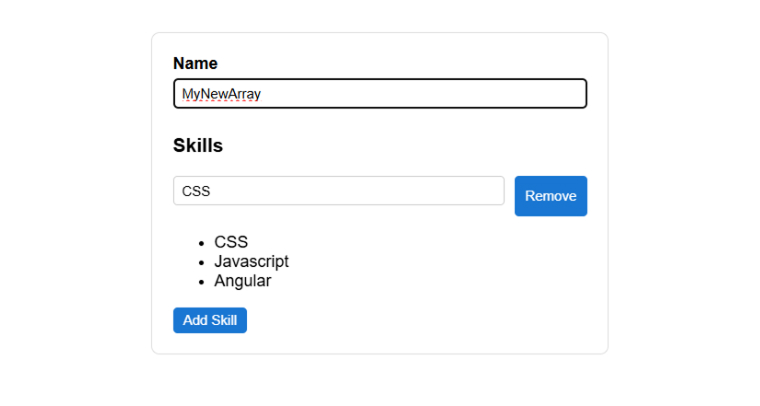
What is the Difference Between a FormArray and a FormGroup?
This is one of the most common questions Angular developers ask, and the answer is actually pretty simple.
Both FormArray and FormGroup are containers that hold other controls and roll up their validity state. The difference is in how they identify controls internally.
| Attribute | FormGroup | FormArray |
|---|---|---|
| Control identification | Named string keys | Numeric index |
| JSON structure | { key: value } | [ value, value ] |
| Control count | Fixed at build time | Dynamic at runtime |
| Best for | Known, static fields | Repeating, user-defined fields |
| Template directive | formGroupName | formArrayName |
| Type safety (v14+) | Strongly typed keys | Typed by control type |
Use FormGroup when your fields are stable and known before the app runs. A login form, a profile edit screen, and a contact form are all FormGroup territory.
Use FormArray when the number of fields changes based on user actions. Multiple addresses, a list of skills, and a set of order items need a FormArray.
In practice, you’ll often use both together. A FormGroup wraps the whole form, and a FormArray sits inside it to handle one dynamic section. Each item in the array is usually its own FormGroup.
What Are the Real-World Use Cases of Angular FormArray?
The FormArray feature is not limited to simple projects. In real-world applications, developers rely on it quite frequently. You can find several practical situations in production-level software where FormArray becomes extremely useful and sometimes even necessary. Below are six common use cases where it proves its real value.
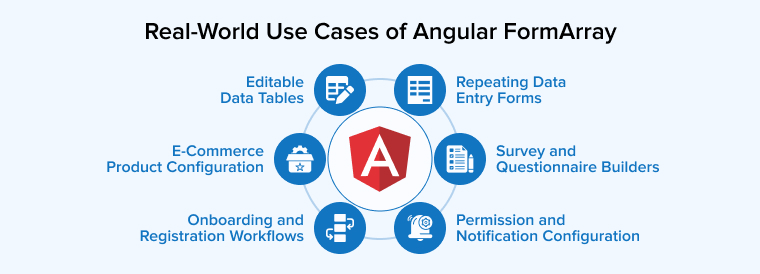
Survey and Questionnaire Builders
In surveys, usually the number of questions is not fixed. Here, FormArray proves very helpful. You can push new question controls at runtime as the survey config loads, apply per-question validation, and remove questions without disturbing the rest of the form state.
Repeating Data Entry Forms
In forms such as job applications, CRM records, purchase orders, etc., users need to enter multiple inputs of the same type. In such forms, FormArray stores each entry in an organized manner and provides separate validation for each of them before the user moves forward.
E-Commerce Product Configuration
In product management forms, sellers need to input different variants of the same item, for example, variable sizes, color choices, or pricing tiers. These options aren’t predecided, hence the form initially starts with zero entries. It expands as the seller adds more variants while preparing the product listing. FormArray properly maintains the data, no matter how many variants get added.
Editable Data Tables
Every table row is represented by its own FormGroup, while all those rows are stored inside a FormArray. This allows validation rules to be applied to individual rows, makes editing directly within the table possible, and enables submitting all rows at once. This approach is widely used in admin panels and data management tools.
Onboarding and Registration Workflows
Many onboarding forms may contain repeating sections, such as listing down emergency contacts, adding certifications, and providing details of previous work experiences. FormArray allows flexible additions to manage such repeating information. Users can add as many entries as needed without affecting the overall stability of the form structure.
Permission and Notification Configuration
Admin panels often require users to define message recipients, approve workflows, or assign roles. Such settings require flexibility to add or modify entries easily. FormArray allows each item to be organized as its own FormGroup. When the configuration is submitted, everything is sent as a single, organized object, which also keeps communication with the API simple.
Angular FormArray Best Practices for Scalable Applications
It’s not that difficult to use FormArrays, but using them in a way that keeps the code organized and performing with the increasing application size requires effort. The following best practices will help you build scalable applications:
1. Use Getter Methods for Cleaner Code
- Always create a getter method to access your FormArray instead of calling this.form.get(‘skills’) as FormArray repeatedly.
- Getter methods keep your component code consistent, readable, and type-safe. They also make your template bindings cleaner and easier to maintain across large components.
2. Leverage FormBuilder for Concise Syntax
- Use the FormBuilder service instead of manually creating FormArray, FormGroup, and FormControl instances. It reduces boilerplate significantly, especially when building complex nested structures.
- FormBuilder also makes your form initialization logic easier to scan and update.
3. Performance Considerations with Large FormArrays
- Always use trackBy with ngFor when rendering FormArray controls in the template to avoid unnecessary re-renders.
- Apply validators only where needed; adding validators to every control in a large array can slow things down.
- Unsubscribe from valueChanges observables when the component is destroyed to prevent memory leaks.
- Consider breaking large FormArrays into smaller child components to keep templates manageable.
Final Thoughts
Angular FormArray seems optional until you actually need it. It is the right tool when your form structure depends on what the user actually does and not what you planned at build time. FormArray provides the flexibility to manage collections of form modules that adapt according to user interaction at runtime. It does not complicate the overall form structure. With the arrival of multiple improvements in Angular, FormArray is becoming a reliable and practical choice for developing modern and scalable applications.
FAQs
In Angular, FormArray is useful when you need a flexible list of similar items arranged in a proper sequence and accessible by index. On the other hand, FormRecord is better for handling dynamic fields with unique names, allowing access through keys and offering better structure for key-value data.
Angular provides two methods, setValue() and patchValue(), to set a FormArray’s value. An array that entirely matches the structure and number of controls in the FormArray is passed to the setValue() method. Unlike setValue(), patchValue() does not require all fields to update specific controls.
Yes, you can use a FormArray without wrapping it inside a FormGroup. In Angular, a FormArray is itself a type of form control, so you can create and use it on its own.
FormGroup is used when you have a fixed number of fields with known names, as data is stored in key-value pairs. FormArray is useful when the list of items may change, and they can be added or removed using their index value.

Parind Shah is responsible for frontend innovations at TatvaSoft. He brings profound domain experience and a strategic mindset to deliver exceptional user experience. He is always looking to gain and expand his skill set.



Comments
Leave a message...