

Development of modern web applications is not often limited to one particular framework. You may need to use multiple frameworks such as Angular, Vue, or React. All these modern frameworks are powerful and have distinct characteristics and specialities. Still, your team may find that reusing UI components across different projects is challenging.
A button or modal created in Angular cannot be directly used in another framework, resulting in repeated work, inconsistent designs, and slower development cycles. Imagine how hectic it will be for large organizations dealing with multiple products and teams.
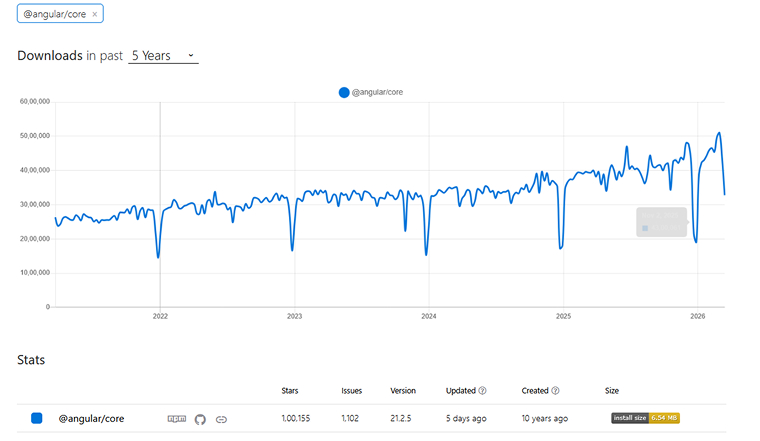
You can observe that Angular has witnessed more than a million downloads in the past years, depicting its high usage in developing modern applications:
For Angular development companies, Angular web components are an effective solution to this problem. Angular developers can customize the Angular components into reusable HTML elements that can run in any environment, no matter the framework being used. This not only saves time and effort but also maintains consistency across varied environments.
In this blog, we’ll discuss what Angular web components are, how they work, their benefits, challenges, best practices, the process to create them, and how enterprises are using them.
What Are Angular Web Components?
Angular web components are standard Angular components packaged as custom HTML elements using the @angular/elements library. Once packaged, they behave like any built-in HTML element. You can drop them into a page with a simple tag, pass data through attributes, and listen for events.
The underlying technology is the Web Components specification, a set of browser-native APIs that enable developers to create custom and reusable HTML elements. This specification describes the foundation of modern Web Components, where developers can build reusable, self-contained pieces of UI. It explains how to create entirely new HTML elements in JavaScript, giving them their own behavior, properties, and lifecycle callbacks.
At the same time, these components can keep their internal structure and styling separate from the rest of the webpage through Shadow DOM, which prevents style conflicts. It also highlights <template> and <slot> elements, which define reusable chunks of markup that don’t appear on the page by default but can be activated as needed, that allow content to be inserted dynamically and flexibly.
The @angular/elements package acts as a bridge between Angular’s components and the native Custom Elements API. It converts an Angular component into a standard custom HTML element that the browser can understand. It essentially packages the component so it behaves like a native element, while internally managing tasks such as change detection, data binding, and input/output mapping. Once this setup is done, the browser can handle it just like any other element without needing to know that it came from Angular.
Why Should Enterprises Consider Angular Web Components?
Angular Web Components provide advantages for enterprises owing to the following reasons:
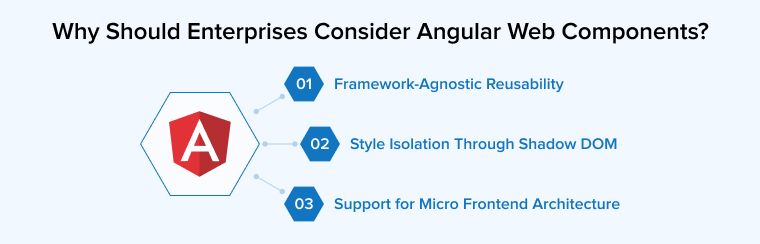
1. Framework-Agnostic Reusability
A web component built with Angular can be embedded in a React application, a Vue dashboard, or a static HTML page. It enables you to write once and use everywhere using the <script> tag. The consuming application need not have Angular or any of its dependencies installed in its system. It doesn’t need to understand Angular’s dependency injection or change detection. It references the JavaScript bundle and uses the HTML tag.
2. Style Isolation Through Shadow DOM
CSS bleed is a recurring problem in large applications. Styles from one component leak into another, or global styles override component-specific rules. Shadow DOM solves this by creating an isolated DOM tree known as a “shadow root” for each component. Styles defined inside this shadow root remain encapsulated within the component, whereas external styles stay outside.
Angular provides three encapsulation modes: Emulated (the default, which scopes styles using attribute selectors), ShadowDom (which uses the browser’s native Shadow DOM), and None (no encapsulation). For web components intended for cross-framework use, ShadowDom mode provides the strongest isolation.
3. Support for Micro Frontend Architecture
Large enterprises often split their frontend into independently deployable modules owned by separate teams. Angular Web components are a natural fit for micro frontend implementations. Each team can build, test, and deploy their micro frontend independently, wrap it in a web component, and let the shell application load it on demand. The web component boundary provides CSS isolation and a clean integration contract through attributes and events.
How Do Angular Web Components Work Internally?
The conversion of Angular components into Angular Web Components follows three steps. Each step is conceptually simple, but production-grade implementations require attention to bundling, dependency management, and cross-browser testing.
1. Creating a Component and Converting It Using createCustomElement()
The @angular/elements package exports one critical function called createCustomElement(). This function takes an Angular component and an injector, then returns a class that implements the browser’s HTMLElement interface. The Angular documentation describes this as a bridge between Angular’s component interface and the built-in DOM API.
Here’s what happens internally when you call createCustomElement():
- The function scans your component for @Input() properties and creates corresponding HTML attributes. Property names get converted to dash-separated lowercase (e.g., inputProp becomes input-prop).
- @Output() events get mapped to native Custom Events dispatched on the element. The emitted data is stored on the event’s detail property.
- Angular’s change detection connects automatically. When an attribute changes, Angular detects it and updates the component’s view.
2. Registering Custom Elements With the Browser
Once you get the constructor class from the createCustomElement(), register it with the browser using the standard customElements.define() method. The registration follows a clear sequence:
- Import createCustomElement from @angular/elements in your bootstrap file.
- Call createCustomElement() with your component and the application’s injector to get the element constructor.
- Call customElements.define(‘your-tag-name’, YourElementClass) to register the tag with the browser.
- Build the project and include the output bundle in any HTML page that needs the component.
Once registered, the browser renders your Angular component wherever <your-tag-name></your-tag-name> appears in the markup. The consuming page doesn’t need Angular or any build step. It just needs the script file.
3. Input and Output Mapping Between Angular and the DOM
Angular’s createCustomElement() API handles the translation between Angular’s type-safe input/output model and the browser’s string-based attribute system. The mapping works like this:
- Every @Input() property becomes an HTML attribute on the custom element.
- Every @Output() EventEmitter becomes a native CustomEvent dispatched from the element.
- HTML attributes are always strings. For primitive types like numbers and booleans, Angular handles the conversion automatically.
- For complex objects, you’ll need to pass JSON strings and parse them inside the component, since the DOM attribute system doesn’t support rich data types natively.
Where Do Angular Web Components Fit in Enterprise Projects?
Angular web components aren’t the right choice for every situation. They work best where cross-framework compatibility, independent deployment, or UI consistency across products is a hard requirement.
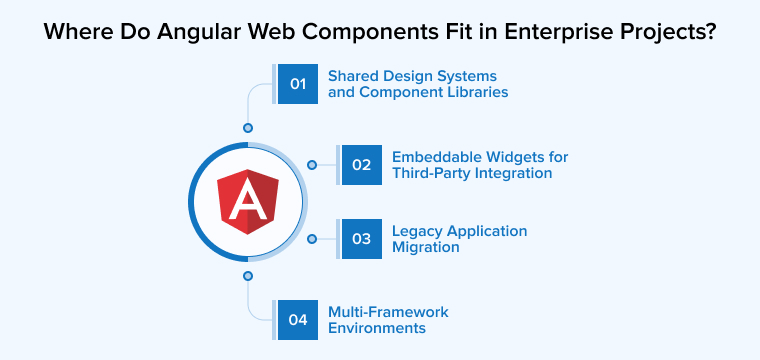
Let us discuss some of the key use cases of Angular web components in enterprise projects:
1. Shared Design Systems and Component Libraries
If your organization maintains a design system, Angular web components let you build it once and distribute it everywhere. Your design tokens, interaction patterns, and accessibility features travel with the component. Teams using React, Vue, or plain HTML get the same experience without re-implementing each element.
A cross-framework compatibility analysis identifies design systems as one of the strongest adoption drivers for web components. Themeable components with consistent behavior across applications reduce design drift and speed up development cycles.
2. Embeddable Widgets for Third-Party Integration
Web Components are especially useful when you want to build small, self-contained widgets such as chat interfaces, analytics dashboards, booking engines, and payment forms that can be embedded into any website.
As Shadow DOM allows each component to keep its own internal structure and styling separate from the rest of the page, it won’t be affected by the surrounding site’s CSS. This means the widget will always appear and function the same way, no matter where it is installed. SaaS products that integrate with customer environments benefit most from this approach.
3. Legacy Application Migration
Legacy web applications built with AngularJS or jQuery often contain a lot of code representing long-term development efforts. Therefore, rewriting them from scratch can be both risky as well as expensive. Instead of doing a full rebuild, developers can slowly introduce new features using web components and embed them into the existing system incrementally without disturbing it. Each part works on its own, separate from the old code.
Over time, when the new Angular-based parts become large enough, they can eventually replace the old structure and become the main application.
4. Multi-Framework Environments
In many large companies, separate teams may build user interface parts using different frontend technologies. Web components help bring all these pieces together by acting as the integration layer. Each team packages its feature as an independent module that can be dropped into the main application.
The central or “shell” app does not need to know what tools or frameworks were used to build them. It simply passes data through HTML properties and listens to events, allowing everything to work smoothly together despite different frameworks underneath.
What Are the Challenges of Using Angular Web Components?
Angular web components carry real tradeoffs. Knowing them before you commit prevents costly rework. The following are some of the major limitations of Angular Web Components:
Bundle Size Concerns
When you use Angular to create web components, the final output often includes parts of the Angular runtime itself, which increases the file size. A simple Angular-based element can end up being much heavier, around 40-60KB gzipped, than a similar component built with lighter libraries like Lit. This extra weight can cause problems, especially when you use the component only once on a page, such as on marketing sites.
To resolve this issue, developers can separate the Angular runtime from the component code and load shared dependencies separately, reducing duplication across multiple web components. Tools like ngx-build-plus extend the Angular CLI to support this pattern. In setups where Angular is already used in the main application, this overhead is less noticeable because the runtime is already present. If you’re targeting optimal Angular application performance, load the components only when needed, i.e., lazy loading, and remove unused code during build time.
Styling Limitations With Shadow DOM
Shadow DOM encapsulation prevents style conflicts, but it also blocks global styles from reaching your component. If your application relies on Bootstrap or Tailwind, those styles won’t apply inside the shadow root.
Sometimes you need to use CSS custom properties (variables) to style across the boundaries of Shadow DOM. In Angular, you can also avoid strict isolation by using emulated encapsulation instead of native ShadowDOM mode. Use Shadow DOM when unknown environments will use your component, and use emulated mode when you control the host and need global theme access.
Tooling and Testing Differences
Testing Angular web components requires a different approach compared to testing standard Angular components. In Angular web components, you’re testing both the Angular component logic and the custom element integration. End-to-end tests must interact with the element through the DOM API rather than Angular’s testing utilities. Debugging can sometimes be difficult because error messages from Angular web components do not appear, showing a blank screen instead of a clear error trace. Setting up proper error boundaries and logging helps overcome such situations during development.
What Are the Best Practices for Building Angular Web Components?
To understand how developers approach this in real-world scenarios, check out this Reddit discussion on best practices for Angular Web Components.
Best Practices for developing Web Component
by u/Snoo_32652 in angular
The following best practices prevent the most common production failures and reduce debugging time:
1. Use Standalone Components for Simpler Bootstrapping
Since Angular 14.2, standalone components can be used directly as Angular Elements. This eliminates NgModule configuration and cuts roughly half of the bootstrapping code. Here’s why standalone components are the preferred approach:
- You call bootstrapApplication() and use the resulting ApplicationRef to create your custom element directly.
- You do not need to configure an AppModule or NgModule, which reduces the code you need to maintain.
- Standalone components also support lazy loading, which helps manage bundle size when distributing multiple web components.
2. Optimize Builds With Externals and Tree Shaking
For production deployments, apply these build optimizations:
- Extract shared Angular libraries (core, common, forms) as externals loaded once by the host application.
- Enable tree shaking to remove unused Angular framework features from the bundle.
- Use single-bundle output tools such as ngx-build-plus to create a single JavaScript file for easy distribution.
- Cache shared dependencies on a CDN so multiple web components benefit from a single download.
3. Define Clear Communication Patterns
Web components communicate through attributes (for data in) and custom events (for data out). Keep this contract simple and well-documented, taking help from the guidelines given below:
- Avoid passing complex objects through attributes. Use JSON strings or a shared service layer for rich data exchange.
- Establish naming conventions for events and attributes across teams, especially in micro frontend scenarios.
- Document each component’s public API (attributes, events, slots) so consuming teams can integrate them without guesswork.
- Consider a lightweight event bus in the global namespace if multiple web components need to communicate with each other.
4. Keep Components Self-Contained
A well-designed web component should be self-sufficient, relying very little on outside code, so it can work easily anywhere. For that:
- Bundle styles, templates, logic, and default configuration within the component itself.
- If your component requires a specific CSS framework or state management library, include it in the bundle or document the dependency clearly.
- Avoid relying on global variables or global CSS that the host application might not provide.
- Test each component in isolation before integrating it into a host application to catch missing dependencies early.
How Do You Create an Angular Web Component Step-by-Step?
Browser-native APIs build Web Components, which are custom, reusable HTML elements that work in any environment.
Here’s a practical walkthrough. We’re assuming you already have Node.js and the Angular CLI installed on your system.
Think of it like creating your own HTML tag:
<input> → built-in HTML element <edu-button> → YOUR custom element (web component) |
Problem Without Web Components:
| Angular App (Team A) | React App (Team B) | Vue App (Team C) |
|---|---|---|
| Own Button | Own Button | Own Button |
| Own Table | Own Table | Own Table |
| Own Input | Own Input | Own Input |
Solution With Web Components:
Angular Web Component Library Has:
- <edu-button>
- <edu-table>
- <edu-input>
Angular, React, and Vue applications use one build and one JS file to make consistent designs everywhere.
Here are the exact steps to create a Button Web Component in Angular:
Step 1: Create New Angular Project
ng new edu-components –standalone |
Step 2: Install Angular Elements
Angular Elements is an official Angular package that allows you to convert any Angular component into a native Web Component. This package provides the createCustomElement() function, which is the core of the whole process.
ng add @angular/elements |
Step 3: Create Button Component
This generates a new standalone button component with its own HTML, CSS, and TypeScript files inside the components folder. The –standalone flag ensures the component works independently without any NgModule.
ng generate component components/edu-button --standalone |
Step 4: edu-button.ts
This is the main component file where we define the button’s inputs, outputs, and logic using Angular’s modern signal-based API. Signals define label, variant, size, and disabled inputs, so they automatically react when external values change.
import { Component, ChangeDetectionStrategy, ViewEncapsulation, input, output, computed, signal } from '@angular/core'; import { CommonModule } from '@angular/common'; export type ButtonVariant = 'primary' | 'secondary' | 'danger'; export type ButtonSize = 'sm' | 'md' | 'lg'; @Component({ selector: 'edu-button', imports: [CommonModule], templateUrl: './edu-button.html', styleUrl: './edu-button.css', }) export class EduButton { label = input<string>('Click Me'); variant = input<ButtonVariant>('primary'); size = input<ButtonSize>('md'); disabled = input<boolean>(false); clicked = output<void>(); buttonClass = computed(() => `${this.variant()} ${this.size()}`); handleClick(): void { if (!this.disabled()) { this.clicked.emit(); } } } |
Step 5: edu-button.html
<button [class]="buttonClass()" [disabled]="disabled()" (click)="handleClick()"> {{ label() }} </button> |
Step 6: edu-button.css
:host { display: inline-block; } button { border: none; cursor: pointer; border-radius: 6px; font-weight: 500; transition: opacity 0.2s; } button:hover { opacity: 0.85; } button:disabled { opacity: 0.5; cursor: not-allowed; } .primary { background: #1976d2; color: white; } .secondary { background: #e0e0e0; color: #333; } .danger { background: #d32f2f; color: white; } .sm { padding: 4px 10px; font-size: 12px; } .md { padding: 8px 18px; font-size: 14px; } .lg { padding: 12px 26px; font-size: 16px; } |
Step 7: Register as a Web Component in app.config.ts
The createCustomElement() function converts the Angular component into a real browser-native Web Component. The browser registers it under the tag name edu-button through the customElements.define() call, allowing you to use it anywhere like a normal HTML element.
import { ApplicationConfig, Injector, APP_INITIALIZER } from '@angular/core'; import { createCustomElement } from '@angular/elements'; import { EduButton } from './components/button/button.component'; export const appConfig: ApplicationConfig = { providers: [ { provide: APP_INITIALIZER, useFactory: (injector: Injector) => { return () => { const buttonElement = createCustomElement( EduButton, { injector } ); if (!customElements.get('edu-button')) { customElements.define('edu-button', buttonElement); } }; }, deps: [Injector], multi: true } ] }; |
Step 8: Update angular.json and Disable File Hashing
By default, Angular adds a random hash to output filenames such as main.abc123.js, which makes it hard to reference in other projects. Setting outputHashing to none gives a predictable filename, main.js, that we can reliably combine and distribute.
"configurations": { "production": { "outputHashing": "none" } } |
Step 9: Build
This command compiles the entire Angular project into optimized JavaScript files inside the dist folder. The production configuration applies minification and tree-shaking to reduce the final file size.
ng build --configuration production |
Step 10: Combine into a Single JS File
The built output may contain multiple JS files; hence, we combine them into a single edu-button.js file. This single file is what gets distributed and included via a <script> tag in any project without the need to install npm.
# Windows type dist\edu-components\browser\main.js > edu-button.js # Mac / Linux cat dist/edu-components/browser/main.js > edu-button.js |
Step 11: Copy edu-button.js to Your HTML Folder
After the build, copy the generated edu-button.js file into the same folder where your test HTML file exists. This ensures the <script src=”edu-button.js”> reference in your HTML file can find and load the file correctly.
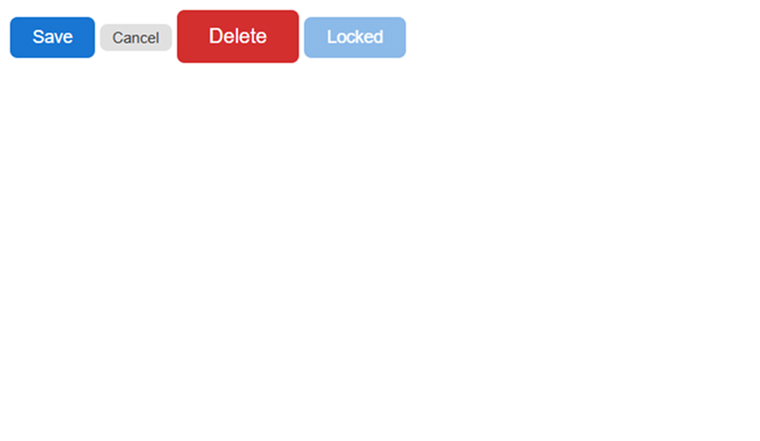
Step 12: Test in a Plain HTML File
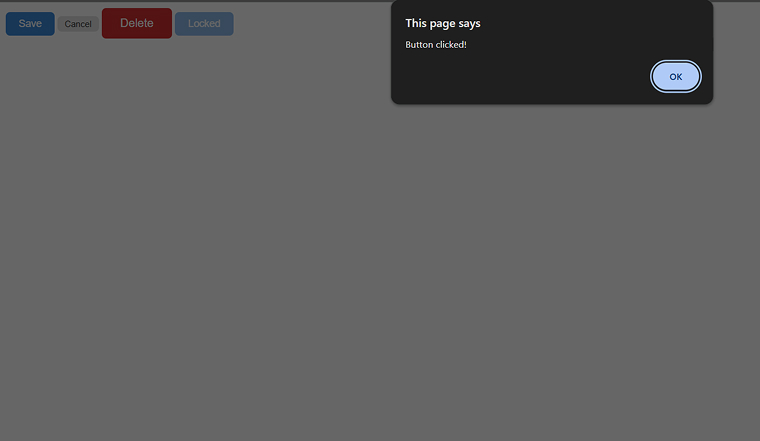
This is the final proof that our Web Component works. We include just one <script> tag and use <edu-button> like any native HTML element. The addEventListener(‘clicked’) shows how to listen to the component’s output events from plain JavaScript with no framework required.
<html> <head> <title>Button Web Component Test</title> <script src="edu-button.js"></script> </head> <body> <edu-button label="Save" variant="primary" size="md"></edu-button> <edu-button label="Cancel" variant="secondary" size="sm"></edu-button> <edu-button label="Delete" variant="danger" size="lg"></edu-button> <edu-button label="Locked" disabled="true" ></edu-button> <script> document .querySelector('edu-button') .addEventListener('clicked', () => { alert('Button clicked!'); }); </script> </body> </html> |
Output :
Final Thoughts
Angular web components are a practical solution for teams to create reusable UI components that can work across different frameworks and projects. They are especially useful in large organizations where consistency and sharing matter. While there are some challenges, such as bundle size and styling limitations, these can be handled using the right strategies. With newer Angular improvements reducing setup complexity, building and using these components has become easier. However, they are not always the best choice for every situation. Teams should carefully consider their requirements before deciding to use them in their projects.
FAQs
Yes, after a custom element is created and registered, it can be used just like any regular HTML tag. Frameworks such as React and Vue can easily include these elements in their templates.
By default, Angular web components use one-way data flow: they pass data in through attributes and send updates out using events. As a result, you cannot use Angular’s usual two-way binding syntax directly with them. However, you can achieve the same effect by combining an input attribute with an output event. The consuming application listens for the change event and updates the attribute accordingly.
Angular services continue to work normally inside web components when the proper injector is passed to createCustomElement() during initialization. They can handle data, manage state, and run business logic. However, multiple components on the same page may start separate Angular instances unless shared properly.
It can be, depending on how the component is used. For small elements, bundle size can be a concern, especially when Angular adds extra weight that affects loading speed. However, this becomes less of an issue in Angular-based apps or when using shared resources and techniques like lazy loading.
Angular web components use a combination of semantic HTML, dedicated tools in Angular CDK, and WAI-ARIA attributes and patterns where native HTML is insufficient to handle accessibility.

Parind Shah is responsible for frontend innovations at TatvaSoft. He brings profound domain experience and a strategic mindset to deliver exceptional user experience. He is always looking to gain and expand his skill set.



Comments
Leave a message...