

Java’s ecosystem is rich and mature, providing a variety of tools and libraries to help with modern software development. Among these tools are build automation solutions, with Maven and Gradle being the leading build tools for Java. Top Java development companies leverage them to facilitate automated conversion of source code into machine code, streamline development tasks, and manage projects efficiently. Both tools deliver outstanding outcomes, but picking the right tool is where most businesses struggle. In this article, we provide an in-depth comparison between both tools, discussing their features and comparing them against standard industry parameters to help you make an informed decision.
What is Maven?
Apache Maven is a powerful, de facto build tool for most Java projects that also supports C# and the Ruby programming language. Created by Jason van Zyl in 2002 and hosted by the Apache Software Foundation, Maven aims to simplify and automate tedious and error-prone tasks associated with building, documenting, and deploying software. It is useful for compiling source code, running tests, generating documentation, and packaging the Maven projects into final artifacts like JAR files.
The XML file named pom.xml defines the Project Object Model, an approach adopted and followed by Maven. This file acts as the central configuration blueprint for the whole project. It declaratively describes all dependencies, build processes, structure, and other important information.
What Are the Key Features of Maven?
Let us understand the build automation and project management capabilities of Maven through its features.
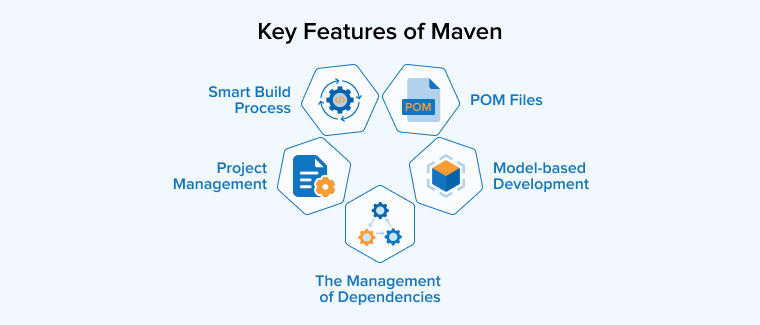
Smart Build Process
Maven follows a standardized build process. Understanding different build procedures is essential for teams that want to deploy several projects. However, Maven allows developers to reference dependencies outside the source files.
Maven’s advantages greatly facilitate the continuous building and integration of different modules because managers and developers want their code to be componentized and alerted in real-time about how a change in one component affects the modules that depend on it.
The Management of Dependencies
To handle JAR files and other dependencies, Maven uses a centralized repository. It offers a way to download JARs from this central repository for project building. Maven also enables users to reuse JARs across different projects. Additionally, it helps address backward compatibility issues by fostering project collaboration. Apart from Maven, other tools can be utilized for handling and deployment tasks.
POM Files
Java developers use the pom.xml file to define the lifecycle behavior, type of packaging, and coordinates of a project. On top of that, the POM can declare dependencies along with their scope, repositories that solve artifacts, and Maven plugin configurations for different tasks such as building, testing, packaging, and deployment. By supporting both inheritance and aggression, Maven POMs allow you to share and override basic configurations.
Being a central configuration artifact, the POM file provides various build settings, reporting, and site configurations for project documentation, unique profiles for build customization across multiple environments, dependency management to control transitive dependency versions, and properties for version management and reusable values.
This helps developers implement declarative, repeatable, and extensible builds across multiple teams and CI systems.
Project Management
Maven creates a project directory when you start a Java project using one of its built-in templates. It adds the source code to a folder within this new project directory. Creating a new pom.xml file in the project allows you to define and manage project details such as Project Information and Project Reports. All the metadata for your project is stored in a central repository through the Project Object Model.
Model-based Development
Maven can generate predefined outputs in various formats, such as WARs, JARs, or distributions, from various projects, mostly without the need for scripting. It also needs minimal or no additional configuration to provide instant access to newly added functionalities.
What is Gradle?
Gradle is an open-source build automation system that uses a domain-specific language based on Groovy. It derives some of its concepts from Apache Ant and Maven, but has clear distinctions from Maven. The build automation tool uses a directed acyclic graph to determine the order of tasks and XML for project configuration.
Initially released in 2008, Gradle was later adopted by Google in 2013 as its build system for Android projects. Gradle supports multi-project builds, allowing incremental additions to the build. This significantly helps identify the updated parts of your Java project.
Consequently, any pending Gradle tasks dependent on updated parts can be easily avoided. The latest versions of Gradle are found to be more stable. They help development and deployment across Groovy, Java, and Scala, facilitating opportunities to integrate different languages and project workflows in the future.
What Are the Key Features of Gradle?
Being a relatively new tool on the market, Gradle brings some excellent and advanced features that streamline development for the team, reducing their time and effort.
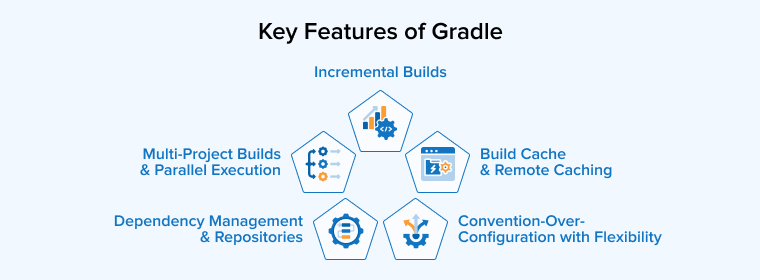
Incremental Builds
Gradle tracks the input and output of all the tasks. When any changes to inputs or outputs are detected, it re-executes those relevant tasks. As a result, it takes the burden of unnecessary efforts from the development team’s shoulders and shortens the build time for CI runs and repeated local builds.
Convention-Over-Configuration with Flexibility
To ensure quick initiation of standard Java projects, Gradle offers sensible defaults. For specific requirements or unique behaviors, developers use Kotlin DSLs, concise Groovy, or write custom tasks and plugins to override or extend these defaults.
Dependency Management and Repositories
Gradle supports rich conflict resolution rules, transitive resolution, dependency locking, dynamic versions, and dependency constraints, and it helps resolve dependencies from both Ivy and Maven repositories. Developers are granted control over publishing artifacts in these repositories as well as customizing dependency resolution strategies.
Multi-Project Builds and Parallel Execution
Gradle allows a single build to contain multiple subprojects, a capability critical for efficiently developing large multi-module Java projects. On top of that, it can enhance throughput on multi-core CI agents by running independent tasks simultaneously. Gradle’s configuration avoidance API prevents developers from undertaking unnecessary task configuration. This build automation tool also helps with task graph optimization.
Build Cache and Remote Caching
Gradle provides remote and local build caches that store specific task outputs keyed by their inputs. These previously computed outputs can be reused by other builds and CI agents, significantly reducing build time across machines, especially when cache hits occur.
Maven vs Gradle: Key Difference
Let us understand the critical differences between the two top Java build automation systems by comparing them against standard industry parameters.
1. Lifecycle
Although it isn’t a direct comparison, this section aims to put the lifecycles of both tools side by side to understand how they work.
Maven Build Lifecycle
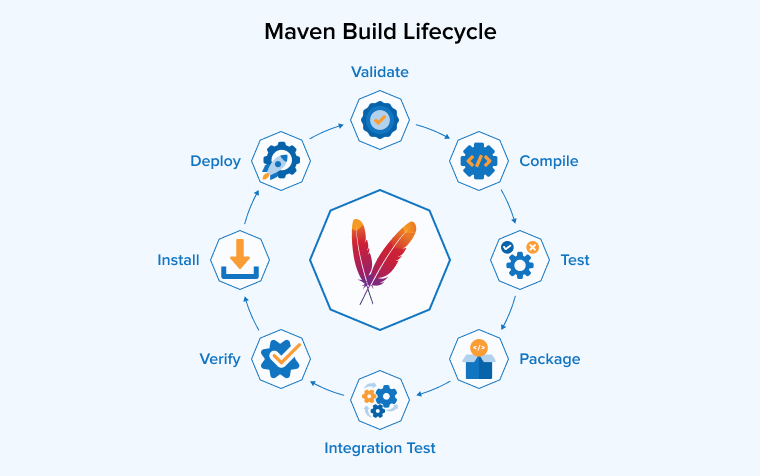
The Maven Build Lifecycle is a core concept used to manage the build process of a project. It consists of a clearly defined, ordered sequence of phases and goals. Maven primarily has three build lifecycles, each designed to serve a distinct purpose.
- Default Lifecycle: This lifecycle is critical as it handles the standard software deployment process. It follows a sequence that includes compiling the source code, running tests, packaging the compiled resources into an artifact (e.g., JAR or WAR files), and finally installing the artifact into the local Maven repository or deploying it to a remote repository.
- Clean Lifecycle: Designed for cleanup, this lifecycle clears all output files and directories generated by previous builds, like a target directory. Running this lifecycle ensures a fresh build environment.
- Site Lifecycle: This lifecycle manages project documentation. It generates, aggregates, and deploys the project’s site documentation, including project reports and other technical documentation.
Every lifecycle consists of multiple stages executed in a specific sequence. The key principle in Maven execution is that you can only run a specific phase in the lifecycle according to its pre-defined order.
Gradle Build Lifecycle
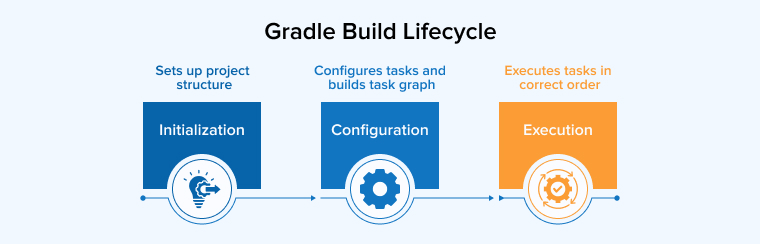
The Gradle Build Lifecycle defines the essential stages a Gradle build goes through to ensure all required tasks are correctly arranged and executed. This lifecycle consists of three distinct phases:
- Initialization Phase: In the first phase, Gradle determines which projects are involved in the multi-project build and sets up the corresponding project structure without configuring or executing any tasks.
- Configuration Phase: During this phase, Gradle executes all build scripts to configure the projects, assemble the complete graph of all available tasks, resolve dependencies, and establish relationships between tasks. However, no tasks are actually executed at this stage.
- Execution Phase: Based on the specific tasks requested by the user, Gradle determines the minimal subset of required tasks. It automatically handles all task dependencies by executing them in the right sequence.
2. Dependency Management
Both systems use configurable repositories to resolve dependencies. They can cache dependencies locally and can download dependencies in parallel.
Dependency Management in Maven
When it comes to dependency resolution, Maven follows specific behavior, especially when consuming libraries. As a library consumer, it allows users to override dependencies. However, the override isn’t more helpful than changing the dependency version.
On top of that, Maven uses a set of built-in dependency scopes, which can be quite limiting. For example, in common scenarios like code generation and test fixtures, the rigid structure forces awkward module architectures. It also lacks explicit separation between unit and integration tests.
Maven utilizes the shortest path rule to resolve conflicts. This means that the declaration ordering of dependencies in the build file directly affects the resolution. In the case of optional dependencies, Maven, being a library producer, allows the provision of metadata. But this information doesn’t provide functional support to customers and serves only as documentation.
Dependency Management in Gradle
Gradle offers customizable rules for selecting and substituting dependencies, which you can set up once to control unwanted dependencies throughout the project. This is a substitution mechanism that also helps Gradle in generating composite builds, allowing the creation of multiple source projects together.
You can create faster, better-modeled builds through precise categorization and by creating custom dependency scopes in Gradle. It resolves conflicts by picking the newest dependency version. In Gradle, developers can declare versions as strict, which takes precedence over transitive versions and even allows users to downgrade a dependency.
In terms of library consumption, Gradle allows producers to declare dependencies as API or implementation. This feature is critical as it prevents unwanted libraries from leaking into the class paths of consumers.
Gradle doesn’t just support documentation but also features variants and optional dependencies with functional impact. It provides greater flexibility and advanced features for dependency management.
3. Flexibility
Let us understand the flexibility offered by both Java build tools.
Flexibility in Maven
Maven works on the principle of convention over configuration. However, this approach is implemented with a very rigid model that significantly restricts customization. While this rigid nature can simplify understanding any given Maven build, especially if there are no special requirements, it also makes customization quite complex and often impossible. This lack of flexibility makes Maven unfit for many complex automation problems that require extensive customization.
Flexibility in Gradle
Gradle is designed with a focus on extensibility and an empowered user. It also follows the convention over configuration principle. But unlike Maven, its underlying model allows for basic customization. Such versatility is the reason why Google made Gradle its official build tool for Android and uses it for diverse forms of development, including C/C++ native development. Gradle also allows for easy integration with other systems through the Tooling API. This makes Gradle a highly adaptable solution.
4. Performance
This section will help you understand how Maven and Gradle work.
Performance of Maven
Maven is one of the most mature and reliable build automation tools. However, it is relatively slow compared to new tools like Gradle. Because Maven lacks a sophisticated caching system and does not support incremental build functionality. It often requires rebuilding the entire project from scratch, causing delays in the build time, especially for large projects.
Performance of Gradle
Gradle is popular for its speed. The build system supports incremental builds, processing only files that have changed since the last build. Gradle also uses a build cache, which helps skip tasks if their outputs are up-to-date.
5. Configuration Style
The configuration styles of the Maven and Gradle are as explained below:
Configuration Style of Maven
Maven utilizes XML in the pom.xml file. Although the XML format is verbose and rigid, it makes Maven predictable. Additionally, Maven provides predefined goals for the cleaning, installation, and deployment processes, making it easy to start with Maven.
Configuration Style of Gradle
The system utilizes a DSL (Groovy or Kotlin), which keeps the configuration more concise and readable compared to XML. However, despite their conciseness and expressiveness, Gradle scripts can be more challenging for users who aren’t familiar with Groovy or Kotlin.
6. Code Comparison
Both tools define similar dependencies and plugins, but their coding styles are fundamentally different.
Maven
plugins { id 'java' id 'org.springframework.boot' version '3.3.0' // use your version id 'io.spring.dependency-management' version '1.1.4' } group = 'com.booklet' version = '1.0.0' java { sourceCompatibility = JavaVersion.VERSION_17 // change if needed } repositories { mavenCentral() } dependencies { // Web + JPA + Redis implementation 'org.springframework.boot:spring-boot-starter-web' implementation 'org.springframework.boot:spring-boot-starter-data-jpa' implementation 'org.springframework.boot:spring-boot-starter-data-redis' // MySQL + Flyway runtimeOnly 'mysql:mysql-connector-j' implementation 'org.flywaydb:flyway-core' // JSON & Lombok implementation 'com.fasterxml.jackson.core:jackson-databind' compileOnly 'org.projectlombok:lombok' annotationProcessor 'org.projectlombok:lombok' // Test testImplementation 'org.springframework.boot:spring-boot-starter-test' } tasks.named('test') { useJUnitPlatform() } |
Maven uses a strict and standardized structure called XML-based configuration. The code above defines the same Spring Boot dependencies and build behavior, only it is more verbose and in a declarative format. Developers prefer to use Maven because it is easy to understand, follows a convention-over-configuration approach, and ensures both stability and consistency.
Gradle
<?xml version="1.0" encoding="UTF-8"?> <project xmlns="http://maven.apache.org/POM/4.0.0" xmlns:xsi="http://www.w3.org/2001/XMLSchema-instance" xsi:schemaLocation="http://maven.apache.org/POM/4.0.0 http://maven.apache.org/maven-v4_0_0.xsd"> <modelVersion>4.0.0</modelVersion> <parent> <groupId>com.booklet</groupId> <artifactId>notes-system</artifactId> <version>1.0.0</version> </parent> <artifactId>notes-api</artifactId> <dependencies> <!-- Web + JPA + Redis --> <dependency> <groupId>org.springframework.boot</groupId> <artifactId>spring-boot-starter-web</artifactId> </dependency> <dependency> <groupId>org.springframework.boot</groupId> <artifactId>spring-boot-starter-data-jpa</artifactId> </dependency> <dependency> <groupId>org.springframework.boot</groupId> <artifactId>spring-boot-starter-data-redis</artifactId> </dependency> <!-- MySQL + Flyway --> <dependency> <groupId>mysql</groupId> <artifactId>mysql-connector-j</artifactId> <scope>runtime</scope> </dependency> <dependency> <groupId>org.flywaydb</groupId> <artifactId>flyway-core</artifactId> </dependency> <!-- JSON & Lombok --> <dependency> <groupId>com.fasterxml.jackson.core</groupId> <artifactId>jackson-databind</artifactId> </dependency> <dependency> <groupId>org.projectlombok</groupId> <artifactId>lombok</artifactId> <optional>true</optional> </dependency> <!-- Test --> <dependency> <groupId>org.springframework.boot</groupId> <artifactId>spring-boot-starter-test</artifactId> <scope>test</scope> </dependency> </dependencies> <build> <plugins> <plugin> <groupId>org.springframework.boot</groupId> <artifactId>spring-boot-maven-plugin</artifactId> </plugin> </plugins> </build> </project> |
Gradle utilizes a script-based configuration that is either written in Kotlin or Groovy. As a result, you get a readable and lightweight file. The Gradle code defines the Spring Boot and Java support, declaring the dependencies concisely for web development, Flyway migrations, Redis caching, database access (JPA, MySQL), and testing. Gradle is preferred for modern and large-scale projects for its faster incremental builds and flexible syntax.
Maven Vs Gradle: A Brief Comparison
After discussing the differences in detail, here is a bird’s-eye view of the differences between Gradle and Maven. This quick comparison ought to help you determine which option is more appropriate for your upcoming Java project.
| Parameters | Maven | Gradle |
|---|---|---|
| Build Script Language | XML | Kotlin or Groovy |
| Customization | Serves a limited number of developers and strictly adheres to the convention over configuration principle. | Supports various customization options through different IDEs. |
| Java Compilation | Compilation is necessary | Avoids compilation |
| Dependency management | Maven Central | Iy and Maven Repositories |
| Performance | It is slower than Gradle because it does not create local temporary files during software development. | Optimized to track the current running task. Hence, delivers better performance compared to Maven. |
| Learning Curve | Easy for beginners to get started | Have a Steeper learning curve |
| Support and Community | Being a popular tool, Maven has a large community support with a mature ecosystem. | Since the tool is new, the community is still growing. |
When to Use Maven
- New to Spring Boot or Java-based projects. Maven’s structure is simple, predictable, and easy to learn.
- Working on a project requiring convention over configuration. Maven is suitable for projects with common structures and simple build logic.
- You have a relatively straightforward build logic.
- You want clarity and stability over flexibility.
- You care about reproducibility in CI/CD pipelines.
- Your team or organization is already using Maven. Sticking with it maintains consistency and collaboration.
When to Use Gradle
- You need faster builds for large projects. Incremental builds and caching in Gradle accelerate development, particularly for large projects.
- You are working with multi-module projects or microservices. Building multi-module projects is faster with Gradle compared to Maven.
- You have complex build logic or conditional plugin usage.
- You need advanced customization. Gradle offers more flexibility and power to fine-tune your build process.
- You are optimizing for startup speed in development environments.
- When local build performance matters.
- You or your team is familiar with Groovy or Kotlin. Gradle’s Domain Specific Language approach will feel more natural.
Conclusion
Both Maven and Gradle are powerful build automation tools, each with different strengths that make them suitable for different scenarios. Maven excels in simplicity, stability, and convention-based setups, making it a highly reliable choice for traditional, stable enterprise projects where consistency, dependency management, and convention over configuration are the top requirements. In some special cases, Maven can also be effective for small-scale projects. It offers a massive selection of readily available plugins.
On the other hand, Gradle stands out in terms of flexibility, performance, and modern DSL-based configurations, making it a more suitable option for complex, large, or multi-module projects like microservices. Its features, such as incremental builds, caching, task dependency inference, and superior handling of build infrastructure via wrappers, help enhance speed, ease of use, and versatility.
However, the choice between the two build tools depends entirely on the specific requirements of your project. Maven is the better choice when modularization, simplicity, and consistency are priorities, while Gradle excels when versatility, speed, and incremental builds are critical, especially as a project grows and outgrows the limitations of Maven.
Understanding the strengths and limitations of both Maven and Gradle is necessary for picking the right tool that helps build faster and more maintainable software tailored to your project’s requirements.
FAQs
Maven Central stores reusable libraries, while Gradle is used to build and manage projects. Maven is simple and follows fixed rules, whereas Gradle offers more flexibility and speed. The right choice depends on project needs and team experience.
Maven is still the most popular build tool among the Java developer community. However, Gradle is becoming more popular, especially for modern applications, as it offers better speed, flexibility, and support for advanced configurations.
Maven is primarily a build automation tool for developing Java projects because it is written in Java, hence highly compatible with Java development. However, it has plugins for languages like C#, Ruby, Python, and Scala.
Gradle usually performs much faster than Maven because it uses advanced features like build caching and incremental builds. This allows it to complete tasks more quickly, especially when only small changes are made to a project.

Rakshit Toke is a Java technology innovator and has been managing various Java teams for several years to deliver high-quality software products at TatvaSoft. His profound intelligence and comprehensive technological expertise empower the company to provide innovative solutions and stand out in the marketplace.



Comments
Leave a message...