

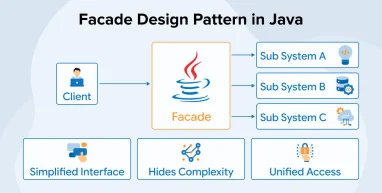
Software development complexity increases with the advent of advanced technologies and changing requirements. With the increasing complexity of architectural patterns and rising dependencies, development and maintenance are becoming more challenging. It’s impractical for developers to understand the complete structure to even make minimal changes. The Facade Design Pattern in Java is a smart solution to these problems. It provides a simplified interface so that developers can see only the required things, whereas the underlying structure remains hidden. Java development companies have started employing the Facade pattern to ease the development process, making it less time-consuming.
In this blog, we will explore how the Facade Design Pattern works, why it is valuable in Java applications, and practical examples that show how it can simplify even the most complex systems.
What is a Facade Design Pattern?
The Facade Design Pattern simplifies complex systems by providing a single, unified interface to a set of subsystem classes. Instead of interacting with many detailed classes, the client communicates only with the facade, which handles the inner complexities. This approach reduces dependencies and improves decoupling, making the system easier to maintain and modify.
Facades are especially useful when working with large Java libraries or layered subsystems, as each layer can have its own facade. Following the Principle of Least Knowledge, facades ensure that clients interact only with what they need. Additional facade layers can be added to manage complexity without overwhelming the client interface.
What Are the Benefits of the Facade Pattern?
The facade design pattern in Java offers multiple benefits in the form of:
- Encapsulation: The Facade pattern hides the complex details of a subsystem from the client. It provides a simple interface, keeps internal workings private, and separates responsibilities. This makes the code easier to manage, maintain, and extend.
- Improved Readability: The Facade pattern combines multiple operations into a single, high-level method. This makes the client code simple and clear. Using meaningful method names and consistent interfaces improves readability, helps developers understand the system faster, and makes maintenance easier.
- Loose Coupling: The pattern separates clients from the internal workings of a subsystem. Clients interact only with the facade, reducing dependencies. This makes the system more flexible, easier to maintain, and allows subsystems to change independently.
- Simplified Interface: The Facade pattern provides a single, clear entry point to a complex subsystem. Clients interact with this unified interface instead of managing multiple classes. This approach hides internal details, reduces confusion, and makes large systems easier to learn and use.
- Easy Maintenance: It protects client code from internal system changes. Developers can modify subsystem components without impacting clients. This separation improves stability, simplifies updates, and makes the overall application easier to maintain.
Key Components of the Facade Design Pattern in Java
The working of the Facade design pattern is based on the following three components:
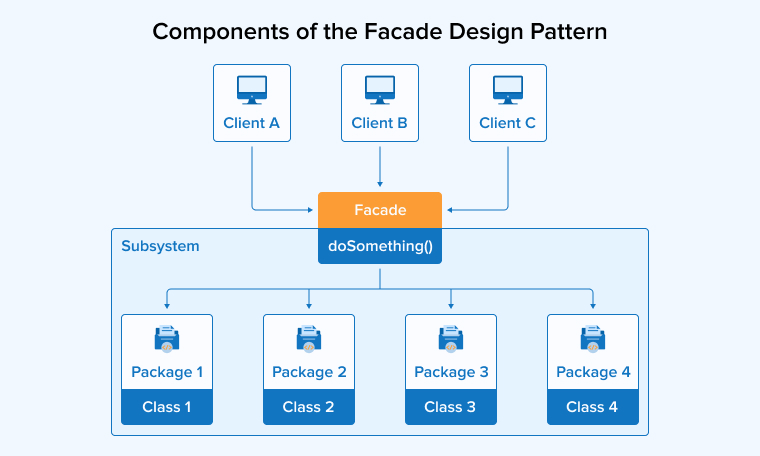
1. Subsystem
In Java, the subsystem in the Facade pattern contains several classes and interfaces that handle specific tasks. These classes work together to complete a larger process, and their connections can become complex. The facade offers a clear entry point and controls access.
2. Facade
In Java, the Facade class stands at the centre of the pattern. It offers one clear and simple interface to the client, so the client only needs to call this class. The Facade receives each request and forwards it to the correct subsystem objects. It hides internal details and controls the workflow.
3. Client
The client in the Facade design pattern represents any class that needs system services. It communicates only with the Facade object. The client does not access subsystem classes directly. It calls simple methods from the Facade. This approach keeps the client code clean, focused, and easier to maintain.
Facade Design Pattern Example in Java
Consider an example of the Facade Design Pattern. In our system, there are multiple services such as TaxiService, HotelService, and FlightService. Each service is responsible for handling its own specific operations, like booking and cancellation.
System A:
SystemA is the TaxiService class that contains the bookTaxi() and cancelTaxi() methods. The bookTaxi() method prints, “Taxi is Booked” on the console on successful booking, whereas cancelTaxi() prints, “Taxi is Cancelled” if the booking gets cancelled.
public class TaxiService { public void bookTaxi() { System.out.println("Taxi is Booked !!"); } public void cancelTaxi() { System.out.println("Taxi is Cancelled !!"); } } |
System B:
SystemB is the HotelService class that contains the bookHotel() and cancelHotel() methods. The bookHotel() method prints, “Hotel is Booked” on the console on successful hotel booking, whereas cancelHotel() prints, “Hotel is Cancelled” if the booking gets cancelled.
public class HotelService { public void bookHotel() { System.out.println("Hotel is Booked !!"); } public void cancelHotel() { System.out.println("Hotel is Cancelled !!"); } } |
System C:
SystemC is the FlightService class that contains the bookFlight() and cancelFlight() methods. The bookFlight() method prints, “Flight is Booked” on the console on successful Flight booking, whereas cancelFlight() prints, “Flight is Cancelled” if the booking gets cancelled.
public class FlightService { public void bookFlight() { System.out.println("Flight is Booked !!"); } public void cancelFlight() { System.out.println("Flight is Cancelled !!"); } } |
Now, we’ll create a single class named TripFacadeService to handle all interactions with TaxiService, HotelService, and FlightService classes. The TripFacadeService class does this with one simple unified interface for the clients to interact with.
Facade.java
public class TripFacadeService { private final TaxiService taxiService; private final HotelService hotelService; private final FlightService flightService; public TripFacadeService() { taxiService = new TaxiService(); hotelService = new HotelService(); flightService = new FlightService(); } public void planTrip() { System.out.println("Planning Trip"); flightService.bookFlight(); hotelService.bookHotel(); taxiService.bookTaxi(); System.out.println("Trip Planned !!"); } public void cancelTrip() { System.out.println("Canceling Trip"); flightService.cancelFlight(); hotelService.cancelHotel(); taxiService.cancelTaxi(); System.out.println("Trip Cancelled !!"); } } |
The client uses only the planTrip() method of the TripFacadeService class to book a flight, hotel, and taxi for the trip. He does not directly interact with all three respective classes separately.
Behind the scenes, the TripFacadeService class takes care of arranging everything in the right order, such as booking the flight, reserving the hotel, and scheduling the taxi.
For the client, the entire process seems a single, simple, and quick operation, while all the detailed coordination is handled internally by the Facade.
Main.java
public class Client { public static void main(String[] args) { TripFacadeService tripFacadeService = new TripFacadeService(); tripFacadeService.planTrip(); } } |
Output

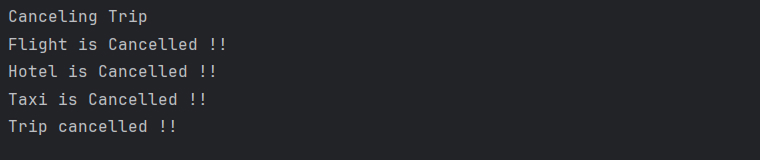
Just like the booking process, the client uses only the cancelTrip () method of the TripFacadeService class to cancel flight, hotel, and taxi bookings.
He does not need to invoke the respective cancellation methods given in the TaxiService, HotelService, and FlightService classes. It’s the Facade’s responsibility to communicate with the services and process cancellations.
The client doesn’t have to worry about how things are managed behind the scenes, since the facade takes care of everything.
Main.Java
public class Client { public static void main(String[] args) { TripFacadeService tripFacadeService = new TripFacadeService(); tripFacadeService.cancelTrip(); } } |
Output 2
When to Use the Facade Design Pattern in Java?
Let’s discuss the scenarios where the use of the Facade design pattern is most suitable in Java programming:
- Complex Subsystems: Choose the Facade pattern when many classes connect in complicated ways. It gathers their behaviour under one simple interface, and the facade hides internal details. Clients call one class instead of many, which reduces confusion and improves code clarity.
- Integration with Legacy Systems: Apply the Facade pattern when connecting old systems or external libraries to new code. The facade acts as an intermediary, managing communication between them. It wraps outdated details and exposes a clear, modern interface for current components.
- System Maintenance and Refactoring: Use the Facade pattern to simplify updates. The facade separates client code from internal classes. Allowing developers to modify or reorganise the subsystem without breaking clients. This separation reduces tight coupling and supports smoother maintenance and refactoring.
- Subsystems with Changing Interfaces: When subsystem classes evolve over time, a facade keeps the client interface stable. Clients continue to use the same simple methods. The facade handles internal updates and absorbs structural changes without exposing them.
- Unified Interface: Apply the Facade pattern to present a single, clear gateway to many features, as it gathers different interfaces under a single class. This allows clients to interact through simple methods, which reduces the number of details they require to learn. As a result, this design reduces confusion and improves overall usability.
- Ease of Use: Use the Facade pattern to simplify client interactions. The facade exposes only essential methods while hiding unnecessary details. As a result, clients read and write less complex code. This approach increases clarity and supports long-term maintenance.
Final Thoughts
The Facade Design Pattern in Java helps developers manage complex systems easily by providing a single, clear interface to multiple classes, allowing clients to call simple methods instead of handling many details. This pattern reduces dependencies and keeps code loosely coupled, which improves readability and makes maintenance faster since developers can update subsystems without breaking client code. Using this pattern leads to cleaner, more organised, and scalable applications while also simplifying interactions, enhancing code quality, and saving time when building or refactoring Java projects.

Rakshit Toke is a Java technology innovator and has been managing various Java teams for several years to deliver high-quality software products at TatvaSoft. His profound intelligence and comprehensive technological expertise empower the company to provide innovative solutions and stand out in the marketplace.



Comments
Leave a message...