


Today, Java is the leading technology behind a number of websites and applications we use for different purposes. Java is a feature-rich programming language, making it highly desirable for Java development companies to build tailored applications. When it comes to web development using Java, advanced libraries and frameworks like Spring and JSF add interactivity and dynamism to websites. There are endless possibilities to turn creative ideas into functional applications by utilizing Java’s versatility, scalability, and portability.
Java web development demands a structured approach to achieve the desired outcomes. Keeping this in mind, this blog provides a comprehensive understanding of developing websites using Java. We’ll explore the benefits, challenges, useful tools and frameworks, and a detailed web development process.
What is Java Web Development?
Java began to play an important role in web development during the late 1990s and has continued to evolve with modern technology trends. Unlike languages such as C or C++, which generate machine-specific programs, Java follows a different approach. When a Java program is compiled, it produces bytecode that can run on any system with a Java Virtual Machine (JVM). Because of this feature, developers can create an application once and run it on many platforms without major changes.
In web development, servlets are a key component that handle user requests and generate dynamic responses for websites. JavaServer Pages (JSP) help developers design web pages more easily by allowing Java code to be included within HTML. Over time, powerful frameworks such as Spring, Struts, and JavaServer Faces have become popular because they simplify complex development tasks while still relying on servlets behind the scenes.
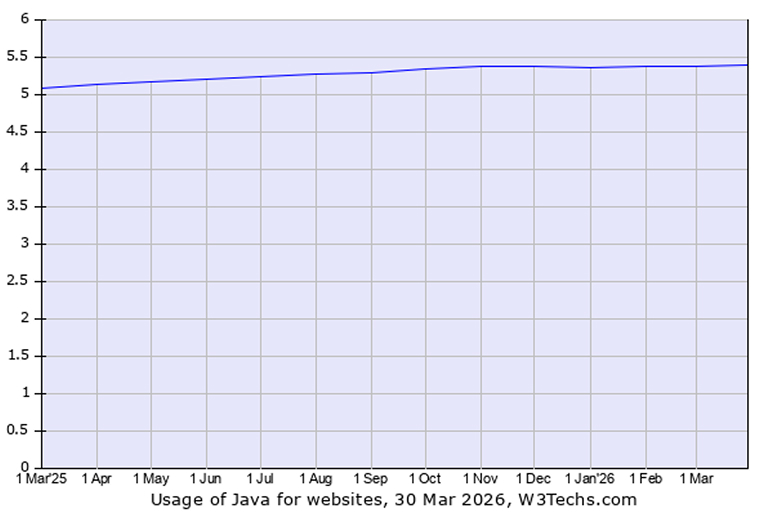
Applications built with Java typically run on web containers like Apache Tomcat, which manage requests and ensure the programs operate correctly. Modern development practices such as Continuous Integration and Continuous Deployment allow teams to update software quickly and reduce the chance of errors. Comprehensive documentation also helps future developers understand and maintain the project. With support for scalable frameworks and even serverless technologies, Java remains a reliable and flexible option for creating secure and efficient web applications. According to a recent survey, Java is used by 5.4% of all the websites whose server-side programming language.
What Are the Benefits of Java for Web Development?
The following advantages make the Java development process smooth and efficient:
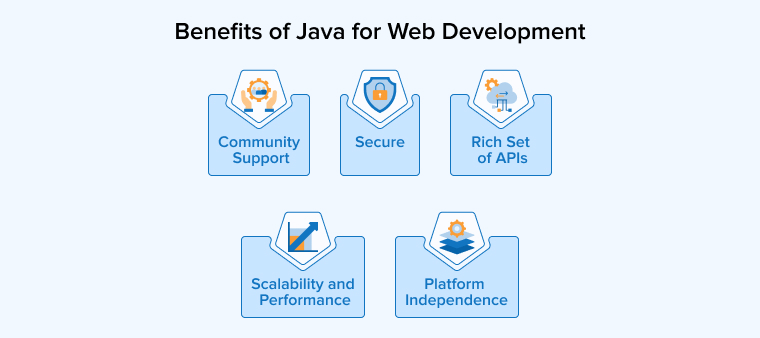
Secure
Java provides strong security for web applications against threats such as SQL injection and cross-site scripting (XSS). Developers can use built-in tools for authentication, access control, and encryption to ensure systems are safe, reliable, and well-protected.
Community Support
Java has a large, active community that helps developers solve problems quickly and avoid getting stuck. Online forums, tutorials, and open-source contributions provide guidance and resources. This kind of support accelerates learning, eases troubleshooting, and keeps developers updated on new tools, trends, and best practices in web development.
Platform Independence
Java allows developers to write code once and run it on any operating system. Its platform-independent design saves time and effort, avoids compatibility issues, and lets businesses deploy applications across multiple devices. This portability streamlines development, reduces costs, and ensures web applications perform reliably in diverse environments.
Scalability and Performance
Java supports building web applications that scale easily with user demand due to its frameworks, capable of smoothly handling high traffic and large amounts of data. Features like multithreading, efficient memory management, and JIT compilation improve speed and responsiveness. Developers can scale applications both vertically and horizontally, making Java ideal for projects ranging from small applications to large enterprise systems.
Rich Set of APIs
Java provides a wide range of APIs that simplify web development. Developers can choose tools for database access, XML processing, networking, and more. Open-source libraries like Apache and Google Guava add additional functionality. These APIs help developers write clean, efficient code, integrate components easily, and build web applications faster while maintaining flexibility and platform compatibility.
How to Develop a Website Using Java?
Java web development follows a step-by-step methodology consisting of the following steps:
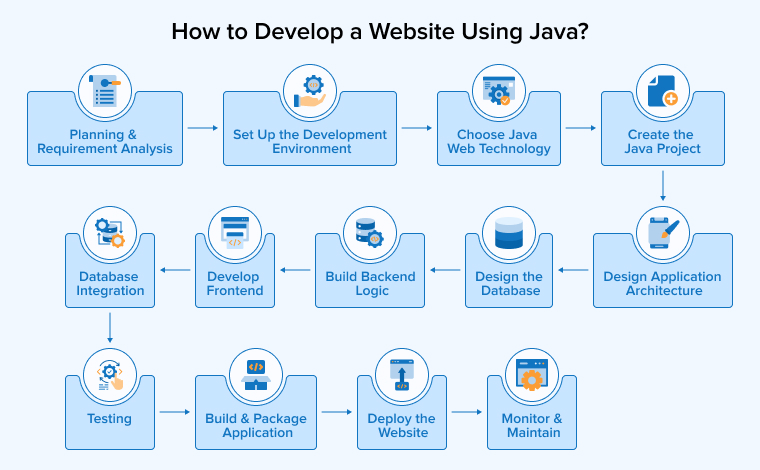
1. Planning and Requirement Analysis
Defining the project’s goals and target audience is the first step in web development. Be clear about what features to include and whether the site will be static or dynamic. Choose the technology stack and architecture, for example, monolithic or microservices. Assess the development team’s skills and assign roles accordingly to utilize everyone’s strengths effectively. Proper planning and documentation create a roadmap, reduce risks, and save time during development. Clear objectives guide decisions and ensure the project meets business needs efficiently.
2. Set Up the Development Environment
Setting up a proper development environment is crucial for efficient development in Java. Install the latest JDK and select an IDE like IntelliJ IDEA or Eclipse. Configure build tools such as Maven or Gradle to manage projects and dependencies. Set up a database system such as MySQL or PostgreSQL and a Tomcat server. Do not skip version controlling and repository management using Git. Testing the setup ensures all tools work smoothly before starting development to avoid future delays.
3. Choose Java Web Technology
Choosing the right Java technology shapes how a web application is developed and maintained. Spring Boot works well for fast production-ready apps, while Spring MVC fits traditional server-side projects. Hibernate manages databases efficiently, and JSF helps build user interfaces. Java frameworks provide reusable modules, simplify coding, and improve scalability. Selecting the right one ensures easier maintenance, better performance, and faster development tailored to project needs.
4. Create the Java Project
The project setup phase establishes the application’s foundation. Tools like Spring Initializr generate a structured project quickly. Developers add essential dependencies such as Spring Web, JPA, and Security. They also define project metadata, including the group ID and artifact ID. The build tool manages libraries automatically. A clear structure improves code readability, simplifies collaboration, and helps the team work efficiently throughout development.
5. Design Application Architecture
A well-designed architecture divides the application into clear layers. Controllers manage client requests, services process business rules, and repositories handle database operations using JPA or JDBC. Entities map data to tables while patterns like MVC or microservices improve structure. This approach supports easier testing, smoother scaling, and better long-term maintenance.
6. Design the Database
A well-planned database structure helps a website run faster and remain stable. Before starting the development, it is important to identify the type of data the application will store. Based on this, developers design tables, choose suitable fields, and define how the tables relate to each other. This organized structure keeps the data easy to manage and reduces mistakes. Java applications can connect to the database using JDBC or frameworks like Hibernate, making data handling simpler and supporting better performance as the application scales.
7. Build Backend Logic
After setting up the database, developers build the server-side logic in Java. They create REST endpoints using frameworks like Spring Boot and handle requests with controllers. Services apply business rules and process data. The Java Persistence API (JPA ) or Hibernate manages database interactions. Developers validate input, handle exceptions, and add authentication for security. Following modular design and MVC principles keeps the code organized. Efficient queries and a clean structure ensure stable and responsive application performance.
8. Develop Frontend
The frontend determines how a user views and interacts with a website. Developers create layouts using HTML, CSS, and JavaScript to ensure responsiveness and clarity. Java technologies like Java Server Pages (JSP) or Thymeleaf generate dynamic pages on the server. Modern projects often connect Java backends with React or Angular for richer interfaces. UI tools such as Bootstrap enhance design and consistency. A well-built frontend improves usability, accessibility, and overall user satisfaction.
9. Database Integration
In this stage, developers link the application to a suitable database management system to store information and configure the connection details in the properties file. They define JPA entities as Java classes that represent tables, while repositories handle create, read, update, and delete tasks. Proper indexing and well-defined relationships boost speed and efficiency.
10. Testing
Testing ensures the web application runs correctly and without errors. Developers write unit tests to check individual components and perform integration tests to verify module interaction. Functional and end-to-end tests confirm complete workflows while tools like JUnit, Mockito, Selenium, and Postman support test automation. Performance and security checks detect weaknesses early and help prevent production issues.
11. Build and Package Application
In this phase, the team prepares the application for release by using Maven or Gradle to build the project and run all tests, after which the system creates a JAR or WAR file for delivery. Developers adjust settings for each environment and fine-tune performance, ensuring that a fresh build helps avoid deployment issues.
12. Deploy the Website
After thorough testing, the team launches the website so users can access it online. They create a deployable file using build tools and host the web app on cloud services like AWS or Azure, or on dedicated servers. Containers and web servers handle traffic and keep environments stable. Automated CI/CD pipelines speed up releases.
13. Monitor & Maintain
After release, the team closely monitors the application. They use logs and monitoring tools to spot errors and check system health. They install updates to improve security and performance. Fix problems quickly when they appear and also back up databases to prevent data loss. Regular care keeps the website safe and reliable.
Tools and Frameworks Used in Java for Web Development
Here is a categorization of the different tools and frameworks used in Java web development into the following five categories:
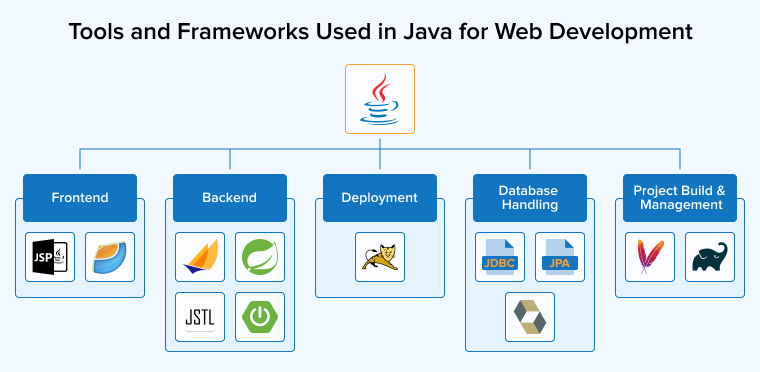
1. Backend
Java uses the following technologies for server-side programming:
Jakarta Servlets
The Java Servlet API helps programmers build server-side programs that handle web requests and responses. A servlet runs inside a servlet container, which manages the servlet’s lifecycle, including its initialization, execution, and termination. It accepts requests from users, processes the required information, and returns the appropriate output. Servlets are commonly used to process form data, maintain user sessions, and interact with databases, while the container manages resources and overall performance efficiently.
Spring Web MVC
Spring Web MVC helps developers create web applications using the Model-View-Controller (MVC) pattern. The DispatcherServlet receives each HTTP request and directs it to the correct controller. The controller handles logic and prepares data, and then the view displays the result to the user. This structure keeps code organized, separates responsibilities, and supports flexible and maintainable web development.
Spring Boot
Spring Boot accelerates Java web development by reducing complex setup steps. It follows simple defaults, enabling developers to write less configuration code. The framework supports dependency injection, which makes testing and maintenance easier. It also includes built-in features for security, web services, and application configuration. Developers can build secure, production-ready applications quickly with minimal effort.
JavaServer Pages Standard Tag Library (JSTL)
JSTL provides ready-made tags that help developers handle common tasks inside JSP pages. It allows them to loop through data, apply conditions, format text, and manage international content. It also supports simple XML and database operations. By using these tags, developers keep Java code out of the view layer. This approach makes web pages cleaner, easier to read, and simpler to maintain.
2. Frontend
Use the following technologies to build the user interfaces of Java web applications:
JavaServer Pages (JSP)
JavaServer Pages help developers to create dynamic websites by combining HTML with Java code. The server runs the Java code before sending the page to the browser. JSP works closely with servlets and follows the Java EE standards. Developers use it to collect form data, access databases, and display results on web pages. The system converts each JSP file into a servlet to produce the final output.
JavaServer Faces (JSF)
JavaServer Faces is a framework that helps developers design user interfaces for Java web applications. It uses reusable components to build pages quickly and clearly. Developers place UI components on a page, connect them to server-side data, and handle events through managed beans. The framework manages application state between requests and reduces frontend complexity. It supports configuration through Java and XML. Many organizations choose JSF because it handles complex interfaces reliably and improves development speed.
3. Database Handling
Java programming primarily uses the following technologies to build and manage the database of applications:
Java Database Connectivity (JDBC)
JDBC allows Java applications to connect with relational databases and execute SQL commands. Developers use it to send queries, retrieve results, and update records. Different driver types support various connection methods. JDBC works inside servlets, JSP pages, and enterprise components. It acts as a bridge between the application and the database, ensuring smooth and reliable data exchange.
Java Persistence API (JPA)
JPA helps developers work with databases using Java objects instead of complex SQL code. It uses object-relational mapping to connect classes with database tables. Tools like Hibernate implement this specification and handle data storage tasks. Developers can save, update, and retrieve records with simple methods. This approach reduces boilerplate code, improves clarity, and makes database interaction faster and easier in web applications.
Hibernate
Hibernate helps Java developers to manage databases through object mapping instead of writing complex SQL queries. It links classes with tables and can automatically generate database structures. The framework improves speed by caching data and loading related records only when required. Many enterprise applications use Hibernate with Spring to handle data persistence cleanly and efficiently.
4. Project Build and Management
The following are the primary project management tools in Java:
Apache Maven
Apache Maven helps developers to manage and build Java projects in an organized way. It uses the pom.xml file to define project details, dependencies, and plugins. Maven compiles code, runs tests, and creates packages automatically. This structured approach reduces manual work, maintains consistency, and simplifies project management across different development environments.
Gradle
Gradle is a modern build tool that supports Java and other programming languages. It uses Groovy or Kotlin scripts to define tasks and project settings. Developers rely on it to manage complex, multi-module projects with ease. Gradle keeps building consistently and handles compilation, testing, and packaging efficiently across different environments.
5. Deployment
Deployment of Java applications is done using:
Apache Tomcat
Apache Tomcat is an open-source web server designed for Java applications. It supports servlets, JSP, and JSF technologies. Developers use it to deploy and run web projects smoothly. Tomcat offers a lightweight and modular design, making setup simple. Many large platforms rely on it for stable and efficient performance.
What Are the Challenges in Java Web Development?
Java offers several features that make development easy. However, it’s equally important to consider some of its limitations that can become a roadblock in web development:

Performance Overheads
Java applications usually run reliably, but large systems may face speed and scaling issues. Poor memory management can cause high consumption and pauses during Java garbage collection. These pauses can slow performance under heavy load. Developers must monitor memory use, manage threads carefully, and use profiling tools to find bottlenecks. They should first build a working solution, then improve performance where real problems appear.
Security Concerns
Java programming offers strong security features, but developers must stay alert. Attackers may exploit weak input validation, poor session management, or outdated libraries. Vulnerabilities like SQL injection, XSS, and CSRF can damage applications and expose sensitive data. Development teams should write clean, secure code, enforce strict authentication, and use HTTPS for safe communication. They must also install security updates regularly and test the system for hidden risks to keep applications protected.
Adapting to Frequent Java Updates
Frequent Java updates bring useful improvements, but also introduce new challenges requiring developers to study new features and improve existing code. Some Java libraries or frameworks may not work smoothly with the latest version, so teams often require additional testing and refactoring to keep systems stable, while large projects face higher migration risks and costs. Organizations should plan upgrades carefully and support continuous learning so developers can adopt changes without disrupting ongoing work.
Final Thoughts
Java continues to lead the way in enterprise web solutions. It offers stability, strong security, and the ability to scale as businesses grow. Many global systems still rely on Java because it delivers consistent performance and long-term reliability. Even with newer languages in the market, Java continues to evolve and improve. Its rich ecosystem and active developer community provide constant support and innovation. When businesses choose Java web development, they invest in a proven and dependable technology.
FAQs
The most popular Java web frameworks include Spring Boot, Jakarta EE (formerly Java EE), Hibernate, Struts, Vaadin, and Micronaut. Spring Boot is the most widely used due to its simplicity and powerful features.
Java is primarily a back-end language. However, tools like Vaadin and Google Web Toolkit (GWT) allow developers to write front-end code in Java. For most modern projects, Java handles the back end while JavaScript/TypeScript frameworks handle the front end.
Jakarta EE is a set of enterprise specifications, while Spring Boot is a framework that simplifies application setup with auto-configuration and embedded servers. Spring Boot is generally preferred for faster development and microservices, while Jakarta EE suits traditional enterprise environments.
Java works with all databases. Popular choices include MySQL, PostgreSQL, Oracle, and MongoDB. Java’s JDBC API and ORM frameworks like Hibernate and JPA make database integration straightforward.

Rakshit Toke is a Java technology innovator and has been managing various Java teams for several years to deliver high-quality software products at TatvaSoft. His profound intelligence and comprehensive technological expertise empower the company to provide innovative solutions and stand out in the marketplace.



Comments
Leave a message...