

Developing a modern JavaScript application often means dealing with information that changes frequently. User login details, form values, product data, notifications, and server responses all need to be available to the right parts of the application at the right time. As the app increases in size, it can become difficult and confusing to handle this shared data with only local component state. This is where state management libraries such as Redux and MobX can be useful.
Redux and MobX provide different ways to organize application data and respond to changes. However, their approaches to state management vary in multiple ways. Redux focuses on a more structured and predictable flow, whereas MobX offers a reactive approach that can feel simpler and more flexible. The selection between the two for ReactJS development companies is not just about which library is better. It depends on the application’s size, project requirements, and development approach.
In this blog, we’ll compare Redux and MobX based on different parameters, understand their pros and cons, use case scenarios, and practical implementation.
What is Redux?
Redux is a state management library that helps you keep application data organized and predictable. It follows a clear structure where the application uses one central store to hold its state. Instead of changing that state directly, you use actions to describe what happened. Reducers then decide how the state should change based on those actions. This approach creates a one-way flow of data, which makes it easier to understand where and why changes occur.
Redux also encourages immutable state updates, which can simplify debugging and improve code consistency. These principles make Redux particularly useful for managing complex state in growing JavaScript and React applications.
What Are the Advantages of Redux?
Redux is one of the most popular state management libraries, especially used by software development companies to develop enterprise and complex applications owing to the following benefits:
Centralized State Management System
Redux helps JavaScript applications manage shared state in a more organized way. It places all the information regarding the state in one central store instead of storing it inside separate components. This allows different parts of the application to use the same data without passing it through many layers of components. As projects become larger, this approach can reduce confusion, make state easier to manage, and help you understand when and why the application’s data changes.
Predictable State Management
Redux makes application state easier to understand by controlling how changes take place. Components do not change the data directly but use actions and reducers to handle updates in a structured way. This creates a consistent flow of information throughout the application. Because each change has a defined path, you can easily find errors, test different situations, and understand why the state changed. This organized approach is especially useful when you are developing and maintaining larger React applications.
Time-Travel Debugging
Redux offers a useful way to find and understand problems through time-travel debugging. It keeps track of the different states an application passes through whenever an action is performed. You can review earlier states and see how the data changed step by step. This makes it easier to locate the source of an error instead of checking the whole application manually. The feature is especially helpful for debugging large React projects with many connected components.
What Are the Disadvantages of Redux?
Redux is highly beneficial, but do keep the following shortcomings in mind while considering it for your project:
Steep Learning Curve
Redux can be difficult for beginners because it introduces a different way of handling application data. Beginners need to understand concepts such as actions, reducers, and middleware before they can use it comfortably. This may take extra time compared with managing state directly in React components. If you are already familiar with React’s usual approach, you may also find the transition confusing at first. As a result, learning Redux often requires additional practice and understanding.
Boilerplate Code
In Redux, there is a lot of code needed for basic setup and state management. You may have to create several files and write separate logic for actions, reducers, and the store. When an application has many pieces of state, this can lead to repeated code and slow down development. Beginners may find this process frustrating, especially for smaller projects. Tools such as Redux Toolkit can reduce this extra work and make Redux easier to use.
Performance Overhead
Redux may sometimes affect application performance when it is used with large or frequently changing amounts of data. State updates are immutable, so new state values are created without changing the existing data directly. If the store is not designed carefully, unnecessary updates can cause extra work for the application. This issue becomes more noticeable in larger projects. However, proper state organization and optimization techniques can help reduce the performance impact.
What is MobX?
MobX is a state management library that helps you handle application data with less code and complexity. It uses a reactive approach, so the application can automatically notice when data changes and update the parts of the interface that depend on that data. You can keep state in different stores and change it through actions when needed.
MobX also supports computed values, which are created from existing state and update automatically when their related data changes. MobX tracks the connection between state and the components using it. This means you usually do not need to manually control every update or apply additional optimization techniques. The state logic can remain separate, reusable, and easier to test because MobX is not tied closely to a particular user interface.
What Are the Advantages of MobX?
Some of the most popular benefits of the MobX library in application development are as follows:
Community and Ecosystem
MobX has a supportive developer community that makes learning and solving problems easier for beginners. Many tutorials, discussions, and useful resources are available online, while third-party tools can add more capabilities when needed. Its simple setup also helps new developers start quickly without learning many complicated concepts.
Flexible Integration
MobX is flexible enough to fit into existing projects without requiring structural changes. It works with different frameworks such as React, Vue, as well as JavaScript applications. This makes it suitable for different environments. You can also add it gradually to an older project rather than replacing everything at once. In MobX, state-management logic can remain separate from the user interface, making it easier to reuse and test independently.
Object-Oriented Approach
MobX can feel familiar to you if you prefer object-oriented programming. It allows related data and the functions that work with that data to stay together in organized classes or stores. Different parts of an application can have their own separate stores, with each one handling a specific responsibility. You can update properties using familiar syntax without dealing with complex state transformations. This structure also makes business logic easier to reuse and test.
What Are the Disadvantages of MobX?
Evaluate the following limitations of MobX before choosing it as your state management library:
Learning Curve for Reactivity Concepts
MobX may seem easy at first, but its reactive behavior can take time to understand. The library automatically follows relationships between data and the parts of an application using it, which happens mostly in the background. This can make unexpected updates harder to trace for beginners. As the state can be changed easily, a lack of proper coding practices can make the application harder to maintain and control.
Overuse of Observables
MobX works well when observables are used only where they are needed. Making every piece of data observable can create unnecessary reactions and cause the application to perform extra work. This may become noticeable when handling large data or values that change frequently. It can also make the code less clear and harder to maintain. For better performance and organization, developers should carefully decide which data truly needs to be reactive.
Debugging Difficulties
Debugging a large MobX application can sometimes be difficult because many updates happen automatically in the background. When a problem occurs, you may need to examine how different parts of the application react to state changes. This may take a little longer to find the original cause. Developer tools can help track these behaviors, but using them effectively may require extra effort and a good understanding of MobX’s reactive system.
Redux vs. MobX: Head-to-Head Comparison
Understand how Redux and MobX differ from each other to get clarity on which would best suit your project requirements:
State Management Approach
- Redux: Redux uses a structured method for handling application state. It keeps the main state in a central store and updates it through clearly defined actions and reducers. This creates a one-way flow, where each change follows an expected path. Redux also encourages immutable updates, meaning existing state is not changed directly. This approach makes state behavior easier to follow and maintain in larger applications.
- MobX: MobX takes a more flexible approach to managing state. It makes selected data observable and automatically reacts when that data changes. You can modify the state directly without following a strict action-and-reducer process. MobX then identifies which parts of the application depend on the changed data and updates them accordingly. This reduces the amount of code needed and provides a more natural way to handle changing application state.
Performance
- Redux: Redux can perform well in large applications because its state updates follow a clear and predictable process. However, every dispatched action passes through the reducers, which can create extra work as the application grows. Components may also perform more checks after updates. Redux can avoid unnecessary rendering and maintain good performance using memoization techniques and careful component design.
- MobX: MobX focuses on updating only the parts of the interface that actually depend on changed data. Its fine-grained tracking means a small state change, such as updating a user’s name, usually affects only the relevant components. This can reduce unnecessary rendering and improve responsiveness, especially in dashboards or data-heavy interfaces.
Store
- Redux: Redux generally follows a single-store approach, where the application’s complete state is kept in one central place called the global store. This provides you with one clear source of truth and makes state easier to locate and inspect. Since Redux keeps state updates immutable, previous versions of the state can be preserved. This structure also supports easier debugging and features such as time-travel debugging.
- MobX: Unlike Redux, MobX commonly organizes application data across several stores instead of putting everything into one central store. You can separate information based on its purpose, such as domain data and UI-related state. This arrangement can make larger applications easier to organize and maintain. You can reuse or test different stores independently, which provides the flexibility to structure the application state.
Learning Curve
- Redux: Redux can take longer to learn because it introduces several concepts, such as asynchronous thunks, that you cannot understand if you’re a beginner. You need to understand concepts such as actions, reducers, immutable updates, middleware, and the overall state flow. Its structured approach may feel complicated at first, especially for those unfamiliar with functional programming.
- MobX: MobX usually offers a gentler learning experience because its approach feels closer to regular JavaScript programming. Therefore, if you’re experienced in JavaScript, you’re also familiar with OOP concepts and class-based structures. Hence, you’ll find MobX quite easier to understand than Redux. You can work with observable data and see changes reflected automatically, without learning as many separate patterns.
Pure vs. Impure
- Redux: Redux follows a predictable approach to handling state. Reducers, pure functions, take the current state and an action, then return a new state without changing the original data. This makes updates easier to trace, test, and reverse when needed. Because the same input should produce the same result, you can understand how changes happen and debug problems more systematically.
- MobX: MobX takes a more flexible approach by allowing observable state to be changed directly. Therefore, the state is impure in MobX. Here, there is no need to create a completely separate state value for every update. You can modify existing data and let MobX detect the change. This makes coding simpler and more natural, but it can make state changes harder to follow if the application becomes complex. Testing may also require more care.
Scalability
- Redux: Redux is well suited to large applications because it provides a consistent structure for managing an increasing number of states. Its centralized approach makes it easier for teams to follow the same patterns and understand how data moves through the application. Although the configuration can feel demanding as projects become larger, clear conventions, predictable updates, and organized code help Redux remain maintainable and scalable over time.
- MobX: MobX can also support large applications, especially when they contain complex data and frequent changes. Its reactive model allows different stores to manage separate parts of the application, which can make certain systems easier to organize. However, the flexible structure providing freedom can sometimes lead to inconsistent patterns. As complexity increases, keeping state predictable and well organized may require extra effort.
Developer Communities
- Redux: Redux has a very large developer community, so finding help is quite easy. You have access to many tutorials, discussions, examples, libraries, and debugging tools when you face problems. Its popularity also means that many developers already have experience with it. This makes Redux a comfortable choice for teams that value strong community support and want plenty of learning resources while developing applications.
- MobX: MobX has a smaller community compared with Redux, but it still has active developers and useful learning resources. You can find documentation, examples, discussions, and support when working with the library. Its community is particularly attractive to developers who prefer a simpler and more flexible approach to state management. In MobX, you’ll find a limited number of third-party resources, but the available ecosystem is sufficient for many projects.
Data Structure
- Redux: Redux mainly stores application state in regular JavaScript objects and treats that data as immutable. When a change occurs, you dispatch an action and update the state through reducers. This approach keeps the state predictability intact, but working with large or deeply nested structures may require extra organization.
- MobX: It works with observable data that can automatically that can track changes through JavaScript proxies when values are changed or accessed. This removes the need to manually specify which data has been updated. You can keep related information in objects and directly modify values, and MobX handles the specific rerenders.
Implementation of Redux vs. MobX on State Management Approach
Step 1: Create Your Project
Create a new React application using Vite with the command shown below:
npm create vite@latest redux-vs-mobx-counter -- --template react-ts |
This creates a new project folder. Next, navigate into it:
cd redux-vs-mobx-counter |
Perfect! Your project is ready. Now let’s install the libraries we need.
Step 2: Install Required Libraries
Now we need to install Redux, MobX, and some styling tools. Run this command:
npm install @reduxjs/toolkit react-redux mobx mobx-react-lite |
Also install the styling library:
npm install -D tailwindcss @tailwindcss/vite |
Here’s what each package does:
- @reduxjs/toolkit & react-redux: These are the Redux libraries. Redux Toolkit is the modern way to write Redux code.
- mobx & mobx-react-lite: These are the MobX libraries for the MobX state management implementation.
- tailwindcss: This makes your app look good with simple CSS utilities.
Step 3: Project Structure
Here’s how we’ll organize your project files:
redux-vs-mobx-counter/ └── src/ ├── components/ │ ├── Header.tsx │ ├── ReduxCounter.tsx │ └── MobxCounter.tsx ├── redux/ │ ├── slices/ │ │ └── counterSlice.ts │ └── index.ts ├── mobx/ │ └── CounterStore.tsx ├── App.tsx ├── index.css └── main.tsx |
Each folder has a specific job. The components folder holds React components, the redux and mobx folders contain the state management code, and App.tsx brings everything together.
Step 4: Create the Redux Store
Redux is all about organizing your app’s data in a structured way. We’ll create a counter that can be incremented, decremented, and incremented asynchronously (with a delay).
First, create the Redux slice. This is where Redux code lives. Create a file at src/redux/slices/counterSlice.ts:
import { createSlice, createAsyncThunk, type PayloadAction, } from "@reduxjs/toolkit"; export interface CounterState { value: number; step: number; loading: boolean; } const counterSlice = createSlice({ name: "counter", initialState: { value: 0, step: 1, loading: false } as CounterState, reducers: { increment(state) { state.value += state.step; }, decrement(state) { state.value -= state.step; }, setStep(state, action: PayloadAction<number>) { state.step = action.payload; }, }, }); export const { increment, decrement, setStep } = counterSlice.actions; export const counterReducer = counterSlice.reducer; |
Now create the Redux store configuration at src/redux/index.ts. This brings everything together:
import { configureStore } from "@reduxjs/toolkit"; import { useDispatch, useSelector, type TypedUseSelectorHook } from "react-redux"; import { counterReducer } from "./slices/counterSlice"; export const store = configureStore({ reducer: { counter: counterReducer }, }); export type RootState = ReturnType<typeof store.getState>; export type AppDispatch = typeof store.dispatch; export const useAppDispatch: () => AppDispatch = useDispatch; export const useAppSelector: TypedUseSelectorHook<RootState> = useSelector; export * from "./slices/counterSlice"; |
In the above code, Redux stores your app’s data in one place. When you want to change data, you send an action. A reducer handles that action and updates the data. TypeScript types help catch mistakes before they happen.
Step 5: Create the MobX Store
MobX takes a different approach than Redux. Instead of actions and reducers, MobX uses regular classes with automatic tracking. Create a file at
src/mobx/CounterStore.tsx: import { makeAutoObservable, runInAction } from "mobx"; import { createContext, useContext, useMemo, type ReactNode } from "react"; class CounterStore { value = 0; step = 1; loading = false; constructor() { makeAutoObservable(this); } increment() { this.value += this.step; } decrement() { this.value -= this.step; } setStep(s: number) { this.step = s; } async asyncIncrement() { this.loading = true; const amount = this.step; await new Promise((r) => setTimeout(r, 900) ); runInAction(() => { this.loading = false; this.value += amount; }); } } const CounterStoreContext = createContext<CounterStore | null>(null); export function CounterStoreProvider({ children, store }: { children: ReactNode; store?: CounterStore; }) { const s = useMemo( () => store ?? new CounterStore(), [store] ); return ( <CounterStoreContext.Provider value={s}> {children} </CounterStoreContext.Provider> ); } export function useCounterStore(): CounterStore { const store = useContext(CounterStoreContext); if (!store) throw new Error( "useCounterStore must be inside Provider" ); return store; } export { CounterStore }; |
In MobX, you write code that looks like regular JavaScript. The store is just a class with properties and methods. MobX automatically tracks which properties are used and only updates components that depend on changed properties.
Step 6: Create the Counter Components
Now let’s create the React components that use our state management libraries. Create
src/components/ReduxCounter.tsx: import { useAppDispatch, useAppSelector, increment, decrement } from "../redux"; export default function ReduxCounter() { const dispatch = useAppDispatch(); const { value, loading } = useAppSelector( (state) => state.counter ); return ( <div className= "p-6 bg-white rounded-xl shadow"> <h2 className= "text-xl font-semibold mb-4"> Redux Counter: {value} </h2> <div className="flex justify-center gap-4"> <button className="px-4 py-2 border rounded"> hover:bg-slate-50" onClick={() => dispatch(decrement())}> - </button> <button className="px-4 py-2 border rounded hover:bg-slate-50" onClick={() => dispatch(increment())}> + </button> </div> </div> ); } Now create src/components/MobxCounter.tsx: import { observer } from "mobx-react-lite"; import { useCounterStore } from "../mobx/CounterStore"; const MobxCounter = observer(() => { const store = useCounterStore(); return ( <div className= "p-6 bg-white rounded-xl shadow"> <h2 className= "text-xl font-semibold mb-4"> MobX Counter: {store.value} </h2> <div className="flex justify-center gap-4"> <button className="px-4 py-2 border rounded hover:bg-slate-50" onClick={() => store.decrement()}> - </button> <button className="px-4 py-2 border rounded hover:bg-slate-50" onClick={() => store.increment()}> + </button> </div> </div> ); }); export default MobxCounter; |
Did you notice the difference? Redux uses dispatch to send actions, while MobX just calls methods directly on the store. Also notice the observer() wrapper in MobX – that makes sure the component re-renders when observed values change.
Step 7: Create Your Main App
Create src/App.tsx to bring both counters together:
import ReduxCounter from "./components/ReduxCounter"; import MobxCounter from "./components/MobxCounter"; export default function App() { return ( <div className= "min-h-screen bg-slate-50 p-8"> <div className= "max-w-4xl mx-auto grid grid-cols-1 md:grid-cols-2 gap-8"> <ReduxCounter /> <MobxCounter /> </div> </div> ); } |
This creates a nice two-column layout with both counters side by side. On mobile, they’ll stack vertically.
Step 8: Connect Everything in main.tsx
Finally, update src/main.tsx to wrap your app with both state management providers:
import { StrictMode } from "react"; import { createRoot } from "react-dom/client"; import { Provider } from "react-redux"; import { store } from "./redux"; import { CounterStoreProvider } from "./mobx/CounterStore"; import App from "./App"; import "./index.css"; createRoot( document.getElementById("root")! ).render( <StrictMode> <Provider store={store}> <CounterStoreProvider> <App /> </CounterStoreProvider> </Provider> </StrictMode> ); |
Providers are like containers that make state management available to all your components. We use both so that Redux and MobX can work in your app.
Step 9: Run Your App
Run the following command in your terminal to run the application.
npm run dev |
Open your browser to the URL shown (usually http://localhost:5173). You should see two counters side by side. Click the buttons on each side and watch them count. They work the same way but use different state management approaches
Side-by-Side Comparison
When you click a button:
Redux: Dispatch action → Reducer updates state → Components re-render
MobX: Call method → Property updates → Components using that property re-render
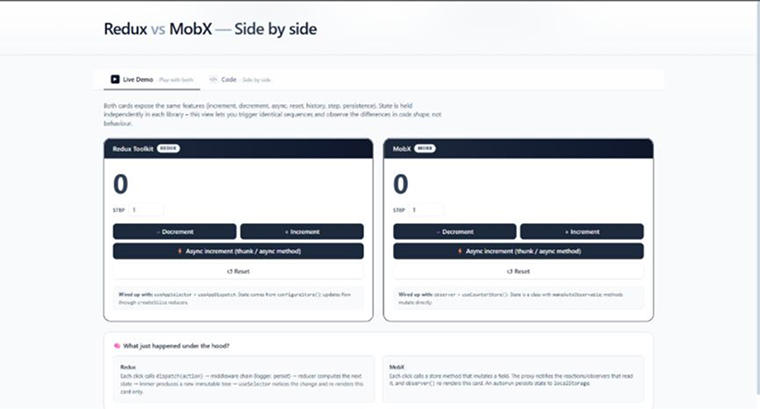
Image 1: Initial Load
Initial State:
- Redux Counter: 0
- MobX Counter: 0
- Step Value: 1
- Both applications loaded successfully

What happened?
React rendered both applications for the first time.
- Redux initialized its store using configureStore().
- MobX initialized its observable store using makeAutoObservable().
- Both counters started with the default value of 0.
This provides a clean starting point for comparing how each library manages state.
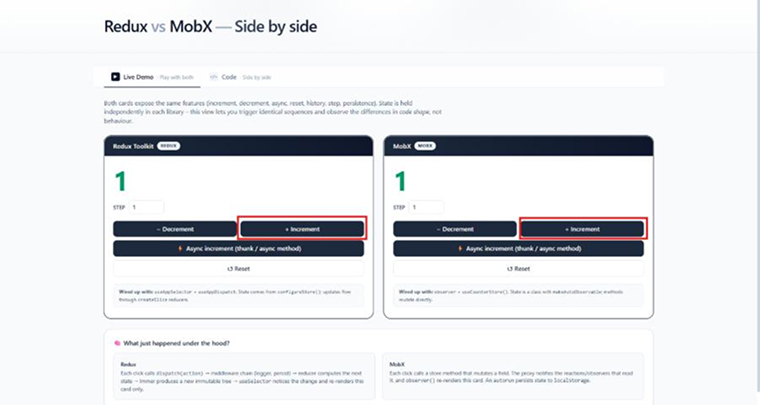
Image 2: User Clicks Increment Button
User clicks “+ Increment”:
- Redux Counter: 0 → 1 📈
- MobX Counter: 0 → 1 📈
- Both counters display the updated value.
What happened?
Although both counters increased by one, the internal process is different.
Redux Flow
Button Click
↓
dispatch(increment())
↓
Reducer Executes
↓
New Immutable State Created
↓
Redux Store Updated
↓
useSelector Detects Change
↓
Component Re-renders
MobX Flow
Button Click
↓
store.increment()
↓
Observable State Updated
↓
MobX Detects Change
↓
Observer Component Re-renders
Both achieve the same result, but Redux uses actions and reducers while MobX updates state directly through store methods.
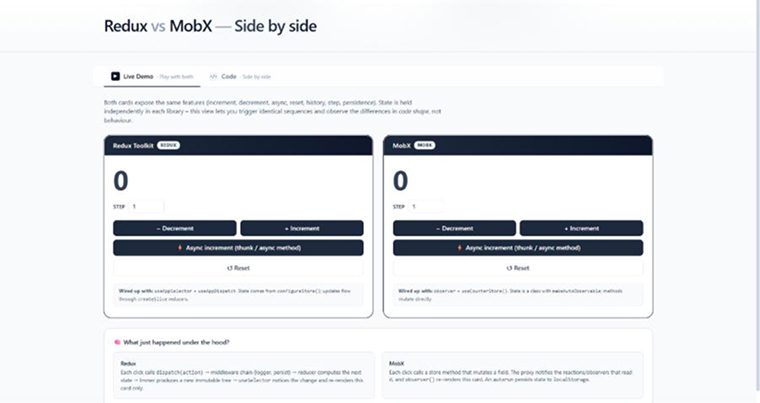
Image 3: Reset State
User clicks “Reset”:
- Redux Counter: 1 → 0
- MobX Counter: 1 → 0
- Both counters return to their initial values.
What happened?
Both state management libraries updated their stores and triggered a UI update.
Redux
dispatch(reset())
The reducer creates a new immutable state object containing the reset value.
MobX
store.reset()
The observable value is updated directly and MobX automatically notifies observers.
The UI stays synchronized with the store in both approaches.
Image 4: Async Increment
User clicks “Async Increment”:
- Redux Counter: 0 → 1
- MobX Counter: 0 → 1
- Update occurs after an asynchronous operation.
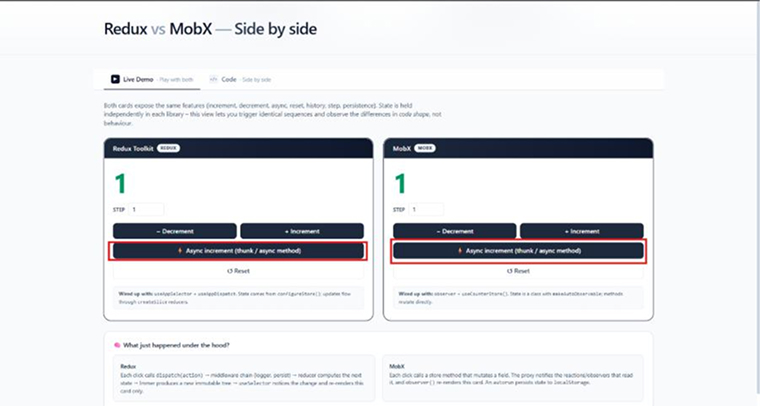
What happened:
Both applications handle asynchronous updates, but the implementation differs.
Redux
Button Click
↓
Thunk Action Executes
↓
Wait for Async Task
↓
dispatch(increment())
↓
Reducer Updates State
Redux commonly uses middleware such as Redux Thunk to handle async logic.
MobX
Button Click
↓
Async Store Method Executes
↓
Wait for Async Task
↓
Observable Value Updated
MobX allows async logic directly inside store methods without additional middleware.
Result
Both counters update successfully after the asynchronous operation completes.
Summary
| Action | Redux | MobX |
|---|---|---|
| Increment | Dispatch Action → Reducer | Dispatch Action → Reducer |
| Reset | Dispatch Reset Action | Store Reset Method |
| Async Update | Middleware (Thunk) | Async Store Method |
| State Updates | Immutable | Mutable Observable |
| Learning Curve | Medium | Easy |
| Large Enterprise Apps | Common Choice | Less Common |
Redux vs MobX: Tabular Comparison
Let’s do a quick recall of the differences between Redux and MobX based on the comparison table below:
| Parameters | Redux | MobX |
|---|---|---|
| Architecture | Strict and centralized Flux architecture | Transparent Functional reactive programming |
| Data Structure | It stores application state in immutable JavaScript objects | It works with observables that are mutable |
| State management patterns | It uses actions and reducers for state updates | It uses observables and reactions for automatic state updates |
| Scalability | Highly scalable for large and complex applications | Scalable for simple applications |
| Debugging | It follows predictable, time-travel debugging | The automatic reactivity in MobX increases debugging difficulties, especially for larger applications |
| Performance | It requires more memory and CPU resources | It provides excellent performance with minimum boilerplate code |
| Community and ecosystem | Huge and mature ecosystem with extensive support | It has an active and growing ecosystem support |
| Boilerplate code | The strict structure in Redux requires writing huge amounts of boilerplate codes | It requires less boilerplate code due to reactive and OOP programming. |
| Maintainability | Predictable state management promotes more maintainable applications | It requires less maintenance owing to minimal code and modularity |
| Supported frameworks/libraries | It is mainly used with React, but it can be used with other JS frameworks as well | It can work with plain JavaScript, React, Vue, and Angular |
When to Use Redux?
The following are some of the most common scenarios where Redux adoption will provide realistic advantages:
- When you’re developing an application where multiple components need the same data to avoid prop drilling.
- You’re developing a large application with a team of multiple developers, and maintaining a strict structure is mandatory.
- You need to keep track of how and when state changes over a period of time and want explicit control over state changes.
When to Use MobX?
If you’re planning to use the MobX library for any of these below given scenarios, you’ll definitely get the expected results.
- When you need to handle deep or nested forms where form fields depend on each other, as MobX updates only the specific UI components that depend on the changed field.
- To develop small and medium-sized projects or an MVP that requires multiple iterations.
- You can implement object-oriented programming concepts and are familiar with reactive programming.
What Are the Use Cases of Redux?
If you’re working on the following application development projects and are figuring out whether to use Redux or not, do read the use cases below:
- E-commerce Applications: Redux can make e-commerce websites easier to manage when many parts of the app depend on the same information. It keeps important data, such as cart items, login details, and orders, organized in one place that helps different pages work together smoothly and gives users a more consistent experience.
- Social Networking Apps: Redux can be useful for social media platforms because they constantly handle changing information. Redux keeps everything organized in one central place. Thus, there’s no need to manage user details, posts, reactions, and comments separately.
- Real-time Collaboration Tools: Redux can prove helpful for collaboration platforms where several people work on the same information at once. It provides a shared way to handle changing data useful for tools like team planners and online editors, where updates need to appear in real time to everyone.
What Are the Use Cases of MobX?
Evaluate the possibilities of using MobX in developing these applications by reading the following use cases:
- Prototype Development: MobX is best suited for developing prototypes, as there is less need for writing boilerplate code, minimal configuration to automatically manage state, and allowing rapid iterations.
- Content Management Systems: MobX can be a practical choice for content management systems that handle different types of media. It makes changes to application data easier to manage so that you can work with articles, images, and other content through a simple and responsive interface.
- Form-heavy Applications: MobX can make handling forms easier when they contain many fields or several steps. It keeps track of the information entered by users and updates the form when changes occur.
Final Thoughts
Choosing between Redux and MobX depends on what your application needs and how your team prefers to work. Redux is a strong option for larger projects where clear structure, predictable updates, and long-term maintainability are important. MobX can be a better fit for smaller applications that need a simpler setup and quick development. Both libraries can manage application state effectively, but they follow different approaches. Therefore, consider your project size, complexity, plans, and development style before making a decision.
FAQs
MobX is used to manage application state, especially in JavaScript and React applications. It helps developers keep data synchronized with the user interface by automatically detecting changes. MobX is useful for applications with frequently changing or complex data, such as dashboards, forms, interactive tools, and real-time interfaces.
MobX simplifies state management by using automatic tracking and reactive data, which eliminates the heavy boilerplate code required by Redux. It updates the user interface instantly when values change. As a result, the project is easier to maintain and scale.
Redux has not been completely replaced by any particular library. Zustand, React Context, Jotai, and TanStack Query are some of the popular alternatives being considered for modern projects.
Frontend developers, especially those working with React, React Native, and Vue, use MobX for state management. Companies like Microsoft, Netflix, and DICE use it in their web applications to create scalable, high-performance user interfaces with transparent and reactive data tracking.
Yes, Redux remains relevant in 2026 for maintaining legacy codebases and managing highly complex and large-scale application states.
Redux is popular because it provides a strict, unidirectional data flow that helps developers understand when, where, and why state changes occur. This facilitates easier debugging and sharing data between components.

Parind Shah is responsible for frontend innovations at TatvaSoft. He brings profound domain experience and a strategic mindset to deliver exceptional user experience. He is always looking to gain and expand his skill set.



Comments
Leave a message...