

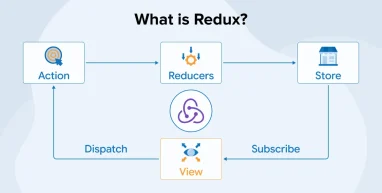
Modern React applications often do much more than display information on a screen. They handle user interactions, form data, login details, API responses, shopping carts, notifications, and many other changing values. As these applications grow in size and complexity, managing this information across different components can become difficult. This is where Redux can be useful.
Redux is a JavaScript library that helps developers manage application state in a structured and predictable way. It provides a centralized store where shared state can be stored and updated through clearly defined actions. This approach can make an application easier to understand, test, and troubleshoot. A ReactJS development company uses Redux when building React applications with complex state-management needs.
In this blog, we will explore what Redux is, how it works, its main concepts, and why you must choose it for building scalable React applications.
What is Redux?
Redux is an open-source JavaScript library inspired by Facebook’s Flux and the Elm programming language. It helps you manage application state in a simple and organized way. It became popular as applications grew more complex and sharing data between different components became difficult. Redux keeps an application’s important state in one central store, so components can access the information they need without passing data through many levels of components.
It follows a predictable way of updating data, which makes applications easier to understand, test, and debug. As a result, it’s called a predictable state container. Although Redux is often used with React, it is not a part of React and can work with other JavaScript applications as well.

What Are the Principles of Redux?
The three fundamental principles of Redux are as follows:
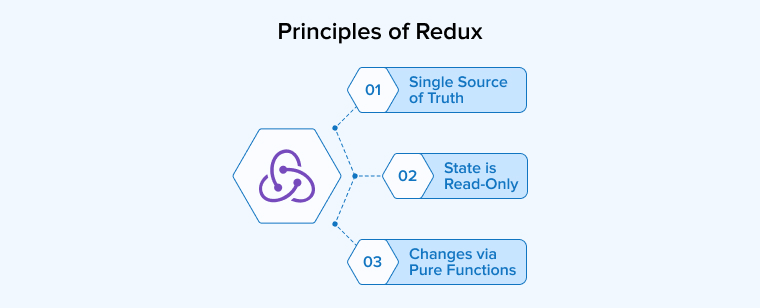
Single Source of Truth
The single source of truth is a fundamental concept in Redux; the application’s overall state is kept in one central store. Redux encapsulates all data within a single state object instead of maintaining important data in different places. This gives you a clear view of the current state and makes changes easier to follow. When something goes wrong, you can inspect the store to understand how the application reached a particular state.
Keeping state in one place can also make features such as saving, restoring, or undoing changes easier to manage. It is especially helpful in larger applications where many components need to work with the same information.
State is Read-Only
The immutability principle in Redux means that the existing state should not be changed directly. When an update is needed, an action is dispatched to describe what has happened. A reducer then uses that action to produce a new version of the state without affecting the previous one. This approach creates a clear and consistent flow of information because changes happen through a defined process rather than in multiple parts of the application.
It also makes it easier to understand what caused a particular change. As actions are simple objects, you can record, review, or replay them during testing or problem investigation. As a result, Redux applications become easier to debug, maintain, and predict.
Changes via Pure Functions
Reducers are an important part of Redux because they decide how the application’s state should change after an action occurs. A reducer receives the current state and the action as inputs, processes them, and produces the updated state. It does not directly alter the existing state or perform unrelated tasks. This makes reducers pure functions whose output depends only on the information they receive. As a result, the same state and action consistently produce the same result, which makes the application easier to understand and test.
As an application grows, its state logic can be divided among several smaller reducers, each one managing a specific area of the state. This keeps the code organized and makes state updates easier to maintain.
What Are the Benefits of Using Redux?
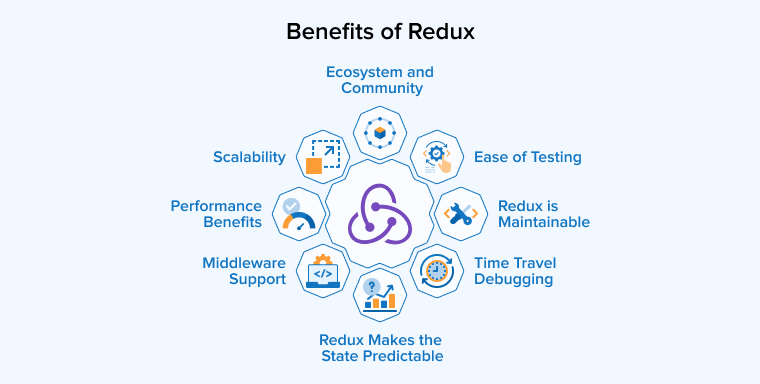
Some of the crucial advantages of the Redux library that help build an interactive application are given below:
Redux Makes the State Predictable
Redux keeps state changes consistent by following a controlled approach to updating data. It does not directly modify the existing state, making it easier to track what changed and why. Reducers produce the next state from the current state and an action, which makes their behavior easier to test and understand. Because previous states remain available, you can also return to earlier points for debugging.
Redux is Maintainable
It’s easy to maintain large applications with Redux because it provides a clear and consistent way to organize code. Redux keeps important application logic in a structured place instead of spreading it across different components. Because Redux follows defined patterns, team members can understand the project more quickly, even when they join later.
Middleware Support
Middleware gives Redux a way to handle extra tasks between the dispatch of an action and the state through custom functionality. It can check, change, delay, or respond to actions before they reach the reducers. This is especially helpful when an application needs to work with data from a server or perform other background tasks. Middleware can also log actions and handle errors. Middleware libraries such as Thunk and Saga make these tasks easier to organize and manage.
Performance Benefits
Using Redux does not necessarily make an application slower, even when state is shared across many parts of the app. React Redux is designed to limit unnecessary rendering by updating only components affected by a state change. Its approach to immutable updates and selective subscriptions helps keep updates efficient. You can also use tools such as useSelector, memoization, and Reselect to avoid repeated calculations and improve performance when working with complex or frequently changing data.
Ease of Testing
Redux can make testing easier because much of its logic follows a simple, consistent pattern. State changes are handled through pure functions that produce clear results without unexpectedly changing other data. This allows you to test individual pieces of logic by providing sample inputs and verifying that the results are correct. Because these pure functions have no external side effects, their tests are easier to write, understand, and maintain, helping you catch errors before they affect the application.
Time Travel Debugging
Redux makes debugging easier by tracking how an application’s state changes over time. Because each state change happens through clear actions, you can review what happened step by step instead of guessing where a problem started. You can return to an earlier state, inspect the actions that caused it, and then move forward again. This makes it much simpler to understand unexpected behavior and find the exact change that introduced a bug.
Ecosystem and Community
Redux has grown into a strong ecosystem supported by a large community of developers, learning resources, extensions, and third-party libraries. This ecosystem makes it easier to connect Redux with different technologies and solve development challenges. Specialized tools and browser extensions such as Redux DevTools help developers inspect and understand application state while debugging. Redux Toolkit, the officially recommended set of utilities, further simplifies everyday development by reducing repetitive code and providing helpful tools for configuring stores, creating slices, handling asynchronous logic, and managing data.
Scalability
It becomes difficult to track data and state changes as an application grows. Redux helps manage this growth by providing a clear and organized structure for state management. Data moves in one direction, which makes changes easier to follow and understand. Different parts of the state can be managed separately, helping keep the code organized as new features are added. Because of this structure, Redux can support large applications while making their code easier to maintain and update.
What is Redux Used For?
Redux is useful for applications where multiple components of the interface need to access and update the same information. It becomes especially helpful when managing state involves complicated logic or when a project has many developers working on it. Redux also provides tools that make tracking changes and finding errors easier. It is commonly used in larger applications such as online stores, social platforms, management dashboards, analytics tools, and other systems that handle a significant amount of shared data.
What Are the Core Concepts of React-Redux?
The working of the Redux library is based on the following three fundamental concepts:

Actions
In Redux, actions communicate events that occur in an application. They are simple JavaScript objects that tell the store what type of change has taken place. The required type property identifies the event, while an optional payload can carry information needed for updating the state. Actions do not change the state on their own; they are sent through dispatch() so that the appropriate reducer can process them. Action creators, functions that create action objects, can be used to simplify and standardize this process. This approach keeps communication between different parts of the application clear, predictable, and easy to manage.
Reducers
Reducers play an important role in deciding how Redux state should respond when something happens in an application. It receives the existing state along with the dispatched action and uses that information to calculate what the next state should look like. A reducer should not directly change the state it receives but should produce an updated state without modifying the existing state. This makes state changes easier to predict and track. Smaller applications may use one reducer, whereas larger projects can divide responsibilities among several reducers and combine them to manage different sections of the overall state.
Store
The Redux store serves as the main place where an application’s state is kept and managed. It provides a single, reliable source of information, from which different parts of the application can access the data they need. The store receives actions through the dispatch() function, which starts the process of updating the state through reducers. You can use getState() whenever you need to read the current state. A subscribe() function can also be used to respond when the state changes. In traditional Redux, the store is commonly created with createStore(). This centralized approach keeps state management organized and makes application behavior easier to follow.
When to Use Redux?
Go for Redux in case of the following scenarios to achieve the expected outcomes:
- When several components need access to the same information.
- Consider Redux when application data changes often and updates can come from many different components.
- When a project becomes large and has many features or developers working on it. Consistent state management with Redux can help you organize code, divide responsibilities, and maintain the application as new functionality is added.
- When you need to track state changes to understand how the application reached its current state.
- If data is repeatedly passed through several components just to reach one lower-level component, you can use Redux to avoid this unnecessary prop passing.
- When you want users to find the page in the same state after returning from another page.
Using Redux with React: Practical Example
Let’s now put the above learnings into a practical implementation to enhance the conceptual clarity:
Step 1: Create Your Project
Create a new React application using Vite with the command shown below:
npm create vite@latest redux-demo -- --template react-ts |
Then navigate into the project folder with the command shown below:
cd redux-demo |
Step 2: Install Redux Libraries
Install the required Redux packages using the command below:
npm install @reduxjs/toolkit react-redux |
Step 3: Create Your First Slice
Create a new slice file at src/store/slices/counterSlice.ts.
This slice should:
- Store the counter state.
- Define actions to update the state.
- Update the state when the corresponding actions are dispatched.
The sample implementation is provided below:
import { createSlice } from '@reduxjs/toolkit' import type { RootState } from '..' type CounterState = { value: number } const initialState: CounterState = { value: 0, } const counterSlice = createSlice({ name: 'counter', initialState, reducers: { increment: (state) => { state.value += 1 }, decrement: (state) => { state.value -= 1 }, reset: () => initialState, }, }) export const { decrement, increment, reset } = counterSlice.actions export const selectCount = (state: RootState) => state.counter.value export default counterSlice.reducer |
Step 4: Set Up Your Redux Store
The store is the central place where your application’s data is managed. Create a file at src/store/index.ts to configure and export the Redux store.
import { configureStore } from '@reduxjs/toolkit'; import { useDispatch, useSelector } from 'react-redux'; import counterReducer from './slices/counterSlice'; export const store = configureStore({ reducer: { counter: counterReducer, }, }); export type RootState = ReturnType<typeof store.getState>; export type AppDispatch = typeof store.dispatch; export const useAppDispatch = useDispatch.withTypes<AppDispatch>(); export const useAppSelector = useSelector.withTypes<RootState>(); |
Step 5: Connect Redux to Your App
Now connect the Redux store to the app. Update the src/main.tsx file.
import { StrictMode } from 'react'; import { createRoot } from 'react-dom/client'; import { Provider } from 'react-redux'; import { store } from './store'; import './index.css'; import App from './App.tsx'; createRoot( document.getElementById('root')! ).render( <StrictMode> <Provider store={store}> <App /> </Provider> </StrictMode>, ); |
Step 6: Build Your Counter Component
Create a CounterPanel component at src/components/CounterPanel/index.tsx with buttons to increase, decrease, and reset the counter.
import { useAppDispatch, useAppSelector } from '../../store'; import { decrement, increment, reset, selectCount } from '../../store/slices/counterSlice'; function CounterPanel() { const dispatch = useAppDispatch(); const count = useAppSelector(selectCount); return ( <section className='counter-panel'> <div className='counter-card'> <h1>Redux Counter</h1> <p className='counter-label'> Count </p> <strong className='count'> {count} </strong> <div className='button-row'> <button type='button' onClick={() => dispatch(decrement()) } > - </button> <button type='button' onClick={() => dispatch(reset()) } > Reset </button> <button type='button' onClick={() => dispatch(increment()) } > + </button> </div> </div> </section> ); } export default CounterPanel; |
Step 7: Add It to Your Main App
Update the src/App.tsx file to display the CounterPanel component.
import CounterPanel from ‘./components/CounterPanel’;
function App() { return ( <main className='app-shell'> <CounterPanel /> </main> ); } export default App; |
Step 8: Run Your Application
Run the following command in your terminal to start the application.
npm run dev |
Once the development server starts, open your browser to view the counter application. Try clicking the buttons to see how Redux updates and manages the state.
Final Thoughts
Redux is a state management library that helps you handle shared data in React applications in a clear and organized way. It keeps application state in a central store, which makes data changes easier to track and manage. Redux is especially helpful for larger applications where many components depend on the same information. Its predictable approach, middleware support, and debugging tools can make complex applications easier to maintain. However, smaller projects may not need its additional structure.
FAQs
Redux is an open-source JavaScript library used for managing and centralizing application state. It helps you write applications that behave consistently across client, server, and native environments.
Redux is mainly used in frontend development to manage an application’s shared state, but not a backend framework. You commonly use it with React to organize data and keep changes predictable across different components.
Redux is a JavaScript library used to manage an application’s shared state. It keeps important data organized in one place, which makes updates easier to control, understand, and debug. It is especially useful when many parts of an application need the same information.
The four components of Redux are a centralized store that stores your application state, actions that tell the store what kind of change has taken place, reducers that calculate new state, and dispatch functions for transmitting those actions.

Parind Shah is responsible for frontend innovations at TatvaSoft. He brings profound domain experience and a strategic mindset to deliver exceptional user experience. He is always looking to gain and expand his skill set.



Comments
Leave a message...