


The world has become fast-paced and closely connected because of real-time communication technologies. Building vital features such as online chatting, video conferencing, live updates, and more for modern applications wouldn’t have been possible without them. React WebSocket is the most useful and effective choice to add real-time features in modern web apps and a trusted tool among top React development companies. It offers a robust and efficient method for establishing seamless two-way communication between the frontend and backend of apps.
This article explores the concept of WebSockets, discusses how it works, its use cases, popular WebSocket libraries, best practices, and how it is better than other communication protocols. It also provides a step-by-step guide to using WebSockets in React applications.
What Are WebSockets?
As a communication protocol, WebSocket enables real-time, two-way data exchange between servers and clients over a single connection. While traditional HTTP connections need a request-response cycle, React WebSockets establishes a duplex communication between a client and a server. It allows them to send and receive data asynchronously without repeated requests.
Since a persistent connection is maintained when using WebSocket, the overhead related to opening and closing multiple HTTP connections is significantly less. WebSockets are a suitable choice for building apps that require low-latency communication and instant updates, such as collaborative tools, stock tickers, live sports updates, online games, and chat applications.
How Do WebSockets Work in React?
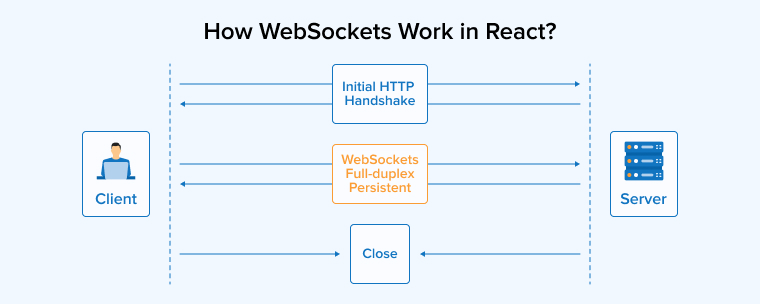
WebSocket offers bidirectional communication between the web browser and the server over a single TCP connection. This communication is established through an HTTP handshake. After getting connected, both sides, the web browser and the server, can easily send and receive data in real-time. However, the connection might break if either side chooses to close it. Once the connection is closed, the communication ceases automatically. Even the other side can’t send or receive the data because it is only a single connection. WebSocket is considered a superior solution compared to HTTP request/response connections because it allows for unlimited data exchange, without any polling. It is also important to note that adding WebSocket to your React project might also add some complexity because it supports event-driven and asynchronous components.
How to Use WebSockets with React?
It’s time to see WebSockets in action. In the given example, we will use Vite to set up a React project and then integrate it with Socket.IO for real-time communication. This example demonstrates the process for establishing a Socket connection, sending data to the server, and utilizing modern React practices to manage its responses.
Setting Up the React Project
- Create a React app using (Pre-requisites: Make sure you have the latest version(> 22) of Node installed):
- npm create vite@latest my-react-app — –template react
- Note: Accept all defaults, and your app will be up and running on: http://localhost:5173/
- npm create vite@latest my-react-app — –template react
- Navigate to the project root folder in the terminal and also open the project in VS Code or another editor.
- Install socket.io-client (https://socket.io/docs/v4/client-installation/)
npm install socket.io-client<br>
- Configuration:
// Import and add below code<br> import { io } from 'socket.io-client';<br> export const socket = io('http://localhost:3000'); // URL used is server connection string.<br> // Socket.IO opens connection by default, to override pass `autoConnect: false`. <br>Example:<br> export const socket = io(URL, {<br> autoConnect: false<br> });<br> - Below are some useful functions provided by socket.io which are going to be mostly used while development.
- socket.connect(): Used to establish a connection.
- socket.disconnect(): Used to disconnect.
- socket.emit(event, data, callbackFn): This method is mainly used for sending custom-named events. It accepts event name, data that we want to send, and a callback function.
- socket.on(event, callbackFn): Accepts an event name and callback function which will be triggered when the event is received.
- socket.off(event): Removes a specific listener added to event.
Example: Sending Data and Handling Server Response
This example demonstrates how a basic React component communicates with a Socket.IO server.
Prerequisites:
- Ensure the correct server URL is configured.
- The page should display: Server Connected: “Success”.
- The backend must listen for the `”search-movies”` event and return a list of matching movies.
Explanation:
- The socket auto-connects since we are not using `autoConnect: false` in the configuration.
- This example uses core Socket.IO methods: `socket.connect`, `socket.disconnect`, `socket.on`, and `socket.emit`.
How it Works:
- Enter text in the input field and click the Send button.
- This triggers `socket.emit` and sends the `”search-movies”` event to the server.
- The server receives the event, searches for movies in a database or other source, and responds with a `”movies-list”` event.
- When the client receives the `”movies-list”` event, the list of movies is rendered on the page.
- Create socket.js file and add below code:
import { io } from 'socket.io-client';
export const socket = io('http://localhost:3000');
- In App.jsx, Add below code:
unction App() {
  const [connected, setConnected] = useState(false);
  const [movieList, setMovieList] = useState([]);
  const [inputText, setInputText] = useState([]);
  const onConnect = () => {
    setConnected(true);
  };
  const onDisconnect = () => {
    setConnected(false);
  };
  const onMoviesEvent = (value: any) => {
    console.log("Movies list received:", value);
    setMovieList(value);
  };
  const handleInputChange = (value: any) => {
    setInputText(value);
  };
  const handleSend = () => {
    console.log("Sending search for movies with text:", inputText);
    socket.emit("search-movies", inputText);
  };
  useEffect(() => {
    socket.on("connect", () => {
  	console.log("Socket connected:", socket.id);
  	setConnected(true);
    });
    socket.on("connect1", (data) => {
  	console.log("Received connect1:", data);
  	setMovieList(data);
    });
    socket.on("disconnect", () => {
  	console.log("Socket disconnected");
  	setConnected(false);
    });
    socket.on("movies-list", onMoviesEvent);
    return () => {
      socket.off("connect");
      socket.off("connect1");
      socket.off("disconnect");
    };
  }, []);
  return (
    <div style="{{" display:="" "flex",="" flexdirection:="" "column",="" height:="" "100vh",="" width:="" "100vw",="" }}="">
  	<div style="{{" padding:="" 32="" }}="">
    	<b>Server Connected : {connected ? "Success" : "Failed"}</b>
  	</div>
  	<div style="{{" padding:="" 32,="" display:="" "flex",="" alignitems:="" "center",="" gap:="" 8="" }}="">
    	<p>Enter letter and get movie name suggestions: </p>
    	<input type="text" placeholder="Enter text..." onchange="{(e)" ==""> handleInputChange(e.target.value)}
          style={{ height: 32, width: 200 }}
        />
    	<button type="button" aria-label="Send" onclick="{handleSend}" style="{{" color:="" "blue",="" textalign:="" "center",="" height:="" 32,="" width:="" 100,="" padding:="" 0,="" }}="">
          Send
    	</button>
  	</div>
      {movieList.length > 0 && (
    	<div style="{{" padding:="" 32,="" gap:="" 12,="" display:="" "flex",="" flexdirection:="" "column",="" }}="">
      	<p style="{{" margin:="" 0,="" fontweight:="" 500="" }}="">Movie List:</p>
      	<ul style="{{" padding:="" 0,="" margin:="" liststyle:="" "none"="" }}="">
            {movieList.map((movie, index) => (
          	<li key="{index}" style="{{" padding:="" "4px="" 0"="" }}="">
                {movie}
          	</li>
            ))}
      	</ul>
    	</div>
      )}
    </div>
  );
}

export default App;
Why Use WebSocket with React?
WebSockets is an ideal option for building online chatting and gaming applications, as it enables real-time communication. Here are a few benefits that prove its worth in React projects.
- Using WebSocket for gaming app development enables reliable communication channels and facilitates real-time updates.
- Most of the web browsers comply with HTML5 and can work well with content from earlier HTML versions, making it easy to support WebSockets.
- No matter what platform your React app is working on, whether it be Windows, iOS, Android or macOS, WebSockets’ exceptional cross-platform protocols ensure consistent efficiency across all of them.
- WebSockets stream data through multiple firewalls and proxies, ensuring data security and app reliability.
- Being user-friendly, learning how to use WebSockets and incorporating them into React projects is easy. WebSockets is open-source, so there is no lack of resources and online tutorials.
- A single allows simultaneous WebSocket connections, even with the same client, improving app scalability.
Best Practices for WebSockets in React
Follow these best practices when using WebSockets in a React project to get more effective outcomes.
1. Enhancing Performance and Resource Management
WebSocket connections use resources on both the frontend and the backend. Perform proper cleanup to avoid memory leaks. Make sure that the WebSocket connection remains closed when releasing the resources during the unmounting of the React WebSocket component.
useEffect(() => { socket.on("connect", onConnect); socket.on("disconnect", onDisconnect); return () => { socket.off("connect", onConnect); socket.off("disconnect", onDisconnect); }; }, []); |
Performing a proper cleanup, along with the utilization of the useEffect function, saves significant resources as it doesn’t leave any connections hanging. Implementing this best practices when working with WebSocket protocols ensures smooth functioning.
2. Security Considerations and Secure Connections (WSS)
Instead of WebSocket, use WebSocket Secure in React to encrypt your connections. It helps protect sensitive information like personal data, login host token, etc, especially in applications comprising private client data or user authentication. Taking this step safeguards your app and its users’ privacy.
import { io } from 'socket.io-client'; export const socket = io('wss://your-domain.com//:port'); |
The data is transmitted in plaintext when you don’t utilize WebSocket Secure, making it vulnerable to man-in-the-middle attacks. Using alternative ReactJS frameworks, such as NextJS, helps apply more protective layers to the application.
Top Four WebSocket Libraries for React
Here are some of the best WebSocket libraries to use for React app development.
React useWebSocket
This library enables seamless integration between WebSocket and React components. It was specifically designed to provide idiomatic integration support for React applications. Because the useWebSocket library is compatible with both plain WebSocket and Socket.IO connections. The real-time functionality was limited to client-side only in this library.
However, with support for either plain WebSocket or Socket.IO connections, you can add real-time functionality to the server-side as well. It also helps handle states for socket connections by default. The real-time functionality of the useWebSocket React library is useful in building various communication features, client and server updates, and dashboards.
Socket.IO
Based on WebSocket, this JavaScript library can establish real-time communication between servers and client browsers. It is event-driven and is supported by multiple devices and browsers, including the older ones, thanks to its HTTP long polling. After connecting the client and server sides, Socket.IO checks the connection regularly. The connection is automatically reestablished whenever it gets disrupted.
Since it is based on JavaScript, Socket.IO is compatible with React but is not designed specifically for it. So, the idiomatic support for integrating WebSocket in a React app is considerably low. The library is built to work with NodeJS on the server side. So, if you are not using NodeJS, your options get shrunk automatically. Many top platforms, including Google Docs, Twitter, Uber, and Slack, use the Socket.IO library for real-time collaboration, updates, and live tracking.
SockJS Client
SockJS is another JavaScript-based library on the list. It offers simpler WebSocket APIs and is compatible with a diverse range of programming languages. Using a fallback mechanism, the library enables WebSocket-like communication through other transport protocols in the absence of WebSocket.
SockJS doesn’t support plain WebSocket servers. To connect the server with the client, you must apply SockJS on the server-side. The reason it offers less integration support for WebSocket is that the library is not specifically designed for React. In addition to real-time communication, the SockJS library helps develop features for live feeds, dashboards, and notifications in React apps.
WS
WS is a WebSocket library popular for its user-friendliness, speed, and scalability. Depending on the environment and the browser, it supports WebTransport or HTTP long-polling. The library has a large community of users on GitHub.
WS is a highly versatile library, but configuring it is a little challenging when used for large-scale app development projects. This library was also not designed for React use cases, but is utilized only because it is based on JavaScript, leading to non-idiomatic integration.
In terms of use cases, WS is used for live dashboards. Multiplayer interactions and real-time communications. It also helps create features that help track progress and provide instant feedback.
Comparing React WebSocket Against Traditional HTTP Methods
WebSockets is not the single most popular protocol that can enable real-time communication in React. HTTP is also a communication protocol, but it uses a request-response cycle, which allows only one-way communication. WebSockets allow two-way communication between clients and servers.
Before WebSockets were released, developers used to find loopholes in HTTP protocols to introduce bidirectional data exchange in web applications. There were many other methods, like HTTP streaming and server-sent events. However, each has its own limitations, just like HTTP polling. Let us explore how these traditional communication protocols fall behind when used as an alternative to React WebSockets.
HTTP Polling
HTTP Polling was one of the first protocols used for real-time communication in web apps. As the name suggests, the HTTP protocol regularly polls the server. Following a request-response cycle, the client first sends a request to the server and waits for the response.
The server waits before processing the client’s request until it reaches a timeout or the request is confirmed with changes or updates. The server only sends a response when it has something to return for that specific request. It can send a response to the client after a change or update. This cycle continues as the client sends another polling request.
The communication here between client and server is rather slow. Apart from that, the HTTP polling method is riddled with flaws because of timeouts, caching, header overhead and latency. You can avoid all these issues using React WebSockets.
HTTP Streaming
HTTP polling methods have some obvious flaws. The only way to deal with it was to enhance the user experience by addressing the major concerns. That’s where developers use HTTP streaming. This method helps handle the latency issues in HTTP polling.
The server closes the request in HTTP polling after sending the response to the client side. This is the primary reason why latency exists in that method. Because the client side has to create a new connection, every time it needs to send a new request to the server.
HTTP streaming solves the latency issue by keeping the connection open through which the initial request was sent, even after the server sends the response along with the required data to the client. So whenever the client side needs to send a new request, it doesn’t have to create a new connection. Apart from that, everything in HTTP streaming works the same as HTTP polling.
Keeping the initial request open for an indefinite time helps HTTP streaming provide real-time communication between the client and the server in a web application. Here, the server can send a response whenever there is a change, update, or a new request from the client. However, using React WebSocket helps create latency-free connections without these complications.
Server-Sent Events
The responsibility for the effective implementation of the SSE method falls upon a React developer. It allows real-time communication between the server and the client but the method for establishing that connection is complex and inefficient. Demanding more effort, the developers will be overwhelmed with making the SSE method’s code functional.
The server uses the SSE system to send data to the client. Facebook does this effectively. Whenever a user uploads a new post, their server uses the SSE method to push the updates to the timeline. However, this method is not suitable for gaming and online chatting applications. The SSE method puts a ceiling on the number of open connections at any given time.
Conclusion
WebSocket simplifies the process of data exchange between the client-side and server-side, enabling real-time communication. It is an excellent React tool that helps developers implement real-time features in web apps, and unlike other tools, it doesn’t demand more manual effort or have any complex processes causing issues.
WebSocket opens up a plethora of opportunities. It can be used to add many advanced real-time features like live tracking, online chatting, online gaming, dashboards, and feeds to React web applications. As a result, developers and business owners can create robust applications. React and WebSocket are a perfect combination to produce outstanding results.

Parind Shah is responsible for frontend innovations at TatvaSoft. He brings profound domain experience and a strategic mindset to deliver exceptional user experience. He is always looking to gain and expand his skill set.



Comments
Leave a message...