

Cloud computing has become a prominent aspect of app development. Every business, from small startups to large enterprises, prefers the cloud for easy, efficient setup and improved availability. According to the Grandview Research report, the cloud computing market size was estimated at USD 752.44 billion in 2024 and is projected to reach USD 2,390.18 billion by 2030. This is why, in the Java ecosystem, expert developers and top Java development companies utilise Spring Cloud AWS to integrate AWS managed services into Spring. Since Spring frameworks provide auto-configuration, integration requires less hassle and yields more effective outcomes. If you wish to achieve the same, below is a step-by-step process for it.
What is Spring Cloud AWS?
Spring Cloud AWS is an open-source project created to integrate AWS managed services into the Spring ecosystem. It utilizes Spring-based idioms for efficient integration with AWS services. Spring Cloud AWS allows you to add any required starter dependencies, such as the Spring Boot starter. Moreover, it also performs configurations automatically.
Why Do We Need Spring Cloud AWS?
AWS offers Java SDKs to integrate with its managed services, but using them often requires writing a large volume of infrastructure-related code. Now, Spring Cloud AWS addresses this by supplying Spring-based modules that encapsulate that infrastructure code. These Spring-based modules are often service-specific, enabling developers to add only the modules needed for particular AWS services.
The image below shows a few AWS managed services and related Spring Cloud AWS components.
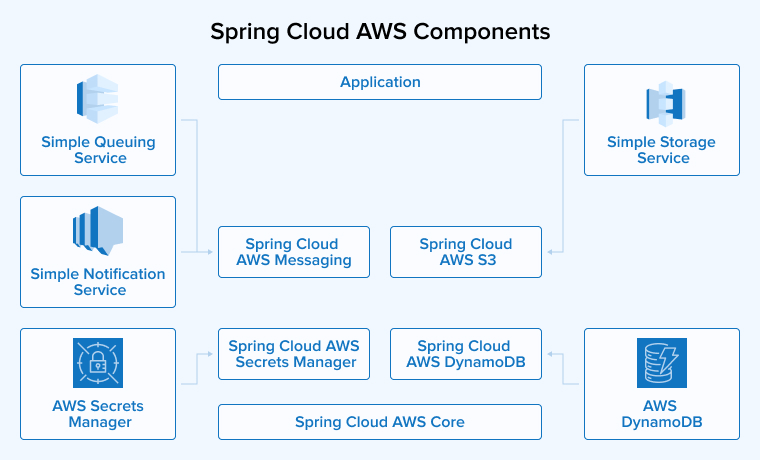
Spring Cloud AWS offers various Spring-based modules, some of which are available as starter projects. Let’s take a look at a few of them.
- Although the Spring Cloud AWS starter is a core module, developers cannot use it directly. They must access it through other modules. This starter offers auto-configuration for authentication, region selection, and other basic setups.
- With Spring Cloud AWS, you can seamlessly integrate with AWS services. For example:
- Spring Cloud AWS S3 provides integration with Amazon S3.
- Spring Cloud AWS DynamoDB provides integration with Amazon DynamoDB.
- Spring Cloud AWS SQS provides integration with Amazon SQS.
- Spring Cloud AWS Secrets Manager integrates with AWS Secrets Manager. This service stores confidential information and messages, preventing developers from exposing the secrets in source code.
Let us now create a project from scratch and follow a step-by-step process to add Spring-based modules as well as use Spring Cloud AWS to integrate AWS managed services. Some of the services mentioned above are used in this process.
How to Get Started With Spring Cloud AWS?
Before getting started, it is important to understand what we need to pursue in this project.
Pre-requisite
- Install Java 17+
- Install Apache Maven
- Install Java Programming IDE
First, we have to create a new Maven project and add Spring Cloud AWS Bills of Material (BOM) in pom.xml. It would recommend the versions for all dependencies that a given release of Spring Cloud AWS used before.
<dependencyManagement> <dependencies> <dependency> <groupId>io.awspring.cloud</groupId> <artifactId>spring-cloud-aws-dependencies</artifactId> <version>${project-version}</version> <type>pom</type> <scope>import</scope> </dependency> </dependencies> </dependencyManagement> |
In the above example, we have io.awspring.cloud as the Spring Cloud AWS group ID, spring-cloud-aws-dependencies for the artifact, and Spring Cloud AWS’s latest version of the current date is 3.1.0. If you wish to use a new version of AWS SDK in the project, then it needs to be declared first in the Spring Cloud AWS and then recommended to the dependency management section in pom.xml, using the below BOM as shown here:
<dependencyManagement> <dependencies> <dependency> <groupId>software.amazon.awssdk</groupId> <artifactId>bom</artifactId> <version>${aws-java-sdk.version}</version> <type>pom</type> <scope>import</scope> </dependency> </dependencies> </dependencyManagement> |
In the aws-java-sdk property, replace the latest version of the AWS SDK. Also, add the AWS credentials in the places given below before using any AWS service in your project.
- Java System Properties – aws.accessKeyId and aws.secretAccessKey
- Environment Variables – AWS_ACCESS_KEY_ID and AWS_SECRET_ACCESS_KEY
- The default location of the credential profiles is (~/.aws/credentials), which is shared by all AWS SDKs and AWS CLI.
We have set two environment variables, AWS_ACCESS_KEY_ID and AWS_SECRET_ACCESS_KEY, for this. Due to the default setting, DefaultCredentialsProvider is auto-configured by the Spring Cloud AWS starter and starts looking for AWS credentials in the following order.
- Java System Properties – aws.accessKeyId and aws.secretAccessKey
- Environment Variables – AWS_ACCESS_KEY_ID and AWS_SECRET_ACCESS_KEY
- Web Identity Token credentials from system properties or environment variables.
- Credential profiles file at the default location (~/.aws/credentials) shared by all AWS SDKs and the AWS CLI
- Credentials delivered through the Amazon EC2 container service if the `AWS_CONTAINER_CREDENTIALS_RELATIVE_URI` environment variable is set and the security manager has permission to access the variable,
- Instance profile credentials are delivered through the Amazon EC2 metadata service.
We will now set up Spring Cloud AWS using the pom.xml file below.
pom.xml
<?xml version="1.0" encoding="UTF-8"?> <project xmlns="http://maven.apache.org/POM/4.0.0" xmlns:xsi="http://www.w3.org/2001/XMLSchema-instance" xsi:schemaLocation="http://maven.apache.org/POM/4.0.0 https://maven.apache.org/xsd/maven-4.0.0.xsd"> <modelVersion>4.0.0</modelVersion> <parent> <groupId>org.springframework.boot</groupId> <artifactId>spring-boot-starter-parent</artifactId> <version>3.3.1</version> <relativePath /> <!-- lookup parent from repository --> </parent> <groupId>com.tatvasoft</groupId> <artifactId>spring-cloud-aws</artifactId> <version>0.0.1-SNAPSHOT</version> <name>spring-cloud-aws</name> <description>spring-cloud-aws</description> <properties> <java.version>17</java.version> <project-version>3.0.4</project-version> </properties> <dependencies> <dependency> <groupId>org.springframework.boot</groupId> <artifactId>spring-boot-starter</artifactId> </dependency> <dependency> <groupId>org.springframework.boot</groupId> <artifactId>spring-boot-starter-test</artifactId> <scope>test</scope> </dependency> <dependency> <groupId>io.awspring.cloud</groupId> <artifactId>spring-cloud-aws-starter</artifactId> </dependency> </dependencies> <dependencyManagement> <dependencies> <dependency> <groupId>io.awspring.cloud</groupId> <artifactId>spring-cloud-aws-dependencies</artifactId> <version>${project-version}</version> <type>pom</type> <scope>import</scope> </dependency> </dependencies> </dependencyManagement> <build> <plugins> <plugin> <groupId>org.springframework.boot</groupId> <artifactId>spring-boot-maven-plugin</artifactId> </plugin> </plugins> </build> </project> |
Spring-based Modules
Now that we have set up the project to use Spring-based modules to integrate AWS managed services, let us understand these modules and how they can help us.
Secrets Manager Integration
This AWS service is used specifically to store all confidential information. Developers must never hard-code API keys and passwords into the source code. Here is a step-by-step process for using Spring Cloud AWS Secrets Manager to achieve this.
Step 1: Add the Spring Cloud AWS Secrets Manager to your existing Spring Cloud AWS setup project.
<dependency> <groupId>io.awspring.cloud</groupId> <artifactId>spring-cloud-aws-starter-secrets-manager</artifactId> </dependency> |
Step 2: To fetch secrets from Secrets Manager and add them to Spring’s environment properties, add spring.config.import property to application.properties as below.
spring.config.import=aws-secretsmanager:/secrets/api-key |
In AWS’s secrets manager, we have a secret named /secrets/api-key. Separate the names using “.” to load multiple secrets.
spring.config.import=aws-secretsmanager:/secrets/api-key; /secrets/db-password;/secrets/token-secret-key |
The app won’t start if there isn’t a secret with the given name. If you want the app to start regardless of the secret’s name, then you can make it optional using a prefix in the configuration.
spring.config.import=optional:aws-secretsmanager:/secrets/api-key |
Step 3: For property-driven dependency injection, a standard Spring app uses @Value. Similarly, you have to pass the secret key name in spEL style format in the @Value annotation. It gives you the secret key’s value from the Secrets Manager AWS service.
@Value("${username}" private String username; @Value("${password}" private String password; |
In the Secrets Manager AWS service, developers can add the name of the key-value-pair secrets just as it is mentioned in the AWS console.
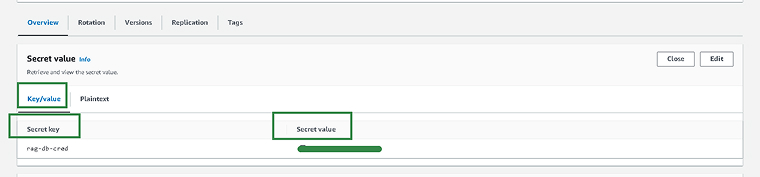
This was the process for using the Secrets Manager AWS service in Spring. Given below is the complete code, including the pom.xml and main method.
Pom.xml
<?xml version="1.0" encoding="UTF-8"?> <project xmlns="http://maven.apache.org/POM/4.0.0" xmlns:xsi="http://www.w3.org/2001/XMLSchema-instance" xsi:schemaLocation="http://maven.apache.org/POM/4.0.0 https://maven.apache.org/xsd/maven-4.0.0.xsd"> <modelVersion>4.0.0</modelVersion> <parent> <groupId>org.springframework.boot</groupId> <artifactId>spring-boot-starter-parent</artifactId> <version>3.3.1</version> <relativePath /> <!-- lookup parent from repository --> </parent> <groupId>com.tatvasoft</groupId> <artifactId>spring-cloud-aws</artifactId> <version>0.0.1-SNAPSHOT</version> <name>spring-cloud-aws</name> <description>spring-cloud-aws</description> <properties> <java.version>17</java.version> <project-version>3.0.4</project-version> </properties> <dependencies> <dependency> <groupId>org.springframework.boot</groupId> <artifactId>spring-boot-starter</artifactId> </dependency> <dependency> <groupId>org.springframework.boot</groupId> <artifactId>spring-boot-starter-test</artifactId> <scope>test</scope> </dependency> <dependency> <groupId>io.awspring.cloud</groupId> <artifactId>spring-cloud-aws-starter</artifactId> </dependency> <dependency> <groupId>io.awspring.cloud</groupId> <artifactId>spring-cloud-aws-starter-secrets-manager</artifactId> </dependency> </dependencies> <dependencyManagement> <dependencies> <dependency> <groupId>io.awspring.cloud</groupId> <artifactId>spring-cloud-aws-dependencies</artifactId> <version>${project-version}</version> <type>pom</type> <scope>import</scope> </dependency> </dependencies> </dependencyManagement> <build> <plugins> <plugin> <groupId>org.springframework.boot</groupId> <artifactId>spring-boot-maven-plugin</artifactId> </plugin> </plugins> </build> </project> |
application.properties
spring.application.name=spring-cloud-aws spring.config.import=aws-secretsmanager:rag-db-cred |
SpringCloudAWSApplication.java
package com.tatvasoft; import org.springframework.beans.factory.annotation.Value; import org.springframework.boot.CommandLineRunner; import org.springframework.boot.SpringApplication; import org.springframework.boot.autoconfigure.SpringBootApplication; import org.springframework.stereotype.Component; @SpringBootApplication @Component public class SpringCloudAwsApplication implements CommandLineRunner{ @Value("${rag-db-cred}") private String secretKey; public static void main(String[] args) { SpringApplication.run(SpringCloudAwsApplication.class, args); } @Override public void run(String... args) throws Exception { System.out.println(secretKey); } } |
SQS Integration
SQS integration is a messaging service offering point-to-point communication using queues. Additionally, the Spring ecosystem supports this module for sending and receiving messages using common Spring idioms. Let us see how Spring provides auto-configuration for this module, as well as how we can configure Simple Queue Service in Spring apps.
Step 1: Go to your Spring Cloud AWS project and add the SQS starter dependency to receive basic SQS configurations.
<dependency> <groupId>io.awspring.cloud</groupId> <artifactId>spring-cloud-aws-starter-sqs</artifactId> </dependency> |
Step 2: To send a message, we first need to create a queue in the AWS SQS service. Use the method given below to send a message to a queue named myQueue.
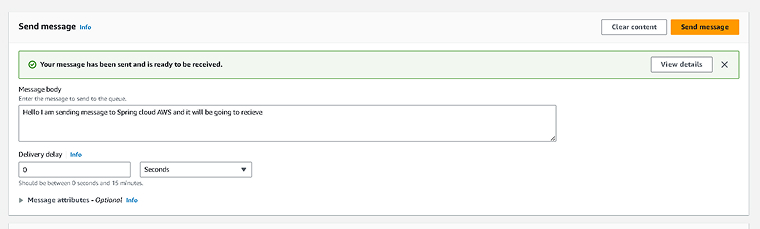
Step 3:To receive the message, the Spring app uses @SqsListener. As this shows, we can leverage the AWS SQS module in the Spring project.
@SpringBootApplication public class SqsApplication { public static void main(String[] args) { SpringApplication.run(SqsApplication.class, args); } @SqsListener("myQueue") public void listen(String message) { System.out.println(message); } } |
Running this method will imply that your Spring Boot app can successfully receive a message from the SQS service.
Step 4: Now, we will utilize the Sqs template class to send the message. If there aren’t any other template beans in your Spring Boot app, then this template class is autowired as the default.
@Autowired SqsTemplate template; SendResult<String> result = template.send(to -> to.queue("myQueue") .payload("myPayload") .header("myHeaderName", "myHeaderValue") .headers(Map.of("myOtherHeaderName", "myOtherHeaderValue")) .delaySeconds(10) ); |
The above code sends the message to the queue on the SQS service with the help of Spring idioms in Spring Cloud AWS. Here is the full code for receiving the message through the SQS service in your Spring Cloud AWS project.
Pom.xml
<?xml version="1.0" encoding="UTF-8"?> <project xmlns="http://maven.apache.org/POM/4.0.0" xmlns:xsi="http://www.w3.org/2001/XMLSchema-instance" xsi:schemaLocation="http://maven.apache.org/POM/4.0.0 https://maven.apache.org/xsd/maven-4.0.0.xsd"> <modelVersion>4.0.0</modelVersion> <parent> <groupId>org.springframework.boot</groupId> <artifactId>spring-boot-starter-parent</artifactId> <version>3.3.1</version> <relativePath /> <!-- lookup parent from repository --> </parent> <groupId>com.tatvasoft</groupId> <artifactId>spring-cloud-aws</artifactId> <version>0.0.1-SNAPSHOT</version> <name>spring-cloud-aws</name> <description>spring-cloud-aws</description> <properties> <java.version>17</java.version> <project-version>3.0.4</project-version> </properties> <dependencies> <dependency> <groupId>org.springframework.boot</groupId> <artifactId>spring-boot-starter</artifactId> </dependency> <dependency> <groupId>org.springframework.boot</groupId> <artifactId>spring-boot-starter-test</artifactId> <scope>test</scope> </dependency> <dependency> <groupId>io.awspring.cloud</groupId> <artifactId>spring-cloud-aws-starter</artifactId> </dependency> <dependency> <groupId>io.awspring.cloud</groupId> <artifactId>spring-cloud-aws-starter-sqs</artifactId> </dependency> </dependencies> <dependencyManagement> <dependencies> <dependency> <groupId>io.awspring.cloud</groupId> <artifactId>spring-cloud-aws-dependencies</artifactId> <version>${project-version}</version> <type>pom</type> <scope>import</scope> </dependency> </dependencies> </dependencyManagement> <build> <plugins> <plugin> <groupId>org.springframework.boot</groupId> <artifactId>spring-boot-maven-plugin</artifactId> </plugin> </plugins> </build> </project> |
SpringCloudAwsApplication.java
package com.tatvasoft; import org.springframework.boot.SpringApplication; import org.springframework.boot.autoconfigure.SpringBootApplication; import org.springframework.stereotype.Component; import io.awspring.cloud.sqs.annotation.SqsListener; @SpringBootApplication @Component public class SpringCloudAwsApplication{ public static void main(String[] args) { SpringApplication.run(SpringCloudAwsApplication.class, args); } @SqsListener("myQueue") public void listen(String message) { System.out.println(message); } } |
S3 Integration
Simple Storage Service (S3) from AWS is used to store various kinds of objects in the AWS cloud. Generally, the AWS S3 starter lets your app read and write objects on S3 and performs auto-configuration. To integrate S3 in a Spring-style application, use the AWS S3 module. Below is a concise description of the basic integration process for S3.
Step 1: Open your existing Spring Cloud AWS project and add the S3 starter dependency to the pom.xml file as shown below.
<dependency> <groupId>io.awspring.cloud</groupId> <artifactId>spring-cloud-aws-starter-s3</artifactId> </dependency> |
Step 2: Adding a dependency gives us all the S3 services-related classes. In the Spring app context, the starter configures and registers the S3Client bean automatically. The given example reads a text file from an S3 bucket.
@Component class S3ClientSample { private final S3Client s3Client; S3ClientSample(S3Client s3Client) { this.s3Client = s3Client; } void readFile() throws IOException { ResponseInputStream<GetObjectResponse> response = s3Client.getObject( request -> request.bucket("bucket-name").key("file-name.txt")); String fileContent = StreamUtils.copyToString(response, StandardCharsets.UTF_8); System.out.println(fileContent); } } |
The snippet above shows a file from an S3 bucket in a Spring-based manner without any configurations.
Step 3: We can also access S3 using an S3 URL. It would only require some additional Spring resources like classpath files, file system, and more.
@Value("s3://[S3_BUCKET_NAME]/[FILE_NAME]") private Resource s3Resource; |
The snippet below is used to write the file content tothe S3 bucket in the mentioned S3_BUCKET_NAME and FILE_NAME
@Value("s3://[S3_BUCKET_NAME]/[FILE_NAME]") private Resource s3Resource; ... try (OutputStream os = ((WritableResource) s3Resource).getOutputStream()) { os.write("content".getBytes()); } |
Using Spring Cloud AWS will help us obtain S3 integration with significantly less code. Here, we offer a complete code that allows you to read the S3 file in a Spring style using Spring resources.
pom.xml
<?xml version="1.0" encoding="UTF-8"?> <project xmlns="http://maven.apache.org/POM/4.0.0" xmlns:xsi="http://www.w3.org/2001/XMLSchema-instance" xsi:schemaLocation="http://maven.apache.org/POM/4.0.0 https://maven.apache.org/xsd/maven-4.0.0.xsd"> <modelVersion>4.0.0</modelVersion> <parent> <groupId>org.springframework.boot</groupId> <artifactId>spring-boot-starter-parent</artifactId> <version>3.3.1</version> <relativePath /> <!-- lookup parent from repository --> </parent> <groupId>com.tatvasoft</groupId> <artifactId>spring-cloud-aws</artifactId> <version>0.0.1-SNAPSHOT</version> <name>spring-cloud-aws</name> <description>spring-cloud-aws</description> <properties> <java.version>17</java.version> <project-version>3.0.4</project-version> </properties> <dependencies> <dependency> <groupId>org.springframework.boot</groupId> <artifactId>spring-boot-starter</artifactId> </dependency> <dependency> <groupId>org.springframework.boot</groupId> <artifactId>spring-boot-starter-test</artifactId> <scope>test</scope> </dependency> <dependency> <groupId>io.awspring.cloud</groupId> <artifactId>spring-cloud-aws-starter</artifactId> </dependency> <dependency> <groupId>io.awspring.cloud</groupId> <artifactId>spring-cloud-aws-starter-s3</artifactId> </dependency> </dependencies> <dependencyManagement> <dependencies> <dependency> <groupId>io.awspring.cloud</groupId> <artifactId>spring-cloud-aws-dependencies</artifactId> <version>${project-version}</version> <type>pom</type> <scope>import</scope> </dependency> </dependencies> </dependencyManagement> <build> <plugins> <plugin> <groupId>org.springframework.boot</groupId> <artifactId>spring-boot-maven-plugin</artifactId> </plugin> </plugins> </build> </project> |
SpringCloudAwsApplication.java
package com.tatvasoft; import java.nio.charset.StandardCharsets; import org.springframework.beans.factory.annotation.Value; import org.springframework.boot.CommandLineRunner; import org.springframework.boot.SpringApplication; import org.springframework.boot.autoconfigure.SpringBootApplication; import org.springframework.core.io.Resource; import org.springframework.stereotype.Component; import org.springframework.util.StreamUtils; @SpringBootApplication @Component public class SpringCloudAwsApplication implements CommandLineRunner { @Value("s3://spring-cloud-aws-s3/Spring_Cloud_AWS_S3.txt") private Resource resource; public static void main(String[] args) { SpringApplication.run(SpringCloudAwsApplication.class, args); } @Override public void run(String... args) throws Exception { String fileData = StreamUtils.copyToString(resource.getInputStream(), StandardCharsets.UTF_8); System.out.println(fileData); } } |
Conclusion
This article provides a detailed understanding of Spring Cloud AWS and how it integrates AWS managed services with the Spring ecosystem. With a graphical representation of Spring Cloud AWS modules and AWS managed services, as well as it gives a step-by-step process for integrating AWS managed services into a Spring-based project using auto-configuration. As a result, Java developers have to write less boilerplate code manually for integration purposes.
FAQs
AWS comes with the Java Software Development Kit, but to integrate the services, developers must write a significant amount of code. Spring Cloud AWS allows for efficient integration without any boilerplate code.
Yes, you can easily integrate the Spring Cloud AWS into the existing Spring Boot project if it is compatible. So, always check for compatibility between Spring Boot and Spring Cloud AWS before undertaking integration.

Rakshit Toke is a Java technology innovator and has been managing various Java teams for several years to deliver high-quality software products at TatvaSoft. His profound intelligence and comprehensive technological expertise empower the company to provide innovative solutions and stand out in the marketplace.



Comments
Leave a message...