


The domain of mobile applications is largely dominated by the Android platform, but the users of iOS come with brand loyalty, as the platform is popular for reliability and security. Therefore, businesses nowadays have to target multiple platforms in an attempt to cover the maximum market.
You need a robust and highly responsive framework that provides cross-platform development capabilities to make this project a success. Using different frameworks to create separate native applications is no longer viable in modern app development.
.NET MAUI and React Native are the most popular options for this task. MAUI offers the advantages of delivering native specific functionalities and high performance, making it a preferred choice within .NET development services. Whereas React Native provides flexibility and pre-built components for rapid and enterprise app development.
This article is not intended to debate the superiority of one framework over another. Instead, it aims to help you find the best option that suits your project requirements.
What is .NET MAUI?
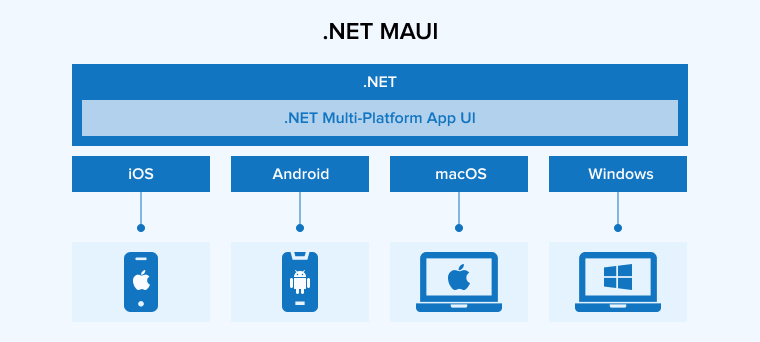
The full form of .NET MAUI is .NET Multi-platform App UI. As the name suggests, this framework simplifies the development of cross-platform applications, especially mobile and desktop apps. It is an open-source platform that evolved from Xamarin.Forms. Consequently, it inherits all the features of Xamarin.Forms and adds more capabilities to help developers create a single shared codebase using C# and XAML that runs across multiple platforms.
.NET MAUI brings the full power of the .NET ecosystem to building a unified API with improved UI controls, delivering enhanced flexibility and performance. With this modern approach, .NET MAUI development service providers can create high-quality native user experiences across multiple platforms such as desktop, Android, and iOS while streamlining the development lifecycle.
Features of .NET MAUI
.NET MAUI offers an extensive set of features that streamline cross-platform development. Here we discuss some of the most critical ones.
Native Performance and Support for Platform-Specific APIs
.NET MAUI optimizes its architecture and rendering engine to achieve near-native performance across all platforms. The framework delivers a responsive UI design, smoother animations, and faster startup times. To integrate platform-specific functionality, it provides seamless access to native APIs, allowing you to incorporate native features such as GPS, camera, and Bluetooth directly from your .NET MAUI code without relying on workarounds.
Dependency Injection
.NET MAUI supports dependency injection by default, which helps manage application dependencies. Dependency Injection pattern promotes a clean architecture and allows you to build loosely coupled components. This also improves app testability.
Cross-Platform Development
.NET MAUI enables developers to write a single codebase that works on various platforms like Android, iOS, web, and desktop. It saves the team time and effort by avoiding the need to build different codebases for different platforms.
Maximum Uptime with Hot Reload
.NET MAUI Hot Reload lets developers modify XAML layouts and C# code while the app continues running. It shows changes instantly on emulators or real devices without restarting the session. This feature preserves the current app state and reduces downtime during updates. Tools like XAML Live Preview, Live Visual Tree, and Hot Restart for iOS further speed up testing, debugging, and deployment.
Layout Engine
When building and deploying a cross-platform application, designers must ensure that the app has a smooth and consistent user interface across multiple platforms. This is where a layout engine becomes especially valuable, simplifying the design process of app pages. The layout engine comes with a drawing canvas providing cross-platform graphics, which enables the developers to give a native look and feel that goes beyond native control dependencies. Using a layout engine gives much more flexibility in UI design.
Benefits of .NET MAUI
With its extensive offerings and the support of the .NET ecosystem, MAUI is proven to be highly beneficial for the app and its stakeholders. Let us take a look at its top advantages.
Cross-Platform APIs
Developers can use .NET MAUI cross-platform APIs to run different tasks like maintaining consistent app behavior across multiple platforms, handling app lifecycle, managing user input, and accessing mobile device hardware.
Unified Codebase
This framework allows you to create a unified structure for the project, keeping the business logic, user interface, and resources consistent across all targeted platforms. Having a unified codebase helps simplify cross-platform development, reduces code redundancy, and makes the app easier to maintain.
Graphics Functionality
Drawing canvas in .NET MAUI provides cross-platform graphic functionality that helps draw and paint shapes and images using a unified toolkit. It also allows developers to compose various operations or elements and transform them into graphical objects.
Faster Development
Bušiness aim for quick releases to gain a first-mover advantage. MAUI enables rapid development, which leads to a faster time to market, benefiting the business in different ways. Because they only have to write a single codebase with MAUI, as it can run on multiple platforms, valuable time and resources of both the development team and the businesses are saved.
This also becomes helpful when making modifications, delivering an updated version, or fixing some issues. You only need to do it once, and the changes will take effect across all platforms. This streamlines your workflow, allowing developers to focus more on the quality and creative aspects of the application.
Integration with Blazor
.NET MAUI supports seamless integration with the Blazor framework, which helps developers to use C# and other popular web technologies to create elegant user interfaces for both web and mobile applications. It promotes code reusability by allowing developers to share the same codebase across different platforms, such as web and mobile platforms.
.NET MAUI Use Cases
.NET MAUI simplifies the development of applications that not only run on multiple platforms but also provide a better native experience on each. Here are the top five use cases of this framework.
High-Load Enterprise Applications
.NET MAUI is suitable for complex enterprise solutions, such as HR portals or productivity tools, that require high performance and the ability to manage resource-intensive workflows. Thanks to the support it receives from the .NET ecosystem, MAUI can handle heavy data computations efficiently compared to other frameworks. This makes .NET MAUI an ideal choice for large-scale applications.
Healthcare and Secure Data Systems
In the healthcare sector, .NET MAUI is primarily used for securely accessing patient records and treatment plans across different devices. This framework ensures enhanced security and strict adherence to compliance standards, which is essential when an app handles medical data. Thanks to .NET MAUI, hospital staff can quickly and reliably access the necessary information during clinical rounds.
IoT and Field Service Solutions
.NET MAUI offers robust native API support that allows easy integration with device hardware such as sensors, cameras, and Bluetooth. This makes it suitable for IoT monitoring dashboards and field service apps, where workers can update inspection details on-site, attach photos to work orders, and sync data once a network connection is available.
Retail and Point-of-Sale (POS) Systems
In the retail industry, .NET MAUI is useful for running unified POS systems across tablets, desktops, and kiosks using a single codebase. As a result, the user experience remains consistent. Because there is no need to develop separate apps for different hardware and platforms, the development costs are reduced dramatically. It also simplifies inventory management in real-time.
Hybrid and Offline-First Applications
.NET MAUI is the ideal choice for applications that need powerful offline capabilities and local database management, such as SQLite. Moreover, it excels in hybrid scenarios, for example, developers want to combine native UI components with web technologies like Blazor. This approach enables businesses to seamlessly share code and features between their web and mobile platforms.
What is React Native?

React Native is an open-source UI framework from Meta. It helps developers build high-performance mobile apps for Android and iOS using a single JavaScript codebase. Following the principles of the React library, the framework adheres to the Write Once, Run Anywhere workflow, reducing the development costs and time.
Unlike hybrid frameworks that run inside a web wrapper, React Native translates JavaScript components into true native UI elements, such as UIView for iOS and android.view for Android. This ensures that the final application provides the authentic look, feel, and fluid performance users expect from a native application while still allowing developers to leverage familiar web technologies like JavaScript and CSS-like styling.
Features of React Native
The React Native framework is mostly popular for building cross-platform mobile apps. But it provides development capabilities beyond that. Let us explore the features that made React Native a preferred and popular option.
Native-Like Performance
Instead of using hybrid frameworks, React Native helps developers to build apps using native components that deliver a platform-specific user experience. This helps build a highly responsive app offering native-like performance. Implementing this approach allows for animations to run smoothly, improves the loading speed, and keeps the user interface clear and concise. In short, it enables the app to completely behave like a native app across targeted platforms.
Third-Party Plugin Support
React Native is a very flexible framework. It supports a wide range of third-party plugins, allowing developers to easily add new functionalities to their applications and eliminating the need to build the app from scratch.
The plugins might come in two forms: native modules or JavaScript-based solutions. For example, React Hook Forms allows you to leverage custom hooks to simplify form management in React applications. Meanwhile, React Error Boundary is a special type of React component that helps developers detect JavaScript errors anywhere in the component tree. In case the errors are detected, it would log those errors and display a fallback UI to prevent the entire app from crashing.
Component-Based Architecture
React Native adopts a component-based architecture, which is used consistently in all of its development projects. Developers use this approach to design a small component specific to a single feature of the application. This gives the development team the flexibility to avoid writing the entire codebase of the application in one place. With a component-based architecture, you can easily divide the components into different categories, such as business logic, design, and more, to make your code modular and maintainable.
Large and Active Community
React Native is a popular framework with a large and active community around the world. The framework boasts a vibrant ecosystem consisting of numerous tools, libraries, and other resources. The community also provides active support to fellow developers in their React projects. You can get guidance and knowledge regarding everything from pre-built components to a technical challenge from the React Native community.
Rich Pre-Built Libraries
React Native fulfills its promise of rapid development by offering several libraries rich in pre-built features and components. This not only eliminates the need to develop the app from scratch but also helps developers build complex features. Each reusable component in these libraries has pre-written code that focuses on unique functionality, saving the time and resources of a business. To name a few React libraries, we have Redux Toolkit for state management, NativeBase and React Native Paper providing pre-built UI components, React Native Reanimated for advanced animations, etc.
Benefits of React Native
React Native is a robust and flexible framework offering a myriad of advantages, some of which are discussed below:
Reusable Components
React native provides libraries rich with reusable UI components. This accelerates the development speed, reducing the time to market. You can easily modify these pre-written components to make them compatible with certain platforms or to specific conditions. With the support of the React Native community, the number of libraries providing these reusable components keeps increasing. They also provide plugins to integrate with third-party libraries.
Hot Reloading
The hot reload feature enables developers to examine the results of their code changes immediately without restarting the app. The hot reloading feature from React Native speeds up the feedback loop and the development process.
Accelerated Development
In comparison to native technologies, React Native takes significantly less time to build cross-platform applications. The primary reason behind its extensive offerings of pre-built components which accelerate the development process. Since the JavaScript programming language lies at the foundation of this framework, users get easy access to one of the biggest package ecosystems in the development realm. Though apps created using React Native take less time in development, they offer better native-like performance compared to apps created by native technologies.
Lower Maintenance Costs
When you run an app on multiple platforms using a single codebase, development and maintenance costs are drastically reduced. With React Native, there is no need to write and maintain a separate codebase or functions for each platform. Businesses only have to spend money or resources after developing and maintaining a unified codebase. Any changes made to this codebase will be instantly reflected across all platforms. The same is true for bug fixing, security patches, and version updates. As a result, the apps become more maintainable.
UI Focused
When designing the user interfaces for its app, this framework leverages the React JavaScript library. It helps create faster and highly responsive app interfaces. The React Native framework possesses better rendering capabilities and adopts a component-based development approach to simplify the creation of interfaces, especially complex UI designs.
React Native Use Cases
React native is highly beneficial for businesses that want to deliver native-like performance across multiple platforms using a single codebase. Let us discuss some of the most common use cases of the React native framework.
Social Media and Communication Platforms
If your application requires real-time updates and seamless user interactions, React Native is preferable. Top social media platforms such as Facebook, Instagram, and Discord leverage this framework to manage dynamic content feeds and multimedia sharing. React Native is ideal for social media and communications apps with a high amount of traffic, as it provides instant data refreshes, fluid, and native style scrolling.
E-commerce and Retail Applications
eCommerce and retail apps must provide a responsive and consistent shopping experience. It can handle complex product catalogues and checkout processes. Companies like Shopify and Walmart use this framework to empower their digital platforms. It uses a shared codebase across Android and iOS and can effectively deploy features across both for a consistent brand experience.
FinTech and Data-Heavy Applications
Performance and security are critical in the finance industry. Developers can use React Native to integrate secure native modules for encryption while managing complex and real-time data visualizations. React Native helps FinTech apps deliver high-performance and responsive dashboards even when processing large volumes of financial data.
Rapid Prototyping and Startups (MVP)
When it comes to building MVPs or validating POCs, once again, React Native comes to the rescue. Because it is based on JavaScript, there is no need for businesses to search for new talent. They can work with existing web developers, ones who have working experience with the JavaScript programming language. Any changes made to the codebase can be instantly seen through the hot reload feature. This accelerates the feedback loop during early-stage user testing.
Enterprise and B2B Tools
React Native is highly cost-effective and efficient as well. It works well for enterprise-grade applications and B2B tools that prioritize efficiency and faster time-to-market. Using React Native, enterprises can effectively manage their app across different platforms like iOS and Android with a single team. In case of any changes or updates, they are reflected immediately.
.NET Maui vs React Native: A Detailed Comparison
Knowing the benefits, features, and use cases is certainly helpful for understanding the overall framework, but it is not enough to determine which option is better suited for your project. For that, you need to compare both options against common industry parameters as discussed below.
1. Performance and User Experience
.NET MAUI helps build applications with better performance and responsiveness, due to its integration with the platform and the .NET runtime. While providing a native-like experience, .NET MAUI ensures a consistent user experience across all platforms. Businesses often choose MAUI to improve their app performance and deliver a consistent brand experience.
React Native is also known for building high-performance applications. However, it requires more effort and optimization for complex applications. It uses a shared code to deliver a consistent user experience across multiple platforms. On the downside, businesses often report facing challenges in maintaining enhanced performance on Android and iOS platforms. If you are familiar with the JavaScript language, then you would face no difficulty in using the framework to quickly build and release the app to the market.
2. Language and Ecosystem
.NET MAUI is based on C#, a widely used programming language. It is strongly typed and offers a wide range of tools. On top of that, .NET MAUI is supported by the extensive .NET ecosystem, which includes numerous packages, libraries, and other resources helpful for developers. More importantly, .NET MAUI can be seamlessly integrated with IDEs like Visual Studio and Visual Studio Code, increasing its popularity among .NET developers.
JavaScript, a popular and easily accessible programming language, is used in React Native for app development. The language boasts a large community and a vast ecosystem of frameworks and libraries. This makes it easy for React Native developers looking for solutions to common development problems during their projects. The framework accelerates the development speed by utilizing its hot reload feature, which allows developers to see their changes in real time. This shortens the feedback loop and development cycles, leading to faster releases.
3. Multiple Platforms
.NET MAUI supports a single project structure or codebase that is easily executed and managed across multiple platforms simultaneously without any major modifications. This eliminates the need to write and maintain a separate codebase for different platforms. In the case of native or unique platform features, you need to write platform-specific code, but most of the code still remains shared. Using a unified code to run the app across all platforms makes project management very easy for the team.
Meanwhile, React Native supports the development of cross-platform applications. However, developers must put in extra effort or write bridging code to provide native-like performance and manage dependencies separately across multiple platforms.
4. Native APIs
.NET MAUI provides seamless integration between the .NET ecosystem and the native APIs of specific operating systems. With this, .NET developers can easily add native functionalities such as GPS, camera, etc to the app to deliver an enhanced user experience. On the other hand, despite being a highly flexible framework, React Native fails to offer the same level of integration with native APIs like .NET MAUI. This limitation restricts the app’s capabilities, reducing the depth of interaction between the user and the app or devices.
5. Development Experience: Speed vs Integration
In .NET MAUI, you get a development environment deeply integrated with the Microsoft ecosystem, especially when using Visual Studio. Although the hot reload feature is available for both C# and XAML, MAUI allows developers to manage platform-specific configurations for better control and workflow.
Such customizability indicates flexibility, but additional configurations in the project also increase its complexity. Therefore, this development approach requires more manual attention when working with native tools or addressing platform-specific concerns.
React Native ensures a modern development experience by using Expo. Developers can quickly complete their iterations without facing major problems using features such as over-the-air updates and Fast Refresh.
In React Native, changes are instantly reflected, improving the speed of the feedback loop. The tooling is also lightweight, which helps accelerate the development process. All of these make React Native an ideal solution for quick prototyping and continuous delivery.
Expo handles native build complexities. So, unless you have to add any advanced native modules, there is no need to use Android Studio or Xcode. As a result, the barrier to entry and the setup time are reduced.
6. Community Support and Long-term Viability
Though .NET MAUI is a relatively new framework, it benefits from the extensive support and community within the .NET ecosystem. Microsoft typically provides long-term support for all of its technologies, securing their future with timely advancements, updates, and essential security patches.
Meanwhile, React Native is an established framework with a large and active community. Although it is an open-source framework, it has support from Facebook, which, along with its community, continuously fuels its growth. The framework also offers several online tutorials and resources that help with various development projects. Additionally, React native also supports a wide range of third-party libraries.
7. Testing & Debugging
.NET MAUI offers a few testing-specific tools. But it comes with the most comprehensive debugging capabilities, thanks to its support for Visual Studio. On the other hand, React Native also offers robust testing frameworks, including Detox and Jest. However, things get complicated when it comes to debugging because the developers need to bridge to the native code.
8. Security and Compliance
.NET MAUI offers various built-in security features and strongly complies with industry regulations. This capability is essential when building apps for highly regulated industries such as healthcare and finance. When any problems or issues arise, Microsoft makes sure to address them immediately using its security infrastructure and regular version updates.
Security in React Native requires a hands-on approach. The framework provides flexibility but requires the developers to manage the compliance and security aspects of the application on their own. So, the application’s capability to meet the security standards and compliance entirely depends on the development team and their effective implementation of security best practices.
Insufficient team expertise can significantly increase the risk of data breaches, regulatory violations, and potential legal penalties.
.NET MAUI vs React Native: Tabular Format
| Parameters | .NET MAUI | React Native |
|---|---|---|
| Programming language | C# is the primary language for development | JavaScript is used for development |
| Platform Support | It’s a cross-platform framework supporting Windows, iOS, macOS, and Android operating systems | It’s a mobile development framework supporting Android and iOS platforms |
| Learning Curve | Easy for developers experienced in C# and .NET | Easy for web developers familiar with JavaScript and React |
| Performance | Runs with native speed, uses AOT compilation, and handles complex tasks without delays | Performs well for common apps, but heavy tasks may slow down owing to the JavaScript bridge |
| Development Tools | .NET MAUI works smoothly with Visual Studio and supports many useful NuGet packages. | React Native offers many plugins and works well with VS Code and Expo tools. |
| Community and Ecosystem | It integrates tightly with Microsoft tools, enjoys strong support, and has a steadily growing community. | Enjoys a large, active, open-source community and many third-party libraries for fast development. |
| User Interface | .NET MAUI delivers native-style interfaces using Xamarin.Forms and toolkit components for consistent apps. | React Native builds UIs with JavaScript, offering many libraries, but sometimes faces performance limits. |
| Access to native device APIs | .NET MAUI accesses native APIs directly, allowing smooth hardware and operating system integrations. | React Native provides many APIs via community packages, but may need bridges for deeper access. |
Conclusion
The decision to pick a framework for your upcoming project doesn’t solely rely on its technical capabilities and limitations. It depends more on your project requirements, business objectives, and the team’s preferences. You have to consider all of these factors and compare them against each framework’s features to find the right fit.
.NET MAUI is deeply integrated with the Microsoft ecosystem, offering many benefits to the team, especially for those seeking desktop support. Meanwhile, React Native is a popular and flexible option for mobile app development. It allows for quick development and provides support through a large community and reusable components.
In short, when it comes to modern app development, pick an option that aligns well with your situation or specific needs and sets up your project for long-term success.
FAQs
.NET MAUI is a better choice if your existing project is already invested in the .NET ecosystem. If you need native specific features and performance, opt for .NET MAUI. But choose React Native if you want faster development cycles, a more extensive ecosystem, and broader community support.
.NET MAUI uses Ahead Of Time compilation to compile MAUI applications into native binaries. This gives your app a native look and feel without requiring you to use the Java or Swift/Objective-C programming languages. Meanwhile, React Native has to use JavaScript to bridge the gap between the app code and the native components.
The .NET MAUI framework faces performance issues such as high resource usage, sluggish UI rendering, and slow startup time. Its ecosystem is also a bit immature because of the limited third-party support, incomplete features, and frequent occurrence of bugs.

Rakesh Patel is a technology expert working at TatvaSoft. He is looking after .NET development projects and also work along side with business analyst team. He developed his passion of writing while working and writes whenever he got the time.



Comments
Leave a message...