

Choosing the right technology stack is one of the most important steps in building an efficient web application. With several JavaScript libraries and frameworks available today, it becomes quite challenging for developers and businesses to decide which one best fits their project needs. Among the most popular options, Next.js and Node.js play key roles in modern web development. While Node.js is a JavaScript runtime environment that allows developers to run JavaScript code on the server side, Next.js is a React-based JavaScript framework designed for creating dynamic, fast, and SEO-optimised web applications. Understanding the difference between helps make better architectural decisions. A Node.js development company often leverages both technologies to deliver scalable and high-performance solutions tailored to client requirements. In this blog, we’ll explore the NodeJS vs NextJS comparison in detail, highlighting their features, pros, cons, use cases, and practical implementation.
What is NodeJS?
Node.js is an open-source, platform-agnostic JavaScript runtime environment built on Google Chrome’s V8 engine. It allows developers to run JavaScript code on the server side, enabling the creation of fast and scalable full-stack web applications. Using an event-driven, non-blocking I/O model, Node.js efficiently handles multiple connections at once without slowing down performance.
Key Features of Node.js
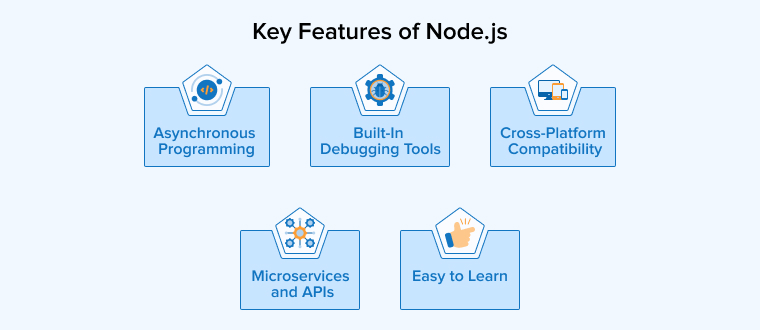
Let’s discuss the five key features of Node.js:
- Asynchronous Programming: Node.js efficiently handles multiple tasks using an event-driven and non-blocking model. It processes operations like database access asynchronously, improving performance and scalability while preventing the main thread from being blocked during execution.
- Cross-Platform Compatibility: Node.js is a cross-platform runtime that runs smoothly across Windows, Unix, macOS, and Linux. Developers can build applications once and deploy them across different operating systems with ease.
- Built-In Debugging Tools: Node.js includes built-in debugging tools, such as an interactive debugger and console logging, which facilitate developers in easily detecting, analysing, and fixing errors during development.
- Microservices and APIs: Node.js is best suited for microservices and API development because it’s lightweight, fast, and efficient at managing multiple small services that interact smoothly.
- Easy to Learn: Since many front-end developers already know JavaScript, learning Node.js for backend development is easy, quick, and requires minimal additional effort.
Advantages of Node.js
The five significant pros of Node.js:
- Faster Development: Node.js enables developers to build fast, high-performance server-side web apps and microservices quickly. Allowing efficient development and easy maintenance of multiple interconnected components.
- Cost-Effective: It simplifies development by allowing the same JavaScript code for both front-end and back-end, reducing resource needs, saving time, and lowering overall project costs.
- Community Support: Node.js has a large, active community that provides open-source tools, libraries, and constant support, ensuring innovation and faster development.
- Extensibility: Node.js is highly extensible, allowing developers to customize features, exchange data using JSON, and build web servers through various built-in APIs.
- Scalable: Node.js’s lightweight, event-driven architecture and non-blocking I/O make it ideal for building scalable, high-performance applications that handle heavy traffic efficiently.
Disadvantages of Node.js
The five significant cons of Node.js:
- Unstable API: Node.js often faces API instability, where frequent updates introduce incompatible changes, requiring developers to modify existing code to maintain compatibility.
- Callback Hell: Node.js heavily depends on callbacks, which can create deeply nested code. Known as “callback hell,” making programs harder to read and maintain.
- Memory Leaks: Node.js applications can suffer from memory leaks, causing performance issues when unused memory isn’t properly released or managed by the garbage collector.
- Single-Threaded: Node.js’s single-threaded architecture struggles with CPU-intensive tasks. Heavy computations can block the event loop and reduce overall application performance.
- Lack of Strong Typing: JavaScript is a dynamically typed language; therefore, type-related errors cannot be detected before execution, making it difficult to debug, especially in complex applications.
What is Next.JS?
Next.js is an open-source React framework developed by Vercel for building fast, scalable, and optimised React-based web applications. It supports server-side rendering (SSR) and static site generation (SSG), helping developers create high-performance and SEO-friendly websites. With built-in features like routing, code splitting, and pre-fetching, Next.js simplifies modern web development.
Key Features of Next.js
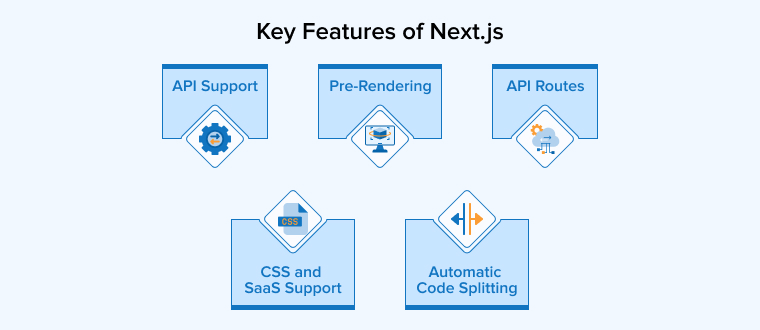
Let’s discuss the five key features of Next.js:
- Pre-Rendering: Next.js supports Server-Side Rendering (SSR) and Static Site Generation (SSG), improving website performance, SEO, and user experience by delivering pre-rendered and fast-loading pages.
- CSS and SaaS Support: Next.js offers built-in support for CSS modules and Sass, enabling modular, maintainable styling while preventing class conflicts and simplifying development.
- Automatic Code Splitting: Next.js improves performance by loading only the code required per page. Reducing bundle size and ensuring faster and more efficient web applications.
- API Support: Next.js includes built-in API support, allowing developers to build flexible serverless applications using tools like Apollo Client and GraphQL.
- API Routes: Next.js backend API routes let developers create backend functionality within the same project. Simplifying deployment and reducing reliance on external web servers.
Advantages of Next.js
Some of the pros of Next.js are as follows:
- Improved SEO: Next.js is used to build SEO-optimised websites as it provides excellent Server-Side Rendering (SSR) and Static Site Generation (SSG). Enabling faster loading, better indexing, and higher search engine visibility.
- Image Optimization: Next.js offers an image optimization feature using the next/image component. Which resizes, lazy-loads, and serves modern formats for better performance.
- Reusable Components: Next.js, built on React’s component-based architecture, enables developers to reuse components across pages, improving scalability and maintainability.
- Developer Experience: Next.js simplifies development with built-in tools like file-based routing, API routes, and hot reloading, supported by strong documentation and community resources.
- Internationalization (i18n): Next.js provides built-in internationalization support, enabling language-specific routing and automatic detection of users’ preferred languages for localized content delivery.
Disadvantages of Next.js
Some of the cons of Next.js are as follows:
- Complexity: Implementing SSR and SSG in Next.js can be complex for beginners. Especially with dynamic content, data fetching, caching, and configuration challenges during setup.
- Frequent Updates: Frequent Next.js updates introduce new features and improvements, but developers must continually learn and adapt to maintain compatibility, increasing project migration effort and learning time.
- Limited Routing Options: Next.js offers simple page-based routing, suitable for basic React apps but requiring additional code and configuration for more complex application structures.
- No Built-In State Management: Next.js does not provide a built-in solution for managing and tracking application state across different components. Therefore, developers usually use third-party libraries like Redux or MobX to handle state management.
- Rigidity: Next.js can be rigid because it enforces specific conventions and structures, limiting flexibility for developers who prefer customized project setups or unique workflows.
NodeJS vs NextJS: In-Depth Comparison
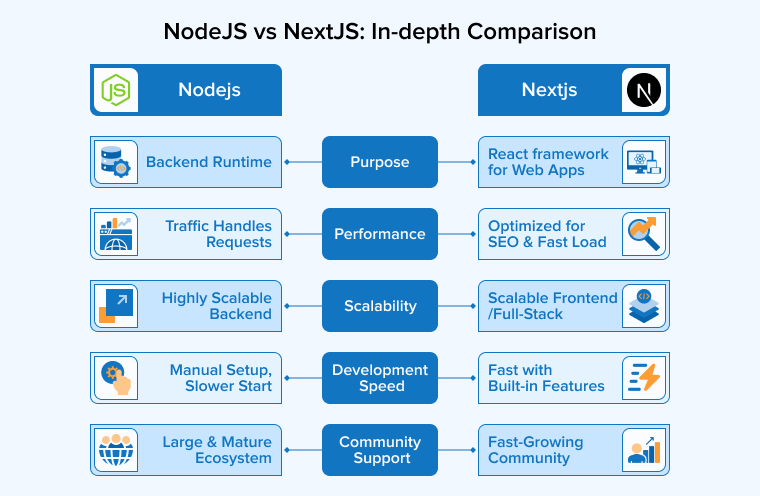
Let’s discuss the key differences between Node.js and Next.js across the following five parameters:
1. Purpose
- Node.js: It is a JavaScript runtime environment allowing developers to execute JavaScript code on the server side. Its main purpose is to build fast, scalable, and efficient backend applications. With its event-driven, non-blocking I/O model, Node.js can handle multiple requests simultaneously, making it ideal for creating APIs, microservices, and real-time applications like chat servers or streaming platforms.
- Next.js: It is a React-based front-end framework designed to simplify the creation of modern, fast, and search engine-friendly web applications. Its primary purpose is to enhance the performance and scalability of modern web apps through features like server-side rendering (SSR), static site generation (SSG), and automatic code splitting. Next.js focuses on improving user experience and developer productivity in building dynamic interfaces.
2. Performance
- Node.js: It delivers excellent backend performance with its non-blocking, event-driven architecture. It efficiently manages multiple simultaneous connections and handles real-time data processing without slowing down. This makes it ideal for developing high-performance, scalable server-side applications. Such as APIs, chat systems, and streaming services that require quick and continuous data exchange.
- Next.js: It focuses on front-end performance by using Server-Side Rendering (SSR) and Static Site Generation (SSG) to optimize page load speed. These features allow pages to load faster and bring benefits in SEO. By loading only essential code for each page, Next.js ensures a smoother, faster, and more responsive user experience.
3. Scalability
- Node.js: Node.js works on an event-driven, non-blocking architecture, allowing it to handle multiple connections and requests simultaneously. It supports horizontal scaling by adding more nodes to the system. This increases performance and capacity, making it ideal for large-scale, data-intensive, and real-time applications.
- Next.js: It is particularly for web applications requiring server-side rendering. Its built-in SSR and static generation features make it easier to manage growing traffic efficiently. However, its scalability often depends on the underlying server infrastructure and hardware performance, requiring careful architectural planning for handling higher loads effectively.
4. Development Speed
- Node.js: It enables rapid development due to its lightweight architecture and vast ecosystem of open-source libraries and tools. Its large developer community provides extensive resources, making it easy to build, test, and deploy applications efficiently. This flexibility and community support help developers speed up the entire software development lifecycle across diverse projects.
- Next.js: It also enhances development speed with built-in tools like server-side rendering, automatic code splitting, and integrated CSS support. These features simplify workflows and reduce manual setup. However, working with Next.js may require prior React knowledge, and its configuration can become complex for beginners, slightly slowing initial development compared to Node.js.
5. Community Support
- Node.js: It has a vast and active developer community that continuously contributes to its growth. Developers can easily find support, access numerous open-source libraries, and use community-driven tools, making problem-solving and application development faster and more efficient.
- Next.js: It benefits from strong community support, largely due to its connection with the React ecosystem. Developers have access to tutorials, forums, and open-source resources, helping them learn, troubleshoot, and build projects effectively with shared community knowledge.
NodeJS vs NextJS: Tabular Comparison
| Parameters | NodeJS | NextJs |
|---|---|---|
| What is it? | Runtime environment for JS code execution | Full-stack, feature-rich React framework |
| Routing | Routing requires additional routing libraries and frameworks, for example, Express.js | File-based routing, where routes are defined based on the file structure |
| Templating | No built-in templating engine in Node.js. It requires third-party support. | Supports JSX for templating |
| Rendering Capabilities | No built-in server-side rendering (SSR). It can be achieved through manual implementation using frameworks like Express.js. | Built-in support for SSR, SSG, and client-side rendering |
| Code splitting | Developers need to split the code manually | Next.js supports automatic code splitting to increase loading speed |
| API Handling | Custom or standalone APIs can be built using frameworks like Express.js | API Routes enable the creation of serverless functions directly within a project’s structure. |
| Middleware Usage | It’s mainly used in frameworks like Express.js | Native middleware support to manage HTTP requests and responses |
| Learning Curve | Steep learning curve proving difficult for beginners | Quite easy to learn if familiar with React |
| Hot Module Replacement (HMR) | Tools such as Nodemon let you enable this | Built-in support for Hot Module Replacement (HMR) through a feature called Fast Refresh |
| SEO friendliness | Additional frameworks and libraries are needed to build an SEO optimized website | Excels in search engine optimization (SEO) owing to server-side rendering (SSR) and SSG |
When to Choose NodeJS?
The following are some of the common scenarios to consider using Node.js:
- Real-Time Chat Applications: Node.js is suitable for building chat apps where messages are exchanged instantly between users using WebSockets.
- Streaming Services: Node.js efficiently handles real-time data flow, making it suitable for building video or audio streaming platforms that require continuous and uninterrupted data transfer.
- Single-Page Applications (SPAs): Node.js can handle asynchronous calls and heavy data updates, making it perfect for dynamic SPAs with frequent client-server interactions.
- RESTful APIs: Node.js is highly used for developing lightweight and fast RESTful APIs that handle multiple simultaneous client requests with minimal resource consumption.
- IoT Applications: Node.js supports handling numerous device connections efficiently, making it suitable for building scalable Internet of Things (IoT) systems with real-time data processing.
When to Choose NextJS?
The following are some of the common scenarios to consider using Next.js:
- E-commerce Websites: Next.js is perfect for building fast, SEO-friendly online stores with SSR and SSG for enhanced performance and customer experience.
- Content-Rich Blogs: They allow quick content updates through static site generation, making them ideal for blogs and marketing websites that publish new content frequently.
- News and Media Platforms: Next.js supports real-time updates and fast rendering, making it suitable for news apps or documentation sites requiring quick data refreshes.
- Enterprise Web Applications: Businesses can use Next.js to build scalable, high-performing enterprise apps that emphasize maintainability, security, and speed across large systems.
- Dynamic Content Platforms: Next.js’s Incremental Static Regeneration (ISR) helps deliver up-to-date dynamic content efficiently, making it great for booking portals, directories, and information hubs.
Final Thoughts
Next.js and Node.js play important roles in modern web development, each serving different yet complementary purposes. Node.js is ideal for building scalable, high-performance backends, handling APIs, databases, and real-time functionalities efficiently. On the other hand, Next.js excels in creating fast, SEO-friendly, and dynamic front-end experiences through server-side rendering (SSR) and static site generation (SSG). Many businesses combine both technologies to build robust, full-stack applications that deliver speed, scalability, and exceptional user engagement. When used together, they provide a complete JavaScript ecosystem for developing seamless, modern, and scalable web applications.

Dipal Patel is a technology expert at TatvaSoft, proficient in backend technologies. His years of experience in software development enable TatvaSoft to effectively meet client needs and create robust software products.



Comments
Leave a message...