


Every product you purchase today, be it electronic or food items, comes with a clear description regarding its usage, precautions, etc. Software development demands multiple tools, APIs, frameworks, etc. When developers use an API, they need guidance to understand how it works and how to use it correctly. This guidance is provided through API documentation. Without it, even a well-built API can feel confusing and difficult to adopt. Good API documentation creates a smooth developer experience. It helps them get started faster and avoid mistakes. When developers understand an API, they are more likely to use it correctly and continue using it.
For any web development company, strong API documentation is a key part of delivering quality software. It bridges the gap between the product team and its users. It also ensures that APIs stay useful as they evolve. In this guide, we will explain what API documentation is, why it matters, and how to create it the right way.
What is API Documentation?
API documentation explains how developers can use an API in a clear and structured way. It describes what the API does and how to interact with it. Developers rely on it to understand available endpoints, API request methods, and expected responses. It also explains how to authenticate, handle errors, and follow usage limits. Clear examples help developers make correct API calls with confidence. Strong API documentation turns a technical interface into a user- friendly product. It helps teams build better integrations, deliver features faster, and fully use the capabilities of an API.
Why is Writing Clear API Documentation Important?
Let’s discuss some reasons why clear API documentation matters in software development:
Improved Developer Experience
Good API documentation makes it easy for developers to understand and use an API. Clear instructions and examples reduce learning time and frustration. Enabling developers to start building faster, collaborate more effectively, and enjoy the experience. This positive experience encourages adoption and attracts more users to the product.
Easy to Maintain
Clear API documentation helps teams maintain APIs and related applications with ease. It explains how features work and how changes should be applied. Developers can fix issues faster, update services safely, and release improvements with confidence. This leads to smoother maintenance and quicker adoption of new updates.
Versioning Support
Versioning support in API documentation helps developers clearly understand which API version they are using. It explains changes between versions and prevents breaking existing integrations. This allows APIs to grow safely, improves trust, and allows teams to move to newer versions without hustling.
Collaboration Features
API documentation tools support teamwork by enabling many contributors to write and edit content together. Commenting and discussion features allow teams to share feedback, fix issues quickly, and improve clarity. This ongoing collaboration ensures that the documentation is accurate, consistent, and aligned with developers’ needs.
Reduces the Learning Curve
Clear API documentation makes it easier for developers to understand and start using an API. It reduces setup time, lowers support effort, cuts costs, and motivates more developers to adopt the product with confidence.
What Are the Different Types of API Documentation?
The popular types of API documentation are as follows:
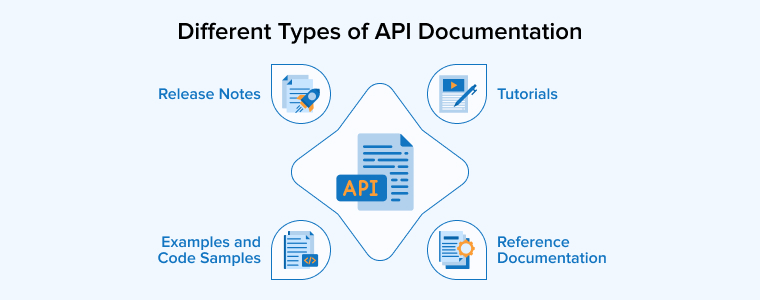
Reference Documentation
Reference documentation is the most technical type of API documentation. It acts as a complete reference manual for developers who already understand APIs. Its main purpose is to provide exact and reliable details about how the API works. Developers use it when they need precise information rather than guidance. This documentation lists all available endpoints and explains what each one does. It clearly shows API request methods, such as GET and POST. It describes both required and optional parameters. Additionally, it explains headers, authentication rules, and request limits. Response formats are defined in detail, including success and error messages.
Reference documentation is structured and consistent. It avoids lengthy explanations and focuses on accuracy. Developers rely on it while coding to verify syntax or expected responses. It helps reduce mistakes and confusion during integration. Because APIs change over time, reference documentation must stay updated. Outdated details can break applications. When maintained properly, it becomes a trusted source for developers. It supports faster development and fewer support requests.
This type of documentation is essential for creating stable and professional APIs. It ensures developers always understand how to interact with the API correctly and confidently.
Tutorials
Tutorials are designed to teach developers how to use an API through real-world tasks. They are learning-focused and practical. Instead of listing every feature, tutorials show how to achieve a specific goal from start to finish. A tutorial usually explains a use case in simple steps. For example, it may show how to create a user, process a payment, or retrieve data. Each step builds on the previous one, making learning easier and more natural. Developers can follow the steps sequentially and see results quickly.
Tutorials often include explanations alongside instructions. They explain why a step is needed, not just how to perform it. This helps developers understand workflows and logic, building their confidence and understanding. These guides are very useful for beginners as they reduce frustration and accelerate learning. Even experienced developers use good tutorials when exploring new APIs as they are clear, focused, and practical without any unnecessary complexity. When done well, tutorials improve adoption and help developers succeed faster with the API.
Examples and Code Samples
Examples and code samples show how an API is used in real situations, providing the best way for developers to learn. They provide practical guidance through working requests and responses, for example, sample API calls and their expected outputs. Code samples show how to use the API in various programming languages, helping developers quickly integrate the API into their own projects.
These samples reduce guesswork, removing the need for developers to figure out the syntax on their own. They can adapt existing examples, which saves time and prevents errors. Good examples are clear and realistic, reflect common use cases, and also follow best practices. Poor examples can confuse developers, so maintaining quality is essential.
Code samples are especially useful for beginners as they help bridge the gap between documentation and real code. Even experienced developers use them for quick reference. When updated regularly, examples build trust by showing that the API is well-maintained. This type of documentation improves productivity and accelerates integration significantly.
Release Notes
Release notes are an important part of API documentation as they inform developers about changes made to the API over time. Each update is clearly documented, so users know what is new, fixed, or removed, which helps developers stay prepared and avoid surprises. Release notes usually explain new features and improvements, and also highlight bug fixes and performance updates. If any breaking changes are introduced, release notes warn developers in advance. This allows teams to plan updates and make required changes safely.
Clear release notes improve communication between API providers and users, removing the need for developers to search for changes or test blindly. They can quickly understand how an update may affect their application and save time and reduce errors.
Release notes also support better version control. Developers can track how the API has evolved, and even see older updates for reference for debugging and long-term maintenance. Well-written release notes build trust and show that the API is actively maintained and transparent. When developers feel informed, they are more confident using the AP, resulting in smoother upgrades, stronger adoption, and better overall developer experience.
The Structure of API Documentation
A clear API document explains usage, structure, and features, making integration simple and reducing confusion for developers. It includes the following sections:
Overview
The overview section introduces the API in a clear and simple way. It explains what the API is built for and the main tasks it can perform. This section highlights key features, available resources, and common use cases. It also informs users for whom the API is meant and how it helps solve problems. Basic details like authentication needs and the base URL are included. A short overview helps developers quickly understand the API’s value. It allows them to decide if it fits their project before exploring deeper details.
Endpoints/API Reference
The endpoints section explains how developers interact with an API.
- Each endpoint should clearly display its URL and the HTTP method used to access it.
- A short description helps users understand what the endpoint does. All request details must be listed, including query values, path data, headers, and body fields.
- Tables work well for showing parameter names, types, and whether they are required.
- For complex data, nested fields should be explained simply. Example requests and responses help users see correct usage. Both success and error responses should be included.
- Response codes must be clearly defined.
Well-documented endpoints act as clear connection points. They help developers send and receive data correctly. Clear endpoint documentation reduces errors.
Authentication and Authorization
The authentication and authorization section explains how users safely access an API.
- It should clearly show which authentication methods are supported and when to use each one. Common options include API keys, OAuth 2.0, and JWT tokens.
- The documentation must explain how to get credentials and how to send them with requests. Each step should be written in a clear order. Examples help developers avoid mistakes during setup.
- Token details such as expiry time and refresh procedures must be included.
- Required headers should be clearly listed.
- Error responses like unauthorized access should include explanations with solutions. This helps users fix issues without support requests.
- The guide should separate simple access methods from advanced flows. New users benefit from quick starts. Experienced teams need more advanced control options.
- Clear security documentation builds confidence from the first API call. It reduces confusion during onboarding. It also protects sensitive data and systems.
Authentication confirms identity, whereas authorization controls permission levels. Both work together to keep APIs safe. Regular updates to this section are important as security practices change over time. Clear instructions help teams work faster and safer.
Use Cases
Along with reference details, add tutorials and practical guides. Real examples show how the API works in real projects. Clear steps and simple code help beginners learn faster and apply features with confidence.
Troubleshooting Guidelines (Error Handling)
Error documentation helps developers fix problems fast and with less stress.
- Each error should be clearly listed with its HTTP status code, message, and exact reason.
- Avoid vague descriptions and explain what caused the issue and what action can resolve it.
- Add simple troubleshooting steps for common mistakes, such as missing parameters or invalid tokens.
- Include example error responses so developers can recognize issues quickly.
- Group errors in tables to improve readability.
- When possible, link to helpful guides or related sections for deeper understanding.
Clear error details reduce guesswork, lower support requests, and help developers recover smoothly when requests fail.
Rate Limiting
Rate limiting documentation explains how often users can call an API without issues. It should clearly state request limits, time ranges, and usage quotas. Describe how limits apply to users, IPs, or API keys. Explain what happens when limits are exceeded and how clients should respond. Include headers that show remaining requests and reset times. Additionally, explain pagination rules and parameters. Providing clear details helps developers to plan traffic, avoid errors, and protect systems from overload or misuse.
Versioning & Changelog
APIs change over time, so documentation must also change with them. Each active API version should have its own clear and updated guide to help developers find the correct details. Older versions may remain in use for long periods; therefore, clear version labels can reduce confusion and mistakes. Breaking changes should be easy to identify, and migration steps should be explained in simple terms. A visible deprecation plan builds confidence, and change logs help users track updates. Versioned docs keep trust strong and usage smooth.
API Documentation Best Practices
API documentation should focus on real users. Clear structure, helpful examples, and simple guides improve usability, boost adoption, and help developers succeed faster. The best practices given below, if implemented correctly, can help you create effective API documentation:
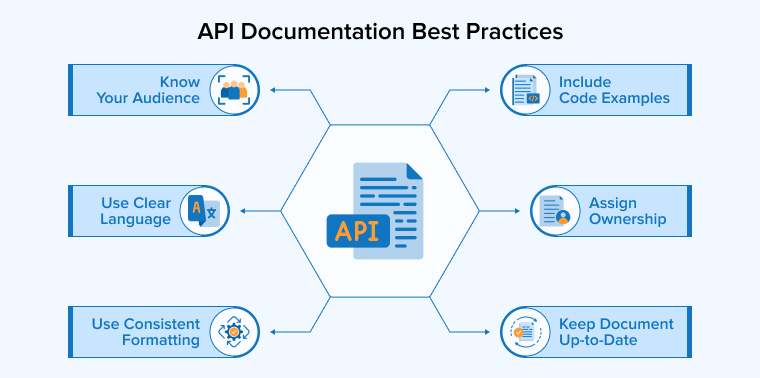
1. Know Your Audience
Before writing API documentation, it is important to clearly understand who will use it. Different users have different needs and skill levels. Some may be new developers who need simple explanations, while others may be experienced engineers who want deep technical details. Creating user personas comprising experience level, goals, and common problems helps define these groups. This makes it easier to choose the right tone and level of detail in the document.
Documentation should be organized so beginners can find overviews and quick-start, while advanced users can access detailed references. Clear language should be used with minimal jargon, and examples should match real use cases. Feedback from support tickets and questions can guide improvements. When content is shaped around the audience, it becomes easier to read and use, saving time and effort. Well-targeted documentation helps users learn faster and use the API with confidence.
2. Use Clear Language
Clear and simple language makes API documentation easier for everyone to use.
- Complex ideas should be explained in plain words, and technical terms should be defined the first time they appear.
- Short sentences help readers understand faster, and the active voice keeps instructions direct and friendly.
- Jargon, slang, and unclear acronyms should be avoided. If a technical word is required, a short explanation should follow.
- Examples should be easy to read and focused on common tasks.
- Parameter descriptions must be simple and specific.
- Code samples should use clear names that explain their purpose.
- The tone should feel welcoming and inclusive. Gender-neutral language helps reach a wider audience.
- Accessibility also matters, so images should include clear text descriptions.
Simple wording supports beginners and saves time for experts. When documentation is easy to read, developers feel confident. This leads to quicker learning, fewer mistakes, and faster adoption of the API.
3. Use Consistent Formatting
Consistency is one of the most important qualities of strong API documentation.
- Using the same terms across all pages helps developers understand concepts faster.
- Clearly define words like resources, requests, and responses early. Use them the same way everywhere.
- Follow one fixed format when describing endpoints. Keep the order of method, URL, parameters, and responses unchanged. This predictability saves time and avoids confusion.
- A shared writing style across teams also matters. Tone, structure, and naming should feel familiar on every page.
- Style guides help teams stay aligned and reduce mistakes.
- Industry standards such as OpenAPI add clarity and familiarity for new users. Good organization is equally important.
- Split content into clear sections like overview, setup, authentication, endpoints, examples, and errors. This makes navigation easy and logical. Developers can quickly find what they need without guessing.
- Consistent layouts also improve scanning and learning. Examples should follow the same structure and naming rules.
Clear navigation and stable patterns build confidence. When documentation feels predictable, developers trust it more. Consistency turns complex APIs into easier tools that feel reliable and professional.
4. Include Code Examples
Code samples make API documentation easier to understand and faster to use.
- Place examples near the features they explain.
- Show how real requests and responses look in practice.
- Include samples in popular languages to support different developers.
- Keep the code short and focused, and add clear comments that explain each step.
- Make sure every example can run with little or no change.
- Test all samples carefully to avoid errors, as broken code reduces trust quickly. Practical snippets help users learn by testing the code themselves.
Examples also reduce confusion during first use. Well-written samples guide developers toward correct usage and best practices.
5. Assign Documentation Ownership
Assigning clear ownership for API documentation ensures it stays accurate and useful. A dedicated owner tracks updates, fixes gaps, and keeps content updated. This role may belong to a technical writer or a developer. Clear responsibility improves consistency, reduces errors, and prevents outdated information.
6. Keep Document Up-to-Date
API documentation must stay updated to remain useful and trusted. APIs change often as teams release new features, fixes, and improvements. If the documentation does not reflect these updates, developers may feel confused or blocked. This can slow adoption and reduce confidence in the product.
- Treat documentation as a living asset, not a one-time task. Every API change should trigger a documentation update. This includes new endpoints, modified behavior, and removed features. Keeping a clear changelog helps users understand what changed and why.
- Regular reviews also prevent small gaps from growing into major issues.
- Sharing updates through release notes, emails, or newsletters keeps users informed and engaged.
- Feedback from developers is valuable and should guide improvements.
- Automated tools can help sync documentation with code changes, but human review is still important.
- Hosting documentation online ensures users always see the latest version.
- Updated examples and clear migration notes save time and reduce errors.
When documentation stays accurate, developers work faster and feel supported. Consistent updates show that the API is actively maintained. This builds long-term trust and encourages users to continue investing in the platform.
API Documentation Example
Many real API documentation samples exist. They help teams understand structure, content, and best practices for creating clear and useful developer guides. Let’s discuss two popular ones:
React Docs
React Docs are a strong example of clear API documentation for a framework. They explain concepts, components, and hooks in simple language. Practical examples help developers learn faster. The guides show how to build real interfaces step by step, which makes React easier to adopt and use.
Dropbox API
Dropbox’s API documentation shows how developers can connect apps with its file-sharing system. It explains available features and contains detailed references to support custom builds. Its ready-made components simplify common tasks, and official SDKs help developers work faster across different programming languages.
Final Thoughts
A good API documentation is more than a technical add-on. It is the main guide that helps users understand, trust, and adopt your API effectively. Interactive documentation explains the value, reduces confusion, and speeds up integration. They also allow teams to avoid repeated questions and errors. Well-written docs act like a product ambassador, showing how the API solves real problems. When documentation stays updated and user-focused, it improves long-term adoption and satisfaction. Using the right tools and best practices makes this process easier and more reliable. In the end, effective API documentation supports growth, builds credibility, and ensures your API reaches its full potential in the developer community.
FAQs
API documentation serves as a clear step-by-step guide that explains how an API works, how to use it, and how developers can integrate it with their applications.
The types of API documentation are reference documentation, tutorials, examples & code samples, and release notes.
A high-quality API documentation structure includes the following things:
1. Overview
2. Endpoints/ API Reference
3. Authentication and Authorization
4. Use Cases
5. Error Handling
6. Rate Limiting
7. Versioning and Changelog

Itesh Sharma is core member of Sales Department at TatvaSoft. He has got more than 6 years of experience in handling the task related to Customer Management and Project Management. Apart from his profession he also has keen interest in sharing the insight on different methodologies of software development.



Comments
Leave a message...