


Using AI in the web development process can revolutionize the industry. It enables a web application development company to build modern web apps that can perform complex and high-computation tasks. They integrate AI to streamline UI/UX designing, programming, QA, and maintenance while building innovative and highly customized web products. In this article, we will explore the use cases, benefits, and limitations, along with a list of AI tools, that assist with various aspects of the web development process.
How to Use AI in Web Development?
Implementing AI in web development helps build better solutions with robust and advanced features. It not only automates or streamlines the development process but also improves the efficiency and outcomes. Let us see how AI is useful in various aspects of web development.
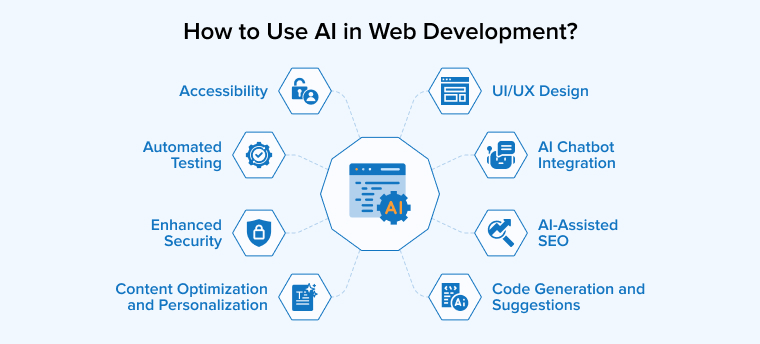
Code Generation and Suggestions
AI-based code generation tools save web developers’ time by automating repetitive tasks and creating repetitive code. Many automated tools also allow automatic generation of new code from scratch. They offer built-in features for database management, real-time APIs, and authentication to set up a backend, eliminating the need for manual coding.
AI-powered tools can also help web developers write clean and efficient code through their suggestion capabilities. They analyze your past programming history and identify the pattern in it. So, when you start writing code for a specific feature, it offers snippet suggestions that combine your programming style with the most efficient way to code that feature.
UI/UX Design
AI tools handle layout optimization, ensuring consistent styles, resizing images and other routine design tasks. They suggest layouts and color schemes to the designers to deliver a personalized and enhanced user experience.
Automation also enables the designers to transform text inputs and sketches into a fully functional UI. It speeds up the design process, allowing UI/UX designers to focus on more creative aspects of the project. Designers can also use AI to analyze preferences and build interfaces with tailored interactions to deliver a personalized user experience.
AI Chatbot Integration
AI chatbots are popular nowadays, and they help users solve their queries and guide them in site navigation. It is quite challenging for humans to address the user’s query quickly, but AI chatbots can give instant support. Users can get a response from AI chatbots in natural language. They can directly ask for information instead of having to search for it.
Automated Testing
QA and testing processes are streamlined, accelerated, and made more efficient with the help of AI solutions. They can also analyze the past test data to ensure that the same issues don’t arise during the development or deployment of the given product. AI is used for code review, code refactoring, and debugging to detect bugs, ensuring high quality and smooth functionality. AI-based web testing is more thorough and accurate compared to manual testing. Automated testing tools offer detailed test reports, providing data-driven insights for faster iterations, improved code quality, and enhanced web experience.
Enhanced Security
AI helps web developers and testers identify weaknesses or vulnerabilities in your system by simulating common cyberattacks. They also enforce adherence to data privacy standards and security protocols. Advanced algorithms are executed to identify the user behavior or patterns and spot anomalies that may pose a threat to your web app or its data. A myriad of ML models are available in the market that help businesses implement authentication procedures, analyze user behavior, and find fraudulent activities.
Accessibility
Businesses must make sure that their websites or web apps can be easily accessed by everyone, including people with disabilities. They can leverage AI tools to implement color contrast optimization, captions and transcripts, voice assistance, image recognition, and text-to-speech technology.
Tools like IBM deliver accessible content, VoiceView helps navigate products and services to visually impaired people, whereas Euphonia provides enhanced speech recognition, especially for people with speech issues.
AI-Assisted SEO
SEO operations require exhaustive research and overwhelming efforts. Using AI for SEO tasks like examining meta descriptions, internal link structure, keyword density, alt texts, content headlines, video titles, and more helps yield effective outcomes with minimum manual effort.
Developers use AI-powered tools to create search engine-optimized websites for better ranking. Many SEO tools also allow automation of finding relevant keywords, identifying user behavior, and other key factors responsible for ranking.
Improved SEO recommendations lead to increased organic traffic and enhanced website visibility. AI SEO also allows for continuous monitoring and tracking of web pages’ ranking, deriving insights to develop effective SEO strategies.
Advanced Content Optimization and Personalization
Businesses utilize GenAI tools to create personalized content for customers for an enhanced brand experience and build loyalty. Creating personalized emails, messages, or content for thousands of customers is not humanly possible. That’s where AI comes in. It sources data from different points, analyzing their journey, behavior, and then creates dynamic content for personalization, making it feel like it is speaking directly to them. And it’s not just limited to text-based content. Businesses can also produce high-quality video content using AI tools.
Benefits of Using AI in Web Development
AI-powered web development brings a wide range of benefits for business users, some of which are as follows:
Minimize Human Errors
Integrating AI into web development reduces manual efforts, leading to minimal manual negligence and inaccuracies. AI helps automate various aspects of the web development process, like designing, programming, testing, and performance monitoring. Automated web development improves operational efficiency and ensures expected outcomes in the development environment.
Improved User Experience & Enhanced Engagement
Businesses utilize web automation to deliver a personalized experience even on the enterprise-level web apps with thousands of daily visitors. AI tools analyze the user’s behavior and preferences to deliver a personalized experience.
With the help of AI, web developers can create better components and web features, such as chatbots and dynamic UI elements, which ultimately improve user engagement on the website.
Enhanced Communication
A popular use case of AI is chatbots and virtual assistants to communicate with visitors in real-time, providing customer care and responding to users’ queries. AI chatbots can handle a variety of interactions with users, ranging from simple questions to complex duties, enhancing customer communication with the brand and reducing the support team’s workload.
Responsive Design Optimization
UI/UX designers leverage AI tools to create responsive websites that deliver a consistent and enhanced user experience across various screen sizes and devices. AI helps build websites or web apps with adaptable layouts and the content that automatically generate, adjusts & considering the capabilities of devices and users’ preferences.
Challenges of Using AI in Web Development
New opportunities also come with their fair share of problems. Using AI tools to develop modern web applications gives rise to complex issues that demand careful consideration and strategic planning.
Skill Erosion
Using AI tools to enhance web development outcomes is beneficial, but over-reliance on them canerode the skills of developers, designers, and testers. In the technological realm, professionals must constantly update their knowledge and upgrade their skill set to stay relevant and in demand to meet evolving customer requirements.
If any AI tool can perform your job, then the business would deem it more plausible and economic to use a few tools instead of hiring and managing an entire team. So, use AI in a way that helps sharpen your skills instead of posing a threat to your job.
Less Oversight in Critical Areas
After automating certain aspects of web development, the biggest mistake the development team makes is leaving the process unchecked or unsupervised. This lack of human oversight on web automation can lead to various types of errors or unintended consequences. Therefore, even if the AI tools are extremely reliable and accurate with their outcomes, human oversight is required to ensure the quality and reliability of the outcomes.
Data Privacy and Security Concerns
In many instances, AI web development tools require sensitive user data or business information for training. If proper data protection measures are not in place or your AI tool is not trained to strictly follow security protocols, then it will be a cause for great concern regarding data security and user privacy.
Bias Risks
AI algorithms often unintentionally inherit and promote bias from the data they are trained on. Therefore, businesses must be very careful about the data they use to train their AI models to ensure fair and accurate outcomes.
AI Tools for Web Development
AI tools are changing how developers design and build modern websites. The tools discussed in this topic speed up coding, improve user experience, and simplify testing and maintenance tasks.
AI Tools for Code Generation and Optimization
Here are the top AI tools that help developers automate code writing and optimization processes.

1. GitHub Copilot
GitHub Copilot acts as your AI assistant during programming with its features like autocomplete-style suggestions. Leveraging vast code repositories and built in collaboration with OpenAI, Copilot provides real-time code snippets, functions, and even entire files that are relevant to the current context, comments, and related files in a project.
This capability makes it an indispensable tool for both generating code and optimizing the development workflow across numerous programming languages. By offering contextual code suggestions and helping to generate documentation and unit tests, Copilot helps boost productivity and enhances the coding experience.
2. OpenAI Codex
Built upon a version of OpenAI’s GPT model, OpenAI’s Codex is a robust AI tool specifically trained for software engineering tasks. It is highly useful for code generation as it can write code and create informative content based on simple prompts.
On top of code creation, Codex also assists in optimization and workflow efficiency by facilitating tasks like code review, pull request review, and automated merges through its integration with GitHub.
Developers and non-engineers can use this AI tool through a ChatGPT interface or a command line interface to efficiently apply changes, summarize differences, and provide feedback, improving collaboration and accelerating development.
3. Tabnine
Tabnine is an AI code completion tool that helps developers with code generation and optimization by leveraging machine learning to analyze code and provide smart, context-aware suggestions. As one of the original AI coding assistants, it can predict entire lines of code, including function calls and variables, dramatically reducing repetitive typing.
Tabnine stands out for its wide language versatility (supporting hundreds of languages and frameworks) and its powerful IDE compatibility. Additionally, it offers unique Team Learning and Private Models capabilities, allowing it to learn from an entire team’s or private codebase to ensure AI-generated code is consistent with specific project requirements and coding standards.
Low-Code/No-Code AI Platforms
In this section, we explore the tools that can help even non-technical professionals to design and develop websites or specific web components with minimal or no code.

1. Wix ADI (Artificial Design Intelligence)
The Wix ADI (Artificial Design Intelligence) platform revolutionizes web development by serving as an AI-driven low-code/no-code solution. Every developer can use this tool to get started with web development by asking a series of questions about the required site’s purpose and content.
Wix ADI uses these inputs to automatically create a fully functional, customized website in minutes. This streamlines the initial design process and ensures the layout is tailored to specific business needs and easily integrates content. Furthermore, it provides more customizability to users through a drag-and-drop feature to further edit the AI-generated site, making it a powerful tool for rapid, code-free website deployment.
2. Webflow with AI Plugins
Basically a visual development platform, Webflow is a low-code solution that significantly aids web development through enhanced AI plugins. It allows both designers and developers to create visually responsive, dynamic websites using an intuitive drag-and-drop interface, effectively bridging the gap between design and code.By combining the flexibility of a design tool with robust CMS functionality, hosting, and SEO tools, Webflow enables users to launch sophisticated sites without writing extensive code. The platform’s ease of use and comprehensive features make it an ideal tool for AI in web development.
AI Tools for UI/UX Design
The tools discussed below empower the UI/UX designers to design more responsive interfaces and engaging UI components:

1. Uizard
Uizard streamlines the UI/UX design and prototyping workflow. It comes with tools like Autodesigner and a wireframe generator that allow users ranging from non-designers to product teams to easily create web and mobile app designs. UIzard can instantly generate wireframes or design layouts from initial concepts or even hand-drawn sketches.
On top of that, it works as a bridge between design and development through its Design-to-Code feature, which automatically converts design mockups into clean, reusable frontend code (like HTML and JavaScript).
This capability, combined with its intuitive interface and real-time collaboration features, makes Uizard a must-have tool that quickly turns design ideas into interactive prototypes and speeds up the entire frontend development process.
2. Figma AI
Figma enhances its platform with built-in AI features that simplify daily design tasks. Designers can quickly generate placeholder text and avoid repetitive typing. The system can automatically rename layers to keep large projects organized. . In brainstorming sessions, it summarizes sticky notes to highlight key ideas. It also creates basic animations between frames to speed up prototyping.
Users can rewrite or translate text without leaving the design file. These smart tools reduce manual effort and support smoother teamwork. By embedding AI directly into its workspace, Figma helps teams design faster and collaborate more effectively.
3. Adobe Sensei
Adobe Sensei is not a standalone application but rather an integral AI and machine learning technology embedded across the Adobe platform, including the Creative Cloud. Sensei’s functionality varies in the context of UI/UX design and content creation, but it is proven to be of great help in automating and simplifying complex tasks. Adobe Sensei offers intelligent features like auto-tagging of assets, content analysis, and Generative AI solutions to assist designers.
Moreover, services like Sensei GenAI and the Firefly prompt-to-image tool empower Sensei for rapid creation of on-brand content, image variations, and high-quality assets that can be ethically sourced and tailored to specific audience insights, leading to increased design workflow efficiency.
4. Canva’s Magic Design
Canva’s Magic Design, part of the Canva Magic Studio suite, serves as a highly useful AI tool for UI/UX and graphic design, especially for non-designers and businesses seeking quick outcomes. Instead of starting with a blank canvas, Magic Design allows users to input a text query or a photo to instantly auto-generate relevant and inspiring templates that match the specified style and content.
This capability helps designers quickly transform ideas into smart designs and layouts, significantly streamlining the initial creation process. By leveraging its AI-based and user-friendly drag-and-drop interface and enabling the one-click application of a Brand Kit (Pro), Canva ensures that even complex designs can be created with visual appeal while maintaining brand consistency.
AI Tools for Automated Testing and QA
The testing team can use these tools to improve the efficiency of their testing and QA process, obtaining more accurate and comprehensive reports.

1. Testim
Testim is a powerful, AI-powered platform that focuses on test stability and maintenance to improve web testing and QA. Its Smart Locators Machine Learning (ML) algorithms help identify and track UI elements using multiple attributes, allowing tests to automatically self-heal when minor application changes occur. This eliminates the significant time testers usually spend fixing flaky scripts.
This AI tool supports both technical and non-technical team members with its low-code/codeless interface for rapid test authoring, including features like Agentic Test Automation, which generates entire tests from natural language input. By ensuring high test stability, accelerating test creation, and integrating seamlessly into CI/CD pipelines, Testim enables QA teams to achieve higher test coverage and faster release cycles with greater confidence.
2. Applitools
Applitools is a robust AI tool that is critical for modern automated testing and QA. It surpasses the traditional code-level checks by leveraging Visual Artificial Intelligence. The main purpose of Applitools is to automate visual testing of web and mobile applications, ensuring they appear and function correctly across various devices and browsers.
Applitools achieves this by comparing the application’s current visual output against pre-approved baseline images, efficiently identifying even minor layout shifts or rendering errors that traditional functional tests often miss. This capability guarantees a consistent user experience across all platforms, and with its seamless integration into CI/CD pipelines, Applitools significantly streamlines the quality assurance process by providing comprehensive reports on identified visual discrepancies.
3. Functionize
Functionize is a comprehensive AI-powered platform that revolutionizes testing by automating the entire lifecycle, from creation to maintenance. It uses a combination of Natural Language Processing (NLP) and Generative AI techniques, allowing testers to easily create and execute tests simply by using plain language.
A crucial capability is the self-healing feature, powered by machine learning technology and its architect plugin, which automatically adapts and maintains tests by recording user interactions and adjusting to UI changes, drastically minimizing the need for manual updates.
Furthermore, its test agents use AI to generate tests from user journeys and auto-debug failures with root-cause analysis, providing cloud scalability and incorporating visual verifications to ensure pixel-perfect user experiences.
4. Mabl
Mabl is a leading low-code AI test automation platform that enhances the efficiency and effectiveness of automated testing and QA for agile teams. It leverages machine learning in multiple ways, mostly through Auto-Healing Tests that automatically detect and adapt to application changes. As a result, the test maintenance overhead reduces significantly.
Mabl allows all team members to create a wide range of tests, including browser UI tests for SVGs, 2FA, email, and PDFs, mobile UI tests, and end-to-end API tests, using low-code or JavaScript. Beyond basic test execution, its AI provides intelligent wait for enhanced reliability, suggests new tests to expand coverage, and performs visual change detection to catch unintended UI differences, ultimately streamlining the QA process and accelerating time to market.
AI Tools for Content Generation
The development team no longer needs to worry about creating the content for the website or application they are building. More importantly, it helps you craft highly personalized content for targeted customers.

1. ChatGPT
ChatGPT, an advanced conversational AI tool developed by OpenAI, is highly useful for content generation due to its exceptional Natural Language Understanding (NLU) and generation capabilities. It specializes in processing complex prompts to create human-like text across various formats, enabling users to rapidly generate copy, summaries, articles, or other textual assets.
While not its primary focus, ChatGPT comes with the ability to respond to and understand instructions, and also allows it to draft preliminary code snippets, structure outlines, and assist in documentation. This helps simplify content-heavy tasks in the fields of web development and customer service solutions, such as chatbots.
With API access and fine-tuning capabilities, it is possible to customize and integrate ChatGPT into various applications to generate relevant, on-brand content.
2. Jasper AI
Jasper is a highly popular and versatile AI content creation tool that streamlines the process for bloggers, marketers, and copywriters across multiple media. It excels at generating diverse on-brand copy, including blog posts, social media captions, marketing materials, and website text, all of which can be easily adapted for different audiences and languages.
Jasper is conversion-oriented, designed to produce content that drives action and engagement. Beyond text, this AI tool also offers features for creating high-quality audio and video content using text-to-speech technology. This simplifies the entire multimedia production process and allows teams to focus on creative strategy while maintaining a consistent voice.
3. Copy.ai
Copy.ai is a cutting-edge AI content creation tool that leverages advanced Natural Language Processing (NLP) and Machine Learning (ML) algorithms to generate high-quality, engaging written content rapidly. It has an exceptional ability to understand user intent and use natural language generation techniques to craft compelling copy in minutes.
With an intuitive user interface, Copy.ai makes it easy for all levels of writers to quickly produce a diverse array of written assets, including blog posts, articles, product descriptions, and marketing copy, significantly boosting content production speed and efficiency.
AI Tools for Chatbots and Customer Support
These AI tools are designed to help developers and businesses create and deploy AI-powered chatbots and virtual assistants that can handle conversational interfaces.

1. Dialogflow (Google Cloud)
Dialogflow is a comprehensive NLP platform offered by Google Cloud for building sophisticated conversational interfaces. It enables developers to design AI agents that understand user intent and context. Its usefulness lies in its strong NLP engine and its ability to seamlessly integrate with a wide variety of channels, including websites, mobile applications, and popular messaging platforms.
2. Microsoft Bot Framework
The Microsoft Bot Framework offers a complete, end-to-end framework for web designing, building, testing, and publishing enterprise-grade chatbots. It provides a robust set of SDKs and tools that facilitate the development process. A key benefit here is its multi-channel capability that allows the same bot to be deployed across platforms like Facebook Messenger and Slack, ensuring broad reach and consistent performance.
3. Rasa
Rasa is an open-source framework for developing context-aware chatbots and AI assistants. As an open-source solution, it offers greater flexibility and customization capabilities over the underlying AI models and conversation logic. This makes it particularly valuable for developers who need to build more complex and demanding applications that require deeper integration and proprietary control over the conversational AI.
4. Zendesk Answer Bot
The Zendesk Answer Bot is a specialized AI-powered chatbot designed to provide instant customer support directly on a website. Its primary function is to immediately answer common customer questions, deflecting support tickets, and reducing agent workload. Its usefulness is closely tied to its tight integration with Zendesk’s customer support platform, allowing it to leverage existing help center content and seamlessly escalate complex issues to a human agent.
AI Tools for Data Analysis and Personalization
These AI-powered platforms are essential for developers and marketers to gain a deep understanding of customer activity, which is crucial for delivering highly personalized customer interactions and optimizing digital experiences.

1. Google Analytics with AI Insights
Google Analytics leverages machine learning to provide meaningful insights into user behavior on websites and apps. It goes beyond simple reporting to predict user actions, identify high-value segments, and flag anomalous activity. Businesses use Google Analytics to understand user interaction, identify areas for improvement, and improve overall website usability and conversion paths.
2. Segment
Segment functions as an AI-powered Customer Data Platform (CDP) that automatically collects, unifies, and analyzes customer data gathered from both online and offline sources. By providing a single, consistent view of each customer, Segment enables teams to activate this clean data to build hyper-personalized customer journeys and execute highly targeted and effective personalized marketing campaigns across all channels.
3. Optimizely
Optimizely is an AI-powered experimentation platform designed to continuously optimize website content, features, and user flows. It utilizes AI to power and scale A/B testing and multivariate testing, allowing businesses to rapidly test different hypotheses about their digital experience. This capability enables companies to confidently make data-backed decisions that offer truly personalized experiences and maximize business results.
Conclusion
AI is becoming increasingly essential to ensure efficient, accurate, and highly personalized outcomes in web development. AI web development tools, ranging from chatbots to data visualization applications, are used by businesses to revolutionize how users interact with websites by enhancing the overall user experience. Companies leverage AI-empowered web development to stay ahead of the competition and serve their customers better. AI also enables you to be more innovative and user-centric.

Itesh Sharma is core member of Sales Department at TatvaSoft. He has got more than 6 years of experience in handling the task related to Customer Management and Project Management. Apart from his profession he also has keen interest in sharing the insight on different methodologies of software development.



Comments
Leave a message...