


Web application development is not just about building and releasing a web app for users. In the process of Web Application Development, what if your developed web application does not work as expected? What if the users encounter unusual behaviour they don’t know about? How will you handle a major loss if an attacker breaches the web security? To prevent these situations, every web app undergoes a testing and debugging phase. Web application testing is a process to guarantee that the objective behind building the application is fulfilled.
What is Web Application Testing?
Web application testing verifies the functionality of a web application according to its expected requirements. It involves end-to-end testing to find bugs, flaws, or mistakes that can hamper the user experience. The primary motive behind web testing is to diagnose potential troubles and figure out solutions beforehand. It’s a systematic approach to performing different tests, evaluating all the components and characteristics of a web application.
Web application testing ultimately leads to customer satisfaction and business profitability. It safeguards the company’s reputation. After the product launch, any defects and vulnerabilities will cost you an unanticipated rework. Hence, prevention is better than a cure. Every web development company has a testing team to handle all the processes of reviewing the quality of the developed web application before its release.
Why is Web Application Testing Important?
The success of any web application depends on its quality and functionality. No matter how many advanced functionalities you put in your web app. If even the smallest function does not work as expected, it’s considered a failure. Some of the key reasons for testing web applications are:
- Enriches User Experience: User interface testing guarantees an appealing and responsive UI, increasing user engagement and improving conversion rates.
- Guarantees Web Security: Security testing maintains data integrity and preserves customer trust.
- Improves SEO Ranking: Website testing verifies SEO practices, including page load times, page structure, and overall performance.
- Reduces Downtime: Web-based testing checks for proper error-handling mechanisms so that the application can recover from unexpected failures and crashes.
- Compliance Validation: Web app testing ensures that the website adheres to standard web practices, guidelines, and regulations.
Process of Web Application Testing
The web app testing process consists of well-established stages that include:
- Requirement Gathering: As a tester, you must know the purpose, requirements, and specifications of a particular web application.
- Test Planning: The QA team prepares the detailed test plan, including the test scope, strategy, timeline, and evaluation of the test estimate.
- Test Case Preparation: Testers prepare thorough test cases and set up a test environment to cover all the possible test scenarios based on the requirements and test objectives.
- Test Execution: Testers execute tests according to the test plan.
- Bugs Reporting: Testers identify, raise, and report bugs when test cases fail
- Regression Testing: Failed test cases are re-executed and reported after bug fixes.
- Test Closure: Once all bugs are fixed, the testers prepare a detailed report of the conducted web app testing.
Approaches to Web Application Testing
Before proceeding with web testing, it’s essential to determine the testing strategy. Any strategy requires specific knowledge, tools, and skills. You need to select the right testing approach that evaluates your web application comprehensively from different aspects. Any web application testing methodology relies on the project goals, the development phase, and the type of application being tested.
We’ll now look at the two most commonly used web application testing approaches:
Manual Testing
Manual testing involves executing test cases manually instead of using an automated testing tool. It’s an in-depth testing method that aims to check the real-time functioning of any web application. In this approach, testers perform actions like clicking buttons, navigating different pages, adding items to the shopping cart or wishlist, placing an order, filling out forms, signing up, and logging in.
Manual testing evaluates any application from a user’s perspective. It’s the first step in developing user-friendly and intuitive interfaces. Manual testing is crucial in exploratory testing, usability testing, and ad hoc testing, as they require a human opinion.
Automation Testing
Automated web application testing is performed using automated tools and test scripts. Various automation testing tools, such as Selenium, Cypress, and TestComplete, execute pre-scripted test cases in a defined manner. Automated testing is suitable for regression testing, data-driven testing, performance testing, smoke testing, and functional testing.
You need to carefully assess the scenarios for which you’re considering automation testing. You can automate tests such as monotonous and repetitive tasks, tests requiring multiple datasets, high-risk tests, manually intensive and time-consuming tests, and test execution on different platforms.
What are the Types of Web Application Testing?
Now, move towards the types of web testing. You must know the tests to perform during various phases of the testing process.
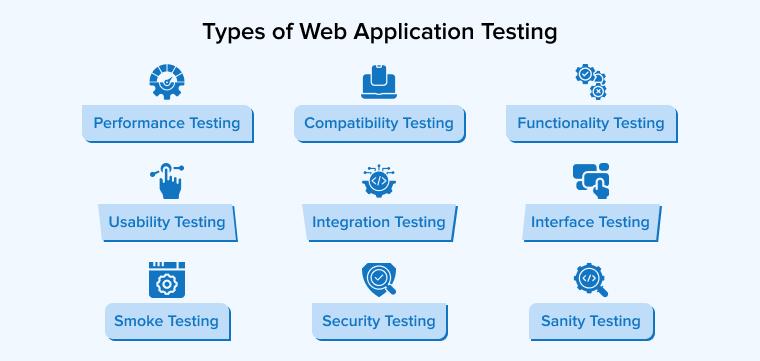
Performance Testing
It determines the application’s performance, such as speed, stability, and scalability, as per the metrics like response time, throughput, network latency, error rate, page load time, requests per second, and resource utilisation. The results help optimise the web app’s performance to ensure a flawless user experience.
There are various types of performance testing:
- Load Testing: Checks performance under average and peak loads.
- Stress Testing: identifies breaking points under high-traffic.
- Spike Testing: Checks response to sudden traffic spikes.
- Scalability Testing: Checks scale up and down to rising and falling loads.
- Soak Testing: Assess the application’s endurance to a higher workload for an extended time.
When to Use?
- To check an application’s scalability when moving an on-premise application to cloud infrastructure.
- Checking any gaming application’s interaction with multiple players simultaneously.
- To evaluate how an electronic health record system can handle large amounts of patient data.
- This is for checking a mobile app working in different geographical locations under variable network conditions.
- Check the performance of an e-commerce website during an online sale.
Compatibility Testing
This testing assesses the website’s compatibility with various platforms, such as different operating systems, web browsers, versions, devices, and networks. It ensures the web app’s intended performance across diverse environments to increase user experience. Users must experience the same functionality, visual appearance, and performance on every platform.
There are various types of compatibility testing:
- Browser Compatibility Testing: Checks the web application’s functionality across multiple web browsers.
- Device Compatibility Testing: Checks the compatibility with different devices with different configurations, like screen sizes and resolutions.
- Operating System Compatibility Testing: Evaluate the web application’s performance on different operating systems, such as Windows, macOS, Linux, and Android.
- Network Compatibility Testing: Assess web application performance under diverse network circumstances.
- Database Compatibility Testing: Checking the working of applications with different database types like MySQL, Oracle, etc.
When to Use?
- OTT platforms like Netflix must be accessible on all devices, including Android mobile phones, iPhones, tablets, and laptops.
- An application’s integration with third-party applications must not hinder its ability to work on different browsers and devices.
- An app for disabled users making use of screen readers must be accessible on different platforms.
- An updated version of the application must also support the old versions of browsers.
- To check if orders can be placed from any device on e-commerce platforms.
Security Testing
In the testing phase, security testing evaluates an application from a security perspective. It analyses various security threats, vulnerabilities, potential risks, and weaknesses an attacker could exploit. Security testing ensures the data integrity and security of your web application. It includes proper mechanisms to address the vulnerabilities and prevent unauthorised access and data breaches.
There are various types of security testing:
- Vulnerability Scanning: Find out the vulnerabilities and weaknesses in your web application.
- Security Auditing: Reviews the web application’s security policies.
- Penetration Testing: Simulates real-world attacks to identify vulnerabilities.
- Application Security Testing: Detects bugs within the application.
- API Security Testing: Checks whether APIs in the application are free from data exposures or unauthorised access.
- Network Security Testing: Checks for security weaknesses in the network infrastructure.
When to Use?
- To prevent loss of financial data and protect transactions on a mobile banking app.
- To ensure the security of data exchanged between the mobile app and the server.
- To prevent the hacking of social media accounts.
- To handle financial transactions across payment gateways.
- To make sure that attackers don’t get unauthorised access to IoT devices.
Interface Testing
Interface testing checks the communication of the web application across the different interfaces. This testing is performed mainly between two interfaces:
- Between a web server and an application server
- Between the application server and the database server
Parameters evaluated include the display of error messages, the functioning of communication protocols, the performance of servers under various scenarios, and the encryption of sensitive data transmitted across interfaces.
There are various types of interface testing:
- User Interface (UI) Testing: Checks the working of the user interface.
- API Testing: Validates the functionalities of the APIs.
- Database Interface Testing: Tests the interaction between web applications and database server interfaces.
- Middleware Interface Testing: Checks the communication of different software layers via middleware.
- Hardware Interface Testing: Verifies the interaction between hardware and software components.
When to Use?
- Check if patient data is correctly inserted into and retrieved from the hospital management system’s database.
- To manage interactions between the POS system, barcode scanners, and card payment devices.
- To download and upload files to cloud storage systems.
- When migrating to a cloud-based infrastructure.
- To check the integration of new modules into the existing system.
Functionality Testing
It’s a comprehensive test that examines your web application according to all the functional requirements and specifications from the perspective of end users. Various test cases are executed to test the application’s behaviour under different circumstances throughout the software development life cycle.
There are various types of functionality testing:
- Unit Testing: Tests individual functions, methods, or classes that build up the entire application.
- Regression Testing: Executing the same test cases after any system update or bug fixes.
- User Acceptance Testing: The end-users and stakeholders test the application in a real-world scenario.
When to Use?
- To test the integration of third-party payment gateways with your web application.
- To check the working of multiple user roles in an application.
- Whether a form takes valid input or not.
- To ensure the total price in the shopping cart displays correctly after adding or removing any product.
- To check if the existing features work correctly when new features are added to the application.
Usability Testing
End users perform usability testing and provide feedback regarding their experience. It checks the user friendliness of your application and whether it complies with standard practices. It’s beneficial for the testers to determine improvement areas and resolve usability issues, fulfilling user expectations and needs. Usability testing can be carried out at any stage of application development.
There are various types of usability testing:
- Explorative Testing: Conducted during the product design stage to assess that the design satisfies user requirements.
- Assessment Testing: Checks the user experience of an almost completed product.
- Comparative Testing: Compares the user-friendliness of two or more designs.
When to Use?
- Assessing the navigation across an online store.
- Verify if a patient can book a doctor’s appointment or view a test report on an online app.
- Disabled people can access the application without facing any difficulty.
- Testing that users can perform financial transactions on a mobile banking application seamlessly.
- Confirm that Users can book online flights on apps like MakeMyTrip.
Integration Testing
Integration testing is a type of functional testing that combines individual units of a web app and tests them together. It checks whether the combination of application components works as expected. Integration testing is performed after unit testing when testing a web application.
There are various types of integration testing:
- Big Bang: All modules are combined and tested simultaneously.
- Bottom-up: Testing begins from lower-level modules and moves upwards.
- Top-down: Testing begins from high-level modules and moves downwards.
- Sandwich: A mix of top-down and bottom-up approaches.
When to Use?
- Ensure seamless communication between different microservices.
- Test role-based access to different parts of the application.
- For cross-browser testing of web applications.
- To check the integration of external services with our application.
- Conduct testing when adding new interfaces or API endpoints.
Smoke Testing
Smoke testing is preliminary testing on every new build to check its stability. It assesses the significant functions of any new software build before moving forward to detailed testing methods. The goal is to recognise critical failures in the development process at an early stage to save the testing efforts in comprehensive testing. Due to this characteristic, smoke testing is also referred to as Confidence Testing, Build Verification or Build Promotion Testing. It’s also vital to conduct smoke testing before the release of the web application.
The following are the types of smoke testing:
- Manual Smoke Testing: Testers manually execute the smoke test cases.
- Automated Smoke Testing: Executing predefined scripts using test automation tools.
- Hybrid Testing: A combination of manual and automated smoke testing.
When to Use?
- To improve the overall quality of software builds.
- Validating each new code commit doesn’t break the build in a CI/CD pipeline.
- After database migration or updates, check the operation of functionalities linked to the database.
- Before the release of the Minimum Viable Product (MVP) of any web app.
- To assess the working of the core functions after fixing critical bugs.
Sanity Testing
Sanity testing is performed after smoke testing. It quickly checks the working of newly added modules or functionalities of the stable software build. There are no predefined test cases for performing sanity tests. Sanity testing is a smaller version of regression testing, as it tests only the recently added parts instead of testing the entire web application.
When to Use?
- After making some minor changes to the codebase, like bug fixes,
- After the integration of some modules or services with the existing web application.
- After performing some updates in the API to prevent failures.
- This is to check if a security patch has been correctly applied.
- After changing the database schema or carrying out database migrations.
What are the Challenges of Web Application Testing?
We know web testing is a complex and extensive process. So, it’s obvious to encounter different kinds of obstacles while testing web applications. QA professionals must be aware of at least the most common challenges of web testing and how to overcome them.
- Interaction with Firewalls: A firewall may block your web app due to some problems with security certificate compliance. Hence, test your website across different firewalls.
- Constant Changes: With the updates in the system, the test scripts must also be updated accordingly.
- Security and Privacy: Checking all the potential threats and vulnerabilities is a massive task due to a wide range of security attacks.
- Sustain Test Automation: Automated tests require updated test prints for every application update, which becomes difficult to maintain.
- Optimisation for mobile devices: To ensure your web application runs on all kinds of mobile devices with different features can be challenging.
Tools for Web Application Testing
Automated web testing accelerates web application tests. Selecting any testing tool for automated testing requires knowledge of the popular web testing tools.
Take a look at the six automated testing tools:
- Katalon Test Studio: It is a complete package of mobile, web, desktop, and API testing. Its prominent characteristics are test recording, test execution, script generation, drag and drop interface, etc.
- Selenium: It’s the most popular open-source web testing library. It supports multiple programming languages such as Java, Python, C#, Ruby, and JavaScript, for testing according to your skills. It supports diverse platforms like Windows, macOS, and Linux.
- Apache JMeter: It’s the best tool to carry out performance tests. You can use it for static and dynamic website testing.
- Appium: It’s one of the open-source cross-platform testing toolsused for mobile application testing for both Android and iOS. It supports JUnit and TestNG frameworks.
- SoapUI: It’s the widely used API testing tool that provides integration support for REST, SOAP, JMS, and 13 API management platforms.
- Browser Stack Cloud: As the name suggests, it’s a cloud-based real-time debugging and testing tool. It supports cross-browser and data-driven testing.
Final Thoughts
In today’s digital era, a website or a web application is a major driving force for running a business. Hence, it’s crucial to keep your website up to date with the latest trends. In this process, web application testing plays a significant role. It saves you valuable time and the investment you’ll incur in the future if you skip this.

Itesh Sharma is core member of Sales Department at TatvaSoft. He has got more than 6 years of experience in handling the task related to Customer Management and Project Management. Apart from his profession he also has keen interest in sharing the insight on different methodologies of software development.



Comments
Leave a message...