


The website or web application you build has a direct impact on how users discover, interact with, and trust your business online. With the advancement in web application development technologies and strategies, website interactivity and competitiveness have emerged as a major challenge. Web development companies need to conduct a proper evaluation of how and when their pages are generated. This is where rendering strategies such as Server-Side Rendering (SSR) and Static Site Generation (SSG) come into the picture.
Both rendering strategies, SSR and SSG, can improve website performance and make content easier for search engines to understand. However, both techniques function differently. SSR creates a page on the server when a user requests it, while SSG prepares pages ahead of time, usually during the build process.
It’s important for businesses to understand the differences between these two strategies to choose the right one. Therefore, we’re here with a blog discussing SSR, SSG, their working, implementation, benefits, limitations, usage scenarios, popular frameworks, and the differentiating factors between them.
What is Server-Side Rendering (SSR)?
SSR (Server-Side Rendering) is a method where a web server creates a complete HTML page before sending it to the user’s browser. When someone visits a website, the server processes the request, collects the required data, and builds the page with its content already included. As a result, users can see the webpage quickly without waiting for the browser to create it. After the page appears, JavaScript loads in the background to make features such as buttons, forms, and menus interactive. This approach is useful for websites that need fresh content, better search engine visibility, and a faster first-page experience.
How Does SSR Work?
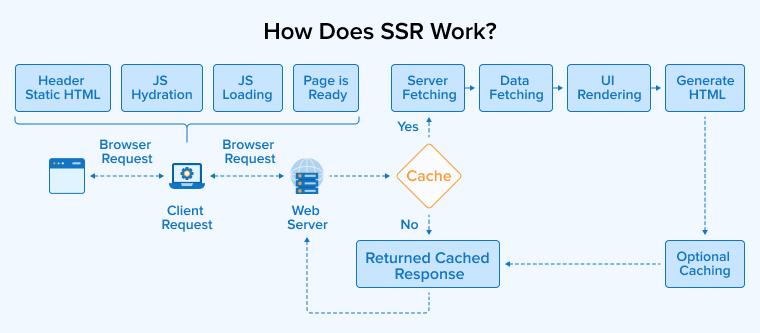
The above image describes the following steps involved in the server-side rendering process:
- Client request: The user types any URL or clicks on any link. The browser then sends the request to the web server for the specific page requested by the user.
- Server processing: Upon receiving the client’s request, the server begins processing.
- Data fetching: If the requested page needs any specific updated information, the server fetches that from databases or external APIs.
- HTML generation: The server processes the application’s code and available data to create a complete HTML page.
- HTML Delivery: The server sends the finished HTML page to the user’s browser for quick display.
- Instant Paint: The browser receives the code and shows the page right away without any blank screen or loading spinner.
- Hydration: After the page is displayed, the browser loads and runs the required JavaScript files. These scripts activate interactive features, allowing users to navigate and use the website without reloading every page.
Implementation of SSR with NextJS
Let’s understand practically how SSR works in a Next.js application:
- Open your terminal or command prompt. Run the following command to create a new Next.js 16 application:
npx create-next-app@latest server-side-rendering-app
- After the installation is complete, move into the project folder:
- Start the development server:
cd server-side-rendering-app
- Open your browser and visit the URL to view the project:
http://localhost:3000
Project structure: The folders below show how the sample routes are organized in the App Router.
📁 server-side-rendering-app — Root project folder 📂 src/ └── 📂 app/ ├── 📄 page.tsx Home route: / ├── 📂 users/ SSR example route └── 📄 page.tsx Opens at /users Tip: In the App Router, every folder inside app/ can become a route when it contains a page.tsx file. |
SSR Example (App Router)
Create: src/app/users/page.tsx
interface User { id: number; name: string; email: string; } async function getUsers(): Promise<User[]> { const response = await fetch( 'https://jsonplaceholder.typicode.com/users', { cache: 'no-store' } // SSR: fetch on every request ); return response.json(); } export default async function UsersPage() { const users = await getUsers(); return ( <main style={{ padding: 40 }}> <h1>Users List (SSR)</h1> {users.map((user) => ( <div key={user.id} style={{ marginBottom: 16 }}> <h3>{user.name}</h3> <p>{user.email}</p> </div> ))} </main> ); } Why it matters: The cache: 'no-store' option forces fresh server rendering on every request. |
Why is this SSR?
The cache: ‘no-store’ option disables caching, so Next.js fetches fresh data and this forces Next.js to render the page dynamically on every incoming request.
Since page.tsx is a Server Component by default, there is no need to use “use client”.
Open your browser and visit the URL:
http://localhost:3000/users
What Are the Advantages of SSR?
The following are the four major benefits of using server-side rendering:
Improved SEO
Server-side rendering helps search engines understand a website more effectively because the page content is already included in the HTML when it is delivered. This allows search engines and other web crawlers to read, index, and display the information accurately without depending on JavaScript, which can improve a website’s visibility in search results.
Enhance Performance on Load / Faster First Load
SSR improves the initial loading experience by sending a ready-to-display webpage directly to the browser. Users can initially view the main content faster without waiting for all scripts to finish loading. This makes websites feel faster and provides a smoother experience, especially when the internet connection is unstable or weak.
Deliver a Better User Experience
As the attention span of users is decreasing rapidly, they’ll bounce if your website takes time to load. SSR enables the site to load the fully rendered page immediately, thus increasing the engagement ratio and possible conversions.
Real-Time Updates
Server-side rendering is well suited for websites that display frequently changing or real-time information. The server can create pages using the latest available data for each request, making it useful for platforms such as online stores, news websites, and live monitoring dashboards.
What Are the Disadvantages of SSR?
Server-side rendering provides significant benefits, but its implementation can become challenging with increasing size and complexity of applications. The following are some of its limitations:
Increased Server Load
Server-side rendering can place significant load on the server because every page request must be processed before being sent to users. As the number of users visiting the site grows, the server may require more computing power and better infrastructure to maintain fast and reliable performance.
Slow Page Rendering Inactivity
Although the webpage appears instantly after it’s requested, users cannot fully interact with it until the required JavaScript files finish loading and running. As a result, interactive features such as buttons, menus, or forms may respond only after the JavaScript is completely executed.
Increase In Expenses
Server-side rendering can be more costly because it depends on server resources to generate pages for every request. As applications increase in size and complexity, development, maintenance, and troubleshooting may also become more challenging. As a result, infrastructure costs may rise, resulting in increased hosting and operational expenses.
Caching Complexity
Server-side rendering often requires careful caching to maintain the website’s performance while serving updated content. Since pages may be generated differently for each request, storing and delivering them efficiently becomes more difficult. This can increase development complexity and may lead to slower loading when cached versions are unavailable.
When to Choose SSR?
It’s important to understand which types of applications are suitable for server-side rendering. If you’re developing the following types of projects, SSR will definitely benefit you:
Content-Heavy Websites
Server-side rendering can be useful if you’re developing websites that contain a lot of information, including blogs, online stores, and news platforms. SSR renders content on the server, which reduces the amount of code to be executed on the client side. This can increase the loading speed of pages, reduce browser workload, and provide a smoother experience for users.
Personalized Content Creation
SSR can help your websites show user-specific information to different visitors. For example, a dashboard can display details related to a user’s account or provide personalized recommendations based on their interests or previous activity.
Security-Sensitive Applications
If you’re developing high-risk applications where there cannot be any compromise in security, SSR will definitely prove useful. This is because SSR hides complex validation rules or proprietary algorithms, database credentials, private API keys, etc from the client.
What is Static-Site Generation (SSG)?
Static Site Generation (SSG) is a method of creating a website where all pages are built before the site is published. During the build process, the framework generates ready-to-use HTML, CSS, and JavaScript files, which are stored as static files. When someone visits the website, these files are delivered directly without creating the page again on the server. This makes websites load faster and improves performance because no extra processing is needed for each request.
How Does SSG Work?
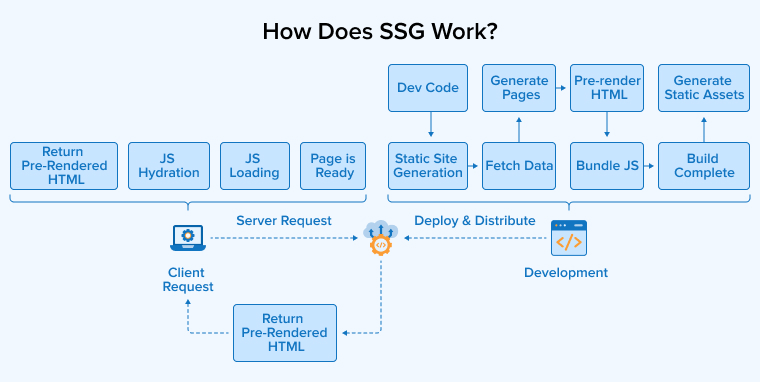
The above image describes the following steps involved in the static-site generation process:
- Content creation: Prepare the website content using different file formats such as Markdown, HTML, headless CMS, or other frameworks. These sources are then used to create the pages that will be displayed on the final website.
- Build Trigger: Use a manual or automated process to run the static site generator tool.
- Data fetching: Your SSG tool fetches data from the necessary data sources.
- Page generation: The static site generator compiles the predefined templates, styles, and fetched data and generates HTML pages for each route in the application.
- Asset optimization: The SSG tool checks source folders or template references to locate CSS, JavaScript, HTML, and image files. It then processes and completely optimizes them before writing to the final output directory.
- Deployment: The ready-made HTML, CSS, and script files are uploaded to a web server or a Content Delivery Network (CDN) for users.
Implementation of SSG with NextJS
Let’s understand practically how SSG works in a Next.js application:
- Open your terminal or command prompt. Run the following command to create a new Next.js 16 application:
npx create-next-app@latest static-site-generation-app
- After the installation is complete, move into the project folder:
cd static-site-generation-app
- Start the development server:
npm run dev
- Open your browser and visit the URL to view the project:
http://localhost:3000
Project structure: The folders below show how the sample routes are organized in the App Router.
📁 static-site-generation-app — Root project folder 📂 src/ └── 📂 app/ ├── 📄 page.tsx Home route: / └── 📂 blog/ SSG example route └── 📄 page.tsx Opens at /blog Tip: In the App Router, every folder inside app/ can become a route when it contains a page.tsx file. |
SSG Example (App Router)
Create: src/app/blog/page.tsx
interface Post { id: number; title: string; } async function getPosts(): Promise<Post[]> { const response = await fetch( 'https://jsonplaceholder.typicode.com/posts?_limit=5' ); // Since no dynamic rendering is requested and the data can be cached, Next.js can pre-render this page during the build process when possible. return response.json(); } export default async function BlogPage() { const posts = await getPosts(); return ( <main style={{ padding: 40 }}> <h1>Latest Posts (SSG)</h1> {posts.map((post) => ( <div key={post.id} style={{ marginBottom: 16 }}> <h3>{post.title}</h3> </div> ))} </main> ); } Build-time behavior: This page is generated during the build and served quickly as static content. |
Open your browser and visit URL:
http://localhost:3000/blog
Creates the production build.
-
npm run build
Starts the production server. -
npm run start
The HTML is generated during the build and served as a static file.
The HTML is generated during the build and served as a static file.
What Are the Advantages of SSG?
The following are the four major benefits of using static-site generation:
Cost Effectiveness
Static websites are less expensive to host because they use very few server resources and do not depend on databases or complex server-side processing. Many hosting platforms like Cloudflare offer free or affordable plans, making them suitable for personal projects and small business websites. Their simple server structure reduces maintenance costs and allows you to spend less on hosting and use resources for other important needs.
Secure
Static websites offer stronger security because they serve pre-built files instead of generating pages through databases or server-side code. This greatly reduces possible entry points for attackers and lowers the risk of common web threats. There are fewer backend components to manage, so the attack surface is much lower. As a result, static sites are easier to protect, require fewer security updates, and provide a safer environment for both website owners and visitors.
Speed and Performance
Static websites provide excellent performance because their pages are created before deployment and delivered directly to users. In SSG, there is no need for database requests or server-side page generation, increasing the loading speed and keeping server workload low. This improves user experience, supports better search engine rankings, and allows websites to perform consistently across different locations.
Improved Reliability
Static websites are highly reliable because they do not depend on databases or complex server-side processes. Their simple architecture, consisting of a few moving parts, reduces the chances of failures and runtime errors. Static sites are hosted on CDNs, so they remain available even during heavy traffic, providing stable performance and a consistent browsing experience for users.
What Are the Disadvantages of SSG?
Do not ignore the following key limitations of static site generation if planning to use it:
Lack of Dynamic Capabilities
Static websites are not well suited for applications that depend on real-time data or any kind of personalized information. By default, every visitor receives the same static, pre-built content, making personalization difficult. Functions such as live updates, recommendations, advanced search, or interactive user features generally require additional client-side scripts or external services to work effectively.
Developer Experience and Flexibility
Static site generators can be difficult for beginners and non-technical content creators because it requires technical knowledge related to coding and using command-line tools to build and manage websites. It also provides less flexibility for creating highly interactive or visually complex websites. As a result, users without development experience may find them harder to use than dynamic content management systems.
No User Interaction / No Standard User Interface
Publishing and updating content with a static site generator can be challenging, especially for non-technical people. Content usually needs to be edited in code files using Markdown or Textile language, rebuilt, and uploaded again before changes appear online. Features such as comments, contact forms, and other user interactions are not included by default and often depend on third-party services for implementation.
When to Choose SSG?
SSG can be used in multiple situations if you’re sure that your site can work by rendering only static pages. However, definitely go for SSG if your website or project fulfills any of the below requirements:
No Frequent Content Updates Required
If your website deals with blogs, documentation, portfolios, etc., containing a huge amount of content that needs updating but not in real-time. For example, user manuals get updated only with the release of a new version. Here, SSG is best, as it will provide excellent performance.
Facing Budgetary Constraints
SSG has very low hosting charges, low maintenance overhead, and no server-side processing. Therefore, if your project has a limited budget, SSG will provide great results by serving static files.
The Project is Scalable
If you’re planning to receive a large number of visitors on your website, pre-built pages can be delivered quickly without placing heavy demands on the server. When combined with Content Delivery Networks (CDNs), traffic will be distributed across multiple locations. As a result, the website will remain fast, stable, and responsive even during periods of high user activity.
Server-Side Rendering vs Static-Site Generation: Detailed Comparison
The comparison table below will clear all your doubts and confusion regarding the differences between SSR and SSG:
| Parameters | Server-side Rendering | Static-site Generation |
|---|---|---|
| Content Type | Content is dynamic as it’s generated as per user request | Content is static as it’s generated at build/deployment time |
| Server Processing | It’s required as pages are rendered by the server as per request | It’s not required as the website can be hosted on any static hosting platform |
| Initial page loading speed | It’s good but depends on server speed | It’s excellent as HTML is already available |
| API Calls | Can fetch fresh data for every request | Fetches data during build unless using regeneration |
| Security | Server can securely access private information | Private information is used only during build, not exposed to clients |
| Traffic Handling | Server load increases as the number of users grows | CDN handles massive traffic efficiently |
| Performance | It’s slower than SSG because rendering happens on every request | Very fast because prebuilt HTML is served from a CDN |
| Scalability | Here, the scalability is limited by server resources | Static websites are highly scalable due to CDNs |
| Suitable scenarios | Dashboards, social media, e-commerce inventory, stock prices | Blogs, documentation, marketing pages, portfolios |
| Interactivity | Websites become interactive after hydration | Static sites become interactive after the JavaScript loads |
What Are the Popular SSR and SSG Frameworks?
Let us now take a brief look at some of the best SSR and SSG frameworks for building websites:
- Next.js: It is a popular React framework that supports both SSR and SSG in the same application. It has features such as hybrid rendering, dynamic page routing, automatic hydration, and incremental static regeneration.
- Nuxt.js: It is a lightweight, component-based Vue framework with automatic code-splitting, file-based routing, built-in SEO, and auto-imports, making it suitable for SSR and SSG.
- Gatsby.js: Gatsby is an open-source and free React-based framework, mainly known for static-site generation, that generates fast and SEO-friendly static websites. However, it also supports Server-Side Rendering (SSR), making it suitable for applications that need to generate dynamic content.
- Hugo: Hugo is a popular, open-source, Go-based static site generator that provides great support for serving web applications and generating HTML. It is also suitable for SSR because it can efficiently render HTML templates on the server using its fast runtime and built-in net/http and html/template packages.
Final Thoughts
When comparing SSR and SSG, you cannot say that there is any particular solution that will work for every website. The right choice depends on your project’s current requirements and how it may grow in the future. If your pages require fresh, personalized, or frequently changing data, SSR is a strong option. If your content changes less often and speed is the top priority, SSG is an excellent fit. Many modern frameworks even let you combine both approaches in one application. By understanding their strengths and limitations, you can build a website that improves user experience and meets your business goals effectively.
FAQs
The key difference between SSR and SSG lies in when the HTML page is generated. SSR generates the page each time a user makes a request, i.e., it delivers fresh and dynamic content every time. In contrast, SSG generates pages during the build process, so pre-built content can be served quickly to visitors.
Use SSR instead of SSG when your website needs frequently updated information, personalized pages, or real-time data. SSR is a better choice for applications where content changes often and must be generated based on each user’s request.
Static sites are usually faster because their pages are pre-generated and delivered quickly from a server or CDN. However, speed also depends on factors such as images, scripts, hosting quality, and overall website optimization.
A common mistake teams make is choosing SSR or SSG without considering their project requirements. They often focus only on speed or popularity instead of evaluating content updates, user needs, scalability, and long-term maintenance.
Both SSR and SSG can provide strong SEO performance because they deliver fully rendered HTML to search engines. The better choice depends on your website needs, as content freshness, loading speed, and page structure also influence search rankings.
Static sites are generally faster because pages are created in advance and served directly to users without server-side processing. However, actual performance also depends on factors like hosting, CDN usage, image optimization, code quality, and website complexity.

Itesh Sharma is core member of Sales Department at TatvaSoft. He has got more than 6 years of experience in handling the task related to Customer Management and Project Management. Apart from his profession he also has keen interest in sharing the insight on different methodologies of software development.



Comments
Leave a message...