

Software applications shape how modern businesses work, compete, and grow. From a simple internal tool to a large customer platform, every application follows a journey that requires structure, clarity, and control. This is where Application Lifecycle Management, or ALM, comes in. ALM explains how an application is planned, built, tested, released, improved, and finally retired. It connects people, processes, and tools into one clear flow. Without a clear lifecycle approach, application management becomes hard. ALM supports modern ways of working, including Agile, DevOps, and platform engineering.
For a web development company, ALM acts as a roadmap. It helps teams track progress, manage change, and improve performance over time. It also ensures that applications continue to deliver value long after launch.
In this complete guide, you will learn what application lifecycle management is, how it works, and why it matters. You will also explore its development phases, benefits, and challenges in the modern software development process.
What is Application Lifecycle Management (ALM)?
Application Lifecycle Management (ALM) is a structured approach used to manage an application from its initial idea to final retirement. It brings together people, processes, and tools to support every stage of the application’s life, including planning, development, testing, deployment, maintenance, and end-of-life decisions. ALM helps teams work together efficiently by providing shared visibility and standardized workflows.
Unlike the software development lifecycle, which mainly focuses on building the application, ALM covers a broader scope by monitoring the application even after release. It ensures that business goals, technical requirements, and compliance needs are met throughout the lifecycle. By using ALM tools, organizations can improve collaboration, automate tasks, maintain quality, and manage changes more effectively. Overall, ALM helps deliver reliable applications while reducing risks and long-term maintenance challenges.
Seven Stages of Application Lifecycle Management
The application lifecycle management goes through the following phases:
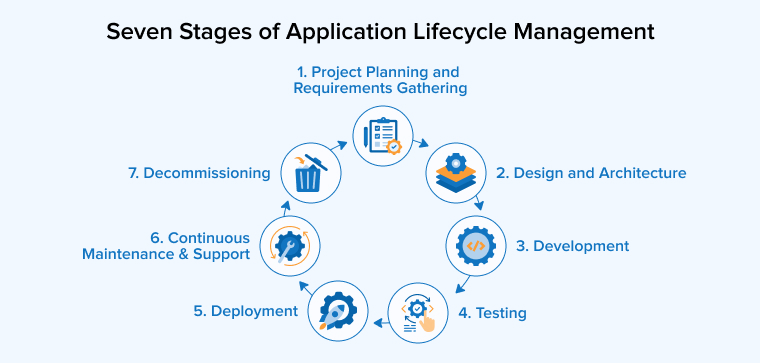
1. Project Planning and Requirements Gathering
The planning and requirements gathering phase is the first and one of the most important steps in developing an application. During this stage, all stakeholders come together to explain what they need the system to achieve and how it will support their business goals. This includes identifying the main users of the application, understanding the problems it should solve, and considering any legal or regulatory obligations. Project requirements can cover both broad business objectives and detailed operational needs. Typically, these requirements are organized from general to specific, forming a structured hierarchy where each smaller need supports a larger one.
In some development approaches, like Agile, requirements are captured as user stories or use cases, rather than in a strict hierarchical order. Alongside defining needs, stakeholders discuss the application’s interface design and ensure compliance standards are met. Project managers use this phase to create timelines, assign responsibilities to teams, and establish clear communication pathways. Breaking the project into smaller, manageable tasks and preparing detailed design specifications early helps prevent delays and confusion later.
A thorough understanding of requirements at this stage provides the software development team with a clear view of the project’s scope and objectives. Careful planning and organized requirements establish the groundwork for smoother development, testing, and deployment, ultimately increasing the likelihood of delivering a successful application.
2. Design and Architecture
The Design phase is where the application development begins to take shape after requirements are clearly understood. In this stage, software architects and design engineers plan how the system will function and how different components will interact. They decide on the overall structure, behavior, and relationships of the solution to ensure it meets business needs. Key activities include creating user stories, wireframes, prototypes, and schema diagrams to visualize modules, data flows, and user interactions.
3. Development
The development stage is when the application moves from planning and design into a working product. During this stage, software developers break down the agreed requirements into smaller tasks and plan how to implement each feature. Teams from development, testing, IT, and business areas work together to ensure the product meets all functional and user needs. Depending on the chosen methodology, such as Waterfall or Agile, development may happen in iterative sprints or in a sequential order.
Developers write code for both backend and frontend systems, while quality analysts set checkpoints to verify progress and maintain high standards. Version control tools like Git help manage changes and keep the code aligned with the latest specifications. Continuous integration and deployment pipelines are often used to automate building, testing, and releasing updates. Throughout this phase, close collaboration between technical and business teams ensures that the application is not only functional but also user-friendly, reliable, and aligned with the original project objectives.
4. Testing
The testing and quality assurance phase ensures that the application performs correctly and meets the requirements defined earlier. Quality is a shared responsibility, and testing begins alongside development to identify issues as early as possible. Testers prepare test cases, environments, and data using separate testing systems to avoid affecting live operations. Different testing methods are applied to confirm that individual components work properly and that all parts of the system function well together.
Throughout this stage, defects are recorded, tracked, and fixed by the development team. Continuous integration tools are often used to automatically test new code changes and maintain stability. Testing also checks performance, security, and compliance to ensure the application is safe and reliable for users. User acceptance testing allows business stakeholders to confirm that the application supports real-world needs. This phase continues until the product reaches an agreed level of quality and stability, making it ready for release and long-term use.
5. Deployment
The Deployment stage is when the application is made available for users after successful testing and approval. During this phase, the software is released into a production environment where it can be accessed and used. The deployment process depends on the type of application, such as web-based or cloud-based systems, and requires proper configuration of servers and infrastructure.
Automated deployment tools are often used to reduce manual errors and ensure smooth releases. Teams may apply strategies like rolling updates or gradual releases to avoid service disruption. Once deployed, the application is closely monitored to ensure stability, performance, and security. Planning for future updates, maintenance, and rollback options is also part of this stage to handle unexpected issues effectively.
6. Continuous Maintenance and Support
After release, teams focus on keeping the application stable, secure, and available by monitoring application performance and responding to user issues. Some defects appear only in real usage, so it’s important to ensure that issues are fixed quickly. Project management tools help track incidents and collect feedback. Teams release updates, security patches, and enhancements regularly as part of a continuous process supported by automation, which supports faster testing and deployment.
Continuous delivery reduces downtime and speeds improvements, ensuring that users consistently benefit from the latest features and fixes. Monitoring and configuration tools play a crucial role in keeping systems healthy by quickly identifying and resolving issues. Although the maintenance stage is the longest phase in the lifecycle, it needs fewer efforts and resources when earlier stages are executed effectively. This even allows teams to plan future updates and make informed decisions about when to retire the application.
7. Decommissioning
Application decommissioning removes software that no longer supports business goals. Teams shut down systems while keeping data accessible and secure. They archive or migrate information with proper context. Users receive early notice and move to a replacement smoothly. This process reduces cost, limits risk, meets retention rules, and supports modernization.
What Are the Benefits of Application Lifecycle Management?
We’ll now discuss the advantages of application lifecycle management (ALM):
Increased Compliance
Application Lifecycle Management helps teams track, record, and review every change made to software. This clear history allows organizations to prove compliance and reduce development risks. As release cycles become shorter and rules keep changing, compliance becomes harder to manage. This is critical in the pharmaceutical and healthcare industries, where audits are strict and frequent. ALM tools connect requirements, tests, and results in one flow that allows teams to follow approved processes across every stage. End-to-end visibility makes it easier to meet safety, quality, and regulatory standards.
Improved Traceability
ALM tools help teams to ensure that development and testing follow approved requirements. They connect requirements, risks, and test cases in one view. This linkage exposes missing tests and weak coverage early. Modern ALM platforms also support e-signatures, helping teams approve milestones securely and maintain clear accountability throughout the lifecycle.
Increased Visibility into Workflow
ALM provides shared access to current requirements, risks, and test results for all teams. This clarity enables teams to build the correct solution from the start. Real-time planning and version control guide decisions early. Stakeholders can track progress, dependencies, and delivery status at every stage. Teams quickly see completed requirements, tested features, and pending work.
Improved Risk Management
Software projects always face risks such as technical limits and changing business needs. ALM helps teams to manage these risks in a structured way that allows teams to spot issues early and understand their impact. Teams can take action before problems arise. This approach reduces delays, supports smarter decisions, and keeps development on track.
Enhanced Collaboration
ALM supports a structured way to manage applications from planning to maintenance. It standardizes workflows and reduces manual work. It facilitates easy collaboration between teams across roles and locations, allowing everyone to see requirements, changes, and progress in real time. Clear priorities guide team goals and skill needs. This shared visibility improves coordination and speeds up software delivery.
Application Lifecycle Management Challenges
The above-mentioned benefits of ALM can only be leveraged properly if the development team considers the following challenges before moving to full-fledged ALM implementation:
Alignment of Goals and Processes
Implementing ALM across many teams can be challenging when goals and working styles differ. Developers, testers, managers, and users often expect different outcomes. Some teams focus on speed, while others need detailed reports. Clear alignment is necessary to avoid confusion. Hence, organizations must define a shared project vision from the start. They must explain goals, roles, and responsibilities, scope, and expected results clearly. There must be some common standards and tools adopted to help teams work together smoothly.
Integration Issues
Using many ALM tools across teams can cause integration problems because each tool may store data differently or follow unique workflows. Teams must choose tools that match project goals. Proper setup ensures smooth data sharing and security. When systems connect well, teams track work easily and avoid confusion during development.
More Agility Required
Maintaining strong governance while staying flexible can be difficult. Too much control can slow teams down, while insufficient control can create risk. Teams must balance rules with freedom. This balance helps them stay agile, support fast releases, and still meet quality and compliance needs.
Final Thoughts
Application Lifecycle Management plays a vital role in building reliable and successful software. It brings structure to every phase, from early planning to long-term support, helping teams get clarity on goals, tasks, and responsibilities. ALM improves collaboration by connecting people, tools, and processes, helping teams track progress and manage changes with confidence. Risks become easier to identify and fix before they grow, while quality stays consistent across releases. Clear visibility supports better decisions at every stage. Over time, ALM helps organizations adapt to change and scale smoothly. By using ALM effectively, businesses can deliver better applications that meet user needs and support long-term growth.
FAQs
Application Lifecycle Management helps development teams plan, build, test, release, and maintain software in an organized way while tracking progress, changes, and quality from start to finish.
Application lifecycle management increases compliance, visibility into workflow, collaboration, and improves traceability and risk management.
Some of the advantages of ALM are:
1. Increased compliance
2. Improved traceability
3. Increased visibility into workflow
4. Improved risk management
5. Enhanced Collaboration
Application lifecycle management includes limitations such as difficulty aligning goals and processes; integration issues, agility limits, scalability, and adaptation issues
1. Alignment of goals and processes
2. Integration issues
3. More agility required
4. Scalability and adaptation limitations

Itesh Sharma is core member of Sales Department at TatvaSoft. He has got more than 6 years of experience in handling the task related to Customer Management and Project Management. Apart from his profession he also has keen interest in sharing the insight on different methodologies of software development.



Comments
Leave a message...