

Wearable technology has changed the way people interact with digital services, especially in healthcare, fitness, and wellness. Smartwatches, fitness bands, smart rings, and other connected devices can collect useful information such as heart rate, activity levels, sleep patterns, and other health metrics. A well-designed wearable app is what turns this data into something people can actually understand and use. As per Grand View Research, the global wearable technology market is valued at $92.9 billion in 2025, projected to cross $230 billion by 2033 at a 12.1% CAGR. This shows the market expansion and its future potential.
Mobile app development companies require a different approach to developing wearable apps than to building a traditional smartphone application. Wearable apps must work smoothly on smaller screens, respond quickly, use limited battery and processing resources, and often communicate with sensors or a companion phone.
In this guide, we’ll explore the key aspects of wearable app development, learning the types of wearable apps, features, benefits, challenges, how to develop them, expected development cost, and their future potential.
What is Wearable App Development?
Wearable app development is the process of designing and building software applications that run on wearable devices such as smartwatches, fitness trackers, smart glasses, smart rings, and head-mounted displays. These apps collect data through built-in sensors such as accelerometers, heart rate monitors, and GPS, process it in real time, and deliver useful information directly on the device.
What Are the Types of Wearable Applications?
Wearable apps generally fall into two categories based on how they function and how much they depend on a connected smartphone.
1. Standalone Apps
Standalone apps run entirely on the wearable device without needing a smartphone connection. They handle everything on-device, from data collection to processing and display. The most familiar example you can relate to here is a GPS-enabled running app on a smartwatch that tracks routes, distance, and pace without a phone nearby. These apps rely on the wearable’s own processor, memory, and connectivity such as Wi-Fi or LTE to operate independently. The only disadvantage is higher battery consumption since the device handles all the processing on its own.
2. Companion Apps
Companion apps work in pairs with a smartphone app. The wearable handles lightweight tasks like showing notifications, tracking activity, or capturing quick inputs, whereas the phone manages data storage, complex processing, and cloud syncing. Most fitness tracker apps follow this model. The user wears the band throughout the day, and the detailed dashboard with graphs, trends, and insights lives in the phone app. This approach conserves battery on the wearable and gives users a richer experience across both devices.
What Are the Types of Wearable Apps based on Devices?
Each wearable device has different hardware capabilities, screen sizes, and user expectations, which directly shape how apps are built for them. The following are the major types:
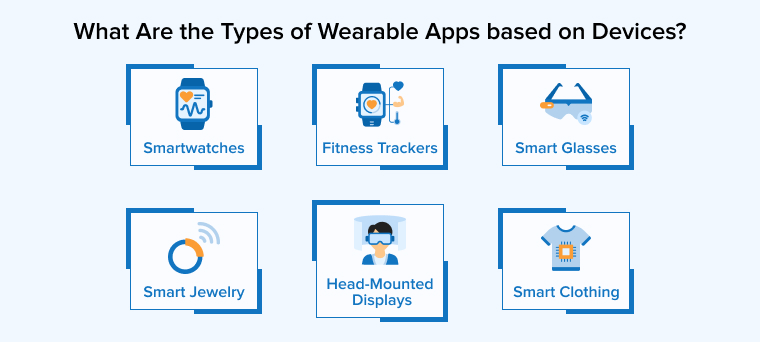
1. Smartwatches
Smartwatches support the broadest range of wearable apps. Users rely on them for notifications, health tracking, calls, payments, and quick daily tasks from their wrist. Apple Watch and Wear OS devices lead this category. Developers use Kotlin with Jetpack Compose for Wear OS apps and Swift with SwiftUI for watchOS. Both platforms support voice commands, always-on displays, and sensor integrations like heart rate and blood oxygen monitoring.
2. Fitness Trackers / Smart Wristbands
Fitness trackers focus on health and physical activity monitoring, tracking steps, calories, heart rate, sleep patterns, and workouts throughout the day. They have smaller screens and fewer features than smartwatches but offer longer battery life. If you charge your wristband today, it will last for the next 7 to 14 days. Most fitness tracker apps follow the companion app model where the band captures data, and the phone app presents detailed analytics.
3. Smart Glasses
Smart glasses overlay digital information onto the real world using built-in displays, cameras, and sensors. Apps for smart glasses handle tasks like navigation, real-time translation, hands-free documentation, and augmented reality experiences. Development for this category requires a voice-first interaction approach and minimal visual clutter since users interact with them while moving.
4. Head-Mounted Displays
Head-mounted displays provide fully immersive experiences using virtual reality, augmented reality, or mixed reality. Apps built for HMDs are used in gaming, employee training, surgical simulations, and industrial design. Unlike smart glasses, HMDs cover the user’s full field of vision and support complex 3D interactions with controllers or hand tracking.
5. Smart Clothing
Smart clothing embeds sensors and conductive fabrics directly into garments to monitor biometric data during physical activity. These garments track muscle activity, posture, breathing rate, and body temperature without requiring a device on the wrist or finger. Apps for smart clothing typically focus on athletic performance analysis, workplace safety monitoring, and continuous biometric tracking.
6. Smart Jewelry
Smart jewelry includes rings, bracelets, and pendants that track health metrics like heart rate, sleep quality, and body temperature while looking like regular accessories. These devices have no screens, so apps prioritize background data collection, long battery life, and seamless syncing with a companion app on the phone for detailed insights.
What Are the Features of Wearable App Development?
Here are the core features that a software development company must include in a wearable app:
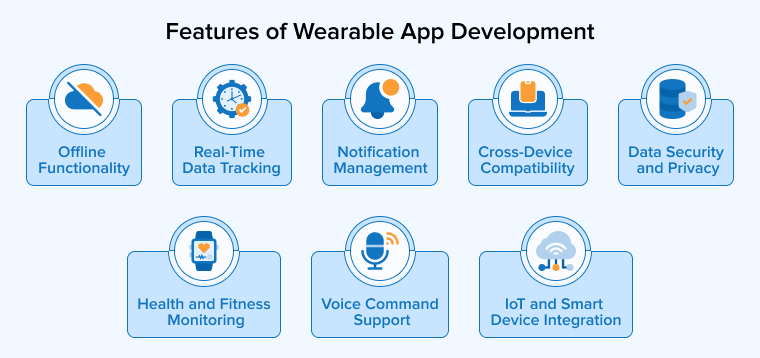
Real-Time Data Tracking
Wearable apps continuously fetch data from sensors like accelerometers, gyroscopes, and heart rate monitors. The app processes this data instantly and displays it on-screen, whether it is step counts, ECG readings, or calorie burn. Efficient real-time processing is essential because even a short delay affects user trust and app reliability.
Notification Management
Wearable screens cannot handle the same volume of alerts a phone does. The app filters and prioritizes what reaches the user, showing only relevant, actionable updates like incoming calls, calendar reminders, or health alerts in a compact format.
Voice Command Support
Typing on a wearable device is not practical. Voice integration through Google Assistant or Siri allows you to set reminders, send messages, make calls, or trigger app actions hands-free. This is especially useful during workouts, driving, or any scenario where your hands are busy doing something.
Offline Functionality
Wearable devices frequently lose connection to a phone or Wi-Fi, especially during outdoor activities. Apps need to cache data locally and sync it automatically once connectivity returns. This keeps core features like fitness tracking and health monitoring running without interruption.
Health and Fitness Monitoring
Heart rate tracking, sleep analysis, SpO2 measurement, step counting, and calorie tracking are now standard expectations in most wearable apps. These features collect data from several sensors and show it in an easy-to-read format that users can understand quickly.
IoT and Smart Device Integration
Wearable apps can communicate with smart home devices, medical equipment, and workplace systems. A smartwatch app can control home lighting, unlock doors, receive alerts from connected sensors, or sync health data with electronic health records for clinical use.
Cross-Device Compatibility
Users expect the same smooth experience whether they are on an Apple Watch, a Wear OS device, or a fitness band. The app needs to adapt its layout, features, and data handling to different screen sizes, operating systems, and hardware capabilities across multiple devices.
Data Security and Privacy
Wearable apps handle sensitive user data, including health metrics, location, and biometric information. Encryption, secure authentication, and compliance with regulations like HIPAA and GDPR are non-negotiable to protect this data from unauthorized access.
How to Build Wearable Apps?
Building a wearable app follows a step-by-step process from planning to launch. Here is how it typically works.
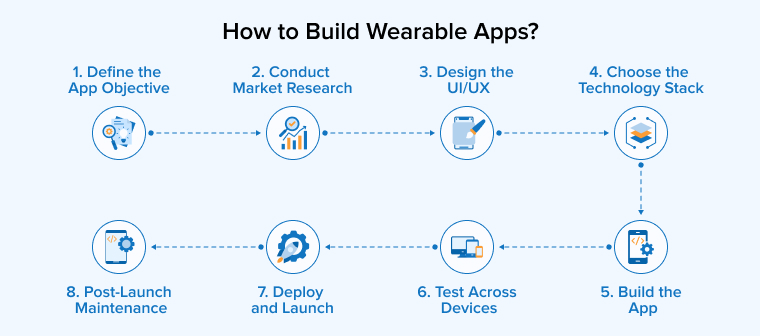
1. Define the App Objective
Identify the app’s core purpose, target audience, and the wearable devices it will support. Decide whether it will function as a standalone app or a companion app paired with a smartphone. A clear objective at this stage sets the direction for every decision that follows, from feature selection to platform choice.
2. Conduct Market Research
Study existing wearable apps in your category to find gaps and understand user expectations. Analyze competitor strengths and weaknesses, look at user reviews to find out common complaints, and identify features that are missing or poorly executed. These insights help shape your feature list and give your app a stronger position in the market.
3. Design the UI/UX
Wearable screens are small, and users interact with them for only a few seconds at a time. Keep the interface minimal with high-contrast visuals, large touch targets, and only essential information on a single screen. The goal is to let users get what they need at a glance without scrolling through multiple menus or tapping through layers of navigation.
4. Choose the Technology Stack
Select the programming language and SDK based on your target platform. Wear OS apps use Kotlin with Jetpack Compose, watchOS apps use Swift with SwiftUI, and cross-platform frameworks like Flutter or React Native support both. The right technology stack also depends on factors like sensor integration requirements, real-time data processing needs, and whether the app requires a companion mobile app on the phone side.
5. Build the App
Develop core functionality, integrate device sensors, configure Bluetooth Low Energy for data transfer, and connect the wearable app with its companion mobile app or cloud backend. This is also the stage where prototyping plays an important role, as it helps validate design decisions and interaction flows before committing to full-scale development.
6. Test Across Devices
Test for functionality, battery consumption, performance, and compatibility across different screen sizes and device models using real devices and emulators. Wearable apps need extra attention during testing because the same app can behave differently on a round smartwatch display versus a square fitness band screen. Automated testing tools like Appium help speed up regression testing across multiple devices and OS versions.
7. Deploy and Launch
Submit the app to the Google Play Store or Apple App Store with accurate compatibility details, wearable-specific screenshots, and clear descriptions. Make sure the listing highlights supported devices and key features so users know exactly what they are downloading before they install it.
8. Post-Launch Maintenance
Monitor performance metrics, gather user feedback, and release regular updates to resolve issues and maintain compatibility with evolving OS versions. Wearable platforms update frequently, and an app that worked perfectly six months ago can break with a new OS release if it is not actively maintained.
What Are the Benefits of Wearable App Development?
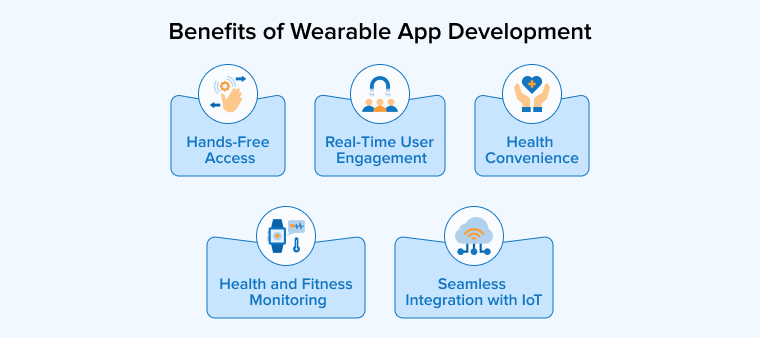
Wearable apps provide practical advantages owing to their always-on presence and direct access to real-time user data that mobile apps alone cannot provide. Some of the prominent benefits are as follows:
Real-Time User Engagement
Wearable apps send notifications, reminders, and alerts right when they matter. You can see them instantly on your wrist and respond with a single tap. This keeps them connected to the app throughout the day and increases overall engagement and retention.
Health and Fitness Monitoring
Wearable apps continuously track heart rate, sleep, blood oxygen, steps, and calories without any manual input. They convert this data into easy-to-read insights like fitness trends, recovery tips, and early health warnings. Healthcare organizations also use this data for remote patient monitoring and allow medical teams to keep track of patient health between visits.
Hands-Free Access
You can read messages, get directions, take calls, and control connected devices straight from your wrist. Voice commands through Google Assistant or Siri make this even easier. This is particularly useful while driving, exercising, or working in situations where using a phone is not practical.
Health Convenience
Wearable devices are in continuous contact with your body and collect data automatically in the background. Medication reminders, hydration alerts, and stress monitoring run on their own and only notify you when action is needed. This passive approach makes it much easier for people to stay on top of their health without extra effort.
Seamless Integration with IoT
Wearable apps connect with smart home devices, medical equipment, and workplace sensors to automate routine tasks. A smartwatch can unlock doors, adjust room temperature, or trigger safety alerts based on real-time data. This makes wearable apps a useful central hub for managing multiple connected devices from one place.
Challenges of Wearable App Development
Building wearable apps comes with a unique set of challenges that you generally do not face with standard mobile app development. Understanding the challenges below early helps avoid costly mistakes during the development process.
Privacy and Data Security
Wearable apps collect sensitive user data, including heart rate, location, sleep patterns, and biometric information. This data needs to be encrypted both during transmission and storage to prevent unauthorized access. Apps handling health data must also comply with regulations like HIPAA and GDPR, which means you need to build proper consent flows, data access controls, and secure authentication mechanisms from the start.
Battery Consumption
Wearable devices run on small batteries that need to last an entire day or longer after charging them once. Apps that constantly pull data from sensors, maintain active Bluetooth connections, or run heavy background processes can drain the battery quickly. You need to minimize the use of non-essential sensors, optimize how frequently the app syncs data, and use energy-efficient protocols like Bluetooth Low Energy to keep power consumption under control.
User Interface
Wearable displays are small, often under two inches, and sometimes circular in shape. Fitting meaningful content into this limited screen space without cluttering the interface is a real design challenge. Every element on screen needs to serve a clear purpose, and navigation must be simple enough that users can complete tasks in a few taps or a single glance.
Ergonomic UX
Users interact with wearable devices while walking, running, or doing other physical activities. The app experience needs to account for movement, varying lighting conditions, and one-handed use. Touch targets must be large enough to tap accurately on a small screen, and the interface should rely more on swipe gestures and voice commands than precise tapping or typing.
Connectivity Limitations
Wearable devices frequently switch between Bluetooth, Wi-Fi, and sometimes LTE depending on proximity to the paired phone or available networks. Apps need to handle these transitions smoothly without losing data or breaking functionality. Offline functionality is equally important because users often take wearable devices to places where connectivity is unreliable, like outdoor trails, gyms, or remote work sites. The app should cache critical data locally and sync it once the connection is restored.
Testing Complexity
Testing a wearable app is more involved than testing a mobile app. The app needs to perform consistently across different screen shapes, display sizes, sensor configurations, and OS versions. Battery impact, Bluetooth stability, and sensor accuracy all require separate testing cycles. A combination of real device testing and emulator-based testing is typically needed to cover the range of devices and scenarios a wearable app will encounter in production.
Device Fragmentation Problem
The wearable market includes hundreds of devices from different manufacturers, each with different screen sizes, hardware capabilities, and operating systems. An app that runs perfectly on an Apple Watch may behave differently on a Samsung Galaxy Watch or a Fitbit device. You need to account for these differences in layout, sensor availability, and OS-level APIs, which adds significant time and effort to the development process.
How Much Does It Cost to Develop a Wearable App?
The cost of developing a wearable app depends on several factors, such as the complexity of features, the number of platforms you want to support, design requirements, and the location of your development team. There is no fixed price because every project has different needs, but here is a general breakdown based on complexity levels:
| Complexity | Estimated Cost | Timeline | What It Includes |
|---|---|---|---|
| Basic | $500 – $1,000 | 1 – 2 months | Simple health or fitness tracking, basic notifications, minimal UI, standard sensor usage |
| Medium | $1,000 – $2,000 | 2 – 5 months | Detailed health tracking with sleep and SpO2, custom notifications, API integrations, personalized UI, gesture-based navigation |
| Advanced | $2,000 – $4,000+ | 5 – 8 months | AI and machine learning for personalized insights, AR/VR integration, real-time data processing, cross-device sync, HIPAA or GDPR compliance, custom hardware integration |
Beyond the app itself, ongoing costs like server hosting, cloud storage, third-party API subscriptions, regular OS compatibility updates, and post-launch maintenance should also be considered in the overall budget. Apps that handle health data will require additional investment in security infrastructure and regulatory compliance, which can increase both initial and long-term costs.
Choosing between native development for a single platform or cross-platform development using frameworks like Flutter or React Native also affects the budget. Native apps generally deliver better performance and deeper sensor integration on wearable devices, but cross-platform development reduces cost and time when you need to support multiple operating systems simultaneously.
What is the Future of Wearable App Development?
Wearable app development is moving fast, and a few key trends are driving this pace of development.
AI is the biggest shift happening right now. Wearable apps are not just displaying raw health data but using machine learning to deliver personalized insights, predict health risks, and coach users in real time. The global wearable AI market was valued at $43.64 billion in 2025 and is projected to reach $310.56 billion by 2033 at a 27.83% CAGR. This clearly shows how artificial intelligence is becoming an integral component of wearable app development.
Medical-grade health monitoring is expanding into consumer devices. Samsung’s Galaxy Watch line is expected to receive FDA clearance for cuffless blood pressure monitoring in 2026–2027. This marks the first time that wearable devices will start tracking BP continuously. ECG readings, blood oxygen monitoring, and irregular heart rhythm alerts are already standard features and improving in accuracy with each generation.
Smart rings and screenless wearables are growing rapidly as users prefer lighter, less intrusive devices with multi-day battery life. The American College of Sports Medicine named wearable technology the top global fitness trend for 2026, with nearly half of U.S. adults now owning a wearable device.
Wearable apps are also connecting more deeply with telemedicine platforms, electronic health records, smart home devices, and enterprise systems. This makes them a part of larger automated workflows rather than standalone trackers.
Conclusion
Wearable app development is no longer a niche market. Businesses in healthcare, fitness, retail, and enterprise are actively building apps for smartwatches, fitness bands, smart rings, and AR glasses.
The key to building a successful wearable app is understanding how different it is from mobile app development. Small screens, short battery life, data privacy, and device fragmentation all need attention from day one. Getting these right is what separates a wearable app people use daily from one they uninstall after a week.
FAQ
Common examples include smartwatches like Apple Watch and Samsung Galaxy Watch, fitness trackers like Fitbit and Garmin bands, smart rings like Oura Ring, smart glasses like Meta Ray-Ban, head-mounted displays like Meta Quest and Apple Vision Pro, and smart clothing with embedded sensors for tracking biometrics during physical activity.
A wearable application is software designed to run on a body-worn device such as a smartwatch, fitness band, or smart ring. These apps use built-in sensors to collect data like heart rate, steps, and location, then process and display it on the device or sync it with a companion mobile app for detailed analysis.
Smartwatches remain the most popular category, followed by fitness trackers and smart rings. Apple Watch, Samsung Galaxy Watch, Garmin, Fitbit, and Oura Ring are among the most widely used devices in 2026. Smart glasses and AR headsets are also gaining traction, especially after the rapid growth in Meta Ray-Ban sales.
Yes, most well-built wearable apps cache data locally on the device when there is no Bluetooth, Wi-Fi, or LTE connection available. Once connectivity is restored, the app syncs the stored data with the companion mobile app or cloud backend automatically.
Fitness trackers focus on general wellness metrics like steps, calories, sleep, and workout tracking for everyday users. Medical wearables are designed for clinical-grade monitoring of specific health conditions, such as ECG for heart arrhythmia, continuous glucose monitoring for diabetes, or blood pressure tracking. Medical wearables typically require regulatory approvals like FDA clearance and comply with standards like HIPAA for handling patient health data.

Rajendra Padhiyar is a Project Manager at TatvaSoft, leading a skilled team of mobile app developers. With extensive experience in mobile application development and management, he ensures timely delivery and high-quality standards for diverse mobile projects



Comments
Leave a message...