

Artificial intelligence has changed how mobile apps work, learn, and respond to users. AI in mobile app development focuses on building apps that analyze user behavior, adapt to patterns, and make decisions on their own instead of following fixed rules. Features such as personalized recommendations, voice assistants, real-time fraud detection, and predictive insights are now standard across industries including healthcare, finance, retail, and fitness.
Technologies like machine learning, natural language processing, and computer vision are driving most of these capabilities and helping software development companies automate repetitive tasks, reduce development effort, and create experiences that feel relevant to each user. AI is no longer an add-on but a core part of how successful mobile apps are built, tested, and maintained throughout their lifecycle.
This blog covers the role of AI in mobile app development, the key technologies behind it, how it is used across industries, benefits and challenges, best practices for integration, and the future potential.
What is the Role of AI in Mobile App Development?
AI is involved at every stage of building a mobile app, not just in the features users interact with on screen. According to Grand View Research, the AI in mobile apps market was valued at $23.8 billion in 2025 and is projected to grow from USD 29.7 billion in 2026 to USD 206.9 billion by 2033, at a CAGR of 31.9% from 2026 to 2033. It shapes how the app is planned, designed, tested, and improved after launch.
Here is what AI brings to the table for businesses investing in mobile apps:
- Faster Time to Market: AI accelerates development by automating code generation, testing, and bug detection to deliver the app to users faster.
- Personalized User Experiences: AI learns from user behavior and delivers customized content, product suggestions, and notifications that feel relevant to each user.
- Stronger Security: AI monitors app activity in real time, detects fraudulent transactions, flags suspicious behavior, and protects sensitive user data through biometric authentication like facial recognition.
- Lower Maintenance Costs: AI identifies performance issues, optimizes battery and memory usage, and fixes potential problems before they affect users, which reduces the need for constant manual monitoring.
- Smarter Decision Making: AI analyzes user data and app performance metrics to give businesses clear insights into what is working, what needs improvement, and where new opportunities exist.
- Better User Retention: AI-powered features like intelligent recommendations, voice assistants, and predictive actions keep users engaged and coming back to the app consistently.
- Scalability: AI helps apps handle growing user bases efficiently by optimizing server resources, automating backend operations, and adapting to changing usage patterns without manual adjustments.
What are the Types of AI Technologies in Mobile App Development?
Different AI technologies serve different purposes inside a mobile app. Understanding what each one does helps AI development companies choose the right combination for their app’s goals. So let’s get into the various AI technologies used in mobile app development:
1. Machine Learning (ML)
Machine learning allows apps to learn from data and improve over time without being explicitly programmed for every scenario. The app identifies patterns in user behavior and uses those patterns to make predictions or take actions automatically.
Some of the most common examples are:
- Product suggestions on shopping apps based on browsing and purchase history
- Personalized content feeds on social media and news apps
- Spam and fraud detection in email and banking apps
- Dynamic pricing in travel and ride-sharing apps based on demand patterns
2. Natural Language Processing (NLP)
NLP enables apps to understand and respond to human language, whether spoken or typed. Instead of relying on fixed menus or button taps, users can interact with the app through natural conversation.
The following are the common use cases:
- Voice search and smart text input for hands-free interaction
- Real-time language translation across 100+ languages
- Sentiment analysis on customer reviews and feedback
- In-app search that understands user intent rather than just matching keywords
- Smart replies and auto-suggestions in messaging apps
3. Predictive Analytics
Predictive analytics uses historical data to forecast what users are likely to do next. This helps businesses stay one step ahead of user needs and deliver timely support for better experiences.
The following are the day-to-day applications of predictive analytics:
- Fitness apps predicting when a user is likely to skip a workout and sending reminders
- Retail apps anticipating which products a customer will buy next
- Banking apps detecting unusual spending patterns before fraud occurs
- Healthcare apps flagging early signs of health risks based on user data trends
4. Computer Vision
Computer vision gives apps the ability to analyze and understand images or video in real time. This technology opens up interactions that go beyond text and touch.
Computer Vision technology is generally used in:
- Visual search, where users photograph a product and find it online instantly
- Facial recognition for secure app login and payment authentication
- Document and receipt scanning for banking and expense tracking apps
- AR filters and effects on social media and camera apps
- Medical scan analysis in healthcare apps to support faster diagnosis
5. Deep Learning
Deep learning is a more advanced form of machine learning that handles complex data patterns using layered neural networks. It powers features that require high accuracy and continuous improvement.
Some of the practical applications of deep learning models are as follows:
- Voice recognition accurate enough to understand natural speech across accents
- Camera enhancements like portrait mode, low-light correction, and scene detection
- Object and face identification in photos and video with high precision
- Real-time speech-to-text transcription in meeting and note-taking apps
- Autonomous decision-making in navigation and self-driving applications
6. Generative AI
Generative AI creates new content based on user input, including text, images, designs, audio, and code. It makes app experiences feel dynamic and personal instead of template-driven.
The following are the widespread uses of Generative AI technology:
- AI writing assistants that draft emails, messages, and social media posts
- Automated design mockups and UI layouts during app development
- Personalized marketing content generated for individual user segments
- Code suggestions and autocomplete for developers during the build process
- Dynamic image and video creation based on user preferences
7. Chatbots and Voice Assistants
AI chatbots and voice assistants give users faster ways to get things done inside the app without waiting for human support. They reduce support costs for businesses and improve response times for users.
Chatbots and Voice Assistants are used to provide:
- Instant answers to customer queries about orders, accounts, and services
- Product recommendations based on conversation context
- Appointment booking and reservation management through chat
- Hands-free app control through voice commands via Google Assistant or Siri
- 24/7 automated support that handles common issues without human agents
How is AI Used in the App Development Process?
AI is not just a feature inside the final app. It is also used during the development process itself to help teams build, test, and launch apps faster with fewer errors.
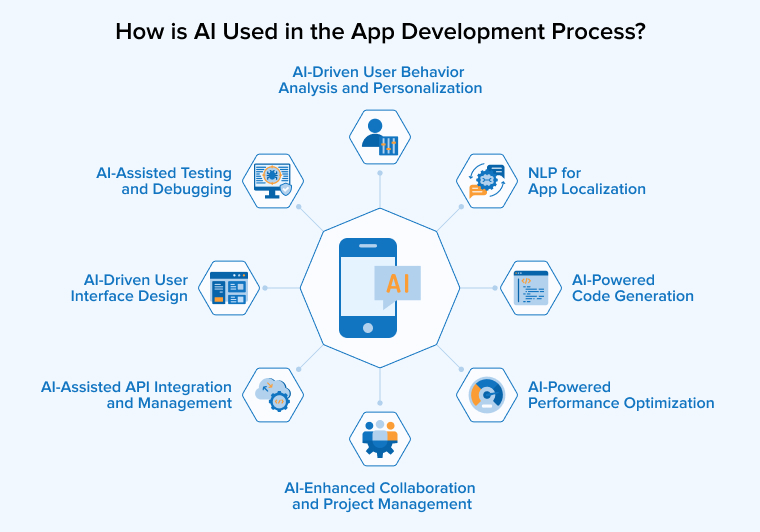
Let’s discuss in detail how AI is helping mobile development companies to improve the efficiency of the app development process:
AI-Powered Code Generation
AI code generation tools help you write code faster by suggesting relevant code based on plain language descriptions or existing patterns. These tools are trained on large codebases and understand programming logic across multiple languages.
The following are the features and benefits of AI-powered code generation:
- Autocomplete suggestions that predict the next line of code as you type
- Full function generation based on simple text descriptions of what the code should do
- Bug detection and fix suggestions in real time during development
- Support for multiple programming languages from a single tool
- Human review is still essential since AI-generated code can contain errors or security gaps
AI-Driven UI Design
AI analyzes how users interact with an app and recommends design changes that improve usability and engagement. Instead of relying on guesswork, AI-Driven UI design can make decisions based on actual user data.
You can make user-friendly user interfaces by leveraging the following advantages of AI-Driven UI design:
- Layout suggestions based on user click patterns, heatmaps, and navigation behavior
- Automatic generation of UI components that follow accessibility and design best practices
- Detection of design issues like confusing navigation, unresponsive buttons, or high error rates
- Personalized interface recommendations based on user demographics and device type
- Faster design iterations since AI handles repetitive adjustments automatically
AI-Assisted Testing and Debugging
AI testing tools make the quality assurance process faster and more reliable by automating tasks that traditionally required manual effort from the engineering team.
The following are the common benefits of AI-assisted testing and debugging:
- Automatic test case generation based on app requirements and new feature updates
- Prediction of where bugs are most likely to appear in the codebase
- Real-time feedback on failed or unstable tests with suggested fixes
- Intelligent test data creation that mimics real user behavior without using sensitive information
- Usability tracking that identifies friction points in the user experience during testing
NLP for App Localization
NLP helps apps communicate naturally with users across different languages and regions. It goes beyond basic translation by understanding context, tone, and cultural nuances.
- Context-aware translation that adapts content to sound natural in each language
- Automatic adjustment of in-app text, notifications, and support messages to local preferences
- Support for multilingual voice commands and search queries
- Tone adaptation between formal and casual communication styles based on region
- Higher engagement and retention in international markets because users feel understood
AI-Powered Performance Optimization
AI continuously monitors how the app performs and makes adjustments to keep it running smoothly across different devices and network conditions.
The features of AI-powered performance optimization are as follows:
- Real-time detection of performance bottlenecks and high resource consumption areas
- Automatic optimization of battery usage, memory allocation, and loading speeds
- Adaptive performance adjustments based on device type and network strength
- Reduced need for manual performance tuning after launch
- Consistent app quality across low-end and high-end devices
AI-Driven User Behavior Analysis and Personalization
AI tracks how each user interacts with the app and uses that data to deliver experiences that feel customized and relevant rather than generic.
- Tracking navigation paths, content preferences, time spent on features, and interaction patterns
- Real-time content and recommendation adjustments as user behavior changes
- Each user treated individually rather than grouped into broad categories
- Continuous learning from new data to improve prediction accuracy over time
- Higher engagement because users see content that matches their actual interests
AI-Assisted API Integration and Management
AI simplifies how apps connect with external services by automating integration tasks that traditionally required significant manual effort.
- Automatic generation of API integration logic based on documentation analysis
- Intelligent data mapping between external formats like JSON or XML and internal structures
- Monitoring API usage to stay within rate limits and handle errors proactively
- Smart API discovery that identifies the best services for a specific task
- Reduced system downtime and faster response to API changes or failures
AI-Enhanced Collaboration and Project Management
AI helps development teams work together more efficiently by automating routine project management tasks and providing data-driven insights.
You can achieve work efficiency in your team using AI for the following reasons:
- Smarter scheduling that creates realistic timelines and adjusts them automatically when priorities shift
- Meeting summaries, action item tracking, and instant status updates for distributed teams
- Task prioritization based on urgency, dependencies, and team workload
- Resource allocation recommendations based on skills, availability, and past performance
- Early detection of potential delays, cost overruns, or workflow conflicts
What are the Benefits of AI in Mobile App Development?
AI adds measurable value to mobile apps by improving how they serve users, protect data, and generate results for businesses. Here are the key benefits that make AI worth integrating.
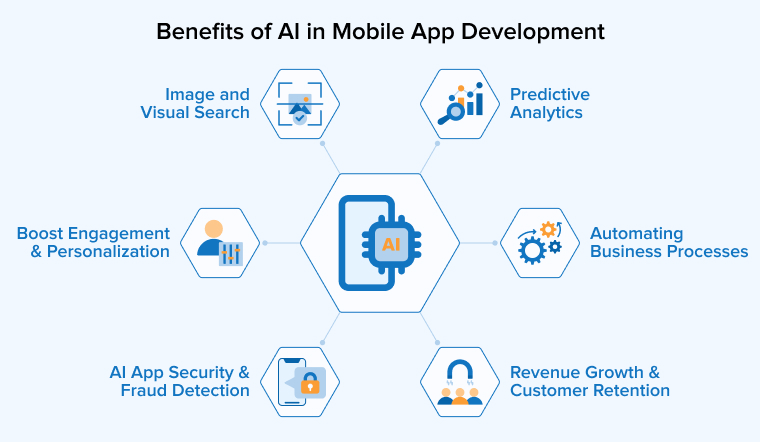
Automating Business Processes
AI takes over repetitive tasks such as customer support, data entry, invoice processing, and report generation without requiring manual effort from teams. Chatbots quickly answer common questions, and workflows automatically take actions using real-time data. This reduces operational costs, minimizes human error, and allows teams to focus on work that truly requires human thinking instead of routine operations.
Enhanced User Engagement and Personalization
Every user uses an app in their own way. AI notices this by watching how they behave, what they like, and when they use the app. This helps the app show content, suggest products, and send notifications that fit each user’s interests and habits. The app interface itself can adapt dynamically based on how someone uses it. With every interaction, the recommendations become more precise as the model learns, making the app feel personalized rather than generic. This directly improves daily active user engagement and retention rates.
Predictive Analytics for Smarter Decisions
AI looks at what users have done in the past and figures out what they are likely to do next. If a shopping app notices that a certain product is getting more attention this week, the business can stock up before it sells out. If a streaming app sees that a user has stopped watching as often, it can send them a personalized recommendation before they cancel their subscription. A food delivery app can prepare for a busy Friday night by looking at order patterns from previous weekends. It helps businesses make the right move at the right time instead of guessing.
AI-Driven App Security and Fraud Detection
AI keeps an eye on everything happening inside the app and catches problems that humans would miss. If someone tries to log into a user’s account from a country they have never been to, AI flags it immediately. If a credit card transaction looks nothing like the user’s normal spending, the app blocks it and sends an alert before any money is lost. Banking apps use facial recognition so users can log in just by looking at their phone. For apps that store medical or financial records, AI also makes sure the data is handled according to privacy laws like GDPR and HIPAA.
Increased Revenue and Customer Retention
AI helps apps make more money by showing each user the right product at the right time. A user who has just bought running shoes might see a recommendation for running socks the next day. Someone who browses winter jackets every October gets an early notification when the new collection drops. Chatbots handle most of the basic support questions, so businesses spend less on customer service. Loyalty rewards adjust to each user’s habits rather than offering the same discount to everyone. Users who feel like the app understands them spend more and stay longer.
Image and Visual Search
Imagine a user spots a coffee table at a friend’s house and wants to buy the same one. All they need to do is take a photo, and the app finds the exact table or something similar within seconds. Shopping apps use this so users can discover products without knowing the brand or model name. Home decor apps recommend pieces that match the furniture a user already owns. In healthcare, apps analyze X-rays and medical scans to help doctors identify issues earlier. Visual search gives users a faster, more natural way to find what they want compared to typing keywords and scrolling through pages of results.
What are the Industry-Wise Use Cases of AI in Mobile App Development?
AI is being used across industries to solve specific problems and deliver experiences that would not be possible without it. Below are the industries where AI-powered mobile apps are making the biggest impact.
Healthcare
Healthcare is one of the earliest and most active adopters of AI in mobile apps. Patients now have apps on their phones that can check symptoms, remind them to take medications, and share health data directly with their doctors. On the clinical side, AI helps medical professionals review complex data faster and catch warning signs that might be missed during routine checkups.
Use Cases of AI in Healthcare:
- Remote monitoring of vitals like heart rate, blood pressure, and oxygen levels throughout the day
- Medical image analysis that assists doctors in reading X-rays, MRIs, and CT scans
- Mental health apps that track mood patterns and suggest coping strategies
- Drug interaction checks that alert patients when medications may conflict
- Predictive models that identify patients at risk of chronic conditions before symptoms appear
Example: Ada Health uses AI to guide users through a symptom assessment conversation and provides a list of possible conditions with recommended next steps. It thus serves over 13 million users globally.
E-Commerce and Retail
Online shopping has become deeply personal thanks to AI. Retail apps analyze each user’s browsing, clicks, cart additions, and purchases to create a shopping experience tailored specifically to that individual. This level of personalization was only possible for large retailers a few years ago, but AI has made it accessible to businesses of all sizes.
Use Cases of AI in E-Commerce and Retail:
- Visual search that allows users to find products by scanning them instead of typing descriptions
- Dynamic pricing that adjusts in real-time based on demand, competition, and stock levels
- AI-powered size and fit suggestions that reduce product returns
- Automated customer support through chatbots that handle order queries and complaints
- Demand forecasting that predicts which products will sell out and triggers restocking early
Example: Amazon’s AI recommendation engine analyzes user behavior across billions of transactions and drives roughly 35% of the company’s total revenue.
Finance and Banking
Banks and fintech companies rely on AI to process millions of transactions every day while keeping user accounts safe. What used to require branch visits and manual paperwork, for example, applying for a loan or disputing a charge, now happens inside an app within seconds. AI has made banking faster for users and more cost-efficient for financial institutions.
Use Cases of AI in Finance and Banking:
- Automated credit scoring and instant loan decisions based on financial behavior patterns
- Smart budgeting tools that categorize expenses and suggest saving opportunities
- Personalized investment management adjusted to each user’s risk tolerance and goals
- Biometric login through facial recognition and fingerprint for secure account access
- Anomaly detection that spots unauthorized account activity and freezes it immediately
Example: PayPal uses AI and machine learning to monitor millions of transactions every day, detect fraudulent activity in real time, and prevent approximately $5 billion in losses annually.
Entertainment and Media
Entertainment apps depend on AI to figure out what each user enjoys and deliver more of it at the right time. The difference between a user opening an app for five minutes and spending an hour on it often comes down to the quality of the recommendations. AI models trained on millions of interactions make that difference by learning individual interests and predicting what someone wants to watch, listen to, or read next.
Use Cases of AI in Entertainment and Media:
- Auto-generated captions, subtitles, and translations for content in multiple languages
- Content moderation that detects and removes harmful or policy-violating material
- Smart ad placement that matches advertisements to user interests without being intrusive
- Audio fingerprinting that identifies songs and matches them to user libraries
- Mood-based content curation that adjusts suggestions based on time of day and listening patterns
Example: Netflix uses AI to analyze viewing behavior, and its recommendation engine influences roughly 80% of the content people end up watching on the platform.
Travel and Hospitality
Travel planning involves dozens of small decisions, and AI simplifies the entire process by handling research, comparison, and booking assistance through a single app. Users no longer need to check multiple websites for the best deal or figure out the fastest route on their own. AI does this exhausting task and presents the best options based on each traveler’s preferences.
Use Cases of AI in Travel and Hospitality:
- Price prediction that tells users the best time to book flights and hotels for the lowest fare
- Dynamic itinerary suggestions based on weather, location, and personal interests
- Real-time language translation for travelers navigating foreign destinations
- Sentiment analysis on hotel and restaurant reviews to highlight what matters most
- Loyalty program personalization that rewards frequent travelers based on their booking patterns
Example: Hopper uses AI to analyze billions of flight and hotel prices daily and predicts future price changes with up to 95% accuracy to tell users exactly when to book for the best deal.
Education
AI-powered education apps adapt to each student’s learning speed and strengths instead of following a fixed curriculum. The app tracks how a student performs on each topic and adjusts lesson difficulty, practice questions, and content recommendations based on their progress. Students who need more time on a concept get additional exercises, while those who are progressing well move ahead without being held back. This personalized approach makes learning more efficient and keeps students engaged compared to traditional one-size-fits-all methods.
Use Cases of AI in Education:
- Automated grading and instant feedback on assignments, quizzes, and essays
- Speech recognition that corrects pronunciation in language learning apps
- AI-generated practice questions according to each student’s weak areas
- Progress dashboards that show parents and teachers where a student needs help
- Peer matching that connects students with similar learning goals for group study
Example: Duolingo uses AI to personalize every lesson for each user based on performance, serving over 100 million monthly active users worldwide.
Food and Delivery
Food delivery apps run on tight timelines where a delay of even a few minutes affects customer satisfaction. AI manages the entire process in real time, from deciding which restaurant should prepare the order to picking the best driver based on location and traffic conditions. It also learns what each user likes to eat and when they usually order, so the app can suggest the right restaurants and dishes before the user even starts searching.
Use Cases of AI in Food and Delivery:
- Demand forecasting that helps restaurants prepare for busy periods before they hit
- Menu personalization that highlights dishes a user is most likely to order based on past behavior
- AI-powered customer support that resolves order issues, refunds, and complaints automatically
- Kitchen load balancing that distributes orders evenly across partner restaurants
- Driver assignment algorithms that match the nearest available driver to each new order
Example: Uber Eats uses AI to predict delivery times, optimize driver routes, and personalize restaurant recommendations, processing millions of orders daily across 6,000+ cities worldwide.
What are the Best Practices for Integrating AI into Mobile Apps?
Adding AI to a mobile app is not just about picking the right technology. How you plan, implement, and maintain it determines whether the AI actually adds value or creates problems.
Start with Clear Use Cases
Not every feature in an app needs AI. Before investing in AI integration, identify the specific problems you want it to solve and map them to measurable outcomes. A fitness app might use AI to detect exercise form through the phone’s camera, while a banking app might use it to flag unusual transactions. Starting with one or two focused use cases allows your development team to build a proof of concept, test it with real users, and iterate before scaling AI across the entire app.
Example: Starbucks started its AI journey with just one use case, personalized drink recommendations based on order history and location. Once that proved successful, they expanded AI into inventory management and demand forecasting across stores.
Prioritize Transparency and User Trust
Users should know when they are interacting with AI and how their data is being used. If your app uses AI to analyze health data, make it clear that the results are suggestions and not medical diagnoses. Build opt-in consent flows so users choose what data they share. Implement explainable AI practices on the development side wherever possible. This helps your team understand why a model made a specific prediction, making debugging and compliance audits much easier.
Example: Apple clearly labels Siri suggestions and on-device AI features across iOS, explaining what data stays on the device and what gets sent to the cloud, which has helped build strong user confidence in its AI features.
Continuously Monitor and Improve AI Models
AI models do not stay accurate forever. User behavior changes, new data patterns emerge, and the model that worked well six months ago might start producing irrelevant results today. To address this, set up automated monitoring pipelines that track model accuracy, prediction drift, and error rates in production. Schedule regular retraining cycles using fresh data and A/B test updated models against the current version before deploying them live to all users.
Example: Spotify retrains its recommendation models weekly using the latest listening data so that Discover Weekly playlists stay relevant and reflect each user’s evolving music taste rather than what they listened to months ago.
Optimize for Mobile Performance
AI models can be resource-heavy, and mobile devices have limited battery, memory, and processing power. Use lightweight models designed for mobile through frameworks like TensorFlow Lite, Google ML Kit, or Core ML. Where possible, run AI inference on-device instead of sending data to a server, which improves response times and protects user privacy. During development, benchmark every AI feature for its impact on battery drain, memory usage, and app startup time across both low-end and high-end devices.
Example: Google Translate runs its neural machine translation model directly on-device using TensorFlow Lite. This allows users to translate text through their camera in real time even without an internet connection.
Collect and Manage Quality Data
AI is only as good as the data it learns from. Before building AI features, set up a reliable data pipeline that captures clean, properly labeled, and relevant data. Remove duplicates, handle missing values, and check for biased samples that could skew model predictions. Follow data privacy regulations like GDPR and HIPAA from the start by encrypting sensitive data to give users control over what they share and maintain audit trails for how data flows through your AI systems.
Example: Netflix collects over 1 billion events per day from user interactions and maintains strict data quality standards to ensure its recommendation models are trained on accurate, representative data rather than noisy or incomplete signals.
What are the AI Tools for Mobile App Development?
Choosing the right AI tools depends on where the model runs, what features you need, and which platforms your app targets. Here is a breakdown of the most widely used tools across on-device, cloud-based, and development categories.
| Tool | Category | Best For | Platform Support |
|---|---|---|---|
| TensorFlow Lite | On-Device ML | Running trained ML models directly on mobile devices with low latency | Android, iOS, Cross-platform (Flutter, React Native) |
| Core ML | On-Device ML | Optimized on-device inference using Apple’s Neural Engine hardware | iOS only |
| Google ML Kit | On-Device ML | Pre-built models for text recognition, face detection, barcode scanning, and pose estimation | Android, iOS |
| OpenAI API (GPT-4o) | Cloud AI | Conversational features, text generation, summarization, and smart replies | Any platform via API |
| Google Vertex AI | Cloud AI | Custom model training, deployment, and management at scale | Any platform via API |
| AWS SageMaker | Cloud AI | Training and deploying ML models with edge device support | Any platform via API |
| Azure Cognitive Services | Cloud AI | Computer vision, speech recognition, and NLP for enterprise apps | Any platform via API |
| Dialogflow | Chatbots | Building conversational chatbots and voice assistants with natural language understanding | Android, iOS, Web |
| GitHub Copilot | Development | AI-assisted code generation, autocomplete, and bug fixing during development | IDE-based (VS Code, JetBrains) |
| Firebase ML | Development | Quick integration of ML features with analytics and crash reporting built in | Android, iOS |
Most mobile apps in 2026 use one of three approaches for AI integration. On-device AI runs models locally on the phone for speed and privacy, which works well for features like image recognition and text detection. Cloud-based AI sends data to a server for processing, which is necessary for features that need large language models like chatbots and content generation. A hybrid approach combines both, running lightweight tasks on-device and offloading heavier processing to the cloud when needed.
What are the Challenges and Risks in AI Adoption?
AI brings clear advantages to mobile apps, but integrating it comes with real challenges that businesses and development teams should be prepared for before they start.
Data Privacy and Security
AI models need large amounts of user data to learn and make accurate predictions, and most of that data is sensitive. Health apps collect biometric readings, banking apps process financial transactions, and shopping apps track browsing and purchase behavior, all of which can cause serious damage to user trust if a breach occurs. Compliance with privacy regulations like GDPR and HIPAA makes this even more complex because it requires encryption, user consent flows, data access controls, and audit trails built into the app from the start.
On-device AI processing through tools like TensorFlow Lite and Core ML helps reduce this risk by keeping data on the user’s phone instead of sending it to external servers, but it does not eliminate the need for a well-planned data security strategy.
Complexity
Adding AI to a mobile app is not as simple as plugging in an API and letting it run. It requires specialized skills in machine learning, data engineering, and model optimization that most mobile development teams do not have in-house. Choosing the right model architecture, training it with quality data, optimizing it to run smoothly on mobile hardware, and keeping it accurate after launch all require expertise that goes well beyond standard app development. Teams that underestimate this complexity often end up with AI features that either underperform in real-world conditions or break entirely once they reach production.
Ethical Considerations
AI makes decisions that directly affect what users see, what they are recommended, and in some cases what they are denied access to. A lending app that uses AI for credit scoring needs to ensure its model is not unfairly rejecting applicants based on factors like location or demographics rather than actual creditworthiness. A hiring app that screens resumes with AI must guarantee the model does not favor one group of candidates over another based on patterns in historical hiring data. Businesses need clear ethical guidelines for how their AI models make decisions, and those guidelines should be reviewed and updated regularly as models evolve and new edge cases emerge.
Bias
AI models learn from historical data, and if that data contains biases, the model will reproduce and sometimes amplify them without anyone realizing it during development. A recommendation engine trained mostly on data from one demographic may deliver poor results for users outside that group, and a facial recognition system trained primarily on lighter skin tones may struggle with accuracy for users with darker skin tones. Bias is rarely obvious during internal testing because it tends to surface only after launch when a diverse set of real users starts interacting with the app.
Regular auditing of model outputs across different user segments, combined with diverse training datasets, is the most practical way to catch and correct these issues before they turn into reputational or legal problems.
Model Accuracy, Latency, and Device Constraints
A model that runs perfectly on a powerful cloud server may perform poorly on a mid-range Android phone with limited RAM, processing power, and battery capacity. AI features such as voice search, image recognition, and real-time translation need to respond instantly because users notice even a one-second delay, and anything longer makes the feature feel broken rather than helpful. On top of speed, AI models can drain battery quickly and increase memory usage if they are not optimized specifically for mobile hardware constraints.
Development teams need to compress models, run performance benchmarks across both low-end and high-end devices, and measure battery impact thoroughly before shipping any AI feature to production.
High Development Cost and Complexity
Building AI features requires significant investment across data collection, model training, cloud infrastructure, specialized talent, and ongoing maintenance that continues long after launch. A basic AI chatbot integration might cost between $5,000 and $10,000, while custom features like recommendation engines or computer vision systems can run from $20,000 to $100,000 or more depending on the level of complexity and data requirements involved. Beyond the initial build, AI models need regular retraining with fresh data, continuous performance monitoring, and data pipeline maintenance, all of which add to the total cost of ownership over time.
For businesses working with limited budgets, starting with pre-built AI services like Google ML Kit or OpenAI API is a more practical entry point than building custom models from scratch.
The Future of AI in Mobile App Development
On-device AI is becoming the standard for features like voice recognition, image analysis, and real-time translation. Instead of sending data to cloud servers, apps run AI models directly on the phone using frameworks like Core ML and TensorFlow Lite, which makes them faster and more private.
AI agents are replacing simple chatbots. Instead of answering one question at a time, these agents handle multi-step tasks like booking flights, rescheduling meetings, or comparing prices across apps. According to Gartner, 40% of enterprise applications will feature task-specific AI agents by the end of 2026, up from less than 5% in 2025.
Generative AI apps such as ChatGPT alone contributed to 43% of the total $18.5 billion revenue generated from the AI app sector in 2025, according to Business of Apps. Apps are using it to write content, generate images, build UI components, and create personalized marketing materials in real time.
Hyper-personalization is moving beyond basic recommendations. AI is now adjusting entire app experiences based on individual habits, mood patterns, and context. A music app might shift to calming playlists when it detects stress. A shopping app might show different products depending on whether the user is browsing casually or ready to buy.
Privacy-first AI is also growing as Apple’s App Tracking Transparency and Google’s Privacy Sandbox limit data access. On-device processing and federated learning allow apps to stay smart without invasive tracking, turning privacy into a competitive advantage rather than just a compliance checkbox.
Conclusion
AI has become a core part of how mobile apps are built, how they engage users, and how businesses generate results from them. From automating development workflows and personalizing user experiences to detecting fraud in real time and predicting what users need next, AI touches every stage of the app lifecycle.
Tools like TensorFlow Lite, Google ML Kit, and OpenAI API make it possible to add AI features without building everything from scratch. Businesses seeing the best results are the ones that start with clear use cases, invest in quality data, and treat AI as an ongoing process rather than a one-time feature addition.
FAQs
AI personalizes content based on user behavior, powers voice assistants and chatbots, improves search results, detects fraudulent transactions in real time, and automates repetitive tasks. Apps like Netflix use AI for recommendations, Google Maps uses it for traffic prediction, and banking apps use it for fraud detection.
AI speeds up the development process by generating code suggestions, automating testing and debugging, analyzing user behavior data, and providing design recommendations based on real usage patterns. It helps development teams build and launch apps faster with fewer errors.
Start by defining your app’s goals and identifying which features would benefit from AI. After that, choose the right tools based on your needs, such as TensorFlow Lite for on-device ML. Build, test across devices, and deploy with a plan for ongoing model monitoring and updates.
It depends on what you are building. For on-device machine learning, TensorFlow Lite and Core ML are the most widely used. For chatbots and text generation, the OpenAI API is a popular choice. For no-code or low-code app building, tools like Bolt.new, Lovable, Cursor, FlutterFlow, and Bubble are among the top options.
Not every app needs AI. But if your app involves personalization, search, recommendations, fraud detection, image processing, or voice interaction, AI can significantly improve the user experience and give you an edge over competitors that rely on static logic.
Yes. AI delivers personalized content feeds, enables 24/7 customer support through chatbots, powers voice assistants for hands-free interaction, supports biometric login for faster and safer access, and adapts the app experience to each user’s individual behavior over time.
AI monitors app performance in real time, identifies bottlenecks, optimizes battery and memory usage, and adjusts how the app runs based on device type and network conditions. This keeps the app fast and smooth without needing constant manual performance tuning from the development team.
The most commonly used AI technologies in mobile apps are machine learning for recommendations and predictions, natural language processing for chatbots and voice search, computer vision for image recognition and visual search, and predictive analytics for forecasting user behavior and business trends.
Yes. AI can be added to existing apps through cloud APIs like OpenAI or Google Vertex AI, or through on-device frameworks like TensorFlow Lite and Core ML. You do not need to rebuild the app from scratch.
AI strengthens app security by detecting fraud in real time, flagging unusual login attempts, enabling biometric authentication through face and fingerprint recognition, and monitoring user behavior for signs of unauthorized access. It responds to threats faster than any manual security system can.
Healthcare, finance, e-commerce, entertainment, education, travel, and food delivery are the industries seeing the biggest impact from AI in mobile apps. Each uses AI differently, from remote patient monitoring in healthcare to recommendation engines in entertainment and fraud detection in banking.
Costs vary based on complexity. Using pre-built AI services like Google ML Kit or OpenAI API can start as low as $10,000 to $30,000. Custom AI features like recommendation engines or computer vision systems can range from $50,000 to $200,000 or more. Ongoing costs for model retraining and maintenance should also be considered.

Rajendra Padhiyar is a Project Manager at TatvaSoft, leading a skilled team of mobile app developers. With extensive experience in mobile application development and management, he ensures timely delivery and high-quality standards for diverse mobile projects



Comments
Leave a message...