

Every cross-platform mobile project in 2026 starts with the same question: Flutter or React Native. Mobile app development service providers use both frameworks to build iOS and Android apps from a single codebase, but they work very differently. Flutter uses Dart and renders its own UI using a built-in graphics engine. React Native uses JavaScript and relies on native platform components to display the interface. This affects how the app performs, how it looks across devices, and how your team maintains it over time.
As of July 2026, Flutter had approximately 177,900 GitHub stars compared to 126,242 for React Native. React Native still powers apps used by over 2 billion people, including Facebook and Instagram. Flutter runs in production at Google, BMW, and Alibaba. The performance gap between the two has narrowed, but choosing the wrong one for your project can still lead to rework, hiring mismatches, or UI issues that surface late in development.
This blog covers what Flutter and React Native are, how they compare across key technical and practical factors, when to pick one over the other, step-by-step implementation for both, market adoption data, and cost differences.
What is Flutter?
Flutter is a Google-developed open-source UI framework for building cross-platform apps from a single codebase. It uses the Dart programming language and supports iOS, Android, web, desktop (Windows, macOS, Linux), and embedded systems.
Unlike other frameworks, Flutter does not rely on native UI components. It has its own rendering engine called Impeller (previously Skia) that draws every pixel on screen directly. This gives Flutter app development companies full control over how the app looks and ensures consistent visuals across all platforms. Flutter also comes with a large library of pre-built widgets, including Material Design and Cupertino styles, which speeds up UI development significantly.
What is React Native?
React Native is an open-source framework developed by Meta for building cross-platform mobile apps using JavaScript. It supports iOS, Android, and, with additional libraries, web and desktop platforms.
A button in React Native looks and behaves like a native iOS button on iPhone and a native Android button on Android. This gives apps a platform-specific look and feel without writing separate code for each operating system.
Flutter vs React Native: Key Differences
Here is a side-by-side comparison of the core differences between Flutter and React Native.
| Factor | Flutter | React Native |
|---|---|---|
| Developed By | Meta | |
| Programming Language | Dart | JavaScript / TypeScript |
| UI Rendering | Uses its own rendering engine (Impeller) to draw UI directly on a canvas | Maps to native platform UI components |
| Performance | Compiles to native machine code via AOT compilation | Communicates with native components through a bridge (Improved with new architecture) |
| Hot Reload | Yes, with hot reload and hot restart | Yes, with fast refresh |
| Platform Support | iOS, Android, Web, Windows, macOS, Linux, Embedded | iOS, Android, Web, Windows, macOS (with community libraries) |
| UI Consistency | Same look across all platforms | Adapts to each platform’s native design |
| App Size | 8 to 12 MB larger due to built-in rendering engine | Smaller base size, reducible with configuration |
| Package Ecosystem | Growing, with around 760K repositories on GitHub | Mature, with access to 2 million+ npm packages |
| Learning Curve | Requires learning Dart, but documentation is well-structured | Easier for JavaScript/web developers, steeper for others |
| Community Size | Growing rapidly with strong Google backing | Larger and more established due to longer market presence |
| Code Reusability | High, single codebase works across mobile, web, and desktop | High for mobile; web reuse possible with additional setup |
Flutter vs React Native: Detailed Comparison
The table above gives a quick overview, but each factor needs more context before you can make a decision. Here is a closer look at how Flutter and React Native differ from each other in terms of parameters that matter most during development.
1. Performance
Flutter
Flutter compiles Dart code directly into native machine code using AOT compilation. There is no bridge or intermediary layer between the app and the device hardware, which results in smoother animations and faster startup times. Flutter apps consistently maintain 60 to 120 fps on capable hardware. Its Impeller engine also eliminates delays by precompiling shaders at build time.
React Native
React Native historically relied on a JavaScript bridge to communicate with native components, which added latency. With the New Architecture (Fabric renderer and TurboModules), React Native has significantly improved responsiveness by enabling direct communication between JavaScript and native code. The performance gap has narrowed, but React Native can still lag in animation-heavy and graphics-intensive applications.
2. Programming Language
Flutter
Flutter uses Dart, a strongly typed, object-oriented programming language developed by Google. Dart’s null safety feature helps you avoid null reference errors during development. Its syntax is clean and considered simpler to pick up for developers coming from Java or C# backgrounds. Dart’s AOT compilation also improves startup performance for Flutter apps.
React Native
React Native uses JavaScript, the most widely known programming language. According to the Stack Overflow 2025 Developer Survey, 66% of developers already know JavaScript. TypeScript has become standard in React Native projects with strong typing and better IDE support. The main disadvantage is that JavaScript is a flexible but weakly typed language, which can lead to runtime errors that Dart catches at compile time.
3. UI Components and Rendering
Flutter
Flutter draws every element on screen using its own rendering engine. It does not depend on native system components at all, which means the app looks identical on iOS, Android, web, and desktop. Flutter includes a large library of pre-built widgets covering both Material Design and Cupertino styles and provides you with pixel-level control over the interface.
React Native
React Native maps its components to native UI elements provided by the platform. This means a button automatically adopts the native style of each platform, so iOS and Android users both get a familiar experience. This gives apps a platform-native feel automatically, but visual differences can appear between platforms if custom styling is not handled carefully.
4. Development Speed
Flutter
Flutter’s hot reload preserves app state during changes, which makes UI iteration fast. Its CLI tools and documentation make initial project setup straightforward. Flutter’s built-in widget library also reduces the need to search for third-party UI packages, which saves time during early development.
React Native
React Native offers fast refresh for instant code changes during development. However, projects using the bare CLI workflow can require more configuration for native modules and third-party dependencies. Version upgrades in React Native can also be time-consuming due to changes in native dependencies across updates.
5. Community and Ecosystem
Flutter
Flutter launched in 2017 and has grown rapidly since then. It had around 177,900 GitHub stars as of July 2026. Google, Alibaba, and BMW actively use and contribute to the Flutter ecosystem, which has helped build a strong developer community around it. Flutter’s official documentation is often praised for being more comprehensive and beginner-friendly.
React Native
React Native was first released in 2015 and has had more time to build its developer base. It benefits from the broader JavaScript ecosystem with access to over 2 million npm packages. Developers can find answers, tutorials, and open-source solutions more easily because the community has been active for over a decade now.
6. Code Reusability
Flutter
Flutter allows developers to write a single codebase that runs on iOS, Android, web, Windows, macOS, and Linux. The same UI code renders consistently across all these platforms without platform-specific adjustments in most cases.
React Native
React Native offers strong code reusability between iOS and Android. Web and desktop support exists but typically requires additional libraries and platform-specific code. One of the biggest advantages is that teams already using React for web can share logic between mobile and web projects.
7. App Size
Flutter
Flutter apps are usually 8 to 12 MB larger than equivalent React Native apps because Flutter bundles its own rendering engine with every build. This extra size allows Flutter to keep the UI looking the same across all platforms.
React Native
React Native apps start smaller since they rely on native platform components rather than shipping their own engine. App size can be further reduced by enabling Hermes (a lightweight JavaScript engine) and removing unused dependencies.
8. Learning Curve
Flutter
Flutter requires learning Dart, a language that is not as widely used as JavaScript. Dart has a clean syntax and solid documentation, so if you have a background in Java, C#, or Kotlin, you can learn Dart in a short time. Flutter’s well-organized docs and built-in widget catalog also help new developers get started without spending too much time on setup.
React Native
React Native is a natural fit for developers who already know JavaScript or have built web apps with React. Core concepts like components, props, and state work the same way. The challenge shows up when projects need native modules, platform-specific dependencies, or debugging at the native layer.
9. Third-Party Libraries and Plugins
Flutter
Flutter’s package ecosystem is smaller but growing quickly, with around 760,000 repositories on GitHub. Google maintains many of the core plugins, and the quality of popular packages is high. For less common use cases, you may need to write platform-specific code using platform channels.
React Native
React Native has access to the npm registry with over 2 million packages. The ecosystem is mature, and most common functionalities like maps, payments, push notifications, and analytics have well-maintained libraries available.
10. Testing and Debugging
Flutter
Flutter provides a built-in testing framework that covers unit tests, widget tests, and integration tests out of the box. Dart’s type safety and compile-time checks catch many bugs before runtime, reducing debugging time during development.
React Native
React Native relies on third-party testing libraries like Jest for unit testing and Detox or Appium for end-to-end testing. Debugging has improved with the New Architecture, but developers still occasionally run into issues related to native module compatibility. Flipper and Chrome DevTools are commonly used for troubleshooting.
Create a Cross-Platform App Using Flutter
In Flutter, everything is a widget. Widgets are the fundamental building blocks of the UI. Instead of HTML or JSX, you compose a tree of widgets where Scaffold provides the basic screen structure, AppBar renders the top navigation bar, and Column stacks children vertically. The StatelessWidget and StatefulWidget classes define whether a widget holds mutable state. Styling is not separate from the structure. It lives inline as properties directly on each widget, using TextStyle for text and Color.fromRGBO or Colors.x for colors.
Entry Point
main.dart is the entry point of a Flutter application. Execution begins in the main() function, and runApp(const MyApp()) boots the widget tree by mounting the root widget onto the screen.
App Structure
MyApp extends StatelessWidget defines a widget that never changes, while MyHomePage extends StatefulWidget holds mutable state in a separate State class. The UI is described in the build() method, which returns a widget tree (MaterialApp → Scaffold → AppBar, body, etc.).
Layout
Layout uses dedicated widgets. Column stacks children vertically, Row arranges them horizontally. Alignment is controlled with properties like mainAxisAlignment: MainAxisAlignment.center.
Styling
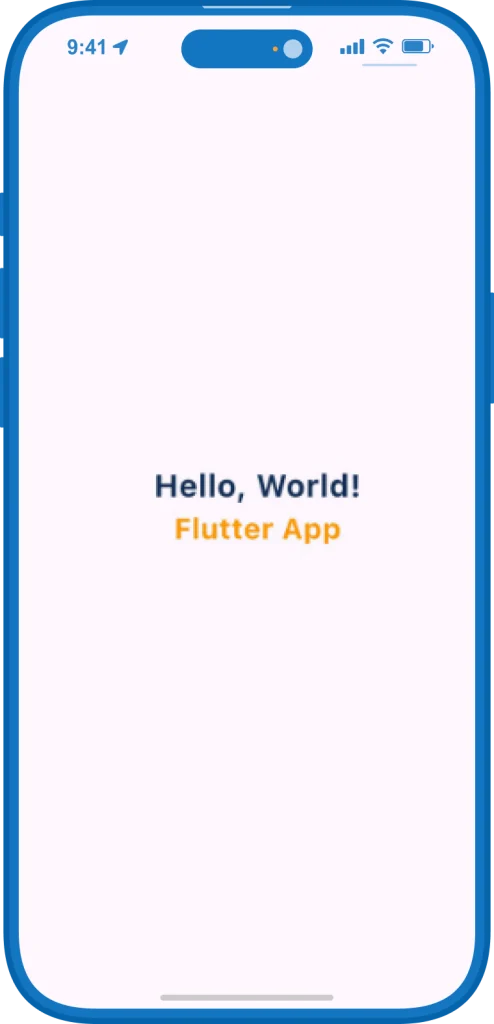
Styles are applied inline as widget properties. Text styling goes through a TextStyle object (fontSize, fontWeight, color), and colors use Dart classes like Colors.orange or Color.fromRGBO(18, 46, 86, 1).
Flutter Code
import 'package:flutter/material.dart'; void main() { runApp(const MyApp()); } class MyApp extends StatelessWidget { const MyApp({super.key}); @override Widget build(BuildContext context) { return MaterialApp( title: 'Flutter Demo', theme: ThemeData(colorScheme: ColorScheme.fromSeed(seedColor: Colors.deepPurple)), home: const MyHomePage(title: 'Flutter vs React Native!'), ); } } class MyHomePage extends StatefulWidget { const MyHomePage({super.key, required this.title}); final String title; @override State<MyHomePage> createState() => _MyHomePageState(); } class _MyHomePageState extends State<MyHomePage> { @override Widget build(BuildContext context) { return Scaffold( appBar: AppBar( backgroundColor: Color.fromRGBO(18, 46, 86, 1), title: Text(widget.title, style: TextStyle(color: Colors.white)), ), body: Center( child: Column( mainAxisAlignment: MainAxisAlignment.center, children: [ Text('Hello, World!', style: TextStyle(fontSize: 26, fontWeight: FontWeight.bold, color: Color.fromRGBO(18, 46, 86, 1))), Text('Flutter App', style: TextStyle(fontSize: 24, fontWeight: FontWeight.bold, color: Colors.orange)), ], ), ), ); } } |
Output
File Structure
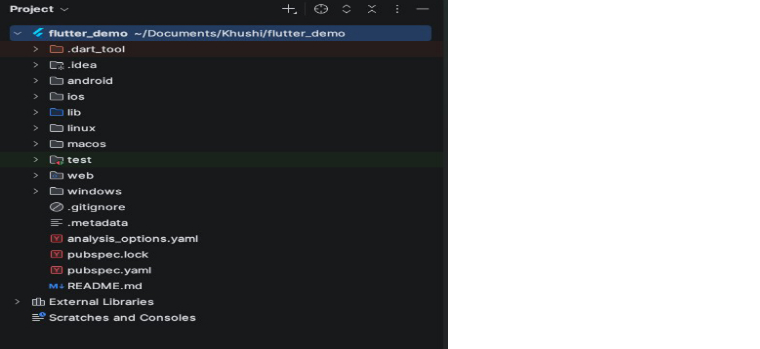
The Flutter project follows a clean separation: lib/ holds all Dart source code, android/ and ios/ contain platform-specific native code that is rarely touched, and pubspec.yaml declares dependencies. The lib/main.dart file is where the app logic lives.
Create a Cross-Platform App Using React Native
In React Native, components are functions that return JSX. Instead of HTML elements, you use native primitives like View (similar to a div), Text, and StyleSheet. The SafeAreaProvider handles iPhone notch and Dynamic Island padding automatically using useSafeAreaInsets.
Entry Point
App.tsx or App.js is the entry point. The App component is exported as default (export default App) and registered as the root. Everything renders from there.
App Structure
Everything is a component, written as functions like App() and AppContent(). The UI is described with JSX returned from the function. Components like View, Text, and SafeAreaProvider nest together to form the component tree.
Layout
Layout uses Flexbox on a View. A View is a column by default (flexDirection: ‘column’). Set flexDirection: ‘row’ for horizontal layout. Alignment is controlled with justifyContent and alignItems.
Styling
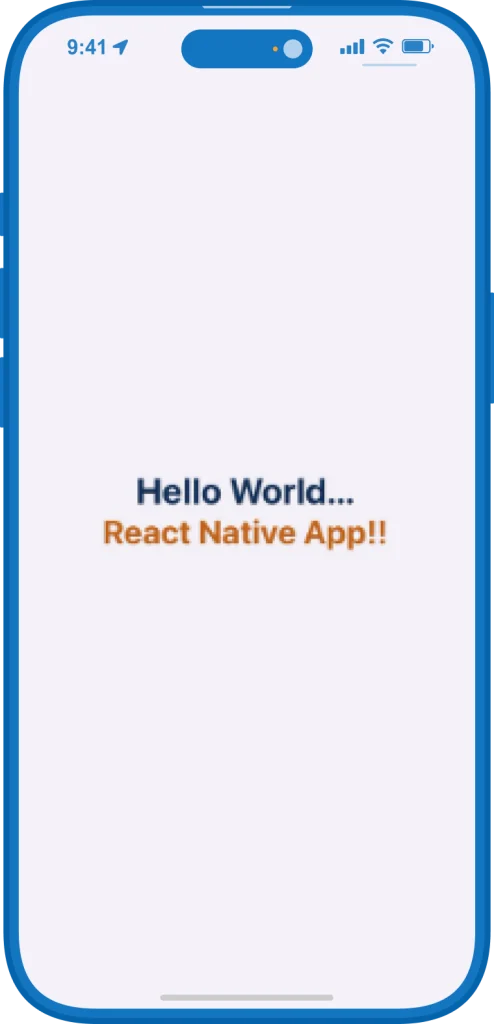
Styles are separate objects, usually defined with StyleSheet.create({…}) and applied through the style prop. The syntax is CSS-like (fontSize, fontWeight, backgroundColor) with colors as hex strings (‘#122e56’). Arrays let you merge multiple styles together (style={[styles.header, {…}]}).
React Native Code
import { StatusBar, StyleSheet, Text, useColorScheme, View } from 'react-native'; import { SafeAreaProvider, useSafeAreaInsets } from 'react-native-safe-area-context'; function App() { const isDarkMode = useColorScheme() === 'dark'; return ( <SafeAreaProvider> <StatusBar barStyle={isDarkMode ? 'light-content' : 'dark-content'} /> <AppContent /> </SafeAreaProvider> ); } function AppContent() { const insets = useSafeAreaInsets(); return ( <View style={styles.container}> <View style={[styles.header, { paddingTop: insets.top, height: 70 + insets.top }]}> <Text style={styles.headerTitle}>Flutter vs React Native!</Text> </View> <View style={styles.content}> <Text style={styles.helloWorldText}>Hello World...</Text> <Text style={styles.reactNativeText}>React Native App!!</Text> </View> </View> ); } const styles = StyleSheet.create({ container: { flex: 1, backgroundColor: '#F5F1F8' }, header: { width: '100%', backgroundColor: '#122e56', justifyContent: 'center', alignItems: 'center' }, headerTitle: { fontSize: 20, fontWeight: '400', color: '#FFF' }, content: { flex: 1, justifyContent: 'center', alignItems: 'center' }, helloWorldText: { fontSize: 26, color: '#122e56', fontWeight: 'bold' }, reactNativeText: { fontSize: 24, color: '#c2631a', fontWeight: 'bold' }, }); export default App; |
Output
File Structure
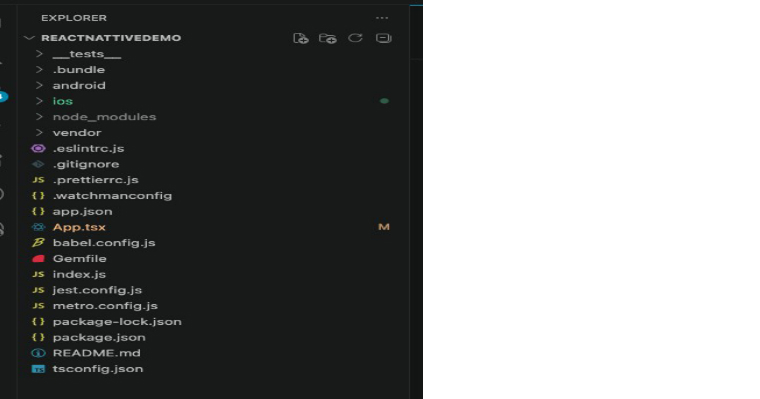
The React Native project structure keeps the JavaScript/TypeScript source at the root level. App.tsx is the entry component, index.js registers it, and android/ and ios/ hold native shells. The node_modules/ folder (not shown fully) contains all npm dependencies.
When to Choose Flutter?
Flutter is a strong fit when your project needs a consistent look and feel across all platforms. Here are the scenarios where Flutter makes the most sense.
- Your app needs custom animations, complex transitions, or brand-specific UI that must look identical on every platform.
- Multi-platform reach beyond mobile is a priority. Flutter supports iOS, Android, web, Windows, macOS, Linux, and embedded systems from a single codebase.
- Performance matters for graphics-heavy apps. Flutter’s Impeller engine handles heavy rendering and maintains 60 to 120 fps without dropping frames.
- The development team does not have strong JavaScript experience but is open to learning Dart, which has a clean syntax and well-structured documentation.
- Reducing dependency on third-party UI packages is important. Flutter’s built-in widget library covers Material Design and Cupertino styles out of the box.
- Long-term UI maintenance needs to stay low. Since Flutter does not depend on native system components, OS updates do not break the app’s visual consistency.
When to Choose React Native?
React Native works best when the team and project align with its JavaScript-first approach. Here are the scenarios where React Native is the better choice:
- The development team already has experience with JavaScript, TypeScript, or React for web. There is no new language to learn, and existing skills transfer directly.
- A native look and feel on each platform matters more than visual consistency. React Native uses native UI components, so the app automatically matches iOS and Android design patterns.
- Access to a large package ecosystem is needed. The npm registry has over 2 million packages, covering most common functionalities like maps, payments, and push notifications.
- Code sharing between a mobile app and an existing React web project is a goal. Shared logic and component patterns reduce duplicate work across platforms.
- Pushing minor updates without app store approval is important. React Native supports over-the-air (OTA) updates through tools like CodePush.
- Hiring and scaling the team needs to happen quickly. JavaScript developers are far more available in the job market compared to Dart developers.
Popular Apps Built with Flutter and React Native
Several well-known software development companies have built their mobile apps using these frameworks, proving that both are capable of handling large-scale, production-level applications.
Flutter
- Google Pay uses Flutter for its cross-platform payment experience across iOS and Android.
- BMW built its My BMW app with Flutter to deliver a consistent interface for vehicle controls, trip planning, and service scheduling.
- Alibaba’s Xianyu marketplace, one of the largest secondhand trading platforms in China, runs on Flutter and serves millions of daily users.
- eBay Motors uses Flutter for its vehicle listing and buying experience.
- Nubank, one of the largest digital banks in the world with over 80 million customers, built its mobile banking app entirely with Flutter.
- Google Classroom uses Flutter to deliver a unified learning experience across devices.
React Native
- Facebook and Instagram both use React Native for key parts of their mobile apps, making them some of the most widely used React Native applications globally.
- Shopify rebuilt its Shop app with React Native to provide a single codebase for iOS and Android.
- Pinterest uses React Native for its onboarding and authentication flows.
- Uber Eats adopted React Native for its restaurant dashboard.
- Discord uses React Native for several features within its mobile app.
- Bloomberg built its consumer mobile app with React Native to deliver real-time financial news and data across platforms.
Cost Comparison: Flutter vs React Native
Both frameworks reduce development costs by 30% to 60% compared to building separate native apps for iOS and Android. The actual cost depends on various factors given in the table below. Here is how each factor influences the development cost:.
| Factor | Flutter | React Native |
|---|---|---|
| Simple App (MVP) | $200 – $400 | $160 – $900 |
| Medium Complexity App | $1,000 – $3,600 | $900 – $3,300 |
| Complex / Enterprise App | $3,600 – $10,000+ | $3,300 – $9,000+ |
| Development Speed | Faster for UI-heavy apps due to built-in widget library and hot reload | Faster for teams with existing JavaScript experience and npm packages |
| Developer Hourly Rate | Generally higher due to smaller Dart talent pool | Lower due to wider availability of JavaScript developers |
| Hiring Cost | Fewer Dart developers available, which can increase recruitment time and cost | Larger talent pool makes hiring faster and more affordable |
| Maintenance Cost | Lower long-term maintenance since Dart’s null safety catches more bugs at compile time and UI stays consistent across OS updates | Can require more maintenance when native dependencies or third-party libraries break during OS or framework upgrades |
| Multi-Platform Reach | Single codebase covers iOS, Android, web, and desktop without additional cost | Mobile coverage is strong, but web and desktop support may need extra development effort |
React Native can lower initial costs for teams that already have JavaScript expertise, since there is no new language to learn and developers are easier to hire. Flutter can reduce long-term costs when UI consistency across platforms is a priority, as there are fewer platform-specific bugs to fix and less design rework during OS updates.
Conclusion
Flutter and React Native are both capable of building large-scale cross-platform apps. The right choice depends on your project needs, team skills, and long-term goals. Pick Flutter when your app needs custom UI, pixel-level consistency, high-performance animations, or multi-platform reach beyond mobile. If your team already has JavaScript expertise, you need to speed up development, or you want your app to deliver a native look and feel on each platform, React Native is a strong choice.
FAQs
We cannot claim that one is better than the other at present, as each one has its own best possible use cases. If your focus is on graphics-heavy and animation-rich apps, Flutter is the recommended framework. If the team is proficient in JavaScript/TypeScript and using cloud-dependent AI integrations, React Native is the ideal option.
Flutter is technically called a hybrid framework. However, it deviates from the hybrid nature because it compiles the Dart code directly into machine code rather than running inside a hidden browser window, as traditional hybrid frameworks do. It draws its own UI using its Impeller rendering engine.
Yes, Flutter is generally faster owing to its custom Impeller engine, AOT compilation, cold start, and animation frame rate of 60–120 FPS for graphics-intensive and animation-heavy apps. React Native has improved with its New Architecture, but Flutter still leads in rendering performance.
Yes. Flutter supports AI and machine learning through packages like Flutter AI Toolkit and app builders like FlutterFlow AI.
No, Flutter performance is generally not better than native development. Flutter compiles the Dart code into native machine code but falls slightly behind only in apps that need deep platform-specific APIs or heavy OS-level integrations.
Flutter is a frontend framework for building user interfaces. It helps developers create natively compiled, multi-platform applications from a single codebase.
Yes, both Flutter and React Native can be used to develop web and desktop apps. Flutter supports native development from one codebase, whereas React Native requires separate libraries like React Native Web and React Native Desktop to build web and desktop apps.
React Native has a larger community as it’s been around for a long time and also due to the JavaScript ecosystem. Flutter’s community is smaller but growing faster, with more GitHub stars and higher developer satisfaction scores in recent surveys.
Migration is possible but costly, typically 60% to 85% of a full rebuild cost. The two frameworks use different languages, rendering approaches, and architecture patterns, so a complete rewrite is often more practical.

Rajendra Padhiyar is a Project Manager at TatvaSoft, leading a skilled team of mobile app developers. With extensive experience in mobile application development and management, he ensures timely delivery and high-quality standards for diverse mobile projects



Comments
Leave a message...