

Building a high-quality iOS application requires more than technical skill; it calls for a clear understanding of proven methods that ensure reliability, performance, and a seamless user experience. As the iOS landscape continues to evolve, developers and businesses must stay aligned with new trends, updated tools, and Apple’s strict review standards. With millions of mobile apps competing for attention, following the right practices is essential for creating products that stand out and function smoothly across evolving Apple devices.
This blog highlights the key principles that help teams design iOS apps that are scalable, secure, and easy to maintain. By consistently applying these best practices, a mobile app development company can build an iOS application that not only meets Apple’s expectations but also delivers long-term value to its users.
The iOS ecosystem is continuously evolving, increasing the demand of users for fast, secure, and easy-to-use applications. Therefore, iOS app development companies must focus on building applications that meet these growing expectations. A properly built iOS application not only performs better but also keeps the user engaged and increases their chance of returning to the app. Apple highly prioritizes user experience, which leads them to reject millions of apps every year due to non-compliance with the app quality requirements.
The app that fulfills the quality requirements of users and Apple automatically increases its competitive advantage in the market. Keeping this in mind, we’re here with a blog on the best iOS app development practices to help you build powerful and high-performing iOS apps.
Top 11 Best Practices to Consider While Developing iOS Apps
The following is a list of eleven key best practices covering various aspects of iOS mobile app development that you must take care of:
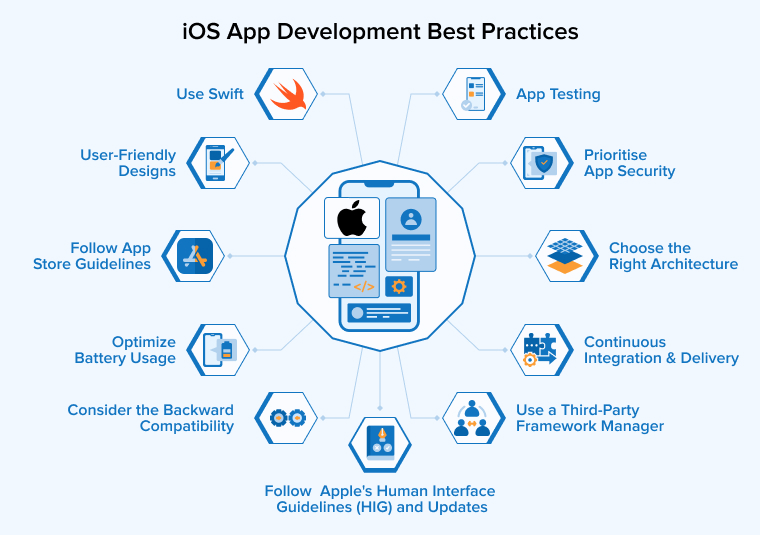
1. Follow Apple’s Human Interface Guidelines (HIG) and Updates
Apple’s Human Interface Guidelines (HIG) act as a design handbook for developers to create iOS apps that look polished, feel intuitive, and behave the way iPad and iPhone users naturally expect. Apple’s reviewers rely heavily on these guidelines to evaluate quality and user experience, so adhering to them increases your chances of quick approval.
- By using the HIG as a foundation, you can easily make decisions about layout, spacing, colors, navigation structure, and interface components without unnecessary guesswork.
- Apple regularly updates these guidelines to align with new device features, design trends, and system behaviors introduced in the latest iOS versions. Staying updated with these changes ensures your app remains modern, accessible, and consistent with current platform standards.
- When you follow the HIG, you automatically create a smooth and familiar experience that boosts user comfort and confidence.
- It also enhances accessibility support by guiding you on readable text sizes, proper color contrast, and compatibility with assistive tools like VoiceOver.
- Apps designed according to Apple’s principles often demonstrate better usability and performance, which helps reduce friction during the App Store review process.
2. Prioritise App Security
Prioritising security at every stage, from writing code to updating the app, you can protect user data, strengthen trust, and safeguard your application against evolving cyber risks. With increasing threats, data breaches, and unauthorised access attempts, it is essential to implement strong security measures in your app from the very beginning.
- A secure iOS app begins with safe data storage, which includes encrypting sensitive information and using protected locations like the Keychain instead of plain-text storage.
- Ensuring secure communication is equally important, so servers and clients should transmit all data through encrypted channels such as HTTPS to prevent attackers from intercepting information.
- Strong authentication also plays a major role; using features like Face ID, Touch ID, or token-based login systems ensures only trusted users can access protected areas of your app.
- Developers must also be cautious when using third-party libraries, keeping them updated and avoiding components that require disabling built-in security features.
- Regular vulnerability checks help identify weaknesses early, allowing developers to patch issues before they become threats.
- Proper session management, thoughtful input validation, and careful handling of error messages further reduce the chances of unauthorized access.
3. User-Friendly Designs
Creating user-friendly designs directly influences how comfortable and confident users feel while interacting with your app.
- A good design begins with a clear purpose, ensuring every screen and element supports the main goal of the app rather than distracting from it.
- Planning the user flow early helps you understand how people will navigate different features and ensures that navigation feels natural and predictable.
- Using tools like Auto Layout, size classes, and Dynamic Type helps your user interface adapt smoothly to various screen sizes and user preferences, making your app accessible to a wider audience.
- Simplicity also plays an important role, such as clean layouts, readable text, and familiar patterns, which reduce confusion and make your app easier to understand at first glance.
- Consistency in fonts, colors, and icons helps users build familiarity quickly, while well-timed feedback, such as small animations or visual cues, reassures users that their actions are being registered.
- A user-friendly design should always prioritize comfort, clarity, and accessibility so your app feels intuitive from the moment someone opens it.
4. Use a Third-Party Framework Manager
Using third-party framework managers improves productivity and allows you to focus on writing meaningful features instead of dealing with setup tasks. Instead of manually downloading and adding libraries, a dependency manager automates the entire process, making integration, updates, and version control much easier.
- iOS app development tools like Swift Package Manager, CocoaPods, and Carthage help you incorporate reliable external libraries into your project with just a few configuration steps.
- Swift Package Manager offers smooth Xcode integration and works well for most Swift-based projects.
- CocoaPods provides access to a large collection of community-maintained libraries, making it easy to discover and add popular tools.
- Carthage provides greater control by delivering lightweight, pre-built frameworks without changing your project structure.
5. Use Swift
Swift offers a modern, secure, and fast foundation for building high-quality apps. Swift’s clean syntax, strong type safety, and efficient memory handling reduce common programming errors and make your code easier to maintain.
- Swift works seamlessly with Apple frameworks like SwiftUI, ARKit, and Core ML, enabling iOS app developers to build powerful and responsive features with less effort.
- Working in Xcode further enhances the mobile app development process by providing tools for debugging, UI design, and performance analysis.
- Staying updated with new Swift releases ensures you can use the latest improvements and keep your apps future-ready.
6. Choose the Right Architecture
A well-planned structure separates responsibilities, simplifies testing, and makes future updates easier. Whether you use MVC, MVP, MVVM, or another pattern, selecting an architecture early helps maintain clean code and supports smooth growth as your app expands.
1. MVC
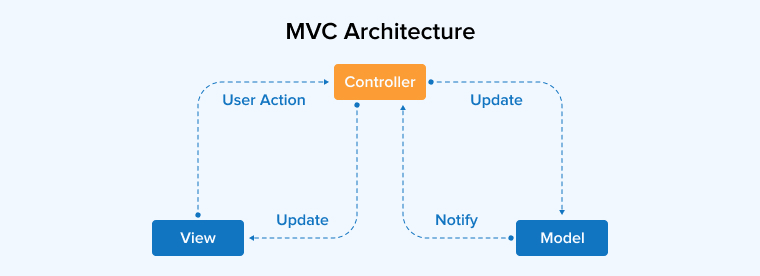
MVC is an architectural pattern that divides an app into three connected layers to keep the structure clean and organized. The Model takes care of core data and business logic, while the View shows information to users and captures their actions. The Controller connects both, handling input and updating what is displayed.
This separation makes small projects easier to build and maintain. However, as an app expands, the Controller often absorbs too much logic, creating what developers call a “Massive View Controller.” Despite this drawback, MVC remains a dependable choice for simple iOS applications.
2. MVP
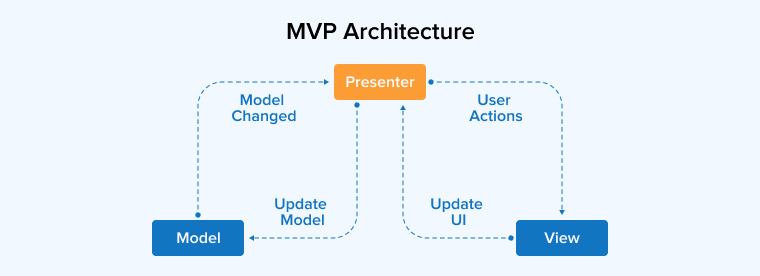
MVP architecture organizes an app into three components: Model, View, and Presenter, to create a clean separation of responsibilities. Unlike MVC, the View in MVP does not interact directly with the Model. Instead, the Presenter handles all communication, taking user actions from the View and requesting data or updates from the Model. This setup reduces tight coupling and makes each part easier to modify or test independently. Because components remain independent and manageable, MVP is often preferred for applications that grow in size and complexity.
3. MVVM
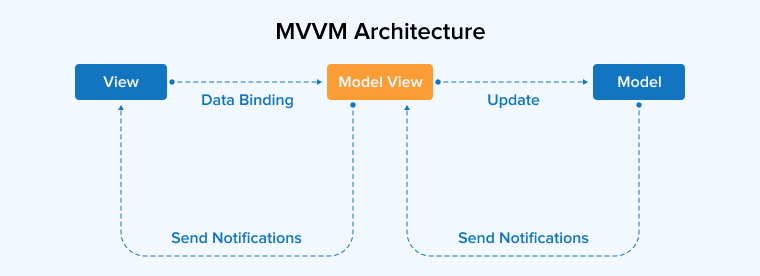
MVVM divides an app into the Model, View, and ViewModel to create a cleaner and more organized structure. In this pattern, the View stays passive while data binders handle updates between the View and ViewModel. This separation makes the codebase easier to scale, test, and maintain, especially when building complex or feature-rich applications.
4. VIPER
VIPER divides an app into five focused layers: View, Interactor, Presenter, Entity, and Router to create a clear and organized structure. Each layer handles a single responsibility, ranging from UI updates to data handling and navigation. This strong separation makes the architecture highly modular, although its many components can add complexity to development, especially in smaller projects.
7. Continuous Integration and Delivery
Continuous Integration and Delivery (CI/CD) ensures that every change made by developers is automatically integrated, tested, and prepared for release, maintaining the project’s health throughout its lifecycle. In a typical CI process, code from all team members is frequently merged into a shared repository, allowing issues to be detected early rather than piling up at the end of development.
- Tools such as Jenkins, Xcode Server, Fastlane, GitHub Actions, Bitrise, and CircleCI help automate recurring tasks like building the project, running tests, managing certificates, and deploying to TestFlight or the App Store.
- A strong CI/CD setup also focuses on fast build times, parallel test execution, and early feedback loops so developers can quickly identify failures or performance drops.
- Securing sensitive credentials, such as signing keys and provisioning profiles, is essential. Solutions like Fastlane Match or encrypted storage make this process safer.
- By maintaining transparency in the pipeline, teams can easily identify bottlenecks and monitor progress.
8. App Testing
App testing ensures the application behaves reliably, performs smoothly, and delivers an excellent user experience across different iOS devices. Although the iOS ecosystem is smaller and more controlled than Android, it still requires careful planning and multiple layers of validation during mobile app testing.
- Developers should prioritize testing on real iOS devices rather than relying only on simulators, since real hardware reveals issues related to memory usage, battery consumption, connectivity, and overall performance.
- Logging crash reports and console outputs is equally important because these details help the team track down unexpected errors and understand their root causes quickly.
- Visual evidence, such as screenshots or screen recordings, can further simplify communication between testers and developers.
- Core testing activities should include unit testing to verify individual components, UI testing to confirm interface stability, and integration testing to evaluate how modules interact.
- Tools like XCTest make it easier to automate these tests and run them consistently during development.
- Beta testing also plays a vital role, allowing real users to explore the app in everyday scenarios and provide feedback before release. Platforms like TestFlight streamline this process by offering easy distribution and insights.
- Developers should also perform regression testing whenever new updates are added to ensure existing features continue working as expected.
- Performance testing, security checks, and edge-case validation help strengthen the app by identifying slow functions, vulnerabilities, or unusual scenarios that could cause crashes.
9. Follow App Store Guidelines
Apple maintains a strict and detailed review system, and even small violations can delay or completely block your app’s launch. These guidelines cover multiple areas, including safety, performance, business policies, design expectations, and legal requirements.
- Developers must pay close attention to performance because Apple rejects apps that frequently crash, freeze, or take too long to load.
- Apps that lack proper encryption, authentication, or a clear privacy policy are likely to be rejected. Apple also evaluates how responsibly user data is collected and whether the app provides transparent disclosures.
- Ensuring the app is complete is equally important. Placeholder text, broken links, unfinished screens, or incomplete metadata are immediate signals that the product is not ready.
- Design is a critical element, and apps must follow Human Interface Guidelines to maintain consistency with the iOS environment. Simple web wrappers or low-effort designs are often rejected.
- Developers should also verify compatibility across multiple iOS devices and orientations, using tools like Auto Layout to ensure smooth adaptation.
- Apple also discourages the use of private APIs or hidden functionality that is not documented for developers.
10. Optimize Battery Usage
Mobile app users prefer apps that perform efficiently without excessively draining their device’s battery. Therefore, prioritizing battery efficiency demonstrates respect for device resources and can enhance user retention and satisfaction.
- Minimize unnecessary background activity, i.e., non-critical tasks should be paused or delayed when the app is idle, and only essential operations should run in the background. This ensures the app remains responsive while conserving energy.
- Efficient networking is an important factor. Reducing the frequency of server requests, implementing batching or delta updates, and using smart caching techniques help lower network consumption and save battery life.
- Managing CPU and GPU usage is equally important. Animations, graphics rendering, and image processing should be optimized to prevent excessive power consumption.
- Techniques like lazy loading, offloading heavy computations to background threads, and caching frequently used resources can improve performance while reducing energy consumption.
11. Consider the Backward Compatibility
While it is essential to support the latest iOS version to leverage new features such as dark mode and voice commands, focusing only on the newest devices can exclude a large segment of users. Backward compatibility ensures that your app works on older iOS versions and legacy devices like iPhones 6S through the latest version. Achieving this may require additional development time and careful planning, as some modern features might not be supported on older systems.
- Developers need to weigh the cost, effort, and potential return on investment before deciding how far to extend support.
- By testing the app on multiple older iOS versions and adjusting features or performance requirements as needed, you can provide a consistent and functional experience across devices.
Final Thoughts
Following best practices in iOS app development is essential for creating apps that stand out in a competitive market. It’s important to keep a check on tools and quality standards introduced in the industry to update the app accordingly. However, continuous quality enhancements in the backend must not affect user experience. Businesses and developers must equally prioritize innovation and user experience to achieve success in the development process.

Rajendra Padhiyar is a Project Manager at TatvaSoft, leading a skilled team of mobile app developers. With extensive experience in mobile application development and management, he ensures timely delivery and high-quality standards for diverse mobile projects



Comments
Leave a message...