


Modern web applications are not just limited to displaying simple pages with text, images, and forms. As businesses add more features and create richer digital experiences, the frontend can quickly become large, complicated, and difficult to manage. Making changes to one part of a traditional frontend may also affect other areas, which may slow down development and increase maintenance difficulties.
Micro frontend architecture provides a practical way to handle this growing complexity. It divides a large frontend into smaller and independent modules. There’s no need to develop the entire frontend as one large monolithic application. Each module can focus on a specific business function and be developed, tested, and deployed separately. Therefore, adoption of microfrontend architecture can make it easier for web development companies to develop and manage large projects.
In this blog, we’ll explore what micro front-end architecture is all about, its working, types, advantages, drawbacks, implementation approaches and how to do it, helpful frameworks, best practices, real-life examples, and usage scenarios.
What is Micro Frontend Architecture?
Micro front-end architecture is a modern application design pattern for building the user interface of a web application by dividing it into smaller, independent modules known as “micro front-ends”. Each micro front-end is responsible for implementing a specific feature, such as user accounts, payments, and product listings, and can be designed, tested, updated, and deployed without affecting the rest of the application.
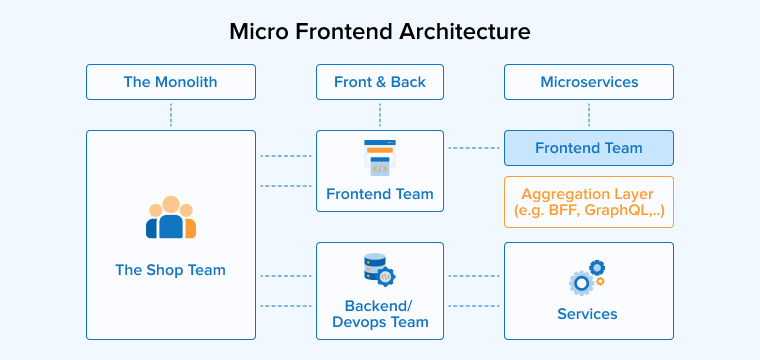
These modules are integrated into a single application to provide users with a seamless and consistent user experience. The way microservices split backend systems into independent services, micro front-ends apply the same idea to the frontend. This approach also makes large applications easier to manage because changes in one module are less likely to impact others.
How Do Micro Front-ends Work?
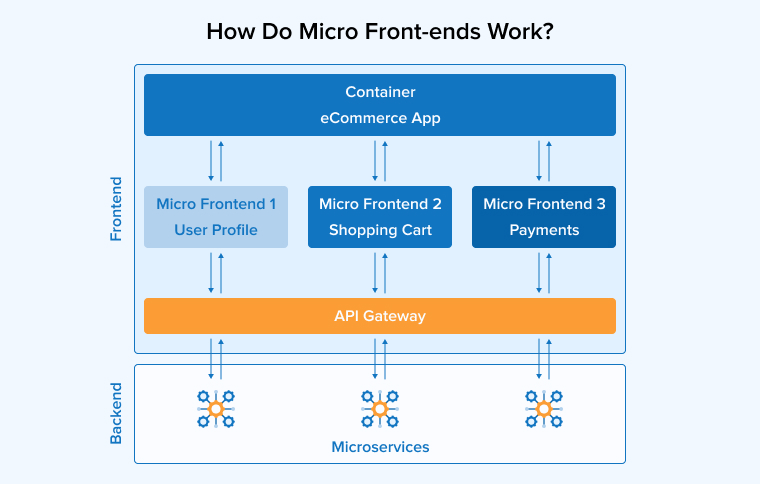
Let’s understand the working of micro front-end architecture in a detailed step-by-step manner:
Decomposition
The first stage of building a micro front-end application is deciding how to divide the frontend into smaller functional units. These units can be organized based on business features, individual pages, or the responsibilities of different development teams. A clear separation makes the application easier to develop, manage, and update while allowing teams to work independently.
Module Development
After the frontend is divided into smaller units, each unit is treated as a separate module. Different development teams can build and maintain their assigned modules independently. They are free to choose the tools, programming languages, and frameworks that best fit their work, increasing development efficiency and flexibility.
Isolation
Each micro front-end is built to operate independently without depending too much on other modules. It functions as a self-contained unit that maintains its own source code, required libraries, and styling.
Communication
Although micro-frontends work independently, they still need to exchange information to provide a smooth user experience. This communication is usually handled through APIs or event-based methods.
Composition
A container or orchestrator, most commonly known as a “shell”, brings all the individual micro front-ends together into one complete interface. It is responsible for loading the required modules and displaying them in the correct place.
Routing
Routing controls which micro front-end is displayed when a user visits a specific page or performs an action within the application. Depending on the application design, routing can be managed either on the server or within the browser with the help of client-side routing libraries.
Deployment
In the micro front-end architecture, once a team finishes developing or updating a feature, they can release that module without waiting for changes in other parts of the application.
Testing and Monitoring
Every micro front-end should be tested thoroughly on its own to ensure it works correctly before being combined with other modules. Monitoring tools help track performance in real time and support timely fixes.
What Are the Types of Micro Front-ends?
There are different types of micro front-ends that you can implement based on your project needs. The three primary types include:
Mono Repository
In this type, all micro front-end projects are stored in one shared code repository, with each module placed in its own separate folder. This setup allows development teams to work on different features while using the same repository, making it easier to share libraries, manage dependencies, and maintain consistent development tools and coding standards. It also improves collaboration because your team can access and understand the complete project structure.

However, as the application grows and more modules are added, the repository can become harder to manage. Build processes and deployment may also require additional planning to ensure that changes in one module do not affect others.
Multi Repository
In a multirepository approach, every micro front-end is stored and managed in its own separate code repository. This allows each team to control its module independently, including its tools, frameworks, dependencies, and development process. As the projects are isolated from one another, there is less chance of conflicts between modules, and new features can be added more easily as the application grows.
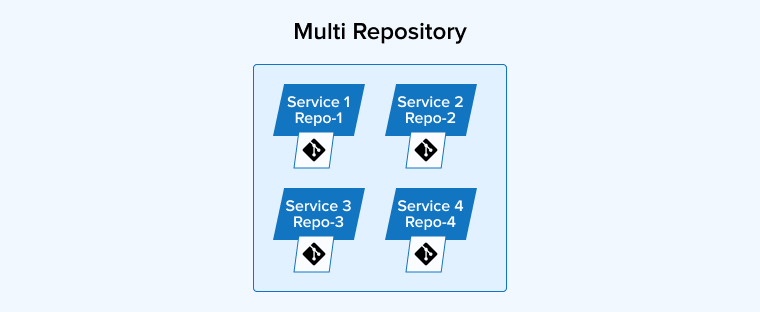
It can become difficult to manage multiple repositories and increase integration complexity. Teams need to carefully handle communication, deployment processes, and dependency compatibility to ensure that all micro front-ends work together smoothly as a single application.
Meta Repository
The metarepository type is a hybrid of the monorepository and multirepository types. It combines both by using separate repositories for individual micro front-ends along with a central repository that connects them together. Each team can independently develop and manage its own module while the main repository helps coordinate integration and shared resources.
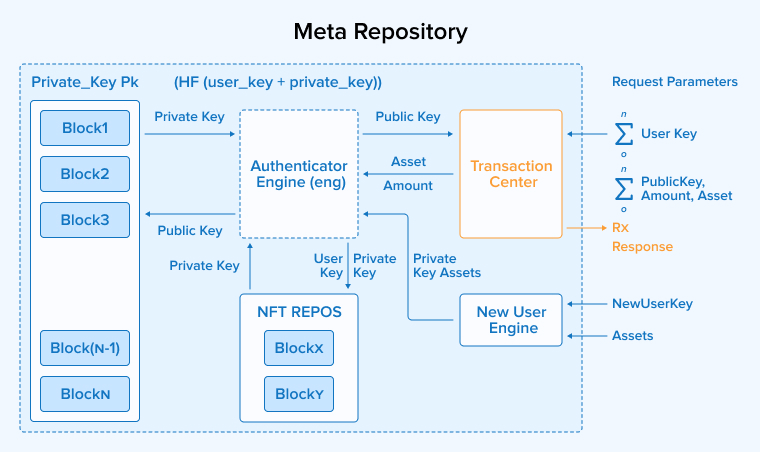
This method provides a balance between team freedom and overall project control. However, it requires proper coordination between teams to maintain common standards and ensure smooth communication between different micro front-ends. Managing both independent repositories and a central integration point can increase project complexity but proves helpful in large-scale applications.
What Are the Approaches to Implementing Micro Front-End Architecture?
Micro front-end architecture differs based on where and how individual front-end elements are combined into a final interface. The following are the common implementation strategies for the micro front-end architecture:
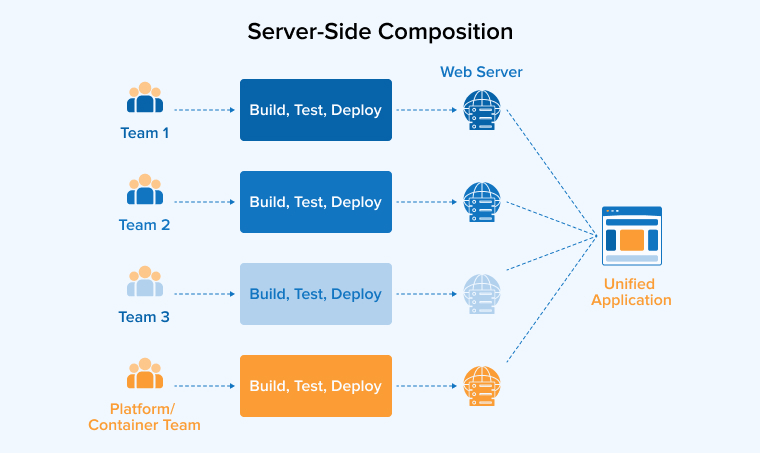
1. Server-Side Composition
Server-side composition is a micro front-end approach where the server combines different micro front-ends before sending the final page to the user’s browser. The server prepares the required HTML and delivers a ready-to-display view instead of depending heavily on the client to build the interface. Micro front-ends can be stored and delivered through CDNs, while the server manages their arrangement and integration. This can improve initial loading speed, reduce rendering work on the browser, and provide a smoother experience.
2. Build Time Integration
In the build-time integration approach, individual frontend modules are developed as separate packages and combined while the application is being built. This allows teams to reuse components, maintain a consistent interface, and simplify deployment when changes are well managed. Testing the application as a complete, bundled system before release helps guarantee stable and consistent performance.
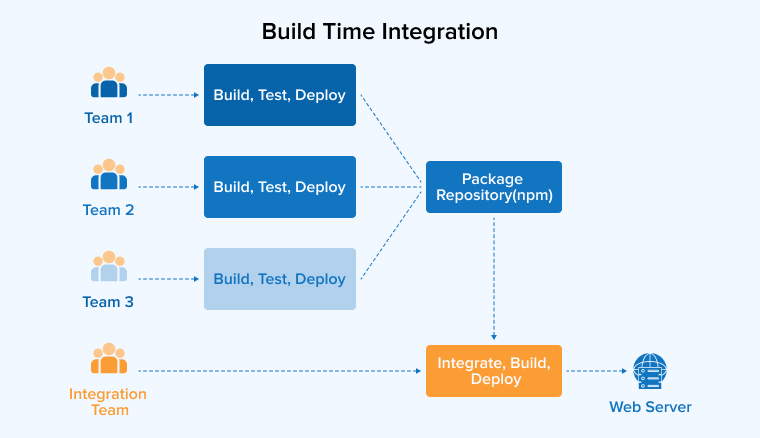
However, this approach also has limitations. Even a small update to one module often requires rebuilding and redeploying the entire application. It can also create dependency management challenges, increase bundle size, and reduce the flexibility of releasing each micro front-end independently.
3. Runtime Integration
Runtime integration is a micro-frontend approach in which different frontend modules are loaded directly into the user’s browser after the application starts, i.e., at runtime. Instead of combining the modules during the build process, each micro front-end is delivered as an independent JavaScript bundle and integrated dynamically by a shell application. This enables development teams to work on, test, and deploy their features without affecting other parts of the application. The approach offers greater flexibility and supports applications that frequently change or expand.
There are different methods to perform runtime integration:
Runtime via JavaScript
In a JavaScript-based runtime integration, a shell application loads micro front-ends only when they are needed using the <script> tag. Each micro front-end provides functions that the shell uses to display it in the correct part of the page. This method offers high flexibility because modules can be added dynamically, but it also requires the shell to handle routing, loading, and the complete lifecycle of each module.
Runtime via iFrames
Using iframes is one of the earliest ways to create a micro front-end application. In this method, every micro front-end runs inside its own iframe, allowing it to keep its code, styles, and resources separate from the rest of the application. An SPA is responsible for loading these iframes and coordinating interactions between them. This separation helps prevent conflicts and makes deployment simpler. However, sharing data and communication between micro front-ends becomes more difficult. It can also affect performance and limit the user interface because content cannot extend beyond the iframe area.
Runtime via Web Components
Web components provide a flexible way to build micro front-ends by creating independent and reusable custom HTML elements. Each component can be loaded only when required and works separately from the rest of the application, thus reducing conflicts. Since they follow browser standards, they can be used with different frameworks or even without one.
How to Implement Micro Front-End Architecture?
We will now explain the step-by-step process to implement micro front-end architecture using the example of a food-delivery application named QuickEats. This app consists of Home, Profile, Menu, Cart, Checkout, and Delivery Tracking.
1. Decide If You Need It
Check whether your decision to adopt micro-frontend architecture is driven by necessity or by trend. Consider micro-frontends if you are working with both old and new tech stacks, there is no clear scope of work for different teams, or deployments are repeatedly delayed.
2. Define Functional Boundaries
Determine the essential features of your application and clearly define the boundaries for each functionality. For QuickEats, it could look like this:
- Home Feed (where you see promos and categories)
- Menu (restaurant pages)
- Cart & Checkout (the fun part!)
- Delivery Tracking (watching your food arrive)
- User Profile (your personal space)
3. Choose an Integration Strategy
Once you establish clear functional boundaries, choose an effective and suitable integration strategy so the different functions can work together to deliver a working application. The runtime approach is widely used for a hassle-free transition. Utilizing module federation at build time helps create a modern application with a better-organized bundle and shared code.
4. Build Independent Pipelines
When building this architecture, each micro front-end functions as an independent small application. Provide a dedicated repository for each micro-frontend, or at least separate them logically within your source control. Set up an independent CI/CD pipeline for every micro-frontend that covers development, testing, and deployment. See to it that all tests to be carried out, including unit and integration tests, are automated.
5. Create Shared Contracts
Keeping all micro front-ends unified within a single architecture is straightforward if you provide:
- A design system: Shared components, styles, and color tokens to ensure a consistent look and feel across the application.
- An authentication contract: Define a login process and a clear method for users to share tokens between micro-frontends.
- Minimal events or global state: Share data only when absolutely necessary, and limit sharing to data that must be accessed across micro-frontends.
6. Start With a Pilot
Start with migrating a low-priority module such as delivery tracking instead of refactoring everything at once. Running this pilot will teach you an appropriate way to migrate the critical functions without any disruption.
7. Monitor and Iterate
Once your app is live, continuously monitor its performance for errors and unexpected interactions to understand user behavior in a better way. Make use of platforms like Grafana and Sentry for this analysis. Additionally, ensure that you consistently reinforce UX standards across your design system.
8. Build-time: Webpack Module Federation
Your application can expose and consume modules at runtime using Webpack Module Federation. This enables a more flexible design and improved dependency sharing. It is an ideal option for development teams using Angular, Vue, and React for robust integration capabilities.
Minimal webpack config snippets
Remote (Menu service) — webpack.config.js
const ModuleFederationPlugin = require('webpack').container.ModuleFederationPlugin; module.exports = { // ...entry, output, loaders plugins: [ new ModuleFederationPlugin({ name: 'menu', filename: 'remoteEntry.js', exposes: { './MenuApp': './src/MenuApp', // component or bootstrap file }, shared: { react: { singleton: true, eager: true }, 'react-dom': { singleton: true, eager: true } }, }), ], }; |
Host (shell) — webpack.config.js
const ModuleFederationPlugin = require('webpack').container.ModuleFederationPlugin; module.exports = { plugins: [ new ModuleFederationPlugin({ name: 'shell', remotes: { menu: 'menu@http://localhost:3002/remoteEntry.js', home: 'home@http://localhost:3001/remoteEntry.js' }, shared: { react: { singleton: true }, 'react-dom': { singleton: true } } }) ] }; |
Host usage (React example)
// HostApp.jsx import React, { Suspense } from 'react'; // dynamic import of remote module const MenuApp = React.lazy(() => import('menu/MenuApp')); const HomeApp = React.lazy(() => import('home/HomeApp')); export default function App() { return ( <div> <Suspense fallback={<div>Loading...</div>}> <HomeApp /> <MenuApp initialCategory="pizza" /> </Suspense> </div> ); } |
- Pros: The benefits of this implementation include granular control over shared dependencies, enhanced performance, and official tooling support.
- Cons: The initial setup is complex, and you must ensure dependency versions remain consistent.
What Are the Micro Front-End Frameworks?
You can develop micro front-ends using any technology, as it’s independent of the technology used to develop it. However, there are some frameworks that ease the development process of micro front-ends. Let’s take a look at them:
React
React is widely used for building micro front-ends because its component-based design makes it easy to create independent, reusable application modules. Its virtual DOM improves rendering speed, which makes the interface more responsive even when multiple micro front-ends are used together. It also has a large collection of libraries and React tools that support routing, state management, testing, and development, which reduces effort and increases productivity. It’s quite simple to update React versions, which simplifies long-term maintenance.
Angular
Angular is a strong framework for developing micro front-ends, especially for large and complex applications. Its component-based architecture helps teams build independent modules that can be developed and maintained separately. Features such as dependency injection, built-in routing, and TypeScript support improve code quality and make applications easier to manage. Angular also supports shared libraries and monorepo development that allow common code to be reused across multiple projects. Angular, when paired with Module Federation, enables runtime integration of independent micro front-ends.
Next.js
Next.js is a popular micro front-end development React framework. It combines strong performance with a modular development approach, supports server-side rendering and static site generation, which help applications to load quickly while improving search engine visibility. Automatic code splitting prevents users from downloading unnecessary dependencies, as it delivers only the required code. Using Module Federation, Next.js allows independent frontend modules to be integrated without changing the existing application structure.
Vue.js
Vue.js is a flexible framework that is well suited for building micro front-ends because it allows applications to be developed in small and independent parts. Its component-based approach makes each feature easier to create, test, and maintain without affecting other modules. You can add Vue into existing applications in a structured, step-by-step manner, which makes it useful for projects that require a mix of frontend technologies. Features such as reactive data binding, routing, and state management help you build organized and scalable applications.
Svelte
Svelte is a modern and highly suitable framework for micro front-end development because it converts components into efficient JavaScript during the build process instead of depending on a large runtime. This results in smaller application files, faster loading, and better overall performance. Its component-based design allows teams to develop and maintain different features independently while keeping the application organized. Svelte also offers a simple syntax and built-in reactivity that eases the development process and reduces unnecessary complexity.
What Are the Benefits of Micro Front-Ends?
Micro front-ends are becoming significant as they are proving to be an effective way to overcome the challenges of monolithic architecture. The following are some of their important advantages that are increasing the efficiency of the development process:
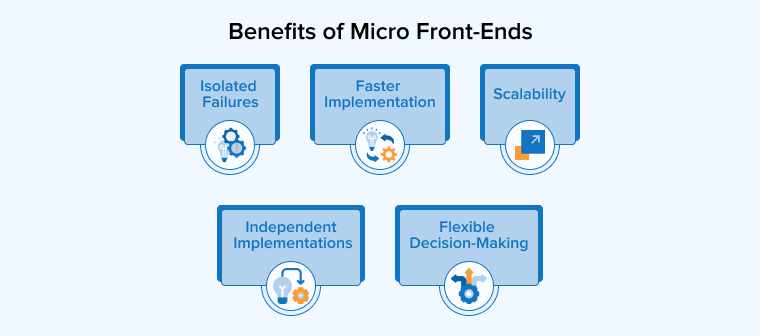
Independent Implementations / Independent Development & Deployment
Micro front-ends allow different development teams to manage their own parts of an application without depending heavily on others. Each team can select the tools, frameworks, and design that best fit their work, which increases their flexibility to work and encourages new ideas. The frontend modules are developed and deployed separately so that an update release does not affect the entire application.
This approach also supports independent testing and deployment pipelines for each module. As a result, teams can work faster, respond quickly to changing requirements, and maintain their applications more easily. This improves the overall software development and release process.
Isolated Failures / Support Code and Style Isolation
Micro front-ends make large applications easier to manage by splitting them into smaller, independent parts. This allows your team to monitor each section separately and identify problems more quickly. As a result, if one of the modules stops working at any time, the rest of the application will continue running and thus will reduce the impact on users and make recovery faster.
Micro front-ends involve multiple teams, each working on a different module. As every module is separate, teams are free to choose programming languages and frameworks of their choice that best fit their capability and understanding of project requirements. They do not need to wait for other teams for any of their task. This flexibility improves productivity and helps organizations build and maintain applications more efficiently.
Faster Implementation / Faster Development Cycles
Micro front-ends help you deliver software more quickly as you can develop and update each part of an application separately. You can improve a single module without rebuilding the entire system, which saves your time and effort. Now, as every team works independently, new features and bug fixes can be released as soon as they are ready instead of waiting for a complete application update.
This approach supports continuous improvement and faster user feedback. As a result, software release cycles become shorter, and your team can respond to changing requirements quickly and efficiently.
Scalability
Micro front-ends provide the flexibility to scale the independent modules and the size of the development team. With the increasing size of the application, certain features and functionalities experience a sudden increase in usage. You might have observed that during any online sale, the payment gateway, product search and listing pages, and shopping cart page load quite slowly compared to normal days. At the same time, the order history and user account settings pages load quickly.
With micro front-ends, you can scale these components without scaling the entire application to meet the increased demand and improve user experience. You can even increase the size of the team working on these modules or establish new teams and increase resource allocations when enlarging the project scope.
Flexible Decision-making / Flexibility in Development and Design
Micro front-end development is not tied to a specific technology stack. The management and development teams can decide about each module independently. Teams are flexible in analyzing the strengths and weaknesses of their members and making decisions that ensure robust development without compromising on any of the required product features or on any team member’s capabilities. As a result, the development process becomes faster and improves the decision-making capabilities of individual teams.
What Are the Challenges and Considerations?
It’s important that you get complete clarity on every aspect of micro front-end implementation before planning for it. It is beneficial in multiple aspects, but certain limitations cannot be ignored. So, let us see some of the most common challenges of micro front-end architecture:
Increased Complexity
Micro front-ends are built of multiple independent modules, each developed in isolation. So, it becomes a challenge to ensure the smooth operation of every module. It can be tough, especially in the initial stages of adopting micro front-end architecture, to manage multiple dependencies, deployments, and repositories associated with different modules. Monitoring and scaling become an added challenge as there are multiple components now instead of one.
Performance Issues / Performance Trade-offs
Since every micro front-end is developed independently, they may perform well in isolation. However, ensuring good performance across all micro front-ends is challenging, as each must be fetched and loaded at runtime. This means loading multiple libraries and dependencies, which can affect important performance metrics such as First Contentful Paint (FCP). You must develop a proper performance optimization strategy that consists of techniques like code splitting, lazy loading, prefetching, etc.
Shared State and Consistency
Micro front-ends can become difficult to manage when different modules need to work closely together. Poor coordination may lead to communication problems, inconsistent data, or compatibility issues between shared components. To avoid these challenges, you must plan how modules exchange information, manage shared resources, and keep the application stable as it grows.
Coordination Between Teams / Team Collaboration Issues
It’s quite obvious that collaboration and communication will become difficult as multiple teams are involved in the development of multiple micro front-ends. The modules must develop independently, integrate smoothly, and work as a complete unit to provide a seamless user experience. Therefore, regular communication, shared documentation, clear guidelines, and timely discussions become a necessity.
Versioning and Compatibility / Versioning and Dependency Management
Keeping different micro front-ends compatible can be challenging because each module is developed independently and may use different library versions or follow separate release schedules. A well-defined versioning approach, standardized integration, semantic versioning, and sharing important libraries help prevent conflicts where possible.
Developing Micro front-end Architecture: Best Practices to Follow
Keep the below-given best practices in mind while developing a micro front-end solution to achieve the expected outcomes:
Define Clear Boundaries for Each Module
Define every micro front-end module with a clear list of responsibilities and functionalities. Keep in mind that every module should focus on a specific business function without interfering with others. This will reduce inter-module dependencies, avoid code and functionality duplication, and thus make the application organized and easy to maintain.
Use Component Libraries
Use a shared library according to your brand’s style guide for common interface elements, styles, and utilities so that all micro front-ends follow the same design standards. It reduces repeated development work and makes applications look consistent. There’s no need to create the same elements for every module, as you can simply reuse existing ones. This will save you time and help maintain a uniform user experience across the system.
Implement Monitoring and Error Handling
Establish well-defined performance metrics that can help you get accurate insights regarding the workings of micro front-ends. Regularly monitor how each of them is performing and detect issues by integrating proper monitoring tools and error tracking systems. Well-maintained logs will help you fix issues before they affect the rest of the system and hamper user experience.
Go for Test Automation and Continuous Integration
Automating testing and deployment makes micro front-end development faster and more reliable. Establish effective CI/CD pipelines, as they check code changes automatically, and you will discover issues early before release. Automated builds, testing, and deployment reduce manual work, improve software quality, and allow updates to reach users more quickly with fewer chances of errors.
Test Thoroughly
Design a comprehensive micro front-end testing strategy that covers all the mandatory tests such as unit testing, integration testing, security testing, and end-to-end testing, and even non-required tests. Select appropriate testing frameworks and tools for performing each type of testing, such as Vitest and Jest for unit testing, Cypress for integration testing, etc.
When to Use Micro Front-end Architecture?
Micro front-end architecture is indeed becoming a popular choice among developers and system architects who are already using microservices. However, implementing it in any kind of application will not provide the desired benefits.
Therefore, it’s important to understand the suitable scenarios to consider for micro front-end implementation. Some of them are as follows:
- Large and Complex Applications: If your application is huge, containing extensive and unrelated features, adopting micro front-end architecture will help you break it into smaller components that can be easily managed. It will also help you scale specific application modules as required to meet the increased demands in the future.
- Evolving Business Requirements: If you’re following the agile development model, micro front-ends will help your application remain agile with the changing needs and business processes. The independent development and deployment of application components help you scale the modules and update the functionalities on a continuous basis without disrupting the functioning of the rest of the application.
- Desiring Tech Stack Diversity: If you want to take advantage of the expertise of developers in different technologies that are suitable for your project requirements, micro front-end architecture provides the best medium to implement it. You can use a variety of frameworks, libraries, and design patterns within a single application to incorporate the best of those technologies.
- Legacy Application Modernization: If your company is planning to modernize any legacy application, such as a CRM solution with a monolithic base, micro frontend architecture provides a practical solution to start with. You can start gradually by breaking the monolithic codebase into multiple manageable components and updating or replacing them as per the existing standards without affecting the current functionality.
What Are the Real-world Examples of Micro Front-end?
Micro front-end architecture is witnessing an increasing use across major industries such as:
- Spotify: This music application uses micro front-ends on desktop and web for teams to work independently on music recommendations, library page, playlists, etc.
- Netflix: Netflix splits its large user interface into independent, business-aligned modules like search, watchlists, and browse rows. Their team built an internal framework named Lattice to allow multiple teams to asynchronously load, build, and deploy separate React components without breaking each other’s code.
- IKEA: It migrated from the monolithic front-end architecture to micro front-end and uses the server-side composition integration technique to stitch product details, pricing, and buy buttons together from different systems.
Final Thoughts
The demand for scalable web applications is continuously growing and will grow as the technology advances. In such a scenario, micro front-ends provide the necessary flexibility to the codebase, allowing reusability, maintainability, and scalability. However, adopting the architecture alone is not enough to achieve expected results. You can do so only through an effective implementation, which requires conceptual clarity and hands-on experience to handle runtime integration, styling conflicts, and performance bottlenecks.
FAQs
A micro front-end is a design pattern that implements the concept of microservices in the frontend of applications. It breaks your application front ends into different smaller, independent modules for different teams to work on independently.
Adopting micro front-end architecture comes with its own set of limitations, such as increased complexity, performance issues, team collaboration issues, versioning and dependency management, etc., associated with multiple modules.
Micro frontends split large web apps into small, independent pieces. Different teams build, test, and launch their modules at the same time. This speeds up work, prevents code crashes, and makes updates much easier.
The most popular real-world example of a micro front-end that you can relate to is an e-commerce application where the Product Catalog, Shopping Cart, and User Profile are built, tested, and deployed by separate teams as independent modules.
No, micro front-end is not a framework but a design pattern that splits the front-end of an application into smaller, independent modules to ease development and maintenance tasks.

Itesh Sharma is core member of Sales Department at TatvaSoft. He has got more than 6 years of experience in handling the task related to Customer Management and Project Management. Apart from his profession he also has keen interest in sharing the insight on different methodologies of software development.



Comments
Leave a message...