

An application developed by following the standard procedure and best practices can still encounter unexpected errors during execution. These issues may arise due to incorrect user input, missing files, network failures, or unexpected program behavior. If such errors are not handled properly, they can cause the application to crash, disrupt its functionality, and negatively affect the user experience.
This is where exception handling in Java becomes important. Java provides a structured way to detect exceptions, respond to them, and keep the application running when possible. It helps Java development companies decide how the application should react and what should happen next to prevent an unexpected condition from breaking the entire program. Understanding concepts such as try, catch, finally, throw, and throws is therefore an important part of writing reliable Java applications.
In this blog, we’ll explore Java exception handling, its key concepts, common approaches, and practical examples.
What is Exception Handling in Java?
Exception handling is a mechanism in Java for dealing with runtime errors that occur during program execution. Java manages these situations by creating an exception object that carries details about what went wrong. The program can then pass this information through the call stack to a suitable handler. Using statements and constructs such as try, catch, finally, and throw, you can control how errors are detected and handled.
Java Exception Handling Keywords
There are some specific keywords used to handle exceptions in Java. They are as follows:
1. Try-catch
A try-catch block is used to manage errors that may occur while a program is running. Place the code that could cause an exception inside the try block. When an error occurs, control moves to the catch block, where you can examine and handle the exception properly. A program can have more than one catch block when different types of errors need different actions. Try-catch blocks can also be placed inside one another when necessary. A try block cannot stand alone; it must be followed by a catch or finally block.
2. Finally
The finally block is used to run important code after a try-catch process finishes. It runs whether the operation succeeds or an exception occurs. This makes it useful for cleanup tasks, such as closing files, ending connections, or releasing resources. The finally block is optional, but it helps ensure that necessary cleanup is not skipped when an error interrupts normal execution.
3. Throw
The throw keyword allows you to raise an exception explicitly when a particular condition is not acceptable. Therefore, the program can create an exception at the required point instead of waiting for the runtime to detect a problem. This is useful for checking invalid input, missing values, or other conditions that should stop normal processing.
4. Throws
The throws keyword is used when a method may cause an exception but does not handle it on its own. It informs the method that calls it about the possible exceptions. The calling method can then handle the exception or pass it to another method. We can also mention more than one exception using throws. It can be used with the main() method as well.
Java Exception Hierarchy
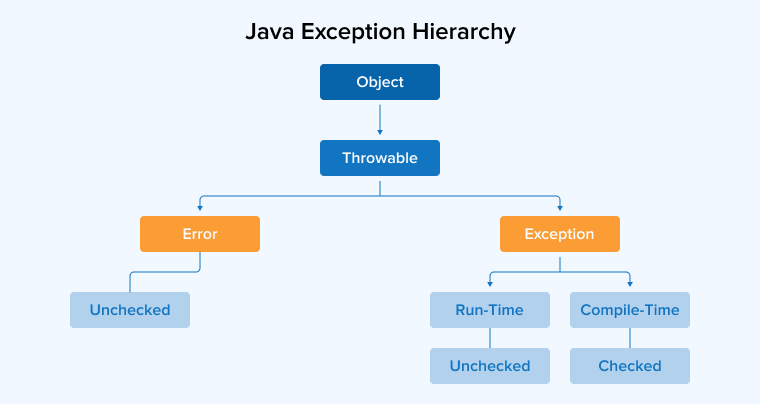
In Java, Throwable, a subclass of the Object class, is the main class from which exceptions and errors are derived. Exceptions usually represent problems that a program can handle, such as invalid input or a missing class. Errors generally indicate serious issues that applications normally should not try to handle. Exceptions are also divided into checked and unchecked types. Checked exceptions need proper handling or declaration, while unchecked ones are mainly associated with programming mistakes and occur during execution.
The following charts clearly explain the Exception Hierarchy in the Java programming language:
What Are the Types of Exceptions in Java?
In Java, there are two types of exceptions based on when they are checked by the compiler and how the application is required to handle them.
1. Checked Exceptions
Checked exceptions in Java are predictable exceptions that are handled during compilation. They usually occur because of situations such as missing files, database issues, or network problems. You must either deal with the exception using try-catch or mention it with throws in the method declaration. If neither is done, the program will not compile. Because checked exceptions represent conditions that may reasonably occur, handling them properly allows the program to respond safely and provide useful information when something goes wrong.
2. Unchecked Exceptions
Unchecked or runtime exceptions in Java inherit from the RuntimeException class and occur while a program is running rather than being detected by the compiler. They are usually caused by errors in the code, such as using an invalid array position, performing an incorrect calculation, or working with a null value. Common examples include NullPointerException, ArithmeticException, and ArrayIndexOutOfBoundsException. These exceptions do not have to be declared with throws.
What is the Difference Between a Java Exception and Error?
Many times we use exceptions and errors synonymously. But they are completely different in terms of programming. Let us understand how Java exceptions differ from errors in Java:
| Parameters | Exceptions | Errors |
|---|---|---|
| Definition | An exception is an unexpected problem during program execution that interrupts normal flow but can be detected and handled within the program. | An error is a serious problem within the system or JVM that usually cannot be controlled or handled by the application itself. |
| Package | Exceptions belong to java.lang.Exception | Errors belong to java.lang.Error. |
| Time of occurrence and detection | All exceptions happen during runtime, but checked exceptions are identified by the compiler before execution. | Errors may arise during compilation or while the program is running. |
| Recoverability | Exceptions can be managed by handling them with try-catch or passing them to the calling method. | Errors usually cannot be recovered from because they represent serious system-level problems. |
| Types | Checked and Unchecked exceptions are two types of exceptions | Syntax Error, Runtime Error, and Logical Error are the three types of errors |
| Cause | Exceptions are often caused by programming mistakes or incorrect logic within the application. | Errors generally result from system issues, hardware issues, or limited resources beyond the program’s direct control. |
| Performance impact | Exceptions may interrupt normal program execution and redirect its flow, but applications can handle them to continue operating properly. | Errors can seriously affect system stability, sometimes causing data loss or corruption, program termination, or other major failures. |
| Examples | SQLException, IOException, NullPointerException, ArithmeticException | OutOfMemoryError, StackOverflowError, VirtualMachineError |
How to Handle Exceptions in Java: Practical Example
Let us understand with a practical example regarding how to handle exceptions in Java:
1. Try-catch Block
A try-catch block is used to handle exceptions that may occur during program execution. The code that may throw an exception is placed inside the try block, while the catch block handles the specific exception.
public class Main { public static void main(String[] args) { try { int a = Integer.parseInt("abc"); } catch(NumberFormatException e) { // Handles the exception thrown while converting the string to an integer System.out.println("Error: "+e); } } } |
2. Multiple Catch Blocks
Multiple catch blocks can be used when a try block may throw different types of exceptions. Each catch block handles a different exception type, allowing the program to respond appropriately.
public class Main { public static void main(String[] args) { try { int a= 10/0; } catch(ArithmeticException e) { // Handles the specific arithmetic exception first System.out.println("Error: "+e); } catch(Exception e) { // Handles other unexpected exceptions System.out.println("Error: "+e); } } } |
3. Multiple Exceptions in One Catch
Java allows multiple exception types to be handled in a single catch block using the multi-catch syntax. This is useful when different exceptions require the same handling logic.
public class ConfigReader { public static void readConfig(String file) { try (DataInputStream in = new DataInputStream(new FileInputStream(file))) { System.out.println("Version: " + in.readUTF()); System.out.println("Port: " + in.readInt()); } catch (FileNotFoundException | EOFException e) { // Handles multiple exceptions with the same handling logic System.out.println("Unable to read configuration: " + e.getMessage()); } catch (IOException e) { System.out.println("Configuration error: " + e.getMessage()); } } } |
4. Throws Keyword
The throws keyword is used in a method declaration to indicate that the method may pass certain exceptions to its caller. The caller can then decide how to handle those exceptions.
public class TestServlet extends HttpServlet { protected void doGet(HttpServletRequest request, HttpServletResponse response) throws ServletException, IOException { // The throws keyword declares exceptions that can be propagated to the caller try { URL url = new URL("hhtp://example.com"); } catch (MalformedURLException e) { // Handles the specific exception locally System.out.println("Invalid URL: " + e.getMessage()); } } } |
5. Finally Keyword
The finally block is executed after the try and catch blocks, whether an exception occurs or not. It is commonly used for cleanup operations that must be performed regardless of the result.
class A { public static void main(String[] args) { int[] x = {1, 2, 3}; try { for (int i = 0; i <= x.length; i++) { System.out.println(x[i]); } System.out.println("Done"); } catch (ArrayIndexOutOfBoundsException e) { System.out.println("Catch"); } finally { // This block executes regardless of whether an exception occurs System.out.println("Final"); } } } |
6. Throw Exception Explicitly
The throw keyword is used when we want to explicitly create and throw an exception based on a particular condition. This allows the application to reject invalid input or an invalid state at the point where it is detected.
public class GreetingImpl { public String greet(String name) { if (name == null || name.length() == 0) { // Explicitly throws an exception when the input is invalid throw new IllegalArgumentException(); } return "Hello " + name; } } |
7. Try-with-resource Block
A try-with-resources statement automatically closes resources after they are no longer needed. It helps avoid resource leaks and eliminates the need to explicitly close resources in a finally block.
public class ConfigReader { public static void main(String[] args) { try (BufferedReader br = new BufferedReader( new FileReader("config.txt"))) { System.out.println(br.readLine()); } catch (FileNotFoundException | EOFException e) { // The BufferedReader is automatically closed after the try block System.out.println("Unable to read config file"); } } } |
What Are the Best Practices for Exception Handling in Java?
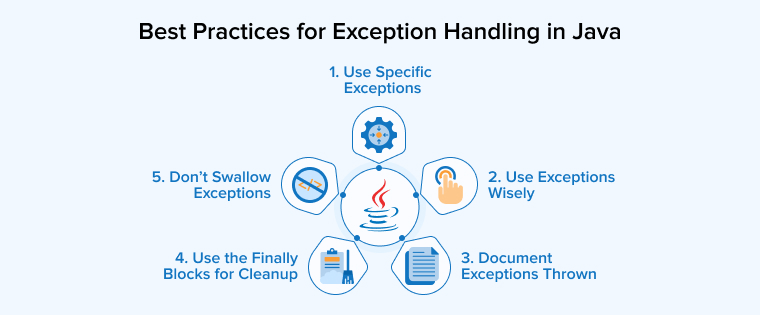
Exceptions can result in disrupting the entire program flow and delays in achieving expected outputs from your Java code execution. Therefore, it’s important that we write the code in a way that exceptions do not cause delays if they occur. The following best practices will help you in this:
1. Use Specific Exceptions
Specific exception classes make Java programs easier to understand and maintain. A detailed exception provides clear information about what went wrong, helping the calling code respond appropriately. For example, invalid numeric input can be handled with NumberFormatException instead of a general exception. Similarly, catch the particular exception you expect rather than using broad classes like Exception or Throwable. This approach also makes debugging simpler and helps identify problems more quickly.
2. Use Exceptions Wisely
Exceptions should not always be used for situations that can be handled more simply. When an operation is optional, a method can return a value, such as true or false, to indicate whether it completed successfully. This keeps the program’s flow simple and avoids unnecessary exception handling. For example, if an application cannot connect to an external database while updating information, it may report the failure through a return value and continue with other tasks instead of stopping the process.
3. Document Exceptions Thrown
Good exception documentation makes code easier for other developers to understand and maintain. The Javadoc @throws tag can be used to mention which exceptions a method may produce. Exception messages should also clearly explain what went wrong, using simple and useful details. A short message is usually enough, especially when the exception type already describes the problem.
4. Use the Finally Blocks for Cleanup
The finally block helps ensure that important cleanup work is completed after a program handles an exception. It can be used to close files, release connections, or free other resources. This is especially useful in larger applications, where failing to clean up resources can cause leaks, performance problems, and unexpected issues during continued program execution.
5. Don’t Swallow Exceptions
Ignoring an exception after catching it can hide the real problem and make debugging much harder. Therefore, instead of leaving the catch block empty, the program should take a useful action. Depending on the situation, the exception can be handled properly or passed to another method. Recording the error with a logging tool also helps you understand what happened and investigate problems when the application is running in production.
What Are the Common Exception Handling Mistakes in Java?
Exception handling is done with the purpose of preserving the program flow and execution. But in order to do that, we sometimes use it unnecessarily or in the wrong way. Some of the most common mistakes are:
Using Exceptions to Control the Flow
Exceptions should be used for unusual problems, not for handling normal program operations. Using them as part of regular program flow can make the code confusing and may reduce efficiency.
public class Main { public static void main(String[] args) { int[] x = {1, 2, 3}; try { for (int i = 0; i <= x.length; i++) { System.out.println(x[i]); } System.out.println("Done"); } catch (ArrayIndexOutOfBoundsException e) { // Exception is being used to control the normal program flow System.out.println("Catch"); } finally { System.out.println("Final"); } } } |
The array has three elements with indexes from 0 to 2. Since the loop uses i <= x.length, it attempts to access index 3, which is out of bounds and causes an ArrayIndexOutOfBoundsException. The catch block prints “Catch”, and “Done” is skipped. Finally, the finally block executes and prints “Final”. To prevent this exception, replace i <= x.length with i < x.length.
Removing the Original Cause of the Exception
When one exception is placed inside another, the original exception should be kept as the cause. This preserves useful details about the actual problem and makes it easier to trace and debug the failure.
public class Main { public static void main(String[] args) { try { int a = 10 / 0; } catch (ArithmeticException e) { // The original exception should be preserved as the cause throw new CustomException(e, ErrorCode.INTERNAL_SERVER_ERROR); } } } |
The code attempts to divide 10 by 0, resulting in an ArithmeticException. The catch block handles this exception and passes it to CustomException along with an error code. Retaining the original exception as the cause helps developers identify the root cause during debugging. However, the CustomException constructor must properly store the original exception; otherwise, important error details may be lost.
Generalizing Exception
Turning a specific exception into a general one can remove valuable details about the original problem. A broader exception should be used only when there is a clear and practical reason for doing so.
public class Main { public static void main(String[] args) { try { int a = 10 / 0; } catch (ArithmeticException e) { // Generalizing a specific exception can hide its original meaning throw new Exception(e); } } } |
The program attempts to divide 10 by 0, resulting in an ArithmeticException. The catch block wraps this exception in a general Exception type, which can make the specific cause of the error less clear during debugging. Use a broader exception type only when necessary, and preserve the original exception as the cause to make troubleshooting easier.
Final Thoughts
Exception handling gives developers a way to deal with unexpected situations without letting the entire program fail suddenly. By understanding try, catch, finally, throw, and throws, developers can manage errors in a clear and controlled manner. When used properly, exception handling leads to safer, cleaner, and more reliable Java programs.
FAQs
Checked exceptions are verified by the compiler, so they must be handled with try-catch or declared using throws. Unchecked exceptions are not checked during compilation and usually happen because of programming mistakes during program execution.
Exception handling in Java helps a program deal with unexpected problems without halting the program abruptly. It allows you to detect errors, respond appropriately, and continue or safely end the program when needed. With statements such as try, catch, finally, and throw, you can control how errors are detected and handled.
final is a keyword used to make a variable constant, prevent method overriding, or stop class inheritance. finally is a block used with exception handling and normally runs after try or catch. finalize() was a method related to garbage collection, but its usage has been completely stopped.

Rakshit Toke is a Java technology innovator and has been managing various Java teams for several years to deliver high-quality software products at TatvaSoft. His profound intelligence and comprehensive technological expertise empower the company to provide innovative solutions and stand out in the marketplace.



Comments
Leave a message...