


Our increasing reliance on digital applications for everyday tasks has shortened our attention spans and made us expect instant gratification. We want to get instant responses from applications within a few clicks. As a result, we’re witnessing the increasing adoption of quick delivery platforms like Instacart, Rappi, Gopuff, etc. With a similar goal, the web development industry is moving towards developing single-page applications instead of traditional web apps. Single-page applications have become a key part of modern web development as businesses are focusing on creating digital solutions that offer a fast, smooth, and highly interactive user experiences.
Traditional programming languages like Java and Python are capable of powering the backend of SPAs, whereas the client side requires JavaScript and modern JS frameworks such as Angular, React, and Vue.
Today, we’ll discuss why and how Angular development companies use Angular’s capabilities like data binding, routing, extensive libraries, etc., to develop scalable and high-performance SPAs. We’ll also briefly understand single-page applications and their advantages in this competitive digital environment.
What is a Single Page Application (SPA)?
Single Page Applications, commonly known as SPAs, are modern web applications that use JavaScript APIs like Fetch and other technologies like GraphQL and AJAX (Asynchronous JavaScript and XML) to update only the required parts of pages requested from servers. As a result, whenever a user clicks on something, an SPA provides only a single HTML file and keeps dynamically updating the existing page as per the user interaction. It does not refresh the complete page every time, and so the rest of the interface elements, such as menus, header component, or sidebars, often remain fixed while the content changes dynamically in the background.
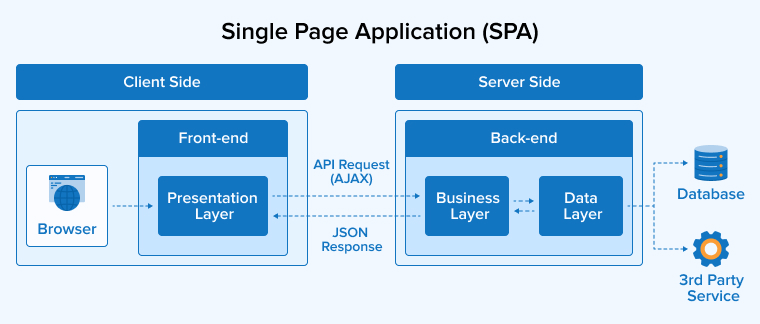
The most common examples of SPAs that we all use regularly include Gmail, Trello, Netflix, Google Maps, and Payal.
What Are the Benefits of Single-Page Applications?
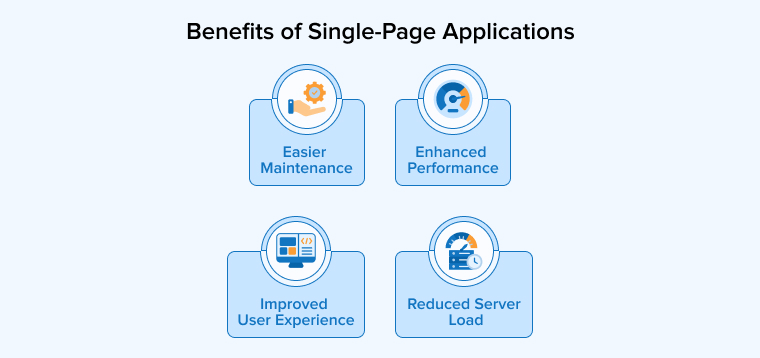
Single Page Applications provide multiple advantages to both developers and users, as they provide:
1. Enhanced Performance
Single Page Applications load the required parts of content, i.e., HTML, CSS, and JS resources, only once and update content dynamically when users interact with the app. This creates faster navigation, smoother browsing, and a more responsive experience across the application.
2. Improved User Experience
SPAs provide a faster and smoother browsing experience as they update content without reloading entire pages. This reduces waiting time, bounce rates, and helps businesses keep visitors on the page for a longer time, thereby increasing conversion rates. This responsive behavior also works well on mobile devices and across different network conditions, offering consistent performance even with varying internet speeds.
3. Reduced Server Load
SPAs help reduce server workload by transferring only the required data instead of the entire HTML pages. Here, most of the interface updates happen on the client-side. Therefore, web servers handle fewer rendering tasks, improving scalability, lowering bandwidth consumption, and reducing infrastructure costs for businesses managing high user engagement.
4. Easier Maintenance
Single-page applications follow a structured, component-based architecture, which makes it easier to manage. You can thus modify or test individual sections without affecting the complete application. The application is separated into frontend and backend development, which allows teams to work independently, improves collaboration, simplifies maintenance, and accelerates the overall development process.
Why Choose Angular for SPAs?
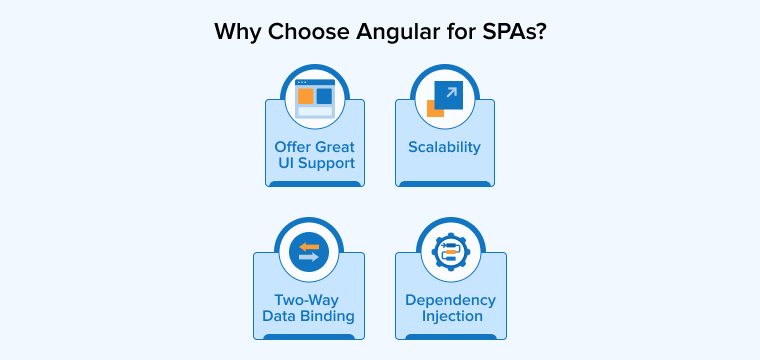
Let us see why Angular is considered one of the most suitable languages for developing single-page applications:
1. Two-Way Data Binding
In two-way data binding, the application’s data model and view layer are always in synchronization. When users enter or modify information, the changes get instantly reflected in the application state, and any updates in the data are immediately reflected on the screen. Therefore, there’s no need to repetitively write explicit boilerplate code to manipulate the DOM to provide real-time updates.
2. Dependency Injection
You can build organized and scalable SPAs by separating components from the services they use Angular’s dependency injection feature. Thus, you can reuse, update, and test features more easily, ensuring an organized app architecture. Shared services also help maintain consistent application data across different sections of the app. Here, dependencies are loaded only when required, thus improving performance while reducing development complexity and making long-term maintenance simpler for growing applications.
3. Offer Great UI Support
Angular offers strong built-in UI capabilities that make it highly effective for building interactive SPAs for different devices. You can use its component-based architecture to organize interface elements into reusable and manageable sections, which simplifies the creation of complex layouts. The Angular Material library provides ready-made design components such as buttons, dialogs, grids, and navigation elements that can help create modern and consistent user experiences quickly.
4. Scalability
Angular is well-suited for developing large-scale single-page applications because its component-based architecture keeps projects organized as they scale. Features like reusable components, modules, and services make complex applications easier to manage and maintain. Angular also supports testing, debugging, and performance optimization through features such as tree shaking, lazy loading, and AOT compilation. It even provides built-in error handling and developer tools to monitor application health and quickly resolve issues with increasing app size.
Building SPAs with Angular
We’ll now understand the entire procedure to build an Angular SPA to help you get a complete picture.
Prerequisites
Before starting Angular SPA development, install the following:
Install Node.js
Download and install Node.js:
- Node.js Official Website: https://nodejs.org/
Verify installation:
node -v npm -v |
Install Angular CLI
npm install -g @angular/cli |
Verify Angular CLI:
ng version |
Step 1: Create an Angular Application
Create a new Angular application using Angular CLI.
ng new angular-spa-app |
During setup:
- Select routing: Yes
- Select stylesheet format: SCSS/CSS
Move into the project folder:
cd angular-spa-app |
Run application:
ng serve |
Open browser:
Step 2: Generate Components
Generate components using Angular CLI.
Create Home Component
ng generate component components/home |
Then, create the Contact Component
ng generate component components/contact |
Create About Component
ng generate component components/about |
Step 3: Configure Routing
Angular routing enables SPA navigation without page refresh.
Update app-routing.ts
import { Routes } from '@angular/router'; import { Home } from './home/home'; import { About } from './about/about'; import { Contact } from './contact/contact'; export const routes: Routes = [ { path: '', component: Home }, { path: 'about', component: About }, { path: 'contact', component: Contact }, { path: '**', redirectTo: '' } ]; |
Step 4: Add Navigation Menu
Update app.component.html
<nav> <a routerLink="">Home</a> <a routerLink="/about">About</a> <a routerLink="/contact">Contact</a> </nav> <hr> <router-outlet></router-outlet> |
Explanation
| Tag | Purpose |
|---|---|
| routerLink | Used for navigation |
| router-outlet | Loads the component dynamically |
Step 5: Add Component Content
home.component.html
<h1>Home Page</h1> <p>Welcome to Angular SPA Application.</p> |
about.component.html
<h1>About Page</h1> <p>This is About Component.</p> |
contact.component.html
<h1>Contact Page</h1> <p>This is Contact Component.</p> |
Output

What Are the Best Practices for Angular SPA Development?
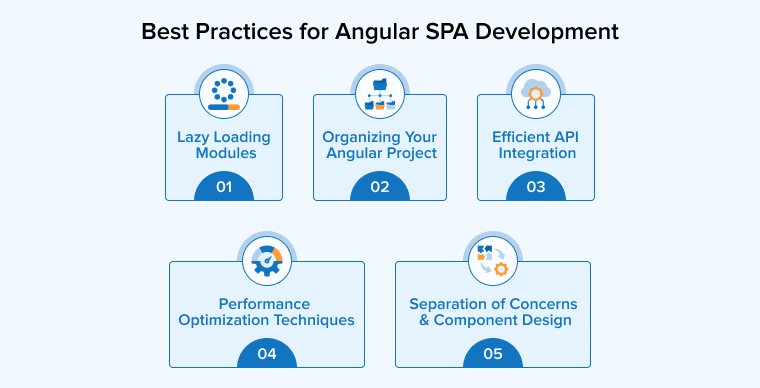
Make use of the SPA development best practices in Angular given below to develop an interactive and high-performing SPA:
1. Lazy Loading Modules
Lazy loading in Angular is an optimization technique that divides the entire application into code bundles known as JavaScript chunks and loads them asynchronously when the user requires them. This reduces the initial size of the JavaScript bundles, thus decreasing the application startup time regardless of its size.
The following lazy loading best practices will increase the performance of your SPA’s:
- Divide your application into various modules based on features, known as feature modules.
- Adopt the loadComponent routing technique to lazy load isolated components without using the wrapper module.
- Do not go for importing a lazy-loaded feature module into your AppModule, as this will force your SPA to load immediately at startup, which goes against the objective of lazy loading.
2. Organizing Your Angular Project
You must organize your SPA code files in a proper structure so that it’s easy for existing as well as new members to maintain, collaborate, and scale in the future.
Keep the following best practices in mind while organizing your Angular SPA project:
- Follow a consistent naming convention to save your project’s files and folders to ensure they are easy to access whenever required.
- Use the following commands like ng generate to generate the application’s components, services, and modules with a consistent and standardized structure.
- Follow the “Rule of One” Angular’s style Guide recommendation that allies only one component, service, or directive per file, with one file containing only 400 lines.
3. Efficient API Integration
API integration helps make an SPA from static to dynamic and data-driven, making it responsive and increasing user experience.
The following best practices will ensure an effective frontend and backend integration using APIs:
- Handle HTTP requests using Angular’s @Injectable services instead of making API calls directly from components.
- Store your API base URLs and environment-specific settings in centralized configuration files
- Define TypeScript interfaces or classes for both request payloads and API responses.
4. Performance Optimization Techniques
Single-page applications are built with the purpose of increasing the performance and speed of web applications by loading only the necessary content, that reducing the loading time of pages.
Increase the performance of your Angular SPAs with the following three techniques:
- When rendering lists with the *ngFor directive, always use a trackBy function to prevent unnecessary DOM rerenders.
- Avoid manual .subscribe() calls in component classes to subscribe to observables to prevent memory leaks. Use the async pipe as it binds observables directly in templates, thus enabling automatic subscription management.
- Use ChangeDetectionStrategy.OnPush to limit checks to only when input properties change, or an event is fired within that specific component.
5. Separation of Concerns and Component Design
Separating concerns and component design in Angular keeps the components reusable and increases their testability and maintainability.
Use the techniques below to ensure the separation of concerns and component design:
- Components only contain the logic necessary for rendering data. Extract Business logic, API calls, and data transformations into services.
- Each component, service, or pipe must handle only one task, adhering to the Single Responsibility Principle.
- Use Dependency Injection (DI) to achieve loose coupling by delegating the creation of a service to the framework rather than the component itself.
Final Thoughts
Angular provides great capabilities to build high-performing single-page applications. With the evolving Angular ecosystem, you must stay up to date with the changes that can have a significant impact on your development strategy and outcomes. Ongoing updates and increasing complexity make the SPA development process quite challenging. Hence, it’s important to experiment with different techniques and find the best way to achieve the expected outcomes.
FAQs
A Single-Page Application (SPA) is a modern web application that loads only the required parts of a web page in a single page. It rewrites the existing page based on user interaction.
Angular has many powerful features, such as two-way data binding, dependency injection, component-based architecture, Ahead-of-Time (AOT) compilation, and Lazy Loading, a robust CLI (Command Line Interface), and built-in libraries suitable for SPA development.
You must consider that initial load time is less, change detection happens only on change of inputs, observables are automatically subscribed and unsubscribed, standalone components are used, unused code is removed, etc., to ensure SPAs perform well.

Parind Shah is responsible for frontend innovations at TatvaSoft. He brings profound domain experience and a strategic mindset to deliver exceptional user experience. He is always looking to gain and expand his skill set.



Comments
Leave a message...