

As digital products reach users across countries and cultures, building applications that support multiple languages has become more important than ever. Internationalization helps developers create applications that can easily adapt to various languages, regions, and user preferences without altering the app’s core functionality. It may look quite simple in the beginning, as architecture and business are already defined, and code is already implemented. However, aspects such as pluralization, currency rules, right-to-left layouts, and many more increase internationalization difficulties.
Angular provides powerful tools and flexible approaches that make implementing internationalization more structured and efficient. Many Angular development service providers now prioritize internationalization from the initial stages of development to ensure applications are scalable and market-ready for users worldwide.
In this blog, we will explore the fundamentals of internationalization in Angular, including implementation strategy, best practices, and supporting tools and libraries that help developers build modern, user-friendly applications for a global audience.
What is Angular Internationalization?
Angular internationalization (i18n) helps developers to build Angular applications that cater to a global audience without major code changes. It allows text, dates, numbers, and layouts to adjust according to the user’s location and active locale. Angular includes an i18n template-based feature that organizes translations effectively, making it easier to manage multilingual applications and maintain a smooth user experience as the project grows.
How to Implement Internationalization (i18n) in Angular?
There must be a well-thought-out strategy to implement internationalization (i18n) in Angular code. The following steps, if followed properly, will give you the expected results:
Step –1: Install Angular Localize Package
Run the following command:
ng add @angular/localize |
Step 2: Generate the XLF Translation File Using Angular CLI
Run the following command :
ng extract-i18n --output-path src/i18n |
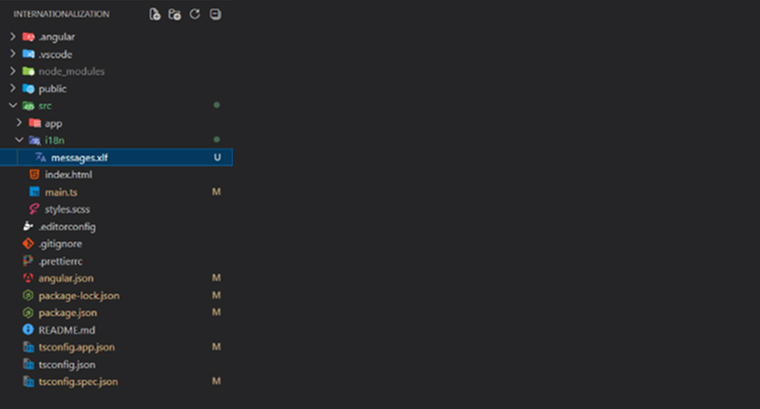
After running this command, the following folder structure is created.
Step 4: Translate the Extracted Files
Copy the base file for each language:
Run the following command :
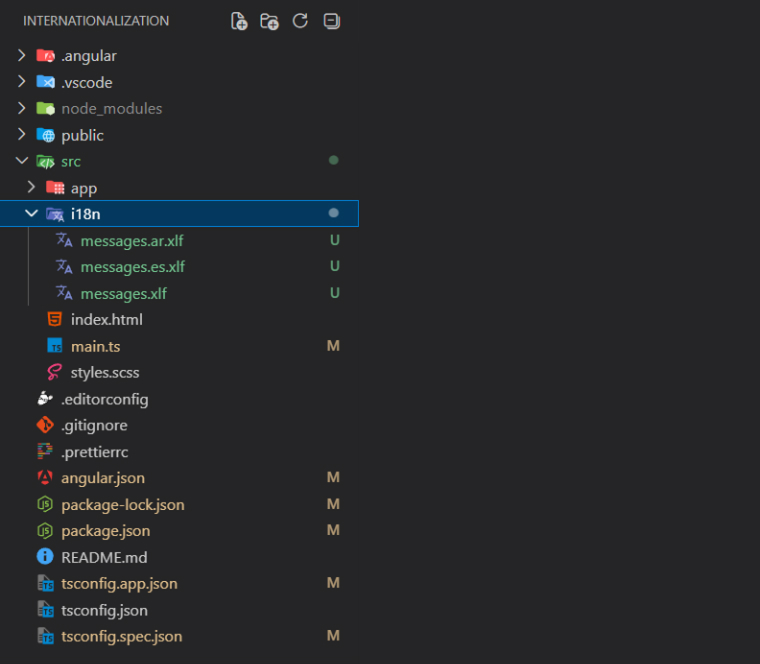
cp src/i18n/messages.xlf src/i18n/messages.es.xlf cp src/i18n/messages.xlf src/i18n/messages.ar.xlf |
After running this command, the following files are created.
Step 5: Configure angular.json for Multiple Locales.
Update the code below under the app name to define your supported locales:
"i18n": { "sourceLocale": "en", "locales": { "es": "src/i18n/messages.es.xlf", "ar": "src/i18n/messages.ar.xlf" } }, |
Update the code below under configuration > production
"localize": true, |
Configure the localization below, under configuration
"es": { "localize": [ "es" ], "outputPath": "dist/es" }, "ar": { "localize": [ "ar" ], "outputPath": "dist/ar" }, |
Then configure the lines below under development :
"localize": [ "es", "ar" ], |
Configure below localize under serve
"ar": { "buildTarget": "Internationalization:build:ar" }, "es": { "buildTarget": "Internationalization:build:es" } |
Step 5: Use the i18n attribute on any HTML element:
<h1 i18n>Welcome to our Angular i18n Demo!</h1> <p i18n>Multi-Language Support in the Application</p> |
Step 6: Add Translation in the source file:
In this step, we add translated text inside each language-specific XLF/XLIFF file. Angular uses these translation files during the build process to replace the original English text with the selected language translation.
- The source file contains the original English text extracted from the application.
- The Arabic file contains Arabic translations for each text element.
- The Spanish file contains Spanish translations for each text element.
- Each <trans-unit> represents one translatable text block.
- The <source> tag contains the original text from the application.
- The <target> tag contains the translated value to be displayed in that language.
- Angular matches translations using the id attribute of each <trans-unit>.
Source File
This file is automatically generated by Angular and contains all extracted translatable text from the application.
<?xml version="1.0" encoding="UTF-8" ?> <xliff version="1.2" xmlns="urn:oasis:names:tc:xliff:document:1.2"> <file source-language="en" datatype="plaintext" original="ng2.template"> <body> <trans-unit datatype="html"> <source>Welcome to our Angular i18n Demo</source> <context-group purpose="location"> <context context-type="sourcefile">src/app/app.html</context> <context context-type="linenumber">9,10</context> </context-group> </trans-unit> <trans-unit datatype="html"> <source>Multi-Language Support in the Application</source> <context-group purpose="location"> <context context-type="sourcefile">src/app/app.html</context> <context context-type="linenumber">10</context> </context-group> </trans-unit> </body> </file> </xliff> |
Arabic Translation File
This file contains Arabic translations for the extracted English text. When the application is built with the Arabic locale, Angular replaces the source text with these Arabic translations.
<?xml version="1.0" encoding="UTF-8" ?> <xliff version="1.2" xmlns="urn:oasis:names:tc:xliff:document:1.2"> <file source-language="ar" datatype="plaintext" original="ng2.template"> <body> <trans-unit id="welcomeHeader"> <source>Welcome to our Angular i18n Demo</source> <target>مرحباً بكم في عرضنا التوضيحي لـ Angular i18n!</target> </trans-unit> <trans-unit id="multiLangSupport"> <source>Multi-Language Support in the Application</source> <target>دعم لغات متعددة في التطبيق</target> </trans-unit> </body> </file> </xliff> |
Spanish Translate File
This file contains Spanish translations for the application content. Angular uses these translations when the application runs in the Spanish locale.
<?xml version="1.0" encoding="UTF-8" ?> <xliff version="1.2" xmlns="urn:oasis:names:tc:xliff:document:1.2"> <file source-language="en-US" datatype="html"> <body> <trans-unit id="welcomeHeader"> <source>Welcome to our Angular i18n Demo</source> <target>¡Bienvenidos a nuestra demostración de internacionalización de Angular!</target> </trans-unit> <trans-unit id="multiLangSupport"> <source>Multi-Language Support in the Application</source> <target>Soporte multilingüe en la aplicación.</target> </trans-unit> </body> </file> </xliff> |
Step 6: Build and Serve :
ng serve --configuration=ar or ng serve --configuration=es |
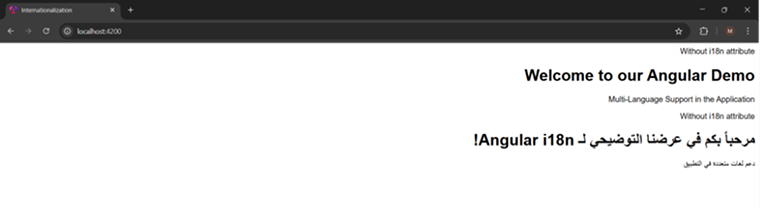
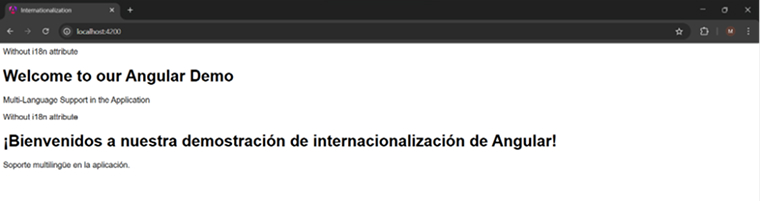
Final Output :
Arabic :
Spanish :
Best Practices for Angular Internationalization
Consider the following five common best practices while implementing internationalization in your Angular application to avoid encountering any roadblocks during the process.
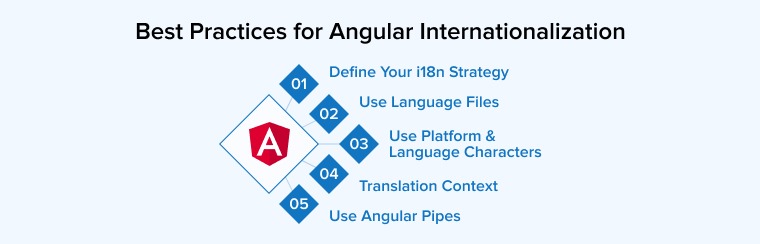
1. Define Your i18n Strategy
Planning an internationalization strategy before development makes the translation process smoother and more organized.
- You must first identify which languages the application should support based on its target users. This helps developers determine which parts of the interface require translation and how to manage the content effectively.
- Teams also need to choose whether translations will be handled internally or by professional translators.
- After selecting the languages, developers should carefully arrange the application’s structure to help translators easily access and update text content.
2. Use Language Files
Managing translations through language files makes Angular internationalization more organized and easier to maintain.
- Categorize translation files based on language and store them in separate folders to improve structure.
- There are multiple formats, like JSON file or XLF, to keep all the translations consistent.
- Use clear hierarchical keys instead of using raw text to avoid confusion as the application grows.
- Features such as plural handling, fallback languages, and automatic extraction tools further enhance translation management.
- It is also important to design the interface for longer translated text and provide helpful descriptions so translators can understand the purpose of each message clearly.
3. Use Platform-Appropriate and Language-Specific Characters
Angular internationalization should support both language-specific and platform-specific characters to create a better experience for users from different regions. Language-specific characters are important for correct spelling and cultural significance, while platform-specific symbols are useful for general formatting such as dates, percentages, and numbers.
- You should use UTF-8 encoding to display special characters across all devices and browsers.
- Angular also supports International Components for Unicode (ICU) expressions, which help manage plural forms and gender-based text in different languages.
- Design applications with a language switcher to handle longer translated sentences and support Right-to-Left (RTL) languages when needed.
- Take care while defining currency symbols and other regional formats to avoid confusion between countries.
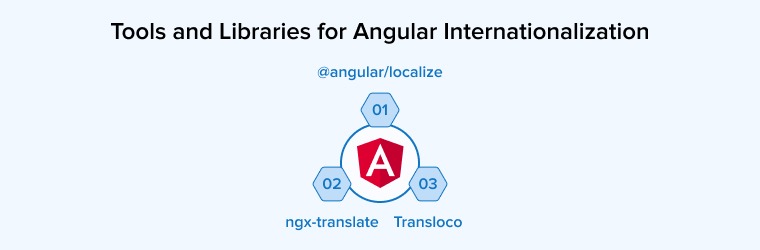
- Tools such as @angular/localize, ngx-translate, and Transloco help developers manage translations more efficiently.
4. Provide Context for Translators
Providing proper context for translators is an important part of Angular internationalization because it helps prevent incorrect translations and improves communication across languages.
- You can add descriptions and meanings inside i18n attributes so translators understand how and where specific text is used.
- Custom translation IDs also help maintain consistency when source text changes during development.
- Provide screenshots or visual examples to make correct translation easier, because translators can see the actual interface instead of working with isolated text.
- Do not use hardcoded strings inside TypeScript files, and keep all translatable content in HTML templates or translation files. Placeholders should also be used for dynamic values so that sentences remain natural in every language.
5. Use Angular Pipes
Angular pipes play an important role in internationalization by helping developers display data in formats suitable for different regions and languages.
- Use Angular’s built-in pipes, such as DatePipe, CurrencyPipe, DecimalPipe, and PercentPipe, to automatically adjust values according to the selected locale, that reducing the need for manual formatting.
- Dedicated translation pipes from libraries like ngx-translate or Transloco help keep templates clean by connecting text directly to translation files through keys instead of hardcoded strings.
- Use I18nPluralPipe for handling plural forms correctly instead of using “if” statements and i18nSelect for displaying different text based on categories such as gender.
- Prefer using pure pipes as it improves performance by updating only when data changes, making applications faster and more efficient.
Top Tools and Libraries for Angular Internationalization
Let’s discuss some popular i18n libraries and frameworks that can ease the internationalization process:
1. @angular/localize
Angular includes a built-in internationalization and localization package called @angular/localize that helps developers create multilingual applications without installing additional libraries. It supports translation extraction, plural handling, interpolation, and compile-time integration, which improves application performance because translations are included during the build process. The module also works well with AOT compilation and Unicode standards, making production builds more optimized and reliable. Developers can provide translation context and use ICU message formatting for better language support.
However, Angular’s default i18n approach creates a separate build for each language, which can make deployment more difficult. It also offers limited support for dynamically changing languages during runtime, and creating translation files may require additional manual effort.
2. ngx-translate
ngx-translate is a popular Angular internationalization library that allows applications to switch to other languages during runtime without rebuilding the project. It stores translations in simple JSON files, making content easier to organize and update. The library supports lazy loading, dynamic language switching, and handling missing translations, which makes it suitable for small and medium-sized applications. It is also compatible with Ahead-of-Time compilation and includes tools like BabelEdit for managing translation files.
However, ngx-translate is not the best library if you want to use it for developing a large Angular application. Your app might face challenges like performance degradation due to processing a large number of translation files at runtime. Additionally, you may also require additional setup for server-side rendering and SEO support.
3. Transloco
Transloco is a modern Angular internationalization library to simplify multilingual application development while supporting scalable project structures. It allows developers to load translation files only when required, helping manage resources more efficiently. The library includes useful plugins for server-side rendering, the localization process, and automatic translation handling. It integrates well with state management tools and supports multiple fallback languages for missing translations. Its clean template structure helps keep code more organized and easier to maintain.
However, because translations are handled dynamically during runtime, the entire application performance may slow slightly in larger projects. Since the library is still evolving, its community support is smaller compared to older Angular i18n solutions.
Final Thoughts
With the increasing adoption of digital technologies from industrial use to daily life requirements, internationalization is becoming a compulsory requirement to increase the user base. There are certain challenges like various legal and regulatory compliances, cultural differences, operational and logistical barriers, financial constraints, lack of understanding of local markets, and others. Hence, it’s important to approach internationalization with flexible business models that are adaptable to different cultural and economic contexts.

Parind Shah is responsible for frontend innovations at TatvaSoft. He brings profound domain experience and a strategic mindset to deliver exceptional user experience. He is always looking to gain and expand his skill set.



Comments
Leave a message...