

Forms play a major role in building interactive and data-driven web applications. From login pages and registration forms to profile updates and multi-step business workflows, they help collect and manage user information efficiently. As modern applications continue to grow in complexity, developers need solutions that are easy to maintain, scalable, and capable of handling validations smoothly.
This is where Angular offers two powerful approaches: Template-Driven Forms and Reactive Forms. Both methods are designed to handle forms, manage user input, validate data, and track changes in real time. However, they differ greatly in terms of structure, flexibility, scalability, and coding style. Many companies offering Angular development services rely on both techniques depending on project requirements, complexity, and long-term scalability goals.
In this blog, we will explore the key differences between Angular Template-Driven and Reactive Forms, along with their features, advantages, disadvantages, and use case scenarios.
What Are the Types of Angular Forms?
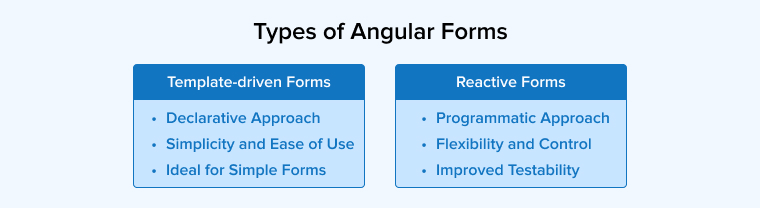
Angular forms help developers handle user input in a structured and efficient way. They make it easier to collect data, check if the entered information is correct, and connect forms with application data or server responses. With built-in features for validation and control, Angular forms support the creation of responsive, interactive, and user-friendly web applications.
1. Template-Driven Forms
Template-driven forms in Angular provide an easy way to create and manage forms directly within the HTML template. They use directives defined in the FormsModule, like ngModel, for automatic data binding between input fields and component data. This method requires very little TypeScript code, making it suitable for simple forms with basic validation, quick setup, and smooth handling of user input.
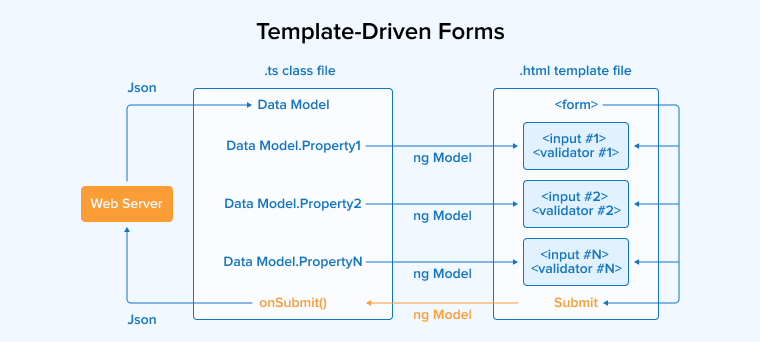
Syntax
<form #form="ngForm" (ngsubmit)="onSubmit(form)"> <input type="text" name="username" [(ngmodel)]="model.username" required=""> <input type="email" name="email" [(ngmodel)]="model.email" required="" email=""> <input type="password" name="password" [(ngmodel)]="model.password" required=""> <button type="submit">Submit</button> </form> |
Features of Template-Driven Forms
The following are the core features of template-driven forms:
- Minimal Component Code: Most of the setup, including validation and field definitions, happens in the template, keeping the TypeScript class file clean and minimal.
- Two-Way Data Binding: Uses the [(ngModel)] syntax to automatically synchronize data between the UI template and the component’s data model.
- Template Reference Variables: Allows you to export form or control instances to local variables (e.g., #userForm=”ngForm”) to access their properties directly within the HTML.
- Quick Prototyping: Template-driven forms ensure rapid prototyping in Angular by utilizing an “HTML-first” approach that reduces boilerplate code and leverages implicit directives for data handling.
- Easy validation: Basic validation can be added directly in the HTML as attributes, offering quick validation without needing to create custom validator functions in TypeScript.
Pros of Template-Driven Forms
Some of the most popular advantages of template-driven forms are as follows:
- Form state tracking: In Angular, you can track state in a template variable and a component to check if the state of the form is touched, dirty, or valid. The NgModel directive helps in this by automatically exposing validation and modification states via specific CSS classes and template variables.
- Easy to learn: If your HTML fundamentals are clear and you have experience in working with HTML forms, it’ll be very easy for you to understand the working of template-driven forms, as its syntax is based on HTML itself.
- Automatic Form Management: You do not need to manage the Angular FormControl and FormGroup instances in your Angular form, as it’s done automatically as per your template directives.
- Easy Migration: If you’ve worked in AngularJS, it’ll be easy to migrate to modern Angular versions, as it won’t take much time to get familiar with template-driven forms.
- Declarative Approach: The ngModel directive allows you to define the form’s structure, validation rules, and data binding rules in the HTML template itself instead of writing logic for each in the TypeScript component.
Cons of Template-Driven Forms
Some of the most popular disadvantages of template-driven forms are as follows:
- Lack of Unit Testability: In template-driven forms, we write the logic directly in the HTML template; this coupling makes it difficult to test the validation logic with unit tests. As a result, the code may become vulnerable to security attacks.
- Asynchronous Data Flow: Due to the asynchronous nature of template-driven forms, you won’t be able to see updated form values immediately after a model change. The form’s state takes time to update, which may result in getting inaccurate or outdated form values.
- Maintenance issues: The complexity of the form increases with more validation logic, error handling, and directives, which can reduce readability and maintainability.
- Custom validators: You’ll have to create custom directives to implement custom validators in template-driven forms, which results in increased boilerplate code and complexity.
- Poor type safety: The template-driven form’s structure is defined in HTML templates. This limits compile-time checks, uses any types for form values, scatters validation logic, and makes refactoring prone to silent runtime errors.
When to Use a Template-Driven Form?
The following are the common use cases where template-driven forms are best suited for:
- If you have to build a basic or small to medium-sized form, such as feedback forms and login forms.
- If you want simple syntax, keep all validation and logic in the template using native HTML attributes.
- If you have less time and cannot write extensive logic in TypeScript files.
2. Reactive Forms
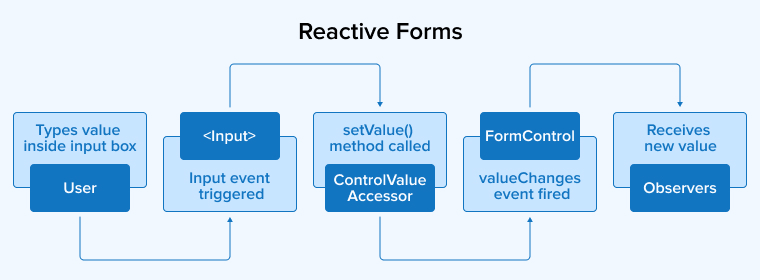
Reactive forms in Angular are component-centric forms that are built in TypeScript. It’s a programmatic way of developing Angular forms in the component class using the following major concepts:
- FormGroup: This Angular class groups related FormControl instances as key-value pairs into a single object.
- FormControl: A FormControl instance deals with the input value, validation logic, and user interaction of only a single input field, such as a checkbox or text field.
- FormBuilder: This service class provides three methods, group(), control(), and array() to create form instances.
Syntax
import { FormBuilder, FormGroup, FormControl } from '@angular/forms'; // Create form controls and group them into a form group const form = new FormGroup({ username: new FormControl(''), email: new FormControl(''), password: new FormControl('') }); |
Features of Reactive Forms
The following are the core features of reactive forms:
- Programmatic control: You can have complete control over the form, as form controls in the component class let you define the form structure and validation rules.
- Dynamic validation: Reactive forms in Angular allow dynamic altering, enabling, and disabling of validation rules while the user is interacting with the form, as they are written in TypeScript.
- Strong Typing: Angular provides compile-time safety and autocompletion through strictly typed reactive forms.
- Built-in & custom validators: Reactive forms provide built-in validation functions, for example, minLength and required, and even make it easy to define custom cross-field validation logic.
- Observable Data: Form controls and states are provided as RxJS Observable streams, so that you can react to user input in real-time.
Pros of Reactive Forms
Some of the most popular advantages of reactive forms are as follows:
- Immutability: Reactive forms generate a new instance of the data model every time the form value changes, instead of modifying the existing object, maintaining data integrity and simplifying debugging.
- Easier Testing: There’s no need to interact with the DOM to perform unit tests on form controls and validation logic, as here the form logic and template are separated.
- Integration with Backend Services: As form controls and groups are structured in TypeScript instead of an HTML template, it becomes easy to have control over the data being sent or received from the server.
- Synchronous access: Reactive forms provide synchronous access to form data, that menas you can instantly access or update form state without waiting for the UI to update, improving reliability, simplifying validation, and debugging.
- Scalability: The dynamic form generation, containment of validation logic and state in the component class, and synchronous data flows allow easy scaling of forms whenever required.
Cons of Reactive Forms
Some of the most popular disadvantages of reactive forms are as follows:
- Steep learning curve: Reactive forms need a thorough understanding of concepts like Angular FormArrays, FormControls, and FormGroup, which may seem difficult for beginners even though they’re familiar with HTML forms.
- Manual State Tracking: In reactive forms, you manually have to track the submitted status or manage complex UI states in case they’re not directly linked to the form group.
- No Direct HTML Binding for “Disabled”: In Reactive forms, fields cannot be disabled using the disabled HTML attribute. You must programmatically control them through the FormControl API, which may sometimes create state management complications.
- Unsuitable for simple forms: Reactive forms may add unnecessary complexity for basic forms such as login or signup pages due to huge boilerplate, explicit TypeScript data models, and manual synchronization with the HTML template.
- Compatibility with Newer Features: Reactive forms may not work smoothly with newer Angular features like Signals because both follow different approaches for handling changes and updating application data.
When to Use a Reactive Form?
The following are the common use cases where reactive forms are best suited for:
- If your form requires validation logic, such as complex server-side checks.
- If you need to set form values or reset controls directly from the Typescript backend.
- When you want to suddenly modify the form upon finding something missing or incorrect while the user is interacting.
Step-by-Step Implementation of Template-Driven Form
Let us practically apply the knowledge gained about template-driven forms by creating a basic form using the steps given below:
Step 1: Create an Angular Project
Create a new Angular application using Angular CLI.
ng new template-form |
Step 2: Generate Components
Generate components using Angular CLI.
Create Home Component
ng generate component components/home |
Step 3: Import FormsModule
Open home.ts
import { Component } from '@angular/core'; import { FormsModule } from '@angular/forms'; @Component({ selector: 'app-home', imports: [FormsModule], templateUrl: './home.html', styleUrl: './home.scss', }) export class Home {} |
Step 4: Create Form Model (Optional)
Create user.ts
export class User { name: string = ''; email: string = ''; password: string = ''; } |
Step 5: Update Component File
Open home.ts
import { Component } from '@angular/core'; import { FormsModule } from '@angular/forms'; @Component({ selector: 'app-home', imports: [FormsModule], templateUrl: './home.html', styleUrl: './home.scss', }) export class Home { user: User = new User(); onSubmit(form: any) { console.log(form.value); } } |
Step 6: Create HTML Form
Home.html
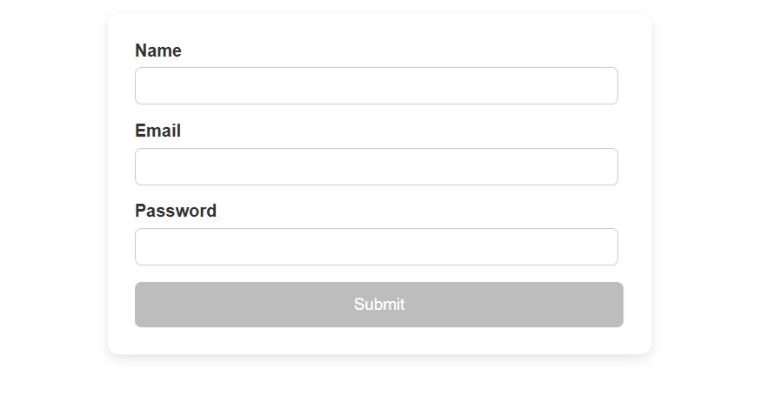
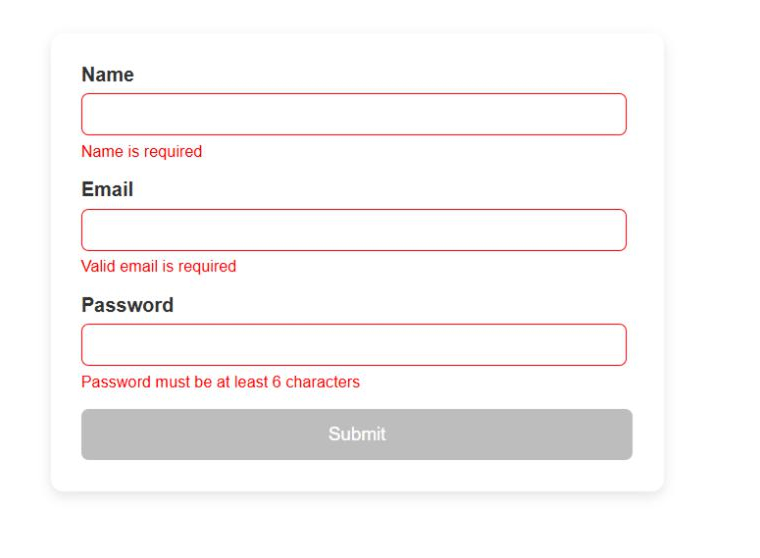
<form #userForm="ngForm" (ngSubmit)="onSubmit(userForm)" autocomplete="off"> <div> <label>Name</label> <input type="text" name="name" [(ngModel)]="user.name" required #name="ngModel" autocomplete="off"> <div *ngIf="name.invalid && name.touched" class="error"> Name is required </div> </div> <div> <label>Email</label> <input type="email" name="email" [(ngModel)]="user.email" required email #email="ngModel" autocomplete="off"> <div *ngIf="email.invalid && email.touched" class="error"> Valid email is required </div> </div> <div> <label>Password</label> <input type="password" name="password" [(ngModel)]="user.password" required minlength="6" #password="ngModel" autocomplete="new-password"> <div *ngIf="password.invalid && password.touched" class="error"> Password must be at least 6 characters </div> </div> <button type="submit" [disabled]="userForm.invalid"> Submit </button> </form> |
Output
Step-by-Step Implementation of Reactive Form
Let us practically apply the knowledge gained about reactive forms by creating a basic form using the steps given below:
Step 1: Create an Angular Project
Create a new Angular application using Angular CLI.
ng new template-form |
Step 2: Generate Components
Generate components using Angular CLI.
Create Home Component
ng generate component components/home |
Step 3: Import ReactiveFormsModule
Open home.ts
@Component({ selector: 'app-home', imports: [ReactiveFormsModule, BrowserModule], templateUrl: './home.html', styleUrl: './home.scss', }) export class Home {} |
Step 4: Update Component File
Update home.ts
import { Component } from '@angular/core'; import { FormBuilder, FormGroup, ReactiveFormsModule, Validators } from '@angular/forms'; import { BrowserModule } from '@angular/platform-browser'; @Component({ selector: 'app-home', imports: [ReactiveFormsModule,BrowserModule], templateUrl: './home.html', styleUrl: './home.scss', }) export class Home { userForm: FormGroup; constructor(private fb: FormBuilder) { this.userForm = this.fb.group({ name: ['', Validators.required], email: ['', [Validators.required, Validators.email]], password: ['', [ Validators.required, Validators.minLength(6) ]] }); } onSubmit() { console.log(this.userForm.value); } get f() { return this.userForm.controls; } } |
Step 5: Create HTML Form
Home.html
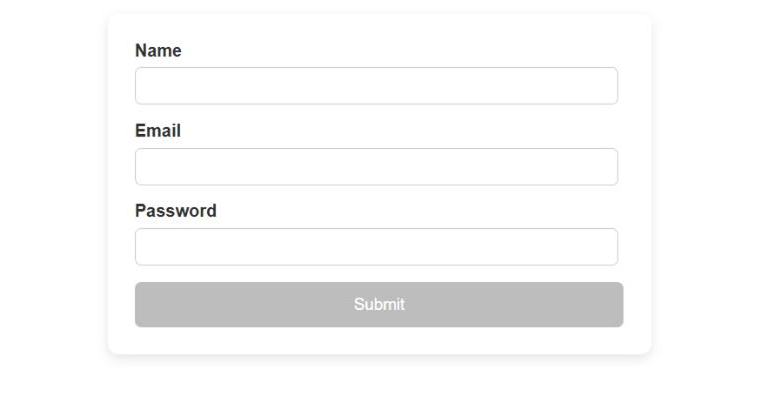
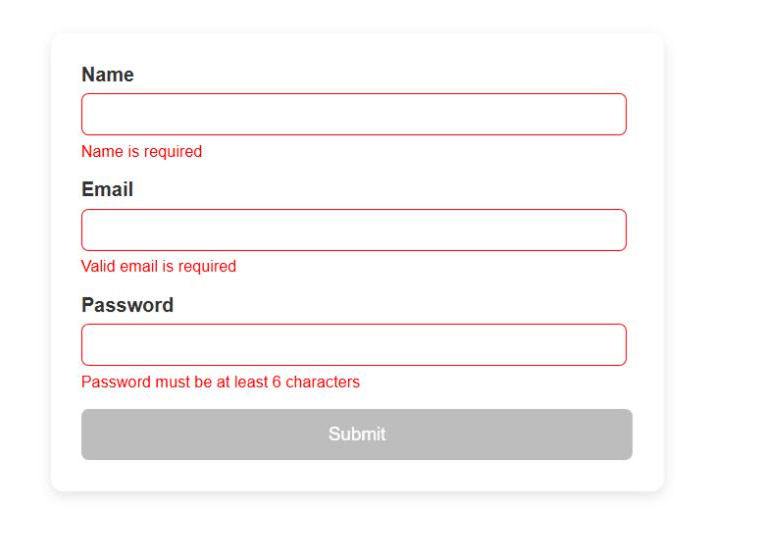
<form [formGroup]="userForm" (ngSubmit)="onSubmit()"> <div class="form-group"> <label for="name">Name</label> <input type="text" id="name" formControlName="name" placeholder="Enter your name" /> @if (f['name'].touched && f['name'].errors?.['required']) { <small class="error"> Name is required </small> } </div> <div class="form-group"> <label for="email">Email</label> <input type="email" id="email" formControlName="email" placeholder="Enter your email" /> @if (f['email'].touched && f['email'].errors?.['required']) { <small class="error"> Email is required </small> } @if (f['email'].touched && f['email'].errors?.['email']) { <small class="error"> Invalid email format </small> } </div> <div class="form-group"> <label for="password">Password</label> <input type="password" id="password" formControlName="password" placeholder="Enter password" /> @if (f['password'].touched && f['password'].errors?.['required']) { <small class="error"> Password is required </small> } </div> <button type="submit" [disabled]="userForm.invalid"> Submit </button> </form> |
Output
Difference Between Template-Driven Forms and Reactive Forms
After understanding the fundamentals of both types of forms, let us delve deeper into template-driven forms vs reactive forms:
| Parameters | Template-driven Forms | Reactive Forms |
|---|---|---|
| Data Binding | Two-way data binding using the ngModel directive. | formControlName and formGroup bind explicitly |
| Form Creation | Form is automatically created with the help of an HTML template | You have to programmatically create a form in the component code |
| Programming paradigm | It implements a declarative approach where form logic is in the template | It implements an imperative approach where form logic is in the component |
| Complexity Handling | Suitable for simple, basic forms | Suitable for complex and dynamic form elements |
| Form Grouping | Here, form controls are not grouped | Form controls are properly grouped into FormGroups and nested structures |
| Backend integration | It’s quite difficult to integrate with the backend services | Programmatic control facilitates easier integration with backend services |
| Learning Curve | It has a beginner-friendly learning curve | It has a steeper learning curve and offers more control and flexibility |
| Unit Testing | The deep coupling of form logic and HTML template makes unit tests difficult | Unit testing is simple and efficient owing to more programmatic control |
| Community preference | It is preferred for small to medium-sized projects | It is preferred for large-scale projects with complex requirements |
Final Thoughts
It’s essential to have an in-depth understanding of both the form types so that it becomes easy to figure out the best one according to the project’s needs. Knowing every aspect of Angular forms is effective only if your team is clear on their project requirements. Therefore, take time and discuss with all the stakeholders to avoid mid-project changes that may result in project delays and affect the client’s trust and reputation.
FAQs
Reactive forms manage form logic and validation mainly in TypeScript, giving developers better control, scalability, and testing support. Template-driven forms depend more on HTML directives, creating deep coupling between form logic and templates, making it difficult to debug and maintain.
Reactive forms provide great programmatic control in defining form structure, validation logic, immutability, type safety, dynamic form handling, custom validation, and easier testing, not possible with template-driven forms.
A template-driven form is an HTML-based form that uses the ngModel directive to define the form structure, validation rules, and data binding directly in the HTML template.
Template-driven forms are useful for small and simple forms where minimal setup is needed. They work well when form logic, validation, and controls do not require advanced customization or complexity.
Reactive forms are best for complex or larger forms that need strong validation, dynamic controls, better testing, and clear management of form data within TypeScript code.

Parind Shah is responsible for frontend innovations at TatvaSoft. He brings profound domain experience and a strategic mindset to deliver exceptional user experience. He is always looking to gain and expand his skill set.



Comments
Leave a message...