

Software products are expected to work smoothly from the very first use, even as they undergo frequent updates. To achieve this level of quality, testing plays a vital role in software development. Among the many testing approaches used during development, sanity testing and smoke testing are two quick yet powerful methods that help teams make early decisions about a software build. Although they are often mentioned together, they are not the same and should not be used interchangeably.
Understanding sanity vs smoke testing helps testers and developers avoid wasting time and effort. Using the right test at the right moment prevents unstable builds from progressing and reduces the risk of defects reaching production. In this blog, we will clearly explain what sanity testing and smoke testing are, how they differ, when to use each, and why both are essential for software testing companies to deliver reliable and high-quality software.
What is Sanity Testing?
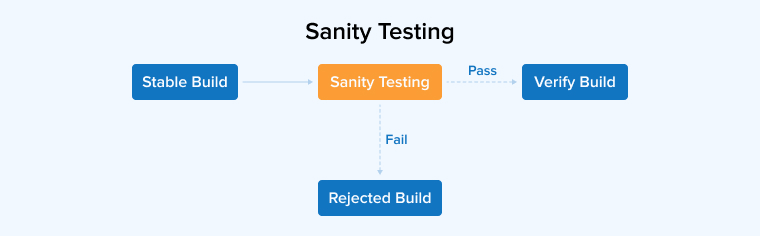
Sanity testing is a quick and focused test that verifies whether recent code changes are working as expected within the application. It is usually performed after receiving a stable build and focuses only on the modified features or affected areas, rather than the entire application. The purpose of sanity testing is to ensure that new updates, bug fixes, or small enhancements have not introduced unexpected issues elsewhere in the system.
This type of testing helps testers quickly determine whether the build is suitable for further testing. By focusing on critical changes, sanity testing saves time, reduces effort, and prevents unnecessary testing on unstable builds.
How Does Sanity Testing Work?
Sanity testing follows a focused process to quickly confirm whether recent changes are functioning as expected.
- The tester reviews the latest build, change logs, or bug reports to understand what has been modified.
- They identify the affected modules and their dependent areas to avoid missing related issues.
- A small set of targeted test cases is prepared, covering only the most critical scenarios related to the changes.
- These tests are executed manually or through automation, depending on frequency and project requirements.
- The results are carefully reviewed to identify failures or unexpected behavior.
Finally, based on the outcome, a decision is made to either proceed with detailed testing or send the build back for fixes, ensuring that time and effort are not wasted.
Sanity Testing Example
The following are the three examples demonstrating Sanity Testing:
Example 1: Forgot Password Bug Fix
- Bug: Reset email not sent
Sanity Test:
- Click Forgot Password
- Enter registered email
- Receive reset email
- Reset link works
Example 2: Pricing Calculation Issue
- Bug: Discount not applied correctly
Sanity Test:
- Add product to cart
- Apply the discount code
- Verify final price
Example 3: Profile Update Fix
- Bug: Phone number not saving
Sanity Test:
- Edit profile
- Update phone number
- Save changes
- Verify persistence
When to Use Sanity Testing?
Sanity testing is typically performed in the following scenarios:
- After Code Fixes or Enhancements: Sanity testing is performed after code updates to verify that recent fixes or improvements are functioning correctly. It ensures that the modified areas behave as expected and that existing functionalities remain stable without introducing unexpected issues.
- Before or After Build Deployment: In CI/CD workflows, sanity testing is often used during deployment stages. Before release, it verifies whether the build is reliable enough to proceed. After deployment, it confirms that the application functions correctly in staging or production environments, helping teams detect critical issues early and maintain smooth, continuous delivery.
- After Regression Testing: Regression testing checks the entire system to uncover issues caused by recent changes. Once it is complete, sanity testing can quickly verify that the core features still work correctly and that the application continues to meet its core functionality requirements.
Tools for Sanity Testing
Using automation tools for sanity testing reduces manual effort, speeds up test execution, and helps teams deliver stable software builds more quickly and efficiently.
- Selenium: Selenium is a free automation tool used for testing web applications. It supports multiple programming languages and enables sanity testing across various browsers and operating systems.
- Cypress: Cypress is a popular automation testing tool for web applications. It supports quick sanity and smoke tests, offers screen recording, and simplifies test execution with reliable, modern testing features.
- Playwright: Playwright is a web automation tool built for Node.js that enables testing applications across Chromium, Firefox, and WebKit browsers using a single consistent interface.
- TestComplete: It is a paid automation tool used for testing web, desktop, and mobile applications. It helps teams quickly verify that recent updates or fixes work correctly through reliable sanity testing.
Advantages of Sanity Testing
Some of the pros of sanity testing are as follows:
- Speedy Evaluation: Sanity testing quickly validates recent changes by checking only the affected features. It reduces testing effort, meets tight deadlines, and helps teams detect issues early without running full regression tests.
- Supports Agile and Continuous Development: Sanity testing supports fast development cycles by validating key updates after changes. Testers can freely explore affected areas, catch major issues early, and prevent unstable builds from progressing further.
- Cost Effectiveness: It offers a rapid consensus on the need for additional testing, conserving significant resources and time.
- Enhances User Experience: Software testers maintain a positive user experience by ensuring that core functionalities operate as intended throughout the entire development lifecycle. Specific testing methods, such as performing sanity checks after receiving a new software build (often following a smoke test), verify that recent modifications or resolved issues function correctly and have not introduced any unintended side effects or new defects.
- Efficiency: Sanity testing quickly verifies the key functionalities of an app, confirming the build’s stability without consuming much time, making it ideal for tight deadlines.
Disadvantages of Sanity Testing
Some of the cons of sanity testing are as follows:
- Dependence on experience: Effective sanity testing relies on the tester’s knowledge of the application and recent changes. Testers must understand critical areas to quickly identify potential issues and ensure that updates do not introduce new problems.
- Not Well-Documented: Sanity testing is usually performed quickly without formal documentation or detailed records. While it helps verify basic functionality, the lack of logs makes it harder to track tested areas or consistently repeat the process in future cycles.
- Possibility of false positives: Because sanity testing is brief and focused, some hidden defects may go unnoticed, creating a false impression that the application is functioning correctly.
- Limited Coverage: Sanity testing examines only selected features or recent changes, not the entire application. Due to this limited scope, issues in other areas may remain undetected until more comprehensive testing is conducted later.
What is Smoke Testing?
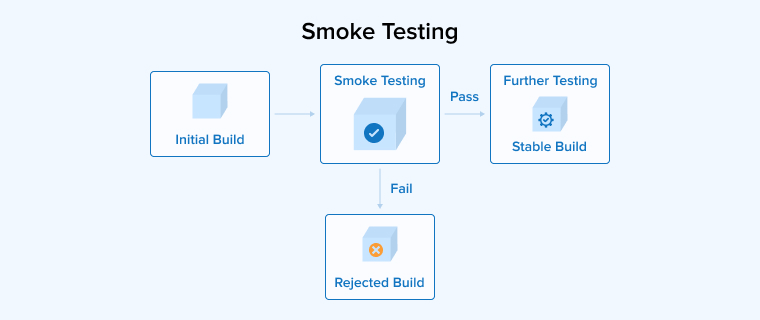
Smoke testing is a basic verification step performed on a new software build to confirm that its core features work properly. It is conducted early to check whether the application is stable enough for more in-depth testing. This testing focuses only on critical functions, such as launching the app, logging in, or completing a main task, rather than exploring every detail.
The goal is to quickly uncover serious problems that could block further testing efforts. If major issues are detected, the build is rejected and sent back for fixes. By catching failures early, smoke testing saves time, prevents wasted effort, and helps teams maintain a smooth development workflow throughout the software lifecycle.
How Does Smoke Testing Work?
Let’s discuss the step-by-step procedure to perform smoke testing:
- Begin by installing all necessary tools and configuring the software build. Ensure the test environment closely mirrors the production setup to obtain accurate results.
- Determine which functionalities are essential for the application, such as login, payment processing, or core data operations. Focus only on features that affect the overall stability of the build.
- Create concise test cases targeting the identified critical features. The goal is to validate that these primary functions work as expected without focusing on less important areas.
- Run the smoke tests manually or using automated tools. Follow a systematic order and record the results of each test to ensure consistency.
- Review the test outcomes to determine whether the core features have passed or failed. Highlight any critical defects.
- Share the results with stakeholders to determine whether the build is stable enough for full-scale testing or requires fixes before proceeding.
Smoke Testing Example
The following are the three examples demonstrating Smoke Testing:
Example 1: Web Login System
- Application launches
- Login page loads
- User logs in with valid credentials
- Dashboard is displayed
Failure indicates a build instability.
Example 2: E-commerce Platform
- Website opens
- Product listing page loads
- Add to Cart works
- Cart page opens
If Add to Cart fails, no further testing is meaningful.
Example 3: Banking Application
- User logs in
- Account summary page loads
- Logout works
- Failure suggests a critical system issue.
When to Use Smoke Testing?
Smoke testing is typically performed in the following scenarios:
- After a New Build or Major Update: Smoke testing is valuable immediately following a fresh build or a significant software update. It quickly verifies that key features such as login, navigation, and core workflows are functioning correctly. This early validation helps teams identify critical issues before investing time in more extensive testing.
- Before Starting Extensive Testing Cycles: Before running full regression or integration tests, smoke testing checks overall application stability. By validating only critical components, teams can ensure the build is stable enough for detailed testing, thereby avoiding wasted effort on unstable versions that may fail repeatedly.
- Continuous Integration and Deployment Pipelines: In CI/CD environments, smoke tests run automatically after every code commit or deployment. They verify that newly integrated changes do not break core functionality. This approach provides rapid feedback, detects major defects early, and maintains the stability and efficiency of the development pipeline.
Tools for Smoke Testing
Some popular smoke testing tools are:
- Appium: Appium is widely used for mobile application automation across Android and iOS platforms. It helps teams quickly validate core app flows on real devices and emulators during early build verification testing.
- Katalon Studio: Katalon Studio offers an all-in-one automation environment for web, API, and mobile testing. Its simple setup and reusable test components make it effective for quickly performing smoke tests on new builds.
- SoapUI: SoapUI is commonly used for testing web services and APIs. It enables teams to verify critical API responses and service availability early, ensuring backend stability before proceeding with detailed functional testing.
- Ranorex: Ranorex supports automated testing for desktop, web, and mobile applications. Its user-friendly interface and robust object recognition enable testers to quickly verify that core features function correctlyafter each build.
Advantages of Smoke Testing
Some of the pros of smoke testing are as follows:
- Time and Effort Savings: Smoke testing saves time by quickly verifying whether a new build is usable. It prevents testers from spending effort on detailed testing when the software is unstable or clearly broken.
- Increased Testing Efficiency: Smoke testing improves testing efficiency by filtering out unstable builds early, allowing teams to focus their testing efforts only on versions ready for detailed evaluation.
- Early Defect Detection: Smoke testing enables early defect detection by examining key features at the start of development. This process teams to identify and fix major issues before they impact later testing stages.
- Mitigation of Regression Risks: Smoke testing the latest build first helps reduce regression issues by quickly identifying major flaws and ensuring that new changes do not negatively affect existing features or disrupt overall system integration.
- Provides a Rapid Feedback Loop: Smoke testing is quick and straightforward, providing immediate insights into the build’s core functionality. This enables teams to address issues promptly and maintain a continuous, efficient development workflow.
Disadvantages of Smoke Testing
Some of the cons of smoke testing are as follows:
- Requires a well-defined test scope: Smoke testing is effective only when key features are clearly identified; unclear priorities may result in important functions being missed or irrelevant areas being tested.
- Not a Detailed Assessment: Since smoke testing is shallow, it cannot detect complex issues or performance problems. It only verifies basic stability, so deeper defects may emerge later during full testing.
- Reliance on Clear Prioritization: The effectiveness of smoke testing depends on accurately identifying the most critical features. Poor selection of test areas can result in missing key issues or testing irrelevant parts of the build.
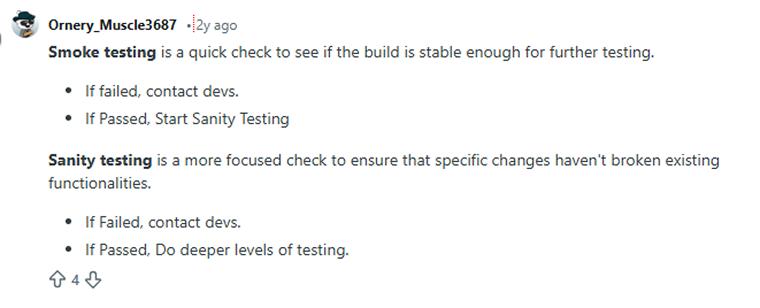
Before examining the differences, consider what a Reddit user says about sanity testing versus smoke testing.
Sanity vs Smoke Testing: Key Differences
| Parameters | Smoke Testing | Sanity Testing |
|---|---|---|
| Definition | Targeted checks are performed to confirm that recent updates or resolved issues operate as intended without causing immediate problems. | An initial check to confirm that essential features operate correctly and that the system responds as expected. |
| Purpose | Confirm that the application’s essential features continue to operate correctly without failure. | Verify that fixes are effective and ensure recent updates operate correctly as intended. |
| Scope | This method performs a basic check across the application to confirm critical functionalities work correctly. Smoke testing covers multiple key areas at a surface level to ensure the system is stable enough for in-depth testing. | Sanity testing focuses on recently updated parts of an application to confirm that changes work as expected. It checks only basic features, ensuring new updates do not disturb stable, existing features. |
| Testing Type | Subset of acceptance testing | Subset of regression testing |
| Methodology | Smoke testing can be performed either manually or using automated tools. | There is no requirement for test cases or test scripts in sanity testing. |
| Build Stability Check | Verifies that newly added functionalities and targeted corrections perform as intended under expected conditions. | Ensures that implemented improvements and resolved issues function properly and deliver the expected results. |
| Execution Timing | Usually executed at the start of development phases, often following builds or releases, these checks quickly evaluate system health and reveal critical problems that block further testing. | Performed once targeted modifications or defect resolutions are applied, these tests confirm that the changes work as expected and verify that no unexpected issues were introduced elsewhere. |
| Issue Detection | Running smoke tests verifies that corrections from earlier builds have not disrupted the application’s basic features, ensuring that essential operations continue to function reliably. | Performing sanity tests reduces wasted time and effort by focusing exclusively on selected features, confirming their stability without the need for comprehensive testing of the entire system. |
| Level of Automation | These tests are frequently automated to maintain speed and consistency by using tools that run scripts, generate reports, reduce human involvement, and significantly accelerate the testing cycle. | Testing may be performed manually or through automation, depending on the complexity of the changes and the required thoroughness. Simple updates typically require manual checks, while complex changes benefit from automated consistency verification. |
| Documentation | The test documents and test scripts are developed for future reference | As sanity testing does not require test scripts, it remains undocumented, so there is no future reference |
Best Practices for Smoke and Sanity Testing
Go through the three best practices given below to follow for both smoke and sanity testing:
1. Pitfalls to Avoid
- Do not skip either smoke testing or sanity testing if you want your developed product to function flawlessly.
- There’s no need to use automation testing every time and for every feature. When human judgment, adaptability, or creative problem-solving is required, automation can hinder the ability to respond effectively to unusual circumstances or changing requirements.
- Though sanity testing is a subset of regression testing, it is not a replacement for it. Regression testing is a much more comprehensive process designed to ensure that the entire application functions correctly after any modifications.
2. Maintaining Test Environments
- Match test configurations with production settings as closely as possible. Avoid random manual changes. Stable environments help tests deliver accurate and reliable results.
- Use production-like but anonymized data. Refresh or reset data after each run. Isolated datasets prevent tests from affecting each other and avoid false failures.
- Dedicate specific environments for smoke and sanity testing. Actively monitor for inconsistencies and fix issues quickly to maintain smooth testing cycles.
- Document the test setup to ensure reliable, repeatable test results.
3. Integrating Tests into CI/CD Pipelines
- Integrate automated smoke and sanity tests to run on every build within the CI/CD pipeline, ensuring immediate feedback on code health.
- Configure pipelines to halt further testing or deployment upon a smoke/sanity test failure, conserving resources and preventing defective releases.
- Utilize dashboard and reporting tools to monitor test results and track the overall health of builds across all environments.
- Periodically review and adjust the tests that run based on evolving project priorities and changes in the development workflow.
Final Thoughts
Smoke testing and sanity testing play an important role in building reliable and high-quality software. Although often mentioned together, they serve different purposes and are applied at different stages of the testing process. Smoke testing acts as the initial checkpoint for any new build, helping teams quickly confirm that the core features are functioning and that the application is stable enough to proceed. Sanity testing, on the other hand, is more focused and is usually performed after small changes, bug fixes, or enhancements.
Together, these testing methods help prevent wasted resources, reduce risks, and improve communication between developers and testers. They also support faster feedback and smoother release cycles. When used correctly, either manually or through automation, smoke and sanity testing strengthen the overall quality assurance process. Understanding when and how to apply each technique enables teams to deliver stable, dependable software that meets both business goals and user expectations.
FAQs
No, sanity testing and smoke testing are not the same, despite sharing some similarities. Smoke testing checks overall system stability after a build. Sanity testing verifies specific fixes or changes to confirm they work correctly.
Yes, sanity testing is a common practice in Agile development. Testing teams perform sanity tests after small updates or bug fixes. It’s perform to ensure that changes work correctly before development.
The phrase originates from hardware testing, where engineers would power on a new device to see if it literally started smoking. In software development, it has evolved to mean a quick check that identifies critical failures before more extensive QA begins.
Smoke testing verifies that core functionality works at a basic level, while sanity testing ensures that new changes or bug fixes are logical and that the system operates as expected.
Essential skills for sanity testing include a solid understanding of the application’s core functionality, the ability to quickly identify new or changed features, and a user-focused mindset to evaluate the basic usability and stability of the software.

Itesh Sharma is core member of Sales Department at TatvaSoft. He has got more than 6 years of experience in handling the task related to Customer Management and Project Management. Apart from his profession he also has keen interest in sharing the insight on different methodologies of software development.



Comments
Leave a message...