


Test cases and test scenarios are two key components of the software testing process. As a part of QA services, these are regularly used to support testing efforts and are included in various testing documents.
In this article, we will compare test cases and test scenarios. Discover how they differ, the benefits they offer, and more by reading on.
1. What is the Test Case?
A test case is a document created for software testing teams that focuses on a single, specific aspect of the program being tested. It includes test phases, test information, preconditions, and postconditions designed for a particular test scenario to verify any prerequisites. Test procedures, expected outcomes, actual outcomes, current status, and other relevant details are often documented in this file.
Test cases are detailed documents that guide testers through the QA process by specifying not only what to test, but also how to test it. Testers can gain a better understanding by comparing the expected outcomes with the actual results.
With a test case document, you can be confident that your test engineer will not miss any crucial tasks in their day-to-day testing activities. Additionally, writing test cases helps testing team managers allocate tasks effectively. Test cases are more complex and time-consuming to create and execute than test scenarios. For example, using an invalid password to log in is one possible test case.
1.1 How to Write a Test Case?
The test cases must be well-written, comprehensive, and accurate, as they serve as a roadmap for the testers. Here are a few principles to follow when creating new test cases or re-evaluating existing ones.
- Determine in advance the desired scope of the test.
- Make sure the test case can be quickly grasped and executed by testers.
- Master appropriate testing strategies and implement them effectively.
- Create a new test case ID for each test.
- When conducting tests, refer to the requirements traceability matrix for clarity.
- Each test should have an explicit description.
- Include necessary preconditions and postconditions.
- Clearly state the desired outcome.
- Make use of adequate testing procedures.
- Before moving further, get your test strategy approved by your peers.
1.2 Types of Test Cases
Here are the types of test cases:
1. Functional Test Cases
The goal of these test cases is to ensure that the software application’s user interface functions correctly and performs as expected. This type of testing is called “black box testing” because it is conducted without knowledge of the software’s code or internal structure, relying solely on the requirements.
2. UI Test Cases
User interface test cases are essential for ensuring that an app’s visual components and features function correctly. Specifically, these tests verify that elements appear as intended and that there are no spelling or grammatical errors. Testing across different platforms is an important part of user interface testing, ensuring the product works properly on all of them. The quality assurance team develops these test cases with support from the design team during the writing process.
3. Performance Test Cases
These test cases ensure that a website or app functions correctly and loads quickly. Their goal is to determine how fast the software responds immediately after a user performs an action. Performance test cases should also include load testing, spike testing, and endurance testing to verify that the software performs well even under heavy user load.
4. Integration Test Case
The purpose of integration testing is to ensure that the combined functionality is accurate after all modules have been integrated. Integration test cases are primarily used to verify that the connections between the different components work correctly.
1.3 What are the Benefits of Test Cases?
Test cases help in the software testing process in the following manner:
1. Streamlined Test Planning and Execution
A reliable test case management system helps teams handle testing tasks in a clear and organized way. Testers can group test cases by features, goals, and user scenarios. This approach keeps the process structured and prevents confusion. Teams can track progress instantly and see which tests pass or fail. They can spot defects early and fix them faster. As a result, they can improve test coverage and deliver software that works smoothly and meets quality expectations.
2. Code Quality
Test cases also give clear insight into the quality of the code. When the same feature fails again and again, the team can see patterns in defects. If a bug returns from development to testing multiple times, it shows gaps in understanding or implementation. These repeated cycles slow down progress and affect delivery timelines. By tracking such trends, teams can measure coding performance and take steps to improve development practices across the project lifecycle.
3. Faster Release Cycles
Agile and DevOps teams work in short and fast release cycles. Testing must move at the same speed to avoid delays. When teams manage tests properly, they reduce confusion and keep work flowing smoothly. Clear planning and tracking help testers run checks alongside development. This approach supports continuous testing and allows teams to respond quickly to new changes. As a result, they release updates more often and maintain product quality without slowing down progress.
4. Improved Visibility and Control
Test case management tools provide a clear view of testing progress at every stage to all the involved stakeholders. They can see which areas have enough coverage and where gaps still exist. It helps in determining delays or reported issues that slow down work. This transparency helps managers take timely action and adjust plans when needed. With accurate insights, teams can assign tasks wisely and use resources in a more practical and efficient way.
1.4 Test Case Example
Let’s create a test scenario based on the basic process of logging onto a website. However, before you start coding the test:
- Obtain a mockup of the login screen and conduct thorough testing.
- Obtain the project’s SRS and FRQ documents.
- The test case can be written once a prototype has been created and the requirements documents have been compiled.
Respond to the questions in the test case by outlining the necessary processes and conditions:
- For this analysis, which fixed or variable controls and fields are displayed to the user? How can you verify that they are performing as expected?
- Are the login button and all other dynamic links responding correctly to clicks and taps?
- Is there a reliable connection between the user interface UI and the site’s database? For example, when a user logs in with their username and password, the program must validate this information against the back-end database and either grant or deny access.
- Do all the subsystems that comprise the feature function as intended? For instance, does the system immediately send an email to the user’s registered email address containing the reset link, once the user clicks the “Forgot Password?” link?
- Does the story progress normally? Is the URL correct across all browsers, and does it allow login with the correct passwords?
- Can the same experience be achieved on a mobile browser with the appropriate credentials?
- What happens when a user exits their session? Are they redirected back to the sign-in page?
- What happens if a user makes a typo when trying to log in? Do the appropriate error messages appear when an issue occurs?
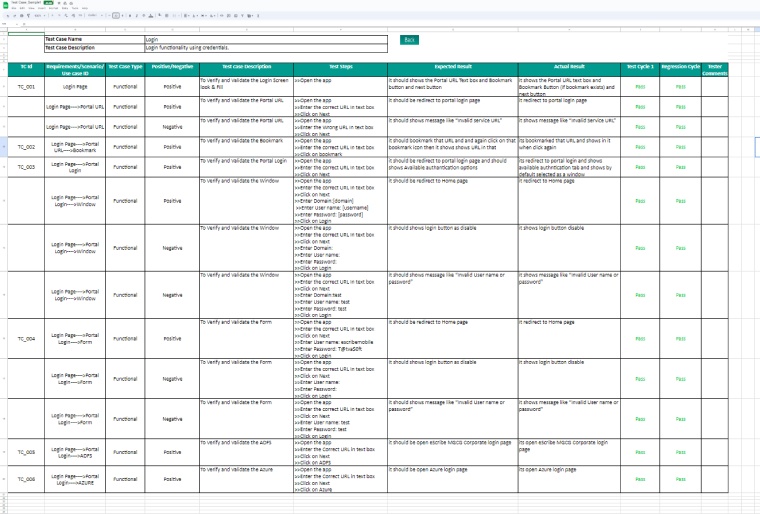
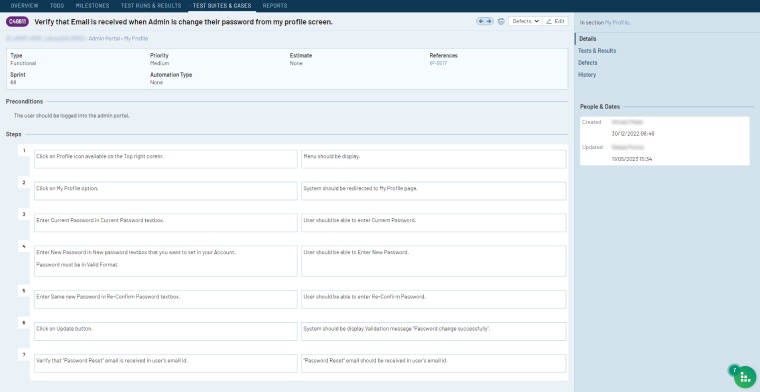
Here are the examples of executing a test case.
Using spreadsheet:
Using the TestRail (Test activities management) tool:
1.5 Best Practices For Writing Test Cases
When creating test cases, you need to carefully consider the testing process and the software requirement specification (SRS) to ensure that the software application functions correctly. Developing test cases is a best practice that helps you establish the testing process quickly and effectively.
- Prioritize simplicity: Ensure that test cases are clear and can be quickly set up and executed without requiring testers to seek additional information.
- Follow naming conventions: To keep track of test cases and ensure they meet the requirements, use a standardized naming method.
- Consider the user’s point of view: Before writing test cases, identify who will be using them. Understand their preferences, needs, and priorities, then create test steps that reflect these aspects to evaluate how well the software meets their requirements.
- Go over every step of the user’s path: Describe each action the user takes to connect with the function being tested. This will help the tester understand the entire process.
- Give detailed explanations: Provide detailed explanations of what is being attempted and how it is being tested. Additionally, clearly describe the test environment, the data involved, and the tools required.
- Set test case priorities: By sorting the test cases according to their importance, ensure that the most critical features and events are tested first.
- State assumptions and preconditions: Outline all assumptions and conditions that must be met before each test is performed. This provides context and helps ensure that the tests are valid.
- Prioritize reusability: Whenever possible, create test cases that can be reused by minimizing the number of variables and issues that prevent them from working together effectively.
- Run test cases in diverse environments: Test cases should always be executed on real browsers, devices, and operating systems. Ensure that your software applications work perfectly in a variety of real-world settings.
- Outline the anticipated outcomes: Clearly specify what you expect the test to detect and describe the state of the software after a particular feature has been activated (post-conditions).
2. What is a Test Scenario?
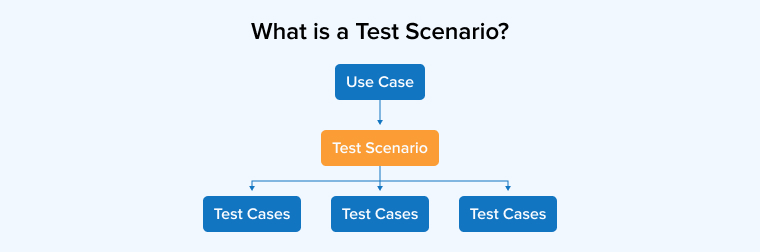
A test scenario provides a detailed explanation of how a specific application function or feature should operate. It typically includes an overview of the steps required to evaluate the function or feature, along with the expected outcomes. In other words, a test scenario outlines the procedures a tester must follow to ensure that an application functions as intended.
Companies and teams using agile techniques to create test scenarios find them helpful and time-saving. Each member of the testing team may view the document, see which tests have been completed, and proceed with the respective test scenario. Instead of spending time inputting a large amount of test data into a complicated file, testers can focus on the testing process thanks to this document. A good test scenario might read, “Verifying the software’s login capabilities.”
2.1 How to Write Test Scenarios?
Below are the actions you need to take as a tester to construct test scenarios.
- Check the software’s test artifacts, including the BRS (Business Requirement Specification), SRS (System Requirement Specification), and FRS (Functional Requirement Specification).
- Identify all technical considerations and goals for each request.
- Explore possible ways for the user to engage with the program.
- Identify potential hacking targets and all possible methods by which the system might be misused.
- After reviewing the scope specification and completing the scheduled analysis, create a list of potential test cases to validate each function of the application.
- After identifying all the test cases, create a traceability matrix to ensure that each specification corresponds to a test case.
- The project manager considers every option. After that, the other people involved in the project review them.
2.2 Benefits of Test Scenario
The following reasons will provide clarity on the necessity of scenario testing:
1. Ensures Functionality
Scenario testing is primarily done to check the application’s functioning under real-life scenarios. It checks that features work together as per the expectations. If the system fails during these checks, users will lose trust and avoid the product.
2. Improves Efficiency
Scenario testing, especially performance checks, helps teams measure how the application handles heavy usage. Developers use these results to fix slow areas and strengthen the system. A well-optimized application can manage higher traffic without breaking down.
3. Enhanced Stakeholder Communication
Test scenarios depict the testing goals of different stakeholders that they wish to fulfill in the software testing process. It keeps everyone on the same page by improving coordination and communication.
4. Risk Management
Scenario-based testing helps teams spot weak points and possible risks before release. Developers fix these issues early and prevent major breakdowns later. This proactive approach protects the product and keeps the software stable and reliable.
2.3 Test Scenario Example
Take the search feature of online shopping as an example. Ultimately, we want to determine whether consumers can find the specific items they’re looking for after performing a search.A test scenario may include numerous test cases. Several test cases can be derived from this scenario to ensure that the search function operates correctly in all aspects. You can create test cases for items such as:
- Can you easily find the search bar? Is it aesthetically pleasing and conveniently located? Are any additional pictures, buttons, or links obscured?
- Does the search bar provide appropriate results when you enter specific terms or words? Do you get the outcomes you expect?
- Can you refine your search by cost, product grade, product substance (like fabric), country of origin, style, size, return policy, and so on?
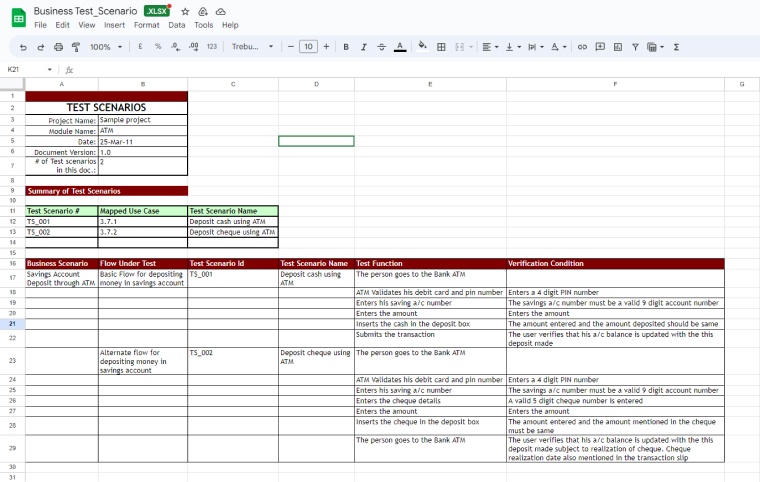
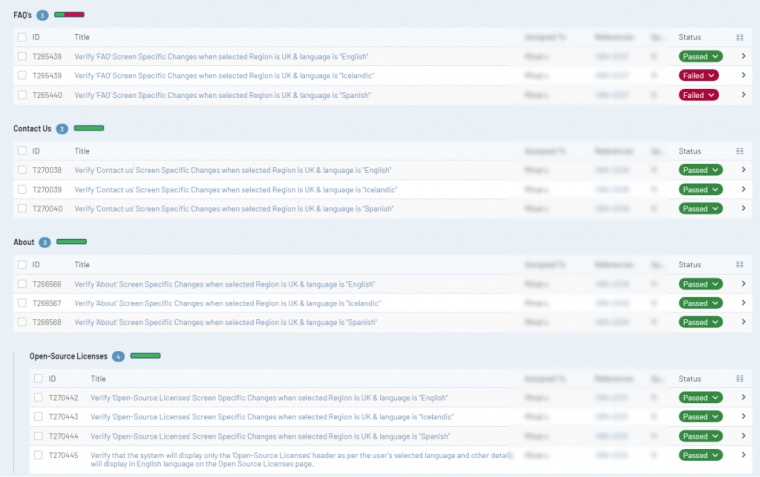
Here are the examples of executing a test scenario.
Using a spreadsheet:
Using the TestRail (Test activities management) tool:
2.4 Best Practices for Creating Test Scenarios
This section on the test scenario vs. test cases section will discuss the best ways to create test scenarios, which are similar to how you create test cases. Both aim to simplify testing, improve organization and clarity, and put the needs of customers first.
- Consider the end user’s point of view. Think about the actions the person using the software is likely to take. Every part of the test begins with this important question.
- One user requirement should correspond to one test scenario. Each test case must focus on a single user requirement to maintain simplicity and clarity.
- Set priorities for test scenarios based on customer requirements. When there are many test scenarios to execute, especially for complex software, arrange them in order of importance to the customer.
3. Key Differences Between Test Cases vs Test Scenarios
Here are the key differences between test cases and test scenarios.
| Test Case | Test Scenario |
|---|---|
| All of an app’s features can be tested using test cases, which consist of predefined actions, data, and expected results. | A test scenario is a high-level document that consists of multiple test cases that cover end-to-end functionality. |
| Complete focus on testing strategies, including both what and how to test. | More emphasis is placed on the “what” of testing than the “how.” |
| Each step, requirement, intended outcome, etc., is specified in the test case. Consequently, the procedure is very clear. | We can sum up test cases in a sentence. So, there is always room for interpretation throughout the testing phase. |
| The majority of the time, test cases originate from test scenarios. With a single testing scenario, several test cases may be generated. | From characteristics like the BRS, SRS, etc., test scenarios are formulated. |
| It facilitates thorough, exhaustive testing of software programs. | It facilitates an agile method of testing overall functioning. |
| Cases in testing are simple procedures. | Scenarios in testing are major events. |
| More resources are essential for creating and executing test cases. | There are significant time and cost savings when employing test scenarios during development and testing. |
4. Conclusion
In conclusion, thorough documentation of the testing process enables managers to keep everyone aligned and maintain quality control.
From a user’s perspective, test cases cover the full range of the software’s capabilities. The test scenarios are designed to realistically represent actual situations, with a primary focus on what should be tested at a detailed, low level of action specificity.
Many companies prefer test scenarios, but test cases provide more comprehensive documentation because they describe every step involved in testing specific software functionality. Each test case includes detailed instructions on what to do and how to perform the tests.
Both types of test documentation have their uses, help testing teams succeed, and reduce the likelihood of errors.
FAQ
No, they aren’t the same. A test scenario describes a complete feature or scenario that needs checking. It gives a broad view of what the team must validate. A test case goes deeper and explains each action clearly. It’s a step by step instruction with the expected outcomes.
Quality assurance (QA) professionals must write test scenarios to meet the testing objectives.
Yes, test cases are developed to fulfill a test scenario.




Comments
Leave a message...