


It’s important to select the right development tool when starting any new React project, as this makes a huge difference. React provides you with the flexibility to build everything from small interfaces to large web applications, but the way a project is set up can affect how smoothly the development process goes.
For years, Create React App (CRA) was a familiar choice for developing a React application and keeping it running. It offered a simple setup and handled much of the configuration behind the scenes. However, as modern web development has evolved, React development Companies have started looking for tools that provide faster development, quicker updates, and a simpler workflow.
This is where Vite comes into the picture. It is built with modern development needs in mind, i.e., a fast startup experience and efficient hot module replacement. It also works well with modern JavaScript features and requires relatively little configuration.
In this guide, we’ll compare Vite and Create React App, look at their major differences, benefits, configuration, and help you understand which build tool will be best suited for your next React app development.
What is Vite.JS?
Vite is a modern front-end build tool that makes front-end development quicker and more convenient. It was created by Evan You to solve some of the delays developers often experienced with traditional build tools. During development, Vite uses native ES modules, which allow the browser to load code efficiently and make the development server start almost instantly. Its Hot Module Replacement feature also updates only the part of an application that has changed, so you can see your work without repeatedly reloading the whole page.
When an application is ready for production, Vite uses a build process to create optimized files that can be deployed easily. It works well with technologies such as React, Vue, Svelte, Preact, JavaScript, and TypeScript. Although older projects or highly customized setups may require extra work to migrate, Vite is a practical choice for many modern web applications because it combines speed, simplicity, and flexibility.
Advantages of Vite.JS
The advantages of using Vite for app development include:
- Speed: Instead of Webpack, Vite uses the pre-configured Rollup. Hence, it provides faster build times for production apps.
- Support: Vite is a platform-independent tool that supports many frameworks, including React, Svelte, and more. It also provides out-of-the-box TypeScript support.
- Plugins: The functionality of this tool can be further extended using various kinds of plugins. Since Vite is highly compatible, it’s very challenging to connect with some robust plugins.
- Enhanced performance: Vite pre-bundles all dependencies into a single file and sends just one request, improving overall performance.
Here’s an X user response on Vite benefits.
Why use Vite instead of create-react-app? – Faster builds – Faster hot reloads – Plugin ecosystem – Uses modern tooling like esbuild – Actively supported, so better ongoing support – Prepare for React Router 7 which will support modern React features like RSC via Vite
— Cory House (@housecor) June 7, 2024
Set Up React Application Using Vite
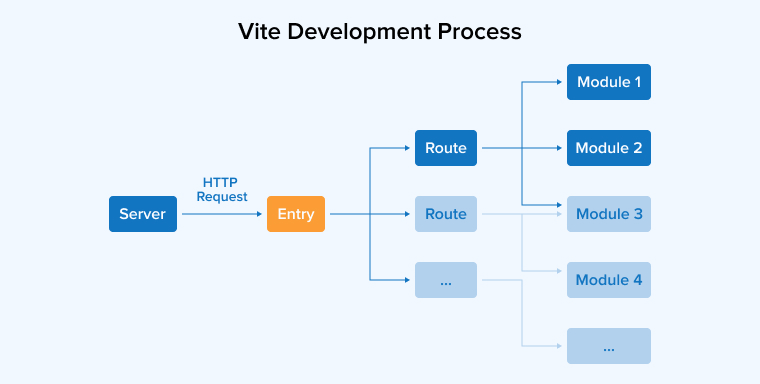
Here is a visual representation of the Vite development process:
Prerequisites
Ensure you have Node.js installed on your system. You can verify this by running node -v and npm -v in your terminal.
1. Scaffold Your Project
You can create a React application with Vite with just a few simple steps. First of all, start a new Vite project by running the command:
npm init @vitejs/app demo-react-app --template react |
2. Select Framework and Variant
If you used the interactive command, follow these prompts:
- Project name: Enter your project name.
- Select a framework: Use arrow keys to select React.
- Select a variant: Choose JavaScript, TypeScript, or a variant with SWC (Speedy Web Compiler) for even faster builds.
3. Install Dependencies
This command allows you to leverage the React template to create a new Vite project. Simply provide a name for your app instead of “Demo React app”. Once that is taken care of, head over to your Project Directory and change into the project directory with this:
cd demo-react-app |
Next, use yarn or npm to install the project dependencies as shown below:
npm install # or yarn |
4. Start the Development Server
After that, you need to start the development server by running the following code:
npm run dev # or yarn dev |
Running this command will start the server, making your React application accessible at http://localhost:3000. In case you need to make any modifications to your code, hot-reloading from Vite takes care of upgrading your application.
5. Build for Production
Now, to create the React app for production, execute the following code:
npm run build # or yarn build |
In the dist directory, you will have an optimized production build.
What is Create-React-App?
Create React App(CRA), as the name suggests, is a build tool designed to help you set up a React project. It’s a boilerplate supported by the React team and is built upon Babel and Webpack. Developers can leverage CRA to build React applications with the necessary scripts, dependencies, and configuration files.
Under normal circumstances, developers have to manage software configurations manually. However, Create React App provides a pre-configured development environment, relieving developers of this burden. This allows developers to concentrate on writing clean and maintainable code.
Advantages of CRA
The popularity of Create React App is no longer what it once was due to the arrival of modern alternatives like Vite and Next.js. However, it was a popular choice due to the following benefits:
- Quick Start: The setup offered by CRA is easy and requires minimal configuration. It allows you to build a new React application with a single command. It comes pre-configured with Babel, Webpack, and a development server.
- Built-in Testing: CRA provides effective testing capabilities using default tools such as React Testing Library and Jest. They help you write and run tests for your components.
- Large community: The tool is supported by a large community that has contributed to its ecosystem with a wide array of resources, ensuring strong support.
- Environment Variables: CRA enables you to define environment-specific variables without any additional setup, simplifying their management within your project.
Set up React Application Using CRA
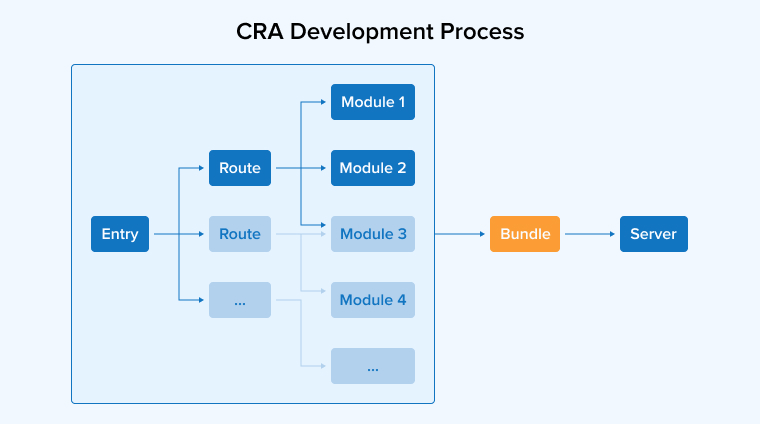
If it’s your first time using CRA for app development, Webpack will create a tree of dependencies from all the project modules using the application’s index.js file as the entry point.
Next, it uses Babel to transpile the code. After that, the code is bundled and served through the Express web server. Finally, it sets up the sockets to manage Hot Module Replacement.
CRA takes a quick approach to give you ample time to work on the code. However, there is a downside to this, and whenever a change is implemented in the code, webpack repeats the building process.
When your code grows over time, the system becomes slow. This also increases the development time of your Create React App project. The graphical representation of the CRA development process is shown in the image below:
Comparison Table
The table below gives a complete overview of the major differences between Vite and Create React App:
| Feature | Create React App | Vite |
|---|---|---|
| Build approach | Builds the complete application before serving | Builds the application on demand |
| Hot Module Replacement | Slower updates as the application increases in size | It provides instant updates regardless of the size of the application |
| Configuration Flexibility | It provides limited flexibility to customize due to pre-configured setup | It provides a lot of scope to configure and customize |
| Development Server | Uses webpack-dev-server for serving the application | It uses the lightweight development server that starts instantly by serving native ES Modules (ESM) |
| Plugin System | Limited plugin system compared to Vite | Supports a flexible and plugin-first architecture based on Rollup |
| Bundling Technology | It uses Webpack for production bundling | Vite uses esbuild and Rollup to deliver optimized production builds |
| Optimization | Webpack configuration handles the optimization process | It uses built-in optimizations and modern bundling |
| Tree Shaking | It supports tree shaking via its internal Webpack and Terser configurations, but it’s not as efficient as Vite | It uses Rollup’s advanced, static-analysis-driven tree shaking engine to reduce the size of the bundle |
| Ecosystem adoption | It has a large and established community in the React ecosystem | Vite is gaining popularity owing to its performance benefits and modern approach |
Key Differences between Vite vs Create-React-App
Let us now delve deeper into the key differentiating factors between Create React App vs Vite:
1. Configurability
- Create React App: CRA is preferred because it requires minimal configuration and allows you to build the app by executing a single command. However, as the codebase grows, the flexibility of an app created with CRA decreases. You have to add new capabilities to CRA to fulfill the requirements of large React projects. The increased configuration would then overwhelm the developers.
- Vite: Meanwhile, Vite makes up for the missing capabilities by supporting a wide range of plugins developed by rollup.js. Rollup has a large ecosystem of plugins that are highly beneficial in meeting all your development-related requirements. Configurations in Vite are simpler and much easier compared to CRA. It doesn’t even need configurations to get started; it comes with various pre-configured components by default.
2. Community and Support
- Create React App: It has lost much of its active community support. Its development has slowed considerably; thus, multiple issues and pull requests are not getting the required attention. Since its dependencies are no longer updated as actively as newer tools, you may also encounter outdated packages and security concerns. If you’re starting a new React project, this limited maintenance can make it difficult for you to find current guidance and reliable solutions.
- Vite: Vite has a strong and active community that continues to grow across modern front-end development. It gets support from a broader base of developers as it is used with React, Vue, Svelte, and other frameworks. It’s easy for you to find required support through regular updates, current documentation, and compatibility with tools such as TypeScript and Vitest. As a result, you get a more current and dependable ecosystem for building applications using the Vite tool.
3. Production Build and Optimization
- Create React App: It uses Webpack as its main production bundler. Webpack is highly capable and offers many configuration options, but its broader processing approach can make builds more demanding. This becomes a major problem, especially when an application grows. It processes project modules through a JavaScript-based pipeline and adds the necessary bundle structure for the final output. This can increase build overhead and may require additional optimization work.
- Vite: Vite takes a more streamlined approach when it comes to creating production files. It uses fast tooling during processing and relies on Rollup to generate the final bundle. Rollup is designed to create efficient output by organizing modules and removing unnecessary code during the build. This can result in cleaner, optimized assets that load efficiently in browsers. For applications where bundle size and loading speed matter, Vite provides a modern production workflow with less build complexity.
4. Performance
- Create React App: CRA can become slower as a project grows in size because Webpack processes a large part of the application during development. The increase in the number of components and dependencies can increase the time to start the development server, and code changes can trigger broader rebuilds. This approach also increases the amount of work needed before you can see your updates. As applications become more complex, these delays can interrupt the development flow and make frequent testing less convenient.
- Vite: Vite is designed to keep development responsive, even when an application contains many files. It does not prepare the whole project before serving it but delivers modules when the browser requests them. Its use of native ES modules and fast dependency processing helps the server start quickly. When you edit a file, HMR updates the affected module without rebuilding everything. This makes everyday development faster, smoother, and more efficient for larger projects.
5. Ecosystem and Plugins
- Create React App: CRA keeps much of the build setup hidden, which makes getting started easier but limits deeper customization. If you need to change Webpack behavior, you may have to rely on extra configuration tools or eject from the standard setup. After ejecting, the project becomes harder to manage and maintain. Although Webpack itself has a large ecosystem, many newer tools and integrations are not designed specifically around Create React App.
- Vite: Vite offers a more open approach through its flexible plugin system. You can add features or adjust the build process without exposing and maintaining a large internal configuration. Its compatibility with Rollup also provides access to a broad range of existing plugins. Vite has gained strong support across modern front-end tools and frameworks, which makes it easier to connect testing, styling, documentation, and other development workflows within the same project.
6. TypeScript and Modern React Tooling
- Create React App: CRA provides support for TypeScript, JSX, and TSX, so you can easily build typed React applications without starting from scratch. However, larger projects may experience slower development and checking cycles as the codebase scales in size. It can increase the maintenance overhead if you want to make deeper TypeScript or build configuration changes, as it can require overrides or ejecting. This makes CRA functional for TypeScript projects, but less convenient if you need a highly customized and modern development setup.
- Vite: Vite offers a smooth workflow for TypeScript and modern React development. It quickly transforms TypeScript and TSX files during development. Type checking is handled separately, so the development server can focus on speed rather than waiting for every type check to finish. React Refresh also provides quick updates, which enhances your development experience. These features make Vite a simple and efficient choice for current React and TypeScript projects.
7. Code Splitting and Tree Shaking
- Create React App: CRA relies on Webpack to divide application code into smaller chunks and remove unused parts during production builds. Its built-in optimization features can handle common cases, but you will have less control without changing the underlying configuration. As projects become larger, managing chunk behavior can become more complicated. Webpack may also keep some unnecessary code when it cannot safely determine whether certain modules are unused. As a result, the size of the final bundle will increase.
- Vite: Vite takes a more streamlined approach to handling the application code. During development, native ES modules allow the browser to request only the files required for the current page. For production, Vite uses Rollup to create separate chunks and remove unnecessary code. This can produce smaller, cleaner bundles and improve loading efficiency. You can also use dynamic imports to split features into separate files to let your browsers download larger sections only when they are actually needed.
Conclusion
This article on Vite vs Create-React-App gives an overview of both build tools, their benefits, use cases, differences, and how they work in development. It is important to note that both tools are valuable for React app development.
Create React App is a good option if you are looking to build an app with a traditional structure and quick startup time. But if you are required to speed up your build process, Vite is the right option.
However, the decision to pick a suitable build tool boils down to your project requirements, preferences, and the developer’s experience.
FAQs
There are many notable differences between CRA and Vite, such as:
CRA uses Webpack as its build tool, whereas Vite comes with native ES modules.
CRA only supports React, whereas Vite supports multiple frameworks and libraries.
Code splitting in CRA is done automatically, but developers using Vite have to do it manually.
Some of the disadvantages of using Vite for React app development include limited browser compatibility and a small community. Because Vite uses modern JS-based features, not all browsers can support them. And because it’s relatively new, its community is still growing.
CRA was once a go-to option for React app development. However, due to its performance issues, the use of heavy and bulky methods, outdated dependencies, the advent of robust front-end tools, and many more reasons, it is not a preferred option for developers anymore.
One of the main reasons people prefer Vite is its faster build times. On top of that, it also offers seamless integration and improved debugging. Vite is straightforward to use even if you are working on large React projects.

Itesh Sharma is core member of Sales Department at TatvaSoft. He has got more than 6 years of experience in handling the task related to Customer Management and Project Management. Apart from his profession he also has keen interest in sharing the insight on different methodologies of software development.



Comments
Leave a message...