

Java has remained one of the most widely used programming languages for enterprise software development for nearly three decades. However, working with groups of data in Java was quite painful for developers as they had to rely on plain arrays, the Vector class, Hashtable, and Stack. Each of which had its own methods and shared no common language with the others. There was no standard interface that allowed developers to pass collections cleanly between methods or enforce unique elements without writing custom logic. Different teams created their own utility methods for basic tasks that should have been in the core platform, making code reuse difficult and slowing down everyday Java programming.
The Java collections framework was introduced to solve exactly these problems faced by Java development companies by providing a unified architecture for grouping Java objects and manipulating collections consistently and reusably. It brought together a clean set of core interfaces, a wide range of ready-to-use concrete implementations. And a powerful collections class packed with utility methods for sorting, searching, and shuffling.
This blog explains collections in Java, the Java collections framework with its core components, why developers use it, and best practices to use it effectively.
What is a Collection in Java?
A Collection in Java is a single object that holds a group of other Java objects. Allows developers to store, retrieve, and process them as one unit. It works as a container for elements, much like a list of customers. A set of unique product IDs, or a queue of pending requests in a real application.
Unlike arrays, which have a fixed size and store only one type of data, a collection grows or shrinks as needed. It offers standard methods for adding, removing, and iterating over elements. It forms the foundation of the entire Java Collections Framework. Since every list, set, queue, or map in Java is ultimately a type of collection.
What is the Java Collections Framework?
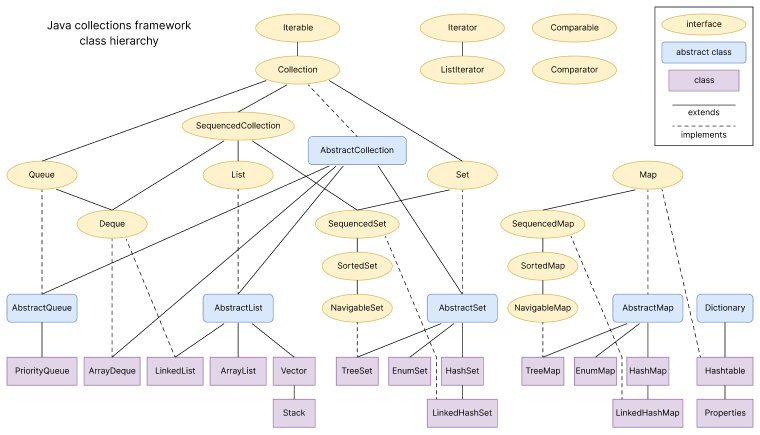
The Java Collections Framework is a built-in library in the java.util package. It provides a unified architecture for storing, managing, and manipulating collections of objects in Java. It brings together core interfaces such as Collection, List, Set, Map, and Queue. Along with concrete classes like ArrayList, LinkedList, HashSet, and HashMap. It also includes a collections class that offers ready-made static methods for sorting, searching, and other common operations.
This new framework was a major improvement in Java. It provides developers a standard way to work with different data structures without rewriting low-level code again and again. It supports generics, allows immutable collections through static factory methods, and forms the backbone of almost every modern Java application.
Why Use Java Collections Framework?
The Java Collections Framework provides the following benefits to developers in working with Java development projects:
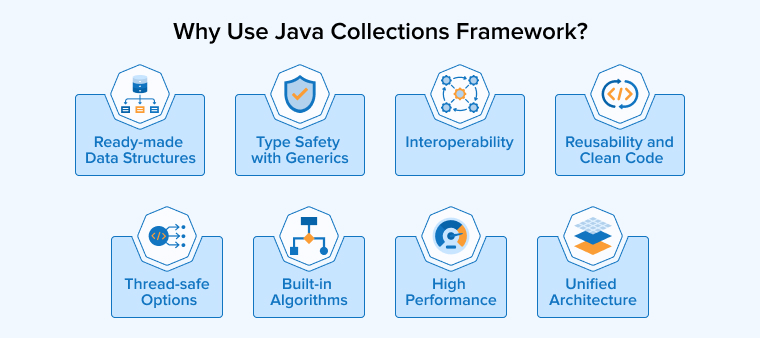
- Unified architecture: It offers a single, standard interface across all collection types. So the same methods work for a list, set, or map without learning different APIs.
- Ready-made data structures: It provides concrete implementations such as ArrayList, LinkedList, HashSet, and HashMap, which removes the need to build common data structures from scratch.
- High performance: Each implementation optimizes specific use cases, helping developers store and retrieve elements efficiently, even at large scale.
- Reusability and clean code: Standard methods and utility methods inside the Collections class let teams write less code, reuse logic across projects, and keep applications easier to maintain.
- Type safety with generics: Support for generic collections catches type errors at compile time, which reduces runtime bugs and increases the code’s reliability.
- Built-in algorithms: The Collections class includes utility methods for sorting, searching, shuffling, and finding minimum or maximum values, so developers do not have to write these manually.
- Thread-safe options: It offers thread-safe variants and synchronized wrappers for use in multi-threaded environments without writing custom locking logic.
- Interoperability: Any method that accepts the basic Collection interface can work with any collection type, which makes it easy to pass collections between different layers of an application.
What Are the Core Components of the Java Collections Framework?
The Java Collections Framework is built on three core building blocks that work together to handle every common data-handling need in Java applications. They are:
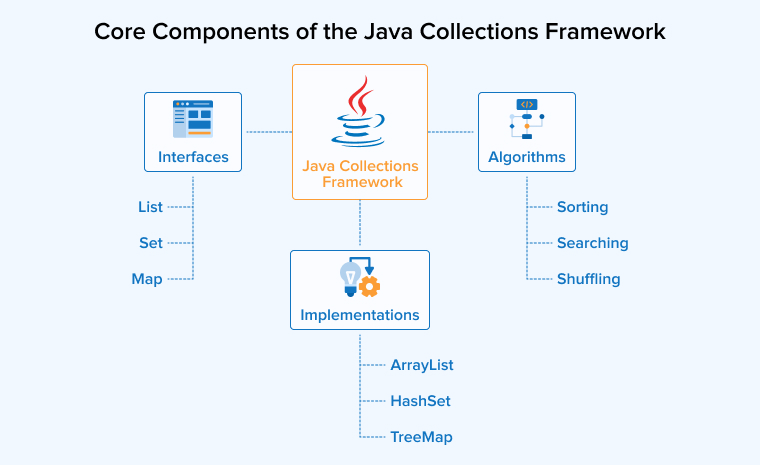
Core Interfaces
The core collection interfaces form the foundation of the Collections framework. They define rules that all collections in Java must follow, allowing developers to change one collection type to another without changing the rest of the code.
- Collection: It is the root interface of the Java Collections Framework and defines the most basic interface and standard methods that every list, set, and queue must support.
- List: It is an ordered collection that maintains the insertion order of elements, supports index-based access, and allows duplicate elements.
- Set: It is an unordered collection that stores only unique elements and does not allow duplicate elements, making it ideal for enforcing uniqueness.
- Map: It stores data as key-value pairs, where each key is unique and maps to exactly one value, which makes it ideal for fast lookups and caching.
Concrete Implementations (Classes)
The concrete implementations are the actual classes inside the java.util package that brings the core interfaces to life. Each class serves a specific use case, so choosing the right one directly improves how efficiently an application stores and retrieves elements.
1. ArrayList
ArrayList is a resizable, dynamic array implementation of the List interface that stores elements in insertion order and allows fast index-based access. It works best when reads are frequent, and most additions happen at the end of the list, since inserting or removing elements from the middle requires shifting other elements.
import java.util.ArrayList; import java.util.List; public class ArrayListExample { public static void main(String[] args) { List<String> users = new ArrayList<>(); users.add("Michael"); users.add("Kibo"); users.add("Emily"); System.out.println("Users: " + users); System.out.println("Second user: " + users.get(1)); } } |
Output:
Users: [Michael, Kibo, Emily] Second user: Kibo |
2. LinkedList
The LinkedList class is a doubly linked list implementation that supports both the List interface and the Deque interface. As a result, it can be used as a list, a queue, or a double-ended queue. It performs faster than ArrayList for frequent insertions and deletions in the middle of the list, but slower for random index-based access.
import java.util.LinkedList; public class LinkedListExample { public static void main(String[] args) { LinkedList<String> workflow = new LinkedList<>(); workflow.add("Analysis"); workflow.add("Implementation"); workflow.addFirst("Initiation"); workflow.addLast("Review"); System.out.println("Workflow Stages: " + workflow); } } |
Output:
Tasks: [Initiation, Analysis, Implementation, Review] |
3. HashSet
The HashSet class is the most commonly used implementation of the Set interface and stores unique elements using an internal hash table for fast lookups. It does not maintain any insertion order and allows one null element, making it the right choice when uniqueness matters, but order does not.
import java.util.HashSet; import java.util.Set; public class HashSetExample { public static void main(String[] args) { Set<String> emails = new HashSet<>(); emails.add("kibo@example.com"); emails.add("michael@example.com"); emails.add("kibo@example.com"); System.out.println("Unique emails: " + emails); System.out.println("Total: " + emails.size()); } } |
Unique emails: [michael@example.com, kibo@example.com] Total: 2 |
4. TreeSet
TreeSet is a Set implementation backed by a self-balancing tree that stores unique elements in their natural ordering or in the order defined by a custom comparator. It is ideal when developers need a sorted set, range queries, or fast access to the first and last elements.
import java.util.TreeSet; public class TreeSetExample { public static void main(String[] args) { TreeSet<Integer> scores = new TreeSet<>(); scores.add(95); scores.add(50); scores.add(98); scores.add(72); System.out.println("Sorted scores: " + scores); System.out.println("Lowest: " + scores.first()); System.out.println("Highest: " + scores.last()); } } |
Sorted scores: [50, 72, 95, 98] Lowest: 50 Highest: 98 |
5. HashMap
HashMap is the most widely used implementation of the Map interface and stores data as key-value pairs in a hash table for constant-time lookups in most cases. It does not guarantee any order of keys and allows one null key and multiple null values, which makes it suitable for caches, lookup tables, and configuration data.
import java.util.HashMap; import java.util.Map; public class HashMapExample { public static void main(String[] args) { Map<String, Integer> productStock = new HashMap<>(); productStock.put("Apple", 25); productStock.put("Banana", 120); productStock.put("Orange", 80); System.out.println("Stock: " + productStock); System.out.println("Apple available: " + productStock.get("Apple")); } } |
Output:
Stock: {Banana=120, Apple=25, Orange=80} Apple available: 25 |
6. TreeMap
TreeMap is a Map implementation that stores key-value pairs in the natural ordering of its keys or based on a custom comparator. It is best suited for scenarios where keys must remain sorted, such as building leaderboards, time-based logs, or range-based queries.
import java.util.Map; import java.util.TreeMap; public class TreeMapExample { public static void main(String[] args) { Map<String, Integer> leaderboard = new TreeMap<>(); leaderboard.put("Kevin", 78); leaderboard.put("Shira", 95); leaderboard.put("Stephanie", 88); System.out.println("Leaderboard: " + leaderboard); } } |
Output:
Leaderboard: {Shira=95, Stephanie=88, Kevin=78} |
Algorithms
The Java Collections Framework includes a built-in algorithms layer through the collections class, which provides static methods to perform common operations on any collection following the standard interface.
1. Sorting
The sort method in the Collections class arranges the elements in a list in their natural order or based on a custom comparator. It uses a stable, efficient merge sort under the hood, which makes it reliable for sorting any list of comparable objects, including string objects and numbers.
import java.util.ArrayList; import java.util.Collections; import java.util.List; public class SortExample { public static void main(String[] args) { List<Integer> numbers = new ArrayList<>(); numbers.add(48); numbers.add(11); numbers.add(70); numbers.add(33); Collections.sort(numbers); System.out.println("Sorted: " + numbers); } } |
Sorted: [11, 33, 48, 70] |
2. Searching
The binarySearch method searches for a specified element inside a sorted list and returns its index if found. The list must be sorted in natural order before calling this method. If it isn’t, the result may not be reliable.
import java.util.ArrayList; import java.util.Collections; import java.util.List; public class SearchExample { public static void main(String[] args) { List<Integer> numbers = new ArrayList<>(); numbers.add(48); numbers.add(11); numbers.add(45); numbers.add(78); int index = Collections.binarySearch(numbers, 48); System.out.println("Index of 48: " + index); } } |
Index of 48: 2 |
3. Shuffling
The shuffle method randomly reorders the elements of a list, which is useful for randomizing quiz questions, shuffling a deck of cards, or generating randomized test data. It works in-place and changes the original list directly.
import java.util.ArrayList; import java.util.Collections; import java.util.List; public class ShuffleExample { public static void main(String[] args) { List<String> tiles = new ArrayList<>(); tiles.add("Red-1"); tiles.add("Blue-2"); tiles.add("Green-3"); tiles.add("Yellow-4"); Collections.shuffle(tiles); System.out.println("Shuffled tiles: " + tiles); } } |
Output (varies each run):
Shuffled tiles: [Green-3, Red-1, Yellow-4, Blue-2] |
4. Min and Max Value
The min and max methods return the smallest and largest elements from a collection based on their natural ordering or a custom comparator. They work on any collection that implements the Collection interface, which makes it easy to find boundary values without writing manual loops.
import java.util.ArrayList; import java.util.Collections; import java.util.List; public class MinMaxExample { public static void main(String[] args) { List<Integer> marks = new ArrayList<>(); marks.add(22); marks.add(65); marks.add(94); marks.add(13); System.out.println("Minimum: " + Collections.min(marks)); System.out.println("Maximum: " + Collections.max(marks)); } } |
Minimum: 13 Maximum: 94 |
Best Practices for Using the Java Collections Framework
Following a few well-tested practices while using the Java Collections Framework helps developers write cleaner, faster, and safer code in production applications. They are:
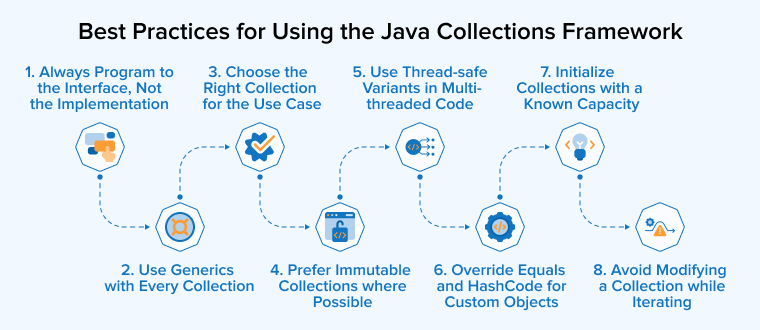
1. Always Program to the Interface, Not the Implementation
Declare variables using the core interface type, such as List, Set, or Map, rather than the concrete class. This makes it easy to switch implementations later without changing the rest of the code.
List<String> users = new ArrayList<>(); |
Here, the variable type is List, so swapping ArrayList with LinkedList in the future does not break any other code.
2. Use Generics with Every Collection
Always use a generic collection to specify the types of elements it can hold. This catches type errors at compile time and removes the need for unsafe casting.
List<Integer> scores = new ArrayList<>(); scores.add(90); |
Without generics, the same list could accept any object, which often leads to runtime errors.
3. Choose the Right Collection for the Use Case
Pick the collection type that matches the actual data access pattern, since the wrong choice directly affects performance. Use ArrayList for fast reads, LinkedList for frequent insertions, HashSet for unique elements, and HashMap for key-value pairs.
4. Prefer Immutable Collections where Possible
Use static factory methods like List.of, Set.of, and Map.of to create immutable collections when the data is not meant to change. This makes the code safer in multi-threaded environments and easier to reason about.
List<String> roles = List.of("Admin", "Editor", "Viewer"); |
Any attempt to modify this list will throw an exception, which prevents accidental changes.
5. Use Thread-Safe Variants in Multi-Threaded Code
Avoid using plain HashMap or ArrayList in concurrent applications. When multiple threads share data, use thread-safe variants such as ConcurrentHashMap and CopyOnWriteArrayList, or wrap a collection inside a synchronized block.
6. Override Equals and Hashcode for Custom Objects
When custom objects are stored in a HashSet or used as keys in a HashMap, override the equals and hashCode methods. Without this, the collection cannot correctly detect duplicates or look up entries, since it relies on the object’s hash code.
7. Initialize Collections with a Known Capacity
When the approximate size of a collection is known in advance, set the initial capacity while creating it. This avoids repeated internal resizing and improves performance for large collections.
List<String> records = new ArrayList<>(10000); |
This is especially useful when loading large datasets, since the underlying dynamic array does not need to keep growing.
8. Avoid Modifying a Collection while Iterating
Do not add or remove elements directly from a collection inside a standard for-each loop, as it can throw a ConcurrentModificationException. Use an Iterator and its remove method, or use methods like removeIf to modify the collection safely during iteration.
Final Thoughts
The Java Collections Framework continues to be one of the most important parts of the Java platform for handling data in the right way. Understanding when to use a List, a Set, a Map, or a Queue, and pairing that choice with the correct concrete class, directly improves the speed, memory use, and clarity of any Java application.
The real value of the framework shows up in everyday work, where the right collection turns complex logic into a few clean lines of code, and the wrong one quietly becomes a performance issue months later. Developers who invest time in exploring the intricacies of the Collections framework will be able to write Java code that is easier to scale, maintain, and far less prone to bugs.
FAQs
A List is an ordered collection that allows duplicate elements, a Set stores only unique elements without any order, and a Map stores data as key-value pairs with unique keys.
ArrayList is faster than LinkedList for most use cases, especially for reads and index-based access, because it uses a dynamic array internally. LinkedList only wins when there are frequent insertions or deletions in the middle of the list.
HashMap is a non-synchronized, faster implementation of the Map interface that allows one null key and multiple null values. Hashtable is a legacy, fully synchronized class that does not allow any null keys or values and is rarely used in modern Java code.
Developers should use generics with Java collections to enforce type safety at compile time and avoid ClassCastException at runtime. A generic collection also removes the need for manual casting and makes the code easier to read.
Developers should use a Set instead of a List when the data must contain unique elements only, and duplicates are not allowed. A List is the right choice only when order matters or duplicate values are required.

Rakshit Toke is a Java technology innovator and has been managing various Java teams for several years to deliver high-quality software products at TatvaSoft. His profound intelligence and comprehensive technological expertise empower the company to provide innovative solutions and stand out in the marketplace.



Comments
Leave a message...