


Java has been around for decades, and today it powers critical banking systems, healthcare platforms, e-commerce engines, and government infrastructure, making it one of the most attractive targets for attackers. Many development teams discover security flaws only after deployment. This happens when a security problem occurs in the live system and requires an urgent fix. The cost of fixing vulnerabilities at this stage is much higher than catching them during development.
Recent data from Datadog’s State of DevSecOps 2026 report shows that Java leads all programming ecosystems for exploitable vulnerabilities, with 59% of Java applications carrying at least one known-exploited flaw. The report also found that 87% of organizations run software with at least one exploitable vulnerability somewhere in their stack. These numbers are highly concerning, given the widespread use of Java applications. Java Development Companies need to implement strategies that always prioritize security from the early stages of development and balance it with the project deadline.
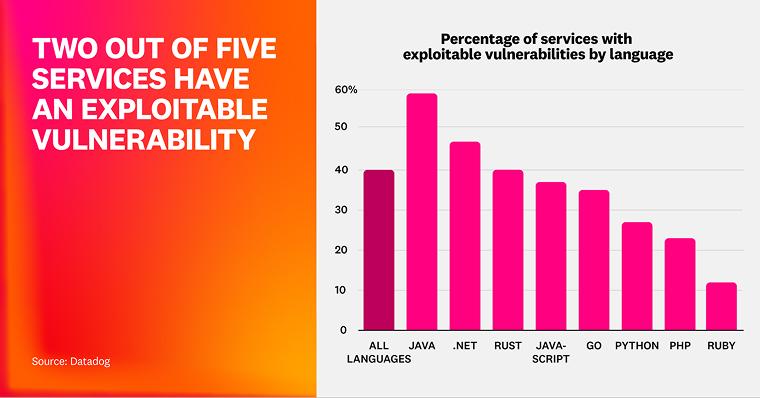
Following Java security best practices is the most reliable way to reduce your attack surface without slowing delivery. This blog covers the most common Java security vulnerabilities and the proven.
What Are the Common Java Security Vulnerabilities?
It’s very important to first understand what security flaws can damage your system before understanding the protection strategy. Attackers generally take advantage of a small set of recurring weaknesses in your Java application. This is crucial to recognize to write secure code from the start.
The following five vulnerabilities are the majority of real-world breaches in Java environments:
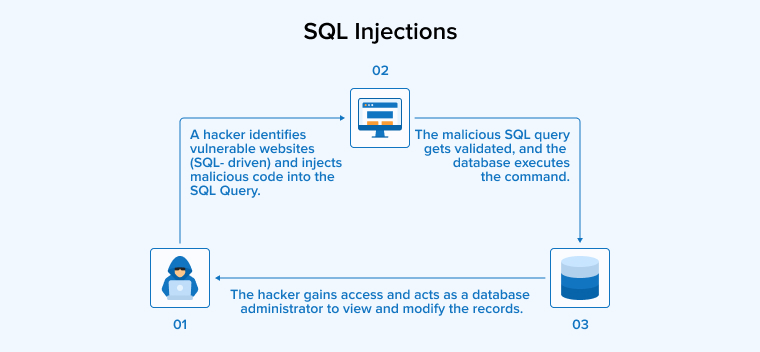
SQL Injections
SQL injection occurs when an attacker inserts malicious data into a query string that the application sends directly to the database. If developers concatenate user input into SQL statements without sanitisation. Attackers can read sensitive data, modify records, or take control of the database server. This remains one of the highest-ranked security risks in the OWASP Top 10. It continues to affect Java applications that bypass parameterized queries.
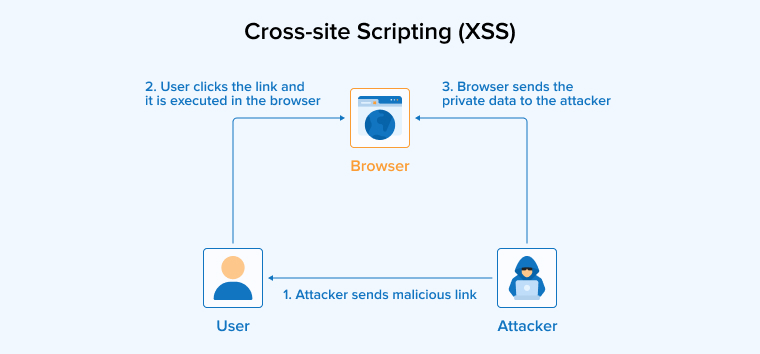
Cross-site Scripting (XSS)
Cross-site scripting allows an attacker to inject malicious scripts into a web page that other users will load in their browsers. Once the script runs in the victim’s browser, it can hijack sessions, steal cookies, redirect users to phishing pages, or modify the page content the user sees. XSS attacks are common in Java applications that render user input directly into HTML without encoding.
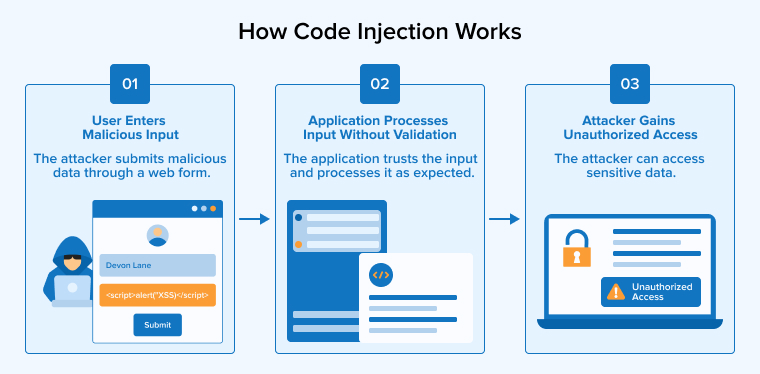
Code Injection
Code injection occurs when applications or operating systems interpret and execute untrusted data as code. In Java, this typically happens through unsafe use of Runtime.exec, ScriptEngine, or reflection APIs that accept user input. An attacker who controls the input can run arbitrary commands on the server. This can quickly result in a full system compromise.
LDAP Injection
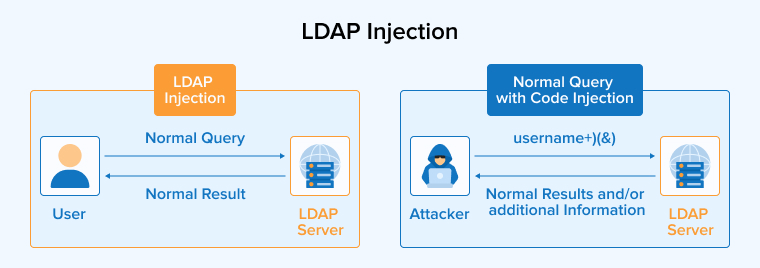
LDAP injection targets directory services used for authentication and access control. When an application builds LDAP queries by concatenating user input, an attacker can manipulate the query to bypass login checks, retrieve unauthorized records, or modify directory entries. This is a common security issue in enterprise Java software that uses Active Directory or OpenLDAP for single sign-on.
Insecure Direct Object References (IDOR)
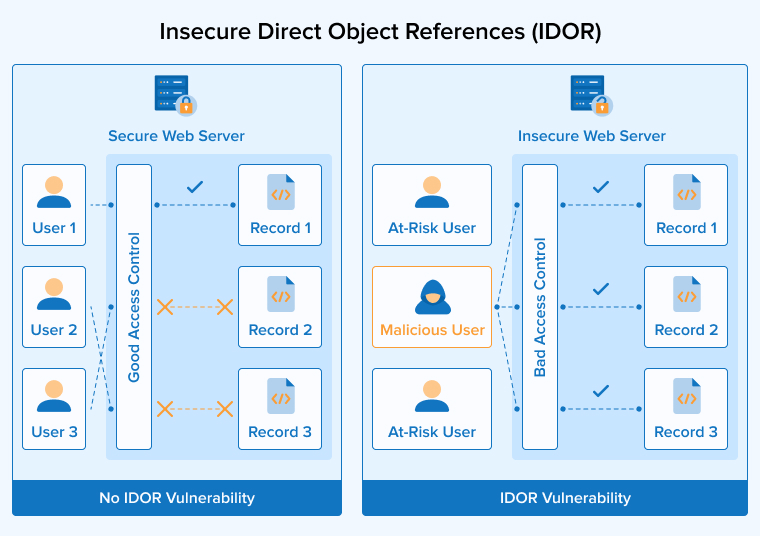
IDOR vulnerabilities expose objects, files, or records directly through identifiers in URLs or API requests without proper authorization checks. If your endpoint accepts a user ID, document ID, or account number from a request and returns the matching record without verifying the user’s authorization, attackers can simply increment the value to access other users’ data. This is one of the most underestimated security vulnerabilities in modern Java applications, particularly in REST APIs.
Top Java Security Best Practices
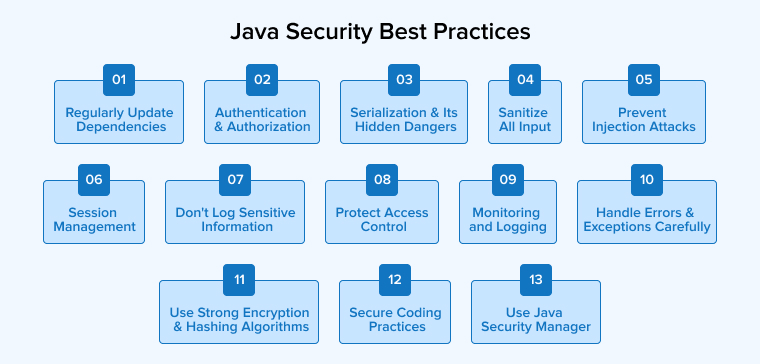
Protect your Java application from the above-mentioned and other security threats by implementing the following top 13 Java security best practices. These are popular best practices used by enterprise teams to manage millions of lines of code and keep the development process structured.
1. Regularly Update Dependencies
Outdated third-party libraries are the single largest source of security vulnerabilities in Java applications, and the data confirms it. According to Datadog’s research, indirect libraries account for 63% of high and critical vulnerabilities in Java applications. Other libraries your application uses automatically include these libraries.
The Log4Shell incident in 2021 gave a complete picture of how dangerous this can be. A single flaw in the Log4j library affected hundreds of thousands of Java applications worldwide.
Avoid such incidents using the following guidelines:
- Use Maven or Gradle with a software composition analysis tool. Such as OWASP Dependency-Check, Snyk, or Sonatype Nexus IQ to scan your dependency tree on every build.
- Configure CI/CD pipelines to fail builds when known vulnerabilities are detected above your acceptable severity threshold.
- Track end-of-life schedules for the Oracle JDK and any major frameworks you use, since unsupported versions stop receiving security patches.
2. Authentication and Authorization
Authentication verifies a user’s identity, while authorization determines what that user can access or do. Developers must implement both layers carefully to prevent unauthorized access to sensitive information. Weak password storage, missing session expiration, and overly permissive roles are recurring problems in Java applications.
Implement the following best practices to ensure robust authentication and authorization:
- Use Spring Security or a comparable framework rather than building authentication from scratch.
- Enforce strong password policies, hash passwords with bcrypt, scrypt, or Argon2 instead of fast hashes like MD5 or SHA-1, and enable multi-factor authentication for any high-privilege accounts.
- Apply the least privilege principle when assigning roles. Review permission grants regularly to remove access that is no longer required.
3. Serialization and Its Hidden Dangers
Java serialization converts Java objects into byte streams for storage or network transmission. Deserialization rebuilds the original object by converting those bytes back on the receiving end. The danger is that deserialising untrusted data can trigger arbitrary code execution if the byte stream contains a malicious gadget chain. This is how attackers exploited several high-profile Java applications. Including the Apache Commons Collections vulnerability that affected WebLogic, JBoss, and Jenkins.
Keep the following serialization best practices in mind:
- Avoid Java serialization for any data that comes from outside trusted systems or users.
- Use safer formats like JSON or Protocol Buffers with a strict schema. Since these formats do not execute code during parsing.
- If you have to use serialization, allow only accepted classes through the ObjectInputFilter introduced in Java 9. Treat any deserialization endpoint as a high-risk surface that requires extra monitoring.
4. Sanitize All Input
Treat every byte of user input as potentially unsafe. Whether it comes from a web form, an API request, an XML file, or an uploaded file. Input validation is the first defence against most injection attacks. Weak validation allows malicious data to slip into your database, logs, or business logic. The principle is simple, even if the implementation requires care.
Sanitize the inputs using the best practices below:
- Validate input on the server side using strict rules that only allow expected data wherever possible. Clearly define what characters, length, and format are acceptable for each field.
- Use Bean Validation annotations such as @NotNull, @Size, and @Pattern in Spring Boot applications to centralize rules.
- For XML inputs, configure XML parsers to disable external entities and DTD processing. Since XML external entity attacks remain a frequent way to read files from the server file system.
5. Prevent Injection Attacks
All injection attacks happen when untrusted data from a user is interpreted as code or commands. SQL injection, LDAP injection, OS command injection, and template injection all follow this pattern. Stopping such attacks means treating data and code as strictly separate at every boundary your application crosses.
Use the practices below to prevent all types of injection attacks:
- Always use parameterized queries when working with databases, escape output before rendering to a browser to avoid script execution, and never pass user input directly to system shells, scripting engines, or template engines without strict sanitization.
- The Java API offers safer alternatives for almost every dangerous operation, and choosing the parameterized methods has no performance cost while removing entire classes of injection attacks.
- If you need to invoke external processes, use ProcessBuilder with separated arguments rather than a single command line string, and validate every input against a strict allowlist.
- Disable unnecessary scripting engines and avoid loading Java classes dynamically from user-controlled locations, as attackers can exploit this behavior to execute malicious code.
- Use libraries like Apache LDAP API or Spring LDAP to encode special characters in LDAP filters into their hexadecimal representations.
- Treat all input destined for LDAP queries the same way you treat SQL input, with strict validation and parameterization.
- Limit the privileges of the bind account so even a successful injection cannot read or modify high-value directory data.
6. Session Management
Session management controls how authenticated users remain logged in across multiple requests, and weak session handling allows attackers to hijack accounts even when authentication itself is secure. Common mistakes include predictable session IDs, missing expiration, and tokens transmitted over unencrypted channels.
Manage sessions securely using the following best practices:
- Generate session IDs using Java’s SecureRandom class with at least 128 bits of randomness, and change them by rotating them after authentication and privilege changes to prevent session fixation.
- Set session cookies with HttpOnly, Secure, and SameSite flags so the browser will not expose them to JavaScript or send them over HTTP.
- Configure server-side timeouts according to the sensitivity of the application. Set shorter sessions for high-risk applications, such as banking and healthcare apps, and longer sessions for read-only public dashboards.
7. Don’t Log Sensitive Information
Logs are essential for debugging and monitoring, but they also become a security risk when they capture sensitive information. Applications can save passwords, API tokens, credit card numbers, personal identifiers, and full request bodies in log files. Developers, third parties, or attackers can read this data if logs are exposed or stolen. Several major breaches started with attackers stealing log files rather than the production database.
Follow the logging best practices given below:
- Establish a clear logging policy that defines which fields are safe to log and which must be masked or excluded.
- Use structured logging frameworks like Logback or Log4j 2, and configure filters that automatically detect and mask patterns matching credit card numbers, social security numbers, and authentication tokens before they are written to logs.
- Encrypt log files at rest, control access tightly, and rotate them on a defined schedule to limit how much sensitive data sits exposed at any one time.
8. Protect Access Control
Access control determines which users can perform which actions on which resources. OWASP consistently ranks broken access control as the top web application security risk. The most common failures are missing checks on REST endpoints, client-side enforcement only, and overly broad permissions granted at deployment time.
Implement robust access control using the following best practices:
- Centralize access control logic in a single layer rather than scattering checks across controllers, services, and templates.
- Use Spring Security’s expression-based access rules or annotations like @PreAuthorize to make permission requirements visible alongside the code they protect.
- Use automated tests to verify every protected endpoint rejects unauthorized callers, including users with valid sessions but insufficient privileges.
9. Monitoring and Logging
You cannot defend what you cannot see, and monitoring security events is how teams detect attacks before they cause real damage. Effective monitoring tracks authentication failures, authorization denials, input validation errors, and unusual access patterns. Then it correlates these across services to detect threats that no single log entry would reveal.
Keep the following monitoring and logging best practices in mind:
- Send application logs to a centralized SIEM such as Splunk, Elastic, or Datadog, and set alerts for patterns that indicate active attacks, including repeated failed logins, sudden spikes in 4xx errors, or access to high-value endpoints from new IP ranges.
- Combine application monitoring with runtime application self-protection tools when the threat level makes it necessary. Review weekly alerts regularly and remove unnecessary warnings to ensure you don’t miss real security signals.
10. Handle Errors and Exceptions Carefully
The way your application throws exception responses tells attackers a lot about how the system works inside. Showing users stack traces, database error messages, and detailed exception messages can expose framework versions, query structures, and file paths, making it much easier for attackers to launch attacks in the future. Several real-world breaches started with attackers reading verbose error pages to map the application before exploiting a vulnerability.
The following are the error and exception handling best practices:
- Configure global exception handlers in Spring Boot or Jakarta EE that return generic error responses to users while logging the full error details on the server-side.
- Never include stack traces or internal exception messages in HTTP responses to clients.
- Test error handling by deliberately triggering failures during security reviews, since bugs in this area are easy to miss during normal development.
11. Use Strong Encryption and Hashing Algorithms
Cryptography protects sensitive data at rest and in transit, but only when implemented with current cryptographic algorithms. Older algorithms like DES, RC4, MD5, and SHA-1 are no longer secure and should never be used in modern applications. Java applications still using them are exposing data that could be decrypted or impersonated by anyone with modest resources.
Some of the top encryption and hashing best practices are as follows:
- Use AES-256-GCM for symmetric encryption, RSA-2048 or higher for asymmetric encryption, and SHA-256 or SHA-3 for general hashing needs.
- For password storage, use adaptive cryptographic functions like bcrypt, scrypt, or Argon2 that are deliberately slow to resist brute force attacks.
- Rely on the Java Cryptography Architecture and well-reviewed providers rather than writing your own encryption methods, since custom cryptography can easily contain hidden security weaknesses.
12. Secure Coding Practices
Secure coding practices are the daily habits that prevent vulnerabilities from being introduced in the first place. They cover input handling, output encoding, error management, dependency hygiene, and how developers think about trust boundaries throughout the codebase. Teams that adopt these habits create more secure software and spend less time on fixing emergency security problems later.
Inculcate these coding best practices in your daily workflow:
- Adopt the Oracle Secure Coding Guidelines for Java SE as the baseline reference for your team.
- Run static analysis tools like SonarQube, SpotBugs with Find Security Bugs, or Checkmarx on every commit, and address findings before merging code.
- Conduct security-focused code reviews on changes related to authentication, authorization, cryptography, or input handling, since small mistakes in these areas can cause the largest breaches.
13. Use Java Security Manager
The security manager was Java’s built-in mechanism for enforcing fine-grained access control on what code is allowed to do at runtime, such as reading files, opening network connections, and accessing system properties. It is worth noting that the security manager has been marked for removal in recent Java platform releases, so teams running newer versions need alternative strategies to isolate code. For older Java applications still in production, the security manager remains a useful additional control.
The best ways to use the Java security manager are:
- Where it is still supported, configure security policy files that grant minimal permissions to each codebase, and run untrusted code such as plugins or user-supplied scripts under restrictive policies.
- For modern Java applications targeting the latest JDK, replace security manager dependencies with operating system-level isolation through containers, sandboxing, and process-level permissions.
- Audit any code that calls AccessController.doPrivileged, since these blocks bypass the security checks the rest of the system relies on.
Final Thoughts
Java security is not something you add at the end of development. It is a set of decisions built across every line of code, every dependency, and every deployment. Hence, treat security as a continuous practice rather than a checklist. The Java security best practices outlined above cover the patterns that prevent the most common security vulnerabilities, from input validation and prepared statement usage to dependency scanning, strong encryption, and disciplined logging.
Teams that embed these key security practices into their development culture develop Java applications that are much better at resisting attacks that affect less prepared organizations every week.
FAQS
Security is important in Java applications because Java powers critical systems in banking, healthcare, government, and enterprise software. A single vulnerability in a Java application can expose sensitive customer records, trigger regulatory fines under GDPR or HIPAA, damage long-term brand trust, and invite constant probing from automated scanners and targeted threat actors.
Developers can secure passwords in Java by hashing them with adaptive algorithms like bcrypt, scrypt, or Argon2, or using fast hashes like MD5 or SHA-1. Each password should be hashed with a unique salt to prevent rainbow table attacks, and the work factor should be tuned to take at least 250 milliseconds on production hardware. Combine hashing with multi-factor authentication so a stolen password alone cannot grant access.
The best way to prevent SQL injection in Java is to use prepared statement objects with parameterized queries to separate commands from inputs for every database operation. Pair this with input validation, least-privilege database accounts, and ORMs like Hibernate or JPA that enforce parameterization by default to eliminate the vast majority of injection attacks.
Spring Security provides battle-tested implementations of authentication, authorization, session management, and protection against common web vulnerabilities like CSRF and clickjacking. It integrates directly with Spring Boot to enforce method-level access rules, OAuth 2.0 flows, JWT validation, and password encoding through a few annotations and configuration classes. It eliminates the need to build security primitives from scratch, which is one of the most error-prone activities in software development.
Java applications should be updated for security on a continuous schedule, with critical patches applied within days of release and routine updates rolled out at least monthly. Set up automated dependency scanning to flag known vulnerabilities, and treat any application running on an end-of-life Java version as a security risk that needs immediate remediation.
Spring Security is the most widely adopted framework for security-focused Java applications, particularly when paired with Spring Boot for rapid development. It supports modern authentication standards, including OAuth 2.0, OpenID Connect, SAML, and JWT, along with fine-grained authorization, encryption helpers, and integration with enterprise identity providers.

Rakshit Toke is a Java technology innovator and has been managing various Java teams for several years to deliver high-quality software products at TatvaSoft. His profound intelligence and comprehensive technological expertise empower the company to provide innovative solutions and stand out in the marketplace.



Comments
Leave a message...