

Modern software development moves fast, but one persistent challenge continues to slow teams down: inconsistent environments. It happens that code running perfectly on a developer’s system can suddenly break in testing or production due to differences in operating systems, libraries, configuration files, or dependencies. This gap often results in delays and repeated debugging.
Containerization offers a practical solution to this problem as it allows developers to package an application along with everything it needs to run into a single, lightweight unit called a container. Hence, teams can move these containerized applications seamlessly from development to testing and into production environments without unexpected issues.
The following example shows the magic of the Docker containerization platform:
🚢 Docker looks simple…
— Nitin Gupta (@niting786) May 13, 2026
Until you realize one tiny container can expose an entire application to the world through a single port.
That’s the magic of containerization. ⚡
In this visual:
🐳 Docker container running internally
🔌 Port 8080 mapped externally
🌐 App becomes… pic.twitter.com/t3iMact25P
For a DevOps cloud services provider, containerization plays an important role in simplifying the deployment process and improving consistency. Tools like Docker and Kubernetes further strengthened this approach by making it easier to build, manage, and run containers efficiently.
This blog examines how containerization functions, its benefits in enabling teams to deliver software more quickly, its tools, and best practices for implementation.
What is Containerization in DevOps?
Containerization in DevOps is the process of packaging an application along with all its dependencies, runtime environment, configuration settings, binaries, and libraries into a single, self-contained unit called a container. It aligns with fundamental concepts of DevOps, such as Continuous Integration/Continuous Delivery (CI/CD), DevOps automation, and Infrastructure as Code (IaC). This approach ensures the containerized application runs consistently across different environments, whether it’s on a developer’s system, a testing setup, or a production server.
Containers are lightweight because they share the host system’s core resources, which also allows them to start quickly and use fewer resources than traditional virtual machines. They provide isolation, so multiple applications can run on the same system without interfering with each other. Once created, container images remain unchanged, ensuring reliability across deployments.
What Are the Benefits of Containerization?
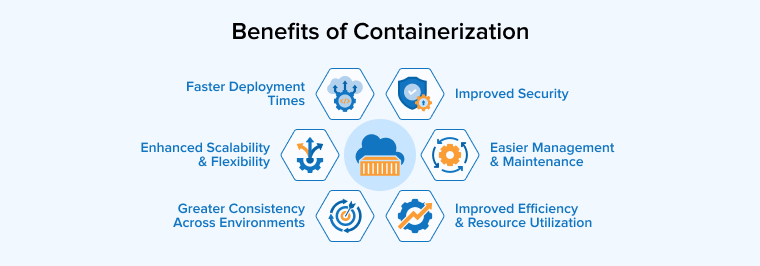
Containerization offers several advantages to DevOps teams in enhancing their workflows. Some of the most significant ones include:
Improved Efficiency and Resource Utilization
Unlike virtual machines, containers do not run separate instances of the entire operating system but share the host operating system kernel to make better use of system resources. This reduces extra load and allows many applications to run smoothly on a single system. As containers are lightweight and start quickly, they improve performance, lower costs, and make it easier to scale applications when needed.
Faster Deployment Times
Containers help teams deploy applications much faster because they take a very short time to be created, started, and updated. They simplify setup and reduce manual work, making testing and changes quicker. This speed supports continuous delivery, helping teams release updates more frequently and respond quickly to new requirements.
Enhanced Scalability and Flexibility
Containers help in scaling applications by running multiple instances of the application whenever demand increases and reducing them when it drops. They also offer flexibility to run across different environments, including cloud and on-premise systems. This allows teams to manage resources efficiently and adapt quickly without affecting the main application.
Improved Security
Containers improve security by keeping applications separate from each other and from the host system. This isolation limits the spread of threats even if one of the containers is compromised. They also allow controlled access to resources, ensuring only required components run, which reduces risks and protects the overall system.
Greater Consistency Across Environments
The application’s executable package, along with all its dependencies, makes it portable, so it can run on any host OS. It will behave consistently in all environments and platforms. This removes issues caused by system differences and ensures smooth transitions from development to production.
Easier Management and Maintenance
Containerization makes application management easier by separating each component into its own container. This enables teams to update or fix parts without disturbing the whole system. With the help of container orchestration tools like Kubernetes, many tasks such as deployment, scaling, and monitoring can be automated, which improves efficiency and reduces downtime.
How to Implement Containerization in DevOps?
Containerizing applications requires a well-structured workflow comprising the following steps:
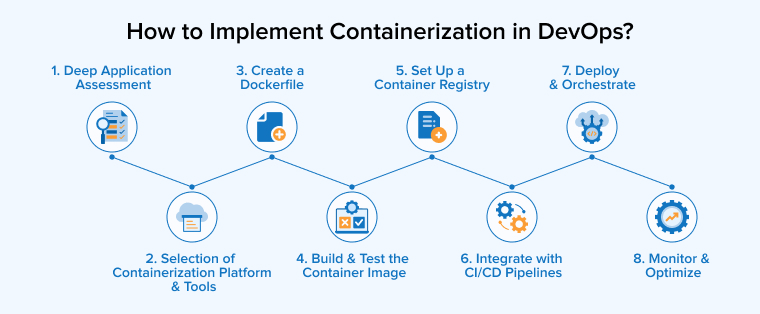
- Deep Application Assessment: Analyze your application thoroughly and find out the components best suitable for containerization. It’s preferred to begin with stateless services as they are easy to containerize.
- Selection of Containerization Platform and Tools: Select tools like Docker to create and run containers, and Kubernetes to manage and scale them efficiently across multiple development environments.
- Create a Dockerfile: It’s time to package the app into a container image. For that, create a plain text document called Dockerfile that includes the application’s dependencies, libraries, environment, and startup commands. This file will work as a “source code” for your container image and ensure a smooth build process.
- Build and Test the Container Image: You need to use the Docker CLI (docker build) to create the container image. After creating the image, test it on the local server or cloud environment to check if it works as expected.
- Set Up a Container Registry: A container registry is like a library for the created container images. It allows easy sharing and versioning across multiple development environments and teams. You can store the container images in central registries such as Azure Container Registry, AWS ECR, or Docker Hub.
- Integrate with CI/CD Pipelines: CI/CD tools like Jenkins and Azure DevOps automate building images when code changes are committed, run automated tests in isolated container runtime environments, and push the verified images to the registry. You can select your preferred CI/CD tool to automate the building, testing, and deployment of containers.
- Deploy and Orchestrate: Use Infrastructure as Code (e.g., Terraform) to provision your underlying environments, and a container orchestration platform like Kubernetes to manage the deployment, scaling, load balancing, and self-healing of containers in production.
- Monitor and Optimize: Implement monitoring and logging solutions to track container health, performance metrics, and security events.
What Are the Common Containerization Tools?
Containerization requires some necessary tools to ensure the efficiency and stability of the code. Some of the popular containerization tools are:
Docker
Did you get Monday’s quiz right? Development is the most common use for containerization tools.
— Docker (@Docker) September 2, 2024
Check out our full report to learn more about developer trends: https://t.co/R9QAADCbNY#ApplicationDevelopment #containerization pic.twitter.com/U3KUpkD43e
Docker is one of the most popular containerization platforms that makes it easy for developers to package applications into multiple containers, so they work consistently across any type of computing environment. The components of Docker, such as Docker Engine, Dockerfile, and Docker Hub, help build, store, and run these containers efficiently. Developers can also use Docker Compose to manage multiple services together. Overall, Docker simplifies development, testing, and deployment by ensuring consistency and saving time across different stages.
Linux Containers (LXC)
Linux Container (LXC) is an early container technology that allows isolated Linux environments to run on a single system without using full virtual machines. It depends on Linux components such as Namespaces and CGroups to manage resources and create separate environments for every resource. Hence, containers include only the essential components needed for an application to run, making them lightweight and efficient. With the core Linux containers tool for building images, running containers, and orchestration platforms for scaling, Linux containers help developers to manage and deploy applications in a much more effective manner.
Kubernetes (K8s)
Kubernetes Tools Ecosystem ⚙️
— Ayaan 🐧 (@twtayaan) May 22, 2026
A visual map of the most popular tools used around Kubernetes.
→ Cluster Management
EKS • AKS • GKE • Rancher • Helm • Minikube
→ Networking
Calico • Cilium • Flannel • Istio • Traefik
→ Infra Automation
Terraform • Ansible • Pulumi… pic.twitter.com/tV94vGVLcu
Kubernetes is a powerful tool used to manage and run containerized applications at scale. It takes simple configuration instructions as input and automatically handles tasks such as deployment, scaling, and fixing failures. It uses components such as pods and services to organize applications, facilitating easier communication. Kubernetes is even capable of balancing traffic and adjusting resources based on demand. It helps development teams to run applications more reliably and efficiently in complex environments by automating these DevOps processes.
Amazon ECS
Amazon ECS is a cloud-based container management service by Amazon that helps developers run and manage containerized applications without the need to handle servers directly. It uses its core components, such as Task Definitions i.e., a JSON file to describe the running of containers, tasks as running instances, services to keep them active, and clusters to provide resources. ECS can automatically scale applications, balance traffic, and replace failed tasks, making it easier to build reliable and efficient systems while reducing operational effort.
Google GKE
Google Kubernetes Engine (GKE) is a managed service that helps developers run containerized applications using Kubernetes on Google Cloud. It handles tasks such as cluster management using GKE fleet management, upgrades, and node maintenance automatically, making operations simpler and smoother. GKE includes strong security features and supports scaling across multiple clusters. It uses control plane nodes to manage the system and worker nodes to run applications, and integrates with cloud services for networking, storage, and monitoring.
Best Practices for Implementing Containerization in DevOps
Containerization forms a significant part of DevOps practices, so it must follow standard containerization best practices, given below:
1. Selecting the Right Containerization Platform
Today, there are many container platforms available, and choosing the right one depends on your team’s needs. If the project is simpler, Docker is best suited to handle it, but if it’s quite large and more complex projects, there’s a high chance that you’ll require Kubernetes for better management. Teams also need to decide between cloud services or self-hosted solutions based on control and the effort needed. Do not forget to check compatibility with existing systems and do consider security features, especially for industries with strict security and compliance norms.
2. Building and Managing Container Images
It is very important to create and maintain good container images to keep applications consistent across different environments. Teams should begin with trusted base images and try to include only what is needed to keep image size small and efficient. Regular updates help fix security issues and keep software relevant to the current version. Go for using multistage builds to reduce the number of unnecessary files and improve safety. Use proper version tags to make it easier to track changes, and store images in secure registries to protect them.
3. Prioritize Security
Keeping the created containers secure is also a very important component of containerization in DevOps. Teams should keep control of who can access containers by giving only the necessary permissions, ensuring strict privilege access. It is also important to regularly update software and apply necessary security fixes whenever needed to avoid risks. Built-in features such as secret management and network rules can provide an extra layer of protection. Practices such as scanning images for issues, using encryption, and separating networks can further strengthen the safety of container-based applications and systems.
4. Implement Automated Testing and Quality Gates
Automated testing in container-based DevOps helps teams run checks consistently across all environments. By packaging tests inside containers, results remain reliable and free from dependency issues. Use of orchestration tools allows multiple tests to run at the same time, which can help in increasing the speed of feedback. Teams should actively test at different levels, from small code units to full user workflows.
Quality gates act as checkpoints within the pipeline, ensuring code meets defined standards such as test success, security, and performance. These checks should be automated, placed early, and updated regularly so issues are detected quickly and fixed without slowing development.
5. Monitoring and Optimising Container Performance
Keeping track of container performance helps ensure applications run smoothly and problems are fixed in the early stages. Teams should monitor key DevOps metrics such as resource usage, response times, and errors using tools like Grafana, Prometheus, or ELK, and set alerts to detect any unusual behavior. Regular analysis of these metrics helps find slow points and improve efficiency. Avoid resource wastage by keeping containers lightweight with clearly defined CPU and memory limits. Using stateless designs and external storage makes systems more flexible.
Final Thoughts
Containerization has become an essential part of DevOps, transforming the development, testing, and deployment of applications. Containers promote faster deployments, efficient usage of resources, and easy scalability, allowing teams to respond quickly to changing demands. Container orchestration and automation make the DevOps pipeline more reliable and agile. Containerization enables organizations to develop robust and scalable applications by maintaining consistency across multiple requirements, which is the need of the hour.
FAQs
Containers rely on the host operating system’s kernel, which can lead to common compatibility issues such as operating system mismatch, kernel version incompatibilities, architecture conflicts, dependency gaps, environment mismatches, etc.
Containers package your application code with all of its dependencies, making it portable, ensuring consistency across all environments, and enabling faster deployment and delivery.
Application containerization is building a complete package of an application’s code and the necessary dependencies it requires to run in a single lightweight unit known as a container.

Shruj Dabhi is an enthusiastic technology expert. He leverages his technical expertise in managing microservices and cloud projects at TatvaSoft. He is also very passionate about writing helpful articles on the same topics.



Comments
Leave a message...