

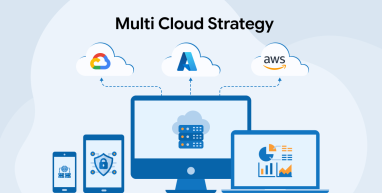
Cloud adoption no longer follows a one-size-fits-all path. Organizations now rely on multiple cloud platforms to run different workloads efficiently. This approach is known as a multi-cloud strategy. Instead of depending on one provider, businesses distribute workloads across public, private, or hybrid environments. Many enterprises use this model to balance high performance with cost control. It also supports stronger disaster recovery and better uptime.
However, multi-cloud adoption requires careful planning. Without a clear strategy, complexity can grow quickly. This is why architectural design plays a critical role in success. Cloud and DevOps service providers implement well-planned multi-cloud strategies that can adapt to different industry requirements
This blog explores how multi-cloud strategies work, why organizations adopt them, and how to design architectures that support diverse operational needs without unnecessary complexity.
What is Multi-Cloud?
In cloud computing, organizations often rely on more than one public cloud to run their systems. This approach is called multicloud. It allows businesses to use services from multiple cloud providers simultaneously. Teams may choose one cloud for application development, another for data storage, and a third for backups. This setup improves flexibility and reduces dependency on a single vendor.
Multicloud also supports better availability by spreading workloads across platforms. If one service fails, others can continue operations. Many companies adopt multicloud intentionally to meet performance, compliance, or regional needs. In some cases, it develops naturally as teams adopt new tools. Although multicloud increases operational complexity, it helps organizations balance cost, reliability, and scalability across diverse business requirements.
What is a Multi-Cloud Strategy?
A multi-cloud strategy gives organizations a clear plan for using more than one cloud provider with purpose. Teams choose specific platforms based on business goals, user location, compliance needs, and workload demands. One cloud may host applications, while another handles databases, backups, or testing. This approach improves availability and reduces dependence on a single vendor. It also helps serve users in different regions with better performance.
Companies often separate development, testing, and production across clouds. A strong strategy defines services, vendors, and responsibilities early. It also includes cost tracking and usage monitoring to avoid overspending. Multi-cloud planning works well for global businesses, regulated industries, and hybrid environments. It supports disaster recovery by spreading workloads across platforms. With the right planning, organizations gain flexibility, resilience, and better control over performance, costs, and compliance.
How to Develop a Multicloud Strategy?
The following steps will guide you towards the development of an effective multicloud strategy:
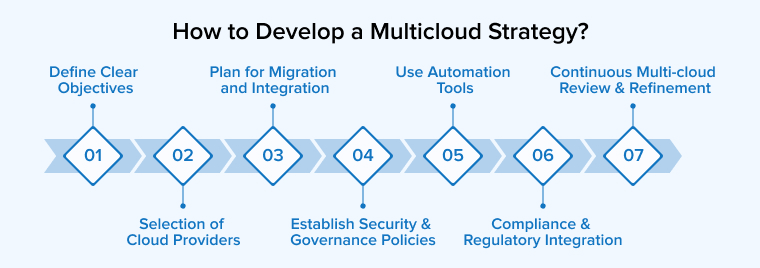
1. Define Clear Objectives
A successful multicloud approach starts with clear business priorities and a defined roadmap. Teams review current systems, applications, and data flows to understand real needs. They select workloads based on performance, compliance, scale, and security goals.
Multicloud setups help teams share data smoothly across locations with low delay. This supports real-time collaboration and reliable service delivery. Decision-makers must set clear KPIs and outcomes early. Strong alignment between business goals and technology choices ensures multicloud delivers measurable value and long-term efficiency.
2. Selection of Cloud Providers
Cloud providers offer core services, but each excels in different areas. One may deliver faster computing, while another shines in analytics or AI tools. A multicloud approach helps businesses select the best service for each workload. Teams should compare pricing models, contract terms, and entry costs carefully. Flexible agreements often reduce long-term spending. IT leaders play a key role in this process; their technical insight helps match providers with real business and operational needs.
3. Plan for Migration and Integration
Strong integration makes a multicloud setup easier to manage and more valuable. IT teams should choose providers that already work well together to reduce friction. Using open standards helps systems connect smoothly and avoids vendor dependence. Clear operational rules keep private clouds consistent and controlled.
Central management platforms simplify monitoring and deployment across clouds. Unified identity and access policies protect data and users everywhere. When services communicate easily, teams move data faster, cut delays, and gain better results from their multicloud investments.
4. Establish Strong Security and Governance Policies
Strong governance keeps multicloud environments secure and well-controlled. Teams should apply shared identity management, encryption, and monitoring across all platforms. Clear policies must explain why each workload runs on a specific cloud.
Sensitive systems need stricter access than low-risk tools. Zero-trust security strengthens protection by verifying every user and request. Continuous monitoring helps detect threats early. A unified security framework ensures consistent protection as business needs change.
5. Use Automation Tools
Automation helps enterprises run multicloud environments with less effort. It removes many manual tasks for IT teams and improves speed. Automation tools operate above virtual machines in public and private clouds, which allow control of resources in a smarter way.
Infrastructure as code allows teams to build and manage systems using scripts. This approach keeps setups consistent and reduces errors. It also saves cloud costs by avoiding waste. Tools like Terraform, Ansible, and CloudFormation support this process. CI/CD tools further speed up building, testing, and deploying applications across clouds. This leads to reliable scaling and better operational control.
6. Integrate Compliance and Regulatory Requirements
Large enterprises working across countries must follow many laws and standards. These rules often differ by region and industry. Many industries, such as Healthcare, finance, and energy, face strict compliance needs. Ignoring regulations can expose private data and cause heavy fines.
Businesses should embed compliance into every stage of their multicloud operations. Automated compliance tools help track rules and apply updates on time. A common compliance framework across clouds reduces confusion and effort. Regular reviews keep systems aligned with new laws and technology changes. This approach improves control, security, and customer confidence.
7. Continuously Review and Refine the Multi-cloud Strategy
A multicloud setup is not something you finish once and forget. It keeps developing as business needs change over time. Hence, organizations need to regularly check their goals and review the cloud services they use. This helps them react quickly to new market demands and improve performance while managing costs.
Staying flexible makes it easier to use new technologies and adjust workloads when needed. This continuous effort supports innovation and helps businesses stay strong and prepared for future changes.
Multicloud Use Cases and Examples
Let’s go through some of the common applications of a multi-cloud strategy in today’s digital world:
Disaster Mitigation and Recovery
Many organizations choose multicloud mainly for disaster recovery. Relying on a single cloud can create serious risks during failures. Data is a critical business asset and needs strong protection. Companies reduce risk by copying data across zones and regions. This protects systems from power issues, network failures, or natural disasters.
Some businesses go further and spread workloads across different cloud providers. This ensures access even if one provider becomes unavailable. Although costs increase with higher protection levels, this approach suits systems that must run without interruption, such as those in financial institutions.
Create a Distributed Workforce
A multicloud approach helps organizations support a distributed workforce. Employees can access applications and data from any location without disruption. Multiple cloud platforms improve availability and performance for remote teams. Businesses can store data in specific regions to meet local legal requirements.
This supports compliance while enabling global operations. Multicloud also strengthens security by spreading workloads across providers. Teams collaborate smoothly across time zones and regions. Overall, this strategy creates a flexible, reliable, and secure digital workplace for modern organizations.
Scaling Out
Multicloud helps organizations scale systems quickly during sudden demand. Seasonal businesses can handle traffic spikes without paying for unused capacity all year. Companies with existing on-site systems can add cloud resources instead of building new infrastructure. Large enterprises may require thousands of servers on short notice, and a single provider may not always meet this demand.
Using multiple cloud providers increases available resources. This approach allows fast expansion during events or campaigns. Although setup requires planning, multicloud gives flexibility and better control when scaling becomes urgent.
Cost Reduction
Multicloud helps organizations reduce cloud costs by spreading workloads across providers. Companies can choose cheaper providers for general computing while using managed services only when necessary. This avoids paying high prices for all resources from a single vendor.
Businesses can also move workloads between clouds if prices change. Using multiple clouds reduces dependence on one provider and prevents costly lock-in. It allows teams to balance performance, flexibility, and budget. Overall, multicloud gives better control over expenses while meeting technical needs efficiently.
Data Sovereignty
Multicloud helps organizations meet data sovereignty requirements by controlling where data is stored. Companies can keep sensitive information in local or country-specific data centers to follow laws like GDPR, HIPAA, or PCI DSS. Using multiple providers allows businesses to serve customers from different regions without breaking rules.
Core management systems can run on major clouds, while local data stays in regional clouds. This approach ensures compliance, protects confidential data, and enables global operations without limiting service offerings or customer access.
We’ll now take a look at some top companies in the world that have adopted a multi-cloud strategy to increase their efficiency and profitability:
Netflix
Netflix uses a multi-cloud strategy to deliver content smoothly to millions of users. It stores most data on AWS while using Google Cloud for analytics and AI tasks. It also runs a private cloud to reduce latency and improve streaming speed. Containerized microservices allow flexible operations across clouds. This setup ensures high availability, better performance, cost efficiency, and reduces dependency on a single provider.
Spotify
Spotify uses a multi-cloud strategy to improve performance and reduce costs. It runs analytics and machine learning on Google Cloud, while using AWS for computing and storage. Kubernetes and Terraform help manage containerized services across clouds. Backstage gives engineers a clear view of all systems, simplifying operations.
Airbnb
Airbnb uses a multi-cloud strategy to improve performance and security. It runs its core operations and website on AWS, while using Google Cloud for analytics and machine learning. Sensitive user data stays in a private cloud for compliance. This hybrid approach balances cost, ensures reliability, prevents vendor lock-in, and allows efficient processing of large datasets.
Multi Cloud vs Hybrid Cloud: What’s the Difference?
Many a time, we get confused between multi-cloud and hybrid cloud as they sound similar. However, they are distinct in the following terms:
| Parameters | Multi Cloud | Hybrid Cloud |
|---|---|---|
| Architecture | Multi-cloud uses services from several cloud providers at the same time to run applications and manage workloads efficiently. | Hybrid cloud architecture connects local systems with public and private cloud platforms to share workloads in one flexible environment. |
| Vendor lock-in | It reduces vendor dependence by allowing easy workload movement across providers for better cost and performance control. | It often increases vendor dependence because organizations rely heavily on one provider’s tools, security, and management systems. |
| Cost | Public cloud–based multicloud reduces upfront costs and offers flexible pricing by matching payment models to actual usage needs. | Hybrid cloud can increase expenses because organizations must buy, operate, and integrate on-site infrastructure alongside cloud services. |
| Complexity Focus | Managing multiple clouds is complex due to different tools, security rules, costs, and required team skills. | Hybrid cloud is complex because it requires syncing data, managing networks, maintaining systems, and ensuring security across environments. |
| Flexibility | It lets companies scale quickly and choose the best services from different providers without vendor restrictions. | It lets organizations combine on-premises and public clouds, choosing the best environment for each workload efficiently. |
| Security | Multicloud increases security complexity because organizations must manage consistent policies, access, and monitoring across multiple providers. | Hybrid cloud gives organizations full control over sensitive data, securing private infrastructure while using public clouds for other workloads. |
| Data Storage | Multicloud storage spreads data across providers, giving businesses flexibility, scalability, and reduced risk of vendor lock-in. | Hybrid cloud stores sensitive data on private infrastructure while using public clouds for other tasks, ensuring control and compliance. |
Top Platforms for Multi-Cloud Management
With the increasing adoption of multi-cloud strategies, the number of cloud management platforms has also increased. An organization must thoroughly review the features, benefits, limitations, etc. of a particular platform before finalizing its use.
We’re here with the leading three multi-cloud management platforms to help you make the right decision.
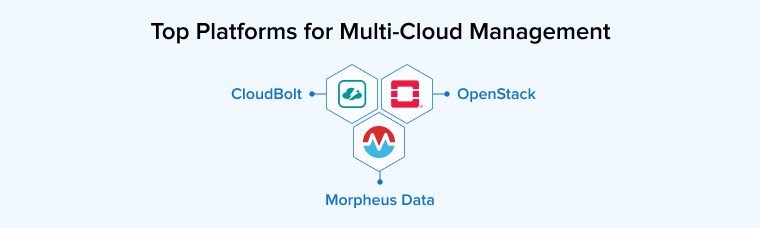
CloudBolt
CloudBolt helps enterprises manage hybrid and multi-cloud environments with strong governance and compliance. It automates provisioning across AWS, Azure, GCP, and VMware while enforcing policies, role-based access, and security rules. The platform integrates with tools like ServiceNow and Terraform, allowing centralized control, workflow automation, and cost visibility. CloudBolt suits organizations that need consistent infrastructure, strict compliance, and policy-driven management across both public and private clouds.
OpenStack
OpenStack lets organizations build and manage private or hybrid clouds with full control. It handles compute, storage, and networking at scale and integrates with Kubernetes and CI/CD tools. Being open-source, it avoids vendor lock-in and allows complete customization. Organizations can pair it with monitoring and cost-management tools for visibility, making it ideal for flexible, high-control cloud environments.
Morpheus Data
Morpheus lets IT teams manage hybrid and multi-cloud environments from a single platform. It supports AWS, Azure, GCP, VMware, and Nutanix while enabling self-service provisioning for developers. The platform enforces policies, automates workflows, and integrates with DevOps tools like Ansible and Terraform. It also provides cost visibility and quota management, helping enterprises control infrastructure, spending, and operations efficiently.
Best Practices for Multi-Cloud Management
Keep the following best practices in mind to build a robust multicloud strategy:
1. Implement a Comprehensive Architecture Design
Interoperability demands clear planning from the start. Teams must choose multi-cloud early and design a strong framework. This approach supports smooth integration later. It improves scaling, boosts reliability, and balances workloads after launch.
2. Go for the Zero Trust Approach
A zero-trust approach is crucial in securing multicloud environments. It operates on the principle that no user or system should be considered safe by default. Every access request must be thoroughly verified before being allowed and kept strictly limited to only what is required. To make this effective, organizations need to align identity and access controls consistently across all cloud platforms, while also ensuring that data always remains encrypted. Network segmentation further strengthens security by isolating different parts of the system. Thus, a zero-trust approach helps reduce damage, prevents misuse, and protects systems regardless of where they are running.
3. Do Not Ignore Resilience Planning
Planning for failures is very important in a multi-cloud setup. Businesses should spread their applications across different providers so they can quickly switch if one fails. It is also necessary to identify key systems, create backups, and test recovery plans regularly. Understanding each cloud platform helps in building better recovery strategies. Keeping systems flexible and well-prepared ensures faster response to problems and reduces downtime, helping maintain smooth operations.
Final Thoughts
A well-planned multi-cloud strategy gives businesses the ability to stay flexible, reliable, and ready for change in this fast-moving digital world. By using different cloud providers for different needs, organizations can avoid depending on a single platform and improve performance while managing costs. However, success depends on proper planning, strong governance, and skilled teams. Companies must also handle challenges like complexity and integration carefully. With the right strategy, organizations can adapt faster, reduce risk, and grow confidently in a changing digital world.

Shruj Dabhi is an enthusiastic technology expert. He leverages his technical expertise in managing microservices and cloud projects at TatvaSoft. He is also very passionate about writing helpful articles on the same topics.



Comments
Leave a message...