

Modern React applications and websites often include chatbots to enhance user experience. These chatbots assist users by answering questions, facilitating shopping, and guiding them to useful resources. These chatbots are often empowered by AI technologies and used widely across different industries for purposes ranging from lead generation to customer service.
While integrating a chatbot may seem complex, it is actually straightforward. Top React development companies leverage robust and suitable solutions that align with your specific requirements to seamlessly integrate a chatbot into your website or application.
This article explores the concept, features, and benefits of using React for chatbot development. It also provides a detailed, step-by-step guide to building and customizing a chatbot with React. Additionally, we discuss various tools, libraries, and best practices relevant to this process.
React for Chatbot Overview
React is a lightweight JavaScript library that provides a comprehensive set of components, tools, and frameworks to create conversational chat interfaces using declarative syntax. It simplifies the process of building chatbots by allowing developers to define conversation flows through an array of objects called steps.
Many developers prefer this library because it offers reusable components. Using these pre-written blocks of code not only saves time but also ensures that your chat interface looks and feels consistent across all platforms.
Additionally, it provides numerous ready-made templates and customizable features, so developers don’t need to start from scratch every time. Even beginners can easily venture into chatbot development with React, delivering a responsive and interactive experience to web visitors.
To create better chatbots or meet specific needs, you can easily access a wide range of robust tools and resources within the React ecosystem. Whether you want to build a chatbot for learning, customer support, or entertainment, React can help you achieve your goals.
What Are the Features of the React Library?
React is a go-to library for many developers worldwide because of its extensive features, including a component-based architecture, declarative UI, and seamless integration support for AI tools that streamline the chatbot development process.
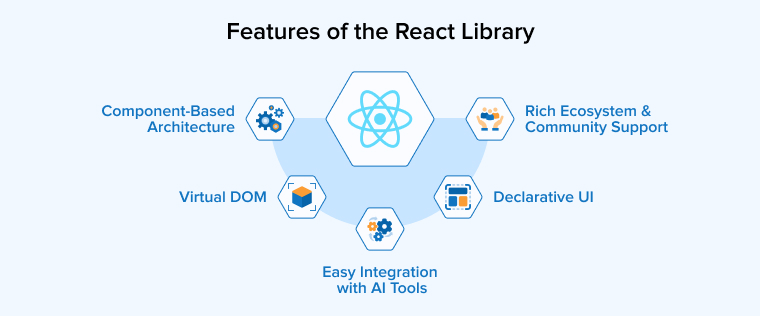
Component-Based Architecture
React’s component-based architecture is particularly beneficial for chatbot development. Developers can break down the user interface into small, reusable components, making the code modular and easy to manage. Development, testing, and debugging can be performed independently for each component, simplifying the development process and boosting overall productivity.
Virtual DOM
Virtual DOM prevents making unnecessary changes to the actual DOM and updating the user interface. It only re-renders the components that have actually changed. Not only that, it tests the changes to see if they work and do not have any adverse effect on the app performance, as well as the user experience. If that goes well, only then are the changes implemented on the actual DOM, which are then updated on the user interface. This helps identify whether the changes would really help the chatbot provide real-time responses.
Rich Ecosystem and Community Support
React has been around for a while now. It already has support from a large and active community, which has created an extensive ecosystem around the technology, providing a comprehensive set of tools, libraries, plugins, and other resources that help streamline as well as accelerate the development process.
From styling libraries to state management solutions, React has everything you need for chatbot development. Moreover, its community actively helps out developers in need to resolve their project issues and continuously updates the technology with the latest advancements.
Declarative UI
React takes a declarative approach to programming. This enables the developers to define how their UI should look across different states of the application. As a result, the code becomes easily predictable and even easier to debug. In the case of chatbots, having a declarative UI helps developers focus on defining the chatbot’s different states and interactions without having to worry about manually updating its user interface.
Easy Integration with AI Tools
Thanks to the flexibility of the React library, you get easy access to several external APIs and AI services. Integrating with them would help create a chatbot that can effortlessly answer smart and even complex user questions. Seamless integration with AI tools not only helps your chatbot navigate through tough questions but also helps improve its responses over time.
What Are the Benefits of Using React for Chatbot Development?
Developers around the world prefer to use React for chatbot development because of the wide range of benefits it offers, such as multi-lingual support, a rich ecosystem and community support, accessibility, and high flexibility supporting various third-party integrations.
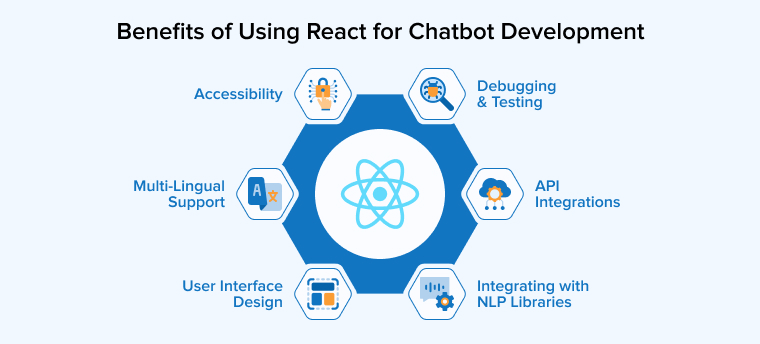
Integrating with NLP Libraries
React allows seamless integration with NLP libraries that help improve interactions between users and machines. Integrating with NLP libraries like Wit.ai and Dialogflow empowers the chatbot to give more human-like responses.
They help chatbots understand the nature of the requests, users’ intent, and entities. It can identify whether the requests are positive, negative, or neutral and respond appropriately. With the help of NLP, chatbots develop a contextual understanding from previous interactions, enabling you to deliver an engaging and personalized user experience.
Debugging and Testing
To ensure reliable testing and precise debugging, React offers a stable environment through tools such as DevTools, Enzyme, and Jest. These tools are not only for comprehensive testing but also simplify the process of finding and fixing the problem, ensuring that the code remains operational and performs up to expectations.
API Integrations
To fulfill your unique requirements, React supports seamless integration with external sources through APIs. They help provide more accurate responses to the user queries. With the help of API integrations, you can connect your chatbot with numerous third-party services, such as e-commerce systems and social media, that help give personalized responses to user queries.
Accessibility
React ensures easy accessibility to chatbots using keyboard navigation and ARIA attributes. Disabled people can understand how to use a chatbot with ARIA, whereas keyboard navigation enables users who cannot operate or touch a mouse or keyboard to use a chatbot. React Simple Chatbot offers texts as an alternative to images and other visual elements to help visually-impaired users. Its color contrast feature allows visually-impaired users to access and use the chatbot.
Multi-Lingual Support
With React, you can prepare a chatbot that supports a single language targeting a specific region, and it can also support multiple languages when working on a global scale. The built-in internationalization feature from React allows users to chat with the bots in their native language. You can enable the location-based texts and images to ensure localization of your chatbot responses. Having multi-lingual support in a chatbot makes it easier for brands to initiate a global campaign and increase their brand awareness.
User Interface Design
React follows a component-based architecture to design user interfaces for the chatbot. The modular approach promotes reusability, helping developers save time. Moreover, developers can customize these components to create a chatbot that offers a unique experience or fulfills specific client requirements. UIs in React chatbots are intuitive and dynamic, and they support real-time updates. The library designs the chatbot responsively, ensuring that its UI fits perfectly on all targeted devices or screen sizes.
How to Create a Chatbot Using React?
We first have to build a React application and then use the React chatbot kit to create a chatbot. Next, we can program this chatbot to respond to the user queries dynamically. You can customize the message component of the React chatbot with the help of a widget to fulfill any specific project requirement.
Step 1: Creating the App
Run the given command to build a React application.
npm init vite chatbot-demo -- --template react |
Navigate to the app folder through the command
cd chatbot-demo |
Execute the command below to install the React chatbot kit.
npm i react-chatbot-kit react-icons |
Run the app with this command:
npm run dev |
Step 2: Initialize the Chatbot
Add this code given below to the App.jsx file to add the chatbot to your React application. Implementing this code would provide a button on the screen that would help open or close the chatbot component.
import { useState } from "react"; import ChatbotWrapper from "./Components/ChatbotWrapper"; import { FaCommentDots, FaTimes } from "react-icons/fa"; function App() { const [openChatbot, setOpenChatbot] = useState(false); return ( <> {openChatbot && <ChatbotWrapper />} <button className="chat-button" onClick={() => setOpenChatbot((prev) => !prev)} > {openChatbot ? <FaTimes size={22} /> : <FaCommentDots size={22} />} </button> </> ); } export default App; |
We need to build a component that can hold the actual chatbot in the React application. Add the following code to the Components/ChatWrapper.jsx file to create a ChatbotWrapper component. This code will help you initialize the chatbot component. The config consists of the initial messages that display the initial messages to the user upon opening the chatbot.
The user would have to type their message or input in the placeholder, shown as the placeholder text in the code. The chatbot’s header is displayed through headerText, whereas the actionProvider and the messageParser are necessary props a chatbot needs against messages.
import Chatbot, { createChatBotMessage } from "react-chatbot-kit"; import "react-chatbot-kit/build/main.css"; import Message from "./Message"; import Action from "./Action"; const config = { initialMessages: [createChatBotMessage("Hello, Good morning!")], }; function ChatbotWrapper() { return ( <div className="chatbot-wrapper"> <Chatbot config={config} actionProvider={Action} messageParser={Message} placeholderText="Ask anything" headerText="Chatbot" /> </div> ); } export default ChatbotWrapper; |
Add the given code to the Components/Message.jsx file to create a message component. This code clones the children element and the messages. It then updates the messages by adding new props like parse and actions. The parse function helps process the message of the user, while the action function helps take necessary action. For example, if the user types Good Morning then the chatbot will be prompted to respond with the action askHowAreYou. If the user replies with fine, then again the chatbot will take the action called goodToHear.
import React from "react"; function Message({ children, actions }) { const parse = (message) => { const lower = message.toLowerCase(); if (lower.includes("good morning")) { if (actions?.askHowAreYou) { actions.askHowAreYou(); } } else if (lower.includes("fine")) { if (actions?.goodToHear) { actions.goodToHear(); } } }; return ( <div> {React.Children.map(children, (child) => { return React.cloneElement(child, { parse: parse, actions: actions, }); })} </div> ); } export default Message; |
Add the code below to the Components/Action.jsx file to create the action component. Similar to the message components, this component also clones every child element and returns them with updated props. The action object here will tell the chatbot what to do when an action is called from the message component. createChatBotMessage creates a new message and calls setState to add the new message to the messages.
import React from "react"; import { createChatBotMessage } from "react-chatbot-kit"; function Action({ children, setState }) { const actions = { askHowAreYou: () => { const message = createChatBotMessage("How are you?"); setState((prev) => ({ ...prev, messages: [...prev.messages, message], })); }, goodToHear: () => { const message = createChatBotMessage("Good to hear it!"); setState((prev) => ({ ...prev, messages: [...prev.messages, message], })); }, }; return ( <div> {React.Children.map(children, (child) => { return React.cloneElement(child, { actions: actions, }); })} </div> ); } export default Action; |
Place your chatbot button in the bottom right corner of your screen by adding this code to the index.css file.
:root { font-family: system-ui, Avenir, Helvetica, Arial, sans-serif; } body { margin: 0; display: flex; place-items: center; } .chat-button { position: fixed; bottom: 20px; right: 20px; background: #2898EC; color: #FFFFFF; height: 56px; width: 56px; display: flex; justify-content: center; align-items: center; border: 1px solid transparent; border-radius: 50%; font-size: 18px; z-index: 9999; } .chatbot-wrapper { position: fixed; bottom: 90px; right: 20px; box-shadow: 0 4px 4px rgba(0, 0, 0, 0.15); } |
Implementing the above code will give the outcome as shown in the image below: a small message button.

Click on the message button, and the chat interface will be loaded with the initial message. For example, if you type in good morning then the chat will respond with how are you. If you respond with a fine, then you will get another message. These messages appear based on the user input, triggering a specific action in the parse function in the Message component.

Step 3: Instead of Hard-Coding the Messages, Dynamically Load the Response From the API
Use APIs to make your chatbot dynamic. This way, it will consider the user input and its context to respond appropriately. The code below uses a public api called https://api.some-random-api.com/joke. To use this component, we must first update the Message and Action components. The code below would help update the Action component. We got a new action called tellJoke, which calls the API endpoint, adding the response to the message list.
import React from "react"; import { createChatBotMessage } from "react-chatbot-kit"; function Action({ children, setState }) { const actions = { askHowAreYou: () => { const message = createChatBotMessage("How are you?"); setState((prev) => ({ ...prev, messages: [...prev.messages, message], })); }, goodToHear: () => { const message = createChatBotMessage( "Good to hear it! Want me to tell you a joke?" ); setState((prev) => ({ ...prev, messages: [...prev.messages, message], })); }, tellJoke: async () => { const res = await fetch("https://api.some-random-api.com/joke"); const data = await res.json(); const joke = createChatBotMessage(data?.joke); const askMore = createChatBotMessage("Want me to tell you one more joke?"); setState((prev) => ({ ...prev, messages: [...prev.messages, joke, askMore], })); }, }; return ( <div> {React.Children.map(children, (child) => { return React.cloneElement(child, { actions: actions, }); })} </div> ); } export default Action; |
Now, use the following code to update your Message component. It adds an extra else if block to load a joke in response to a yes message that answers Want me to tell you a joke? It triggers a tellJoke action.
import React from "react"; function Message({ children, actions }) { const parse = (message) => { const lower = message.toLowerCase(); if (lower.includes("good morning")) { if (actions?.askHowAreYou) { actions.askHowAreYou(); } } else if (lower.includes("fine")) { if (actions?.goodToHear) { actions.goodToHear(); } } else if (lower.includes("yes")) { if (actions?.tellJoke) { actions.tellJoke(); } } }; return ( <div> {React.Children.map(children, (child) => { return React.cloneElement(child, { parse: parse, actions: actions, }); })} </div> ); } export default Message; |
The reply Yes calls for a public API endpoint, responding to the user with a joke. Here, you can call your one API endpoint and dynamically load questions/answers based on user input.

Step 4: Customize the Message Component Using the Widget
For the question Want me to tell you a joke?, we need the user to type in yes. But what we can do here is provide them with buttons of yes and no. The clicking of either button will dictate the further process. We have to create a new component that provides these options or a set of buttons. Add the code below to the Components/CustomOption.jsx file. Here, we have two different buttons and the clicking of any single button will call for appropriate action from the actionProvider.
import React from "react"; function CustomOption({actionProvider}) { return ( <div className="button-wrapper"> <button onClick={() => actionProvider?.tellJoke()}>Yes</button> <button onClick={() => actionProvider?.haveGoodDay()}>No</button> </div> ); } export default CustomOption; |
We must register the option component before using it. To do this, update the ChatbotWrapper.jsx component with the code below. We have added the widgets in the config object, including a widget that contains the widgetName property. The name of this widget is used while sending the message and widgetFunc to which UI to return for this widget.
import Chatbot, { createChatBotMessage } from "react-chatbot-kit"; import "react-chatbot-kit/build/main.css"; import Message from "./Message"; import Action from "./Action"; import CustomOption from "./CustomOption"; const config = { initialMessages: [createChatBotMessage("Hello, Good morning!")], widgets: [ { widgetName: "SelectYesNo", widgetFunc: (props) => <CustomOption {...props} />, }, ], }; function ChatbotWrapper() { return ( <div className="chatbot-wrapper"> <Chatbot config={config} actionProvider={Action} messageParser={Message} placeholderText="Ask anything" headerText="Chatbot" /> </div> ); } export default ChatbotWrapper; |
Use this code to update the Action.jsx. In case of the gooToHear and tellJoke action, you can see the code passing a widget name that tells the chatbot to load a particular widget along with the message.
import React from "react"; import { createChatBotMessage } from "react-chatbot-kit"; function Action({ children, setState }) { const actions = { askHowAreYou: () => { const message = createChatBotMessage("How are you?"); setState((prev) => ({ ...prev, messages: [...prev.messages, message], })); }, goodToHear: () => { const message = createChatBotMessage( "Good to hear it! Want me to tell you a joke?", { widget: "SelectYesNo", } ); setState((prev) => ({ ...prev, messages: [...prev.messages, message], })); }, tellJoke: async () => { const res = await fetch("https://api.some-random-api.com/joke"); const data = await res.json(); const joke = createChatBotMessage(data?.joke); const askMore = createChatBotMessage( "Want me to tell you one more joke?", { widget: "SelectYesNo", } ); setState((prev) => ({ ...prev, messages: [...prev.messages, joke, askMore], })); }, haveGoodDay: () => { const message = createChatBotMessage("Have a good day!"); setState((prev) => ({ ...prev, messages: [...prev.messages, message], })); }, }; return ( <div> {React.Children.map(children, (child) => { return React.cloneElement(child, { actions: actions, }); })} </div> ); } export default Action; |
The user sees two options when the message is loading: Yes and No buttons. Clicking on the Yes button will prompt more jokes, whereas clicking the No button triggers a farewell message.

What Are the Key Metrics to Measure Chatbot Performance?
You need to use certain metrics to be able to measure the performance and success rate of your chatbot. Response accuracy and customer satisfaction are among the most important benchmarks in terms of chatbot success. Whereas engagement rate, conversion rate, and customer retention rate are more critical to yield actual business value.
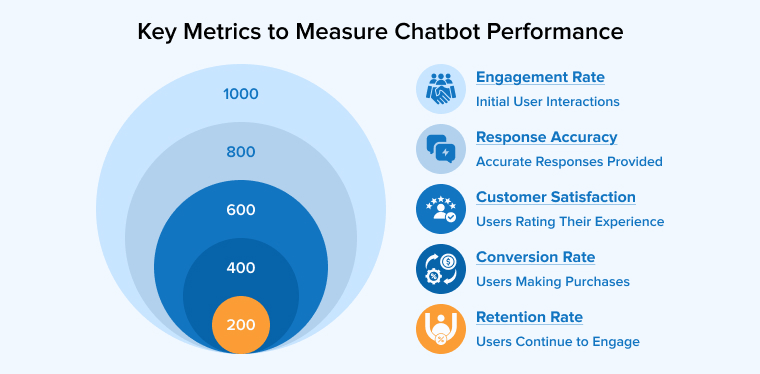
- Engagement Rate: Tracks your chatbot’s users and their usage patterns.
- Response Accuracy: Monitors the chatbot’s success rate on the first try. Dialogflow and other AI tools should help improve these stats.
- Customer Satisfaction (CSAT): Get users to rate their experience after interacting with the chatbot. A good user experience is reflected in a high CSAT score.
- Conversion Rate: In the e-commerce field, it determines how many customers buy after using the chatbot.
- Retention Rate: Monitors chatbot usage for follow-ups by users from healthcare and other industries.
Which Frameworks Are Best for Building Chatbots in React?
The React ecosystem provides a range of tools and libraries to simplify the process of building a chatbot. Among others, Botpress, React Chatbot Kit, React Native Chatbot, and React Simple Chatbot are the most commonly used and preferred chatbot development frameworks in React.
Botpress
It is an open-source framework supporting the ReactJS library. Botpress comes with inherent NLU capabilities as well as a visual interface that helps create conversational flows. With Botpress, you can easily integrate any popular messaging platform into your chatbot. It also allows for extension and customization of the chatbot’s behavior using React components for seamless interactions and enhanced user experience.
React Native Chatbot
You get readymade components that are already optimized to support chatbots on a mobile interface. So, React Native Chatbot helps build mobile-friendly chatbots. The UI elements it offers, such as attachments, rapid replies, and typing indicators, are easily customized to deliver a personalized and enhanced chatbot experience. It works seamlessly with the React Native framework and is an ideal solution for businesses looking to add a chatbot to their React mobile application.
React-Chatbot-Kit
In React-chatbot-kit, you get a comprehensive package to design a complete chat window user interface, such as input fields, buttons, and customized voice bubbles. The library also provides advanced features for chatbot development that help with user input validation, conversation management, and interaction with popular NLP providers such as Wit.ai and Dialogflow. React-chatbot-kit is the right fit for delivering a dynamic and captivating chatbot experience. Its pre-built components can significantly speed up your chatbot development process.
React Simple Chatbot
This is a lightweight and user-friendly library that provides declarative syntax to help define conversation flows. As the name suggests, the React simple chatbot is user-friendly. By offering pre-written UI elements like message displays, input fields, and buttons, it works as an ideal option for rapid and efficient chatbot development. Among other offerings, React Simple Chatbot also provides tools for data collection during conversations, custom styling, and user input management.
What Are the Best Practices for Chatbot Development in React?
Effective React chatbot development starts with the goal of keeping the design user-friendly and providing contextual logic to keep conversations natural. On top of that, extensive testing, error handling, prioritizing data security, and optimizing performance regularly are some widely recommended best practices.
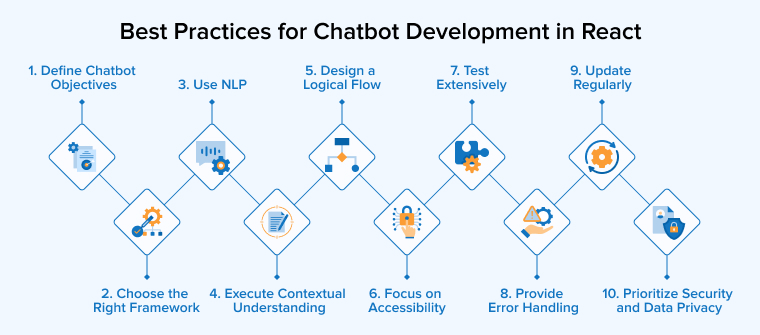
1. Define the Objectives for Your Chatbot
You need a clear sense of purpose for your chatbot before you delve into the journey of chatbot development. Keep the users in mind, think about what kind of business value you want your chatbot to offer: customer support, web navigation, or simple FAQs.
A well-defined objective will help you develop an effective conversational flow for your chatbot and steer clear of any unnecessary features.
2. Select the Right Chatbot Framework
There are many options out there that can help build a chatbot for your React application, including Botpress and the React chatbot kit. Analyze your options, test their strengths and limitations, read their reviews online, and pick the one that perfectly fits your project requirements.
3. Use Natural Language Processing
Effective NLP integration helps your chatbot gain a better understanding of the customer queries. As a result, the chatbot can provide more appropriate responses to the customers. Using NLP is an essential requirement if you are planning to add a chatbot to the app or website. It uses elements to make interactions more engaging and intuitive, which guides the entire conversational flow more naturally.
4. Execute Contextual Understanding
Similar to NLP, contextual understanding is also a must-have. It enables the chatbots to provide humanized and personalized answers. Chatbots use contextual understanding to understand the current queries in the context of their previous interactions with the customer and answer accordingly. Getting such human responses enhances the user’s chatbot experience.
5. Design a Logical Flow
Visualizing a conversational flow for your chatbot is another essential aspect of chatbot development. Map out all possible user interactions using flowcharts or diagrams. Taking such a proactive approach would help avoid any confusion during user interactions.
6. Focus on Accessibility
Accessibility ensures that your chatbot is accessible to all users by using clear color contrast and readable fonts for different visual abilities. Features like voice input options and screen reader support make interactions more inclusive. Testing for accessibility issues helps identify and fix gaps so the chatbot performs effectively for users with diverse needs.
7. Test Extensively
Conducting testing is necessary to deliver an enhanced chatbot experience. Interactions with a chatbot help identify issues and areas for improvement. You can also invite your friends and colleagues to try it and provide feedback. However, it is most important that the chatbot is tested across different conditions, like devices, network speeds, and browsers. It tells whether your chatbot is viable across multiple platforms and whether it offers a consistent experience to all users.
8. Provide Error Handling
Despite planning or programming your chatbot for numerous scenarios, occasionally, there will come a user input that won’t make sense to the Chatbot. In those moments, you want your chatbot to provide fallback replies or redirect the users to helpful resources. This way, in the face of unexpected inputs, your chatbot can use default responses to keep the conversation going without frustrating the user.
9. Update Regularly
Chatbots aren’t going to be perfect in one go. They also need to evolve with changing user behavior and market trends. Implementing regular updates will help maintain its usefulness and relevance. Moreover, consider user feedback to improve chatbot responses or add new features that address customer requirements.
10. Prioritize Security and Data Privacy
Data security and user privacy are critical for the React chatbot. Enforce secure authentication protocols like OAuth and JWT to verify users and control access. Use encrypted cookies to secure local storage and sensitive data. On top of that, you must conduct frequent security audits that ensure compliance with relevant regulations.
Conclusion
Building a dynamic and responsive chatbot that offers a unique experience to the users, as well as fulfills your business requirements, is possible using React. The library provides several robust tools and libraries with an extensive set of UI components that streamline your development process and deliver an engaging chat interface. Using React for chatbot development is truly beneficial as it supports multiple languages, AI integrations, debugging, and accessibility features.

Parind Shah is responsible for frontend innovations at TatvaSoft. He brings profound domain experience and a strategic mindset to deliver exceptional user experience. He is always looking to gain and expand his skill set.



Comments
Leave a message...