

Software has become a core part of business operations in any industry. It helps businesses improve their operations, connect with customers, and stay competitive in this rapidly changing digital world of AI. However, building successful software is not only about having the best and most innovative idea or skilled developers. It also depends on choosing the right approach to manage the entire development process. This is where software development models become important.
Every project has different goals, timelines, budgets, and technical requirements. These models provide a clear structure for planning, designing, testing, and delivering software efficiently. Today, there are innumerable SDLC models, each designed to solve specific challenges. Many organizations depend on professional software development services to choose and implement the most suitable model for their project.
It’s important to have an in-depth understanding of the popular development approaches followed by companies. Therefore, we’re here with a detailed blog on some of the top SDLC models explaining their benefits, limitations, and suitable selection scenarios.
What is a Software Development Model?
Software developers use software development models as structured approaches to plan and manage software development. It helps in guiding teams through stages such as planning, designing, developing, and maintaining a product. These models help teams use resources wisely, stay organized, and meet project goals efficiently. They also define how clients and developers communicate from the start. By following a clear model, teams can track progress, handle risks better, and ensure smooth development.
Top 10 Software Development Lifecycle Models
Industries use different types of SDLC models according to their project requirements. The following 10 software development models are the most popular worldwide:
Waterfall Model – The Traditional Sequential Approach
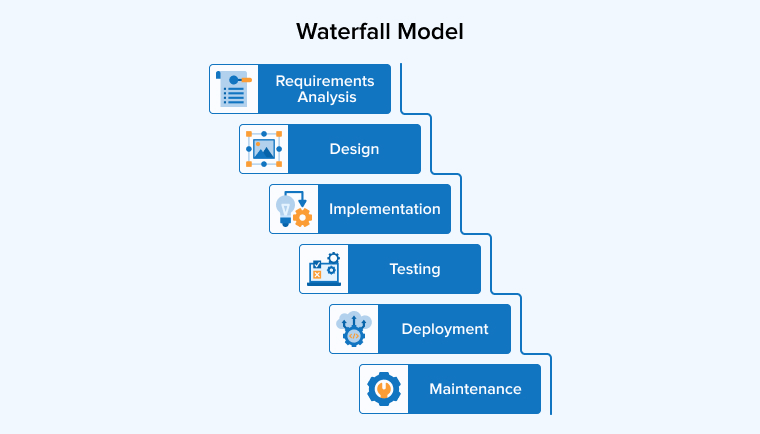
Developers introduced the Waterfall model in the 1970s as one of the earliest methods to develop software. It follows a step-by-step process, where developers complete each stage before moving to the next. The usual flow includes requirements gathering, designing the system, developing, testing, deploying, and maintaining it. This approach became popular because it is simple to understand and keeps work well organized with clear goals at every stage. Although many now prefer newer methods, developers still use the Waterfall model for projects with clear and fixed requirements.
Pros of the Waterfall Model
- Straightforward and Transparent: The Waterfall model is simple and structured, with clear roles and no overlap between stages. The Waterfall model suits small projects with fixed and well-defined requirements best.
- Improves Communication: This model requires clear documentation and proper communication, and it ensures that developers complete each phase accurately with well-organized information transfer.
- Logical and Intuitive Progression: The Waterfall model moves in a clear, step-by-step sequence, making progress easy to track. Its simple flow is understandable for both teams and clients.
Cons of the Waterfall Model
- Changes Are Difficult: In the Waterfall model, making changes is difficult because it follows a fixed path. If requirements change later, the team may waste earlier work, causing delays and disrupting the project timeline.
- Delays Testing: In the Waterfall model, testing happens late, so defects are harder to fix. Discovering issues at this stage can be costly and may delay the project significantly.
- Excludes End-users: The waterfall model mainly helps internal teams and limits customer involvement. Many a time, clients often want feedback and participation throughout the project process, but it does not happen in this approach.
When to Use the Waterfall Model?
- If your project has fixed requirements and no scope for any change in the future.
- When you cannot change the project’s timeline and budget.
- If you’re a startup or small business looking to develop a reliable, high-quality product within a limited budget.
V-Model: High Quality & High Cost
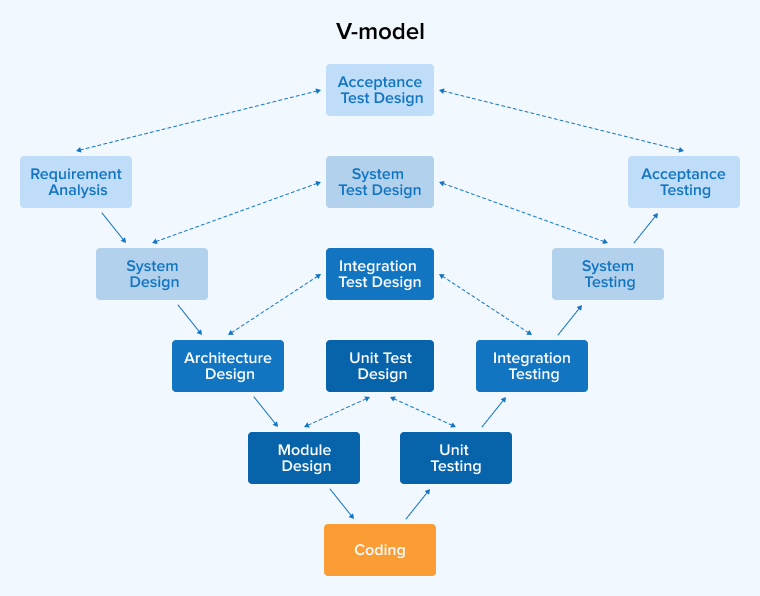
The V-model, or the validation and verification model, is a software development approach that came as an improvement of the waterfall model. Unlike the waterfall model, it adds a related testing phase at each stage of development. The process follows a V-shaped structure, where the left side focuses on planning and design (verification phases), and the right side focuses on testing and validation (validation phases). This setup allows teams to identify issues early and fix them before they grow into bigger problems.
Pros of the V Model
- Easy to Manage: The V-model provides a clear structure, which helps teams track progress, manage timelines, and stay aligned. This improves planning accuracy and reduces misunderstandings throughout the project.
- Early Defect Detection: The V-model encourages testing at every stage, helping detect errors early, reduce rework, and save both time and cost by preventing major issues in the later stages.
- Clear Traceability: As there is a testing phase attached to every stage, it’s easy to identify the gap between expected and achieved progress and work on improving the test results.
Cons of the V Model
- Inflexible: The V-model follows a fixed sequence, so it’s difficult to make changes later. It often requires extra time and effort, especially when project requirements keep evolving.
- High Upfront Planning: In the initial phase, the V-model needs detailed planning and heavy documentation, delaying progress and consuming time, especially when requirements are unclear or likely to change.
- Complicated Bug Fixing: The V-model lacks a clear way to handle issues found during testing and is not suitable for projects that need frequent changes or unexpected updates later.
When to Use the V Model?
- Critical systems, such as banking apps and healthcare systems, do not allow any kind of system failure.
- If the project demands huge documentation and strong regulatory compliance.
- Developers handle projects with mostly fixed and unambiguous requirements by developing them sequentially.
Iterative and Incremental Model – Modular Development for Faster Delivery
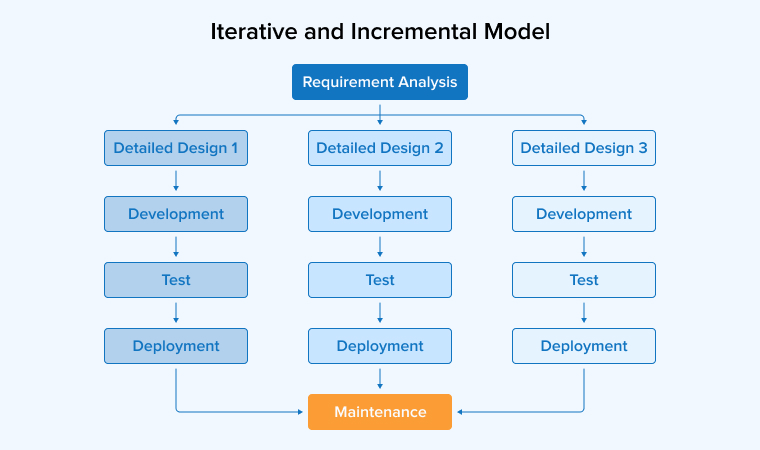
The Iterative and Incremental model builds software step-by-step through repeated cycles. Each cycle improves the previous version and adds new features or modules. This approach allows developers to learn from earlier stages and make small adjustments as the project progresses. This model works well when developers do not fully understand requirements from the beginning, as they can use feedback to refine future versions. The system grows gradually while maintaining a stable structure. Although the team allows minor changes, they must define the basic design early to avoid issues later.
Pros of the Incremental and Iterative Model
- Flexibility and Adaptability: This approach allows updates during development, helping teams adapt to changing needs or market conditions without disrupting the overall progress of the project.
- Continuous Testing: In these models, testing happens continuously throughout the process. Therefore, it’s easy to find and fix errors early, which improves quality and makes updates more manageable throughout development.
- Collaboration: Regular interaction with customers after each cycle provides timely feedback and insights throughout development, which helps to improve the product quickly and refine it as per the user expectations.
Cons of the Incremental and Iterative Model
- Technical Debt: Focusing too much on iterative development can lead to ignored technical debt, which gradually builds up and eventually slows down future feature development significantly.
- Scope Creep: Incorporating frequent customer feedback can lead to changes in project scope, create prioritization challenges, and make it difficult to meet deadlines, thus delaying project delivery.
- Minimal Documentation: When teams move quickly and change plans often, they often ignore writing documentation. It may not become a part of the workflow, resulting in the loss of important details.
When to Use the Incremental and Iterative Model?
- When developers build an application involving different loosely coupled components, such as registration and payment.
- If the product requires customer feedback and client involvement regularly.
- If you need to release the application quickly without compromising its stability.
Spiral Model – Risk-focused Development
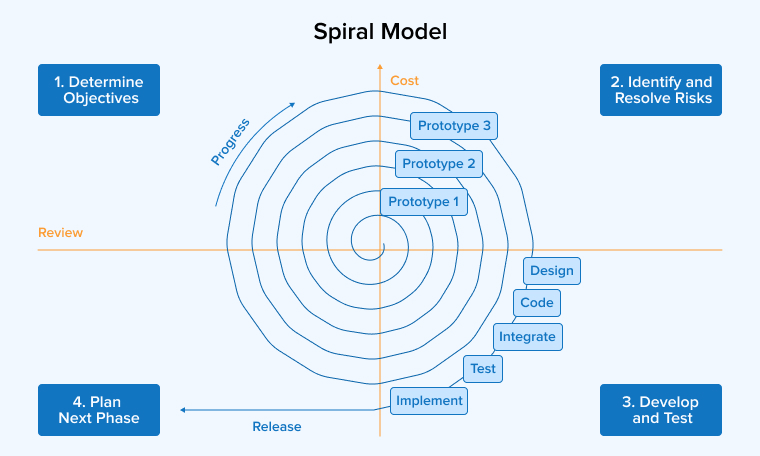
The spiral model is a development approach that focuses heavily on identifying and managing risks throughout a project. Teams perform work in repeated cycles, where each loop includes planning, analyzing risks, building or testing a solution, and reviewing progress. With every cycle, the system improves step-by-step. It also requires regular involvement from clients to give feedback and guide decisions. Teams usually handle changes in future cycles to avoid disrupting current work. This method blends structured and flexible practices of the waterfall, incremental/iterative, and prototype models.
Pros of the Spiral Model
- Early Prototyping: A major benefit is the ability to create working prototypes that stakeholders can try. Their feedback helps teams correct issues quickly and keep the project aligned with expectations.
- Flexible: The spiral model supports changing requirements by allowing updates after each cycle. Teams can add features or adjust plans anytime, which keeps the product relevant and up to date.
- Increased Risk Management: The spiral model focuses on identifying risks early in each stage. Teams study possible problems and plan solutions in advance, reducing unexpected issues and avoiding costly rework later.
Cons of the Spiral Model
- High Cost and Time: The model involves risk analysis and prototype development at each stage, making it quite expensive and time-consuming.
- Huge Documentation: Due to multiple cycles involved in the development process, the documentation becomes extensive and infeasible.
- No Fixed Deadline: You cannot estimate the number of phases in the early stages, and risk assessment and prototyping make it further difficult to predict the delivery date and budget.
When to Use the Spiral Model?
- If your project requirements are not very clear in the beginning, and you think that there can be changes and improvements from the client side at any stage.
- Developers handle critical software development related to space, defense, healthcare, etc., where they must avoid any chance of failure completely.
- If the project involves long-term commitments that may lead to changes in budget and deadline.
Prototype Model – Increasing the Team’s Understanding
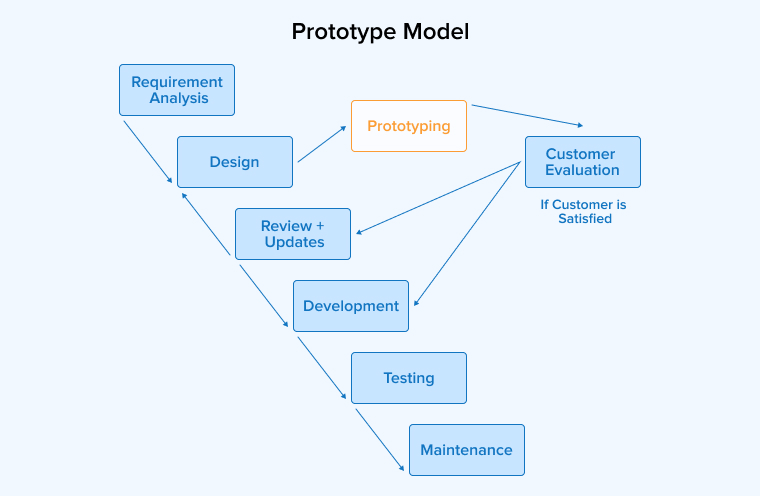
The prototyping model focuses on building an early version of the software to better understand what users actually need. Developers first create a simple working model, called a prototype, and share it with customers for feedback. This helps clear confusion and improves communication before full development begins. Developers test and update the prototype multiple times based on user input until it meets expectations. Once customers approve it, developers develop the final product more confidently.
Pros of the Prototype Model
- Quick Feedback: Prototyping lets users try an early version of the software and share feedback. This helps teams fix problems in the early stages and improve the final product effectively.
- Client Satisfaction: Allowing users to interact with early versions helps teams to understand their needs better. Their feedback improves design, validates ideas, and makes the final product more satisfying and user-friendly.
- Speedy Development: Rapid prototyping allows developers to build and test different ideas quickly. This speeds up design decisions, keeps work on track, and helps deliver the final product faster.
Cons of the Prototype Model
- Poor Decision-Making: Prototypes can sometimes mislead teams into prioritizing appearance over functionality. This may result in choices that look appealing but do not support the project’s long-term success.
- Excessive Change Requests: Frequent feedback during prototyping can lead to changing requirements, causing the project scope to expand and making it harder to clearly define final software needs.
- Prolonged Deadlines: Too many customer changes can delay deadlines and disrupt plans. It also makes it harder to maintain clear documentation and consistent project progress.
When to Use the Prototype Model?
- If you’re planning to build any product, consider this model as a prototype or MVP to help test your ideas before actual development begins.
- If you want to test specific features before complete integration with the product.
- If project requirements are unclear, a prototype will help teams and users understand what is actually needed, making the final system more accurate and aligned with expectations.
RAD Model (Rapid Application Development)
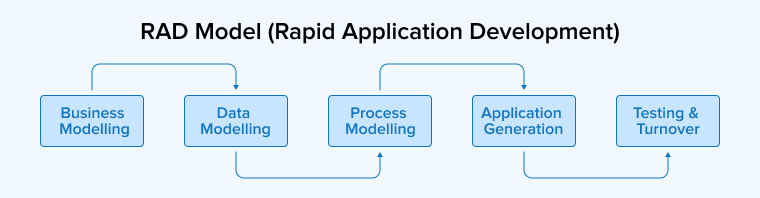
The Rapid Application Development (RAD) model is a software development approach that focuses on building systems quickly through repeated prototyping and continuous user feedback. Instead of spending a long time on planning, teams develop small parts of the system in parallel and release basic versions early. These versions are tested and improved in short time-boxed cycles. This allows requirements to be adjusted easily as the project progresses. Testing happens alongside development to ensure quality while maintaining speed.
Pros of the RAD Model
- Flexibility: RAD allows teams to easily handle changing requirements during development. Continuous collaboration helps improve the product while adding new features without disrupting the overall progress.
- Cost-Efficient: RAD reduces development time and makes updates easier through reusable components and continuous feedback. It can lower overall cost and simplify future maintenance efforts.
- Risk Control: RAD improves risk management by identifying problems early and fixing them during development. Continuous testing helps keep the project stable and reduces unexpected issues later.
Cons of the RAD Model
- Dependency on User Involvement: RAD needs regular user participation for feedback and decisions. If users are not available often, it can slow down development and delay project progress.
- Technical Debt: RAD’s fast development can create shortcuts in coding, which may cause technical debt. Over a period of time, this increases maintenance effort and makes large projects harder to manage.
- Reduced Scalability: RAD delivers results quickly but may ignore long-term design needs. This can limit scalability, making it less suitable for large or complex systems that require future growth.
When to Use the RAD Model?
- If the project demands client involvement during the entire development process, or the client himself wants to be an active part of the process.
- If the application to be developed can be divided into smaller and independent modules
- If the project is to be completed within a short span of time, such as 2-3 months.
RUP (Rational Unified Process) Model – Balance of Structure and Flexibility
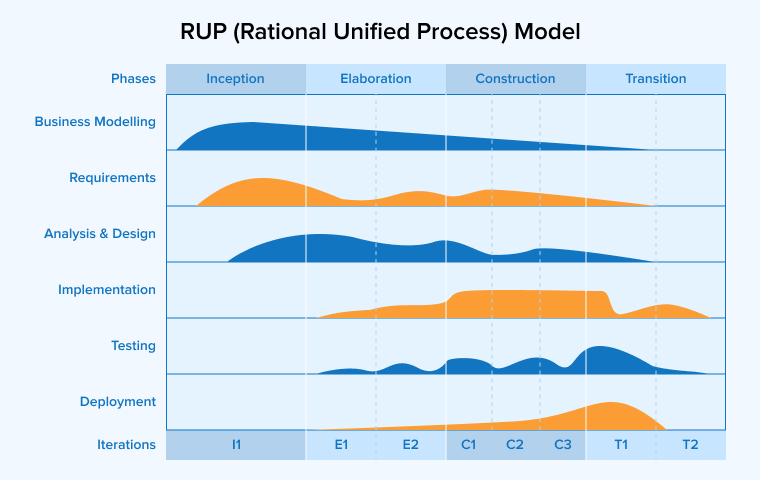
The Rational Unified Process (RUP) is a flexible software development approach that combines step-by-step structure with repeated iterations. It divides the project into four main phases: inception, elaboration, construction, and transition. Each phase focuses on different goals, such as gathering requirements early and emphasizing design, coding, and testing later. Work is done in short cycles, where teams build and improve parts of the system gradually. Important activities like planning, design, and testing happen throughout the process, but with different levels of attention.
Pros of the RUP Model
- Better Control: RUP ensures strong control through step-by-step approvals, improving quality and security. However, this strict process can reduce flexibility and slow down changes during development.
- Risk Management: RUP improves risk handling by identifying potential problems early. Teams can address issues in advance, which lowers the chances of failure and supports smoother project progress.
- Reusability of Components: RUP encourages using existing code and components whenever possible. This reduces development effort, saves time, and helps reduce overall project costs while improving efficiency.
Cons of the RUP Model
- Extensive Documentation: RUP requires creating many detailed documents throughout development. This can increase workload and slow progress, as teams spend more time on paperwork than actual development tasks.
- Unsuitable for Small Projects: RUP works best for large and structured projects, but it can become too heavy and time-consuming for smaller projects with budget constraints and tight deadlines.
- Requires Discipline: RUP depends on team members for following rules, maintaining proper records, and staying organized, which may be difficult for teams lacking experience or consistency.
When to Use the RUP Model?
- If your project requires thorough and compulsory documentation, structured quality assurance, and traceability.
- If the project is complex and risky, it demands a large and highly skilled team.
- If the project requirements change constantly, and if there can be different levels of customer and stakeholders’ involvement.
Agile Model – Iterative Development with Continuous Collaboration
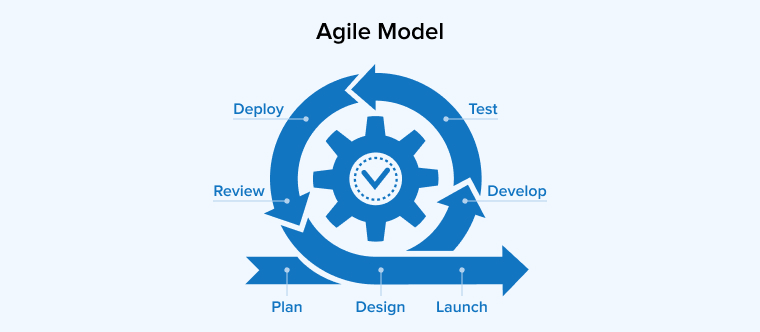
The Agile model is a flexible software development approach that follows the Agile Manifesto, prioritizing individuals, working software, customer collaboration, and responding to change over rigid processes. The teams break the project into smaller parts and deliver pieces of software in short cycles called iterations or sprints. Each cycle typically takes two to four weeks and ends with a working product increment that stakeholders can review. The Agile methodology is widely adopted today due to its emphasis on continuous feedback, strong collaboration between developers and clients, and flexibility in adapting to change.
Pros of the Agile Model
- Adaptability to Change: Even in later stages of development, Agile welcomes changes without resistance. Priorities can be reshuffled, features can be added, or requirements can be modified without disrupting the overall flow of the project.
- Faster Time to Market: Working features are delivered in short cycles, allowing businesses to release products quickly. This rapid release pattern helps companies respond to market needs and stay ahead of competitors.
- Stronger Customer Involvement: Throughout the project, customers stay engaged by reviewing each iteration and sharing feedback. Such continuous engagement ensures the final product matches user expectations and business goals.
Cons of the Agile Model
- Less Predictability: Predicting exact timelines and budgets in advance becomes difficult due to Agile’s flexible nature. For projects with strict delivery dates or fixed costs, this lack of certainty can be a serious challenge.
- Requires Experienced Teams: Skilled team members who can self-organize and make decisions quickly are essential for Agile methodology to succeed. Without that maturity, inexperienced teams often struggle with its fast pace and collaborative demands.
- Documentation Gaps: Working software takes priority over detailed documentation in Agile projects. Later on, this can create issues when onboarding new members or maintaining the system over the long term.
When to Use the Agile Model?
- When project requirements are likely to evolve or are not fully defined at the start.
- If the project demands frequent client involvement, regular feedback, and continuous improvements.
- When the business needs to release a working product quickly and refine it through real user input over time.
Kanban: Continuous Flow and Transparency
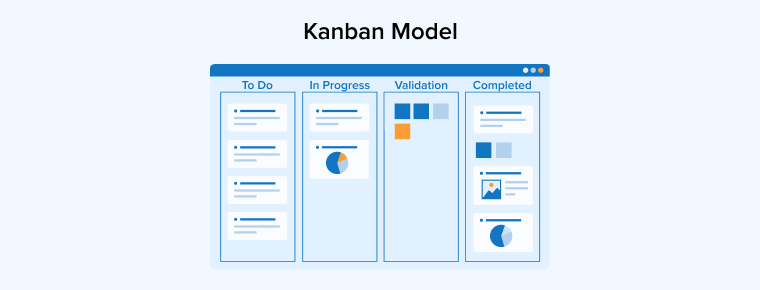
Kanban is a visual approach to the software development process that manages work through a continuous flow rather than fixed iterations. Originally developed in Japanese manufacturing, this method uses a Kanban board with columns such as To Do, In Progress, and Done to track tasks at every stage. Teams limit the number of tasks in progress at any given time, which helps prevent bottlenecks and improves focus. Unlike Scrum, Kanban does not rely on sprints or strict timelines, making it ideal for teams that handle ongoing work or unpredictable priorities.
Pros of Kanban
- Clear Visibility of Work: Every task and its current status appear on the Kanban board at a glance. Such transparency helps identify delays, manage workloads, and keep everyone aligned without lengthy status meetings.
- Continuous Delivery: Work flows steadily without waiting for fixed release cycles. Completed features can be delivered as soon as they are ready, improving overall responsiveness.
- Reduced Bottlenecks: Limiting work in progress prevents teams from being overloaded. This focused approach helps complete tasks faster and improves the overall efficiency of the development process.
Cons of Kanban
- Lack of Timeboxing: Without fixed sprints or deadlines, progress can slow down over time. Maintaining urgency becomes difficult, especially when priorities are not clearly defined.
- Difficult for Complex Planning: Kanban is not suitable for long-term projects that need detailed roadmaps and predictable milestones.
- Dependency on Team Discipline: Updating the board regularly and respecting work-in-progress limits is left entirely to the team. Without this discipline, the entire system loses accuracy and effectiveness.
When to Use Kanban?
- When the project involves continuous improvement, ongoing work such as maintenance, support, or operational tasks.
- If the team handles unpredictable workloads where priorities shift frequently and need real-time adjustments.
- When the goal is to improve workflow efficiency, reduce waste, and gradually optimize processes without disrupting current operations.
Scrum: Structured Sprints
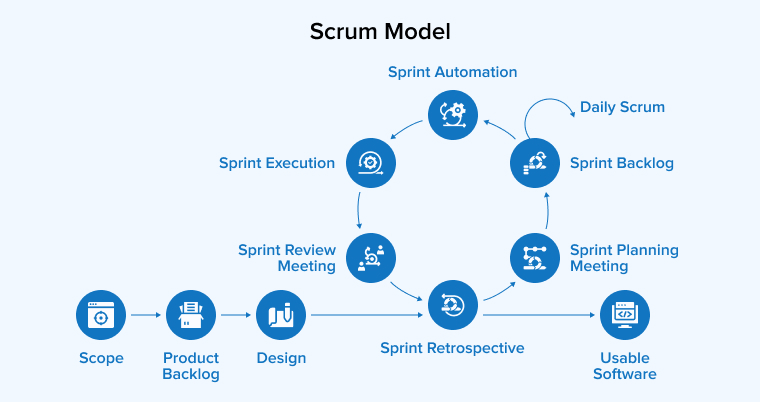
Scrum is a popular Agile framework that organizes software development into short, structured cycles called sprints, usually taking two to four weeks. A working increment of the product gets delivered at the end of each sprint, allowing teams to review progress and adjust direction quickly. Clear roles such as Product Owner, Scrum Master, and Development Team are defined, along with specific events including sprint planning, daily standups, sprint reviews, and retrospectives.
Pros of Scrum
- Predictable Delivery Cycles: Fixed sprint lengths make it easier to plan releases and forecast progress. Teams know exactly when work will be reviewed, tested, and delivered, which improves planning accuracy.
- Strong Team Accountability: Defined roles and daily standups create clear ownership of tasks. Every team member understands their responsibilities, which improves coordination and reduces communication gaps during development.
- Continuous Improvement: Sprint retrospectives give teams a structured opportunity to reflect on what worked and what didn’t. This regular review cycle helps refine processes and increase productivity over time.
Cons of Scrum
- Rigid Event Structure: Multiple sessions, such as planning, standups, reviews, and retrospectives, are required by Scrum. For smaller teams, these events can feel time-consuming and may slow down actual development work.
- Scope Creep Within Sprints: Although sprint goals are fixed, frequent change requests from stakeholders can disrupt focus. Without strong product ownership, sprints may lose direction and impact delivery quality.
- Difficult for New Teams: Discipline, role clarity, and Agile maturity are all required for Scrum to work effectively. Teams new to Agile often face a steep learning curve before achieving consistent results.
When to Use Scrum?
- When the project is complex, requirements are expected to evolve based on user feedback and market changes.
- If the team needs a structured framework with defined roles, ceremonies, and predictable delivery cycles.
- When stakeholders want regular visibility into progress and the ability to influence priorities, sprint by sprint.
How to Choose the Right Software Development Model
Selecting the right software development model is one of the most important decisions in any project. The wrong choice can lead to missed deadlines, budget overruns, and a final product that fails to meet user expectations. Below are the key factors to consider before finalizing the development approach for your project.
- Project Size and Complexity: Smaller projects with limited features often work well with Waterfall or Prototype models, while large and complex systems benefit from Agile, Scrum, or RUP. Evaluate the scope, number of modules, and integration requirements before deciding.
- Clarity of Requirements: Fixed and well-defined requirements suit Waterfall or V-model approaches. If requirements are likely to change or evolve based on user feedback, flexible models like Agile, Scrum, or Iterative work better.
- Project Timeline and Deadlines: Tight deadlines with quick delivery needs are better served by RAD or Agile models. For projects with longer timelines and detailed planning phases, the Waterfall, V-model, or Spiral are more appropriate choices.
- Budget Constraints: Limited budgets typically align with Waterfall or Incremental models due to their predictable cost structures. Higher budgets can support risk-heavy approaches like Spiral or RUP, which involve detailed analysis and prototyping.
- Level of Customer Involvement: Frequent client participation throughout development calls for Agile, Scrum, or RAD. If clients prefer minimal involvement after initial requirements, the Waterfall or V-model fits better.
- Risk Tolerance: High-risk projects involving safety-critical systems such as healthcare, banking, or defense need Spiral or V-model approaches. Lower-risk projects can adopt Agile, Kanban, or Iterative methods without extensive risk management overhead.
- Team Size and Expertise: Experienced and self-organizing teams perform well with Agile, Scrum, or Kanban. Smaller or less experienced teams often find Waterfall or Incremental models easier to follow due to their structured nature.
- Documentation Requirements: Industries with strict regulatory and compliance needs require heavy documentation, making V-model or RUP a suitable choice. Projects with minimal documentation needs can move faster with Agile or Kanban.
- Need for Early Product Release: When launching an MVP or quickly validating an idea in the market, RAD, Prototype, or Agile models deliver faster results. For projects where the complete product must be ready before release, the Waterfall or V-model is better suited.
- Scope for Future Changes: Products that are expected to evolve should follow Agile, Iterative, or Spiral approaches. Stable products with no anticipated changes can rely on the Waterfall or V-model without facing long-term limitations.
- Type of Product or Industry: Enterprise software, healthcare systems, and financial applications often demand structured models like the V-model or RUP. Consumer-facing products, mobile apps, and SaaS platforms typically benefit from Agile, Scrum, or Kanban.
- Testing and Quality Requirements: Projects where quality cannot be compromised should adopt V-model or Scrum, both of which emphasize testing throughout development. For less critical projects, Iterative or RAD models offer adequate quality with faster delivery.
Final Thoughts
There cannot be a single best model that every project can implement to achieve the expected results. Every model is developed to enhance the software development and delivery process. The selection of the correct model creates the path for a successful project delivery, but it can be achieved only when all its associated stages are properly implemented. Hence, it’s necessary to ensure that the team thoroughly understands the project goals and all the aspects of the selected SDLC model.
FAQs
Software design models are structured approaches that guide teams through planning, building, testing, and maintaining software. The most common ones include Waterfall, V-model, Iterative, Spiral, Prototype, RAD, RUP, Agile, Kanban, and Scrum.
The Software Development Lifecycle (SDLC) is a structured process used to plan, build, test, and deliver high-quality software within a defined timeline and budget. It covers every stage from initial requirements to post-release maintenance.
The SDLC typically includes six core phases: requirement gathering, design, development, testing, deployment, and maintenance. Each phase has a clear purpose, from defining what to build to keeping the product running after release. Different models may rearrange these phases, but the core structure stays the same.
The SDLC improves software quality by adding structure, accountability, and testing at every stage. Defined phases help catch defects early, reduce rework, and maintain clear documentation. Continuous reviews and stakeholder feedback ensure the final product meets functional, performance, and security standards.

Itesh Sharma is core member of Sales Department at TatvaSoft. He has got more than 6 years of experience in handling the task related to Customer Management and Project Management. Apart from his profession he also has keen interest in sharing the insight on different methodologies of software development.



Comments
Leave a message...