

Software teams are under more pressure than ever. Deadlines are shorter, codebases are becoming bigger, and developers spend more hours on routine tasks like writing test cases, fixing small bugs, building repetitive components, and reviewing pull requests. This leaves less time for logical and analytical work that actually matters, such as solving real-world problems and building better products.
Custom software development companies are now using AI agents to improve software quality by freeing teams from repetitive tasks. According to the PwC AI Agent Survey, 75% to 88% of companies from various domains have already started using AI agents in some form, and 66% of companies are seeing real productivity improvements.
However, you cannot expect a huge difference in productivity by just using AI agents. Many teams directly jump in without a clear plan and end up spending more time fixing AI-generated code. Therefore, it’s important to have a thorough understanding of how AI agents work and a proper strategy to leverage them.
This blog covers what AI agents are, the key features that distinguish them from autocomplete tools, their types, tools, the benefits and limitations you should consider, how to integrate them into your engineering workflow, and the future possibilities.
What Are AI Agents?
AI agents are autonomous software systems that can perceive their environment, make decisions, and take multi-step actions to complete tasks with limited human intervention. Unlike traditional AI assistants that respond to a single prompt at a time, AI agents can handle complex tasks by planning, using tools, evaluating results, and adjusting their approach until the goal is met.
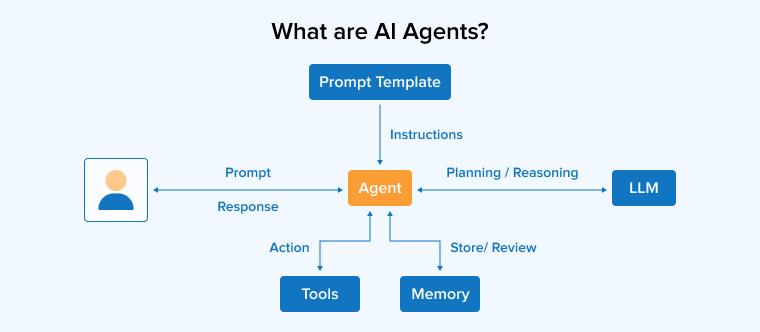
In a software development context, an AI agent can read a ticket, locate the relevant files, propose a fix, run the tests, debug failures, and open a pull request, all without a developer guiding each step. The agent uses Large Language Models (LLMs) for reasoning and Natural Language Processing (NLP) for input interpretation, but its defining trait is the ability to operate autonomously across a sequence of decisions rather than producing a single output.
Key Features of AI Agents in Software Development
The features below highlight how AI agents are useful in the software development process.
- Contextual Understanding: AI agents can read across multiple files, understand project structure, and follow existing code patterns. A good AI agent picks up your team’s conventions from existing code rather than generating output that ignores your style guide.
- Multi-modal Capabilities: Modern AI agents process more than just text. They handle code, logs, error traces, screenshots, design files, and documentation, providing a broader context required to produce accurate output.
- Automated Code Generation: AI agents generate code for routine work like CRUD endpoints, API contracts, boilerplate components, and database schemas. This frees developers from repetitive tasks and reduces time spent on low-value work.
- Bug Discovery and Debugging: AI coding agents identify patterns linked to common bugs, perform root cause analysis across logs and stack traces, and suggest fixes faster than manual investigation in most debugging workflows.
- Continuous Integration and Deployment (CI/CD): AI agents integrate with CI/CD pipelines to run automated checks, flag failed builds, and apply fixes in real time. Some agents can even detect and fix runtime errors before they affect production.
- Automated Testing: Agents generate unit tests, integration tests, and edge case scenarios that human developers often skip. This results in broader test coverage without putting in manual effort.
- Natural Language Processing for Requirements Gathering: AI agents use natural language processing to read tickets, user stories, and product specs, then translate them into structured technical tasks. This bridges the gap between business requirements and code.
Types of AI Agents in Software Development
AI agents are categorized into the following five types based on the stage of the development lifecycle they handle:
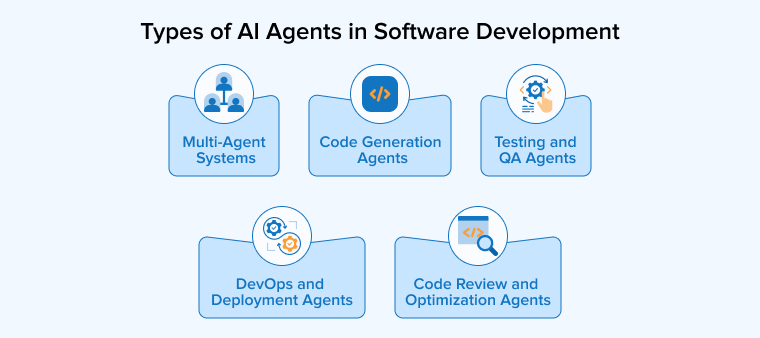
- Code Generation Agents: These agents generate code for new features, scaffolding, and boilerplate based on prompts or tickets. Tools like Claude Code, Cursor, and GitHub Copilot Agent Mode fall into this category and are used by software engineers to accelerate day-to-day coding.
- Testing and QA Agents: These agents create and run unit, integration, and end-to-end test suites. They identify edge cases that human testers often miss and improve overall test coverage without adding manual effort.
- Code Review and Optimization Agents: These agents analyze pull requests for bugs, security gaps, and performance issues. They suggest cleaner implementations, flag style violations, and help teams maintain consistent code quality across large codebases.
- DevOps and Deployment Agents: These agents automate build, deployment, and infrastructure tasks. They monitor CI/CD pipelines, apply configuration changes, and respond to runtime errors, reducing the operational load on DevOps teams.
- Multi-Agent Systems: These setups combine multiple AI agents that work together as agent teams. One agent might handle research, another write code, another run tests, and another review the output. Frameworks like CrewAI make it easy to build these systems for complex tasks that need different skills.
Top AI Agent Tools for Developers
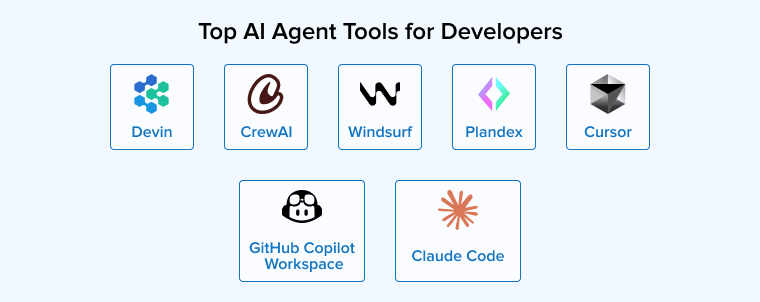
The list below includes the AI agent tools becoming popular among developers, each designed for different ways of working.
Claude Code
Claude Code is Anthropic’s terminal-based coding agent powered by the Claude family of AI models. It reads files, writes code, runs shell commands, and handles multi-step tasks from the command line. Its 1M-token context window allows for understanding and working with large codebases in a single session, making it a strong fit for autonomous tasks that require deep code understanding.
Cursor
Cursor is an AI-focused IDE built on VS Code to tightly integrate the editor with AI agents. It offers inline completions, multi-file edits, and an Agent Mode to handle autonomous changes across the codebase. Developers prefer Cursor when they want IDE-native features with the ability to switch between underlying AI models such as Claude, GPT, and Gemini.
CrewAI
CrewAI is an open-source Python framework for orchestrating multiple AI agents that work together as agent teams. It uses a role-based model where each agent has a defined role and goal, and supports sequential, hierarchical, and consensus-based workflows. CrewAI is best suited for teams building custom workflows where specialized agents collaborate on complex tasks.
Devin
Devin AI is designed as a fully autonomous AI software engineer that operates in its own cloud environment with access to a browser, terminal, and editor. Developers only need to assign tasks to the Devin AI, and the rest of the processes, such as planning, coding, execution, and creating pull requests, will be carried out by it. It is considered one of the most advanced approaches to fully autonomous AI development tools in the market.
Plandex
Plandex is an open-source terminal-based AI coding agent built for large, multi-file projects and long-running tasks. It uses a sandboxed approach where changes are made in a separate version control layer, so developers can review and approve them before they are committed to the main codebase. This lets teams maintain strong control while still benefiting from the speed of an autonomous agent.
GitHub Copilot Workspace
GitHub Copilot Workspace extends Copilot from autocomplete to autonomous task execution. It analyzes the codebase, reads relevant files, proposes changes, runs terminal commands, and fixes issues based on compile and test results. It supports multiple AI models and works across multiple editors like VS Code, JetBrains, Eclipse, and Xcode, giving it the broadest IDE coverage among development tools.
Windsurf
Windsurf is a dedicated AI-powered IDE built around an agent called Cascade, which keeps the agent aware of every change you make. It automatically tracks edits, understands intent, and suggests next steps without needing constant prompting. Developers who want a more hands-off experience than Cursor while still working in an IDE often choose Windsurf.
Benefits of Using AI Agents in Software Development
The following are the benefits of AI agents once they are integrated into real engineering workflows:
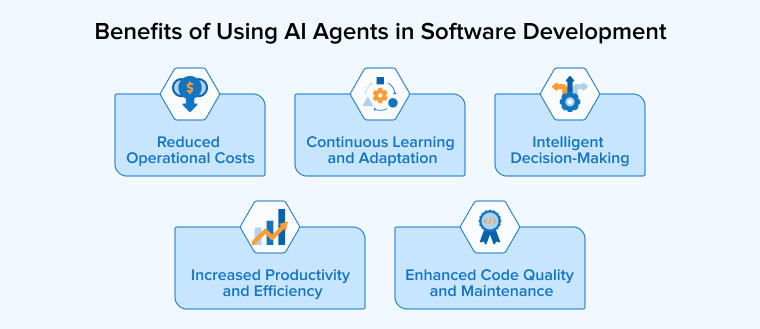
Increased Productivity and Efficiency
AI agents handle repetitive tasks like writing boilerplate, generating tests, and drafting documentation. This frees hours of manual work, letting developers spend more time on design, problem-solving, and releasing features.
Enhanced Code Quality and Maintenance
AI coding agents catch issues during code reviews that human reviewers often miss, including security gaps, performance regressions, and inconsistent patterns. They also help to maintain older code by flagging outdated libraries, suggesting refactors, and keeping documentation aligned with the latest changes in the codebase.
Reduced Operational Costs
AI agents can even handle those tasks that require senior developers or hiring specialists. Faster delivery cycles, fewer production errors, and lower review overhead translate directly into cost savings, especially for teams managing large or long-running projects.
Intelligent Decision-Making
AI agents go beyond producing code by helping teams to make better technical choices. They compare different implementation options, evaluate trade-offs between performance and readability, and gather relevant context from past projects, giving software engineers the inputs they need for faster and more confident decision-making.
Continuous Learning and Adaptation
Unlike static tools, AI agents improve over time. Learning agents adapt to your team’s coding style, identify patterns in accepted versus rejected suggestions, and adapt to new frameworks, which keeps them useful as your stack and standards evolve.
Challenges of AI Agents in Software Development
AI agents are powerful, but they come with real limitations that engineering teams need to plan for before scaling adoption.
Code Quality and Verification Debt
AI-generated code is not always high-quality code. Without rigorous review, teams end up with a backlog of unchecked AI output that carries hidden bugs, security gaps, and architectural drift. The teams that rely too heavily on AI without verification often spend more time fixing issues later than they saved during the original development.
Security and Compliance Risks
AI agents that write code, call APIs, and access proprietary code can create security risks that traditional development tools do not. These include prompt injection, leakage of customer data through agent prompts, and unauthorized access to external systems via overly permissive tool integrations. For regulated industries, these risks need to be addressed before deploying code in production.
Hallucinations and Contextual Gaps
AI agents can confidently generate code that references nonexistent libraries, invents API signatures, or implements logic that looks correct but fails on edge cases. The required context for accurate results, like team conventions, system anomalies, and business logic, is not always available to the agent. When that context is missing, the agent fills the gap by producing output based on probabilities from their training data that sounds correct but is actually incorrect.
Integration Complexity and Initial Setup Cost
Integrating an AI coding agent into a real workflow requires significant effort. Initial setup involves configuring permission boundaries, setting up MCP servers, defining instruction files, and integrating with existing tools like Jira, GitHub, and CI/CD pipelines. Many teams underestimate this cost and abandon agents before they reach productive scale.
Over-Reliance and Decreased Proficiency
When developers depend too much on AI agents, their own skills can erode. Teams that rely heavily on agents for core tasks may lose institutional knowledge of how their systems work, which makes them dependent on the agents to debug their own codebases. Striking a balance between automation and hands-on engineering is essential for long-term team health.
How to Integrate AI Agents into Software Development Workflow
A successful AI agent rollout requires a structured, step-by-step approach instead of simply providing tools to the team and expecting results.
Identify Areas for AI Assistance
Do not attempt to overhaul your entire workflow at once. Start by identifying bottlenecks or repetitive tasks where AI agents can add immediate value, such as:
- Documentation: Creating and updating API docs, READMEs, or changelogs that often become outdated between releases.
- Testing: Automatically generating unit tests, integration tests, and edge-case scenarios that developers tend to skip.
- Triage: Grouping and summarizing incoming bug reports or support tickets to help engineers prioritize faster.
- Code Reviews: Conducting initial line-by-line checks for syntax errors, security flaws, and style guide violations before a human review.
Implement Spec-Driven Development
AI agents perform best when they have clear constraints rather than vague instructions. Adopt a spec-driven development process:
- Product Requirements Document (PRD): Collaborate with the agent to draft a PRD or technical spec outlining features, user stories, and constraints like which libraries to use.
- Contextual Spec File: Save the spec as a versioned document, such as PLAN.md or AGENTS.md, so the agent can reference it during every task.
- Acceptance Criteria: Define clear inputs, outputs, and edge cases for each task to reduce hallucinations and assumptions.
- Architecture Boundaries: Document which patterns, frameworks, and folder structures the agent must follow to keep changes consistent.
Connect Agents to Your Development Ecosystem
An AI agent delivers value only when it can interact with the tools that your team already uses. Plug it into your stack so it works alongside developers, not in isolation:
- Version Control: Connect agents to GitHub, GitLab, or Bitbucket so they can branch, commit, and open pull requests within your standard flow.
- Project Management: Integrate with Jira, Linear, or Asana so the agent can read tickets and write status updates automatically without manual transfers between teams.
- CI/CD Pipelines: Integrate the agent into your build, test, and deploy pipelines so it can run checks and respond to failures in real time.
- MCP and APIs: Use Model Context Protocol servers to give the agent controlled access to internal databases, observability tools, and other external systems.
Establish Robust Guardrails and Review Processes
Autonomy without oversight is the fastest way to introduce risk. Set up guardrails that keep agents productive without compromising code quality or security:
- Permission Boundaries: Limit which folders the agent can edit and which commands it can run, especially around proprietary code and production systems.
- Access Controls: Restrict the agent’s reach into customer data, secrets, and sensitive configuration files unless explicitly approved.
- Mandatory Human Review: Require a human-in-the-loop review on every pull request, with no exceptions for changes that look minor.
- Automated Safety Nets: Add linting, security scans, and test coverage gates as a second layer of defense behind human reviewers.
Train Your Team and Refine
The teams that treat AI agents as a skill to learn, and not a tool to install, benefit the most. Invest in training and feedback loops to compound the value over time:
- Hands-On Onboarding: Conduct working sessions where developers practice prompting, reviewing, and correcting agent output on real tasks.
- Pattern Library: Build a shared collection of strong and weak prompts so the team learns what produces useful output.
- Performance Tracking: Monitor metrics like time-to-merge, defect rates on AI-coauthored PRs, and developer satisfaction scores.
- Iterate and Expand: Refine specs, permissions, and review processes based on what the data shows, and then extend the agent to new areas once the current workflow proves itself.
Future of AI Agents in Software Development
The next phase of AI agents will reshape how engineering teams are structured. Some of the predicted trends to watch out for in the future are as follows:
Multi-Agent Systems Becoming the Default
Single-agent workflows handle one task at a time through a single context window, but production systems are moving toward agent teams that work in parallel. One agent handles research, another writes the code, another runs tests, and another reviews the output. Frameworks like CrewAI and LangGraph make these setups practical for real projects, and most enterprise teams will run multi-agent setups within the next two years using these frameworks.
Industry-Specific Agents on the Rise
Industry-specific agents are rapidly replacing generic coding agents. Healthcare AI agents are entering clinical software development to handle compliance-heavy workflows, telecom companies are deploying agents to automate network configuration, and finance teams are using agents for regulatory reporting and risk modeling. The underlying patterns stay similar, but the domain-specific guardrails differ in important ways.
Shift From Coding to Orchestration
The role of the human developer is shifting from typing code line by line towards orchestrating, reviewing, and guiding agents. Senior engineers will spend more time on architectural decisions, system design, and quality oversight, while agents handle the bulk of implementation. This shift is already visible in teams that have integrated agents at scale.
Deeper Integration with the SDLC
AI agents are expanding beyond coding into every stage of the software development lifecycle. They will increasingly handle requirements analysis, sprint planning, deployment monitoring, and incident response. The final goal is an SDLC where agents handle every step, while human developers serve as decision-makers and reviewers instead of executors.
Tighter Governance and Compliance Layers
As AI agents take on more critical work, organizations will invest heavily in governance frameworks that track agent actions, audit decisions, and enforce compliance. You can expect enterprise-grade tooling around permission management, action logging, and explainability to mature quickly, especially for regulated industries where every change needs a clear paper trail.
Final Thoughts
AI agents for software development have moved from the experimental stage and have become part of how serious engineering teams release faster, maintain quality, and reduce the overhead of routine work. The teams getting real value are not the ones with the most agents installed, but the ones that built clear processes around them. When AI agents are treated as collaborators that need guidance rather than autonomous autopilots, the productivity gains increase over time.
The shift ahead is less about replacing developers and more about reshaping what developers spend their time on. Teams that adopt this shift early, with the right governance and discipline, will be in a much stronger position than teams that either resist the change or rush in without structure.
FAQ
AI agents in software development are autonomous software systems that perform development tasks such as writing, testing, debugging, and reviewing code with minimal human intervention. They differ from traditional AI assistants because they take action across multiple steps rather than just suggesting code. Tools like Claude Code, Cursor, and GitHub Copilot Workspace are leading examples.
No, AI agents cannot replace software developers. They handle repetitive tasks and routine coding, but they lack the architectural judgment, business understanding, and stakeholder communication that human developers bring.
The best AI agent tools for developers are Claude Code, Cursor, GitHub Copilot Workspace, Devin, Plandex, Windsurf, and CrewAI.
Yes, AI agents are safe to use when deployed with proper guardrails like permission boundaries, sandboxed execution, and mandatory human review. Without these controls, they introduce risks such as security vulnerabilities, hallucinations, and unauthorized access. Treat AI agents like junior engineers who need oversight, not autonomous systems left unchecked.
Businesses can integrate AI agents by starting with one bounded use case, defining clear specs, connecting the agent to their existing tools, setting permission boundaries, and requiring human review on every change. Code reviews, automated testing, and documentation are common starting points because they are low-risk and easy to measure.

Itesh Sharma is core member of Sales Department at TatvaSoft. He has got more than 6 years of experience in handling the task related to Customer Management and Project Management. Apart from his profession he also has keen interest in sharing the insight on different methodologies of software development.



Comments
Leave a message...