

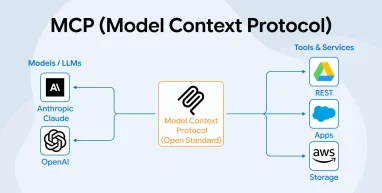
Large Language Models (LLMs) have become essential tools across modern industries. However, their usefulness is often limited when they cannot directly access real-time or private enterprise data. Though these models are strong at generating text and reasoning through problems, they are still disconnected from the critical information stored in business systems. This gap creates challenges for organizations that want AI to perform meaningful, real-world actions instead of just producing responses based on training data.
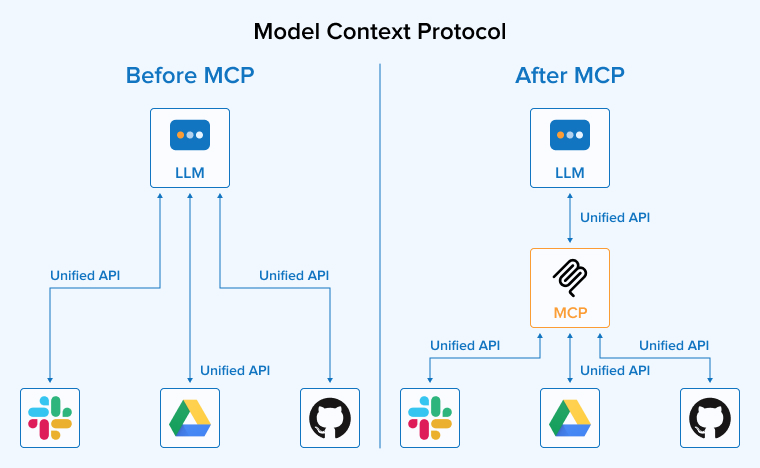
AI software development companies used to depend on custom APIs, plugins, or complex integrations, which were difficult to maintain and scale. The Model Context Protocol (MCP) introduces a standardized approach to bridge this gap. It defines a common way for AI systems to interact with external tools, databases, and applications without needing repeated custom development. This makes AI systems more practical and useful in enterprise environments.
In this guide, we’ll understand what an MCP is, its architecture and components, working, features, advantages, real-world applications, usage scenarios, and comparison with its previous and existing alternatives.
What is MCP (Model Context Protocol)?
The Model Context Protocol (MCP) is a common framework that enables AI models such as Claude, GPT, Gemini, and others to interact with external applications, data sources, and digital tools in a consistent manner. Instead of creating separate integrations for each database, cloud service, software platform, or business application, developers can expose their systems through MCP. Consequently, AI models can access these systems using a shared set of rules. As a result, they can discover available functions, request information, and perform actions whenever needed without requiring complex, custom integrations.
MCP follows a client-server approach, where servers provide tools and resources that AI applications can discover and use as needed. The protocol offers detailed descriptions of available functions, guiding models on the necessary inputs and the expected outputs.
By giving AI access to reliable external data and services, MCP improves accuracy, reduces the chances of generating incorrect information, and enables more capable, context-aware applications.
Why Do We Need MCP?
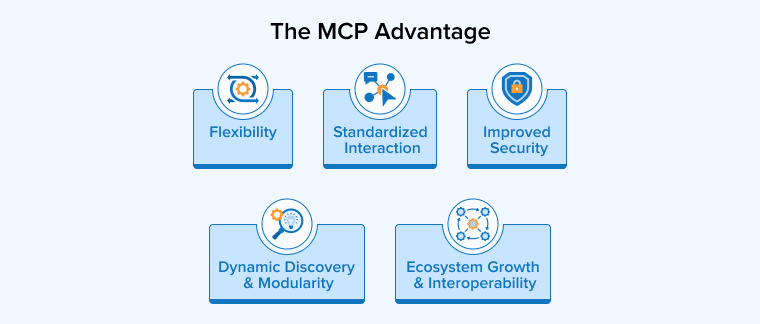
Model Context Protocol is becoming a necessary need for businesses to make the best use of AI platforms due to its following advantages:
Enhanced Security & Governance Capabilities
MCP is designed to help organizations use AI securely while maintaining strict control over data and system access. It allows administrators to define exactly what information and tools an AI agent can use, ensuring actions remain within approved limits. Features such as authentication, permission management, activity monitoring, and centralized governance improve visibility and accountability. MCP even supports compliance requirements and reduces security risks by accessing data directly from trusted sources rather than storing unnecessary copies.
Standardized Interaction
MCP creates a consistent way for AI systems to work with different applications and data sources. Organizations do not need to establish separate connections for every tool or platform, but can use the shared framework to simplify the integration. As a result, it’s easy to expand AI capabilities with the addition of new services without much technical effort and compatibility challenges.
Flexibility
A major advantage of MCP is its flexibility across different AI technologies and platforms. Organizations are not tied to a single provider and can adopt new models or services as their needs change. As there is a common standard followed across the organization, replacing or upgrading AI tools becomes much simpler and requires minimal rework. This adaptability helps businesses respond to technological changes more efficiently while preserving compatibility with existing systems and workflows.
Dynamic Discovery and Modularity
MCP provides flexibility to AI systems by allowing them to discover available tools during execution rather than relying on fixed, pre-programmed functions. Consequently, the system can automatically adapt to new services, add capabilities, or remove outdated ones without requiring changes to its core structure. As a result, AI agents become more adaptable, scalable, and easier to maintain. This approach reduces manual setup, supports continuous expansion, and makes it simpler for developers to manage complex and evolving tool environments.
Ecosystem Growth and Interoperability
As an open standard, MCP encourages a growing network of compatible tools that can be easily adopted across different AI applications. Developers can quickly take advantage of new integrations without rebuilding existing systems, allowing AI capabilities to expand over time. The availability of shared tools, community contributions, and clear implementation guidance reduces development effort and speeds up deployment.
What is the MCP Architecture?
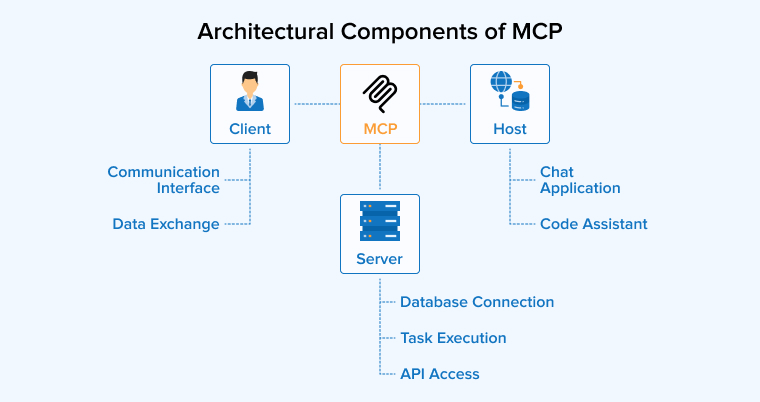
The Model Context Protocol (MCP) employs the client-host-server architecture, where the responsibilities are separated across the following components:
Architectural Components of MCP
There are three main components in the MCP architecture. They are as follows:
1. MCP Host
In an MCP-based environment, the host is the main execution environment of the AI Agent or model. It acts as the main application with which users interact and serves as the central coordinator for AI operations. It manages connections to external services, coordinates tool usage, and ensures that information is delivered to the model in an organized manner. Additionally, the host applies security policies, manages permissions, and maintains session boundaries, thereby ensuring secure and controlled interactions.
2. MCP Client
A client in the MCP architecture is created and managed by the host, and it serves as the communication bridge between the host application and an MCP server. Each client maintains a dedicated one-to-one connection to a single server and is responsible for exchanging requests and responses. It helps discover available capabilities while facilitating information exchange in both directions. As a result, it ensures that all interactions comply with the protocol’s requirements.
3. MCP Server
An MCP server is a lightweight and independent program hosted on the server or in the cloud that makes external resources available to AI systems in a structured and controlled way. It connects to a specific application, database, service, or local resource and provides access to selected functions and information. Each server is usually responsible for a focused set of capabilities, making it easier to manage and maintain.
Functional Components of MCP
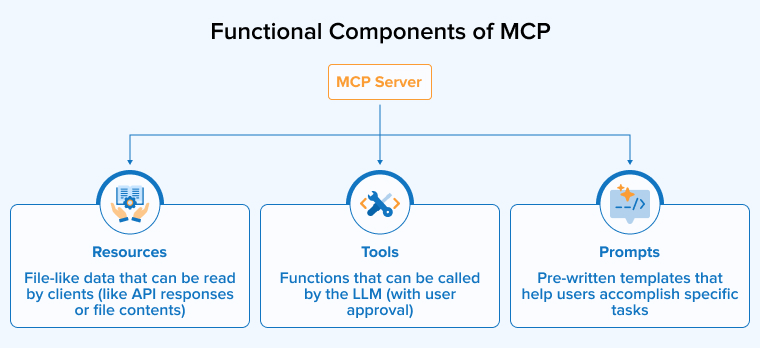
The MCP server provides AI assistants with access to three core functional components:
1. Tools
In MCP, tools are the executable functions by the MCP server that allow an AI system to perform tasks beyond generating text. Each tool includes clear instructions about its purpose, input parameters, and output schema. Consequently, the model can determine when and how to use the tool after it is invoked through the client. These tools can interact with external applications, process information, or trigger operations in other systems.
2. Prompts
In MCP, prompts are predefined templates that help LLMs perform common tasks in a consistent and organized manner. Because they provide structured instructions and workflows, users can activate them or applications can invoke them whenever needed. Furthermore, they can accept contextual information and user inputs, enabling more accurate and relevant outputs. As a result, prompts simplify repetitive processes, improve consistency, and standardize interactions across applications.
3. Resources
Resources are the structured and read-only data, such as configuration files, database records, log entries, source code, images, PDFs, JSON, XML, etc. They provide current and relevant information that AI systems can access and use as context when performing tasks. As a result, outputs are reliable and not based on assumptions.
How Does MCP Work?
MCP follows the step-by-step approach given below to help AI models connect with external data sources and tools:
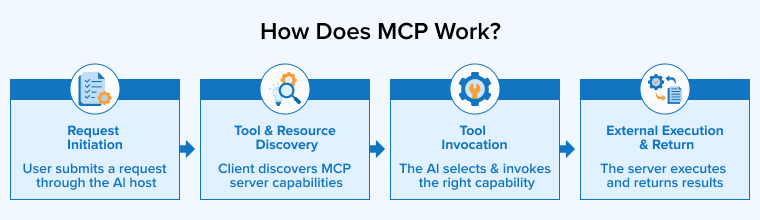
- Request Initiation: The interaction begins when a user submits a request through an AI application, i.e., host. The host receives and processes the request, then forwards the relevant information to the client.
- Tool and Resource Discovery: After receiving a request, the client communicates with the connected MCP server to discover the capabilities it provides. The AI can perform server executable actions, use read-only information for additional context, and complete specific tasks through predefined workflows.
- Tool Invocation: When the LLM recognizes that external information or an action is required to process the request, it identifies the most suitable capability to use. It then prepares a structured request containing the necessary parameters for the system to retrieve data or perform the action needed to complete the user’s request accurately.
- External Execution and Return: The MCP client forwards the AI’s request to the MCP server in a secure and structured way. The server then converts this request into a format that the external system can understand, such as a database query or an API call. After processing the request, the server sends the resulting output back through the client to the AI.
Getting Started with an MCP: Demo Project
We’ll understand the working of MCP with a practical example to help you get complete clarity of the topic.
In this example, the FastMCP Server has five tools:
- add_numbers
- subtract_numbers
- multiply_numbers
- Divide_numbers
- power.
No database, no external API.
The entire focus is on the MCP flow, i.e., the way the Host, Client, and Server connect and communicate with each other. Once you understand this, every other MCP project follows the same pattern.
Conversation Flow
| You (User) | What is 25 + 30? |
| Host | Sends message + tool list to Gemini API |
| Gemini | Decides to call: add_numbers(a=25, b=30) |
| Host via FastMCP Client | Calls the tool on the FastMCP Server |
| FastMCP Server | Runs: 25 + 30 = 55, returns result |
| Host | Sends result 55 back to Gemini |
| Gemini | The answer is 55. |
Project Structure
calculator/ ├── server.py # FastMCP Server — 5 tools: add, subtract, multiply, divide, power ├── host.py # Host + FastMCP Client — chat loop with Gemini └── requirements.txt # google-genai, fastmcp, python-dotenv |
server.py: FastMCP Calculator Server
With FastMCP, you write a normal Python function and add @mcp.tool(). FastMCP automatically reads your type hints and docstring to generate the tool schema, handles validation, and sets up all the protocol machinery. No JSON schema to write, no handler boilerplate.
host.py automatically starts the server as a subprocess. You will never have to run server.py manually.
from fastmcp import FastMCP mcp = FastMCP("calculator") # ── Basic arithmetic tools exposed to the MCP host ─────────────────────────── @mcp.tool() def add_numbers(a: float, b: float) -> str: """Add two numbers together and return the result.""" result = a + b return f"{a} + {b} = {result}" @mcp.tool() def subtract_numbers(a: float, b: float) -> str: """Subtract b from a and return the result.""" result = a - b return f"{a} - {b} = {result}" @mcp.tool() def multiply_numbers(a: float, b: float) -> str: """Multiply two numbers together and return the result.""" result = a * b return f"{a} × {b} = {result}" @mcp.tool() def divide_numbers(a: float, b: float) -> str: """Divide a by b and return the result. Handles division by zero gracefully.""" if b == 0: return "Error: division by zero is undefined." result = a / b return f"{a} ÷ {b} = {result}" @mcp.tool() def power(base: float, exponent: float) -> str: """Raise base to the power of exponent and return the result.""" result = base ** exponent return f"{base} ^ {exponent} = {result}" if __name__ == "__main__": mcp.run() # Runs over stdio by default - works with Claude Desktop and FastMCP Client |
That is the entire server. In our working implementation, we extended this to 5 tools: add_numbers, subtract_numbers, multiply_numbers, divide_numbers, and power.
FastMCP generates the JSON schema from your type hints, validates inputs automatically, and handles all protocol messages.
host.py: FastMCP Client + Gemini Host
The Host uses FastMCP’s Client class to connect to the server and the Google Genai SDK to communicate with Gemini. The Client(‘server.py’) call tells FastMCP to start server.py as a subprocess and communicate over stdio. There is no manual subprocess management or pipe setup needed.
The mcp_tools_to_gemini function converts FastMCP tool objects into Gemini’s FunctionDeclaration format. This happens once at startup. After that, every Gemini API call includes the tool list so the model knows what actions it can take.
import asyncio, os from google import genai from google.genai import types as gtypes from fastmcp import Client import dotenv dotenv.load_dotenv() # ── Gemini client setup ────────────────────────────────────────────────────── gemini = genai.Client(api_key=os.environ["GEMINI_API_KEY"]) MODEL = "gemini-3.5-flash" # ── Convert FastMCP tools → Gemini FunctionDeclaration format ─────────────── def mcp_tools_to_gemini(tools: list) -> list: """Convert FastMCP tool objects into Gemini FunctionDeclaration format.""" declarations = [] for tool in tools: schema = tool.inputSchema or {} props = schema.get("properties", {}) required = schema.get("required", []) gemini_params = { "type": "object", "properties": { name: { "type": prop.get("type", "string"), "description": prop.get( "description", prop.get("title", "") ) } for name, prop in props.items() }, "required": required } declarations.append( gtypes.FunctionDeclaration( name=tool.name, description=tool.description or "", parameters=gemini_params ) ) return declarations # ── Main interactive chat loop ─────────────────────────────────────────────── async def chat_loop(client: Client): """Fetch MCP tools, then run an interactive calculator chat.""" # 1. Fetch tools from server.py via FastMCP and convert for Gemini mcp_tools = await client.list_tools() gemini_tool = gtypes.Tool( function_declarations=mcp_tools_to_gemini(mcp_tools) ) history = [] print("Calculator AI ready. Ask any math question. Type 'exit' to quit.") print("-" * 55) # 2. Outer loop: one turn per user message while True: user_msg = input("\nYou: ").strip() if user_msg.lower() in ("exit", "quit"): break if not user_msg: continue history.append( gtypes.Content( role="user", parts=[gtypes.Part(text=user_msg)] ) ) response = gemini.models.generate_content( model=MODEL, contents=history, config=gtypes.GenerateContentConfig( system_instruction=( "You are a helpful calculator assistant. " "Always use the provided tools to compute math. Never guess." ), tools=[gemini_tool], automatic_function_calling=gtypes.AutomaticFunctionCallingConfig( disable=True ) ) ) # 3. Inner loop: handle tool calls -- Gemini may call multiple tools per turn while True: parts = response.candidates[0].content.parts fc_list = [p for p in parts if p.function_call] if not fc_list: # No more tool calls -- Gemini produced the final text answer break history.append(response.candidates[0].content) # Execute every requested tool call via the MCP server result_parts = [] for part in fc_list: fc = part.function_call args = dict(fc.args) if fc.args else {} print(f" → calling tool : {fc.name}({args})") # FastMCP Client.call_tool() returns a CallToolResult object mcp_result = await client.call_tool(fc.name, args) result_text = mcp_result.content[0].text if mcp_result.content else "(no result)" print(f" ← tool result : {result_text}") result_parts.append(gtypes.Part( function_response=gtypes.FunctionResponse( name=fc.name, response={"result": result_text} ) )) # Send tool results back to Gemini for the next reasoning step history.append(gtypes.Content(role="user", parts=result_parts)) response = gemini.models.generate_content( model=MODEL, contents=history, config=gtypes.GenerateContentConfig( tools=[gemini_tool], automatic_function_calling=gtypes.AutomaticFunctionCallingConfig(disable=True) ) ) # 4. Print the final answer from Gemini final = ( response.text if hasattr(response, "text") and response.text else " ".join( p.text for p in response.candidates[0].content.parts if hasattr(p, "text") and p.text ) ) print(f"\nAssistant: {final}") history.append(response.candidates[0].content) # -- Entry point -------------------------------------------------------------------------------------------------------- async def main(): # Client("server.py") tells FastMCP to launch server.py via stdio automatically async with Client("server.py") as client: print("[MCP] Connected to calculator server via FastMCP.") await chat_loop(client) asyncio.run(main()) |
Running Example 1
python3 host.py |
A real session:
[MCP] Connected to calculator server via FastMCP. Calculator AI ready. Ask any math question. Type 'exit' to quit. ------------------------------------------------------- You: what is 25 + 30? → calling tool : add_numbers({'a': 25.0, 'b': 30.0}) ← tool result : 25.0 + 30.0 = 55.0 Assistant: The answer is 55. You: multiply 12 by 8 → calling tool : multiply_numbers({'a': 12.0, 'b': 8.0}) ← tool result : 12.0 × 8.0 = 96.0 Assistant: 12 multiplied by 8 is 96. You: what is (5 + 3) multiplied by 4? → calling tool : add_numbers({'a': 5.0, 'b': 3.0}) ← tool result : 5.0 + 3.0 = 8.0 → calling tool : multiply_numbers({'a': 8.0, 'b': 4.0}) ← tool result : 8.0 × 4.0 = 32.0 Assistant: The answer is 32. First I added 5 + 3 = 8, then multiplied by 4. |
Step-by-Step Flow
The following steps are illustrated in the above image:
- You type: host.py reads the message and adds it to the conversation history.
- Gemini call: host.py sends history + FastMCP tool list to Gemini API.
- Gemini decides: Gemini returns a function call with the tool name and arguments.
- FastMCP Client call: host.py calls client.call_tool(name, args). FastMCP starts server.py as a subprocess and sends a JSON-RPC message over stdio.
- Server runs: server.py’s decorated function runs, computes the result, and returns it as a string.
- Result to Gemini: host.py wraps the result in a function_response and calls Gemini again.
- Final answer: Gemini writes a natural language response. host.py prints it.
Connecting to Claude Desktop, Cursor, and ChatGPT
Although we built our own Host, FastMCP servers can also integrate directly with existing AI products such as Claude Desktop, Cursor, and ChatGPT. Because these applications already have an MCP Client built in, you simply need to point them to your server. Consequently, the same MCP server can be used across multiple AI tools without additional development. In other words, one of MCP’s greatest advantages is that you write the server once and use it anywhere.
1. Connecting to Claude Desktop
Claude Desktop reads a JSON config file at startup. You add your FastMCP Server there and restart Claude Desktop.
Config file location:
# macOS: ~/Library/Application Support/Claude/claude_desktop_config.json # Windows (paste into File Explorer address bar): %APPDATA%\Claude\claude_desktop_config.json |
Add your FastMCP Server using the absolute path to server.py:
{ "mcpServers": { "weather": { "command": "python", "args": ["/Users/yourname/weather/server.py"] # Windows: "C:\\Users\\yourname\\weather\\server.py" } } } |
You can connect multiple FastMCP Servers at once. Claude Desktop will start each one and give Claude access to all their tools:
{ "mcpServers": { "weather": { "command": "python", "args": ["/Users/yourname/weather/server.py"] }, "calculator": { "command": "python", "args": ["/Users/yourname/calculator/server.py"] } } } |
Completely quit Claude Desktop (Quit from the menu, not just close the window), then reopen it. A tools icon appears at the bottom of the chat input. Claude can now call your FastMCP tools in any conversation.
2. Connecting to Cursor
Cursor uses the same JSON format. Create a file at .cursor/mcp.json in your project folder:
# .cursor/mcp.json — inside your project root { "mcpServers": { "weather": { "command": "python", "args": ["/Users/yourname/weather/server.py"] } } } |
Cursor starts your FastMCP Server automatically when you open the project. You can also use Cursor Settings to add servers through the GUI.
3. Connecting to ChatGPT and Claude Web (via HTTP)
ChatGPT and the Claude web app connect to a server that is already running over the internet and not a local subprocess. You run your FastMCP Server with HTTP transport instead of stdio. The tool logic is identical; only the transport changes.
FastMCP makes switching to HTTP very easy. Add transport and host parameters to mcp.run():
# server_http.py — same server.py with HTTP transport instead of stdio # All tool definitions are exactly the same. Only the last 2 lines change. # ... (copy all the tool code from server.py here) ... if __name__ == "__main__": # Run over HTTP — server listens at http://0.0.0.0:8000/mcp mcp.run(transport="streamable-http", host="0.0.0.0", port=8000) |
Run the HTTP server:
python server_http.py # FastMCP server is now running at http://localhost:8000/mcp |
For ChatGPT or Claude web to reach it, you need a public internet URL. Use ngrok for quick testing (free at ngrok.com):
# In a separate terminal while server_http.py is running: ngrok http 8000 # ngrok gives a URL like: https://abc123.ngrok-free.app # Your FastMCP endpoint is: https://abc123.ngrok-free.app/mcp |
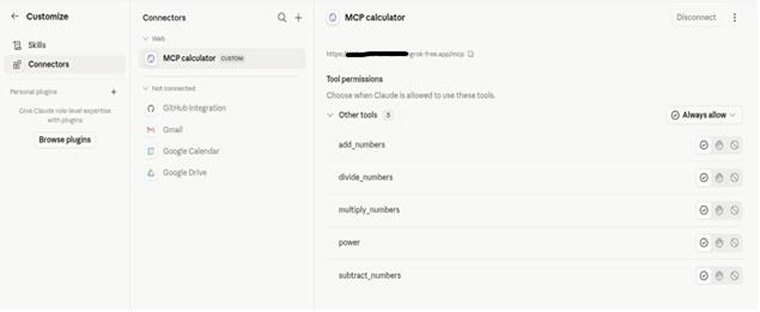
In Claude web (claude.ai): Profile icon → Settings → Integrations → Add Integration (or Custom Connector).
Paste: your ngrok URL ending in /mcp. Ex: https://abc-xyz-123.ngrok-free.app/mcp
Leave auth blank (no auth configured) → Save
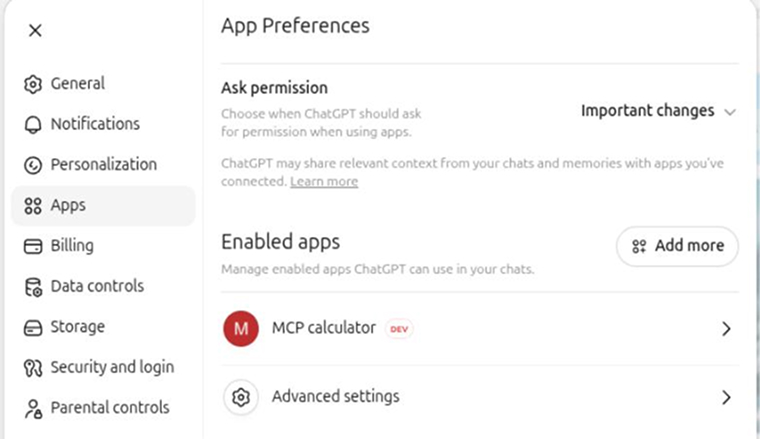
In ChatGPT (chatgpt.com): Settings → Connectors (or Beta Features)
Enable Developer Mode (under Apps → Advanced Settings).
Click Create app → paste your ngrok URL ending in /mcp. Ex: https://abc-xyz-123.ngrok-free.app/mcp
Use it in a chat by enabling the connector from the + menu
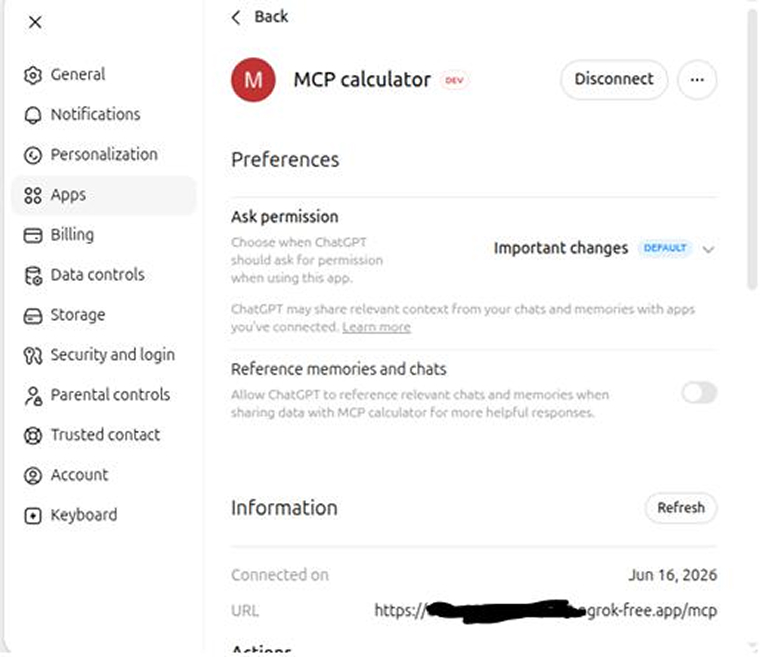
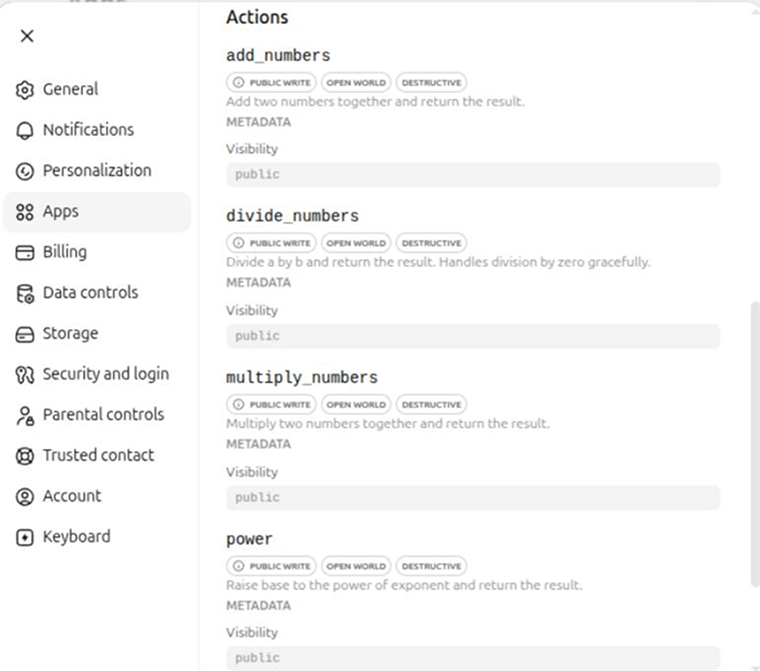
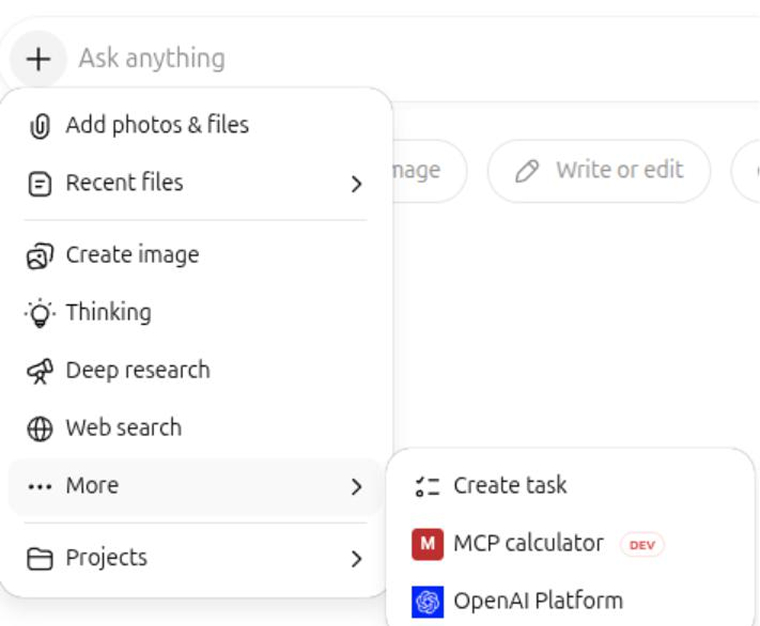
For a permanent URL, deploy server_http.py to any cloud platform such as Fly.io, Railway, Render, or any standard Python hosting. FastMCP is a standard Python web app when running HTTP, so any platform that hosts Python apps will work.
Key Features of MCP
Let us discuss some of the significant features of the Model Context Protocol (MCP):
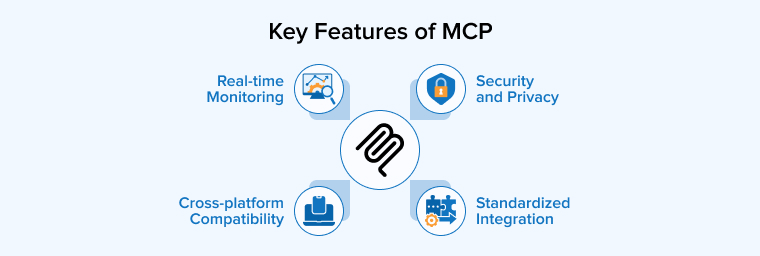
- Security and Privacy: MCP uses strong security controls such as authentication, role-based permissions, encryption, and logging to protect data and systems. It ensures AI agents only access approved resources, operate within defined limits, and leave traceable records.
- Standardized Integration: MCP works as a unified connection layer that links AI models with different data systems through a single protocol. This reduces development effort, improves consistency in data exchange, and lowers the chances of errors.
- Real-time Monitoring: MCP supports real-time monitoring by tracking every AI request as it moves through the system. Organizations can easily log activities, record data usage, and maintain detailed audit trails as every interaction passes through a central server.
- Cross-platform Compatibility: MCP enables AI systems to work smoothly across different platforms, devices, and models through a single unified approach. This makes it easier for organizations to use multiple AI tools without redesigning their systems each time.
Comparing MCP to Other Approaches
There have been and still are some methods other than MCP to connect AI systems with external services. Let us look at a quick comparison between all such approaches to get a brief overview:
| Aspect | MCP | Traditional API | OpenAI Plugins | RAG | AI Agents |
|---|---|---|---|---|---|
| Primary Purpose | Standardized protocol for AI-to-service communication | General application integration | LLM interaction with external services | Improving LLM accuracy with external knowledge | Executing tasks and making decisions on behalf of users |
| Integration Approach | One common framework for multiple services | Custom code required for every service | Individual setup and configuration per plugin | Search and retrieval systems | Relies on separate integrations per platform (without MCP) |
| Complexity | Low, as the shared protocol reduces repetitive work | High, and grows with every new service added | Moderate, since each plugin needs its own setup | Moderate, depends on the retrieval infrastructure | High, needs custom connections to each tool |
| AI Compatibility | Built specifically for AI systems with structured tool/data formats | Not designed with AI in mind | Limited to specific platforms (mainly OpenAI) | Designed for LLMs but limited to retrieval only | Works best when paired with MCP as a communication layer |
| Communication Style | Ongoing, context-aware interaction across workflows | Isolated request-response cycles | Limited to isolated requests | One-time retrieval before response generation | Task-based execution across tools |
| Security and Auth | Standardized authentication and permission management | Handled separately for each integration | Separate authentication per plugin | Not applicable, focused on data retrieval | Depends on the integration method used |
| Scalability | High, one protocol supports many services | Low, each new service adds more code and maintenance | Limited, platform-specific compatibility | Moderate, scales with retrieval sources | High when combined with MCP |
| Best Used For | Connecting AI assistants to multiple tools and services consistently | Connecting non-AI software systems | Extending ChatGPT with external capabilities | Providing accurate, up-to-date answers from external data | Automating complex multi-step workflows |
| Relationship with MCP | NA | MCP replaces the need for custom API integrations per service | MCP offers a more flexible, platform-agnostic alternative | Complements MCP — RAG retrieves knowledge, MCP enables actions | MCP serves as the communication layer that powers AI agents |
Let us now discuss in detail whether MCP is better than all the mentioned four approaches to get a complete conceptual understanding:
1. MCP vs Traditional API
Although APIs and MCP can both connect software systems and access data, they solve different problems. APIs are designed for general application integration and usually require developers to write custom code for every service they want to connect. This means handling requests, responses, authentication, error management, and maintenance separately for each integration. As the number of services grows, the amount of code and complexity increases significantly.
MCP simplifies this process by providing a common framework that AI assistants can use to interact with many different systems in a consistent way. Instead of creating unique integrations for every tool, developers can connect an MCP server and allow the AI to work with supported services through a shared protocol. Remember that MCP is designed with AI systems in mind; therefore, it presents tools, data, and capabilities in a structured format that LLMs can easily understand and use correctly. This reduces confusion and improves reliability when AI agents perform tasks. MCP also offers a standardized approach to security and authentication, removing the need to expose credentials through custom implementations.
2. MCP vs Open AI Plugins
OpenAI plugins demonstrated that LLMs could interact with external services instead of depending only on the information contained in a conversation. These plugins allowed AI systems to access data and perform actions through connected applications, which expanded the capabilities of AI. However, each plugin required its own setup, configuration, and authentication process, which made integration more complex and often limited compatibility to specific platforms.
MCP builds on the same idea but offers a more flexible and widely usable approach. It allows developers to use a common protocol for different AI tools and environments. MCP even supports ongoing communication between AI systems and external services, allowing context and information to be maintained throughout a workflow instead of being limited to isolated requests. MCP also introduces a more consistent way to manage permissions and secure access to data through its standardized auth, and eliminates the burden of handling authentication separately for every integration.
3. MCP vs RAG
MCP and RAG are both designed to improve the capabilities of LLMS, but they address different challenges. RAG focuses on helping an AI provide more accurate and relevant answers by retrieving information from external sources before generating a response. This is especially useful when the model needs access to current, specialized, or company-specific knowledge that is not included in its training data.
MCP, on the other hand, is built to help AI systems interact with external tools, applications, and services. It enables the model to perform actions, exchange data with other systems, and complete tasks through a standardized communication framework. The two approaches also differ in their technical requirements. RAG depends on search and retrieval systems, whereas MCP requires secure connections, permissions, and tool integration.
4. MCP vs AI Agents
MCP and AI agents work together, but they play different roles within an AI system. An AI agent is responsible for carrying out tasks, making decisions, and interacting with digital tools on behalf of a user. MCP acts as the communication layer that helps these agents connect with external applications and services in a consistent way. This eliminates the need to create and maintain separate integrations for every platform an agent needs to access. Thus, MCP makes it much easier to build capable and scalable AI assistants.
As more applications adopt MCP, AI agents gain access to a broader range of capabilities and can handle increasingly complex workflows. This allows them to coordinate actions across multiple tools, automate routine work, and deliver more value to users by providing smooth interaction with different software environments.
What Are the Real-World Applications of MCP?
The real-life applications of MCP are spread across different industries and workflows. We’ll look at three of the most common applications:
Git and Code Management
GitHub’s MCP server helps AI assistants work directly with GitHub projects, reducing the need for developers to constantly switch between different tools. There’s no need for developers to open GitHub, check pull requests, and manually share information with an AI assistant. They can simply ask questions or give commands in a conversation. The assistant can view pull requests, examine issues, manage branches, and report the status of automated checks using GitHub’s API. This makes routine development tasks faster and more convenient.
Unlike reviewing a code snippet or diff in isolation, AI can access the repository’s broader context. Therefore, it analyzes changes more effectively and identifies potential issues with greater accuracy. This provides developers with more time to focus on software development.
Data Analysis
MCP helps organizations connect different systems so information moves securely and efficiently between them. AI-powered applications use a single standardized framework to gather and process the data they need, instead of accessing databases, analytics tools, and reporting platforms separately. This lets analysts pull concise summaries, review historical records, and reach informed decisions faster.
AI assistants also coordinate routine tasks, such as scheduling reports and validating data sources. A key benefit of this approach is built-in support for strict security and privacy requirements. Every interaction is monitored, access permissions follow user roles, and detailed records stay in place for accountability.
File System Access
The filesystem MCP server allows AI assistants to work directly with files stored in a specific project folder. This makes it easier to understand and manage large collections of documents or source code. Users can ask the assistant to locate important files, review project documentation, or identify where certain settings are defined instead of copying files into a chat. This creates a smoother workflow, especially for development teams working with complex projects.
New developers can quickly learn how a project is organized by asking questions about its structure and key components. Teams can also provide guidance files that help AI tools understand the project from the beginning. Nevertheless, access should be carefully restricted to only the necessary directories to reduce security risks and ensure that private or unrelated files remain protected.
When to Use MCP?
MCP enhances your working efficiency with AI systems if used in the following scenarios:
- If you’re developing a tool that can work with multiple AI applications, such as Cluade Desktop or Cursor, a single MCP server can run as many clients as needed.
- If you want your IDE to connect through all the necessary dependencies, such as version control, package managers, file systems, etc., with just a single protocol.
- If you’re developing a data query tool that multiple teams can use through different clients, with centralized access control.
Final Thoughts
MCP is changing how AI applications connect to the digital world by providing a consistent, scalable way to access tools, data, and services. This makes AI systems more capable, easier to maintain, and better equipped to perform real-world tasks. As adoption continues to grow, understanding MCP is becoming an increasingly valuable skill to build high-powered AI products. It will help you to create smarter applications that can retrieve information, automate workflows, and interact with multiple systems seamlessly.
FAQs
RAG focuses on retrieving static information to support AI responses in specific knowledge bases. Moreover, MCP is an open standard that not only enables AI agents to securely call live APIs but also allows them to retrieve dynamic data and execute actions across external systems.
Yes, MCP is an open-source standard and collaborative community project hosted on GitHub. Designed to provide a common protocol for AI models to connect to and interact with external data and tools
Applications that require real-time data processing or integration with external services and tools benefit the most from MCP. It can be AI coding assistants, CRM databases, communication platforms like Slack, and design platforms like Figma.

Niket Shah oversees technology projects at TatvaSoft, blending hands-on expertise with a passion for crafting innovative solutions. He thrives on turning complex challenges into impactful results.



Comments
Leave a message...