

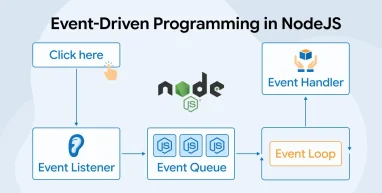
Event-Driven Architecture (EDA) is becoming one of the most effective approaches in modern software development, especially for applications that need to be scalable, fast, and responsive. This design style works especially well with asynchronous operations, which are common in tasks like network requests, database queries, and user interactions. Node.js is built around asynchronous, non-blocking principles, making it a natural fit for event-driven architecture. By combining Node.js with EDA, Node.js development companies can build applications that are quick, reliable, and capable of handling large amounts of data or traffic without slowing down.
In this blog, we’ll discuss event-driven architecture, its components, working, advantages, and use cases.
What is Event-Driven Architecture in Node.js?
Event-driven architecture is a design approach where the flow of a program is determined by events such as user actions, system signals, or messages from other services. Instead of following a fixed sequence, applications react to events in real time. This makes systems more flexible, responsive, and capable of handling tasks efficiently.
What is the Event Loop in Node.js?
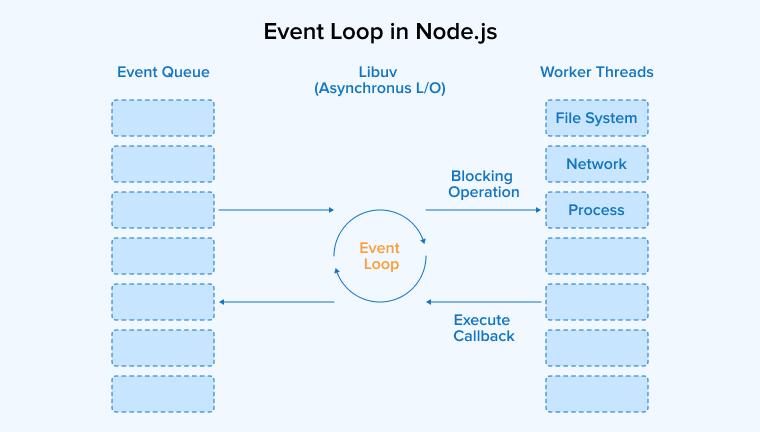
The event loop is a mechanism that enables non-blocking asynchronous execution of concurrent tasks in a single-threaded environment. Node.js delegates tasks to the C library named Libuv that manages a thread pool to offload heavy tasks. The event loop sends callbacks to the event queue after all tasks are completed. The event loop processes these callbacks in multiple phases.
There are six phases of the event loop in Node.js:
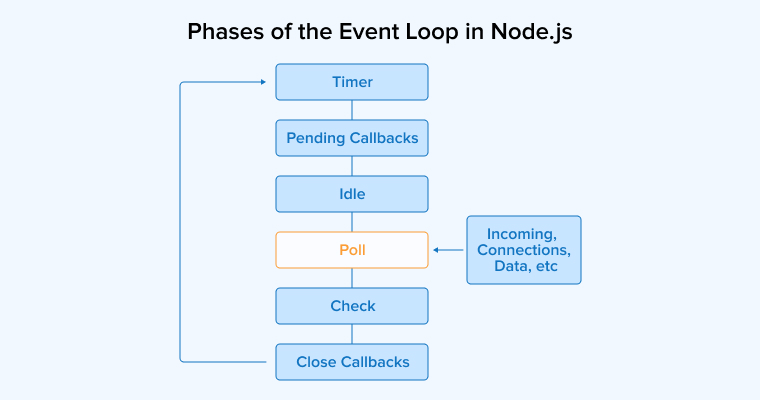
- Timer Phase: Timers set using setTimeout() and setInterval() are processed in this phase.
- Pending Callbacks: It processes those I/O callbacks deferred from the previous iteration.
- Idle Phase: The event loop performs background tasks as it has no tasks.
- Poll Phase: I/O tasks are processed here.
- Check Phase: Event loop invokes setImmediate() callbacks in this phase.
- Close Callbacks Phase: It’s the last phase where callbacks from closed connections, like event emitters, are executed.
What Are the Benefits of Node.js’ Event-Driven Architecture?
The event-driven architecture in Node.js sets it apart from other web development technologies in multiple ways:
- Scalability: Node.js uses an event-driven, non-blocking model that helps applications handle many connections at once. It manages tasks efficiently by using events and listeners to improve load distribution. This design makes it easier to scale apps by adding more processes, which is important for handling heavy web traffic.
- Error Handling and Resilience: Event-Driven Architecture (EDA) in Node.js helps manage errors effectively. Components send out error events, allowing other parts of the system to respond. This organized error handling makes the application stronger and more reliable during unexpected issues or failures.
- Highly Responsive: Node.js uses an event loop to handle I/O tasks quickly, making it ideal for real-time apps like chats or games. It processes events without delay, keeps the server responsive, and ensures smooth performance even when handling many user requests.
- Low Latency: Node.js uses an event-driven model that reduces delays in handling I/O bound tasks like database access or network calls. This makes applications respond quicker, providing smoother performance and a better experience for users.
- Loose Coupling: In Node.js, event-driven communication helps keep application parts loosely connected. Each component works independently and shares information through events. This approach improves flexibility, makes the system easier to manage, and supports modular development. Since components are not tightly linked, changes in one part rarely disrupt others, ensuring scalability and adaptability.
Key Components of Event-Driven Architecture
Node’s event-driven architecture is built upon the following core components:
EventEmitter Module
The EventEmitter module allows creating objects that emit and listen for events. It forms the foundation of event-driven architecture, helping applications respond efficiently to different actions or signals.
The following are the three aspects of the EventEmitter module:
- Event Registration: Objects from EventEmitter attach listeners to events, running specific functions automatically whenever those events occur.
- Event Emission: The emit() method triggers an event in EventEmitter. When an event is emitted, all functions registered as listeners for that event are executed automatically.
- Custom Events: Developers can define custom events with unique names. These events represent specific actions, and when triggered, all listeners registered for them are executed automatically.
const EventEmitter = require('events'); class NotificationService extends EventEmitter {} const notifier = new NotificationService(); // Register a listener for the 'userSignup' event notifier.on('userSignup', (username, email) => { console.log(`Welcome aboard, ${username}! A confirmation has been sent to ${email}.`); }); // Trigger the 'userSignup' event with relevant data notifier.emit('userSignup', 'JaneDoe', 'jane@example.com'); |
Events
Events are key occurrences within an application, representing actions or state changes. Event emitters send these signals, such as data arrival, file access, or errors, for handling.
The following are the main aspects related to events:
- Event Types: Events include various actions, such as data changes, user actions, system errors, or lifecycle updates. They can be built-in, such as stream events, or custom events created by developers.
- Event Naming: Events are identified using string names. Descriptive names, like userLoggedIn or fileUploaded, make the code easier to understand, maintain, and work with effectively.
- Event Payload: Events can include extra data called the event payload. When an event is emitted, listeners receive this payload as arguments to perform actions based on the event’s context.
const http = require('http'); const app = http.createServer((req, res) => { switch (req.url) { case '/products': res.writeHead(200, { 'Content-Type': 'text/plain' }); res.end('Browse our product catalog here.'); break; case '/cart': res.writeHead(200, { 'Content-Type': 'text/plain' }); res.end('Your shopping cart is ready.'); break; default: res.writeHead(404, { 'Content-Type': 'text/plain' }); res.end('Sorry, this route does not exist.'); } }); // Log each incoming request with method and URL app.on('request', (req) => { console.log(`[${req.method}] Incoming request: ${req.url}`); }); app.listen(4000, () => { console.log('Store server is live at http://localhost:4000'); }); |
Listeners
Listeners are functions linked to specific events. They run automatically when the event occurs, defining the actions to perform. Listeners are registered using the .on() method of an EventEmitter.
Key aspects of the listener include:
- Event Binding: Event binding connects listeners to events using the on() or addListener() methods. This registration ensures listeners respond whenever the specified events are emitted by an EventEmitter.
- Execution of Listeners: When an event is emitted in Node.js, all registered listeners for that event run one after another, handling the event’s actions.
- Listener Parameters: Listeners can receive parameters or event payloads when triggered, allowing them to use important information related to the emitted event.
const EventEmitter = require('events'); const orderSystem = new EventEmitter(); // First listener: confirm the order orderSystem.on('orderPlaced', (orderId, item) => { console.log(`Order #${orderId} confirmed for: ${item}`); }); // Second listener: notify the warehouse orderSystem.on('orderPlaced', (orderId, item) => { console.log(`Warehouse alert: Prepare shipment for ${item} (Order #${orderId})`); }); // Third listener: send customer notification orderSystem.on('orderPlaced', (orderId, item) => { console.log(`Email sent: Your order #${orderId} for ${item} is being processed.`); }); // Trigger the orderPlaced event orderSystem.emit('orderPlaced', 'A1024', 'Wireless Keyboard'); |
How Does Node.js’ Event-Driven Architecture Work?
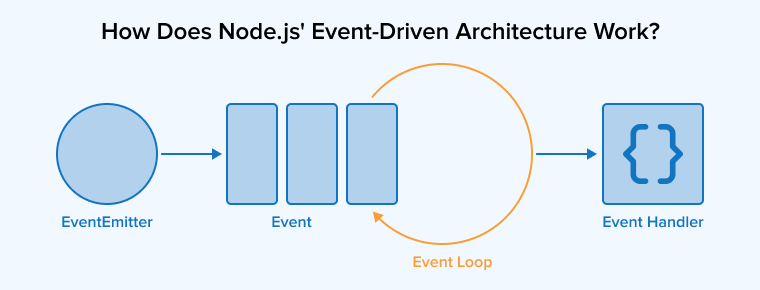
- When a Node.js application starts, it sets up its environment. This includes loading necessary modules and libraries, and initializing event-related components like event emitters and listeners.
- Events occur whenever users interact with the application, send requests, or timers expire. These events are emitted by event emitters to signal that an action has happened.
- Emitted events are added to the event queue, a data structure that holds events waiting to be processed by the system.
- The event loop runs continuously in the background. Its job is to monitor the event queue and execute events as soon as they appear, ensuring the application responds quickly.
- When the event loop detects an event in the queue, it sends the event to the corresponding listener. The listener executes its callback function asynchronously, performing the action tied to that event.
- Node.js handles non-blocking I/O operations, like reading files or network requests, efficiently using the event loop. For blocking operations, a separate thread is assigned to complete the task without stopping other events from being processed.
- Listeners are executed asynchronously. This means that while one event listener is running, the event loop can continue checking and processing other events, maintaining smooth operation.
- Callback functions define how the system should respond to specific events, such as processing data, sending responses to clients, or triggering additional events.
- The event loop, along with event listeners, allows Node.js to handle many events concurrently without blocking the application, making it highly efficient for I/O-heavy tasks.
When to Use Event-Driven Architecture in Node.js?
Event-driven architecture is suitable for developing the following:
- Real-Time Applications: Event-driven systems allow to build instant apps, teamwork tools, and live alerts by handling events right away. They react quickly, making communication, collaboration, and notifications happen in real-time.
- Streaming Services: Apps that deliver continuous data, music, or video must handle it instantly. Node.js manages these streams efficiently using non-blocking methods, ensuring smooth and real-time processing without delays.
- Web Servers and APIs: Node.js APIs use an event-driven model to handle multiple requests at once. This makes them faster, more efficient, and always ready to respond without waiting for other tasks to finish.
- IoT Applications: IoT devices create frequent events, and Node.js helps handle this continuous sensor data. It processes information quickly and allows real-time communication between devices, ensuring fast, efficient, and responsive IoT applications.
Final Thoughts
Event-driven architecture makes Node.js a powerful choice for building modern applications. Its ability to manage asynchronous tasks and multiple events simultaneously allows developers to create fast, scalable, and real-time solutions. Whether used for APIs, chat systems, monitoring tools, or microservices, Node.js with EDA ensures flexibility, responsiveness, and efficiency. By adopting this approach, developers can design loosely coupled systems that adapt to various use cases while maintaining high performance.

Dipal Patel is a technology expert at TatvaSoft, proficient in backend technologies. His years of experience in software development enable TatvaSoft to effectively meet client needs and create robust software products.



Comments
Leave a message...