

Running a business becomes more challenging as it grows. The number of workflows occurring across departments like sales, operations, customer support, finance, and supply chain can quickly grow from a few spreadsheets and individual programs to hundreds. When these systems are not working together, data can get all over the place, processing times increase, and even basic decisions can wind up requiring data from several sources. This is where enterprise software is useful.
Imagine software that integrates key business processes, automates repetitive tasks, and provides a unified perspective of operations. From managing finances and customer relationships to staffing, supply chains, analytics, and delivery, enterprise apps can support it all. A software development company can help businesses build and implement enterprise solutions tailored to their operational needs and long-term goals.
However, enterprise software isn’t just about a single product or platform. It is an umbrella term for a wide variety of applications, each tailored to meet a specific requirement in the corporate world. This article will explain what enterprise software is, why it’s important, its types, and more.
What is Enterprise Software?
Enterprise software is designed to support, automate, and manage business processes across an organization. Unlike consumer-facing applications, enterprise applications are purpose-built to handle large volumes of data, users, transactions, and interdependent workflows on behalf of departments, teams, and entire organizations.
Businesses of all sizes can benefit from enterprise software to simplify their operations and manage complex workflows. However, it really stands out when tasks get too complicated to handle simply with spreadsheets or separate apps. By integrating data from many sources, it can help teams with more reliable information, including finance, sales, HR, operations, supply chain, and customer service.
Integration is a key feature of enterprise software. Data interchange is essential even when a business uses separate platforms for customer, employee, inventory, accounting, and logistics management. Enterprise apps can integrate these workflows, allowing changes in one area to trigger changes in another. Take inventory, procurement, fulfillment, and financial records as an example.
Additionally, enterprise software has the ability to automate routine tasks, simplify real-time reporting, improve teamwork, and grant access to enterprise data based on user roles. Depending on an organization’s infrastructure, security requirements, and operational demands, modern solutions can be deployed in one of three ways: on-premises, cloud-based, or using a hybrid approach.
Enterprise software, in its most basic definition, provides a digital backbone on which complicated business processes can be executed. Instead of rewriting all of the apps, it can simplify important tasks and provide companies greater control over the flow of data and work.
Why is Enterprise Software Important?
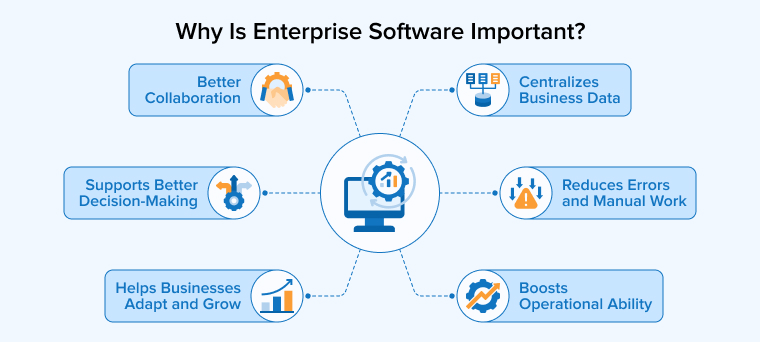
The difficulty of manually managing business processes grows as businesses grow. Enterprise software supports the organization of these processes by improving communication between teams, automating repetitive tasks, and improving the accessibility of sensitive data. Let’s discuss its benefits.
1. Improves Operational Efficiency
Enterprise software has the ability to automate routine operations, freeing up staff from a lot of manual effort. With integrated and combined workflows, teams can get more done without having to put the same data into multiple systems or move data between spreadsheets. Because of it, employees will be able to spend less time waiting and more time doing tasks that call for creativity and expertise.
2. Centralizes Business Data
When data is spread out across many systems, it can be challenging to get a full picture of the business. Departments gain reliable information, and the likelihood of conflicting records is reduced with the use of enterprise applications that help bring useful data together. Reporting and decision-making can be made easier with a centralized overview as well.
3. Supports Better Decision-Making
With the help of enterprise software, operational data can be transformed into insightful dashboards, reports, and more. Tools for business analytics and intelligence can compile data from several sources and display it in a manner that helps managers to figure out patterns, spot difficulties, and make sensible choices.
4. Better Collaboration
Business processes often require coordination between multiple departments. Enterprise software creates a shared platform where teams can access relevant data, track workflows, exchange information, and work together on projects. This helps reduce communication gaps and keeps everyone aligned. It is particularly valuable for businesses with teams working remotely or across multiple locations.
5. Reduces Errors and Manual Work
Errors are possible in repetitive tasks and manual data entry. Enterprise software can improve processes and cut down on errors by automating everyday tasks like computations, approvals, data transfers, and notifications.
6. Helps Businesses Adapt and Grow
Companies need their own systems to be able to adapt to new requirements. The standard operating procedure for modern enterprise software is to make it easy to add more users, departments, locations, integrations, and business processes as a company grows. This highlights the significance of functionality when selecting or developing a business application.
Use Cases of Enterprise Software
Enterprise software is useful for many business tasks in which teams need to track information, improve efficiency, or plan activities. Common use cases include financial management, customer relationship management, human resources, supply chain operations, marketing, business analytics, project management, and content management. However, these applications vary by industry and organization.
For example, a manufacturing company could use enterprise software to integrate its inventory, production, distribution, finance, and procurement processes. In a healthcare organization, enterprise software can help manage employees, finances, patient administration, and operational workflows. Similarly, professional services companies can use it for project management, client relationship management, billing, workforce planning, and reporting.
Ultimately, the aim remains the same: to simplify business processes, reduce manual work, and improve teams’ access to relevant data through technology.
What Are the Examples of Enterprise Software Applications?
For almost every major business task, there is enterprise software available. While some businesses employ all-inclusive software packages, others mix and match specialized apps and link them through connectors.
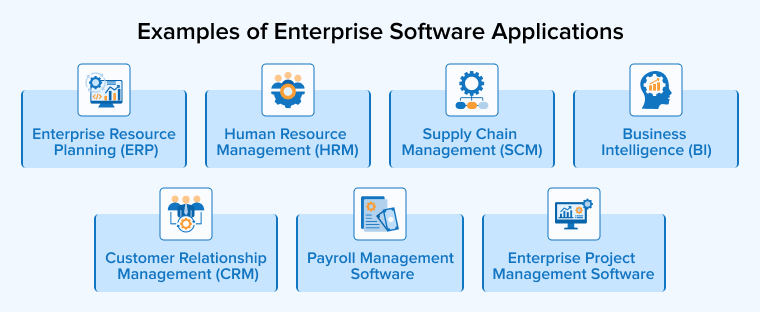
A few examples of the most popular business software applications are listed below.
1. Enterprise Resource Planning (ERP)
Enterprise Resource Planning (ERP) software is developed to connect and manage the most important business tasks through a single system. Finance, sales, inventory, human resources, supply chain, production, and project management are some of the areas integrated.
One major benefit of ERP is that it allows departments to work together rather than operate in isolation. Any business function can use data generated by another. For example, a sales order can affect inventory levels, which may trigger procurement activities and eventually influence financial reporting. This makes it easier to understand how business operations are interconnected.
In addition to centralizing reporting, standardizing processes across sites, and automating repetitive tasks, ERP systems can do the same for other businesses. Companies can choose to install ERP as a whole or implement specific modules as needed, depending on their objectives.
Features of ERP Software
- Financial and accounting management
- Procurement and purchasing
- Inventory management
- Sales and order management
- Human resource management
- Supply chain management
- Project management
- Reporting and analytics
- Workflow automation
- Multi-location and multi-entity support
- Third-party integrations
2. Customer Relationship Management (CRM)
Customer Relationship Management (CRM) software helps businesses keep track of their interactions and relationships with customers, both existing and potential. It puts all the information about customers, sales, communications, service interactions, and other important things into one central location.
CRM software is valuable for teams working in sales, marketing, and customer service. By using a centralized customer database, teams can gain a better understanding of past interactions and prospective customers instead of sifting through multiple spreadsheets, emails, and applications.
Organizations can also benefit from a CRM’s ability to manage marketing efforts, customer support requests, sales pipelines, follow-ups, and leads. Customer information can be linked to inventory, financial, and order management systems through integration with other company apps. With this, businesses may learn more about the client journey as a whole.
Features of CRM Software
- Customer and contact management
- Lead management
- Sales pipeline tracking
- Opportunity management
- Customer service management
- Communication tracking
- Marketing integration
- Sales forecasting
- Customer analytics
- Workflow automation
- Reporting and dashboards
3. Business Intelligence (BI)
Business Intelligence (BI) software helps businesses gather, analyze, and display business data so that teams can make smarter choices. It can integrate data from various enterprise systems, including databases, spreadsheets, cloud apps, and more, and display it in a variety of ways, including dashboards, reports, and analytical views.
BI is useful for more than just gathering data. The key is to simplify the data so that it can be used more effectively. Key performance indicators can be tracked by business leaders, financial performance can be monitored by the finance team, pipeline patterns can be examined by the sales team, and inefficiencies can be identified by the operations team.
Additionally, automated insights and predictive analysis can be supported by modern BI technologies. Business intelligence (BI) can offer a broader overview of an organization’s performance when integrated with enterprise resource planning (ERP), customer relationship management (CRM), and other systems.
Features of Business Intelligence Software
- Interactive dashboards
- Data visualization
- Report generation
- Data integration
- KPI monitoring
- Real-time or near-real-time reporting
- Trend analysis
- Predictive analytics
- Self-service analytics
- Data filtering and drill-down
- Automated reporting
4. Human Resource Management (HRM)
Human Resource Management (HRM) software lets businesses oversee tasks linked to employees at all stages of their employment. Recruiting, payroll, onboarding, attendance, leave management, performance evaluation, training, and incentives are all possible areas it can involve.
Manually managing staff data can become challenging for larger firms. Human resource management software allows HR departments to automate everyday tasks and maintain a centralized database of employee data. Rather than relying on HR for every need, employees can use self-service tools to update information, request leave, access documents, and more.
Integration with accounting, payroll, recruitment, and workforce planning software is another feature of HRM systems. Organizations can benefit from this since it helps them keep employee information accurate and reduces administrative effort.
Features of HRM Software
- Employee information management
- Recruitment and onboarding
- Attendance tracking
- Leave management
- Performance management
- Learning and development
- Benefits administration
- Employee self-service
- Payroll integration
- Workforce reporting
- Role-based access
5. Supply Chain Management (SCM)
Supply chain management (SCM) software helps businesses track and organize the flow of materials, information, products, and related activities from suppliers through production and delivery to customers. Companies that oversee complex supply chains, warehousing operations, manufacturing processes, logistics providers, and retail outlets should prioritize this.
Logistics software can help you keep track of your inventory, purchases, shipments, suppliers, and orders. Businesses can improve their understanding of demand, decrease wasteful inventory, identify delays, and coordinate supply chain activities by integrating various processes.
Since delivering a product can involve numerous locations and collaborators, supply chain software can be very useful for global enterprises. To further enhance visibility across the firm, SCM can be integrated with ERP, finance, and order management systems.
Features of SCM Software
- Procurement management
- Supplier management
- Inventory tracking
- Warehouse management
- Demand planning
- Order management
- Transportation management
- Shipment tracking
- Supply forecasting
- Supplier performance monitoring
- Supply chain analytics
6. Payroll Management Software
Payroll management software makes it easier to handle and figure out how much to pay employees. Payroll software helps businesses stay in compliance with all payroll-related regulations by handling computations, deductions, taxes, benefits, recordkeeping, payslips, and processing payments.
Payroll can become a complex process for businesses with big or distributed workforces, involving thousands of employee records and various compensation standards. With payroll software, HR and payroll departments no longer have to manually calculate employee paychecks; instead, they have access to a streamlined system.
Accounting and human resource management software can integrate with payroll programs as well. This simplifies the transfer of payroll and employee records across departments by eliminating the need for teams to manually enter the same data.
Features of Payroll Management Software
- Salary calculation
- Tax and deduction management
- Benefits administration
- Payslip generation
- Direct deposit support
- Employee self-service
- Attendance and leave integration
- Payroll reporting
- Compliance support
- Payroll accounting integration
- Multi-location payroll management
7. Enterprise Project Management Software
Businesses can benefit from enterprise project management (EPM) software in many ways, including the ability to organize, track, and manage various projects simultaneously. Project management features such as task assignment, scheduling, resource management, document sharing, and progress tracking are all housed in one convenient location.
When a company has multiple projects going at once and needs a better picture of who is working on what, when, and how much funding is available, this software comes in handy. Executives can monitor the project’s progress as a whole, and project managers can utilize it to see how things are progressing. Businesses can keep tabs on project expenses, billing, resource usage, and profitability with the help of EPM’s ability to integrate project data with financial systems.
Features of Enterprise Project Management Software
- Project planning
- Task management
- Resource allocation
- Time tracking
- Budget management
- Project documentation
- Team collaboration
- Milestone tracking
- Project reporting
- Risk and dependency management
- Financial tracking
Challenges of Enterprise Software Development
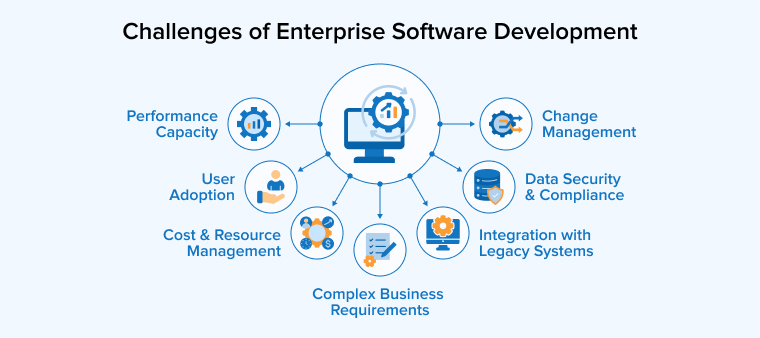
While enterprise applications have the potential to generate substantial value, they may bring up unusual challenges during development. Careful management of such challenges is required for larger organizations with more systems.
1. Complex Business Requirements
Multiple departments, each with its own set of procedures and requirements, are frequently catered to by enterprise systems. Operations may have utterly different priorities than finance, which means that HR may desire entirely different functions. It can be challenging to integrate all of these criteria into a unified system.
2. Integration With Legacy Systems
There are a lot of businesses that are stuck using outdated software that can’t be upgraded. The requirement for new business software to communicate with these systems can increase the complexity of their design and integration.
3. Data Security and Compliance
Enterprise apps often deal with private data, including that of customers, finances, and employees. Compliance with relevant regulations, encryption, monitoring, secure integrations, and strict access controls are all necessary for protecting this data.
4. Performance Capacity
Enterprise software might have to handle a lot of users and transactions. If a system works well with a small dataset, it might not be able to handle a lot of users at once with a large dataset. Performance and capacity must thus be taken into account during the design phase.
5. User Adoption
If employees don’t use software correctly, even software that works well technically may not be useful. To promote adoption, organizations require well-defined processes, instruction, training, and user-friendly interfaces.
6. Change Management
Many people can have a stake in an enterprise project, and new needs can keep coming up as it’s being developed. The project’s budget and timeline can balloon out of control if change management and prioritization are not effectively implemented.
7. Cost and Resource Management
There are a lot of moving parts in enterprise development, including infrastructure, security, connectors, testing, training, and maintenance. Instead of focusing just on the development budget, organizations should assess the overall cost.
How to Choose the Right Enterprise Software Development Partner?
Enterprise software can become a long-term part of your business system, so picking a development partner is a wise choice. The ideal partner has expertise in software development in addition to knowledge of the business challenges that the app is meant to address. Here are a few factors to consider before choosing an enterprise software development partner:
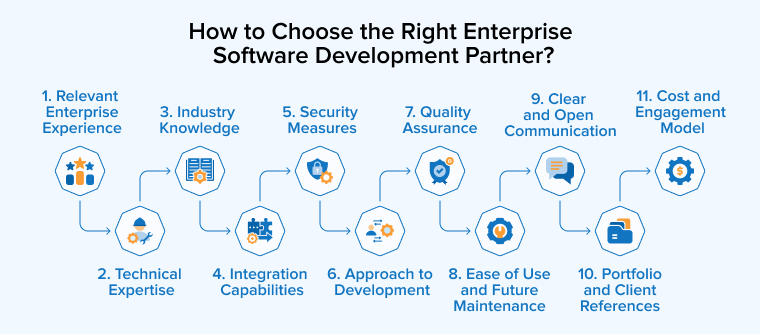
1. Relevant Enterprise Experience
Find a company that has worked on projects like yours before. Instead of a portfolio full of random projects, it can be more beneficial to have experience with business apps, large user bases, complicated integrations, and long-term support.
2. Technical Expertise
Find out if the development partner is well-versed in the technologies that are necessary for your project. Some examples of such technologies are APIs, databases, mobile apps, artificial intelligence, data analytics, cybersecurity, and cloud platforms.
3. Industry Knowledge
It is common for a development team with industry knowledge to be able to identify needs and potential risks earlier. Industries with complicated operations and regulatory constraints, like healthcare, banking, manufacturing, retail, and logistics, can benefit from looking at their industry experience.
4. Integration Capabilities
Enterprise software is never designed to operate independently. Find out how possible partners integrate with ERP, CRM, HR, payment systems, old apps, third-party APIs, and other business tools.
5. Security Measures
Prior to starting work, it is important to discuss security. Consider and prioritize aspects like secure development, data protection, compliance, vulnerability testing, and access control.
6. Approach to Development
Learn the ins and outs of the company’s project management and status reporting processes. A reliable business associate will have a well-defined procedure for gathering requirements, developing the product, testing it, reviewing it, documenting it, managing modifications, and communicating with stakeholders.
7. Quality Assurance
Throughout the development lifecycle, inquire about the testing process. The application’s functionality, integration, performance, security, and usability should all be evaluated as part of a well-structured quality-assurance process, and a trustworthy partner will have such a process in place.
8. Ease of Use and Future Maintenance
Long after its initial release, enterprise software may still require updates. Find a partner that can keep up with upgrades, new users, integrations, performance, security, updates, and maintenance.
9. Clear and Open Communication
In a complicated software project, effective communication is essential. Make sure you know who will be in charge of communicating with you, how to manage challenges, how decisions will be documented, and how frequently you will receive updates before signing a contract.
10. Portfolio and Client References
If at all possible, talk to its current or former clients and look over completed business tasks. Inquire about the partner’s punctuality, change management skills, communication abilities, and post-launch assistance.
11. Cost and Engagement Model
Although price is an important consideration, it shouldn’t be the exclusive one. Evaluate each option’s cost in light of its technical capacity, project management, security, quality control, support, and expected future maintenance needs. In the long run, more work or support charges can make an affordable initial price seem like a better deal.
Conclusion
These days, most modern businesses rely on enterprise software to help them manage their ever-growing and complicated operations. It can become more challenging for firms to keep up with data accuracy, coordinate teams, and respond quickly to changing requirements when they depend on overlapping technologies and manual processes, especially as they develop. With the help of enterprise applications, all of these different parts can be brought together to form a stronger digital framework for the company.
Enterprise resource planning (ERP) and customer relationship management (CRM) systems, among others, automate marketing, supply chain operations, payroll, projects, assets, content, and business information. The specific mix that’s best for a company is determined by its size, sector, processes, technological landscape, and future goals.
Building a custom enterprise application is more than developing software for businesses. It is important to pay close attention to the following areas: requirements, architecture, integrations, security, testing, deployment, user adoption, and long-term maintenance.
Successful enterprise software should adapt to an organization’s needs while allowing for future growth. Enterprise software has the potential to strengthen a company’s foundation for long-term success, increase visibility, decrease operational friction, and support better decisions when the correct technology, development process, and implementation strategy are all in place.

Itesh Sharma is core member of Sales Department at TatvaSoft. He has got more than 6 years of experience in handling the task related to Customer Management and Project Management. Apart from his profession he also has keen interest in sharing the insight on different methodologies of software development.


Comments
Leave a message...