

As a company grows, it can get harder to keep track of its finances, employees, purchases, inventory, sales, supply chain, and other tasks that need to be handled by different systems. Disconnected applications often create data silos, duplicate information, and communication gaps between departments, making it harder for businesses to maintain accurate information and make timely decisions.
This is where enterprise resource planning (ERP) software plays a major role by providing a centralized view of enterprise data and unifying essential business operations to overcome these obstacles. However, the operational needs, workflows, and processes of each company are unique. In some cases, a company’s unique requirements may require more customization than what a generic ERP system can offer.
With custom ERP development, businesses can design or alter an ERP system to fit their specific needs, connect it to other apps, and add functionality that supports their strategic objectives. A software development company can help organizations navigate this process by developing tailored ERP solutions that align with their business goals. This article explores the fundamentals of ERP software development, its key stages, major benefits, and important considerations.
What is ERP Software?
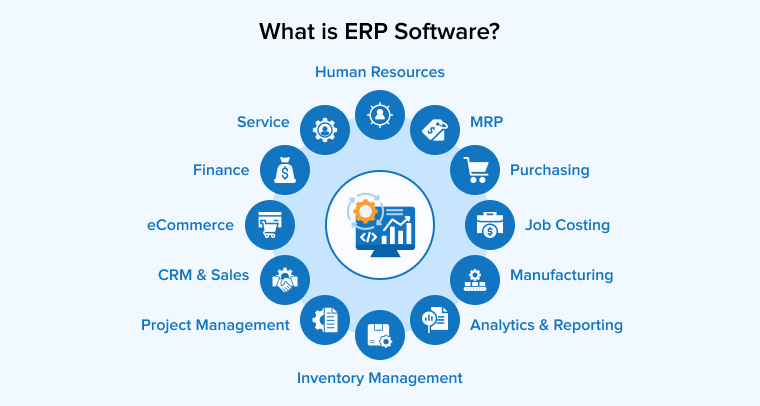
Enterprise Resource Planning (ERP) is a type of software that the majority of organizations in the market use to manage their day-to-day business activities like project management, accounting, risk management, procurement, inventory management, and supply chain operations. Large organizations take advantage of ERP’s complete suite, which includes modules for budgeting, planning, forecasting, & reporting on a firm’s financial results, enterprise performance management, and human capital management.
Basically, an ERP system can integrate various business processes and manage the flow of data between them. In addition to this, for customer relationship management, an ERP system can also help organizations to collect shared transactional data and eliminate duplicate details to offer quality assurance and data integrity with a single source.
This means that ERP software is an integrated platform that can be present in the cloud or on-premises to help organizations handle all the aspects of logistics management or production business. Additionally, ERP software can manage human resources, financial management, supply chain management, and manufacturing.
Benefits of ERP
Some of the major benefits of enterprise resource planning are –
- Simplified Maintenance: When a company internally builds an ERP app, its team can offer customization and ongoing support for the system.
- Dedicated Modules: The majority of employees and stakeholders usually utilize enterprise resource planning software, so it must be easy to use. In this case, if the ERP system is custom-based, employees can only use the modules that their firm or team requires. This means that a custom-based ERP system works on the concept of minimum privilege for each department.
- No Changes in the Workflow: The ERP system offers one of the biggest benefits, as it allows companies to avoid changing their operational processes to accommodate the uncustomized management system; the ERP software handles everything.
- Easy to Maintain: Generally it happens that when there are any issues or bugs in the third-party software, any organization using it has to contact the vendor but with an ERP system, the in-house developers are aware of the solutions and can easily maintain it as ERPs are not complex.
Must-Have Capabilities in ERP
An ERP system that works well should do more than just merge different business tasks onto a single platform. Businesses should be able to use technology to streamline operations, integrate data, automate everyday tasks, and equip workers with the information they need to do work well. While specific features may differ from one industry and company to another, all modern enterprise resource planning (ERP) systems should include the following capabilities.
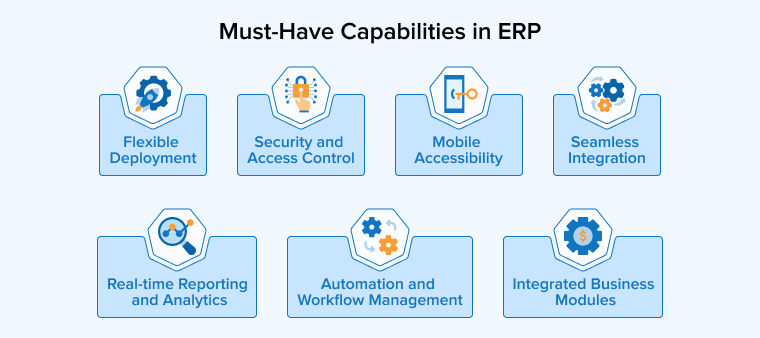
Integrated Business Modules
The primary goals of an enterprise resource planning (ERP) system are to provide a unified platform for essential business processes like accounting, finance, human resources, purchasing, inventory, sales, manufacturing, and supply chain management. This allows the elimination of data gaps and the free flow of information across different divisions.
Seamless Integration
Enterprise resource planning (ERP) software must have the ability to connect with preexisting company apps, databases, third-party services, and external systems via application programming interfaces (APIs) or alternative integration mechanisms. When systems are well-integrated, businesses can keep their workflows connected without having to send data back and forth between different programs.
Real-time Reporting and Analytics
In order to transform operational data into actionable business insights, ERP systems ought to offer centralized reporting and analytics capabilities. To better track performance and make choices, managers can benefit from having access to operational, financial, inventory, and sales data in real time.
Mobile Accessibility
There are times when workers need to access company data even when they’re not at their desks. Data viewing, record updating, workflow monitoring, and relevant task execution through smartphones and tablets are all made possible by mobile compatibility.
Security and Access Control
Since ERP systems deal with highly sensitive operational, customer, financial, and employee data, security is of the utmost importance. Employees should only have access to the data that is directly related to their work responsibilities, and measures like role-based access, authentication, data security, and limited permissions can help with this.
Flexible Deployment
Companies need to be able to pick and choose whatever deployment model works best for their specific operational and security needs. Deploying an enterprise resource planning system (ERP) on-premises, in the cloud, or using a hybrid model is up to the individual company.
Automation and Workflow Management
Automating routine tasks can make processes more consistent and cut down on repeated manual labor. To free up staff for more valuable work, an ERP should provide automated workflows for common data processing, purchasing, reporting, notifications, and approvals.
Custom-Built VS Off-the-Shelf ERP: Which One to Choose
Most often, when it comes to enterprise resource planning (ERP) systems, businesses can either build a custom solution or use an existing product. While both methods can assist companies in managing their essential activities, they vary with regard to personalization, expense, execution, integration, and maintenance.
A custom-built ERP is made just for a company based on its processes, workflows, operational goals, and the needs of its industry. This model provides companies more control over the system’s features and functionality, enabling them to tailor integrations and workflows to their specific requirements. Companies that have unique or complicated procedures that aren’t well-suited to the capabilities of mainstream ERP software may find this method very helpful.
Off-the-shelf ERP, on the other hand, is a solution that is already made to fit the needs of many different types of businesses. It usually comes with generic, configurable modules and functionality that most businesses will need. There is generally less initial development effort and faster implementation when the fundamental program is already built. Nevertheless, companies might have to change a few things to get the most out of the ERP system they choose.
The following factors can help businesses determine which approach is more suitable for their requirements.
Business Requirements
Custom-built ERP: An organization’s unique processes, operations, and requirements are carefully considered while developing a custom-built ERP. Because of this, it is a good fit for companies that have specific needs or conduct unusual operations.
Off-the-shelf ERP: An off-the-shelf ERP is made to help businesses that use the same business processes. When your operations align closely with the product’s features and workflows, it can be a practical choice.
Customization
Custom-built ERP: More power over the system’s functionality, processes, user responsibilities, reporting, and integrations is yours with custom ERP. Companies have the freedom to determine the functionality of individual modules and adapt the system to meet their evolving needs.
Off-the-shelf ERP: Businesses may still have to modify some procedures to match the software, even though off-the-shelf ERP packages offer configuration and customization possibilities. When the pre-built features don’t cut it, more personalization might be in order.
Cost
Custom-built ERP: Due to the individualized nature of the ERP system’s planning, design, development, testing, and deployment, the initial investment in a custom ERP system is usually higher. On the other hand, companies can steer clear of paying for features that aren’t necessary and have more say over which ones are produced.
Off-the-shelf ERP: The main product is already available with off-the-shelf ERP; thus, there is usually less of an initial investment in development. Nevertheless, companies may be charged subscription or licensing fees on an ongoing basis, in addition to extra charges for customization, integrations, and support.
Implementation Time
Custom-built ERP: Due to the extensive requirements analysis, design, development, testing, and deployment processes involved in developing an ERP from scratch, the overall system development time is increased. Therefore, companies that are able to commit to a longer implementation period will benefit more from this strategy.
Off-the-shelf ERP: Since the core software for off-the-shelf ERP is already built, its implementation is typically quicker. Prior to implementation, businesses must mainly attend to system configuration, data migration, application integration, and personnel training.
Integration
Custom-built ERP: It is possible to tailor enterprise resource planning (ERP) software to tightly interface with an organization’s preexisting internal systems, databases, APIs, and apps. Businesses that depend on specific or older software may find this very helpful.
Off-the-shelf ERP: Commonly used business apps and services are usually compatible with off-the-shelf ERP packages. It may be necessary to invest in extra development time or acquire third-party connection solutions in order to link the ERP with extremely specialized systems.
Maintenance and Support
Custom-built ERP: Organizations implementing custom ERP systems are tasked with software maintenance, including bug patches, security enhancements, updates, and technical support, either independently or in collaboration with a development partner. This allows for more control, but it also necessitates the availability of suitable technical knowledge.
Off-the-shelf ERP: In most cases, the software vendor handles product updates, security patches, technological enhancements, and support for off-the-shelf ERP. Businesses will have to rely more on the vendor’s product roadmap and support practices, but they will also have less maintenance to handle internally.
Which ERP Approach Should You Choose?
When your company has specific needs, complex interconnections, unique workflows, or operations that aren’t well-supported by pre-existing technologies, a custom-built ERP may be the way to go. As a result, you have more say over the system’s functionality, and the software can adapt to your company’s needs rather than the other way around.
When your company has consistent procedures and needs a solution quickly, a pre-packaged enterprise resource planning (ERP) system can be the way to go. Using an existing ERP that can fulfill most of your needs with little tweaking can save a ton of time and energy compared to developing from scratch.
Business processes, finances, implementation schedule, integration needs, and long-term goals should all factor into the final decision. You may find out if it’s more practical to create an ERP from scratch or to utilize an existing solution by doing a thorough review of these aspects.
How AI is Changing ERP Software Development in 2026
These days, AI isn’t an add-on for enterprise resource planning software; it’s an integral component of it. To help users with data analysis, automating repetitive tasks, spotting suspicious transactions, and facilitating quicker decision-making, AI is being integrated directly into ERP operations in 2026. Both the design of ERP systems and the way employees interact with company data are being impacted by this trend.
Here are a few of the aspects with which AI is changing ERP software development in 2026.
Smarter Forecasting and Planning
AI has the ability to sift through a mountain of operational data, including sales activity, seasonal patterns, and company history, in order to produce more accurate predictions. Demand planning, cash flow forecasting, inventory management, and workforce planning are all areas where ERP systems can make advantage of these skills. Predictive insights allow firms to anticipate changes and make quicker decisions rather than depending solely on past information and rigid formulas.
AI-Powered ERP Copilots
The use of natural language by employees to communicate with ERP systems is gaining traction. With the help of AI assistants, users may query databases, obtain specific records, generate summaries, and generate reports, all without having to learn how to navigate several screens or query databases on their own. An accountant, for instance, may send a query to the system and get a straight response detailing which clients have invoices that are past due.
Real-Time Anomaly Detection
Artificial intelligence can monitor financial transactions in real time, looking for anything out of the ordinary. In the world of finance, this can manifest as questionable spending habits, duplicate bills, odd journal entries, or suspect conduct involving payments. Other operational procedures, including inventory management, can benefit from similar capabilities. Businesses can explore any concerns sooner by integrating these signals into ERP workflows, rather than finding them during periodic assessments.
Automated Document Processing
Another area where AI is transforming ERP development is in procedures that rely heavily on documents. Extracting data from invoices and other documents, classifying it, and linking it to important ERP records are all within the capabilities of modern systems that employ AI and language models. This can simplify activities such as invoice entry, purchase order matching, and exception handling while reducing the amount of manual data entry required from employees.
Agent-based ERP Workflows
As a potential next step in ERP automation, AI agents are quickly becoming a reality. An AI agent can carry out many stages of a business process in accordance with predetermined rules and with human supervision, rather than just giving information or suggestions. An agent may, for instance, notice a transaction that needs attention, collect the necessary data, formulate the necessary action, and submit it for approval. The focus of enterprise resource planning (ERP) development is shifting from individual tasks to comprehensive workflow assistance as agent-based capabilities advance.
Why Does Your Organization Need ERP?
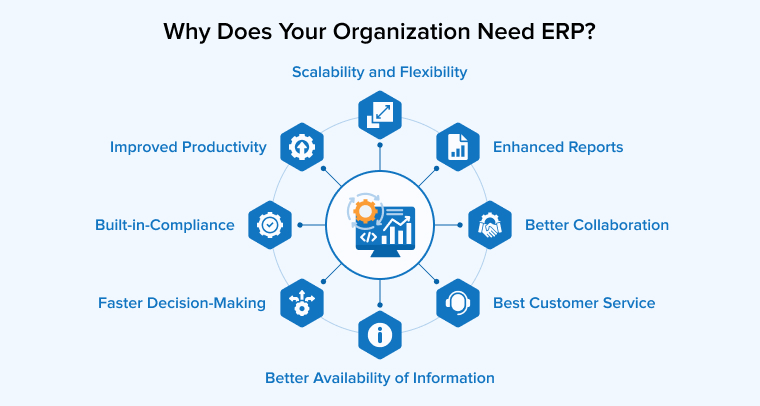
There are multiple reasons behind companies choosing ERP systems for their business. Some of them are operational improvement, business expansion, and cost reduction. Besides this, ERP is an approach that enables businesses to modernize their legacy systems and enhance the customer experience. Here, let’s go through some of the many reasons behind companies needing an ERP system –
Better Collaboration
ERP is a unified system that has all the required business-related data, which can eventually help in improving cooperation between various departments of an organization. It helps reduce communication delays inside the firm and is beneficial for any organization that has a distributed network of affiliates in multiple places.
Improved Productivity
ERP is an approach that enables companies to automate their routine processes and manual tasks, which eventually results in saving a lot of time that goes into managing tasks and day-to-day business processes. Besides this, it also eliminates instances of duplication and rework. This helps employees complete their tasks in a shorter period of time and perform better. It also enables the integration of various other systems that eliminate repetitive work and generate revenue for your business.
Faster Decision-Making
With a custom ERP system and integration into your core business processes, employees can get access to a real-time view of data, with easy-to-use reporting and analysis that empowers intelligent decision-making. For example, businesses can use these insights to identify process inefficiencies, monitor operational performance, and determine where improvements can reduce costs and increase profitability.
Built-in Compliance
Your business must maintain regulatory compliance. One of the most powerful advantages of ERP systems is that they help keep track of industry regulations and changes in compliance. This allows businesses to stay ahead and comply with guidelines, relevant laws, and specifications.
Better Customer Service
Another major benefit of ERP is that it helps in offering better customer service. Centralized data storage provides all necessary information on sales and clientele. This makes it easier for sales managers and customer support staff to communicate with clients and reduce delays in offering services to customers.
Scalability and Flexibility
ERP software allows adjusting its scale according to current needs and situations. An ERP system easily adapts to the expansion or reduction of the company at every level. ERP systems can easily handle changes such as production increases, inventory extensions, and the addition of new functions, services, or users. In short, it helps in enterprise digital transformation.
Enhanced Reports
ERP software leads to reduced paperwork and improved communication among departments. It helps in the quick and easy submission of all kinds of reports such as financial, customer behavior, technical maintenance, etc.
Better Availability of Information
Advanced ERP systems enable the effective and centralized collection, processing, and storage of information on the product, sales, or customers. In this way, we use a single data system instead of multiple databases that require regular checks and synchronization to remove duplicate or obsolete information.
What are the Types of ERP?
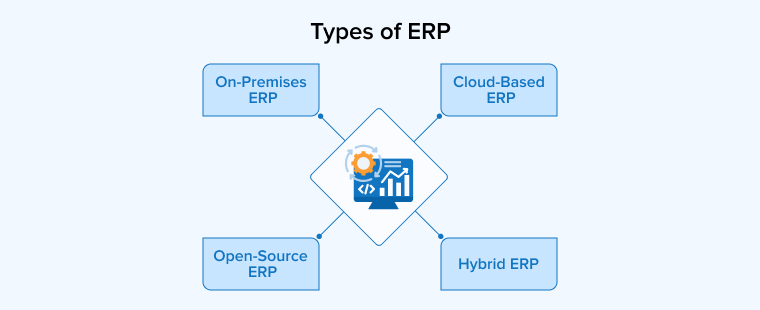
ERP systems can be categorized based on how they are deployed, managed, and accessed. For enterprise resource planning (ERP), the four most prevalent models are on-premises, cloud-based, hybrid, and open-source. Let’s discuss them below:
On-Premise ERP
An on-premises ERP is set up and run on the servers and hardware of a company. With the help of either an in-house IT department or an ERP provider, the company oversees the software, hardware, data, security, and updates. This method offers companies greater control over the setup of the system and the handling of their data. For businesses that demand a great deal of personalization or have strict security standards, it may be an excellent choice.
Advantages of on-premises ERP
- Companies have more power over their data and systems.
- Businesses can tailor the system to meet their own needs.
- A third-party ERP provider is no longer as crucial to the running of many organizations’ systems.
- Organizations that have strict guidelines about data security or compliance may find it to their liking.
- For most basic applications, there are no ongoing subscription costs to the cloud.
Cloud-Based ERP
Accessible via the internet, a cloud-based ERP is stored on the provider’s infrastructure. The ERP supplier takes care of hosting, maintenance, upgrades, and system availability instead of the firm. This relieves them of most infrastructure-related tasks. Cloud ERP is a viable alternative for companies with dispersed or remote teams because it facilitates employees’ access to company information from various locations.
Advantages of cloud-based ERP
- Regardless of their physical location, employees have access to ERP systems and company data.
- In comparison to on-premises solutions, businesses won’t have to worry as much about maintaining the necessary hardware and infrastructure.
- The ERP supplier usually handles system improvements and updates.
- The necessity for substantial initial investments in infrastructure can be mitigated through cloud deployment.
- Supporting evolving company needs and making user additions easy are two potential benefits.
Hybrid ERP
An enterprise resource planning (ERP) system that is hybrid uses both on-premises and cloud-based components. While utilizing cloud services for various tasks, businesses might retain specific applications or sensitive data within their own infrastructure. Businesses who wish to update their ERP system without removing it entirely may find this method helpful. Businesses with unique operational, regulatory, or security needs also benefit from this adaptability.
Advantages of hybrid ERP
- When necessary, businesses can store sensitive data on their own infrastructure.
- With cloud services, businesses don’t have to scrap their current enterprise resource planning (ERP) systems entirely.
- It gives you flexibility to choose which data and apps should stay on-premises.
- Businesses have the option to migrate some workloads to the cloud in stages.
- Companies with complicated infrastructure or need to comply with regulations can benefit from this.
Open Source ERP
With open-source enterprise resource planning (ERP) software, developers and companies have access to the system’s source code and can make changes to suit their needs. Organizations can modify the program and add features as needed, rather than being restricted to the capabilities and customization possibilities offered by a commercial vendor. For companies with in-house IT departments looking for more control over their ERP system, open-source ERP is an excellent option.
Advantages of open-source ERP
- Organizations are permitted to change the source code to accommodate special demands.
- The ERP system can be more easily customized and expanded upon by organizations.
- When compared to certain proprietary ERP programs, it has the potential to save licensing costs.
- When necessary, developers can provide more features and connectors.
- Companies don’t have to rely on just one software provider for all of their customized needs.
ERP Software Development Process
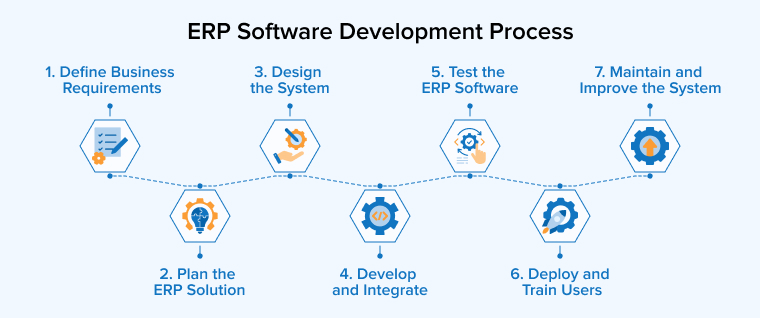
Developing ERP software requires careful planning since the system links many business tasks and departments. Making sure the end product is secure, dependable, and easy to maintain while also meeting business needs is easier with a clearly defined development process. The specifics may change from company to company, but most ERP software development follows these steps.
1. Define Business Requirements
The first step is to get a feel for the current processes, obstacles, and objectives of the company. The necessary ERP modules, user roles, integrations, reporting requirements, and other crucial functions should be determined with the help of stakeholders from various departments.
2. Plan the ERP Solution
When requirements are defined, the development team can set priorities, establish a technological strategy, create a timeframe, and allocate resources. At this point, you’ll also have to choose between developing and releasing the most important parts first or developing the whole system all at once.
3. Design the System
The ERP’s framework, database, UI, processes, and individual modules are the primary areas of attention throughout the design phase. Additionally, developers decide on the solution’s compatibility with preexisting business apps and how various system components will interact with one another.
4. Develop and Integrate
The next step is for developers to build the ERP modules and integrate them with the necessary business systems, third-party apps, databases, and APIs. In order to assess and improve on specific components as development progresses, it is common practice to carry out development in stages.
5. Test the ERP Software
Verifying the ERP’s functionality across all of its modules and processes is what testing is all about. Before releasing a product to the public, developers and quality assurance teams make sure it works as planned by testing its integrations, performance, security, data accuracy, and user access.
6. Deploy and Train Users
After testing and final approval, the ERP is deployed in the selected environment and existing business data can be migrated into the system. Also, make sure your staff gets the training they need to master the system and the new workflows.
7. Maintain and Improve the System
Deploying an ERP system is just the beginning of the development process. Updating security patches, monitoring performance, fixing bugs, and improving features are all part of routine maintenance that helps keep the system reliable. Along with changing business needs, the ERP can also get new features and integrations.
Common Challenges in ERP Software Development and How to Overcome Them
ERP software integrates several functional areas, procedures, and data repositories into a unified platform. Although there are a number of benefits to improving operational efficiency, there are also a number of challenges related to building and deploying an ERP. Let’s talk about it individually and how you may solve it.
Complex Business Requirements
Each division has its own unique set of procedures, workflows, and expectations, and ERP systems must accommodate all of them. Poor early understanding of these criteria might make the project difficult to manage and lead to missing features or capabilities.
Solution
To kick things off, have key stakeholders from several departments participate in a thorough needs analysis. Be sure to document the current workflows, pinpoint any issues, set priorities, and clarify project goals before development starts. The development team can stay on track and save money by working within a clearly defined scope.
Data Migration Problems
Data migration from older systems, spreadsheets, or legacy apps to a new ERP can be challenging. The reliability of the new ERP and associated business processes is at risk when data is inaccurate, missing, duplicate, or inconsistent.
Solution
Data migration should only occur when businesses have cleaned, standardized, and validated their data. Making sure you have a well-defined migration strategy, running test migrations, and checking the transferred data are all crucial steps before launching the system. As a result, there is less chance of data loss and discrepancies.
Integration with Existing Systems
An ERP rarely works in isolation. It can be necessary for it to integrate with various internal programs, such as accounting software, warehouse management tools, e-commerce platforms, payment systems, and customer relationship management platforms. Data synchronization difficulties and interruptions to company activities might arise from poorly planned integrations.
Solution
During the planning phase, you should specify the data movement between systems and identify all necessary integration points. A planned integration strategy and well-designed APIs allow for easy monitoring and troubleshooting of linked systems and assist to ensure dependable data interchange.
High Development Costs
ERP development can cost a lot of financial resources because it includes developing software, setting up infrastructure, integrating it with other systems, moving data, testing, training, and ongoing maintenance. When needs keep evolving throughout development, costs have the potential to rise even further.
Solution
Before development starts, prioritize the most crucial features and define the project scope and budget. Another option for businesses is to build the ERP in stages, with the most important modules completed first and then more advanced features added later. With this method, you may manage development expenses and project priorities more effectively.
Employee Resistance and Adoption
Introducing a new ERP often changes how employees perform their daily tasks. Employees who are already familiar with the systems in place could be hesitant to implement new workflows if they do not feel well-supported or trained to do so.
Solution
Get staff involved early on in the ERP process and ask individuals who will be using the system for their feedback. Before and after deployment, give practical training, make sure documentation is clear, and be there for them every step of the way. This has the potential to simplify the new system and increase its acceptance.
ERP Software Development Cost
The development expenses are directly affected by both the number and complexity of ERP modules. It usually takes more work to design a system that covers multiple modules, such as inventory, finance, HR, procurement, CRM, production, and supply chain management, than a solution with a few modules.
Customization level is another important factor. Some businesses may require additional development work due to their particular workflows, industry-specific requirements, or customized reporting. The price tag can go up even higher if you want to integrate the ERP with other third-party services, payment platforms, CRM tools, legacy systems, or applications.
When evaluating the total expenditure, it’s important to consider factors such as the size of the user base, the location of the development team, the requirements for data migration and security, as well as testing, training, and continuing maintenance. Instead of depending on predetermined pricing, ERP development should be organized around the individual requirements of the organization.
Scope, features, degree of customization, integrations, and company size all play a role in determining the ERP software development cost. Compared to a massive enterprise system that supports several departments, locations, users, and complicated processes, a small ERP system with a few key modules may require a far lesser investment. Custom enterprise resource planning (ERP) development can cost anything from $50,000 for simpler solutions to over $2 million for really complicated enterprise systems, according to current industry estimates. On average, the budget for a mid-sized ERP system is between $150,000 and $500,000.
Conclusion
As seen in this blog, enterprise resource planning systems have become essential for businesses as they help improve operational efficiency and break down barriers between the different departments of the firm and improve their performance. Organizations adopt ERP systems to have a successful operational approach that can streamline the entire business process and offer transparency & visibility in the business functionality of the firm.
FAQs
Enterprise resource planning (ERP) software is a centralized program that helps firms manage and link fundamental processes like supply chain, inventory, sales, procurement, and finance. It unifies all company data into one place, streamlining collaboration, process coordination, and day-to-day operations management.
ERP stands for Enterprise Resource Planning. The term is used to describe a type of software that allows companies to control and coordinate their main functions from one place. Accounting, HR, inventory, procurement, sales, manufacturing, and other modules are available in enterprise resource planning (ERP) systems.
ERP systems help companies fix issues brought on by siloed apps, manual procedures, redundant data, and a lack of cross-departmental visibility. By bringing company processes and information together, ERP can enhance coordination, decrease repetitive work, and give managers a clearer view of corporate operations.
The term “cloud ERP software” refers to enterprise resource planning systems that are accessible online and stored on the servers of a third-party supplier. Although the provider usually handles the underlying infrastructure, upgrades, and maintenance, businesses are granted permission to use the system from many places and devices.
ERP accounting refers to the accounting features included in an ERP system that allow companies to centralize the management of their financial processes. Budgeting, spending management, general ledger, invoicing, accounts payable, accounts receivable, and financial reporting are all possible components.

Itesh Sharma is core member of Sales Department at TatvaSoft. He has got more than 6 years of experience in handling the task related to Customer Management and Project Management. Apart from his profession he also has keen interest in sharing the insight on different methodologies of software development.


Comments
Leave a message...