


The .NET runtime provides garbage collection (GC), which automatically releases memory held by unused objects in your C# applications. To optimize memory usage, use GC tuning and best practices. Leading .NET development company follows these methods to deliver high-performance, memory-efficient applications.
If you don’t want your app to suffer from memory leaks, slowdowns, crashes, or other issues, read this article to understand how garbage collection occurs in multiple phases. We also discuss its benefits, generations, methods, and best practices.
What is Garbage Collection in C#?
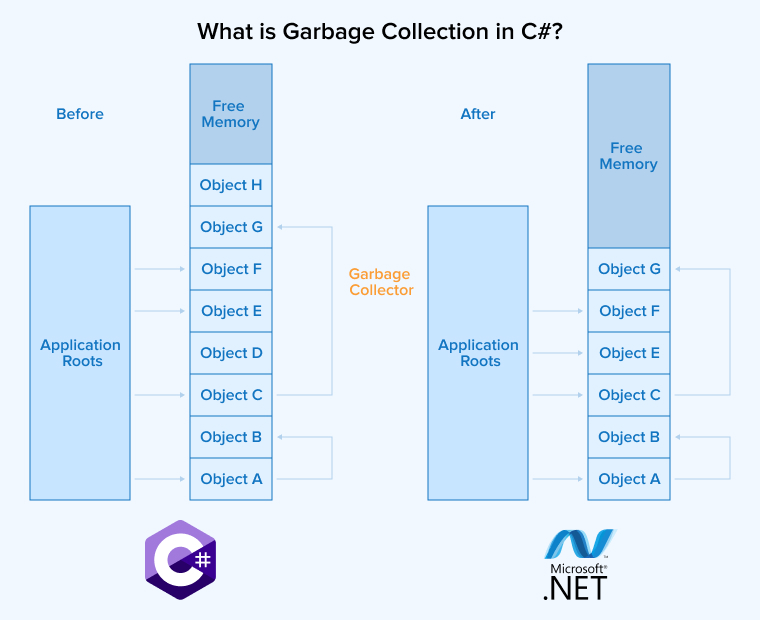
The process of reclaiming memory that an application no longer uses and making it available for new allocations is called garbage collection. In C#, garbage collection is automatic and is handled by the .NET runtime. It frees developers from the burden of tracking memory allocation and releases.GC allocates memory on the managed heap and regularly scans it to find objects no longer referenced by the application. The automatic memory management helps prevent memory leaks and related issues.
Take a look at what a Quora user said about garbage collection in C#.
Benefits of Garbage Collection in C#
Let us review a few important benefits of automatic garbage collection in C#.
- Simplified Development: Developers no longer need to manually free memory, allowing them to focus on writing clean and easy-to-maintain code.
- Memory Leak Prevention: The garbage collector regularly scans the heap to identify and reclaim unused objects, helping to prevent memory leaks.
- Efficient Generational Collection: Generational GC improves efficiency by focusing on short-lived objects and by compacting memory to eliminate fragmentation.
- Thread-Safe Management: Garbage collection in C# is thread-safe and supports multithreaded environments, providing improved performance without concurrency issues.
- Enhanced Productivity: By eliminating the need for manual memory management and reducing debugging time for memory-related issues in C#, garbage collection accelerates development.
- Application Stability: Efficient memory management produces optimal memory usage, minimizing slowdowns and crashes.
Phases in Garbage Collection
For efficient memory management, garbage collection in C# is carried out in three consecutive phases as discussed below:
Marking Phase
In the first phase, the garbage collector categorizes objects as in-use or unused. After examining each reference from the application, it checks whether each object is reachable. Objects are marked live if they are reachable, and dead if they are not.
Relocating phase
After creating a list of live objects, the garbage collector copies them to new memory locations. This prevents fragmentation that arises when many objects are deallocated from the managed heap, which otherwise leaves the heap divided into discontinuous segments.
Compacting Phase
The garbage collector compacts live objects to eliminate gaps and removes dead objects to free unused memory. This makes memory available for allocation to new objects quickly.
Generations in Garbage Collection
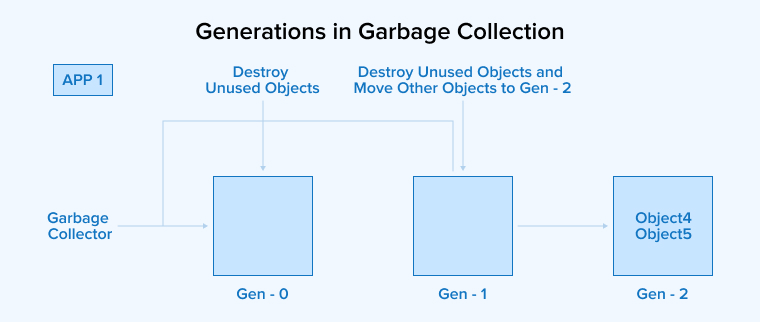
For optimal memory management, the garbage collector in C# uses a generational collection strategy, organizing heap objects into three generations:
Generation 0 (Gen 0)
This generation contains short-lived, newly created objects. Local variables in methods and other temporary objects are allocated here and are quickly reclaimed when they become unreachable.
Generation 1
Objects that survive collection in generation 0 are considered longer-lived objects and are promoted to generation 1, where garbage collection occurs less frequently than in generation 0.
Generation 2 Heap Memory
Objects from generation 1 are promoted to generation 2 when they have survived enough collections. Long-lived objects, such as global variables and static objects, are moved to generation 2 and remain in the heap for the lifetime of the process. Generation 2 is allocated a larger portion of the heap than generation 1, and generation 1 has a larger allocation than generation 0.
Most Important Methods of GC Class
Here, we discuss several important methods that interact with the C# garbage collector to perform crucial operations.
GC.GetGeneration()
Used to return the target object’s generation number, this method requires a single parameter: the target object whose generation number is requested.
Syntax:
int generation = GC.GetGeneration(myObject); |
Example:
using System; class Device { public string Name; public Device(string name) => Name = name; } class Program { static void Main() { Device d = new Device("Sensor"); Console.WriteLine("Initial generation of 'device': " + GC.GetGeneration(d)); GC.Collect(); // Force GC GC.WaitForPendingFinalizers(); Console.WriteLine("Generation of 'device' after GC.Collect():" + GC.GetGeneration(d)); } } |
Output :
Initial generation of 'device': 0 Generation of 'device' after GC.Collect(): 1 |
Explanation :
The above code shows the working of garbage collection in object generations. Newly created device objects start in generation 0; this generation is printed after object creation but before garbage collection. After garbage collection runs, the object’s generation is promoted from 0 to 1. Printing this change illustrates how the objects are moved to higher generations for more efficient memory management.
GC.Collect()
This method triggers garbage collection using a single parameter that specifies the generation requiring collection.
Syntax:
GC.Collect(); |
Example :
using System; using System.Collections.Generic; class Program { static void Main() { List<string> obj = new List<string> { "Apple", "Banana" }; for (int i = 0; i < 3; i++) { Console.WriteLine($"Generation of obj after GC.Collect() #{i}: {GC.GetGeneration(obj)}"); GC.Collect(); } Console.WriteLine($"Final generation of obj: {GC.GetGeneration(obj)}"); } } |
Output:
Generation of obj after GC.Collect() #0: 0 Generation of obj after GC.Collect() #1: 1 Generation of obj after GC.Collect() #2: 2 Final generation of obj: 2 |
Explanation :
The code above demonstrates how an object’s generation changes after multiple GC cycles. We created a List<string> and called GC.Collect() three times in a loop. The object is promoted after each garbage collection. At the end, the code prints the object‘s final generation, which is 2.
MaxGeneration
It returns the total number of generations supported by the system.
Syntax:
int maxGen = GC.MaxGeneration; |
Example :
using System; class Program { static void Main() { Console.WriteLine("Max Generation supported by GC: " + GC.MaxGeneration); } } |
Output:
Max Generation supported by GC: 2 |
Explanation :
The code uses the GC.MaXGeneration property to obtain the highest generation number supported by the system’s garbage collector. The return value is typically 2, which indicates that the GC supports three generations 0,1, and 2.
GC.GetTotalMemory()
This method checks the total number of bytes allocated to the managed heap.
long memoryUsed = GC.GetTotalMemory(false); // or true to force GC first |
Example :
using System; class Program { static void Main() { long memoryBefore = GC.GetTotalMemory(false); Console.WriteLine("Memory before allocation: " + memoryBefore); byte[] data = new byte[50000]; // Allocate some memory long memoryAfter = GC.GetTotalMemory(false); Console.WriteLine("Memory after allocation: " + memoryAfter); } } |
Output:
Memory before allocation: 1126040 Memory after allocation: 1173928 |
Explanation :
This code reports the total memory used by the app before and after memory allocation. It passes false when measuring to avoid triggering garbage collection. First, the memory usage is recorded; then an array of 50,000 bytes is allocated, increasing memory usage. Memory usage is measured again after the allocation. The difference between the initial and the final measurement shows how much memory was consumed.
GC.WaitForPendingFinalizers()
This method allows the thread to finalize the objects by pausing all the other threads in the queue.
Syntax:
GC.WaitForPendingFinalizers(); |
Example :
using System; class MyClass { ~MyClass() { Console.WriteLine("Finalizer: MyClass object cleaned up."); } } class Program { static void CreateAndReleaseObject() { MyClass obj = new MyClass();// obj will go out of scope when this method ends } static void Main() { CreateAndReleaseObject(); GC.Collect(); GC.WaitForPendingFinalizers(); Console.WriteLine("Finalization complete. Program continues."); } } |
Output:
Finalizer: MyClass object cleaned up. Finalization complete. Program continues. |
Explanation :
This code runs finalizers before the program proceeds to the next task. Here, the main method is CreateAndReleaseObject(), which creates a resource object. Next, the GC.Collect() is called to trigger garbage collection and invoke finalizers, so that the destructor-defined message. Calling the GC.WaitForPendingFinalizers() ensures that all finalizers complete before the program moves on.
GC.SuppressFinalize()
Execute this method to prevent the garbage collector from finalizing an object. It takes the object as an argument and informs the GC that the object’s finalizer does not need to run. This reduces unnecessary finalizations, decreases cleanup overhead, and improves performance.
Syntax:
GC.SuppressFinalize(this); // Used inside Dispose() |
Example :
using System; class MyClass : IDisposable { public void Dispose() { Console.WriteLine("Dispose called. Skipping finalizer."); GC.SuppressFinalize(this); } ~MyClass() { Console.WriteLine("Finalizer called."); } } class Program { static void CreateAndReleaseObject() { MyClass obj = new MyClass();// obj will go out of scope when this method ends obj.Dispose(); // Finalizer will be skipped obj = null; } static void Main() { CreateAndReleaseObject(); GC.Collect(); GC.WaitForPendingFinalizers(); Console.WriteLine("Program complete."); } } |
Output:
Dispose called. Skipping finalizer. Program complete. |
Explanation :
The code example shows how to use GC.SuppressFinalize() to prevent finalizers from running after an object is disposed. The CreateAndReleaseObject() method in Main creates a resource object, and the IDisposable implementation disposes of it explicitly.
By calling GC.SuppressFinalize(this) inside the Dispose(), you inform the garbage collector to skip this object’s finalizer. Therefore, when GC.Collect() is invoked in the Main; the absence of any destructor message confirms that the finalizer did not run.
Best Practices for Optimizing Garbage Collection
Although garbage collection in C# is automatic and optimized, you can further improve an app’s performance by following these best practices.
1. Minimize Object Allocations
One of the most effective ways to optimize GC is to reduce unnecessary object allocations. Each allocated object increases the workload for the GC, raising overhead. Minimizing allocations keeps that overhead low, so allocate objects only when necessary.
2. Use Value Types For Small Data
Using value types (structs) instead of reference types like classes for small, immutable data can reduce heap allocations. Structs are typically allocated on the stack and do not require garbage collection.
3. Reuse Objects
Don’t create new objects in your app and allocate additional memory every time you need a similar object. Instead, reuse existing objects. Object pooling is a simple, effective technique to avoid excessive allocations. Reusing the object also reduces the frequency of garbage collection.
4. Dispose of Unmanaged Resources
Make sure to release unmanaged resources by implementing the Dispose method and the IDisposable interface. You can also automate disposal by using the statement.
5. Avoid Large Object Allocations
Large objects that require more than 85,000 bytes of memory are allocated in a special heap segment called the Large Object Heap. Collecting and compacting these objects is costly. Instead, break down large objects into various small ones or use object pooling to improve memory management.
6. Profile and Monitor GC Performance
Leverage tools such as dotMemory and dotnet-counters to monitor your app’s memory usage and its garbage collection activities. They help optimize GC behavior by identifying long GC pauses, excessive allocations, and memory leaks.
7. Know When to Force GC
Although GC in C# runs automatically, sometimes developers need to do it manually by using the GC.Collect() to optimize memory management. However, calling it frequently can also negatively impact the application’s performance. Here, timing is crucial. Forcing garbage collection during application initialization, during transitions, or when memory usage is peaking can help optimize memory usage. Use profiling tools to understand your application’s memory behavior and make an informed decision about when to trigger GC.
Conclusion
Garbage collection is critical for memory management in C#. It reclaims unused memory automatically, optimizing overall memory usage. It also helps developers avoid memory fragmentation and leaks. So, if you want to build a high-performing and memory-efficient application, it is necessary to understand how garbage collection works, including its functions and best practices.
FAQs
C# provides automatic garbage collection that identifies and reclaims memory used by objects no longer referenced by the application. Using a generational approach, GC organizes the objects into three generations depending on their lifetime.
In C#, the main difference is that garbage collection automatically collects garbage, whereas you must explicitly invoke Dispose. In short, the CLR releases unused memory while developers are responsible for releasing unmanaged resources such as operating system resources, file handles, and locks.
In C#, the system automatically triggers garbage collection when allocated memory exceeds a predefined threshold. Another way to perform garbage collection in C# is to run it manually using the GC.Collect() method.
As an integral part of the IDisposable pattern in C#, the dispose() method is used to release unmanaged resources held by an object that the garbage collector cannot reclaim.

Rakesh Patel is a technology expert working at TatvaSoft. He is looking after .NET development projects and also work along side with business analyst team. He developed his passion of writing while working and writes whenever he got the time.



Comments
Leave a message...