


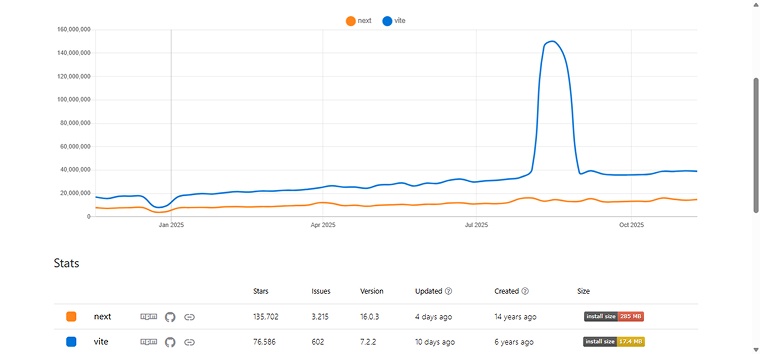
Choosing the right tool to build modern web applications can be a game-changer for developers. Among the most talked-about options today are Vite and Next.js. Both are significant in their own ways. Vite is known for its lightning-fast development environment, while Next.js stands out for its robust full-stack capabilities and server-side rendering features. According to recent reports, Vite has gained massive traction among developers, while Next.js remains a trusted framework for production-ready React applications.
Understanding their strengths and differences can help a Vue.js development company choose the right one for their next project. To assist you, this blog discusses the definitions, features, advantages, practical examples, usage scenarios, and key differences between Vite and Next.js.
The chart below compares recent npm trends for Vite and Next.js, highlighting how developer adoption of each tool has evolved over time.
What is Vite?
Vite, pronounced as “veet,” is a modern frontend build tool created by Evan You, the developer behind Vue.js. Designed for speed and simplicity, it uses native ES modules to deliver instant server startup and fast hot module replacement. Vite supports various frameworks and libraries, including React, Preact, Vue, and Svelte, making development smooth and efficient.
Take a look at this Reddit discussion about Vite to see what developers are saying right now.
Comment
byu/sitabjaaa from discussion
inreact
Key Features of Vite
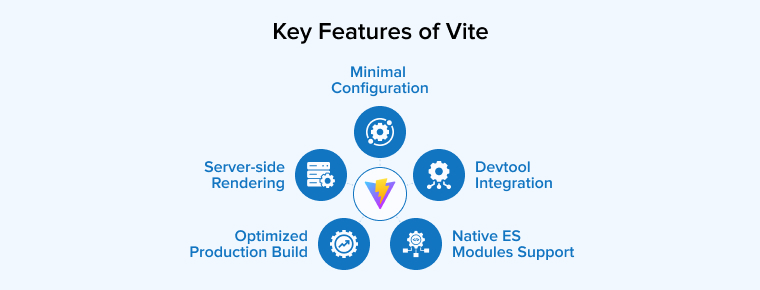
The five major features of the Vite are as follows:
- Optimized Production Build: In production mode, Vite uses Rollup to bundle and optimize application assets. It applies techniques such as minification, code splitting, and tree-shaking to remove unused code and reduce file sizes. This process ensures faster loading times and improved performance for deployed web applications.
- Minimal Configuration: Vite.js follows a zero-configuration approach, allowing developers to start projects instantly without complex setup. It comes with smart defaults for tools like JSX and CSS preprocessors, simplifying the development process. For those needing more control, Vite offers a flexible configuration file for advanced customization.
- Server-Side Rendering: Vite has built-in support for server-side rendering (SSR), enabling developers to pre-render applications built with React, Vue, or Svelte on the server. This improves performance and SEO while ensuring smooth client-side hydration after loading.
- Devtool Integration: Vite.js works smoothly with major browser developer tools, such as Chrome Dev Tools, making debugging easier. It maps the source code to the browser, allowing developers to inspect and debug their code directly without any extra setup. This integration streamlines development and saves valuable time.
- Native ES Modules Support: Vite.js leverages native ES modules supported by modern browsers, allowing them to load as separate files during development without bundling. This approach speeds up startup, improves caching, and enables the browser to load modules in parallel, resulting in faster development and better overall performance.
Benefits of Using Vite
Vite is gaining momentum due to several outstanding advantages it offers. They include:
- Improved Development Workflow: Vite provides a smooth and efficient development experience with fast build times, instant browser updates, and built-in hot module replacement. These features streamline workflows, minimize manual testing, and allow developers to focus more on coding.
- Bare Module Resolving: Vite supports bare module resolving, allowing developers to import packages directly by name. It automatically detects bare import specifiers in JavaScript files, rewrites them, and resolves the correct module paths from project dependencies for seamless integration.
- Plugin System: Vite offers a powerful plugin system that allows developers to easily extend and customize their projects. Built on Rollup’s architecture, it supports numerous official and community plugins, enabling integrations with frameworks, preprocessors, and tools for enhanced functionality and a smoother development experience.
- Broad Ecosystem Support: Vite’s approach is widely adopted, with many frameworks now using or supporting it by default. This shared foundation enables developers to collaborate efficiently and focus more on building new features.
- Hot Module Replacement: Vite includes built-in Hot Module Replacement (HMR), which instantly updates changes in the browser without a full page reload. Only the modified module is refreshed, ensuring a smooth and efficient development workflow with real-time feedback and faster iteration, even in large projects.
Vite.js Code Example
Here’s a minimal Vite + Vue project setup to help you understand how Vite works.
1. package.json (scripts)
{ "name": "vite-vue-app", "version": "1.0.0", "private": true, "scripts": { "dev": "vite", "build": "vite build", "preview": "vite preview" }, "devDependencies": { "vite": "^5.0.0", "vue": "^3.4.0", "@vitejs/plugin-vue": "^5.0.0" } } |
Explanation:
- dev → Starts a development server with hot-module replacement (HMR). You’ll see changes instantly in the browser.
- build → Compiles and optimizes your app for production.
- preview → Serves the production build locally so you can test it.
- Dependencies:
- vite → the bundler itself.
- vue → Vue framework.
- @vitejs/plugin-vue → enables .vue single-file component support.
2. index.html (root file)
<!DOCTYPE html> <html lang="en"> <head> <meta charset="UTF-8" /> <meta name="viewport" content="width=device-width, initial-scale=1.0" /> <title>Vite + Vue App</title> </head> <body> <div id="app"></div> <!-- Vite injects your main script here --> <script type="module" src="/src/main.js"></script> </body> </html> |
Explanation:
- This is not just a template — Vite uses this directly as the entry HTML.
- <div id=”app”></div> → The root element where Vue will mount the app.
- <script type=”module”> → Vite serves modern ES modules natively, so no bundling step is required in development mode.
3. src/main.js (entry file)
import { createApp } from 'vue' import App from './App.vue' createApp(App).mount('#app') |
Explanation:
- createApp(App) → bootstraps your Vue application.
- .mount(‘#app’) → attaches the Vue app to the #app div in index.html.
- This is the starting point — every Vue component eventually connects here.
4. src/App.vue (root component)
<template> <div> <h1>{{ message }}</h1> <button @click="increment">Clicked {{ count }} times</button> </div> </template> <script> import { ref } from 'vue' export default { setup() { const message = ref('Hello from Vite + Vue!') const count = ref(0) const increment = () => { count.value++ } return { message, count, increment } } } </script> <style> h1 { color: #42b983; font-family: Arial, sans-serif; } button { margin-top: 10px; padding: 6px 12px; background: #42b983; border: none; color: white; border-radius: 4px; cursor: pointer; } </style> |
Explanation:
- Template → HTML-like structure with Vue’s reactivity syntax.
- Script (Composition API) →
- ref makes variables reactive.
- count updates automatically in the UI when changed.
- increment updates the counter when the button is clicked.
- Style → scoped CSS that only applies to this component.
Summary of Flow
- index.html loads → Vite injects src/main.js.
- src/main.js creates the Vue app and mounts it into <div id=”app”>.
- src/App.vue runs as the root component, rendering the UI.
- Changes are instantly reflected during development thanks to Vite’s HMR.
What is Next.js?
Next.js is a popular open-source React framework developed by Vercel, designed for building high-performance, SEO-friendly web applications. It supports server-side rendering, static site generation, and incremental static regeneration, enabling developers to create fast, scalable, and production-ready applications efficiently.
Take a look at this Reddit discussion about Next.js to see what the community is talking about.
Comment
byu/peace_keeper977 from discussion
innextjs
Key Features of Next.js
The following five features of Next.js play an important role in simplifying the development process:
- Incremental Static Regeneration (ISR): Next.js offers Incremental Static Regeneration (ISR), which allows specific pages to be updated or regenerated after deployment without a full rebuild. This feature combines the speed of static sites with the flexibility of dynamic content, ensuring pages remain up to date and load quickly for users.
- File-based Routing: Next.js features a file-based routing system that automatically creates routes based on the project’s directory structure. This intuitive approach simplifies navigation setup, supports dynamic routes, and enables developers to build advanced layouts and routing patterns without manual configuration.
- Automatic Code Splitting: Next.js automatically splits JavaScript code into smaller chunks, ensuring that only the necessary code loads for each page. This reduces initial load times and improves overall application performance and efficiency.
- React Server Components: Next.js 13+ leverages React 18+ features, including Server Components, which allow parts of the UI to be rendered on the server. This reduces client-side JavaScript, improves performance, and enables efficient data fetching while keeping the interface interactive.
- Data Fetching: Next.js provides multiple data fetching methods, including getStaticProps, getServerSideProps, and getStaticPaths, allowing developers to fetch data at build time or on each request for both dynamic and static pages.
Benefits of Using Next.js
Modern web development must address multiple aspects to ensure long-term usability. Next.js is a suitable choice due to the following benefits:
- Increased Flexibility and Scalability: Next.js is flexible and scalable, making it suitable for projects of any size. Its modular architecture supports easy integration with libraries, APIs, and backends, while features such as static and dynamic rendering, fast refresh, and TypeScript support enable developers to build and scale applications efficiently.
- Improved Performance: Next.js enhances application performance through features such as server-side rendering, static site generation, and automatic code splitting. Its optimized Image component delivers responsive, lazy-loaded images, while caching mechanisms reduce server workload. Together, these features ensure faster page loads, better user experience, improved SEO, and efficient handling of high-traffic websites.
- Developer Experience: Next.js enhances development efficiency with features such as file-based routing, API routes, hot module replacement, and automatic code splitting. Its clear project structure, plugin ecosystem, and support for modern tools streamline coding, simplify maintenance, and enable developers to build high-quality applications quickly.
- Built-in CSS Support: Next.js offers built-in support for CSS and Sass, enabling developers to style applications without additional setup. It ensures locally scoped styles, optimized bundling, and seamless integration with server-side rendering and code splitting for efficient and maintainable designs.
- Community and Rich Ecosystem: Next.js has a large, active community that supports its growth through open-source projects, tutorials, and third-party libraries. Developers benefit from shared knowledge, solutions, and access to React tools, making development easier and more efficient.
Next.js Code Example
A small Next.js app using the App Router (modern approach):
package.json (scripts):
{ "name": "next-app", "private": true, "scripts": { "dev": "next dev", "build": "next build", "start": "next start" }, "dependencies": { "next": "^14.0.0", "react": "^18.0.0", "react-dom": "^18.0.0" } } |
app/page.jsx (App Router):
export default function Page() { return ( <main> <h1>Welcome to Next.js</h1> <p>This page is server-rendered by default (App Router).</p> </main> ) } |
app/hello/page.jsx (a nested route):
export default function Hello() { return <div>Hello from nested route!</div> } |
Explanation of the Next.js Example
- package.json
- “scripts” → Running npm run dev launches the Next.js development server with live reloading. npm run build prepares the production application, and npm run start serves the optimized, production-ready version of the app.
- “dependencies” → With Next.js, you only need to install next, react, and react-dom, as it includes routing, server-side rendering, and bundler configuration by default. In contrast, Vite requires the separate installation of React and additional libraries for routing or server-side rendering (SSR).
- app/page.jsx
- The App Router (Next.js 13+) gets activated by the presence of the app/ folder. Once activated, any file named page.jsx inside a folder automatically becomes a route.
- At the root route /, the page displays an <h1> element with the text “Welcome to Next.js” and a paragraph. This page is rendered on the server by default, so the HTML is pre-generated and sent to the browser, a feature not available by default in Vite.
- app/hello/page.jsx
- Creating a folder named hello containing a page.jsx file automatically provides a /hello route. Therefore, it eliminates the need to configure the React Router DOM library.
- The visit to http://localhost:3000/hello renders the statement, “Hello from nested route!”.
- Running the App
- Run npm run dev. Next.js starts its development server (default: http://localhost:3000).
- Visit / for the homepage and /hello to access the nested route.
- For production, running npm run build followed by npm run start delivers optimized pages with server-side rendering, automatic code splitting, and enhanced image performance.
Next.js vs. Vite.js: Key Differences
Before proceeding to the differences, take a look at this Reddit discussion on Vite vs Next.js to see how developers compare the two.
Comment
byu/Pt-tS from discussion
innextjs
Let us now focus on the core of our article, i.e, what differentiates Vite from Next.js. We will explore eight major differences to provide a clearer and better understanding of these two popular technologies.
1. Next.js vs. Vite.js: Server-Side Rendering (SSR) vs. Client-Side Rendering (CSR)
- Next.js: Next.js is designed with server-side rendering (SSR) as its default approach. Pages are pre-rendered on the server and sent as fully-formed HTML to the client, improving initial load times and SEO. While SSR enhances performance and search visibility, it can increase server load and latency, though features like caching and Incremental Static Regeneration help mitigate these issues.
- Vite: It primarily focuses on client-side rendering (CSR), where the browser handles most of the page rendering after loading JavaScript. This approach reduces server load and simplifies deployment, but may slightly delay the first meaningful paint. Vite can support SSR when used with frameworks like React or Vue, but the rendering approach depends on the framework and setup chosen by the developer.
2. Next.js vs. Vite.js: Community and Level of Adoption
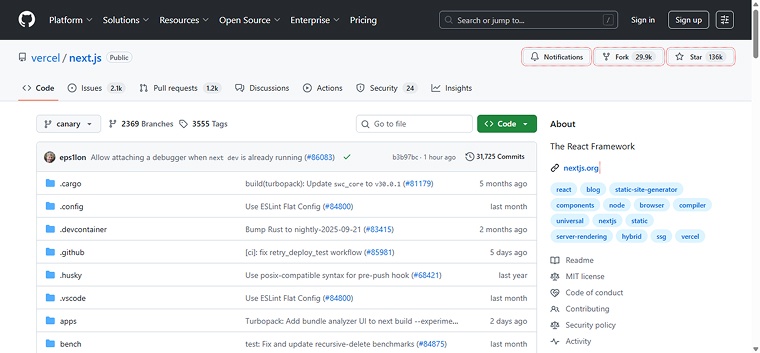
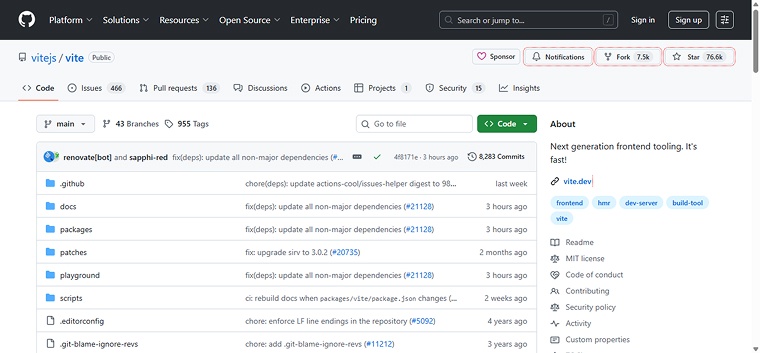
- Next.js: Released in 2016, Next.js has a large and mature community with extensive ecosystem support. Over 2.6 million websites use it, and it enjoys strong backing from the React community. Developers benefit from abundant tutorials, libraries, and open-source contributions, making adoption easier and more reliable.

- Vite: It was launched in 2020, making it relatively new but rapidly growing in popularity. Although its community is smaller than Next.js, it has gained attention for its fast development speed and simplicity. Increasing adoption, GitHub stars, and developer interest indicate that Vite is quickly establishing a supportive and active ecosystem.
3. Next.js vs. Vite.js: Learning Curve and Ease of Use
- Next.js: It has a steeper learning curve due to its extensive features, such as server-side rendering, routing, and React Server Components. Understanding these concepts, especially with the App Router in version 13, requires more time. However, it offers powerful long-term benefits for complex applications.
- Vite: Vite is easier to learn and use, focusing on core client-side functionality. Its minimal setup and straightforward configuration allow developers to start quickly, making it ideal for small to medium projects or for those seeking fast development without deep architectural complexity.
4. Next.js vs. Vite.js: Deployment
- Next.js: Next.js offers versatile deployment options, supporting static, server, and serverless environments. Developers can deploy applications on platforms like Vercel, Netlify, AWS, or Firebase. Additionally, self-hosting is possible using Docker or Node.js, making it suitable for a wide range of production scenarios.
- Vite: It focuses on static and serverless deployments, generating HTML, CSS, and JavaScript files that can be hosted on platforms like Vercel, Netlify, or GitHub Pages. While flexible, it may require more manual setup compared to frameworks with built-in deployment optimizations.
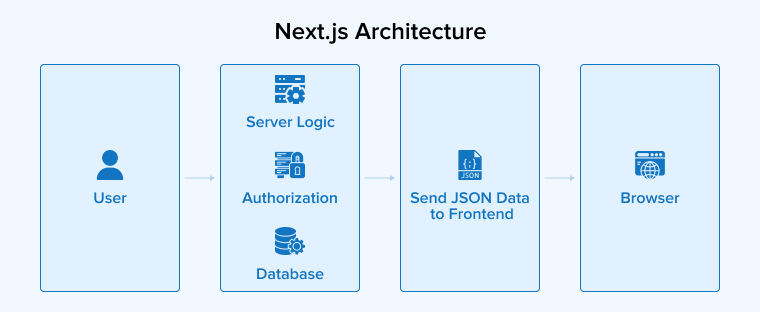
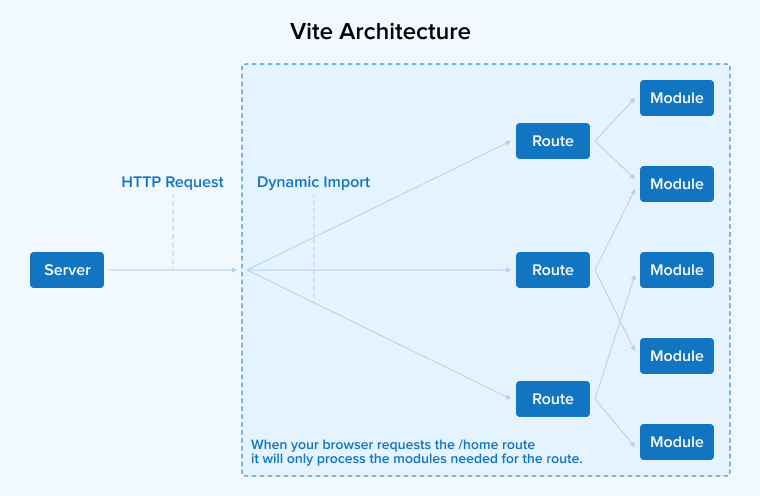
5. Next.js vs. Vite.js: Architecture
- Next.js: It is a full-featured React framework with a comprehensive architecture that supports both client-side and server-side rendering. It uses Webpack for bundling and includes built-in features such as server-side rendering (SSR), static site generation, and routing, providing a structured, all-in-one development environment.
- Vite: It is a lightweight build tool that uses native ES modules during development for fast server startup and hot module replacement. It relies on Rollup for optimized production builds, focusing on an efficient, modular architecture.
6. Next.js vs. Vite.js: Development Experience
- Next.js: It offers a comprehensive development experience for React applications. Features such as static site generation, code splitting, and automatic route creation enhance productivity. Its full-stack capabilities, debugging tools, and TypeScript support make building scalable and maintainable applications efficient, though the learning curve can be steep.
- Vite: It focuses on speed and efficiency in development. With instant server start, lightning-fast hot module replacement, and intuitive configuration, it supports frameworks like React, Vue, and Svelte. Its streamlined setup, fast rebuilds, and excellent debugging tools enable developers to iterate quickly and maintain a smooth workflow.
7. Next.js vs. Vite.js: Performance
- Next.js: Next.js enhances performance through server-side rendering, static site generation, and automatic code splitting. Features such as image optimization and Incremental Static Regeneration ensure fast page loads, efficient updates, and strong SEO, making it ideal for dynamic, content-rich web applications.
- Vite: Vite excels in both development and build performance. Using ES modules, Esbuild, and hot module replacement, it delivers lightning-fast builds, instant server start, and smooth development iteration, making it perfect for projects that prioritize speed and rapid development cycles.
8. Next.js vs. Vite.js: Project Scope and Complexity
- Next.js: Next.js is ideal for complex projects that require server-side rendering, API routes, and advanced features. Its comprehensive framework handles many common requirements out of the box, reducing manual setup and making it suitable for large-scale applications.
- Vite: Vite is best suited for simpler projects where fast development is a priority. Its lightweight and flexible design allows for quick setup and iteration, but developers may need to configure additional features themselves for more complex requirements.
Use Cases of Vite vs Next.js
Let us discuss some key factors to consider when choosing between Vite vs Next.js for developing web applications:
When to Use Vite?
The following are some of the top use cases of Vite:
- Single Page Applications (SPAs): Vite is well-suited for building single-page applications (SPAs) using frameworks like React, Vue, or Svelte. It offers fast development, hot module reloading, and optimized builds for efficient client-side rendering.
- Developing a Diverse Tool: Vite enables you to quickly create applications using React, Vue.js, Svelte, or Preact. By selecting a template, Vite sets up your project within minutes.
- Prototyping: Vite is ideal for rapid prototyping, offering an instant server start and hot module replacement. Developers can quickly build, test, and iterate on ideas without complex configuration.
When to Use Next.js?
The following are some of the top use cases of Next.js:
- SEO-Friendly Applications: Next.js is ideal for SEO-sensitive applications, such as blogs, portfolios, and marketing sites. Its server-side rendering pre-renders HTML on the server, improving page load speed and ensuring that search engines can easily crawl and index the content.
- eCommerce Platforms: Next.js is well-suited for building eCommerce platforms by combining server-side rendering and static site generation to deliver fast, SEO-friendly pages. Features such as dynamic content handling and Incremental Static Regeneration ensure smooth updates, an improved user experience, and higher conversion rates for online stores.
- Content-Heavy Websites: Static site generation pre-renders pages at build time, ensuring fast load speeds. Integration with a headless CMS simplifies content management and updates.
Comparison Table: Vite vs Next.js
Now, let’s summarize the differences we observed between Vite and Next.js:
| Comparison Parameter | Vite | Next.js |
|---|---|---|
| What is it? | Frontend build tool and development server. | Full-stack React framework to develop high-quality web applications. |
| Used for | Bundling and quick development. | Server-side rendering, SEO optimization, and automatic route generation. |
| Rendering modes | CSR is the default rendering mode. SSR can be added via plugins. | SSR, SSG, CSR, ISR. |
| Routing | Lacks a default routing mechanism. Depends on third-party libraries like React Router. | Built-in file system-based routing that supports static, dynamic, API, and nested routes. |
| Framework support | Vite is a framework-agnostic tool, hence it supports multiple JS libraries and frameworks. | It is specifically built for the React library and can be quite challenging to use with other frontend frameworks. |
| NPM Downloads | The weekly download numbers are above 15 million. | The weekly download numbers are above 7 million. |
| API Development | No built-in server-side API capabilities. Requires a separate backend service to handle API requests. | Built-in support for API routes, facilitating easy creation of server-side API endpoints. |
| Learning Curve | Gentler learning curve. | Steeper learning curve owing to its extensive features and advanced concepts. |
| Optimization features | esbuild to prebundle dependencies, rollup for production builds, static asset caching, instant HMR, automatic code splitting, etc. | Built-in image optimization, lazy loading, co-location of API routes, font optimization, etc. |
| Use Case | Single-page applications (SPAs), prototypes, and small to medium-scale projects. | Dynamic web apps, full-stack applications, SEO heavy apps. |
Final Thoughts
Choosing between Vite and Next.js depends on your project’s goals. Vite is ideal for fast, lightweight development, ideal for projects requiring quick iteration and minimal setup. Next.js, however, is a comprehensive React framework that excels in server-side rendering, SEO optimization, and building dynamic, content-rich applications. It’s better suited for large-scale projects where performance and advanced features are essential. By understanding the strengths of each tool and your team’s needs, you can select the one that ensures efficient development and high-performance applications.
FAQs
No, Next.js does not replace Vite. They serve different purposes—Next.js is a full framework, while Vite is a fast build tool.
Vite is popular because it offers a fast, lightweight development experience, with instant server start, hot module replacement, minimal configuration, and optimized builds for modern frontend frameworks.

Parind Shah is responsible for frontend innovations at TatvaSoft. He brings profound domain experience and a strategic mindset to deliver exceptional user experience. He is always looking to gain and expand his skill set.



Comments
Leave a message...