


When it comes to cross-platform development, there is fierce competition between Flutter and .NET MAUI to take the leading position as frameworks that enable building mobile and desktop apps from a single codebase.
Flutter from Google is a popular choice worldwide, mainly because of its high-performance rendering engine. Meanwhile, .NET MAUI is gradually gaining traction as a powerful alternative, not only because it is an evolutionary successor to Xamarin.Forms, but also because it provides access to reliable and effective .NET development services.
The decision to choose any one of these frameworks is highly influenced by factors such as long-term scalability, native performance, and development costs. This article provides a comprehensive comparison of them, discussing their unique strengths and limitations to help you select the framework that best aligns with your project requirements and organizational objectives.
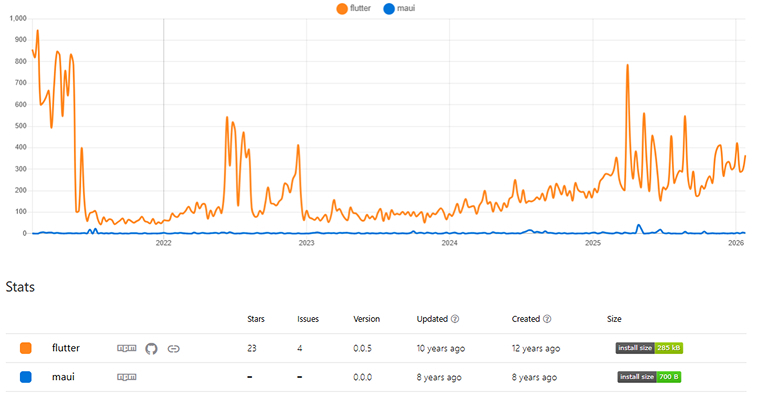
Before proceeding to the article, let’s see the npm trends between .NET MAUI vs Flutter.
What is .NET MAUI?
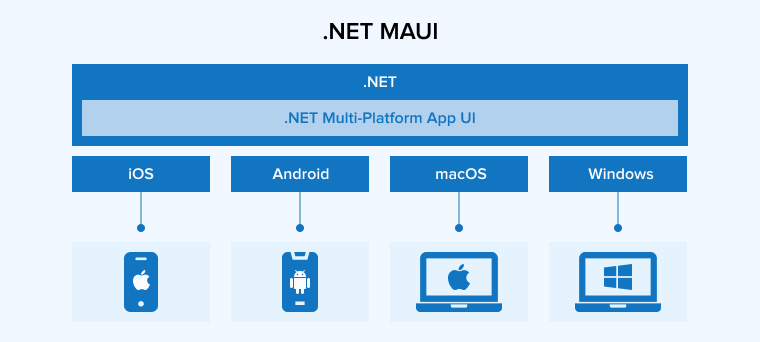
.NET MAUI is a cross-platform framework developed by Microsoft that streamlines the creation of applications for Android, iOS, macOS, and Windows. As the evolved successor to Xamarin.Forms, it enables developers to build native mobile and desktop applications using a single, shared codebase.
.NET MAUI uses XAML and C# to ensure that apps maintain the look and behavior of native software across all supported operating systems. This unified structure significantly simplifies the development, testing, and maintenance, making it a highly efficient choice for building modern, high-load solutions within the .NET ecosystem.
Key Features of .NET MAUI
The .NET MAUI framework offers a comprehensive set of features that enhance flexibility and performance while streamlining cross-platform development.
Data Binding
.NET MAUI supports data binding, providing an easy way to connect your app’s model data to the user interface. This helps create more responsive and easier-to-maintain applications.
Enhanced Development Flexibility and New Controls
.NET MAUI offers a wide range of layout options and controls, enhancing development flexibility. It not only provides all the necessary controls from the Xamarin.Forms, but also introduces new ones that were previously unavailable or required third-party integrations.
With the control options such as GraphicsView and Shapes, .NET MAUI enables advanced graphics rendering, giving developers freedom to be creative. Additionally, its customization capabilities are better suited for designing tailored user interfaces.
MVVM Architecture Support
By supporting the Model-View-ViewModel (MVVM) architectural pattern, .NET MAUI separates the user interface from the business logic. This separation of concerns simplifies app management and significantly improves testability.
Rich UI Components
.NET MAUI includes a rich library of pre-built UI elements such as layouts, lists, and buttons. As a result, UI designers can quickly and easily create more polished and user-friendly applications.
Integration with .NET Ecosystem
.NET MAUI is an integral part of the Microsoft .NET ecosystem. By using .NET MAUI, developers gain access to the entire .NET platform. It offers tools and libraries for cross-platform app development, as well as AI and data processing. The .NET ecosystem includes everything needed to create scalable and efficient applications, from the development environment to cloud services.
Benefits of .NET MAUI
Using .NET MAUI offers several high-end advantages in cross-platform app development, including but not limited to:
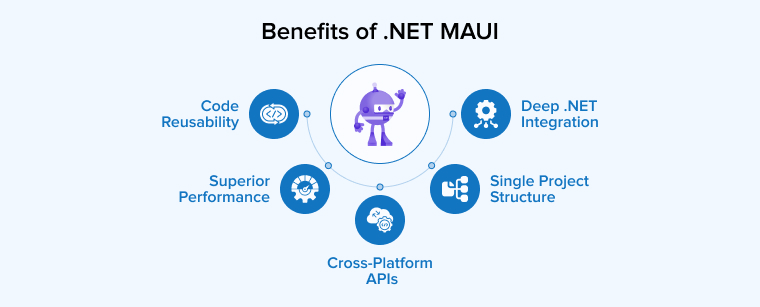
Single Project Structure
.NET MAUI provides a single unified project for all platforms, eliminating the need to create and manage multiple codebases. With this single project structure, you can organize everything in one place.
Code Reusability
One of the most important benefits of using .NET MAUI is its code reusability. It allows developers to use the same data models, APIs, and business logic across different platforms. This helps create a seamless working environment while minimizing development costs. Moreover, code reusability improves consistency across the codebase.
Superior Performance
The .NET MAUI framework ensures efficient resource utilization, optimized startup times, and other enhancements that improve app performance. Compared to Xamarin, which had higher resource consumption and slower loading times, .NET MAUI delivers a seamless user experience.
Cross-platform APIs
The .NET MAUI framework provides cross-platform APIs to access various native device features. These API enable access to robust functionalities such as network status, battery information, accelerometer data, and GPS. From providing information about devices the app is running on to initiating authentication flow, from checking the network’s connectivity state to using text-to-speech engines to read text from the device, cross-platform APIs prove to be truly helpful.
Deep .NET Integration
With the capabilities of the latest .NET versions, .NET MAUI provides seamless integration within the .NET ecosystem. It enables developers to access an extensive suite of tools and libraries, allowing them to utilize and quickly leverage the latest .NET advancements.
When to Use .NET MAUI?
Here are the top five use cases for .NET MAUI:
Enterprise-Level and High-Load Applications
.NET MAUI is an ideal solution for building complex, resource-intensive enterprise tools that involve high-load workflows or intricate mathematical algorithms. Its integration with the .NET ecosystem ensures the performance and reliability required for large-scale business operations.
Cross-Platform Development with a Shared Codebase
This framework is highly effective for developers building applications for Android, iOS, macOS, and Windows simultaneously using a single codebase. It streamlines cross-platform development while ensuring the app runs efficiently across diverse mobile and desktop environments.
Integration with the Microsoft Tech Stack
.NET MAUI works smoothly with Microsoft tools and services. Developers can easily connect it with Azure, ASP.NET Core, and AI features like ML.NET. It also supports Blazor for sharing code between web and mobile apps. This setup improves performance and accelerates development.
Migrating Legacy Xamarin.Forms Projects
For organizations currently maintaining Xamarin.Forms projects. .NET MAUI provides the best path forward due to its backward compatibility. It enables a smooth transition to a modern framework while enhancing app performance and the overall user experience.
Long-Term Projects with Native Hardware Requirements
Thanks to the large pool of .NET talent, this framework is considered a stable choice for long-term projects that require consistent staffing. Additionally, it is well-suited for applications needing direct access to native device functions and hardware sensors across multiple platforms.
What is Flutter?
Flutter is an open-source app development kit and framework created by Google for building high-quality, natively compiled applications. It enables developers to create software for mobile, web, and desktop platforms using a single, shared codebase.
Unlike other frameworks that rely on native UI rendering, Flutter uses its own custom rendering engines, such as Skia and Impeller, to draw every pixel on the screen. This approach gives developers complete control over the application’s appearance, ensuring consistent and visually appealing performance across diverse operating systems.
The framework is built on the Dart programming language and operates using a reactive coding model. Its core architecture is based on widgets, which serve as the fundamental building blocks for all interface elements, ranging from basic buttons to complex layout structures.
Key Features of Flutter
Critical features that make Flutter a unique framework are discussed below:
Rich Widget Library
Flutter offers a rich library of widgets for designing modern and visually elegant user interfaces. These widgets are also easy to configure, allowing you to meet specific requirements. Widgets play a crucial role in simplifying the process of building complex user interfaces.
Cross-Platform Development
Flutter allows developers to use the same codebase to run applications on different platforms such as web, mobile, and desktop. This eliminates the need to create separate codebases for each platform, saving significant time and resources.
Custom Rendering Engine
When designers need to create high-performance UI drawing, Flutter’s Skia rendering engine can help. It is an ideal solution for designing complex yet visually rich user interfaces.
Hot Reload
This feature helps developers test, modify, and enhance their application’s user interface and functionality in real-time, thereby improving the development workflow.
Dart Language
Flutter is based on the Dart programming language, which is known for its productivity and performance. Therefore, applications developed with Flutter also benefit from enhanced productivity and high performance.
Benefits of Flutter
Here are a few reasons why developers choose Flutter over other frameworks.
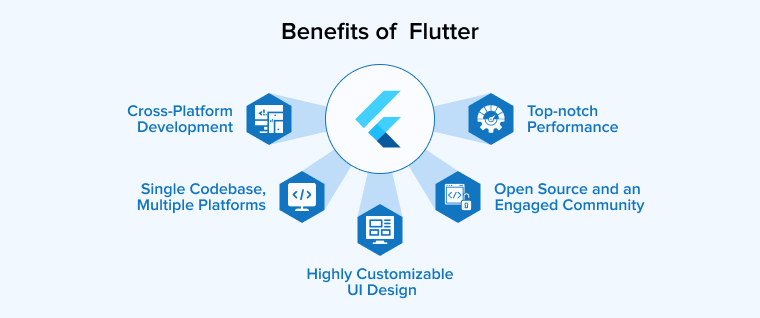
Single Codebase, Multiple Platforms
Flutter uses the Dart programming language for writing code. Once written in Dart, the same codebase can run acrossmultiple platforms, including Linux, Windows, Android, iOS, web, and macOS.
Top-Notch Performance
Nobody wants to use an app with poor performance. Users remain loyal and keep returning only if they find the app’s performance and user experience satisfactory. Factors such as CPU usage, frames per second, requests per second, and average response time directly impact an app’s performance. Flutter enhances overall app performance by delivering a smooth 60fps.
Cross-Platform Development
Flutter supports cross-platform development, including mobile, web, and desktop applications. It offers the flexibility of writing a single codebase that runs seamlessly across multiple platforms without major issues.
Highly Customizable UI Design
Designing complex user interfaces with Flutter is easy because it offers extensive customization options. This helps cater to specific requirements, especially on native platforms. Flutter allows you to manage transformations, shadow manipulation, shared element transitions, shape, color, and clipping. As a result, it simplifies the UI design process without increasing the workload.
To create visually appealing and high-fidelity user interfaces, Flutter offers a comprehensive set of graphics and animation libraries. It enables building UIs and apps that adapt seamlessly to different aspect ratios and screen sizes, ensuring they look great on both mobile phones and tablets.
By using traditional 3D tools like Blender, designers can create 3D graphics, 3D meshes, and models, which can then be imported into Flutter and used like any other code component.
Open Source and an Engaged Community
Flutter is available for free because it is an open-source framework. As a result, it has garnered support from a growing community that actively contributes to its documentation and assists fellow developers with their project issues. Developers at the beginner level can watch YouTube videos to learn Flutter and sharpen their skills.
When to Use Flutter?
Here are five primary use cases for Flutter:
Cross-Platform Development with a Single Codebase
Flutter is an ideal choice when you need to build applications for mobile, web, and desktop simultaneously using a unified codebase. This approach ensures a consistent user experience across different operating systems while significantly reducing development time and costs.
Design-Driven Apps with Complex Customization
This framework excels in projects that prioritize pixel-perfect designs and highly customized user interfaces. It employs a widget-based approach and dedicated rendering engines, enabling developers to create visually rich, interactive UIs that remain consistent across different screen sizes.
Rapid Prototyping and Fast Market Entry
For startups and small-to-medium projects, Flutter enables a fast launch through its hot reload feature, which facilitates immediate experimentation and iteration. Since it is based on Dart, a declarative language designed for conciseness, Flutter ensures faster software development compared to other frameworks.
High-Performance Applications with Smooth Animations
Flutter is highly effective for applications requiring complex visual effects and smooth motion, often achieving a consistent 60fps. Because it compiles to native ARM code rather than relying on platform-native controls, it delivers superior performance for animations that might otherwise appear jerky.
Mobile-First Projects Leveraging Rich Ecosystems
The framework is an ideal choice for mobile-centric development due to its pre-built widgets optimized for mobile navigation and scrolling. It also offers seamless integration with the Firebase cloud platform and a vast library of third-party plugins, making it efficient for building feature-rich mobile applications.
.NET MAUI vs. Flutter: Head-to-Head Comparison
.NET MAUI and Flutter both support cross-platform development, enabling the creation of apps that deliver a native-like experience. However, they differ in their approaches, programming languages, supporting ecosystems, and more. Let us compare these frameworks in detail across common parameters.
1. Performance
While MAUI is still relatively new, it compensates by leveraging .NET optimizations. This proves beneficial for different kinds of apps in terms of speed and performance. For native code compilation, MAUI uses an intermediate language as a layer of abstraction.
Meanwhile, Flutter provides direct native code compilation and GPU rendering, enhancing overall app performance, even on older devices. In mobile app development, Flutter utilizes AOT (Ahead of Time) compilation, which results in faster builds and smaller app sizes. However, AOT is less effective on iOS devices because not all libraries support it.
Both .NET MAUI and Flutter include a Hot Reload feature that allows the app to reload without losing its current state or requiring a reinstall. This makes changes easily testable and immediately visible.
However, Hot Reload in MAUI often feels unreliable and less effective compared to Flutter. As a result, frequently need to rebuild the app. While Hot Reload works well with XAML changes, updates to C# code that affect theUI do not always reflect immediately. This forces developers to rebuild or restart the app to see those changes.
On the other hand, Flutter includes a Hot Restart feature that recompiles the app code and resets its state. However, it does not require a rebuild when new resources are added. This feature helps improve the development cycle and reduces the application delivery time.
2. Capabilities & Limitations
.NET MAUI works well for projects requiring demanding deep integration with macOS and Windows ecosystems or for projects where prioritizing existing .NET business logic is essential. Its extensive range of native control options ensures that the app feels natural on every platform.
The desktop development support in .NET MAUI is more robust than in Flutter. However, the ecosystem is still growing, resulting in fewer plugins and libraries. This creates a demand for advanced UIs and hardware integrations to enable better native development.
Flutter is the go-to option for designing pixel-perfect and custom user interfaces. Its widget system enables rapid prototyping and the creation of unique designs that remain consistent across all platforms.
The Flutter ecosystem is rather rich, offering a wide range of features to support the integration of analytics, payments, and push notifications. However, the real challenge in using Flutter lies in creating an app that truly feels native for each platform. Additionally, the binary sizes of these apps tend to be quite large, requiring extra effort for optimization, especially in the case of desktop applications.
3. Cross-Platform Outreach
Many developers prefer the .NET MAUI framework for mobile development because it provides APIs that provide access to native Android and iOS features. When used with Visual Studio Code, the framework enables the creation of apps that run on multiple platforms, including desktops. Additionally, the.NET MAUI framework can be effectively combined with Blazor to build web applications.
Meanwhile, Flutter allows you to write a single codebase that runs on multiple platforms, such as Windows, Linux, macOS, Android, web, etc. Similar to .NET MAUI, Flutter works seamlessly with Visual Studio Code, offering efficient programming and robust debugging tools across different platforms. The ecosystem of Flutter is rich and mature, especially for mobile development, providing a wide variety of tools and plugins for Android and iOS development.
In short, both frameworks support cross-platform development in their own unique way. .NET MAUI and Flutter offer distinct strengths for building native-like applications across different platforms or operating systems. While the difference in platform support between these two frameworks is minimal, the outcomes vary significantly, and this matters most.
4. Learning Curve
Developers familiar with C# and the .NET ecosystem can easily get started with the .NET MAUI. This framework is based on Xamarin.Forms and provides a unified API for creating cross-platform applications. However, developers who are not proficient in C# may need some time to understand and master the paradigms used in .NET MAUI.
Using Dart, Flutter adopts a widget-based approach to designing user interfaces. Flutter feels intuitive for developers with experience in declarative UI paradigms. However, if you have previously worked with imperative styles, the learning curve may be steeper when adapting to Flutter.
5. Development Processes
Though both frameworks streamline the app development process, .NET MAUI is relatively new and lacks some of the well-developed features found in more mature frameworks like Flutter.
.NET MAUI ensures a faster and more efficient development process through features like real-time visual tree updates and hot reload. The XAML hot reload is a markup language feature in .NET MAUI that simplifies the declarative syntax for developers designing UIs. This functionality also accelerates the development process and improves its effectiveness.
Flutter also enables accelerated development through its hot reload functionality. Moreover, it provides an extensive set of pre-built widgets that help design elegant user interfaces quickly and effectively.
6. Software Reliability and Maintenance
.NET MAUI leverages Microsoft’s enterprise-grade support to offer backward compatibility guarantees, security patches, and long-term support releases. It allows seamless integration with tools that have a mature ecosystem, such as Visual Studio, providing robust debugging and profiling capabilities. This helps deliver high-quality software and ensure reliable maintenance services. Enterprises benefit from .NET MAUI’s integration with the broader .NET ecosystem for continuous integration and seamless updates.
Google supports and maintains Flutter, making it one of the most reliable software development tools. It is open-source and has garnered the support of a large community that helps developers to resolve bugs and security issues quickly. Although Flutter boasts of a rich ecosystem, it currently lacks key features for desktop and web development, which could affect app stability on those platforms. Developers effectively manage dependencies by using actively maintained packages and applying frequent updates from the Flutter ecosystem to ensure long-term stability.
.NET MAUI vs Flutter: A Quick Comparison
After a detailed discussion, let’s take a quick look at how both frameworks fare against common industry parameters.
| Parameters | .NET MAUI | Flutter |
|---|---|---|
| UI Rendering | Provides native UI controls for each targeted platform, leading to the creation of a more native look and feel. | Allows designing highly customized UIs through its own high-performance rendering engine for drawing widgets. |
| Language | C# and XAML are widely used, robust, and versatile programming languages | Uses Dart, which is easy to learn and offers better performance |
| Animation | Less optimized for complex animations | Optimized, providing smooth 60fps animations |
| Hot Reload | Help developers make changes to the UI and code in real-time, which improves the overall development and debugging experience. | Enables the developers to view changes in real-time, enhancing the development workflow. |
| Control Over Display | Access to platform features | Direct control over screen pixels |
| App Start Time | Modern speed enhancements lead to faster startup times | Ahead-of-time code ensures faster startup time |
| Memory Use | The use of native elements can make it more memory efficient | Need more memory for custom rendering |
| Ecosystem | Offers seamless integration with .NET languages, tools, and libraries. | Come with its own set of packages and plugins. |
| Platform Support | Supports iOS, Android, macOS, and Windows. Also allows native Linux desktop app development. | Supports iOS and Android but demands additional efforts to ensure desktop support. |
| Community Support | Growing | Strong |
| Best Use Cases | Platform-specific integrations | UI-heavy apps, games, and complex visuals |
Conclusion
.NET MAUI and Flutter are both effective options for cross-platform development. However, the choice primarily depends on the project requirements and the development team’s preferences.
.NET MAUI is an ideal choice for projects using tools, languages, or libraries within the .NET ecosystem. It enables you to quickly build a prototype or a small app. The framework is also very helpful in creating applications that offer a native like feel and features across multiple platforms.
When the requirements become complex or the project is flexible, you need a framework like Flutter to balance cost and quality. It helps deliver an effective codebase and outcomes, guaranteeing quick software delivery and a great user experience.
FAQs
Both frameworks support cross-platform development. However, .NET MAUI has proven to be more effective for creating enterprise-grade applications, while Flutter is better suited for quickly building versatile mobile-first solutions.
Of course, .NET MAUI is a robust option for cross-platform app development in 2026. You can use it to write a single codebase and run it on both Android and iOS platforms with minimal tweaks using native SDKs. Through seamless integration with the .NET ecosystem, .NET MAUI also provides impressive capabilities for desktop app development.
Yes, you can use .NET MAUI to build applications with a single shared codebase that runs on multiple platforms, including Windows and Linux. It provides native UI controls, which help deliver apps with a native like performance on every platform.

Rakesh Patel is a technology expert working at TatvaSoft. He is looking after .NET development projects and also work along side with business analyst team. He developed his passion of writing while working and writes whenever he got the time.



Comments
Leave a message...