

Modern applications often need to communicate with different devices, services, and platforms. This is where a Web API becomes useful. It provides a medium for applications to exchange information and perform actions through clearly defined endpoints. Among the technologies available for creating APIs, ASP.NET Core offers a strong and flexible environment for .NET developers. It supports API development across different operating systems and can handle applications that need to serve many users and requests.
.NET Development Companies can use it to create APIs for websites, mobile applications, business systems, and other software that needs reliable communication. Understanding how Web APIs work in ASP.NET Core can therefore help developers create applications that communicate smoothly and efficiently.
In this blog, we will explore the basic concept of Web APIs in ASP.NET Core, their types, the need for them, their features, and the development process.
What is a Web API?
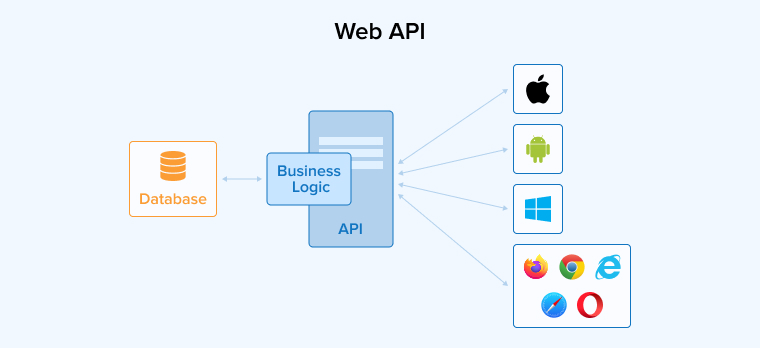
A Web API is a specialized set of protocols and tools that enables different software applications to communicate with each other over the internet. It acts as a mediator between a web server and clients such as mobile apps, web browsers, and desktop applications, facilitating seamless data and service exchange. Web APIs use standardized protocols, such as HTTP, to establish clear guidelines and conventions for requesting and delivering information.
It also enables the integration of third-party services via a client-server architecture, connecting frontend interfaces to backend servers. This approach facilitates communication between the two without requiring navigation of the complexities of each system.
Web APIs are essential in modern software development as they act as a bridge between different kinds of apps to enable interactions and the sharing of resources in a unified manner.
What is ASP.NET Core Web API?
A Web API acts as a communication bridge between different software systems over the internet. It allows applications built with different programming languages, frameworks, or technologies to share information and request services from one another. For example, a mobile application can send a request to a server and receive the required data through an API.
Most Web APIs use HTTP to handle these requests and responses. They provide specific endpoints through which clients can perform actions such as viewing, adding, changing, or removing information. This makes APIs useful for websites, mobile apps, desktop programs, and external services that need to work together.
What are the Types of Web APIs?
Before using ASP.NET to create Web APIs, it is important to determine the type of API you need to build. This section explains different types of Web APIs, categorized based on their accessibility and range of applications.
Private API
As the name suggests, a Private API is strictly limited to a specific group of users and cannot be accessed by the general public. These APIs are designed exclusively for internal use within a company or organization and are never meant to be shared outside a certain set of users. Private APIs are used to connect an organization’s software with other internal systems. For example, a company might use a private API to integrate its payroll and human resources software.
Composite API
This API combines multiple API calls into a single request to reduce the round-trip time for each call. As a result, your app’s speed and effectiveness improve significantly. Composite API enables you to process multiple queries within a single database transaction. Using the Composite API, you can make various requests in one call, such as updating purchase history, checking inventory, and validating payment details while placing an order. One of the most valuable applications of a composite API is in the e-commerce industry.
Partner API
This kind of API is available for particular users. Users with proper credentials or who are truly trustworthy are given access to partner APIs. These APIs provide business-to-business transactions and collaboration. For example, CRM systems need to access client data to function properly. Organizations use partner APIs to selectively share customized data with third-party services.
Open Source API
The APIs that are publicly available for free use in software development are called Open-source or Public API. Since they are not restricted to any particular user, you can easily integrate them with other software systems. Developers leverage Public APIs, also known as external APIs, to access specific data and features from third-party software to use in their applications. Some of the most popular APIs readily accessible from the public domain include the JSONPlaceholder API, Google Translate API, GraphQL, and WebSocket.
Key Characteristics of Web APIs
- HTTP-based communication: Web APIs work on standard HTTP or HTTPS to communicate between clients and servers. Thus, requests use all the standard HTTP methods such as GET, POST, PUT, and DELETE based on the required action.
- Data exchange formats: Web APIs structure and exchange data between the client and server using standardized lightweight universal text formats such as JSON (JavaScript Object Notation) and XML (Extensible Markup Language).
- RESTful Architecture: RESTful Web APIs follow a simple structure for handling online resources. Each resource has its own URL, while HTTP methods define the required action. Every request is handled independently, so the server does not need to remember previous requests or maintain client-specific session information.
- Authentication and Authorization: Web APIs use security measures to protect information from unauthorized access. They check the identity of clients and determine what they are permitted to do. Common approaches include API keys, OAuth tokens, and JWTs, which help keep API requests and resources secure.
How to Build a Web API with ASP.NET Core?
Follow this step-by-step guide to understand how to use ASP.NET Core to create a Web API.
1. Prerequisite
You will need the following things to start this project.
- Visual Studio 2022 Community Edition
Why: best-in-class developer tooling for .NET (project templates, integrated debugging, NuGet UI, and easy IIS/IIS Express support). - .NET SDK (preferably .NET 8)
Why: latest LTS features, performance improvements, and up-to-date EF Core compatibility.
2. Create a New Web API Project
Follow the given steps to create a new project for building a web API in Visual Studio Code.
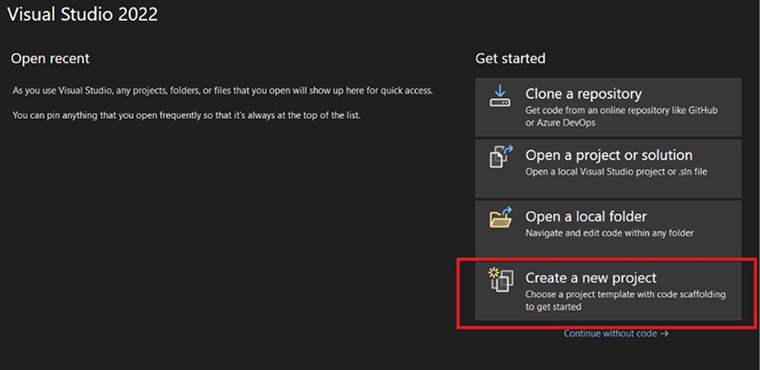
1.1 Open Visual Studio → Create New Project.
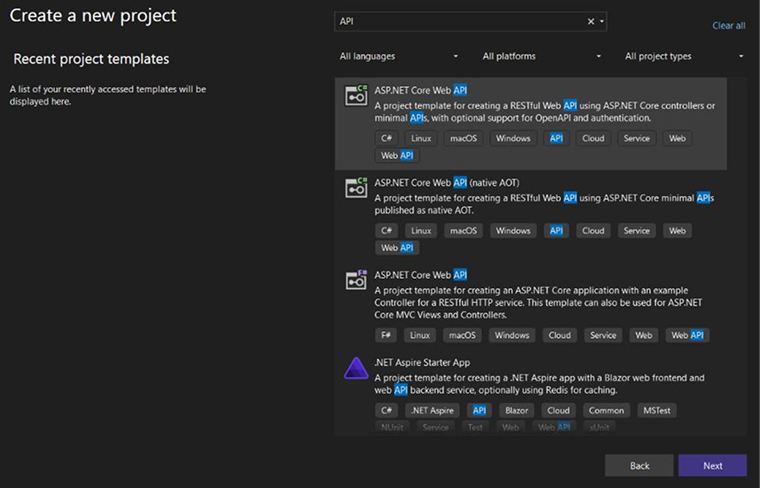
1.2 Choose ASP.NET Core Web API → Next.
1.3 Make the following Configurations:
Project Name: CarAPI
Framework: .NET 8 Check
Enable OpenAPI (Swagger) and Use Controllers
Why these settings?
- Using controllers will provide an explicit and familiar structure for routing and HTTP verbs.
- Enabling OpenAPI automatically adds the Swagger UI. This helps with manual testing and documentation.
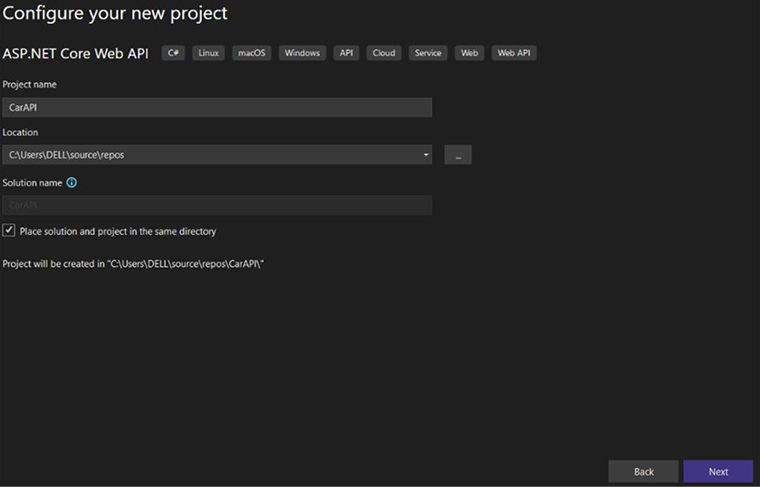
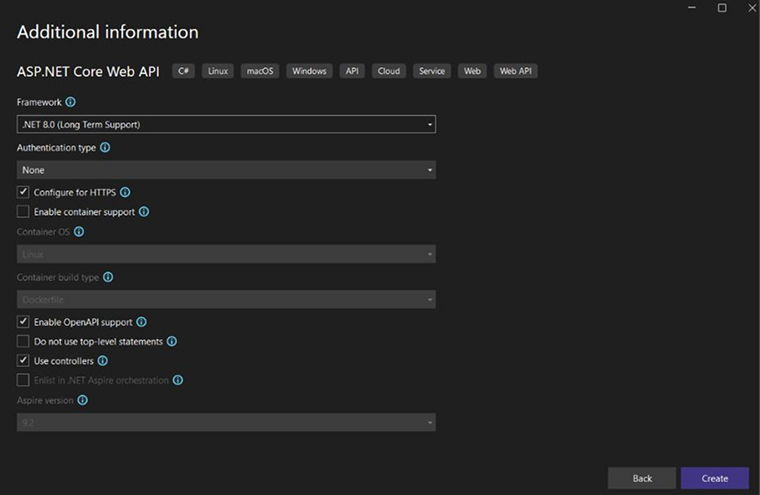
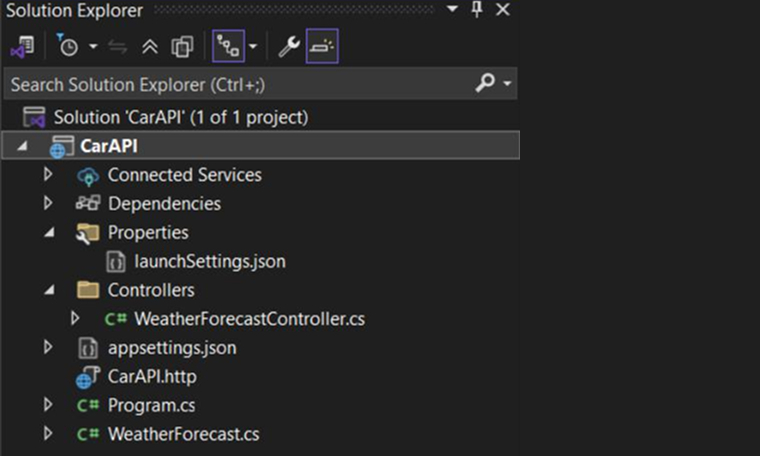
3. Project Structure (Default)
4. Install EF Core Packages
Command (PMC or Visual Studio Terminal):
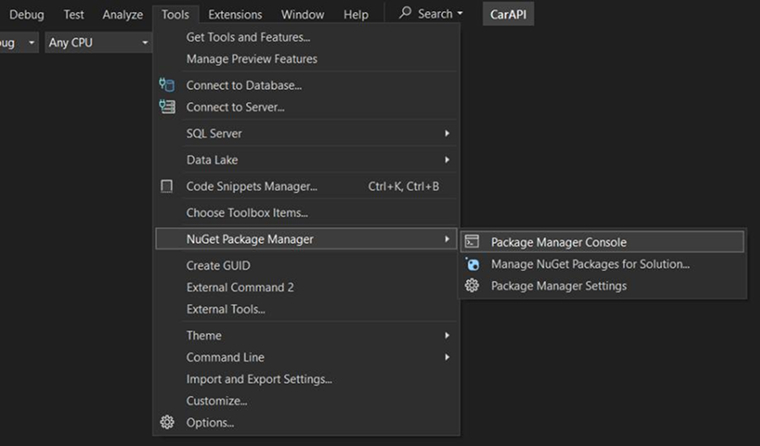
Why use these packages?
- Microsoft.EntityFrameworkCore — EF Core ORM that maps C# objects to DB tables.
- Microsoft.EntityFrameworkCore.SqlServer — SQL Server provider.
- Microsoft.EntityFrameworkCore.Tools — migrations & design-time tools.
Tip: For .NET 8, ensure the EF Core package versions match (EF Core 8.x).

Verify if the installation of the packages is completed successfully.
5. Create the Entity Model
Go to the location mentioned below in your project and use the given code to create the entity model.
Location: Models/Car.cs
namespace CarAPI.Models { public class Car { public int CarId { get; set; } public string Model { get; set; } = string.Empty; public DateTime LaunchDate { get; set; } public string Company { get; set; } = string.Empty; public int Price { get; set; } public string FuelType { get; set; } = string.Empty; public string Description { get; set; } = string.Empty; } } |
Why use non-nullable strings with = string.Empty;?
- Non-nullable strings ensure that the property is required at runtime while avoiding compiler warnings. The EF Core creates a NOT NULL column for non-nullable reference types.
6. Setup EF Core + Create Database Context
Navigate to the mentioned location and use the code below to create a database context.
Location: Data/AppDbContext.cs
using CarAPI.Models; using Microsoft.EntityFrameworkCore; namespace CarAPI.Data { public class AppDbContext(DbContextOptions<AppDbContext> options) : DbContext(options) { public DbSet<Car> Cars { get; set; } } } |
7. appsettings.json — Connection String
"ConnectionStrings": { "DefaultConnection": "Server=Your_Server_Name;Database=CarDb;Trusted_Connection=True;TrustServerCertificate=True;" } |
Why store the connection string here?
- Centralized environment-specific config; avoids hard-coding secrets in code. Replace with secure secret store or environment variables in production.
8. Create DTOs for POST/PUT (Hide Identity)
Why build DTOs?
- The DB is represented by entities, whereas the API contract is represented by DTOs. This separation prevents over-posting, protects internal DB fields, and supports versioning.
- DTOs ensure that Swagger displays the correct JSON schema (e.g., POST should not require a CarId).
📁 DTOs → CreateCarDto.cs
namespace CarAPI.DTOs { public class CreateCarDto { public string Model { get; set; } public DateTime LaunchDate { get; set; } public string Company { get; set; } public int Price { get; set; } public string FuelType { get; set; } public string Description { get; set; } } } |
9. Create Repository Layer
Why are we using an interface + repository pattern?
- Abstraction: ICarRepository provides a contract. Controllers are highly dependent on the interface, and not on the concrete class (dependency inversion).
- Testability: Unit testing enables you to mock ICarRepository interface.
- Separation of concerns: Keeps data access logic centralized, preventing SQL from leaking into controllers.
- Single responsibility: The repository handles data retrieval/storage; controllers handle HTTP requests and validation.
📁 Repository → ICarRepository.cs
using CarAPI.Models; namespace CarAPI.Repository { public interface ICarRepository { Task<IEnumerable<Car>> GetAllAsync(); Task<Car> GetByIdAsync(int id); Task<Car> AddAsync(Car car); Task<Car> UpdateAsync(Car car); Task<bool> DeleteAsync(int id); } } |
📁 Repository → CarRepository.cs
using CarAPI.Data; using CarAPI.Models; using Microsoft.EntityFrameworkCore; namespace CarAPI.Repository { public class CarRepository : ICarRepository { private readonly AppDbContext _context; public CarRepository(AppDbContext context) { _context = context; } public async Task<IEnumerable<Car>> GetAllAsync() { return await _context.Cars.ToListAsync(); } public async Task<Car> GetByIdAsync(int id) { return await _context.Cars.FindAsync(id); } public async Task<Car> AddAsync(Car car) { _context.Cars.Add(car); await _context.SaveChangesAsync(); return car; } public async Task<Car> UpdateAsync(Car car) { _context.Cars.Update(car); await _context.SaveChangesAsync(); return car; } public async Task<bool> DeleteAsync(int id) { var car = await _context.Cars.FindAsync(id); if (car == null) return false; _context.Cars.Remove(car); await _context.SaveChangesAsync(); return true; } } } |
Implementing the Example: CarRepository
- Use the AppDbContext
- Execute the methods with EF Core async calls such as ToListAsync(), FindAsync(), and SaveChangesAsync().
10. Register Repository & EF
This step requires you to take two actions as mentioned below:
- Register EF in the Program.cs
- Register the Repository in the Program.cs
builder.Services.AddDbContext<AppDbContext>(options => options.UseSqlServer(builder.Configuration.GetConnectionString("DefaultConnection"))); builder.Services.AddScoped<ICarRepository, CarRepository>(); |
Why AddScoped?
- One DbContext per HTTP request makes a scoped lifetime perfect for DbContext/repository, aligning with the request lifetime.
11. Create Controller
File: Controllers/CarController.cs (you already have it)
Why keep the controller thin?
- The controller must coordinate DTO validation, call the service/repository, and send a suitable response. A service layer (if present) should house business rules, not controllers.
Key endpoints
- GET /api/car → Get all cars
- GET /api/car/{id} → Get single car
- POST /api/car → Create car (accepts CarCreateDto)
- PUT /api/car/{id} → Update car (accepts CarUpdateDto)
- DELETE /api/car/{id} → Delete
📁 Controllers → CarsController.cs
using CarAPI.DTOs; using CarAPI.Models; using CarAPI.Repository; using Microsoft.AspNetCore.Mvc; namespace CarAPI.Controllers { [Route("api/[controller]")] [ApiController] public class CarController : ControllerBase { private readonly ICarRepository _repo; public CarController(ICarRepository repo) { _repo = repo; } [HttpGet] public async Task<IActionResult> GetAll() { return Ok(await _repo.GetAllAsync()); } [HttpGet("{id}")] public async Task<IActionResult> Get(int id) { var car = await _repo.GetByIdAsync(id); if (car == null) return NotFound(); return Ok(car); } [HttpPost] public async Task<IActionResult> Create(CreateCarDto dto) { var car = new Car { Model = dto.Model, LaunchDate = dto.LaunchDate, Company = dto.Company, Price = dto.Price, FuelType = dto.FuelType, Description = dto.Description }; var createdCar = await _repo.AddAsync(car); return CreatedAtAction(nameof(Get), new { id = createdCar.CarId }, createdCar); } [HttpPut("{id}")] public async Task<IActionResult> Update(int id, CreateCarDto dto) { var existingCar = await _repo.GetByIdAsync(id); if (existingCar == null) return NotFound(); existingCar.Model = dto.Model; existingCar.LaunchDate = dto.LaunchDate; existingCar.Company = dto.Company; existingCar.Price = dto.Price; existingCar.FuelType = dto.FuelType; existingCar.Description = dto.Description; var updatedCar = await _repo.UpdateAsync(existingCar); return Ok(updatedCar); } [HttpDelete("{id}")] public async Task<IActionResult> Delete(int id) { var deleted = await _repo.DeleteAsync(id); if (!deleted) return NotFound(); return Ok("Car deleted successfully"); } } } |
At last project folder structure looks as follows:
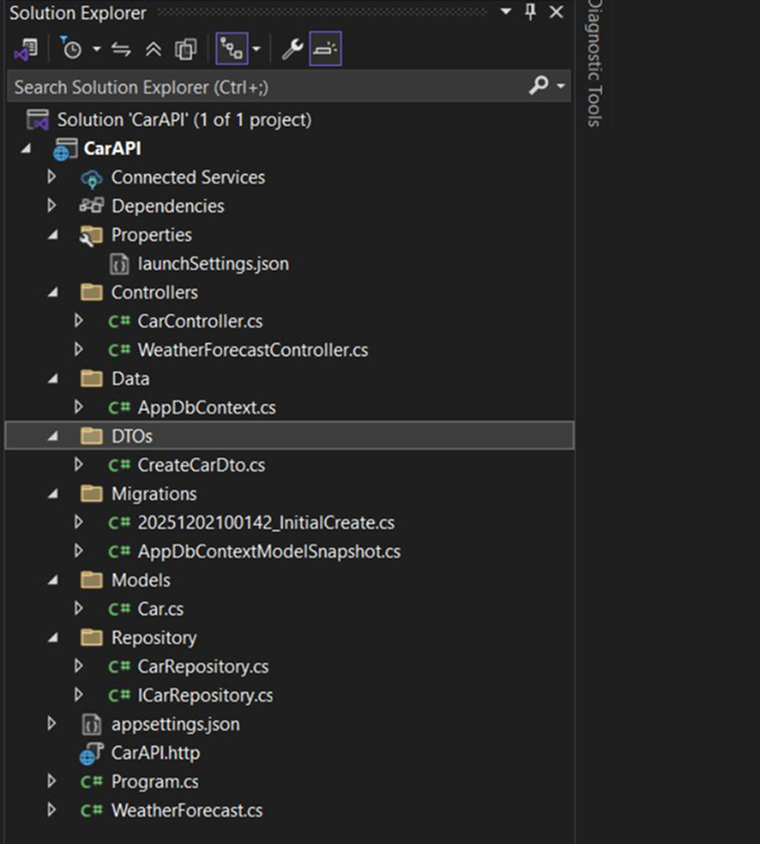
12. Apply Migrations
Commands (Terminal / VS Terminal):

Add-Migration InitialCreate
Update-Database
Create a Migration folder as shown in the image below:

Why migrations?
- Using EF Core code-first migrations, you can track DB schema changes in source control, safely evolve the database schema, and easily set up on other machines and CI.
CarDb has been created in your DB
13. Run the Project and Swagger
Press IIS Express (or run via dotnet run) to run the project.
For Swagger:
- Go to /swagger for automatically generated interactive API docs.
- Try the POST body, as the example JSON won’t show CarId because you use DTOs.
Click IIS Express → Swagger will launch.

14. Test the API
Manual testing with Swagger or Postman
- POST JSON (without CarId)
- GET to check entry
- PUT to modify (send CarId in URL and DTO)
- DELETE to remove
Tip: Check the DB table to confirm data inserted.
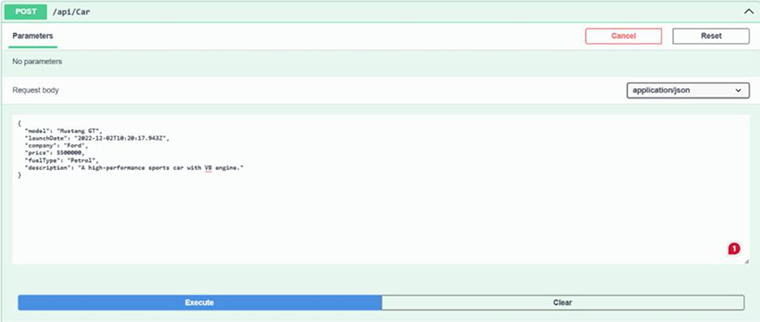
Use the Get method to get the DB record
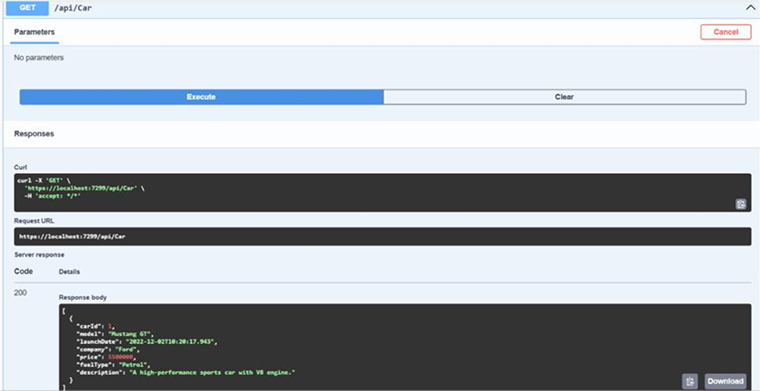
You can also check the car record in the DB

Conclusion
Web API in ASP.NET Core can help you build modern and scalable applications by allowing you to build efficient APIs that can communicate well with the clients or users. From creating endpoints and handling requests to managing data, security, and errors, each part contributes to a better API experience. ASP.NET Core provides a structured and practical environment for developing APIs that can communicate smoothly with different applications and platforms.
FAQs
Yes, ASP.NET Core uses the C# programming language to support the creation of RESTful services, commonly known as Web APIs. They utilize controllers to manage requests. Controllers are basically classes derived from ControllerBase in Web API.
Here is a step-by-step process for integrating the Web API in ASP.NET Core.
Create the ASP.NET Core Web API Project.
Define the Data Model.
Integrate Entity Framework Core.
Configure the Database Connection.
Apply Migrations.
Create the Controller.
Test the RESTful API.
Web APIs allow you to build services that run on different entities, making it easy for developers to build ASP.NET apps that are compatible with multiple devices and browsers.
Clean architecture is highly recommended because it adheres to the principle of separation of concerns, allowing each module to operate independently of the other.
Go for minimal APIs if you’re developing small, modern apps because they require less setup, keep everything in one file, and run slightly faster. On the other hand, choose Controllers if you are building complex, enterprise-level systems that require strict organization, deep custom routing, and massive team collaboration.
To add JWT authentication, first allow users to log in with credentials. If the credentials are valid, your server must generate a signed token containing their data. Send this token back to the client, which stores it locally. For future requests, the client attaches the token in the headers so that the server can verify identity instantly.

Rakesh Patel is a technology expert working at TatvaSoft. He is looking after .NET development projects and also work along side with business analyst team. He developed his passion of writing while working and writes whenever he got the time.



Comments
Leave a message...