

Web applications have undergone major changes with the arrival of HTML5, JavaScript frameworks like React and Angular, and the growing adoption of mobile devices. All this has increased the user expectations from modern web applications. They want fast loading times, smooth interactions, and app accessibility on any device without dealing with complicated downloads. This is where the growing need for Progressive Web Apps (PWAs) has arisen.
PWAs combine the accessibility of websites with the performance and feel of native mobile applications. They have provided a solution for developers and businesses aiming to deliver a high-quality user experience across various platforms without creating separate apps for each. According to Grand View Research’s reports, the global market size of PWAs was around USD 2.08 billion in 2024. Their projection shows that the market size may reach USD 21.24 billion by 2033, growing at a CAGR of 29.9% from 2025 to 2033.
Angular makes this process even more efficient. It’s a framework with built-in tools and support for features such as service workers, caching, and offline functionality. These capabilities give an added advantage to Angular development companies to step into the world of high-powered PWA development.
This guide covers what PWAs are, why they are becoming popular, why Angular is great for PWA development, how to build an Angular PWA, and which companies have used Angular PWAs to improve their metrics.
1. What is a Progressive Web App (PWA)?
A Progressive Web App or PWA is an HTML, CSS, and JavaScript-built web application that behaves like a native mobile app. It runs on the browser but can be installed on any device without requiring a download from any app store. It can work without a stable internet connection. In simple words, a PWA gives you most of what a native app does, at a fraction of the cost and development time.
There are three foundational elements of any web application to work as a PWA. First, it needs a service worker, which is a background script that manages caching and enables the app to work even without an internet connection. Second, it must include a web app manifest, which informs the browser how the app should appear and be installed on a user’s device. Finally, the app must be served over HTTPS to ensure secure communication.
Let’s see what the Reddit community feels about the PWA breakthrough:
Are Progressive Web Apps the Future of the Web? Here’s What I’ve Learned in 2025
by u/Kooky_Bid_3980 in WebdevTutorials
2. What Are the Features of PWAs?
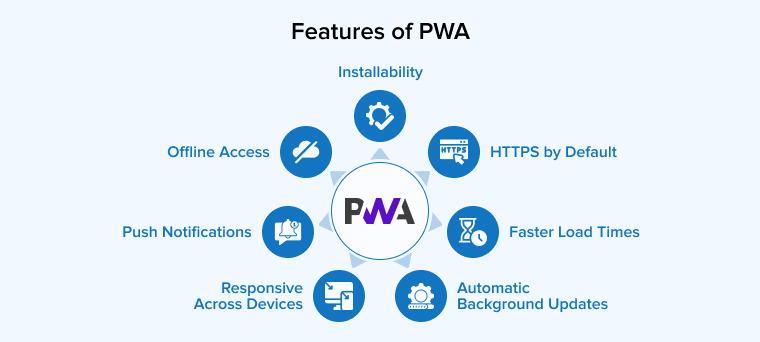
There are seven capabilities that separate a PWA from a standard website:
2.1 Offline Access
Angular service workers cache your app’s assets and API responses. This caching allows the app to work even if the connectivity goes down at any point in time. This isn’t a fallback version of the app. It’s the full app loaded directly from the cache.
2.2 Installability
Users can add your PWA to their home screen directly from the browser. It opens in its own window, with no browser interface, and feels like a native app. There’s no need to visit an app store and download it, saving time and device memory.
2.3 Push Notifications
PWAs can send push notifications with the help of the Web Push API. You can re-engage users with relevant updates, reminders, or offers, even if the app is not open in the browser, just like a native app does.
2.4 Responsive Across Devices
One codebase works on all device types, such as desktop, tablet, or mobile. Users will get a consistent experience across different screen sizes and resolutions. You can save development and maintenance time for separate versions of the same app for different platforms.
2.5 HTTPS by Default
PWAs require a secure HTTPS connection to encrypt every request and response between the user and the server. This matters for compliance, user trust, and browser security requirements.
2.6 Automatic Background Updates
PWAs can update themselves in the background without disturbing users. They use service workers and APIs like Background Sync and Periodic Background Sync to fetch new content, retry offline actions, and refresh data. Developers can also control updates to ensure users always see the latest version.
2.7 Faster Load Times
Service workers cache static assets such as JS bundles and CSS on the first visit. As a result, when users visit the page next time, it loads instantly. This immediate improvement enhances the user experience significantly.
3. Why Angular is Ideal for PWA?
According to the Stack Overflow Developer Survey 2025, 18.2% of developers use Angular. That adoption is concentrated in enterprise teams building complex, long-lived applications. If you’re evaluating top PWA frameworks, Angular’s position in that space is worth understanding.
Here’s what makes Angular a practical fit for PWA work specifically:
3.1 Built-In PWA Tooling
Angular has a first-party PWA package: @angular/pwa. One command configures the service worker, creates a web app manifest, and sets up default caching rules. Users no longer need to write code for implementing these settings.
3.2 TypeScript and Modular Architecture
TypeScript enforces type safety, which results in fewer runtime errors in production and more predictable behaviour across large teams. Angular’s component-based structure allows you to develop a PWA as independent and reusable modules. Hence, it’s easy to update any of those modules or add new modules for feature additions. This makes long-term PWA maintenance straightforward and reduces onboarding time for new developers joining the project.
3.3 Angular Universal for SEO
Server-side rendering through Angular Universal improves First Contentful Paint and makes your PWA indexable by search engines. If organic search matters to your business, this is a real advantage.
3.4 Long-Term Stability
Angular is developed and supported by Google, which ensures long-term stability and reliability. It follows a consistent release schedule, offers comprehensive documentation, and provides a well-established ecosystem with tools such as Angular Material, NgRx, and RxJS.
3.5 Security and Testing Tools
Angular’s built-in DomSanitizer protects against XSS attacks by automatically sanitizing URLs and HTML values. On the testing side, Jasmine, Karma, and Cypress cover unit, component, and end-to-end testing. HTTPS enforcement ensures service workers only run in a secure context by default.
3.6 Scalability and Performance
Angular is built to grow with your application. AOT compilation reduces runtime processing for faster load times, while lazy loading ensures only the required modules load at startup. Whether you’re serving hundreds or millions of users, Angular’s architecture holds up without performance degradation.
4. How to Create a PWA (Progressive Web App) with Angular
Here’s how to go from a standard Angular project to a fully working progressive web app.
PWA Setup Requirements
Before enabling PWA functionality in an Angular application, ensure the following requirements are met:
- Node.js Installed
- Angular CLI
- Angular Project
- Modern Browser
Step 1: Create Your Angular Project
Create a new Angular application using the Angular CLI.
ng new my-angular-pwa cd my-angular-pwa |
Step 2: Configure PWA Package in Angular Project
Run the following command to add PWA support to your Angular project:
ng add @angular/pwa |
This command automatically configures the first project name by adding:
- A service worker configuration file (ngsw-config.json)
- A manifest file (manifest.json)
- Icon files for various resolutions
- Updates to the angular.json file
What is a service worker configuration file?
The Service Worker Configuration File (ngsw-config.json) specifies how application resources are cached and managed by the Angular service worker. It controls asset caching, data requests, update behavior, and enables offline access to improve application performance and reliability.
{ "$schema": "./node_modules/@angular/service-worker/config/schema.json", "index": "/index.html", "assetGroups": [ { "name": "app", "installMode": "prefetch", "resources": { "files": [ "/favicon.ico", "/index.html", "/manifest.webmanifest", "/*.css", "/*.js" ] } }, { "name": "assets", "installMode": "lazy", "updateMode": "prefetch", "resources": { "files": [ "/assets/**", "/media/*.(svg|cur|jpg|jpeg|png|apng|webp|avif|gif|otf|ttf|woff|woff2)" ] } } ] } |
What is manifest file?
The Manifest File (manifest.json) is a configuration file that provides metadata about a Progressive Web App (PWA), such as the application name, icons, theme colors, and display settings. It enables the web application to be installed on a user’s device and allows it to behave like a native application.
{ "name": "PWA Demo", "short_name": "Crizmo", "theme_color": "#1976d2", "background_color": "#010101", "display": "standalone", "scope": "./", "start_url": "./", "icons": [ { "src": "assets/icons/icon-72x72.png", "sizes": "72x72", "type": "image/png", "purpose": "maskable any" }, { "src": "assets/icons/icon-96x96.png", "sizes": "96x96", "type": "image/png", "purpose": "maskable any" }, { "src": "assets/icons/icon-128x128.png", "sizes": "128x128", "type": "image/png", "purpose": "maskable any" }, { "src": "assets/icons/icon-144x144.png", "sizes": "144x144", "type": "image/png", "purpose": "maskable any" }, { "src": "assets/icons/icon-152x152.png", "sizes": "152x152", "type": "image/png", "purpose": "maskable any" }, { "src": "assets/icons/icon-192x192.png", "sizes": "192x192", "type": "image/png", "purpose": "maskable any" } ] } |
Step 3: Running Angular Application
npm run start |
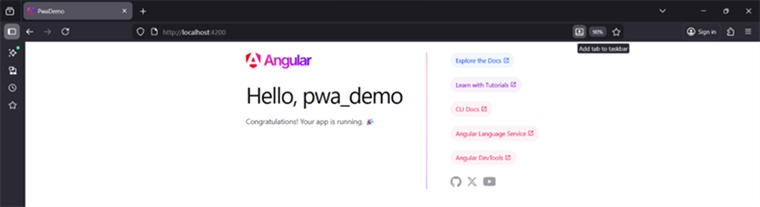
Step 4: Install the PWA
In Browser, you’ll see an “Install” button in the URL bar or under the three-dot menu.
5. Real World Examples of Angular PWAs
Almost every industry, including e-commerce, social networking, and travel, has begun implementing PWAs to leverage their benefits. Some of the top companies that implemented PWA versions include:
5.1 Twitter Lite
Twitter Lite is built with Angular and designed for regions with slow internet and expensive data. It reduced data usage by 70%, increased pages per session by 65%, and boosted tweets sent by 75%. The app also lowered the bounce rate by 20% while using less than 3% of the storage of the native Android version.
5.2 Forbes
Forbes rebuilt its web experience as an Angular PWA to fix slow page loads that were hurting readership. The PWA home page now loads in 0.8 seconds on desktop, down from 6.5 seconds before the migration. Bounce rate decreased by 20%, and sessions per user increased significantly after launch. Offline reading became available for the first time across all devices.
5.3 Starbucks
Starbucks built a PWA ordering system for regions with unreliable internet. Customers can browse the menu, customise orders, and add to cart while offline. Orders sync automatically when connectivity returns. The PWA doubled daily active users and is 99% smaller than the native iOS app.
5.4 Flipkart Lite
Flipkart introduced Flipkart Lite, a PWA, to better serve mobile users with limited data connectivity. This shift led to a 40% increase in user re-engagement compared to their earlier mobile site and boosted conversions by 70%, showing the impact of PWAs on user interaction and sales.
5.5 Trivago
Trivago developed its PWA to offer mobile users a fast and dependable way to browse hotels, even with poor internet connections. After launching the PWA, users could explore listings offline, and clickouts to hotel offers jumped by 97%. The experience became smooth and consistent across both Android and iOS browsers.
5.6 AliExpress
AliExpress used a PWA to improve their mobile web experience for users on slower networks, particularly in emerging markets where native app downloads are a real barrier. The PWA loaded twice as fast as the previous mobile site. Conversion rates for new users jumped 104%, and time spent per session increased by 74%.
6. Final Thoughts
Progressive Web Apps represent the future of web development. It offers a compelling combination of reliability, speed, and engagement. Angular, with its powerful tools and framework, makes it easier than ever to build PWAs that can run on any device, online or offline. By embracing PWAs in Angular, developers can deliver high-quality, app-like experiences to users while reducing costs and development time.
FAQs
PWAs are witnessing increasing adoption across industries such as networking, entertainment, e-commerce, automotive, and so on. Some of the best examples are Twitter Lite, Spotify, Flipkart Lite, and BMW. They saw significant increases in user base, conversion rates, and accessibility speed after the release of the PWA version.
PWAs are modern web applications that use service workers and manifest files to provide offline access, home screen installation, and push notifications. Traditional web apps cannot run offline, require device installation, and lack advanced capabilities such as PWAs.

Parind Shah is responsible for frontend innovations at TatvaSoft. He brings profound domain experience and a strategic mindset to deliver exceptional user experience. He is always looking to gain and expand his skill set.



Comments
Leave a message...