

Modern React applications are expected to support large, complex, and dynamic diagrams, data visualizations, or an intuitive dashboard while ensuring seamless user interactions. React Flow is the top-most reason behind these expectations. Top React development companies leverage this library to transform ideas and large datasets into node-based data visualizations, making it easy to understand and optimize. This article explores the concept of React Flow along with a discussion on its components, techniques, benefits, use cases, and a step-by-step guide.
What is React Flow?
React Flow is an open-source JavaScript-based library providing the necessary building blocks to create everything from static diagrams to data visualizations, including graphs, flowcharts, and node-based visual editors in web apps.
React developers use this library to design interactive dashboards and diagrams that represent complex data relationships in an easy way to understand. React Flow makes use of nodes and edges to build interactive diagrams. Nodes represent individual items like tasks or users, while edges show how they are connected. Handles define where connections start or end on a node.
This React library is very helpful in building, customizing, and controlling visualizations in web apps. Additionally, it enables you to create an end-to-end workflow along with decision-making. The development team also utilizes this library to programmatically design the whole architecture of the React project. The library is popular, free to use, and takes very little time to set up and get started.
What Are the Features of React Flow?
React Flow is a JavaScript library that provides a myriad of robust features to build interactive diagrams and visual editors in web apps. Let us check out the top features of this library.
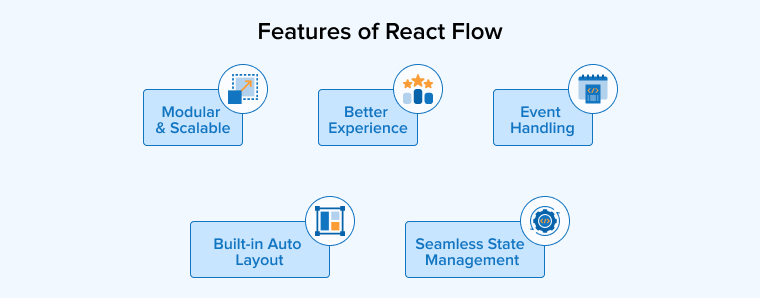
Modular & Scalable
React Flow is modular by nature because it follows a component-based architecture. This enables the developers to reuse components such as custom nodes and edges to build diagrams and visual editors, promoting reusability and maintainability. The library also allows the developers to render numerous nodes and edges, but minimizes the unnecessary re-renders, supporting easy scalability.
Better Experience
React comes with built-in features like drag-and-drop, pinch-to-zoom, pan, etc, that help develop highly interactive user-friendly applications. Users can interact with the diagrams in real time, easily rearrange nodes, and more, which improves the overall user experience.
Event Handling
React Flow is a JavaScript library that comes with pre-built components to simplify developers’ tasks as well as the development process. Event handling in React Flow is a powerful feature that users can use to customize the behavior of components such as context menus, hover states, and click events.
Seamless State Management
For basic use cases, React Flow offers a simple uncontrolled state system, whereas for advanced requirements, it provides a controlled state system. As a result, React developers get total control over diagram logic and synchronization with the entire application.
React Flow ensures a seamless integration with the state management of your app to streamline tracking of the flow and interactions with every diagram.
Built-in Auto Layout
Developers face a significant challenge when it comes to keeping the flow organized and clean, especially when it is complex or expanding. React Flow addresses this concern with a solution called Auto-layout. This functionality comes built-in with the library and automatically arranges the nodes and edges to ensure a neat and easy-to-understand layout.
What Are the Benefits of React Flow?
The flexible and extensive offerings from React Flow have a multitude of advantages. We cover a few critical ones in this section.
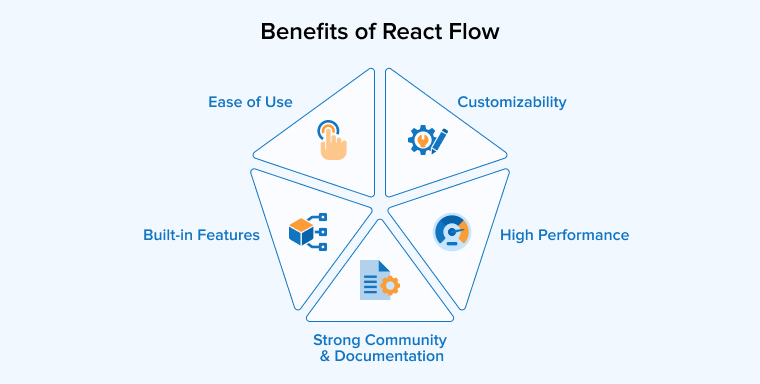
Ease of Use
The core activities of building an interactive data visualization involve multiple selections, panning, zooming, and dragging, all of which are easy to handle through React Flow. When creating an interface from scratch, especially a complex one, this library helps developers abstract the logic behind it. As a result, the implementations are simplified.
Customizability
React Flow allows developers to create custom nodes and edges with standard React components. Developers have total control over the graph components. You can define the custom types for nodes, edges, and even interactions, styling every React component to match your app design or branding. Such extensive customization options enable you to create personalized or unique user interfaces for any domain.
High Performance
React Flow is proficient at managing diagrams, even if they are large or complex, because it only allows those nodes and edges to render that have either changed or appeared in the viewport. This is achieved with the help of features like virtualization, which ultimately improve the overall performance. Moreover, it allows you to create interactive interfaces or dashboards with fewer nodes, which makes interactions highly responsive and seamless.
Built-in Features
React Flow is a feature-rich library and provides numerous pre-written or readymade components like viewport controls, minimap, background, keyboard navigation, and accessibility features, which speed up the development process and improve user experience. On top of that, it also offers snap-to-grid functionality that helps maintain visual consistency, and handles to define connection points.
Strong Community and Documentation
React Flow is a JavaScript-based library available for free use. Therefore, it has been able to garner support from a large and active community. Comprehensive documentation is available on the React website, along with real-world examples that guide users through the development process and how to use its features. The community also provides technical support to the developers in case they face any trouble during their project or with using the library. The community actively works towards the advancement of the React Flow library.
React Flow Core Components
React Flow is a library providing building blocks to developers to create diagrams and visual editors. Nodes, edges, and handles are the key building blocks. Let us understand these concepts of the React Flow library.
- Nodes: They are basically React components representing an item or block. It renders specific content like text, form, data visualization, and more. Every node is assigned a specific ID, a type that determines its appearance, and a position to define where it is placed on the canvas.
- Edges: SVG paths that link two different nodes or show the connection between them. Though React Flow provides several edge types by default, such as straight, step, smoothstep, and bezier, it also allows you to design custom edges to fulfill specific project requirements.
- Handles: They are the connection points on a node where edges attach. It allows users to draw or receive the connections. The positioning and styling of the handles are completely customizable.
Advanced Techniques and Customization
While basic concepts help create simple diagrams and more, building unique interfaces or visualizations requires advanced techniques such as.
Custom Nodes and Edges
You can create custom React components for nodes by defining and registering them in the nodeTypes object to display dynamic content like widgets, analytics, or forms. React Flow also supports creating custom edge logic with customized drag handles, animations, and labels using edgeTypes props. These features are useful for dynamic data tools, domain-specific workflows, and specialized diagrams, while still maintaining strong performance.
Plugins and Extensions
React Flow comes with a large number of built-in plugins like Panel, Background, Controls, and MiniMap. On top of that, you can create your own plugins and extensions as well. These plugins easily integrate with the ReactFlow components, minimizing the boilerplate code when creating common features.
Styling and Themes
React Flow offers a great deal of styling and theme options to help you create custom nodes, edges, and flows on the canvas. Using CSS or inline styles, you can give your diagrams or visual data a unique or specialized look and feel that enriches the end-user experience.
Interactivity
React Flow consists of countless pre-written React components, and it allows easy customization of nodes, edges, and handles to shape the app behavior in a specific way that enables the app to interact with the users as intended. Moreover, the capabilities it offers to create everything from static diagrams to dynamic visual editors, React Flow helps improve the user interactivity even in the case of complex data visualization.
React Flow Installation and Setting up a Project
This section gives you a working understanding with a step-by-step guide to get started with React Flow.
Project Setup
Use the “npm init vite app-name — –template react” to create the React app, and then navigate to the project folder and run the following command to install NPM.
Install @xyflow/react npm package |
Basic ReactFlow Component
Now, add the following code to the App.jsx file.
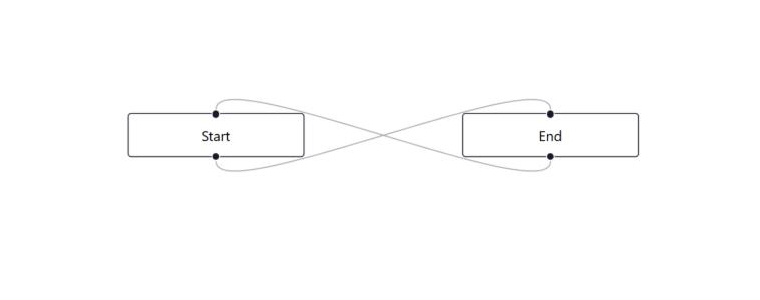
import { useState } from "react"; import { ReactFlow } from "@xyflow/react"; import "@xyflow/react/dist/style.css"; function App() { const [nodeList, setNodeList] = useState([ { id: "start", position: { x: 0, y: 0 }, data: { label: "Start" } }, { id: "end", position: { x: 100, y: 100 }, data: { label: "End" } }, ]); const [edgeList, setEdgeList] = useState([ { id: "edge-1", source: "start", target: "end" }, ]); return ( <div style={{ height: "100vh", width: "100vw" }}> <ReactFlow nodes={nodeList} edges={edgeList} fitView /> </div> ); } export default App; |
The code above uses the initial node list and edge list to render the ReactFlow component. To identify the nodes, we use nodes with the id property. Similarly, position helps place the node in a specific place on the canvas. From the id of the nodes and edges, you can identify every single edge, and what sources and targets it connects. Running the above code will give the output as shown in the figure below.

Now, you won’t be able to change the node position. What you need is a handler in your React Flow component. Add the code given below to change the node position. This code updates the nodeList with the latest data on node position using the applyNodeChanges function of React Flow. This happens when you drag the node and change its position.
const handleNodeChange = useCallback((updates) => { setNodeList((prevNodes) => applyNodeChanges(updates, prevNodes)); }, []); |
Add the onNodesChange props with the change event in the <ReactFlow /> component.
onNodesChange={handleNodeChange} |
Add the onConnect props with the addEdge handler to enable the users to connect the node edges. Run the given function with your code to add the edges connecting nodes. The addEdge function from React Flow will add the new edge to the edgeList.
const handleNodeConnect = useCallback((newEdge) => { setEdgeList((prevEdges) => addEdge(newEdge, prevEdges)); }, []); |
Add below props in <ReactFlow /> component
onConnect={handleNodeConnect |
Now, you can easily change the node position and connect two nodes by adding an edge.
Customized Node Component
You can use custom styling and features to customize an existing node or create your own custom node. Add the given code in Components/CustomNode.jsx to create a custom node.
import { Handle, Position } from "@xyflow/react"; function CustomNode({ data }) { return ( <div style={{ padding: "8px 16px", border: "1px solid black", borderRadius: "4px", background: data?.textBackground || "white", color: data?.textColor || "black", fontSize: data?.textSize || "12px", }} > <Handle type="target" position={Position.Top} /> {data?.label} <Handle type="source" position={Position.Bottom} /> </div> ); } export default CustomNode; |
If we want our custom node to connect with other nodes, then it is essential to add the <Handle /> component. Register the custom node with ReactFlow by adding the props given below in the <ReactFlow /> component to be able to use it.
nodeTypes={{ customNode: CustomNode }} |
In the above code, we are required to define the name of the NodeType as well as the component of the custom node against it. Use the following code to update the nodeList. It allows you to use a custom node.
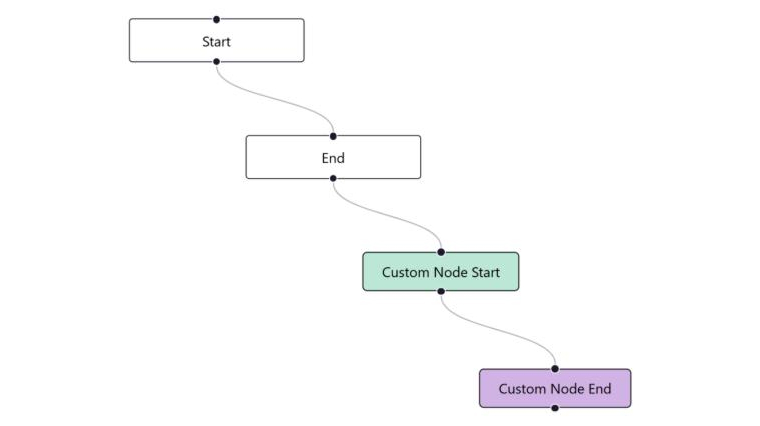
const [nodeList, setNodeList] = useState([ { id: "start", position: { x: 0, y: 0 }, data: { label: "Start" } }, { id: "end", position: { x: 100, y: 100 }, data: { label: "End" } }, { id: "custom-node-start", position: { x: 200, y: 200 }, data: { label: "Custom Node Start", textBackground: "#B1E8D4", textColor: "#000", }, type: "customNode", }, { id: "custom-node-end", position: { x: 300, y: 300 }, data: { label: "Custom Node End", textBackground: "#D7B1E8", textColor: "#000", }, type: "customNode", }, ]); |
Running the above code will show you the newly added custom node and allow you to connect it with other nodes as well.
Customized Edge Component
Similar to the node, it is possible to customize the edge as well. The code below allows you to create a custom edge. Add it in the Components/CustomEdge.jsx.
import { BaseEdge, EdgeLabelRenderer, getBezierPath } from "@xyflow/react"; function CustomEdge({ sourceX, sourceY, targetX, targetY, sourcePosition, targetPosition, markerEnd, data, }) { const [edgePath, labelX, labelY] = getBezierPath({ sourceX, sourceY, sourcePosition, targetX, targetY, targetPosition, }); return ( <> <BaseEdge path={edgePath} label="Test" markerEnd={markerEnd} style={{ stroke: data?.edgeColor || "red" }} /> {data?.label && ( <EdgeLabelRenderer> <div style={{ transform: `translate(${labelX}px,${labelY}px)`, background: "white", fontSize: "12px", }} > {data.label} </div> </EdgeLabelRenderer> )} </> ); } export default CustomEdge; |
The code above calculates the path of the edge and label coordinates using the getBezierPath from “@xyflow/react”. Similar to the custom node, you also need to register the custom edge with ReactFlow. Add the props given below in the <ReactFlow /> component.
edgeTypes={{ customEdge: CustomEdge }} |
Define the name of the Edge Type and the component of the custom nodes against it that are connected by the newly created custom edge. Run the code below to update the edgeList to be able to use the new custom edge.
Here we need to define the name of customEdge and against it the component of the custom node. Now, to use a custom node, update the edgeList with the code below.
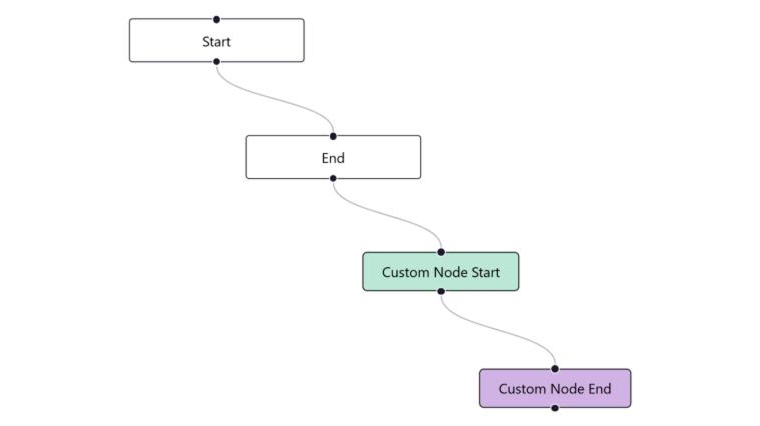
const [edgeList, setEdgeList] = useState([ { id: "edge-1", source: "start", target: "end" }, { id: "edge-2", source: "custom-node-start", target: "custom-node-end", type: "customEdge", data: { edgeColor: "#F5A623", label: "Custom Edge" }, }, ]); |
After running the above code, you will be able to see the newly created custom edge that connects the two custom nodes.
Real-time Collaboration in React Flow
React Flow not only allows for real-time updates but also enables multiple users to work on the same diagram or data visualization simultaneously, making changes or edits to it. Such real-time syncing ensures seamless operations across the project and communication between users, no matter if your team is collaborating to create a mind map or a workflow automation. Here are a few reasons why you truly need real-time collaboration.
- Instant Updates: You and your team can view the changes instantly made by you or anyone in your team. So, the users will always get to see the most recent updated version of the diagram or data visualization.
- Seamless Teamwork: Even if multiple users work simultaneously on the same diagram or dashboard, removing or adding nodes and edges, there would be no disturbance or disruption of work to another.
- Effortless Layout Adjustments: Real-time collaborations ensure real-time modifications as well, and this makes your workflow smoother.
- Increased Productivity: When your team can work together on the same project in real-time without having to wait for manual approvals, refreshes, and file exchanges, the overall productivity improves.
- Coordinate Better in Remote Teams: Real-time collaboration ensures that everyone on the team is on the same page, no matter where they work.
Use Cases of React Flow
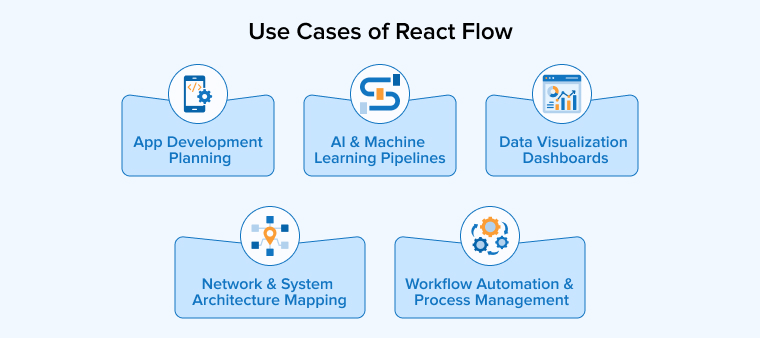
React Flow is a go-to option for designing interactive data visualizations, diagrams, and workflows. Some of the most common use cases of this library are discussed below:
Workflow Automation and Process Management
React Flow allows businesses to design and automate workflows, which helps simplify their business operations and improve overall efficiency. It automates business processes with optimized different types of workflows for IT, finance, and HR operations. You can easily manage processes or projects of your business with the help of task management tools created using React Flow.
Data Visualization Dashboards
Dealing with complex data sets is a challenging job. Analysts have to first process these data sets and separate them to derive enough insights. Then they would have to visually represent all the information obtained from these data sets. This was an overwhelming task until the arrival of the React Flow library. It helps businesses and analysts create well-organized diagrams that display data from these complex data sets elegantly.
With such a capability of creating data visualization dashboards, React Flow enables developers to build financial dashboards that can track market trends and financial transactions, healthcare analytics that visualize patients’ medical records, and sales pipelines that accurately map the entire customer journey.
Network and System Architecture Mapping
IT engineers can leverage React Flow components to design entire server architectures and network infrastructures. It also helps create cloud infrastructure by mapping APIs, databases, and servers.
Additionally, it is used in cybersecurity monitoring to track system vulnerabilities and access control. IT professionals can also visualize the CI/CD workflows using React Flow to create DevOps pipelines for software deployment.
AI and Machine Learning Pipelines
The data visualization capability of the React Flow library comes in handy when building AI applications. It helps visualize neural networks, data processing steps, and machine learning models. React Flow allows you to display different steps of model development, which is useful in creating a training workflow for AI models, whereas showing different layers of neural networks is helpful for deep learning visualization. You can also design data preprocessing pipelines by mapping input sources and feature selection.
App Development Planning
Another important use case of React Flow diagrams is to plan logic and define user flows in the application. It is to ensure the creation of elegant interfaces and seamless interactions. Developers use React Flow to map out decision trees, which are mostly helpful in designing the mechanics of a gaming application.
You can also use this library to plan out UI/UX structures that define the navigational flow of your application. But more importantly, React Flow diagrams help you track user behavior, which enables you to understand how users interact with the app.
Conclusion
React Flow is a rich JavaScript library offering building blocks to create interactive and node-based editors in web applications. Before using the library, it is necessary to understand its core concepts, such as nodes, edges, and handles. To address the complex requirements of specialized UIs, React Flow provides options for advanced customization, styling, and themes, along with a comprehensive set of plugins.
In short, React Flow has everything you need to create rich and dynamic diagrams with ease. You can use it to create a wide range of visualizations and interfaces across multiple domains, including finance, healthcare, and more. More importantly, your team can collaborate and work simultaneously on a single dashboard, making it an ideal solution for complex scenarios.
FAQs
React Flow is used for building highly customized React components that enable developers to design interactive diagrams, graphs, and flowcharts. React Flow is a JavaScript library continuously evolving. Recently, it was rebranded as XyFlow, introducing new functionalities that still follow its core purpose.
React Flow is an open-source JavaScript-based library. You need to obtain an MIT license to be able to use it, but that allows you to use the library for life. React Flow is helping developers and organizations alike when it comes to developing node-based applications.

Parind Shah is responsible for frontend innovations at TatvaSoft. He brings profound domain experience and a strategic mindset to deliver exceptional user experience. He is always looking to gain and expand his skill set.



Comments
Leave a message...